
On this page
You may have noticed a new look in ZenML Pro. We’ll share more about that next week. Today, we’re introducing something new: Bots.
There are failed runs to investigate, expensive workflows to revisit, and agent behaviors that could be improved. The hard part is giving that work consistent attention alongside everything else you need to ship.
Bots in ZenML Pro give you an always-on team of AI engineers for those tasks. Ask a bot to investigate, or schedule it to run a recurring review. Give it a concrete deliverable: a pull request, a validated fix, a cost investigation, or an experiment comparing an agent change against a baseline.
Bots work across your repositories, ZenML runs, and Kitaru agent sessions. That connects the work of maintaining ML pipelines and AI workflows with the work of improving the agents running in them. Below, we look at the results bots can produce, a claims-agent benchmark, and how to put recurring investigations on a schedule.
Delegate work with a result you can review
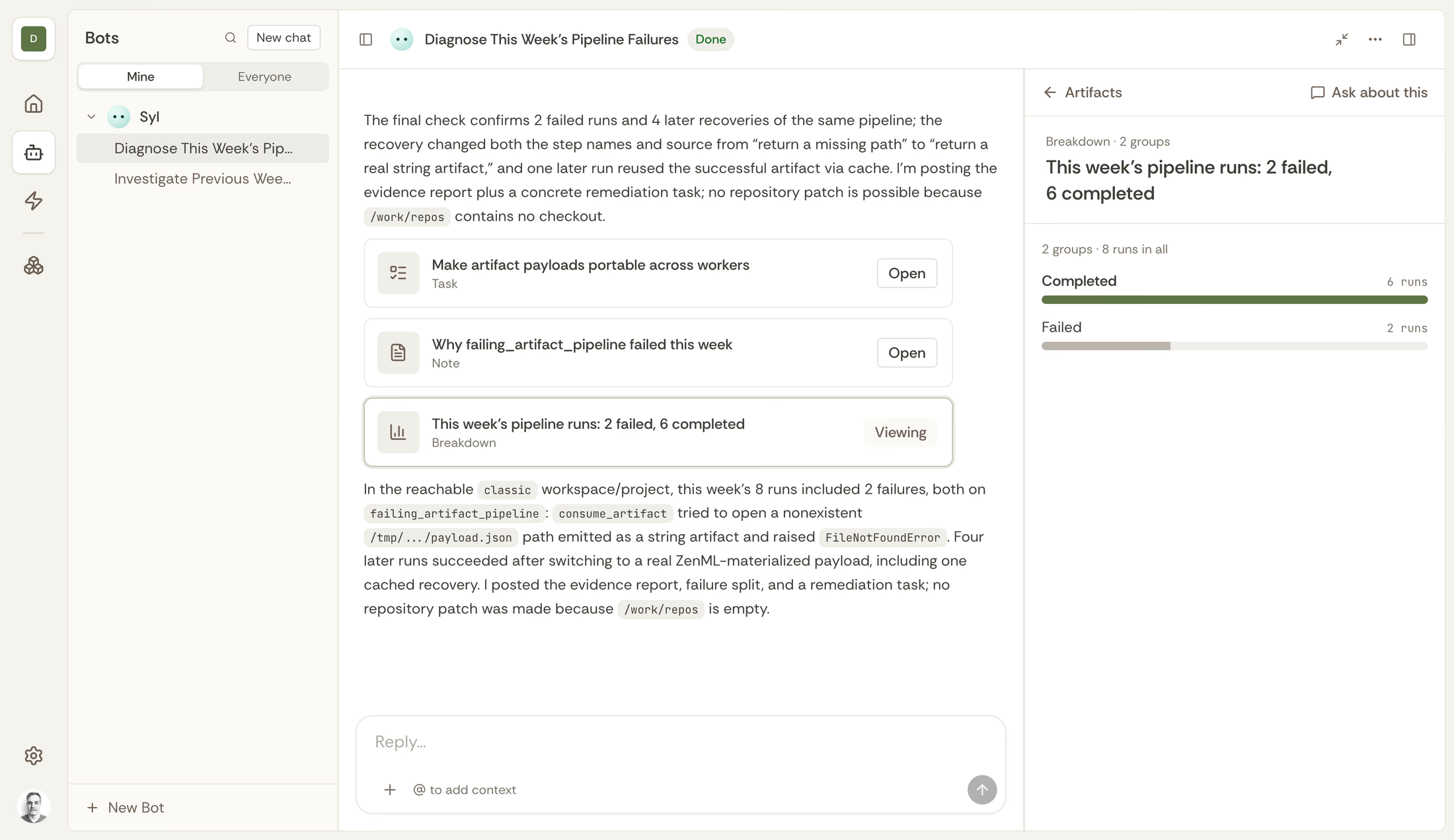
A failed pipeline run is a starting point. The useful outcome is understanding the failure, changing the relevant code, and checking whether that change resolves it.
For ML pipelines and AI workflows in ZenML, a task might be:
Investigate this failed training run, compare it with the last successful run, and open a draft pull request with a fix. Include the evidence behind the change and a validation plan.
The bot can follow the run context into pipeline metadata, artifacts, configuration, and repository code. With an authorized rerun, the investigation can continue through to a new run that tests the proposed fix. Your review has both the code change and the execution evidence behind it.
For an AI document-processing workflow, the deliverable might be a comparison explaining why two runs produced different outputs, alongside a targeted change to the processing code.
Results are recorded as artifacts: code diffs, pull requests, reports, charts, comparisons, and links to the relevant runs and model versions. You can find the proposed action and its evidence without reconstructing the investigation from a conversation.
Improve AI agents with Kitaru
For agents, a successful execution does not necessarily mean good behavior. Repeated tool calls, unnecessary model requests, and poor tool selection can all leave room for improvement.
Bots can read your agent’s recorded sessions, test a change, and show you the comparison. This gives your team a path from a specific behavior to a proposed improvement.
For example:
Investigate repeated tool calls in this cohort. Propose a change, then use the agreed evaluator to compare it with the baseline. Report quality, cost, and latency trade-offs.
The deliverable is an experiment your team can inspect, with the sessions and evaluator results behind the recommendation. A candidate model or prompt change can be assessed against recorded behavior before you decide to roll it out.
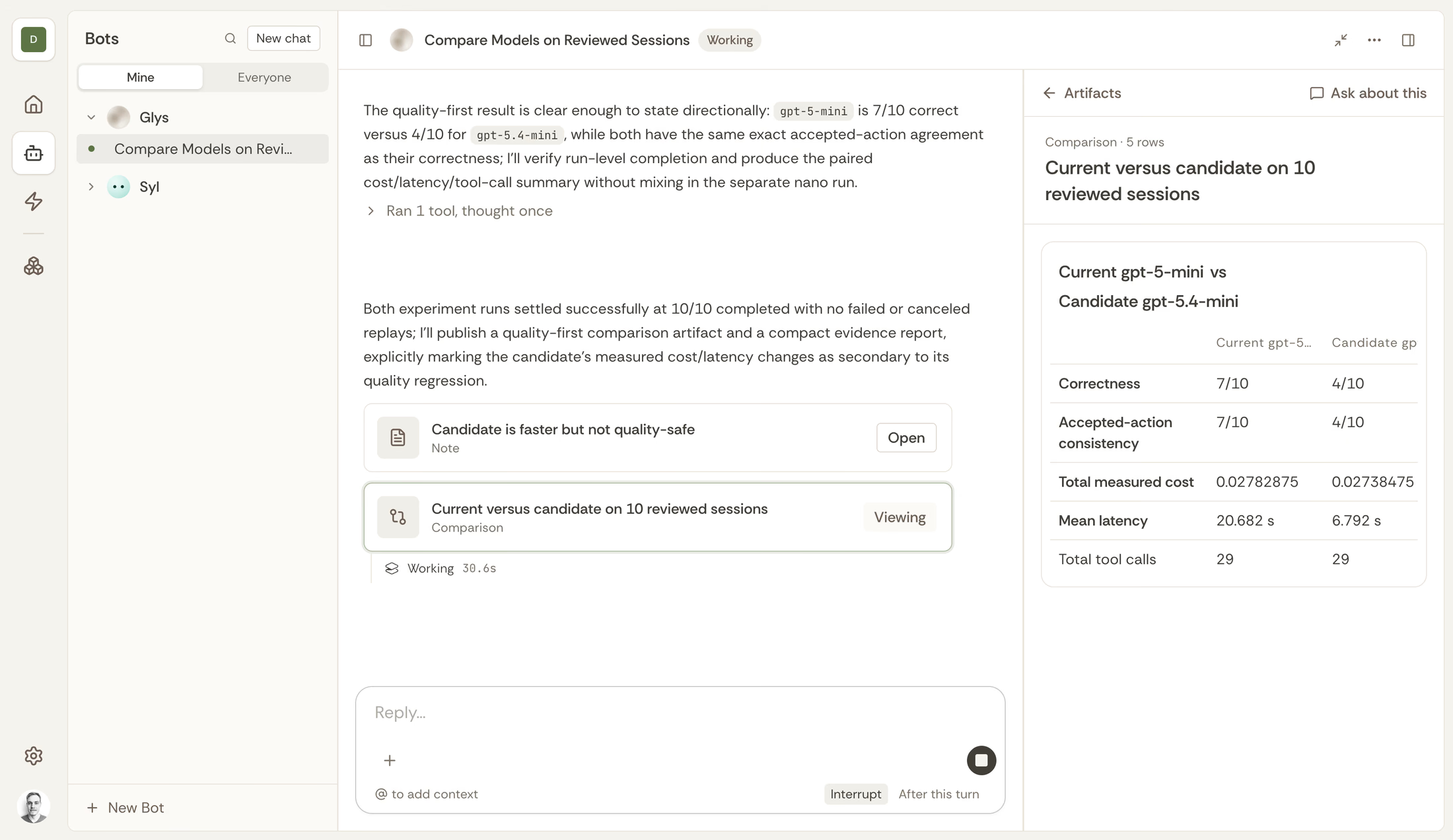
This is particularly useful for model choice. You can ask a bot to help test whether a cheaper model handles a particular workload well enough, with a selected set of sessions and clear quality criteria. The comparison makes the trade-off visible.
What this looks like: improving a claims agent over time
We put this approach to the test in Improving a claims agent over time. Our AI engineer and Codex each worked to improve a claims-review agent across eight batches of 100 real California health appeals. The test case files were generated from public appeal decisions. Partway through, the agent switched to a cheaper open model.
Over the 800 appeals, the AI-engineer-improved agent scored 3.3 percentage points higher in balanced accuracy than the Codex-improved agent. After the model switch, our AI engineer used recorded session endings to find that some appeals were left undecided because the agent ran out of tokens or model requests. It raised the limits and tested the change.
See the batch-by-batch graph and full benchmark. The comparison reflects different setups: our AI engineer used Kitaru and a specific instruction to count session endings, while Codex received a general improvement request. An earlier run without that instruction found no clear difference. The result illustrates the value of an investigation workflow and its context; it is one benchmark, not a general ranking of coding agents.
Put recurring work on a schedule
You do not need to start every investigation in a chat. Automations run a configured bot with a fixed prompt on a schedule, so the work can begin before someone remembers to ask.
For example, you could give a bot a daily task:
Review yesterday’s failed pipeline runs. Investigate recurring failures, link the affected runs, and open draft pull requests where a code fix is clear. Report anything that needs an engineer’s decision.
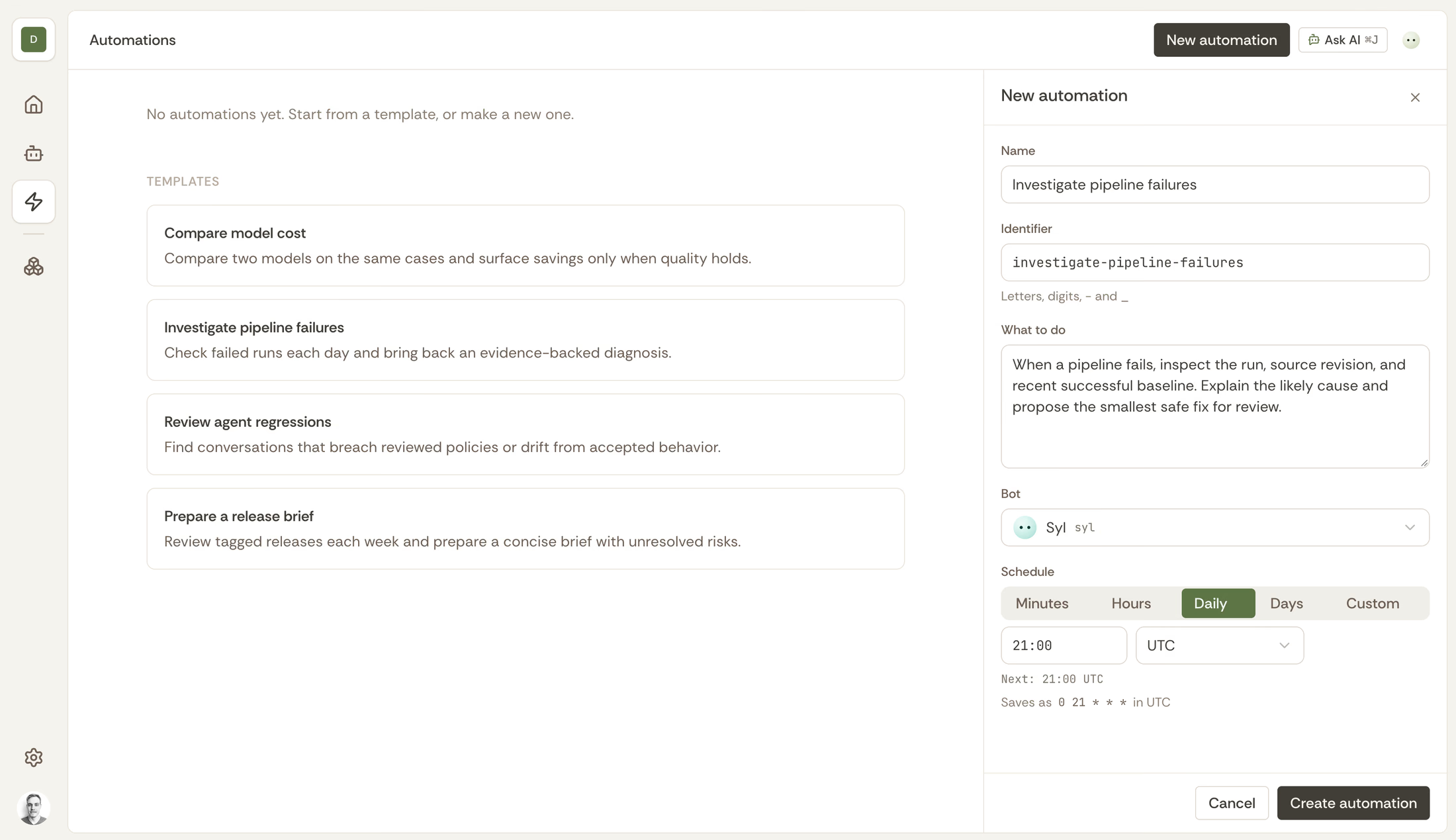
Or give another bot a weekly cost review:
Review the selected AI workflows and agent sessions for avoidable work. Investigate repeated calls and expensive execution patterns. Rank proposed improvements by the available evidence, and identify one bounded experiment worth running.
You define the scope and the actions the recurring task is authorized to take.
That creates a practical FinOps workflow: regularly look for waste, propose a change, and compare its cost and quality before adopting it. Engineers can spend their attention reviewing findings and deciding what to ship.
Each scheduled execution has its own chat and recorded outputs. Reports from work started in Slack or GitHub return to their associated threads, and bots can send Slack notifications when something needs your attention.
Shared context and repeatable working environments
A bot combines your team’s instructions and skills with a prepared environment and a ZenML Pro service account. You might have a pipeline maintenance bot and an agent evaluation bot, each with its own procedures and access.
The environment defines the repositories and setup commands. Skills capture how your team investigates failures, evaluates changes, and prepares pull requests. Connectors add services such as GitHub, Notion, Context7, Firecrawl, and Tavily; custom MCP servers are supported too.
Every task gets an isolated sandbox prepared from that configuration. Built-in skills help the bot work with the ZenML and Kitaru workspaces it can reach. A bot can link its investigation to the relevant runs, sessions, and experiments, so your team can find the evidence behind its results.
The configuration is reusable across engineers, scheduled tasks, and requests from the dashboard, Slack, GitHub, SDK, or API. Your team can delegate the same class of work consistently without preparing a local workspace for each investigation or keeping a laptop session running.
Set the scope for your AI engineers
Each bot acts through its own ZenML Pro service account. Its roles determine which ZenML and Kitaru workspaces and resources it can access. Separate permissions control who may use and manage the bot.
Give each bot the access its responsibilities require, and make the expected deliverable explicit. A recurring investigation can prepare a report or draft pull request; an explicitly authorized task can also run a validation.
Learn more about Bots roles and permissions.
Start with one recurring responsibility
Choose work your team wants done consistently: investigating failed ML pipelines, reviewing AI workflow regressions, or finding an agent improvement worth testing in Kitaru.
Configure a bot with the relevant repositories, skills, and permissions. Give it a clear output to produce, review the first results, and put the task on a schedule when the scope is right.
Your team gets investigations, proposed fixes, and evaluation results ready for review, even when nobody is sitting in a chat asking for them.