On this page
Imagine you’re in the driver’s seat of a complex data pipeline, with multiple workflows running simultaneously, each crucial to your organization’s success. The challenge? Ensuring these workflows are managed efficiently and without a hitch. This is where data orchestration tools come into play, acting as the conductor for your data processes, including essential components like model registry and model artifacts in Machine Learning Operations (MLOps). These tools are crucial for managing everything from model training pipelines to the deployment process in production environments.
In this blog, we’ll explore three of the most prominent tools: Airflow, Dagster, and Prefect. Each tool offers its own set of powerful features designed to address different aspects of data orchestration, including continuous delivery and integration, open-source platform capabilities, and support for DevOps engineers and machine learning engineers alike. We’ll break down what makes each tool unique, compare its strengths, and help you determine which one might be the best fit for your needs, whether you’re focusing on feature stores, model monitoring, or the entire deployment process.
Updated May 2026. The orchestration space did not stand still after Airflow 3.0 and Dagster Components went GA last year. Airflow 3.1 added Human-in-the-Loop operators, Airflow 3.2 added asset partitioning and multi-team deployments, Dagster moved FreshnessPolicy to GA and shifted Dagster+ Solo and Starter to pay-as-you-go pricing, and Prefect’s April 2026 Cloud release closed long-standing enterprise gaps around audit and bulk operations. This refresh folds in those new releases, the State of Airflow 2026 survey data, and the agent-orchestration conversation that has become hard to ignore.
Overview of Data Orchestration Tools
Selecting the right data orchestration tool is critical to the success of any project that involves building a robust data infrastructure. The challenge lies in finding the tool that best aligns with your specific needs, whether it’s for managing complex pipelines or handling model training jobs.
Objective:
- To compare Dagster, Prefect, and Airflow based on core concepts, features, and use cases, including their support for model deployment, model management, and model retraining requirements.
- To guide you in choosing the ideal tool for your unique projects, whether you're dealing with deep learning models, machine learning workflows, or feature stores.
By the end of this article, you’ll understand how these tools differ and which one is the best fit for your data orchestration needs.
Understanding Orchestration Tools: What They Are and Why They Matter
Imagine juggling multiple tasks simultaneously: deploying apps, managing services, and keeping everything running smoothly as your systems grow. It’s a lot to handle, right? That’s where orchestration tools come in. These tools are your secret weapon for simplifying the chaos and ensuring that all the moving parts of your environment work in harmony. They help you streamline processes, boost efficiency, and keep everything running like a well-oiled machine.
What Are Orchestration Tools?
Orchestration tools act as conductors for your tech environment, automating the setup, coordination, and management of your systems, apps, and services. They ensure that every part of your system performs its role perfectly, keeping everything in sync and running smoothly. Additionally, they allow you to oversee entire processes from one place, making it easier to create workflows that may have seemed impossible before.
These tools take care of essential tasks like:
- Deployment: Automatically rolling out your apps across different environments, ensuring that model artifacts are properly managed and deployed.
- Scaling: Adjusting resources on the fly to match demand is crucial for maintaining real-time predictions in production environments.
- Workflow Automation: Streamlining complex processes, like CI/CD pipelines, to keep everything running smoothly, including the continuous integration of model specifications and the management of model training jobs.
Orchestration tools simplify the heavy lifting so you can focus on what matters most.
Why Orchestration Tools Matter?
As your organization embraces microservices, containerization, and cloud-native development, managing these complex environments becomes more challenging. Orchestration tools are crucial because they:
- Boost Efficiency: Automating repetitive tasks frees you from manual work, allowing your team to focus on more strategic initiatives.
- Ensure Consistency: They standardize deployments across environments, minimizing the risk of errors and keeping everything running smoothly.
- Enable Effortless Scaling: These tools handle the heavy lifting of scaling your applications, whether it’s more user requests or expanding microservices.
With orchestration tools, you streamline your operations, reduce errors, and accelerate your time-to-market, making your entire process more efficient and reliable.
Understanding Apache Airflow
Airflow is a workflow orchestration tool for orchestrating distributed applications. It works by scheduling jobs across different servers or nodes using Directed Acyclic Graphs (DAGs). Apache Airflow provides a rich user interface that makes it easy to visualize the flow of data through the pipeline. It also allows users to monitor the progress of each task and view logs.
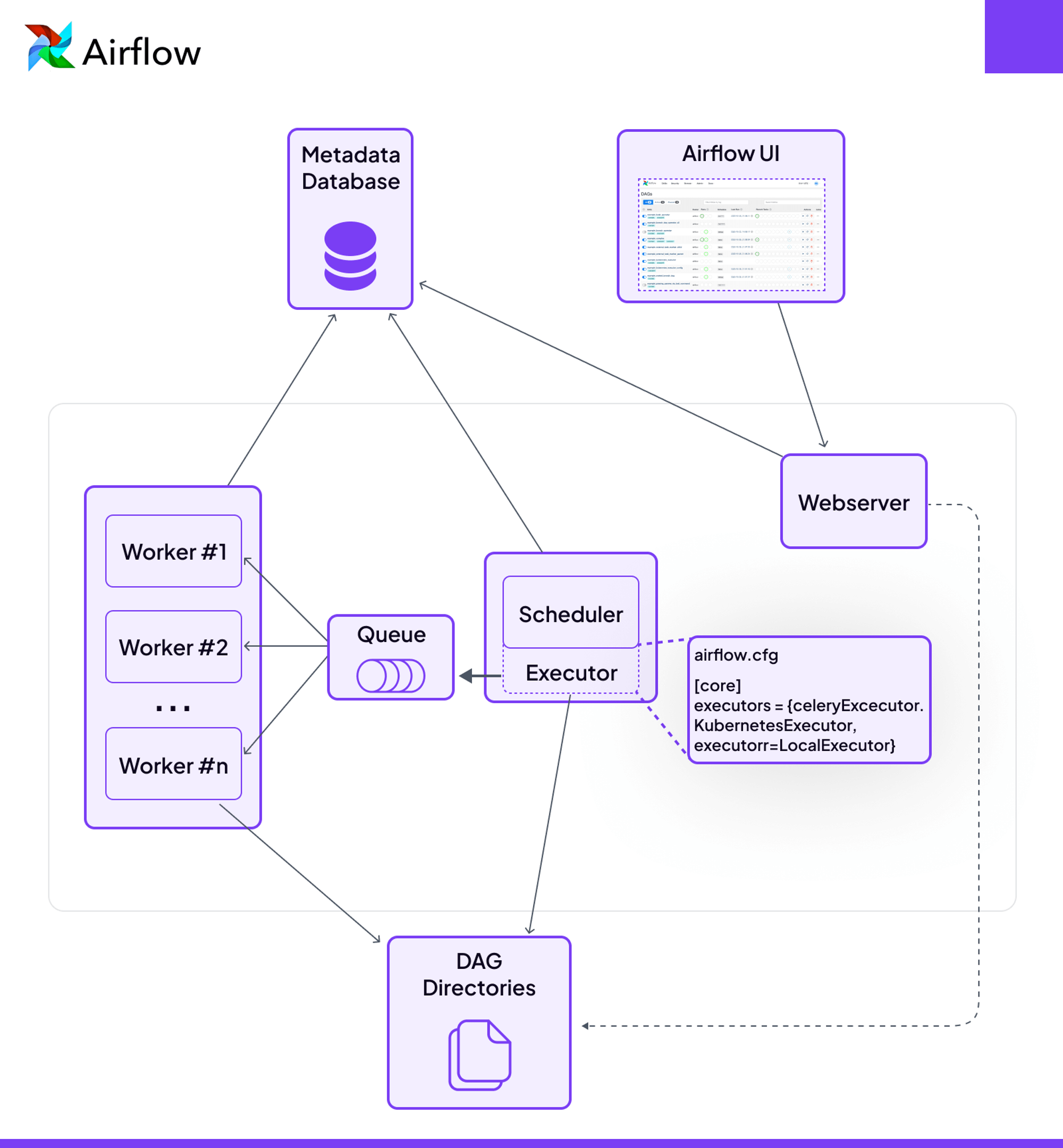
Features of Airflow
- Dynamic Workflows: Airflow supports the creation of dynamic workflows through Directed Acyclic Graphs (DAGs), enabling users to define complex dependencies and task relationships, making it a better option for managing complex ML workflows and model training pipelines.
- Extensive Community Support: The Apache Software Foundation backs Airflow, fostering a vibrant community dedicated to enhancing the tool's capabilities through continuous development and innovation.
- Rich Operator Library: Airflow provides an extensive library of pre-built operators, allowing you to easily interact with various systems and services, such as databases, cloud platforms, and APIs, making it versatile for different types of workflows.
- Scalability: Whether you're running workflows on a single server or across multiple nodes, Airflow’s design supports scaling up or down to meet your needs, with various executors like LocalExecutor, CeleryExecutor, and KubernetesExecutor.
- Comprehensive Logging and Alerting: Airflow includes built-in logging and alerting capabilities, allowing you to track task execution and receive notifications on task failures or successes, keeping you informed about your workflows' performance.
- Human-in-the-Loop Operators (3.1): Released September 2025. Four deferrable operators that pause a workflow for human approval, a branching choice, or a parameter input directly through the Airflow UI. This is the first time Airflow treats human-gated steps as a first-class primitive, and it is what makes it a credible orchestrator for approval-gated and agentic pipelines.
- Asset Partitioning (3.2): Released April 2026. Downstream DAGs can now trigger on a specific slice of an asset instead of the whole asset, which is something Dagster users have had for a while. The asset-aware gap with Dagster narrows considerably here.
- Multi-Team Deployments (3.2): One Airflow deployment can now isolate DAGs, connections, pools, and executors per team. A long-asked-for enterprise primitive that finally lands.
- Multi-Language Task SDK: The Go Task SDK is rolling out post-Airflow Summit 2025, with Java and R on the roadmap. Worth noting because the "Airflow is Python-only" framing in older comparisons (including earlier versions of this post) is on its way out.
- Ensure you have Python 3.10, 3.11, 3.12, 3.13, or 3.14 installed for Airflow 3.2.x. installed.
- Ensure Docker is installed with docker-compose.
- Set up a virtual environment to isolate your Airflow installation:
- Airflow requires specific directories for DAGs, logs, and plugins.
- If you’re using MacOS or Linux, you need to set the correct folder permissions:
- Before starting Airflow, initialize the database and create the necessary configurations:
- Now, start the Airflow services:
- To stop the Airflow services, use the following command:
- local development, testing, and storage abstractions
- one-off and irregularly scheduled tasks
- the movement of data between tasks
- dynamic and parameterized workflows
- Scalability: Dagster empowers users to scale their data workflows efficiently as their requirements evolve, making it a versatile choice for growing organizations needing to manage complex ML workflows.
- Developer Productivity: By focusing on enhancing developer productivity and debugging capabilities, Dagster streamlines the process of orchestrating complex data pipelines.
- Observability and Monitoring: Dagster provides built-in tools for observability, giving you detailed insights into the execution of your workflows. You can monitor pipeline runs, view logs, and track the status of individual components, ensuring greater transparency and control, especially for model training jobs.
- Asset-Centric Approach: Adopts an asset-centric model, where assets are first-class citizens. This allows you to define and track data assets directly, making it easier to manage and monitor the flow of data throughout your pipelines.
- Modular Architecture: The highly modular design promotes reusability and flexibility. You can easily create reusable pipeline components, making it simpler to adapt and scale your workflows. While Prefect and Airflow support modular workflows, Dagster's focus on modularity makes it particularly powerful for complex data engineering tasks.
- dg CLI and the Components Library: Components went GA in October 2025, and Dagster has shipped 20+ components since then. The current set covers dbt Cloud, Spark, Azure Blob and ADLS2, BigQuery, GCS, Dataproc, Databricks, Tableau, Looker, Census, and Polytomic. The `dg api` surface now supports programmatic inspection of assets, runs, jobs, and schedules, which means declarative YAML is a real authoring path, not an experiment.
- FreshnessPolicy GA: The FreshnessPolicy API moved from Preview to GA, and the FreshnessDaemon runs by default. This is Dagster's answer to SLA tracking, and it converges with Airflow 3.1's deadline alerts on the same primitive.
- Workload Identity Federation: New `azure_wif`, `gcp_wif`, and `aws_wif` auth options for the Postgres backend remove the need to ship long-lived service-account keys. A small thing, but it matters if your security team has opinions.
- Ensure you have Python 3.10 or higher installed. Dagster currently recommends Python 3.13. installed.
- Basics of creating, connecting, and testing assets in Dagster.
- Convenient ways to organize and monitor assets, e.g., grouping assets, recording asset metadata, etc.
- A schedule is defined to run a job that generates assets daily.
- A scaffolded project layout helps you quickly get started with everything set up.
- Fetches data from HackerNews APIs.
- Transforms the collected data using Pandas.
- Creates a word cloud based on trending HackerNews stories to visualize popular topics on HackerNews.
- First, install your Dagster code as a Python package. Using the --editable flag, pip will install in "editable mode" so that local code changes will automatically apply as you develop. Check out Dagster Installation for more information.
- Cloud-Native Workflows: Prefect is designed to seamlessly integrate with cloud platforms like AWS and Google Cloud, offering scalability and performance optimization tailored for modern cloud environments, especially for deploying models in production.
- Dynamic Workflow Management: Prefect excels in handling dynamic workflows with changing requirements, providing users with a lightweight yet powerful solution for orchestrating their data processes.
- Powerful API and Programmatic Control: Prefect offers a robust API that lets you programmatically control executions, interact with the scheduler, and manage workflows, providing greater automation and control over your data pipelines.
- Flexible Scheduling: Prefect allows you to schedule workflows with ease, supporting both time-based schedules and event-driven triggers. This flexibility ensures that your workflows can run exactly when needed, whether on a fixed schedule or in response to specific events.
- Cloud Audit Trail and Bulk Operations: The April 2026 quarterly release added full audit-trail tracking for who created, updated, or cancelled flows, deployments, work pools, queues, and block documents. It also added bulk-delete across flow runs, deployments, and flows. Unglamorous, but exactly the kind of thing enterprise teams kept asking for.
- Real-Time Websockets: The same release replaced UI polling with a websocket data layer. Flow-run state changes in the UI feel immediate now instead of a few seconds late.
- Marvin 3.0 as a First-Party Agent Framework: In late 2025, Prefect consolidated its ControlFlow project into Marvin 3.0 and swapped LangChain for Pydantic AI as the LLM backbone. Marvin is now Prefect's agentic framework, sitting on top of Prefect 3.0's events and automations. It makes Prefect the only one of the three orchestrators with a first-party AI agent layer.
- Create Your Prefect Flow
- Here’s an example flow that maps a task over a list of inputs to run them concurrently:
- To execute your flow locally, simply run the script with Python:
- The flow will execute, and you’ll see the output directly in your terminal.
- For a more interactive experience, you can use the Prefect Orion UI to monitor and manage your flows. Start the Prefect Orion server:
- Large enterprise with existing Airflow investment: Airflow 3.0 — leverage DAG versioning, event-driven scheduling, and multi-language support while maintaining your established ecosystem
- Data mesh or asset-centric architecture: Dagster — purpose-built for treating data as products with unmatched lineage and metadata management
- Fast-moving startup or small team: Prefect — minimal operational overhead, rapid iteration, and new self-serve pricing make it ideal for lean teams
- ML model lifecycle management: Dagster — asset-based approach naturally maps to ML artifacts, experiments, and model versions
- GenAI application orchestration: Airflow 3.0 — proven at scale with 10% of users running GenAI workflows, plus extensive integration ecosystem
- Event-driven real-time pipelines: Prefect or Dagster — both offer superior event-native design compared to Airflow's historically batch-focused architecture (though Airflow 3.0 improves this)
- Multi-cloud or edge deployment: Airflow 3.0 — new Edge Executor and Task Execution API enable deployment across cloud and edge environments
- dbt-centric data transformation: Dagster — tightest dbt integration with asset-aligned models and built-in lineage visualization
- Immediate Execution: Prefect allows you to run your flows whenever you want without worrying about the scheduler delays you’d encounter in Airflow.
- Dynamic Scheduling: Dagster’s ability to modify job behavior based on the schedule gives you unprecedented control. Whether it’s different configurations for weekdays and weekends or handling special events, you’re in the driver’s seat.
- No Schedule? No Problem!: Both Prefect and Dagster let you run tasks and jobs manually without the hassle of predefined schedules. This flexibility is a breath of fresh air compared to Airflow’s rigid structure.
- Ease of Use: Prefect allows you to pass parameters directly into your flows, making it easy to scale and customize your workflows on the fly.
- Flexible Configuration: Dagster’s ability to define and parametrize graphs gives you unparalleled control over how your jobs are executed. You can easily swap out resources and configurations, tailoring each job to its environment.
- Adaptability: Both platforms allow you to start small and scale up as your needs grow, all while keeping your code clean and manageable. This is in stark contrast to Airflow, where creating dynamic workflows can feel like wrestling with an octopus.
- Pythonic and Intuitive: Prefect feels like a natural extension of Python. You define your tasks and flows just as you would write any Python function, making it incredibly easy to get started.
- Automatic Error Handling: Prefect automatically handles errors and retries, so you don’t have to write extra code to manage these scenarios. It’s all built-in, saving you time and headaches.
- No DAGs Required: Unlike Airflow, which requires you to define DAGs explicitly, Prefect allows you to build workflows in a linear, step-by-step manner. This simplicity is a game-changer if you prefer to focus on the logic rather than the orchestration mechanics.
- Declarative Workflow Design: With Dagster, you declare what your pipeline should do, and it figures out the rest. This reduces the cognitive load, especially in complex workflows.
- Software-Defined Assets (SDAs): Dagster introduces SDAs, allowing you to manage your data assets declaratively. This is a huge win if you need to track data lineage and dependencies.
- Built-in Debugging and Testing: Dagster’s integrated tools for testing and debugging make it easier to develop and maintain your workflows. You can simulate runs and inspect the state of your data at each step, something that can be more cumbersome in Airflow.
- Versatile Technology Integration: Airflow connects seamlessly with various technologies, making it adaptable to diverse environments.
- Powerful Scheduling: It offers robust scheduling and easy-to-define pipelines, allowing you to automate complex workflows with ease.
- Python-Friendly: Deeply integrated with Python, Airflow lets you write custom components and extend its functionality effortlessly.
- DAG Versioning: Airflow 3 tracks structural changes to DAGs over time, making it easier to inspect historical DAG definitions through the UI and API. Rollback should still be handled through source control and deployment practices.
- User-Friendly UI: Airflow’s intuitive UI makes managing and troubleshooting workflows straightforward.
- Collaborative: Multiple users can collaborate on workflows, making it ideal for team-based projects.
- Proven Scalability: Airflow is a mature, scalable tool backed by a large community, making it a reliable choice for projects of any size.
- Top-Notch Security: Prefect prioritizes your data and code privacy, offering robust security for sensitive projects.
- Smart UI and Notifications: Stay informed with its advanced UI and real-time notifications via email or Slack, so you’re always in the loop.
- Seamless Cloud-Native Support: Prefect integrates effortlessly with Kubernetes and Docker, making it ideal for cloud-native environments.
- Efficient Parallel Processing: It excels at parallel processing, allowing you to manage large datasets and complex workflows efficiently.
- Dynamic Workflows: Prefect’s support for dynamic workflows makes adapting to changing requirements a breeze.
- Third-Party Integrations: With strong support for third-party integrations, Prefect easily fits into your existing tech stack.
- GraphQL API: Prefect’s REST API and Python SDK let you interact programmatically with Prefect Cloud or a self-hosted Prefect server, including triggering and managing workflow runs.
- Data-Driven Design: Built with data pipelines in mind, Dagster is perfect for projects centered around data engineering.
- Modular and Dynamic Workflows: Easily create and scale modular, dynamic workflows tailored to your needs.
- Python-Based DSL: Use its Python-based DSL to build highly customizable pipelines that fit perfectly with your project requirements.
- Integrated Testing: Catch issues early with Dagster’s strong emphasis on integrated testing.
- Comprehensive UI: Enjoy deep visibility into your pipelines with a user-friendly UI that makes monitoring and debugging a breeze.
- Versatile Use Cases: Whether you’re tackling ETL, machine learning, or CI/CD, Dagster’s versatility ensures it’s up to the task.
- If your organization deals with intricate, static workflows that require careful planning and execution, Airflow is your go-to solution. Its Directed Acyclic Graphs (DAGs) are perfect for defining complex dependencies and task relationships, making it ideal for workflows that follow a set sequence.
- Airflow’s robust and active community is a valuable asset when you need support or inspiration. With contributors from around the globe, you’ll benefit from continuous development and a wealth of shared knowledge, making Airflow a reliable choice if you’re looking for comprehensive backing.
- If your focus is on local development, testing, and debugging, Dagster is the tool that will boost your productivity. It’s designed to streamline your software development life cycle locally, making it easier to perfect your workflows before deployment.
- When orchestrating complex data pipelines, Dagster is your go-to tool. It ensures that your data flows smoothly through each stage, respecting dependencies and processing everything in the correct order. This makes managing intricate workflows much simpler and more reliable, so you can focus on the bigger picture without getting bogged down in the details. With Dagster, you’re in control, making sure every part of your pipeline works together seamlessly.
- Operating in a cloud-centric environment like AWS or Google Cloud? Prefect is your strategic choice. Its seamless integration with cloud platforms allows for scalable solutions tailored to modern infrastructures, making it the perfect fit for businesses embracing cloud-native technologies.
- If agility and simplicity are what you seek, especially in managing dynamic workflows with evolving requirements, Prefect delivers. Its lightweight yet powerful features enable you to handle changing data processes with ease, streamlining your workflow management and keeping things simple yet effective.
- Ease of Use: Prefect and Dagster reduce the barriers to entry by offering intuitive, Pythonic APIs and declarative workflow designs. This simplicity allows you to focus on your logic rather than the complexities of orchestration.
- Reduced Boilerplate: Both platforms minimize the need for boilerplate code, with built-in features like error handling, retries, and configuration management that save time and effort.
- Better Developer Experience: With features like SDAs in Dagster and Prefect’s linear flow design, these platforms provide a smoother development experience, particularly when compared to Airflow’s more complex DAG-centric approach.
- Out-of-the-Box Functionality: Prefect and Dagster come with more out-of-the-box functionality, making it easier to start developing workflows without needing extensive setup or configuration, which is often required with Airflow.
- What is the difference between perfect vs Airflow vs Dagster?
Airflow: Uses static DAGs, which can be limiting for dynamic workflows. Dagster: Supports dynamic workflows to some extent through software-defined assets but focuses heavily on data quality and type safety. Prefect: Excels in dynamic workflows, allowing for runtime adjustments of tasks and dependencies. - Is prefect better than Airflow?
Prefect's monitoring is more sophisticated than Airflow, offering more built-in and native logging. Prefect has better event management and the ability to handle dynamic orchestration through the subscription of existing event systems. Airflow provides built-in task logging in the UI and supports remote logging through providers. Prefect may still feel more integrated for Cloud-native notifications and automations, but Airflow logging is not something developers build from scratch. - Why Dagster instead of Airflow?
Dagster's Software Defined Assets provide an intuitive framework for collaboration across the enterprise. You can focus on delivering critical data assets, not on the tasks of pipelines. Airflow remains primarily DAG/task-oriented, but Airflow 3.x now includes Assets and asset-based scheduling. Dagster still has the stronger asset-native model because assets are central to how dependencies, lineage, metadata, checks, and materializations are modeled. - What does orchestration mean in containers?
Container orchestration automatically provisions, deploys, scales, and manages containerized applications without worrying about the underlying infrastructure. Developers can implement container orchestration anywhere containers are, allowing them to automate the life cycle management of containers.
The Benefits of Airflow
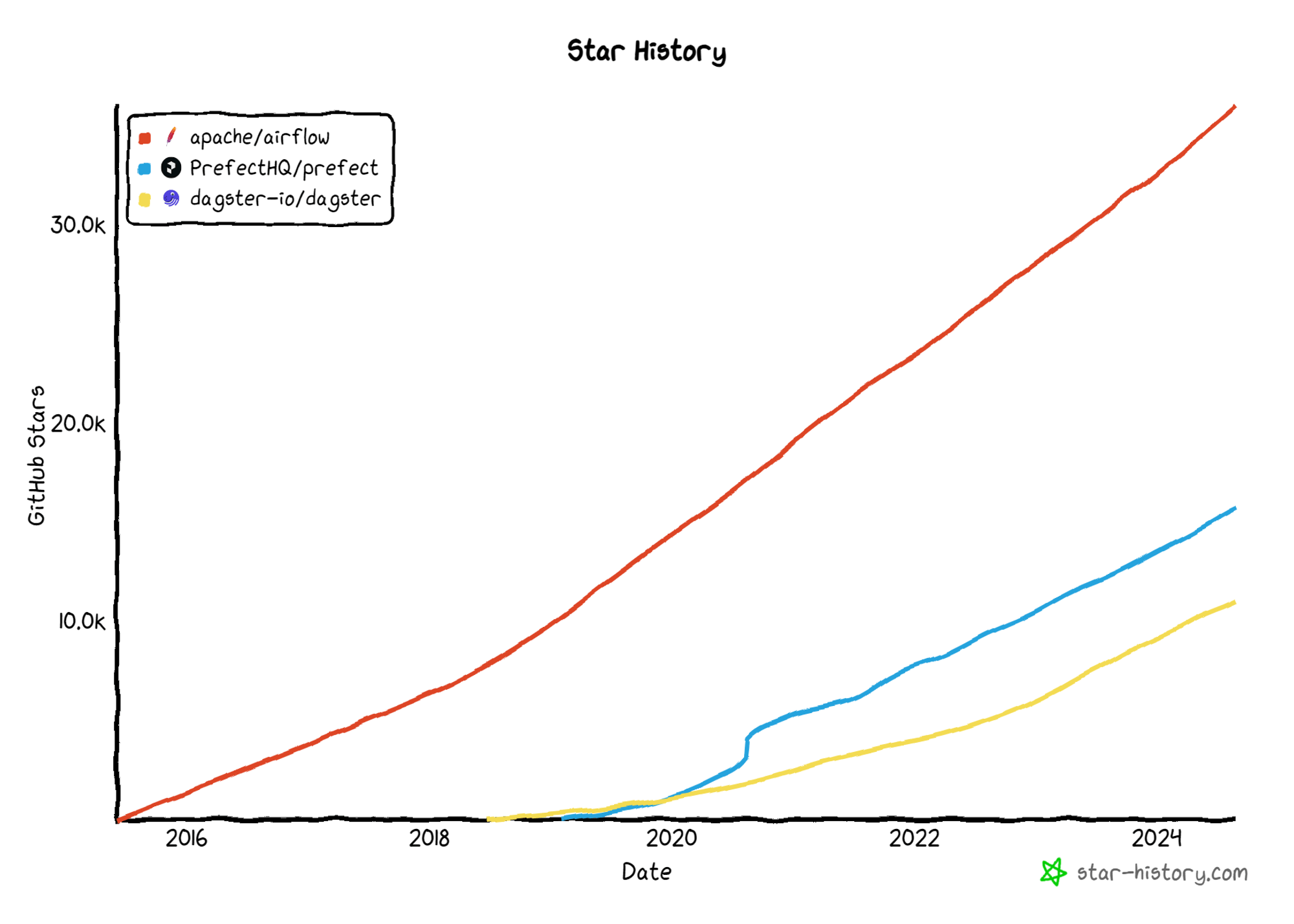
Before discussing potential issues, let’s first acknowledge the advantages of using Airflow. Imagine working with a tool that has been battle-tested for over a decade, backed by the Apache Foundation, and embraced by thousands of companies worldwide—Airflow is exactly that. As an open-source project with a massive user base, Airflow is a powerhouse worth your consideration, especially for complex pipelines and model monitoring.
One of the greatest advantages is that you’re never alone when you encounter a problem. With two orders of magnitude more questions on Stack Overflow compared to its competitors, it’s likely that someone else has already encountered and solved the same issue you’re facing, especially for those managing models in production, model specifications, and model drift. This extensive community support means you’re more likely to find a quick solution to keep your workflow running smoothly.
And let’s not forget the convenience of Airflow Providers. They are pre-built packages that allow seamless integration with various external systems, APIs, and services. Whatever tool you’re using—be it cloud platforms, databases, messaging services, or even DevOps tools—there’s probably an Airflow Provider for it. These providers simplify the process of integrating your existing data tools into your workflows, enabling you to build and automate pipelines with ease. By leveraging Airflow Providers, you can reduce the time and effort needed to connect and manage different services, allowing you to focus on optimizing your data pipelines and ensuring proper monitoring of model metrics.
Let’s run Airflow locally to get some hands-on experience:
Install Prerequisites
python3 -m venv airflow_venv && source airflow_venv/bin/activateStep 1: Install Apache Airflow
mkdir airflow-docker && cd airflow-dockerStep 2: Download the official Docker Compose file for Apache Airflow:
curl -LfO https://airflow.apache.org/docs/apache-airflow/stable/docker-compose.yamlStep 3: Create Necessary Folders
Create these directories:
mkdir ./dags ./plugins ./logsStep 5: Set Folder Permissions (MacOS/Linux Only)
echo -e "AIRFLOW_UID=$(id -u)\nAIRFLOW_GID=0" > .envStep 6: Initialize the Airflow Database
docker-compose up airflow-initStep 7: Start Airflow
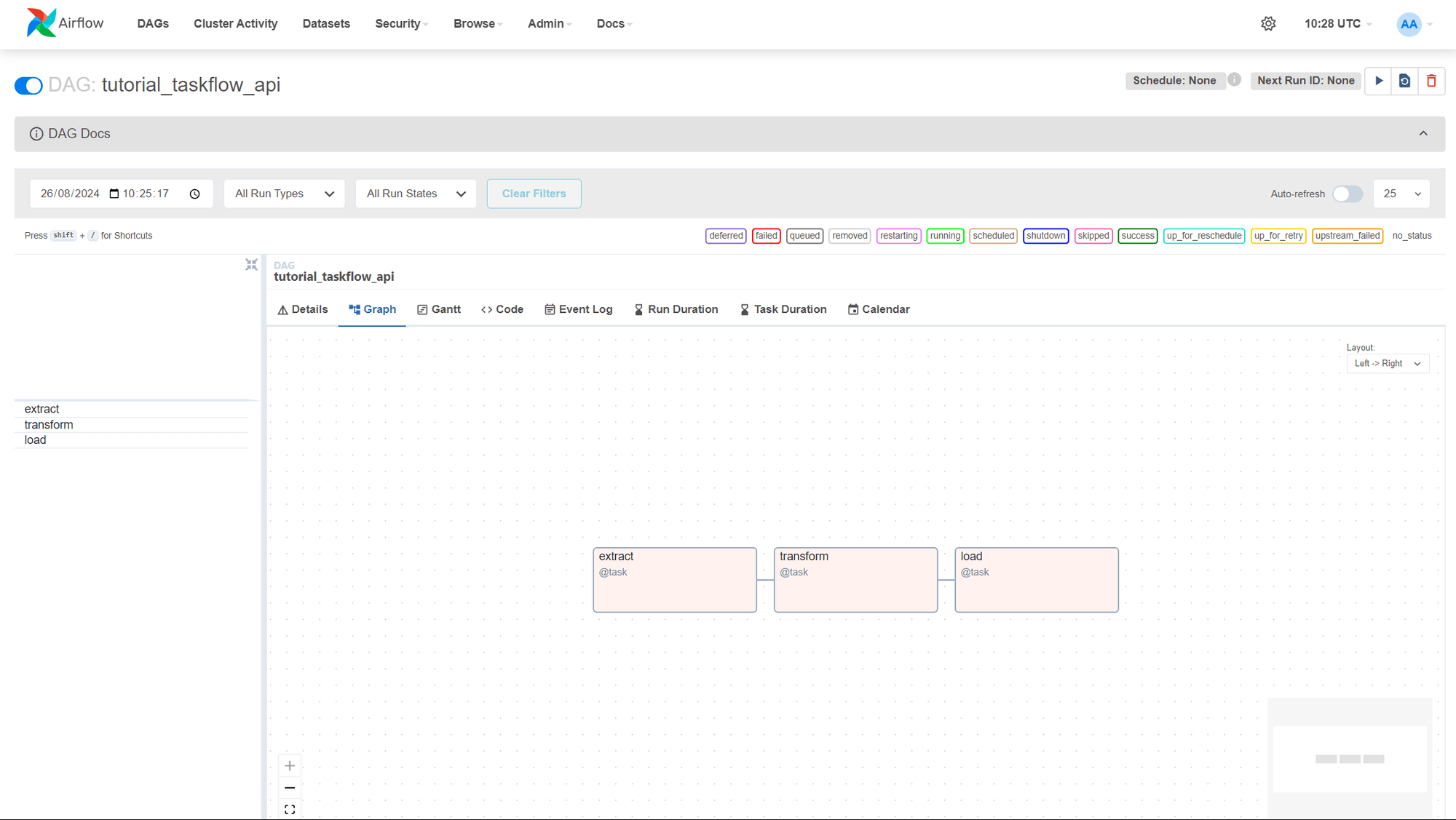
docker-compose upStep 8: Now, let’s start the official Airflow ETL pipeline example, tutorial_taskflow_api.
This simple data pipeline example demonstrates the use of the TaskFlow API with three tasks: Extract, Transform, and Load. The tutorial documentation for the Airflow TaskFlow API.
Access the Airflow Web UI
Open your web browser and go to http://localhost:8080. The default username and password are both airflow. This will give you access to the Airflow dashboard, where you can manage your DAGs and monitor tasks.
Step 9: Shut Down Airflow
docker-compose downThe Problems with Airflow
As the data landscape continued to evolve, data teams were expanding the capabilities of their tools. They were developing intricate pipelines to support data science and machine learning applications, collecting data from various systems and endpoints to store in data warehouses and data lakes, and managing workflows for end-user tools across multiple data systems. Airflow was the primary orchestration tool available for a period of time, leading many teams to attempt to accommodate their increasingly complex requirements within Airflow, often encountering obstacles along the way.
The main issues we’ve seen with Airflow deployments fall into one of several categories:
We will explore each of these problems by analyzing how Dagster and Prefect, two substitute tools, resolve them.
Exploring Dagster
Dagster offers a life cycle-oriented approach that provides unparalleled flexibility, particularly during development and testing. With its strong scheduler, dynamic pipeline generation, and seamless integrations, Dagster enables you to create dependable and adaptable data workflows that cater to all your diverse engineering requirements, including the deployment of machine learning models and proper monitoring of model metrics.
Architecture Diagram
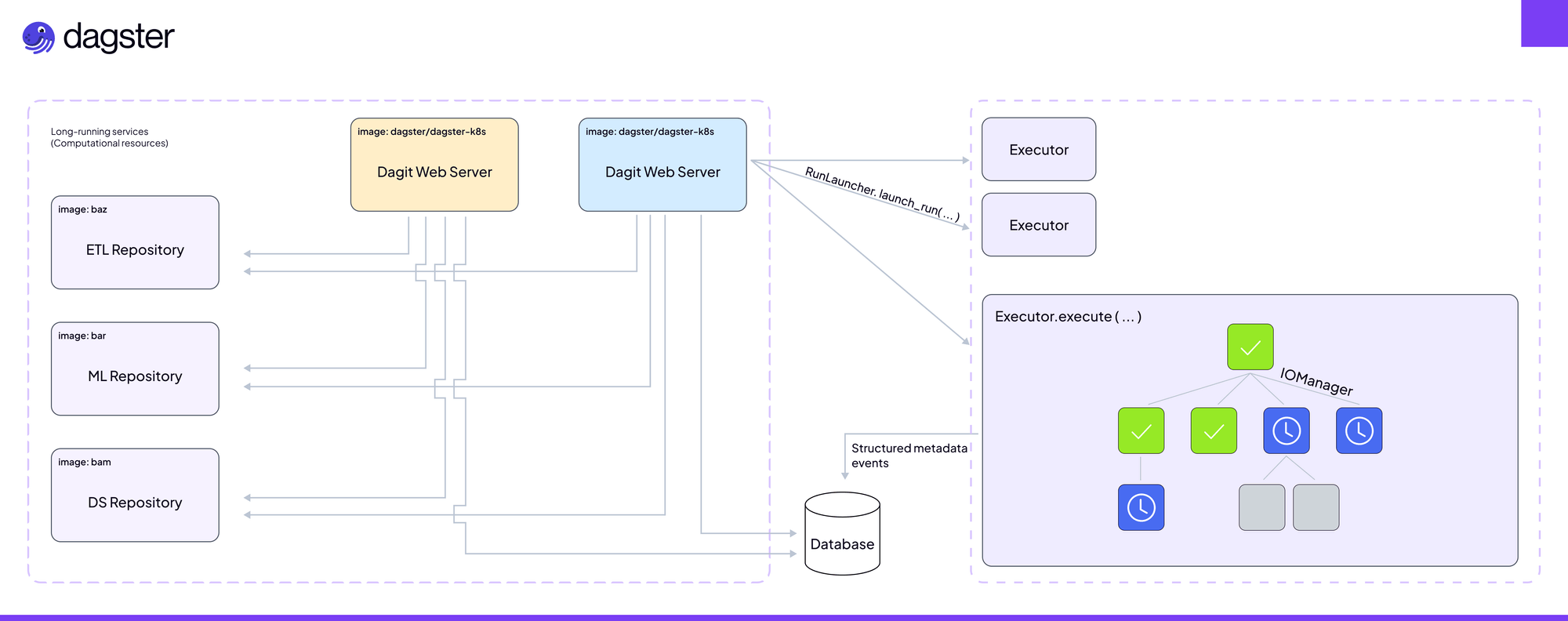
Features of Dagster
The Benefits of Dagster
With Dagster, you have the flexibility and control to navigate the complex world of data engineering effortlessly. You can tailor your development environment to your needs, switch seamlessly between local and production resources, and have a clear, transparent view of your data flows at every step, which is crucial for managing model retraining requirements and monitoring model metrics. Dagster empowers you to build dynamic workflows that adapt to changing requirements and schedules while providing the observability you need to keep everything running smoothly. It’s a modern solution designed to eliminate the headaches you’ve encountered with tools like Airflow, making your data pipelines more reliable, adaptable, and easier to manage.
Let’s run Dagster locally to get some hands-on experience:
Install Prerequisites:
python --version && pip --versionInstalling Dagster into an existing Python environment
pip install dagster dagster-webserver dagster-dg-cliGetting Started with Dagster on Your Local Machine
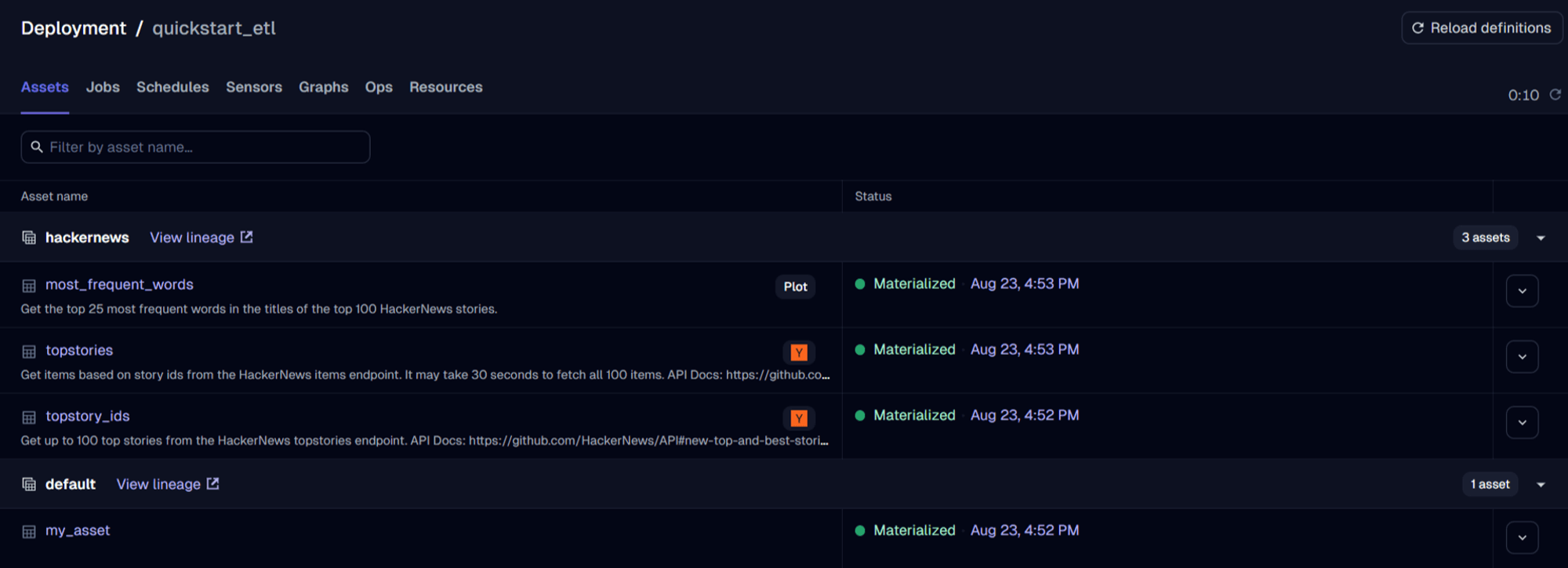
This example is a starter kit for building a daily ETL pipeline. At a high level, this project shows how to ingest data from external sources, explore and transform the data, and materialize outputs that help visualize the data.
New to Dagster? Learn what Dagster is in Concepts or the hands-on Tutorials.
This starter kit includes:
In this project, we’re building an analytical pipeline that explores popular topics on HackerNews.
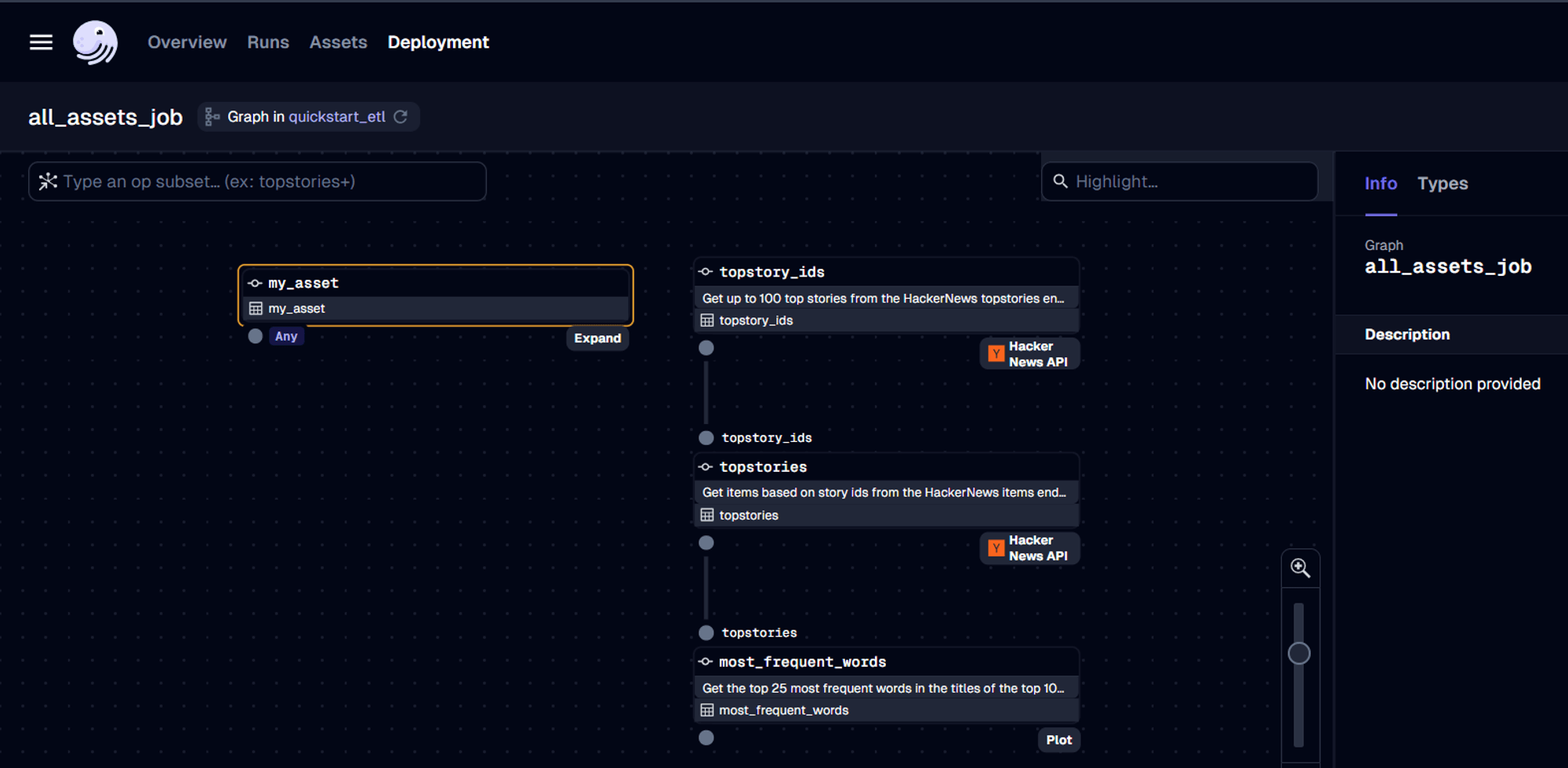
This project:
dagster project from-example --name my-dagster-project --example quickstart_etlpip install -e ".[dev]"Then, start the Dagster UI web server:
dagster devAccess the Dagster Web UI
Open your web browser and go to http://localhost:3000.
With Dagster, you define pipelines using an asset-centric approach instead of tasks. Dagster’s modular architecture allows custom resources as inputs into pipelines, which can be swapped based on environments.
The Problems with Dagster
While Dagster offers a host of powerful features, it’s not without its challenges. As you dive into its unique asset-centric approach and modular architecture, you might find the learning curve steeper than expected, especially if you’re transitioning from more traditional tools like Airflow. The community around Dagster is still growing, so you might occasionally feel the lack of extensive resources or quick fixes that more established tools provide.
Being a relatively new player, some of Dagster’s features are still maturing, which can lead to the occasional bug or the need for creative workarounds. Additionally, managing Dagster in a production environment can add infrastructure overhead, particularly if you’re scaling across multiple nodes or cloud environments without dedicated DevOps support. While
Dagster integrates with many popular tools, but there’s always the possibility that your specific setup might not be fully covered, leading to some integration challenges. Despite these hurdles, Dagster’s innovative approach makes it a compelling choice, but it’s important to be aware of these potential bumps on the road as you consider making the switch.
Now let’s take a look at Prefect
Prefect takes a “negative engineering” approach, trusting that you already know how to code and focusing on making it incredibly easy to turn that code into a distributed pipeline. Its robust scheduling and orchestration engine streamline the process, but this simplicity can sometimes be a double-edged sword when you’re tackling more complex data pipelines. Even so, Prefect has quickly gained traction and continues to evolve, helping you overcome many of the challenges that traditional tools like Airflow struggle with.
Architecture Diagram
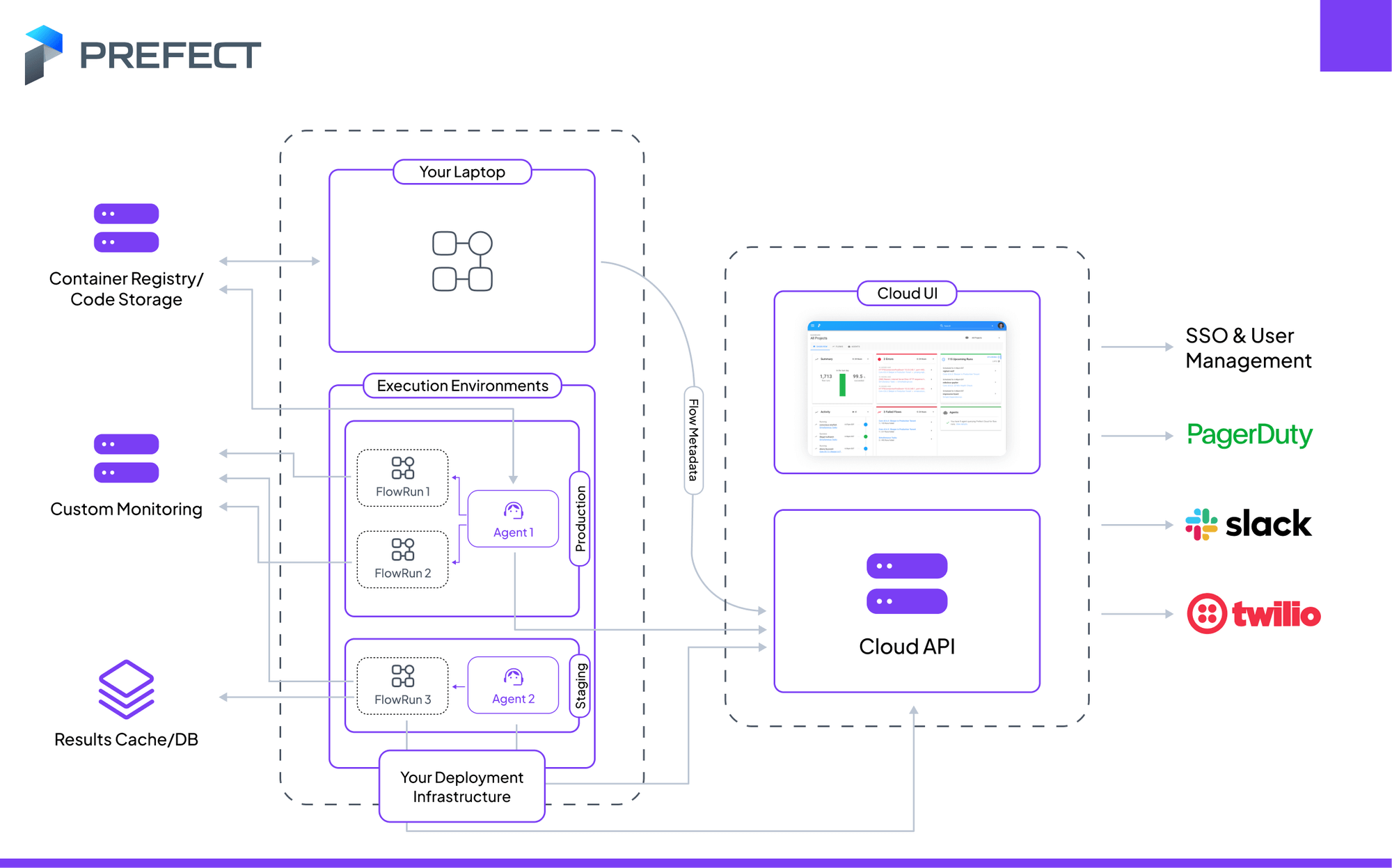
Features of Prefect
The Benefits of Prefect
With Prefect, you’re not just managing data pipelines—you’re simplifying them. Unlike Airflow, which often bogs you down with rigid scheduling and complex configurations, Prefect lets you focus on writing code without the headache of orchestration. You can run workflows whenever you need, easily scale complex computations, and manage everything with a level of clarity and flexibility that Airflow simply can’t match. Prefect’s dynamic workflows, straightforward pipeline creation, and robust scheduling give you the freedom to build and iterate faster, making it the smarter choice for modern data engineering.
One of the standout advantages of Prefect is its modern approach to what you’re doing and what it needs to do. It offers an extensive API that allows you to programmatically control executions and interact with the scheduler—something Airflow only recently began supporting in production with its 2.0 release. Before this, using Airflow’s API in production often required hacky workarounds. Prefect also shines with its dynamic execution model, which determines the DAG at runtime and offloads computation and optimization to other systems like Dask. This smarter approach keeps pace with increasingly dynamic workflows, ensuring your data processes are as efficient and adaptable as possible.
If your company doesn’t already have Airflow or Prefect in place, Prefect is the clear choice. It naturally encourages better modularization of code, allowing you to test more aggressively and thoroughly. For data-driven companies relying on well-curated data to make automated product decisions, this modularity is invaluable. While you can achieve similar results with Airflow, it often requires significant effort and workarounds. With Prefect, this level of modularity and reliability comes naturally, making it the obvious winner for your data orchestration needs.
Let’s run Prefect locally to get some hands-on experience:
Install Prefect into your existing Python environment using pip:
pip install prefectOption 2: Running Your Flow Locally
If you prefer to run your flow locally, follow these steps:
from prefect import task, Flow

@task
def fetch_data():
    return requests.get('https://api.example.com/data').json()

@task
def process_data(data):
    return [item['value'] for item in data]

@task
def store_data(processed_data):
    with open('data.csv', 'w') as f:
        for item in processed_data:
            f.write(f"{item}\n")

with Flow("Simple Data Pipeline") as flow:
    data = fetch_data()
    processed = process_data(data)
    store_data(processed)

flow.run()
Run Your Prefect Flow Locally
python your_script_name.pyExplore the Prefect UI
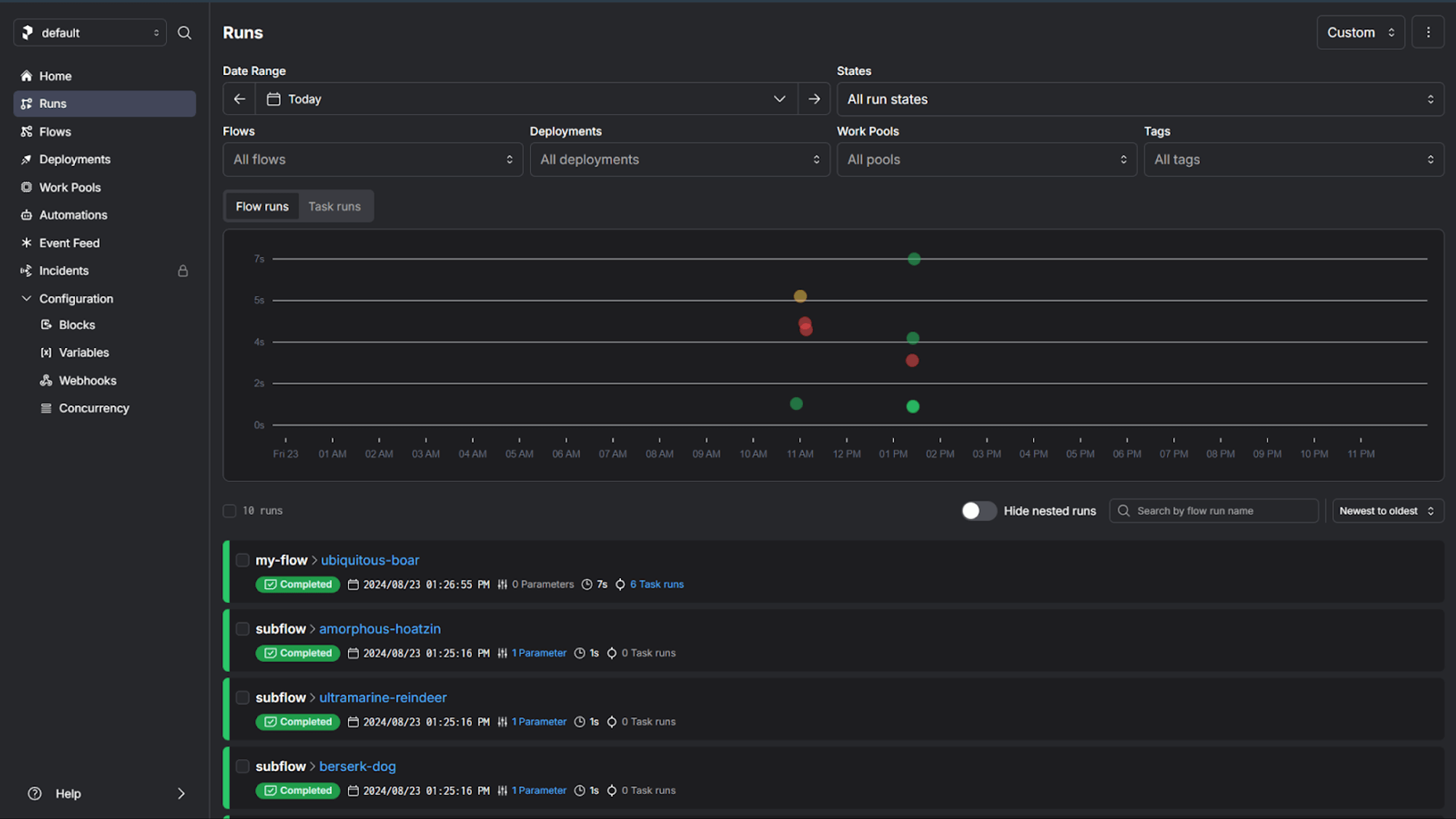
prefect server startAccess the Prefect Web UI
Here, you can visualize your flow runs, view logs, and manage your Prefect settings.
The Problems with Prefect
While Prefect offers many modern conveniences, you may encounter some challenges. Its error messages can be vague, which can make troubleshooting more difficult and lead you to rely on community support rather than clear documentation. For more advanced workflows, you might find that Prefect struggles with complexity, sometimes requiring workarounds that can slow you down. Although Prefect’s semi-managed solution is a step in the right direction, it still requires you to manage your own workers, unlike fully managed services like Airflow on the cloud, which might be a better fit if your team has limited DevOps resources. Deployment can also be tricky without a Kubernetes cluster, and if you’re already invested in another platform like Google’s Composer, migrating to Prefect might seem like more trouble than it’s worth. Despite these challenges, Prefect’s dynamic capabilities and modern approach still make it a compelling choice—but it’s important to weigh these factors before diving in.
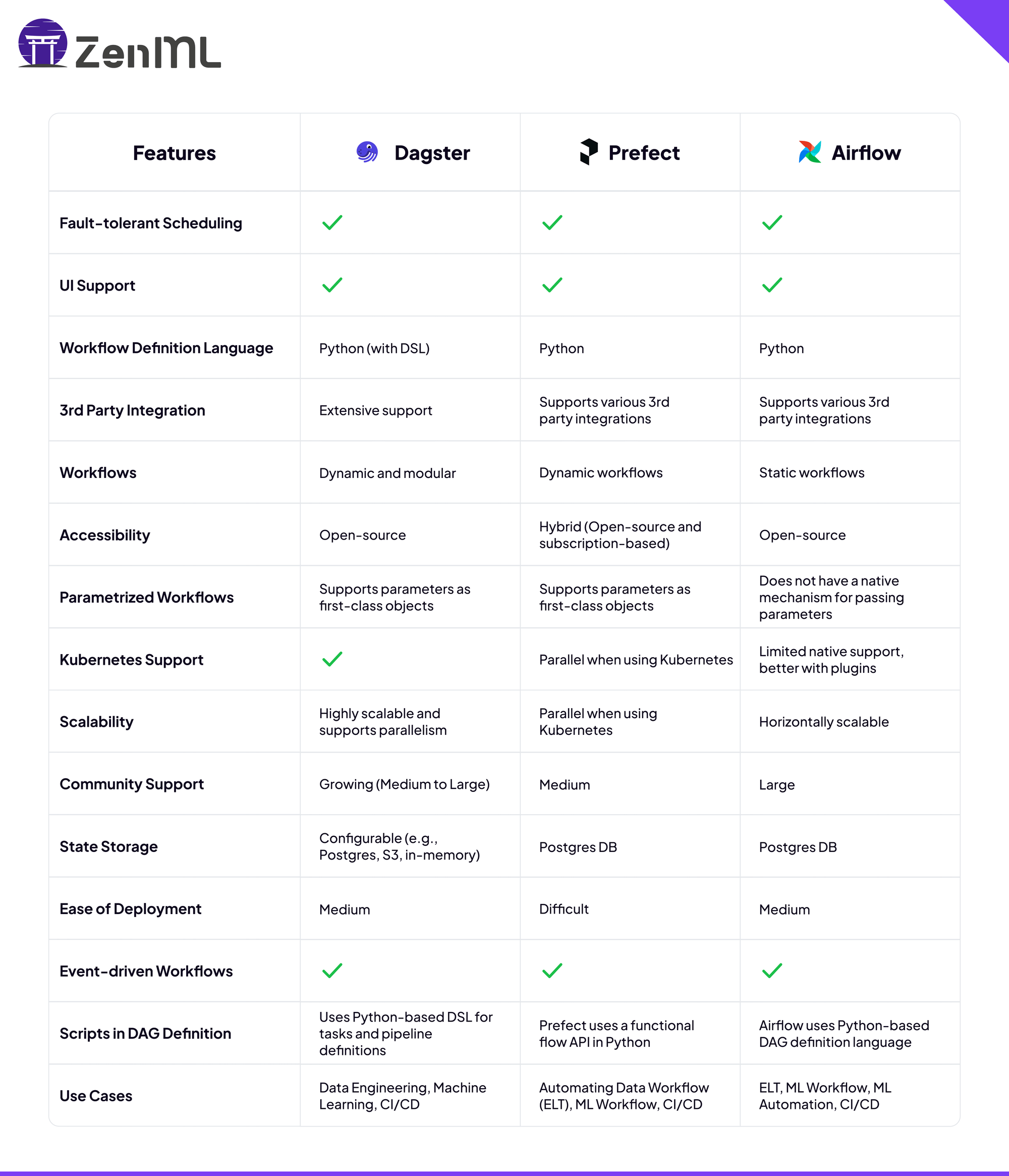
Features: Comparison table
Quick Selection Guide by Use Case (2026 Edition):
Data Flow in Airflow, Prefect, and Dagster
Moving data between related tasks in Airflow can be a real headache. Typically, you have to store data externally, use XComs to pass the location, and then parse it in the next task—just to get things moving. This process can feel cumbersome and unnecessarily complicated, making it harder to keep your workflows smooth and efficient.
In Dagster, the inputs and outputs of jobs can be made much more explicit.
import csv
import requests
from dagster import get_dagster_logger, job, op
@op
def download_cereals():
    response = requests.get("<https://docs.dagster.io/assets/cereal.csv>")
    lines = response.text.split("\\n")
    return [row for row in csv.DictReader(lines)]
@op
def find_sugariest(cereals):
    sorted_by_sugar = sorted(cereals, key=lambda cereal: cereal["sugars"])
    get_dagster_logger().info(
        f'{sorted_by_sugar[-1]["name"]} is the sugariest cereal'
    )
@job
def serial():
    find_sugariest(download_cereals())
The above example shows that the download_cereals op returns an output and the find_sugariest op accepts an input. Dagster also provides an optional type hinting system to enhance the testing experience, something not possible in Airflow tasks and DAGs.
@op(out=Out(SimpleDataFrame))
def download_csv():
    response = requests.get("<https://docs.dagster.io/assets/cereal.csv>")
    lines = response.text.split("\\n")
    get_dagster_logger().info(f"Read {len(lines)} lines")
    return [row for row in csv.DictReader(lines)]
@op(ins={"cereals": In(SimpleDataFrame)})
def sort_by_calories(cereals):
    sorted_cereals = sorted(cereals, key=lambda cereal: cereal["calories"])
    get_dagster_logger().info(
        f'Most caloric cereal: {sorted_cereals[-1]["name"]}'
    )
In Prefect, inputs and outputs are also clear and easy to wire together.
from prefect import flow, task


@task
def extract_reference_data():
    # Add your reference data extraction logic here
    return reference_data


@task
def extract_live_data():
    # Add your live data extraction logic here
    return live_data


@task
def transform(live_data, reference_data):
    # Add your transformation logic here
    return transformed_live_data


@task
def load_reference_data(reference_data):
    # Add your loading logic here
    pass


@task
def load_live_data(transformed_live_data):
    # Add your loading logic here
    pass


@flow(name="Aircraft ETL", log_prints=True)
def aircraft_etl():
    reference_data = extract_reference_data()
    live_data = extract_live_data()
    transformed_live_data = transform(live_data, reference_data)
    load_reference_data(reference_data)
    load_live_data(transformed_live_data)


if __name__ == "__main__":
    aircraft_etl()
The transform function accepts the outputs from both reference_data and live_data. For large files and expensive operations, Prefect even offers the ability to cache and persist inputs and outputs, improving development time when debugging.
Scheduling Tasks
Making sure tasks are scheduled properly in workflow orchestration is essential, and the level of flexibility available can significantly impact your experience. If you’ve used Airflow, you’re well aware of the problems that can arise from off-schedule tasks. Airflow DAGs can be scheduled, event-triggered, or run manually with schedule=None. Historically, Airflow was more schedule-centric, but Airflow 3.x has moved toward more flexible scheduling defaults and asset/event-aware execution. But what if there was a more seamless way to manage scheduling? This is where Prefect and Dagster come into play, providing the flexibility and speed that Airflow may struggle to deliver.
Prefect: Freedom to Run Anytime
With Prefect, you’re not shackled by rigid schedules. Flows are standalone objects, meaning you can run them anytime without worrying about predefined schedules. Imagine the convenience—no more waiting for the scheduler to kick in. Prefect’s scheduling is lightning-fast, especially when you leverage tools like Dask to parallelize tasks, which is crucial for managing large-scale model training jobs and ensuring proper monitoring of your entire pipeline.
Dagster: Schedule with Power and Flexibility
Now, suppose you need even more control—like modifying job behavior based on the day of the week. Dagster gives you that power, allowing you to customize how jobs run based on the schedule itself. Want different configurations for weekends versus weekdays? Dagster’s got you covered.
Example: Dynamic Scheduling in Dagster
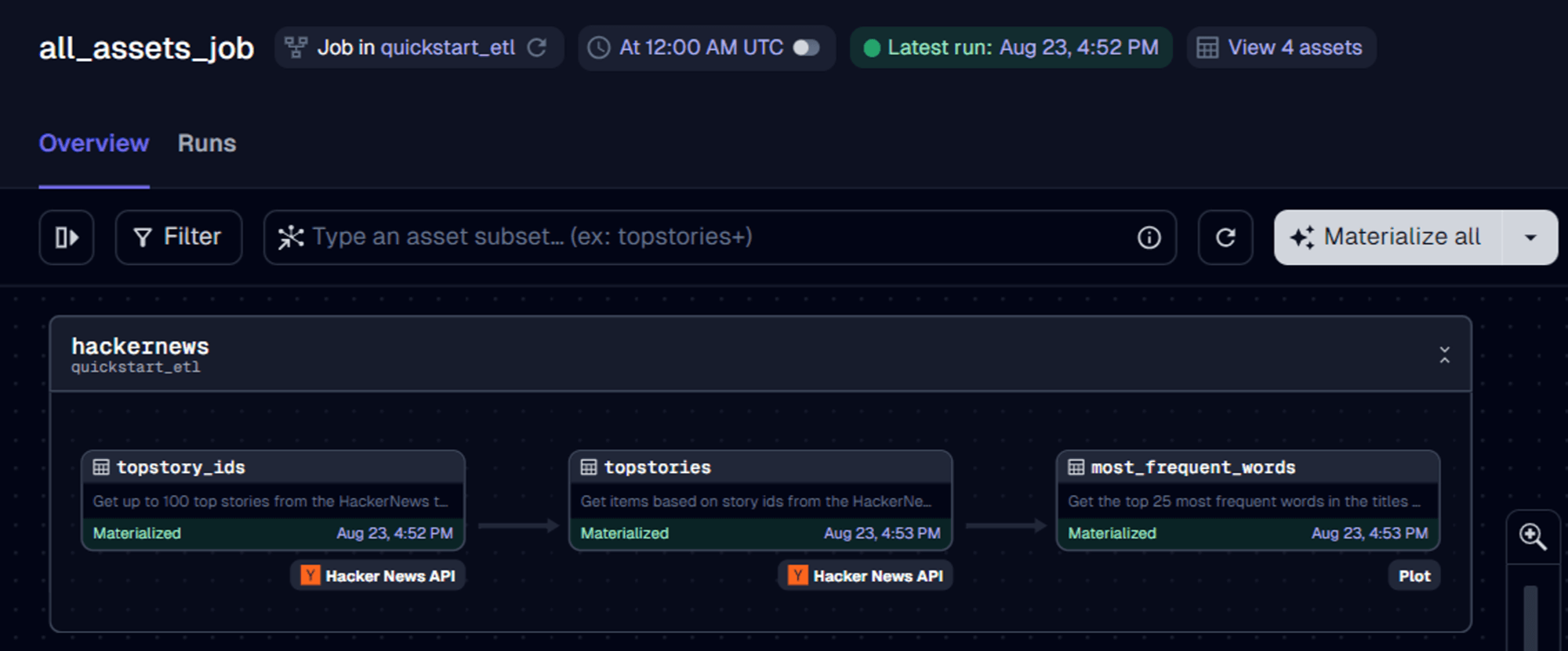
With Dagster, you’re not just scheduling tasks—you’re controlling them with precision. You can tailor your job’s execution to suit your exact needs, something Airflow struggles with, especially when it comes to dynamic scheduling.
Why Prefect and Dagster Make Scheduling Simpler
Dynamic Workflows
When you’re building workflows, having the ability to easily create dynamic pipelines can be a game-changer. Both Prefect and Dagster offer powerful tools for crafting these flexible, dynamic workflows, making them much more adaptable than Airflow. If you’ve ever found yourself wrestling with Airflow’s rigid structure, you’ll appreciate how Prefect and Dagster let you scale and customize your workflows with ease.
Prefect: Dynamic Workflows Made Simple
In Prefect, creating dynamic workflows is as straightforward as it gets. You can specify parameters directly in the Cloud Interface or pass them to the Flow runner. This flexibility means you can easily scale your workflows as they grow in complexity, allowing you to start simple and expand as needed without getting lost in a tangle of configurations.
Dagster: Powerful Graphs for Dynamic Configurations
Dagster takes dynamic workflows to another level with its ability to define and parametrize graphs. This allows you to fully customize your resources, configurations, hooks, and executors, giving you total control over how your jobs are executed.
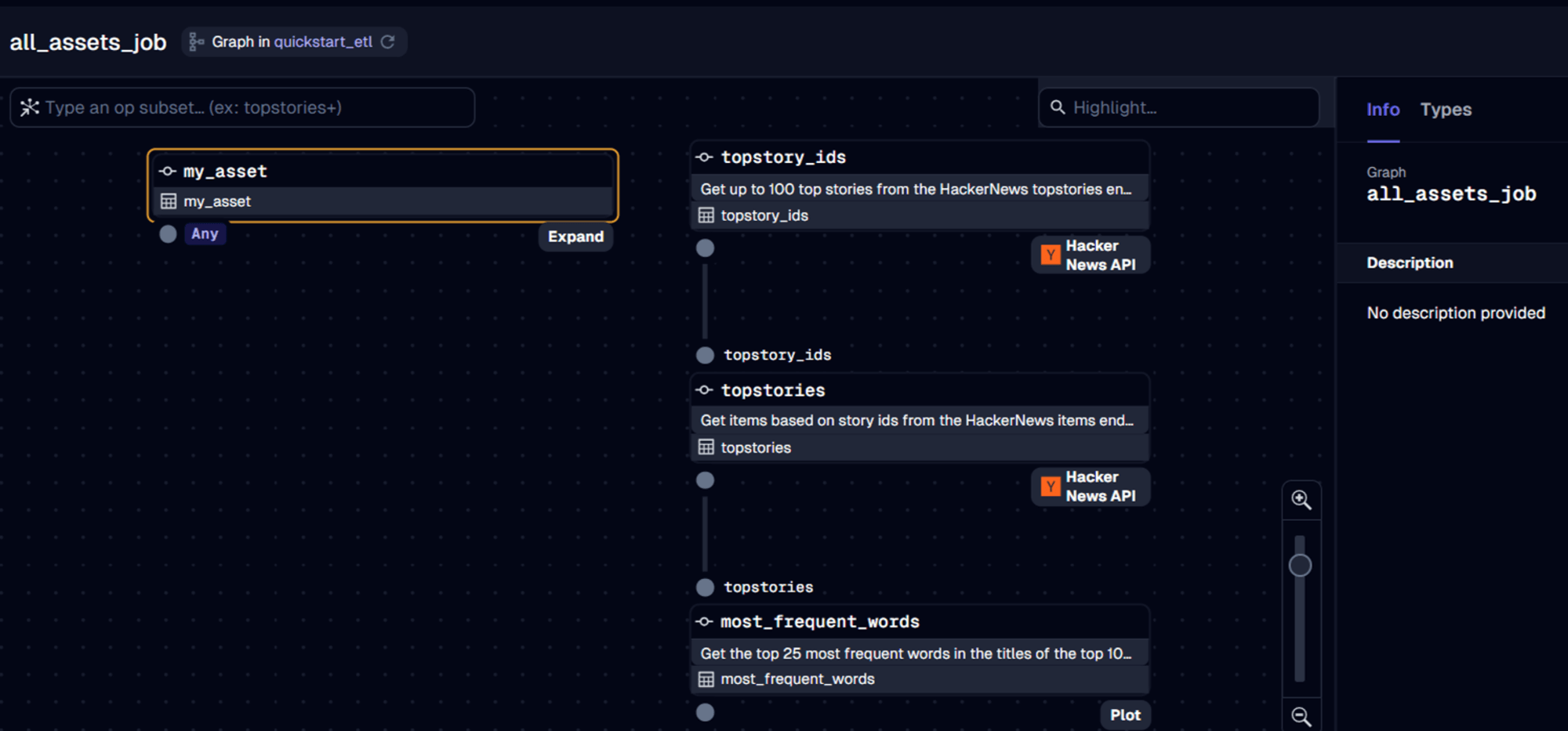
Why Prefect and Dagster Are the Dynamic Workflow Champions
Developer experience with Airflow, Prefect, and Dagster.
When you’re diving into workflow orchestration, you want a platform that doesn’t just get the job done but makes the process smooth and intuitive. That’s where Prefect and Dagster shine. They’re built with simplicity in mind, helping you streamline your development process without getting bogged down by complexity—unlike Airflow, which, while powerful, can feel like a maze. Let’s explore how Prefect and Dagster make your life easier with real code examples to illustrate just how simple they can be.
Prefect: Orchestrating Made Easy
Imagine you’re setting up a data pipeline, and you want it to be as straightforward as possible. Prefect lets you do just that with its clean Pythonic API. You don’t need to worry about complex configurations or manually managing retries and error handling—Prefect takes care of it for you.
Example: Prefect in Action
Let’s say you need to pull data from an API, process it, and then store it in a database. Here’s how easy that is with Prefect:
from prefect import flow, task

@task
def fetch_data():
    return requests.get('https://api.example.com/data').json()

@task
def process_data(data):
    return [item['value'] for item in data]

@task
def store_data(processed_data):
    with open('data.csv', 'w') as f:
        for item in processed_data:
            f.write(f"{item}\n")

with Flow("Simple Data Pipeline") as flow:
    data = fetch_data()
    processed = process_data(data)
    store_data(processed)

flow.run()
In just a few lines, you’ve defined a full workflow. No need to worry about managing dependencies between tasks—Prefect handles that automatically. Error handling? Built-in. Retries? Prefect’s got you covered. You’re free to focus on what really matters: your data and logic.
Dagster: Clarity and Control
Now, suppose your project involves complex data workflows with multiple dependencies and data assets. Dagster not only simplifies this but also gives you complete control and visibility over every aspect of your pipeline.
Example: Dagster in Action
Let’s build a simple data pipeline where you clean data and then run some analytics on it. Here’s how you can do it with Dagster:
from dagster import op, job

@op
def clean_data():
    data = requests.get('https://api.example.com/data').json()
    return [item for item in data if item['value'] > 10]

@op
def analyze_data(cleaned_data):
    return sum(item['value'] for item in cleaned_data)

@op
def report_results(result):
    print(f"Total value is {result}")

@job
def data_pipeline():
    data = clean_data()
    result = analyze_data(data)
    report_results(result)
In this example, you’ve defined three operations (op) that clean, analyze, and report data. The job ties everything together, making it easy to visualize the entire workflow. Dagster’s declarative nature means you’re describing what needs to happen, and Dagster takes care of executing it in the correct order. Plus, with its web-based UI, you can monitor and debug your pipeline with ease.
Why Prefect and Dagster Outshine Airflow
Now, let’s talk about why you might find Prefect and Dagster to be more developer-friendly compared to Airflow.
Prefect’s Simplicity
Dagster’s Control and Clarity
Airflow: Powerful but Complex
Airflow has been a go-to for many engineers, but its power comes with complexity. Defining workflows as DAGs can be overkill for simpler projects, and setting up and managing Airflow often requires more configuration and manual handling than you might want.
Here’s a simple Airflow DAG to contrast:
from airflow.sdk import DAG
from airflow.providers.standard.operators.python import PythonOperator
from datetime import datetime

def fetch_data():
    return requests.get('https://api.example.com/data').json()

def process_data():
    # Add your processing logic here

with DAG('simple_pipeline', start_date=datetime(2023, 1, 1), schedule="@daily") as dag:
    fetch = PythonOperator(task_id='fetch_data', python_callable=fetch_data)
    process = PythonOperator(task_id='process_data', python_callable=process_data)

    fetch << process
While Airflow is robust and highly customizable, the DAG-centric approach requires you to think in terms of task dependencies from the start, which can add complexity to your development process.
Why use these tools?
So far, we’ve explored the basic concepts and features of these tools. Now, let’s dive into why you might choose Dagster, Prefect, or Airflow for your project.
Why Choose Airflow?
Airflow is a powerhouse when it comes to managing and automating workflows. Here’s why it might be perfect for your project:
If you’re looking for a tried-and-true solution to handle your workflows with efficiency and flexibility, Airflow is a strong contender.
Why Choose Prefect?
Perfect is a powerful tool that brings flexibility and resilience to your workflow management. Here’s why it could be the right fit for your project:
Prefect is a standout choice if you’re looking for a flexible, secure, and highly adaptable orchestration tool.
Why Choose Dagster?
If your project is centered around data engineering, Dagster has the potential to be a game-changer. These are the reasons:
If you want a powerful, flexible tool designed for data-centric projects, Dagster is a standout choice.
Use Cases and Recommendations
As your data engineering landscape evolves, choosing the right orchestration tool is crucial for ensuring smooth and efficient workflow management. Understanding where Airflow, Dagster, and Prefect shine can help you make informed decisions that align with your needs.
Best Use Cases for Airflow
Complex and Static Workflows:
Extensive Community Support:
Best Use Cases for Dagster
Local Development and Testing:
Data Pipeline Orchestration:
Best Use Cases for Prefect
Cloud-Native Workflows:
Dynamic and Simple Workflows:
By understanding these strengths, you can confidently choose the orchestration tool that best suits your organization’s unique needs.
Community and Ecosystem
Let’s dive into the vibrant ecosystems of Prefect, Dagster, and Airflow—three powerhouses in the world of data orchestration. Whether you’re orchestrating complex workflows, managing data assets, or automating tasks, these platforms offer unique features and integrations that cater to different needs. Let’s explore how each one stands out and how they compare to each other.
Prefect Ecosystem
Imagine you’re building a data pipeline, and you need something flexible and modular. Prefect is like a Swiss Army knife, offering a rich ecosystem of pre-built tasks, flows, and blocks that you can easily plug into your workflows. Prefect supports a wide range of integrations, including heavyweights like AWS, GCP, Azure, Docker, and Kubernetes. Whether you’re managing cloud resources, orchestrating machine learning pipelines, or automating infrastructure, Prefect has you covered.
What’s great about Prefect is its ease of use. The platform is designed to make your life simpler by allowing you to build custom tasks and flows that fit your exact needs. With integrations maintained by Prefect and an active community, you’ll always have access to the latest tools and best practices.
Dagster Ecosystem
Now, let’s say you’re focused on data engineering or MLOps, and you need precise control over data workflows. Enter Dagster, the platform that gives you more than just orchestration—it offers complete visibility and control over your data assets. Dagster’s ecosystem is built around Software-Defined Assets (SDAs) and Ops, giving you the power to manage data lineage, asset versioning, and real-time monitoring with ease.
Dagster integrates seamlessly with tools like AWS, GCP, Databricks, and Snowflake, but what really sets it apart is its community-driven approach. You’ll find integrations that are not only maintained by the core team but also supported by an active community, allowing you to extend its capabilities far beyond the basics. If you’re looking to elevate your data workflows with advanced features, Dagster is a strong contender.
Airflow Ecosystem
And then there’s Airflow—the veteran in the orchestration space that continues to be a go-to for many engineers. Airflow is built around a DAG-based approach (Directed Acyclic Graph), making it ideal for orchestrating complex, interdependent workflows. The Airflow ecosystem is robust, offering out-of-the-box support for a wide range of integrations like AWS, GCP, Azure, Docker, and Kubernetes.
What makes Airflow special is its flexibility and community support. With Airflow, you can manage and scale workflows with precision, whether you’re running ETL jobs, managing data lakes, or automating machine learning pipelines. The platform is highly customizable, allowing you to write custom operators and extend its functionality to suit your needs.
Why Prefect and Dagster Win on Simplicity
If you want a platform that simplifies development and speeds up the process, consider Prefect and Dagster. They are designed for modern developers, reducing complexity and enhancing productivity for easier workflow orchestration.
The Orchestration Landscape in Late 2026
The orchestration space kept moving through late 2025 and the first half of 2026. The gap between “data orchestrator” and “agent orchestrator” is now visibly closing, and all three of the major platforms have made that closing explicit.
Airflow has not slowed down: Airflow 3.1 (September 2025) landed Human-in-the-Loop operators, Airflow 3.2 (April 2026) added asset partitioning and multi-team deployments, and the multi-language Task SDK is rolling out behind the scenes. The State of Airflow 2026 survey is the best single data point on adoption right now: 5,800+ respondents, 32% running GenAI or MLOps in production (62% among Astronomer customers), and 89% expecting to use Airflow for revenue-generating or external-facing workloads in the next year. IBM also entered the picture with an OEM partnership with Astronomer, distributed as “Astronomer with IBM.” Whatever you think of Airflow’s ergonomics, the platform’s enterprise gravity in 2026 is real.
Dagster doubled down on asset-native primitives: Components went GA in October 2025, and the team spent the following two quarters expanding the component library and moving FreshnessPolicy to GA. On the commercial side, Dagster+ Solo and Starter plans shift to pay-as-you-go pricing on May 1, 2026: Solo is $10/month plus $0.040 per credit, Starter is $100/month plus $0.035 per credit, where one credit equals an asset materialization or an op execution. Hybrid deployments carry no Dagster compute charge, which is the right choice if you already run your own infrastructure.
Prefect is on a steady release cadence and a quieter but more interesting AI bet: The 3.x line keeps shipping (3.7.0 in May 2026). The April 2026 Cloud release closed long-standing enterprise gaps with full audit trails and bulk operations. The bigger story is Marvin 3.0, which absorbed ControlFlow in late 2025 and is now Prefect’s first-party agent framework running on top of its events and automations engine. None of the other two orchestrators ship anything comparable.
Conclusion
In summary, when comparing Airflow, Dagster, and Prefect, each tool brings something unique to the table in data orchestration. If your organization deals with complex, static workflows and models in production, Airflow’s robust framework and strong community support might be your go-to. For those focused on machine learning pipelines and model management, Dagster shines with its local development and testing capabilities. If you’re looking for a tool that excels in cloud-native workflows and dynamic processes, Prefect might just be the perfect fit, offering a scalable solution for your model deployment and monitoring needs.
As data engineering continues to evolve, adopting the right tools is key to staying ahead in managing your workflows efficiently. I hope this exploration has provided you with valuable insights into the latest orchestration tools.
But now, I’d love to hear from you. Which scheduler are you using? Are you thinking about moving away from Airflow? Let’s discuss it on Twitter or LinkedIn.
Common Questions About Airflow, Dagster, and Prefect in 2026
How does Airflow 3.0 change the comparison with Dagster and Prefect? Airflow 3.0 narrows the gap significantly by introducing DAG versioning, event-driven scheduling with Data Assets, and multi-language support. However, Dagster still leads in asset-centric design and data lineage, while Prefect maintains its advantage in developer experience and simplicity. Airflow 3.0’s strength lies in its maturity, massive ecosystem, and proven scalability for organizations already invested in the platform.
Which tool is best for ML and AI workflows in 2026? All three tools now excel at ML/AI orchestration, but with different strengths. Dagster’s asset-centric approach naturally fits ML pipelines with its focus on data products and lineage tracking. Airflow 3.0’s expanded MLOps support (30% of users) and GenAI capabilities (10% of users) prove its production readiness at scale. Prefect’s lightweight approach and rapid iteration capabilities make it ideal for ML experimentation and fast-moving data science teams.
Should I migrate from Airflow 2.x to Airflow 3.0 or switch to Dagster/Prefect? If Airflow 2.x meets your needs and you’re not experiencing pain points around versioning or event-driven workflows, adopt a measured approach to 3.0 migration—early patches typically address bugs discovered in major releases. However, if you’re struggling with data lineage visibility, local development complexity, or asset management, Dagster offers compelling advantages. Teams prioritizing rapid development and minimal operational overhead should evaluate Prefect’s serverless offerings.
What’s the learning curve difference between these tools in 2026? Prefect remains the easiest to learn with its Pythonic, function-first approach. Dagster’s asset-centric paradigm requires a mental shift from task-based thinking but pays dividends in complex data environments. Airflow 3.0 improves on Airflow 2.x’s complexity, though its extensive feature set still presents a steeper learning curve—the trade-off is access to the largest community and most comprehensive documentation.
How do pricing models compare for teams in 2026? Airflow is still fully open source with no licensing cost, and there are several managed options if you do not want to run it yourself: Amazon MWAA, Google Cloud Composer, Astronomer, and the new “Astronomer with IBM” OEM offering. Prefect Cloud’s Hobby tier is free forever: 1 dev seat, 1 workspace, 5 deployments, and 500 minutes of serverless compute per month. Paid self-serve tiers add seats, deployments, and infrastructure options. Dagster offers an open-source core plus Dagster+ in Serverless and Hybrid flavours. As of May 1, 2026, Dagster+ Solo and Starter shift to pay-as-you-go: Solo is $10/month plus $0.040 per credit, Starter is $100/month plus $0.035 per credit, where one credit equals an asset materialization or an op execution. Hybrid deployments carry no Dagster compute charge.