
On this page
It’s Friday afternoon, and your support agent somehow approved a refund that should have escalated.
You still found the bad tool call, fixed the prompt, and got a better answer in testing. Yet you’re unsure whether that fix will hold up across the tens of thousands of requests your agent has already handled.
- AI engineers on your agent
- Set up in minutes
- No credit card
LangSmith and Braintrust use a similar approach, and both help you inspect production runs, collect test cases, and compare executions. Kitaru works on top of both these platforms. It imports your existing traces and re-runs your agent’s real code against them, with one thing changed.
Nevertheless, all three help you inspect the root cause. But because the mechanisms differ, each tool can and cannot tell you different things.
In this LangSmith vs Braintrust vs Kitaru comparison, we’ll cover tracing, production-derived test sets, human review, and regression testing. Then we’ll compare pricing and help you decide where each tool fits.
LangSmith vs Braintrust vs Kitaru: Key Takeaways
- LangSmith: An observability and evaluation platform with detailed trace views, dataset automation, and structured human-review queues. A strong choice for LangChain and LangGraph teams that want to investigate behavior and compare experiments.
- Braintrust: A tracing and evaluation platform with the best trace viewer of the three. Human review comes with assignment and a Kanban board, and experiment comparison comes with pinned baselines and a CI action that comments on pull requests, useful when evaluation is already part of your release process.
- Kitaru: An open-source agent replay and evaluation tool for ML engineers and AI developers. It imports traces from LangSmith and Braintrust, groups production sessions into immutable cohorts, and replays agent code with controlled changes.
What Problems Are These Tools Actually Solving?
All three can help you catch agent failures. They start from different questions, though, and that changes what you’ll do with them every day.
LangSmith
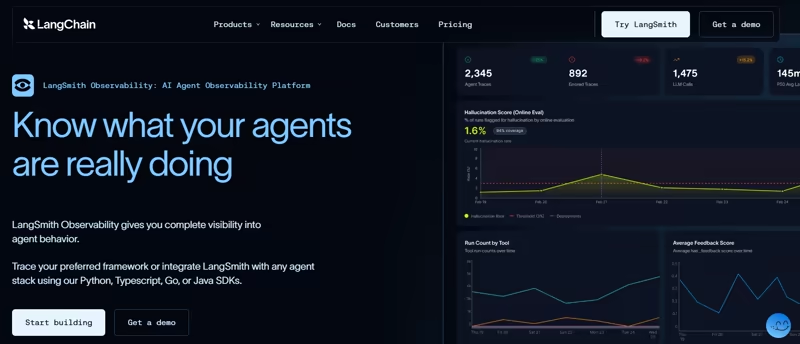
LangSmith began as the tracing layer for LangChain and LangGraph and is framework-agnostic today. Each trace is a collection of runs for a single operation. Around tracing sit datasets, experiments, and evaluators, plus annotation queues, online evaluators, and a hosted deployment runtime.
For testing, LangSmith centers on datasets of inputs and optional reference outputs. Your target function runs against those examples, and LangSmith stores the results as experiments. You can also score production traces with online evaluators or send selected runs into annotation queues.
Braintrust
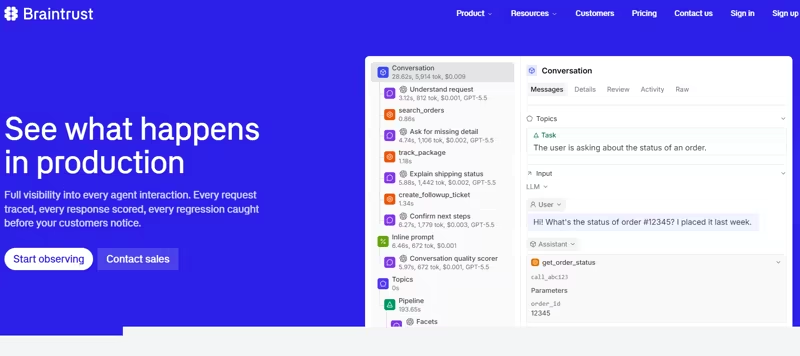
Braintrust brings production tracing, datasets, scorers, and experiments into one platform. Its Eval() function runs a task against a dataset, scores the outputs, and saves the results as an experiment you can compare with previous runs. Unlike LangSmith, Braintrust also lets you reference a logged trace directly in a dataset instead of copying its input.
Kitaru
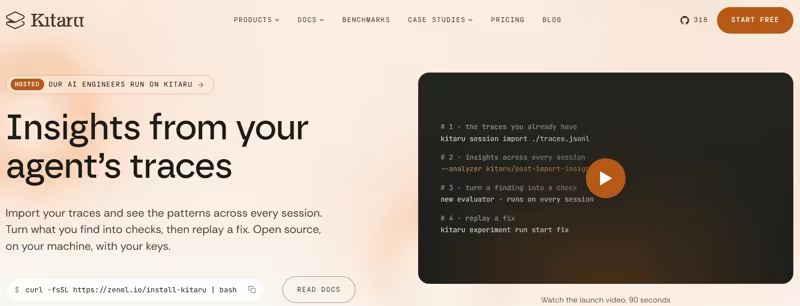
In Kitaru, your existing LangSmith or Braintrust project can remain the primary trace store. Freeze selected sessions in a cohort version and attach evaluators to the experiment. You can override the model, prompt, or model parameters. To test a code change, select a different registered agent version for the run.
Comparing LangSmith, Braintrust, and Kitaru Features
The table summarizes how the three tools handle your use cases. The sections after it go deep into each one.
| Feature | Kitaru | LangSmith | Braintrust |
|---|---|---|---|
| Agent trace capture and inspection | Records sessions or imports captured trace data. Includes a session inspector and insight cards from selected analyzers. | Trajectory and Details views; inputs, outputs, timing, tokens, errors, and metadata per run | Spans, thread, and timeline views; Messages, Details, Review, and Raw tabs; in-trace search |
| Test sets built from production runs | Cohorts of whole sessions; immutable versions preserve the exact test population | Runs become examples manually, via automation rules, or from annotation queues; automatic versioning and splits | Datasets from logs, feedback, uploads, or Loop; rows copy a span or reference a trace; experiments pin to versions |
| Human review and annotation | Investigations: per-session questions, answers pinned to evidence, verdicts that calibrate evaluators | Annotation queues with rubrics, reservations, multi-reviewer thresholds, and a pairwise mode | Categorical, continuous, and free-form review scores; assignment, kanban, blind review; corrections to expected |
| Experiment comparison and regression detection | Replays a cohort with a tool policy and can score baseline and replay sessions with the same evaluators. In CI, use --wait to catch failed runs and check evaluator results separately to enforce quality thresholds. | Compare view over two or more experiments; red/green per row against a source experiment | Pinned or git-branch baselines; score delta column; sort by regressions; GitHub action posts to the PR |
Feature 1. Agent Trace Capture and Inspection
Everything downstream depends on what the trace holds and whether anyone reads it.
Kitaru

Kitaru records instrumented model calls, tool calls, and other captured events in an ordered session. Imported sessions contain the data captured by the source trace. Its LangSmith, Braintrust, or any other importer you want to use maps existing trace data into that structure; for example, the LangSmith importer maps a thread to one session and llm and tool runs to llm_call and tool_call nodes.
You can inspect a session or compare it with a replay in the dashboard. For larger imports, post-import analyzers read a whole import at once and store insight cards with supporting session references and investigation prompts.
Those analyzers must be selected when you import, and Kitaru doesn’t replace the monitoring charts, alerts, and broader trace exploration offered by observability platforms.
LangSmith
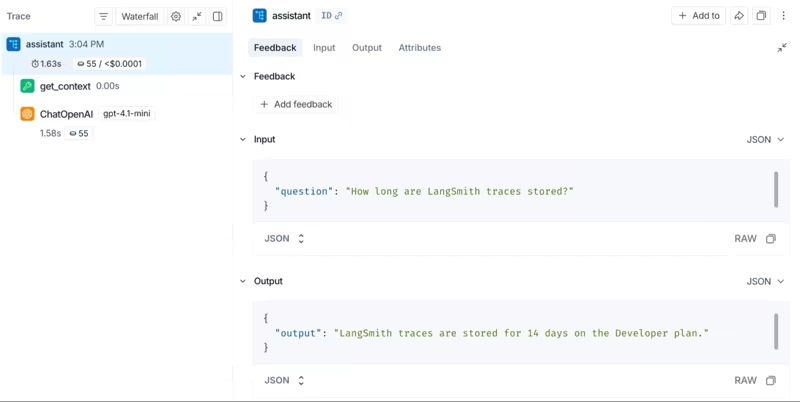
LangSmith’s trace view separates the conversation and the execution layer. For instrumented threads, LangSmith offers Trajectory, Turns, and Details views. Turns requires thread_id metadata, and Trajectory requires renderable messages.
Trajectory is the conversation layer. It shows the conversation with model responses, tool calls, and results. Details lets you inspect individual runs, including inputs, outputs, tokens, timing, and errors.
The process goes like this: you scan the trajectory, click the tool call that looks wrong, and land in Details at the run that produced it.
Say a research agent cites the wrong document; you can trace the issue to the retrieval call and check the returned results in Details.
You can also group related interactions into threads using a thread_id. Without it, LangSmith displays individual traces with less conversation-level context.
Braintrust
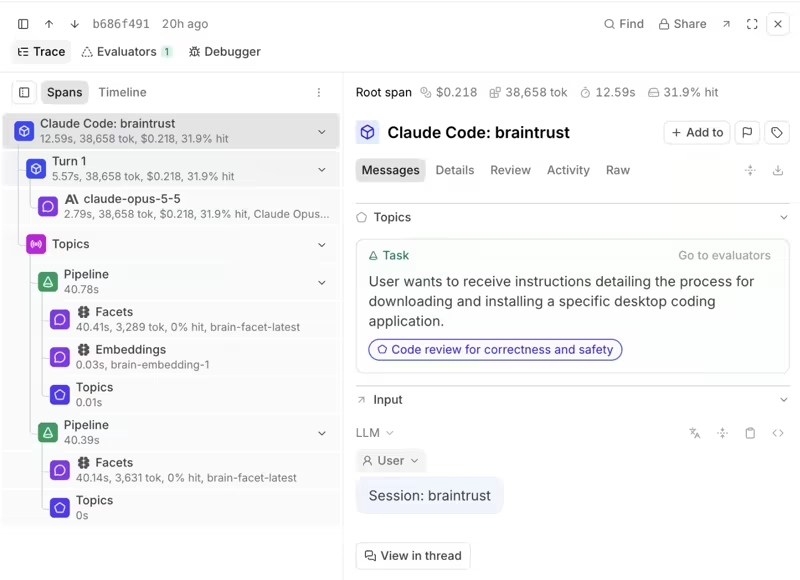
Braintrust’s tracing captures inputs and outputs, tool calls, timing, token usage, costs, and errors. It provides three views: spans, thread, and timeline views.
The spans view shows the execution tree, with tabs to inspect messages, run details, and raw JSON. The timeline shows execution order, while the thread view groups related interactions and displays raw span data by default.
These views account for improved readability and make individual traces easier to debug. However, the limit is who uses it and how. With three layouts and a raw tab, a human still reads one trace at a time, while reviewing thousands of traces still takes considerable manual effort.
Bottom line: Braintrust and LangSmith win on inspection, Braintrust for breadth and LangSmith for the trajectory-to-details workflow.
Feature 2. Build Test Sets From Production Runs
It’s important to know how each tool turns a production run into something you can run again next week, and whether it stays fixed.
Kitaru

Kitaru takes a different approach with cohorts. Each cohort version is a named set of sessions belonging to one agent, and it is the unit an experiment replays. You can combine known failures, successful counterexamples, and common production paths in one test population.
Suppose a new policy prompt fixes an incorrect refund. Include that failed request, plus legitimate refunds the agent must still approve. The cohort stays unchanged between experiments, so you can compare the same cases after each revision.
Two limits apply. No trace export contains the code, so replay needs a registered run command for the agent version that produced the runs. And no automation rule feeds a cohort; new versions are explicit.
LangSmith
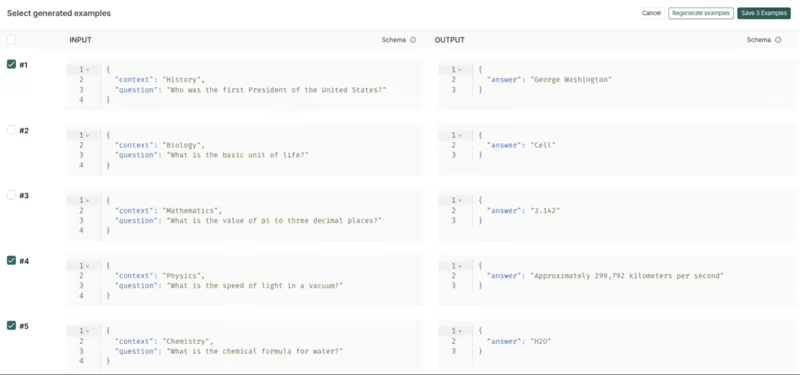
In LangSmith, a dataset contains examples with inputs, optional reference outputs, and metadata. You can select production traces and add them to a dataset, or use automation rules to collect runs that match conditions such as errors or low feedback scores.
Versioning is automatic. LangSmith versions datasets as examples change. However, the example does not carry the run as an executable unit. When you run an experiment, your target function executes again on the stored input. You’ll need your own mocks or fixtures if you want to reproduce earlier tool responses.
Braintrust
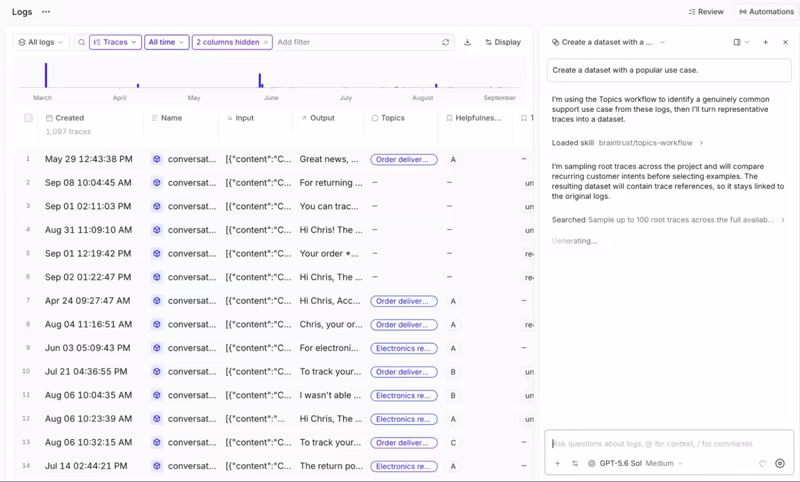
Braintrust builds datasets from production logs, user feedback, uploads, or directly from Loop, Braintrust’s built-in agent.
A log becomes a row in one of two ways.
- “Add this span to dataset” copies the span, and the span’s
outputtypically becomes the row’sexpectedvalue. - The row’s input holds the pointer to the logged trace. Copying span data is a separate action. That is the closest either trace tool gets to Kitaru’s whole-session unit.
The catch is, a row that references a trace depends on that trace remaining available. Starter and Pro retention is 14 and 30 days.
Bottom line: Kitaru wins. A cohort holds whole sessions and a version never changes, so the cases you test after a fix are the exact cases that failed before it. A LangSmith example keeps the input and re-executes the rest, and a Braintrust trace reference lasts only as long as the retention window. Neither makes the whole run the unit you test again, so a repeat is a fresh execution rather than a replay of what happened.
Feature 3. Human Review and Annotation
An evaluator can’t define your refund policy. Your domain expert still has to judge what counts as acceptable behavior. The question is how each tool gets your domain expert’s opinion onto a run, and what it does with it afterward.
Kitaru

Kitaru organizes human judgment through investigations. A coding assistant can select sessions, prepare focused questions, and point to the exact trace evidence behind each question. A domain expert reviews the evidence and records a verdict like acceptable, problematic, or uncertain.
By design, a coding agent authors it, not you. The agent maps the sessions, drafts the questions, and pins evidence; the reviewer opens the dashboard’s review page, answers, and sets the verdict. You can then run an evaluator against reviewed sessions and compare its judgments with the human answers before using it to block a release.
Kitaru, however, lacks the mature assignment and queue management available in the other two products.
LangSmith
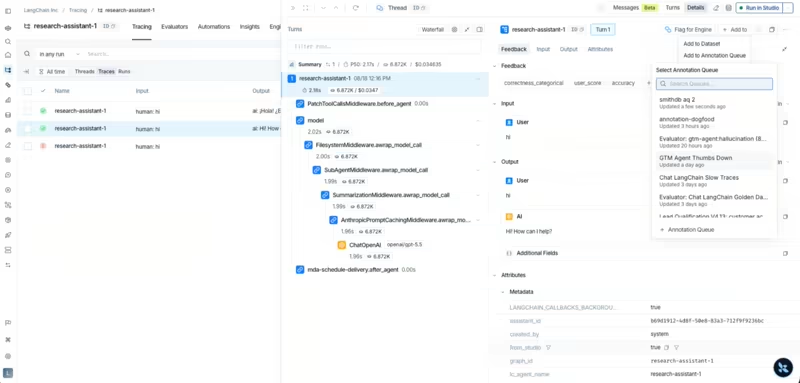
LangSmith’s annotation queues give human reviewers a focused workflow for attaching feedback to specific runs or threads, in single-run or pairwise style. If you’re tuning a support agent’s tone, reviewers can judge which answer is more helpful without agreeing on a perfect numerical score first.
You can reserve items to avoid duplicate work and require several reviewers to complete an item before it’s done.
The queue’s labels can also inform an LLM-as-a-judge evaluator. LangSmith includes a workflow for comparing judge scores with human feedback, so you can check whether the evaluator follows your reviewers’ decisions.
Braintrust
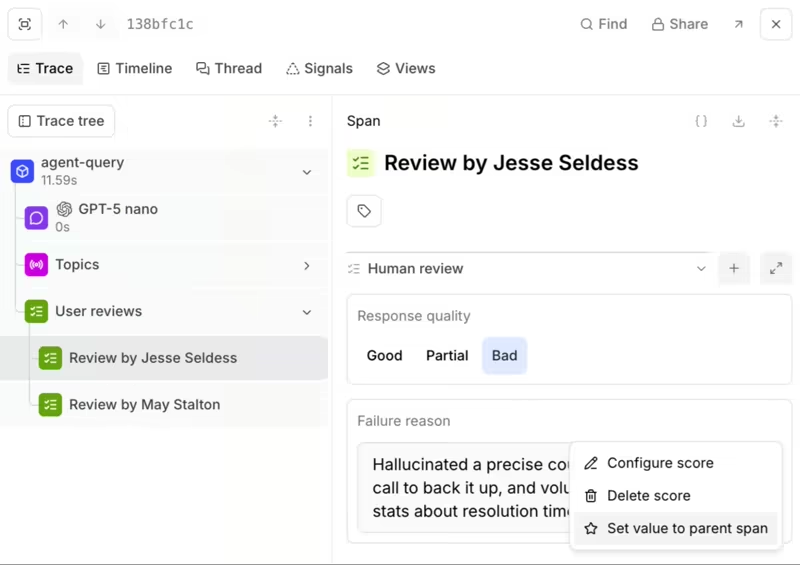
Braintrust’s human review scores are configured per project as categorical, continuous, or free-form text written to metadata or expected. You can score logged behavior, receive assignments, and track work through the Review page. Teams can also correct an expected value directly when the recorded output was wrong.
Corrections are first-class, and so expected values define the correct or ideal output for a given input. For example, a reviewer might replace a mistaken refund amount with the approved amount. That correction then becomes the reference for future evaluations instead of accidentally treating the production mistake as ground truth.
However, Starter includes one human-review score per project. Unlimited review scores require Pro or Enterprise, even though all plans support unlimited users.
Bottom line: Kitaru wins. LangSmith and Braintrust run the better queues, but both still send your domain expert into a trace to read it before scoring anything. Kitaru does the reading for them. The coding agent pins the evidence and asks one focused question, so the expert only judges. Those verdicts land on the same sessions you replay, so the evaluator you calibrate against them is checked on the exact cases it will gate.
Feature 4. Experiment Comparison and Regression Detection
A higher average score means little if the new model breaks a refund your customers care about. Here the experiment’s mechanics matter.
Kitaru

An experiment in Kitaru is a named change, replayed across a cohort and evaluated. It holds an override (model, prompt, params), a tool policy, and the evaluator list. For code changes, you register a new agent version.
The key difference is the tool policy, which keeps the comparison controlled:
historyreturns a recorded result for a matching tool callstaticreturns a canned resultpassthroughcalls the live tool
If no recorded result matches, the policy can fail, return a controlled error, or allow a live call.
Consider a refund agent that previously called refund_payment(order_id=4821). During replay, a history policy can return the saved response without issuing a second refund. A new tool call with no recorded match can stop the test instead of touching the payment system.
That safety isn’t automatic. The server defaults to live passthrough if no policy is supplied, and adapter support varies. The OpenAI Agents adapter, for example, requires named history overrides for supported direct function tools instead of a global history default.
Kitaru recommends replaying an unchanged agent first to check fidelity. Once that works, you can change one variable and compare baseline and candidate evaluations.
The good part is, a failed replay remains visible instead of quietly disappearing from the result count. The bad part is, the comparison views are lighter than the other two, with no charts and no pairwise mode.
LangSmith
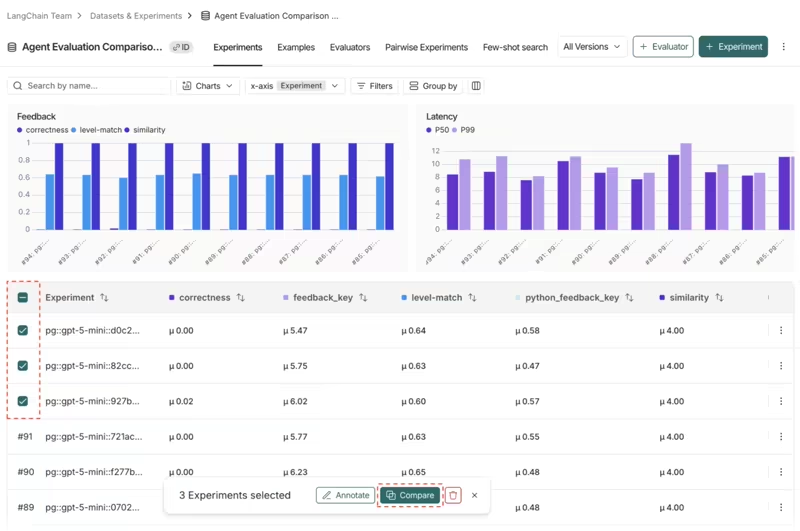
LangSmith runs a target function against dataset examples through evaluate(). Change the prompt or model, run another experiment, and open the comparison view.
The comparison view starts from a selection. You can select two or more experiments and then click Compare. LangSmith marks regressions in red and improvements in green. The UI also supports output diffs and side-by-side trace inspection, which helps you see why a score changed.
The rows are fresh executions, so if the agent calls a payment service during an experiment, LangSmith doesn’t automatically substitute the original production response. You must control that dependency in your application or test environment.
LangSmith can run your agent again on the same input; it can’t re-run a recorded production session with the model swapped, and the tool results held fixed.
Braintrust
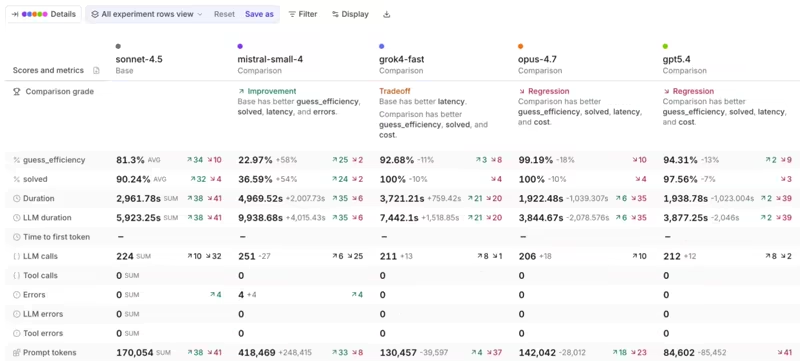
Braintrust’s comparison starts from a baseline or the most recent experiment on the same git branch. Once set, a score delta column appears in the table, and each row is color-coded. It matches test cases, calculates score changes, and helps you sort through regressions.
In CI, the braintrustdata/eval-action runs evaluations and comments on pull requests. bt eval returns a non-zero exit code if any eval throws an exception. To block a merge when quality falls below your threshold, you can define a custom reporter or another explicit failure rule.
Bottom line: Braintrust has the most complete CI reporting workflow. LangSmith wins on the detailed, in-UI comparisons. Both sides of Kitaru’s comparison are the same recorded session, with the world held constant by a tool policy, so Kitaru wins on control.
LangSmith vs Braintrust vs Kitaru: Pricing Comparison
All three offer a free starting point, but their bills follow different meters. Here’s what matters when usage grows.
Kitaru
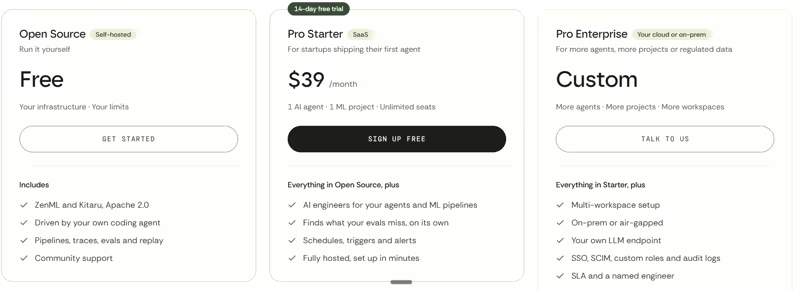
Kitaru is free and open source under Apache 2.0. You host the server, import and record sessions without limits, and replay on your own workers with your own model keys.
The paid tier is ZenML Pro. It hosts Kitaru and ZenML for your team and adds AI engineers that read every trace your agent sends, flag evals that are wrong or missing, and draft the fix.
- Pro Starter: $39 per month, flat. One AI agent, one ML project, and unlimited seats, with a hosted dashboard, trace import, evaluators, cohorts and replay, scheduled eval runs, and alerts when an eval starts drifting. There is no cap on sessions.
- Pro Enterprise: Custom pricing for more agents, projects, and workspaces. Adds on-prem or air-gapped deployment, your own LLM endpoint, SSO (SAML / OIDC), SCIM, custom roles, audit logs, and an SLA with a named engineer.
Note: Starter has a 14-day free trial with full access and no credit card. One agent means one shipped product, even if it runs several sub-agents. Replays use your own model keys, so those model costs stay on your provider’s bill.
LangSmith
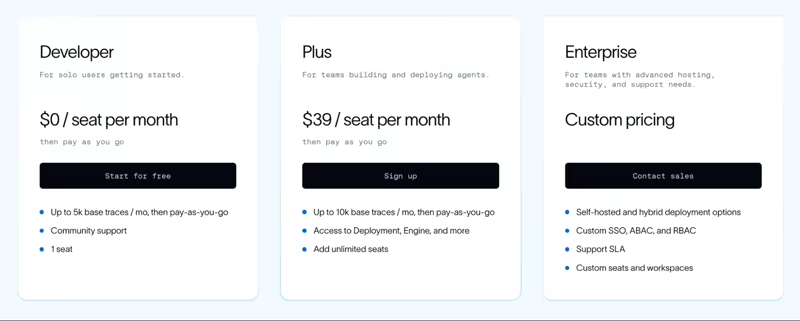
LangSmith meters usage across its services in LangChain Standard Units. One LSU costs $1.
- Developer: Free up to 5k base traces per month
- Plus: $39 per seat per month
- Enterprise: custom
Base traces are retained for 14 days, while extended retention is 180 days by default. Traces beyond the included allowance cost extra. LangSmith also meters certain deployment and agent services separately, so tracing volume isn’t the only thing to watch on a larger bill.
Braintrust
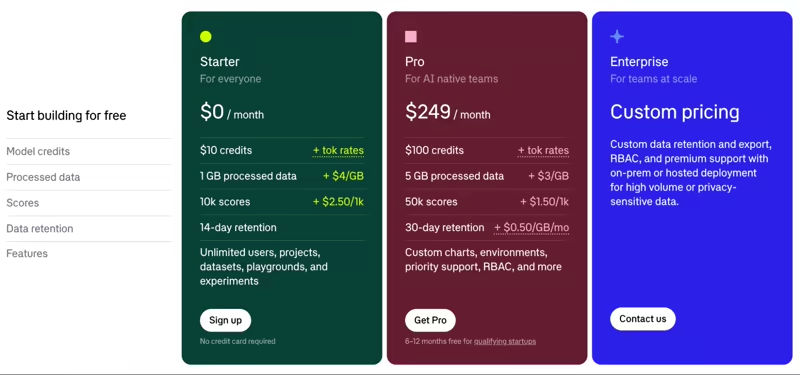
Braintrust combines a platform fee with processed-data and scoring allowances. All plans include unlimited users, projects, datasets, and experiments.
- Starter: Free; 1 GB of processed data, 10,000 scores, $10 in model credits, and 14-day retention.
- Pro: $249 per month and includes 5 GB of processed data, 50,000 scores, $100 in monthly model credits, and 30 days of retention.
- Enterprise: Custom pricing
Final Recommendation: Which One Should You Choose?
The three tools are not interchangeable. The right choice depends on what you already have and what you need to prove.
- Choose LangSmith if you build on LangChain or LangGraph and want trace debugging, online evaluations, dataset management, and structured review queues in one place.
- Choose Braintrust if your team already treats evals as part of every release. It connects tracing, reviewer corrections, versioned datasets, baseline comparisons, and GitHub Actions.
- Choose Kitaru if your agent is live and you need to test a model, prompt, or code change against complete production-derived sessions. It can sit alongside LangSmith or Braintrust without replacing either.
We’re biased on the last point, so here is the trade-off in full. Kitaru isn’t an observability dashboard, and neither does it have alerting, online evaluators, regression sorting, or charts in its comparison views.
What it has is the mechanism the other two don’t. It freezes production sessions into immutable cohorts, replays them against your code, and holds the world constant with a tool policy while you change the agent.
To investigate yesterday’s bad answer, start in LangSmith or Braintrust. To test whether tomorrow’s fix breaks other real cases, Kitaru adds a different test.
Ready? Try Kitaru out for free.
- AI engineers on your agent
- Set up in minutes
- No credit card