On this page
Claude Agent SDK gives you Claude Code’s agent loop as a library. Claude can read files, edit code, run commands, use MCP servers, follow permissions, keep sessions, and work through a real task inside your application.
That is exactly why teams want to use it.
Then the workflow leaves the happy path, and different questions appear:
- What did Claude produce, and where is that result saved?
- Can a reviewer approve tomorrow without keeping a Python process alive?
- Can replay retry the failed suffix without asking Claude to redo the review?
- Can an engineer or coding assistant inspect the artifacts, logs, warnings, and failure context later?
- If this is deployed, which flow version or route handled the run?
Kitaru’s Claude Agent SDK adapter is not trying to replace that loop. It adds the durable runtime around it: a completed Claude run becomes checkpointed workflow state, with a typed result, named artifacts, logs and run summaries, session and cost context when the SDK reports it, replay/rerun behavior, and wait/resume surfaces that humans or agents can inspect and operate later.
one completed Claude Agent SDK invocation = one Kitaru checkpointClaude owns what happens inside the invocation. Kitaru records the completed boundary around it, so the larger workflow can reuse that finished work as durable workflow state.
You already have a Claude Agent SDK workflow
Imagine a compliance workflow.
A customer uploads an IT security policy. Your workflow asks Claude to review it against SOC 2 controls. Claude reads the relevant documents, follows the project rules, spends a few turns building the finding, and returns a clear answer.
Then the boring production thing happens.
The report upload fails. Or the reviewer notification gets throttled. Or the workflow needs to wait overnight for a human to approve the next step.
The expensive part already happened. Claude already did the review. The workflow should not ask Claude to do the same work again just because a downstream step broke.
The useful production question is not only “can replay skip Claude?” It is also “what can the team see and do next?” The run should have a durable result, named artifacts, warnings if transcript capture was best-effort, logs and failure context for debugging, a pending wait that can be answered from another surface, and a replay/rerun path that starts from the right boundary.
That is the runtime problem Kitaru solves around Claude Agent SDK.
Claude Agent SDK is the harness. It decides how Claude reads, reasons, calls tools, runs commands, follows permissions, and keeps session history. Kitaru is the runtime around completed invocations: it records what finished, what artifacts and logs explain it, where the workflow can wait or resume, and which replay/rerun boundary should be reused instead of asking Claude to do completed work again.
Harnesses define behavior. Runtimes make completed work durable.
Kitaru should not pretend to own what Claude still owns. The point is not to pull Claude’s agent loop apart. The point is to give the completed Claude invocation somewhere durable to land.
The boundary Kitaru draws: one invocation, one checkpoint
Here is the basic shape:
from pathlib import Path

from claude_agent_sdk import ClaudeAgentOptions
from kitaru import flow
from kitaru.adapters.claude_agent_sdk import (
    ClaudeRunRequest,
    ClaudeRunResult,
    KitaruClaudeRunner,
)

runner = KitaruClaudeRunner(
    name="claude_sdk_summary",
    options_factory=lambda request: ClaudeAgentOptions(
        allowed_tools=[],
        cwd=request.cwd,
        resume=request.resume_session_id,
        max_turns=request.max_turns,
    ),
)

@flow
def summarize(prompt: str) -> ClaudeRunResult:
    request = ClaudeRunRequest.start(
        prompt,
        cwd=str(Path.cwd()),
        max_turns=1,
    )
    return runner.run_sync(request)
This is the same runner name used by the runnable example in the repo, so the Kitaru UI will show a checkpoint named:
claude_sdk_summary_claude_invocationMechanically, the flow looks like this:
flow body calls runner.run_sync(...)
→ adapter opens one Kitaru checkpoint
→ adapter calls claude_agent_sdk.query(...)
→ Claude runs its internal loop
→ Claude emits a final ResultMessage
→ adapter returns ClaudeRunResult
→ Kitaru stores that result as checkpoint output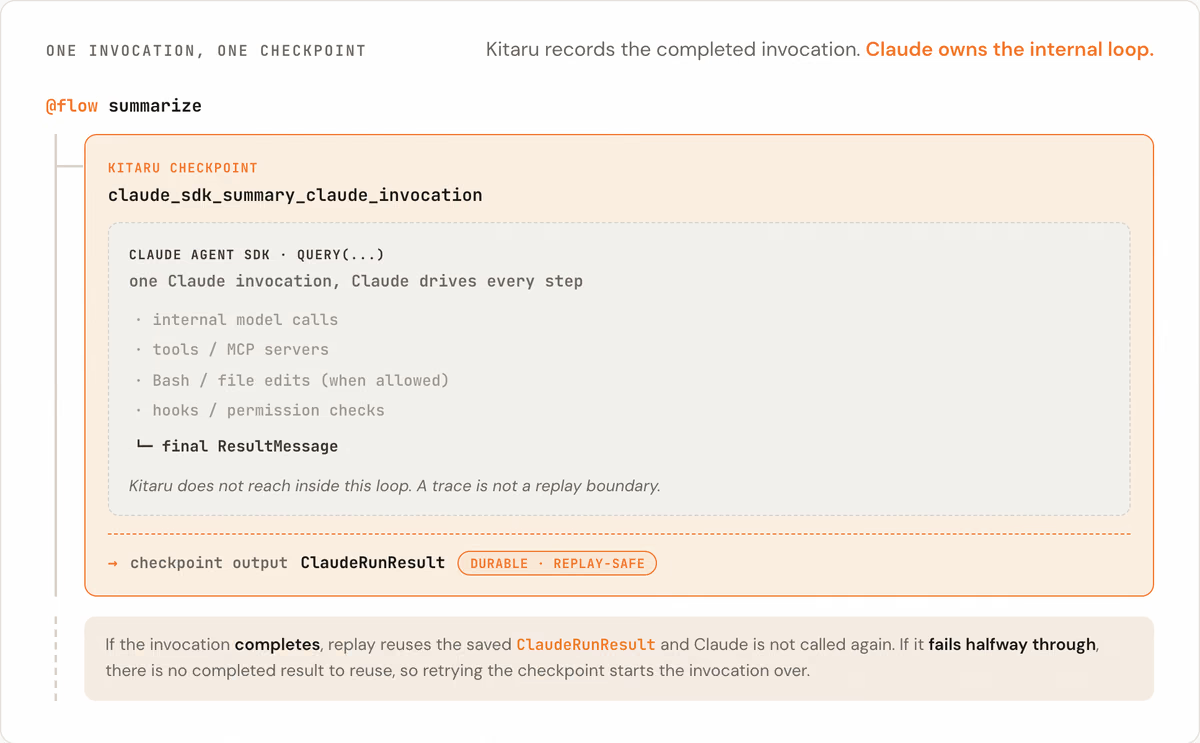
The important word is completed.
If the Claude invocation completes, Kitaru has a durable checkpoint output: the ClaudeRunResult. On replay, when Kitaru can reuse that completed checkpoint, Claude does not need to be called again for that completed invocation.
If the Claude invocation fails halfway through, there is no completed invocation result to reuse. Retrying that checkpoint means starting the invocation again.
That boundary is deliberate.
Claude owns the internal model calls, tool calls, Bash commands, MCP calls, hooks, permission checks, and session behavior. Kitaru records the completed outer boundary. Seeing that Claude used Bash, called a tool, or touched an MCP server is useful observability, but it is not the same as having a replay-safe Python function body that Kitaru can rerun or skip independently.
A trace is not a replay boundary.
Granularity is a design choice, not a badge of honor. For this adapter, the honest durable unit is the completed Claude Agent SDK invocation.
One practical note: call the runner from the flow body, as in the example above. If you call it from inside an existing Kitaru checkpoint, the adapter raises by default so replay does not quietly turn into another Claude call. There is an opt-in escape hatch for unusual cases, but the normal pattern is: let the adapter create the Claude invocation checkpoint itself.
Session resume is not Kitaru replay
Claude Agent SDK sessions and Kitaru checkpoints are related, but they are not the same thing.
A Claude session is the conversation handle Claude can pick up again. A Kitaru checkpoint is the workflow receipt that says: this boundary finished, here is the saved result.
You often want both.
first = runner.run_sync(
    ClaudeRunRequest.start("Review the policy.", cwd="/repo", max_turns=3)
)

follow_up = runner.run_sync(
    ClaudeRunRequest.resume(
        "Now explain the highest-risk gap.",
        session_id=first.session_id,
        cwd="/repo",
        max_turns=2,
    )
)
In that example, ClaudeRunRequest.resume(...) tells Claude Agent SDK to continue the Claude session identified by first.session_id.
Kitaru replay is different. Kitaru replay says: this workflow checkpoint already completed, and replay rules allow us to reuse the saved output instead of running that boundary again.
A compact way to keep the ideas separate:
| Concept | Owned by | What it means |
|---|---|---|
Claude session_id | Claude Agent SDK | Continue a Claude conversation/session. |
| Claude transcript | Claude SDK / local filesystem | Conversation record for debugging or audit when available. |
| Claude file checkpointing | Claude Agent SDK | Rewind supported file edits in a session. |
| Kitaru checkpoint | Kitaru | Reuse or replay completed workflow work. |
| Workspace snapshot | Not provided by this adapter | Recreate arbitrary files/process state after a crash. |
This distinction matters most when something fails.
If a completed Claude invocation sits before the failure, Kitaru can reuse that completed checkpoint. If Claude failed halfway through, Kitaru cannot resume from Claude’s sixth internal tool call. Claude may have its own session and recovery features, but the Kitaru adapter boundary is one completed invocation.
That is the honest contract.
Side effects: what belongs inside Claude, what belongs in Kitaru
The easiest way to understand the boundary is to talk about files.
Suppose Claude is allowed to use Bash. Inside its agent loop, Claude writes a file:
report.mdClaude returns a final message like:
I wrote report.md with the compliance summary.Kitaru stores the completed ClaudeRunResult as the checkpoint output.
Then a later workflow step fails. Maybe the workflow was about to notify a reviewer, and Slack returned a temporary error. You replay the workflow. Kitaru sees that the Claude invocation checkpoint already completed and can reuse the saved ClaudeRunResult.
That part works.
But if the replay runs in a fresh workspace, or a different pod, report.md may not exist. The file write happened inside Claude’s Bash/tool loop. Kitaru recorded the completed invocation result; it did not snapshot arbitrary workspace files.
This is not a reason to avoid Claude tools. It is a reason to be explicit about which system owns which side effect.
If the file is just a temporary thing Claude used while reasoning, fine. Keep it inside Claude’s loop.
If the file must become durable workflow output, make the file write visible to Kitaru:
from pathlib import Path

import kitaru

@kitaru.checkpoint
def write_report(text: str, path: str) -> str:
    Path(path).write_text(text)
    return path

@kitaru.flow
def report_flow(prompt: str) -> str:
    result = runner.run_sync(ClaudeRunRequest.start(prompt, max_turns=1))
    return write_report(result.final_text or "", "report.md")
Now the workflow shape is clearer:
Claude invocation checkpoint
  → returns report text

write_report checkpoint
  → writes report.md as Kitaru-owned work

notify_reviewer checkpoint
  → sends the notification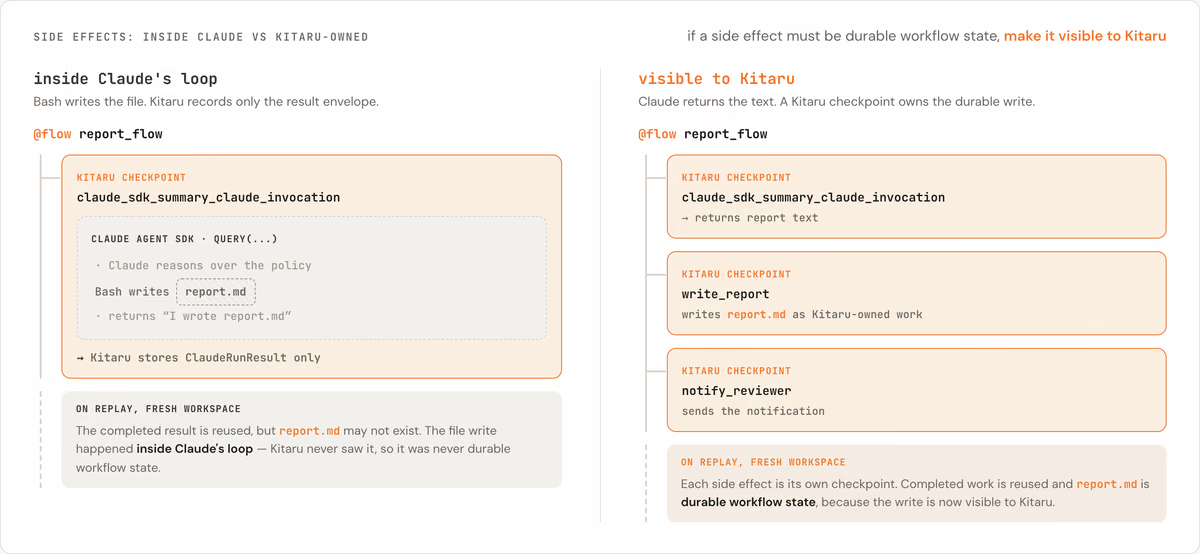
The rule of thumb is simple:
If the file must be durable, make the file write visible to Kitaru.
Claude Agent SDK also has its own file checkpointing feature. That is useful, but it is a different mechanism. Claude file checkpointing helps rewind supported file edits inside a Claude session. A Kitaru checkpoint helps replay or reuse completed workflow work. The adapter does not turn Claude file checkpointing into Kitaru workflow checkpointing, and it does not provide a general workspace snapshot system.
Again, the goal is not to constrain Claude. Claude can still use tools, Bash, MCP, hooks, and permissions. The question is which system is responsible for replaying or reusing the result later.
What you can inspect after the run
After a completed invocation, the adapter returns a typed ClaudeRunResult. Depending on what the SDK reports and what capture settings you choose, that result can include fields such as:
final_textsession_idtranscript_pathusagecost_usdmodel_usagestop_reasonnum_turns- artifact names
warningsmetadata
The cost fields need a small but important caveat. Claude Agent SDK populates cost fields with its own client-side estimate. Treat them as a development signal or approximate budgeting aid, not as finance source of truth.
By default, Kitaru captures the boundary data that is useful for replay inspection and audits:
- prompt and SDK message records
- best-effort local transcript JSONL payload
- redacted options manifest
- final output
- usage and cost information when the SDK reports it
- model usage when the SDK reports it
- event log
- run summary
You can reduce what is stored with ClaudeCapturePolicy:
from kitaru.adapters.claude_agent_sdk import ClaudeCapturePolicy, KitaruClaudeRunner

runner = KitaruClaudeRunner(
    name="private_claude_run",
    capture=ClaudeCapturePolicy(
        save_prompt=False,
        save_messages=False,
        save_transcript_file=False,
        save_usage=True,
    ),
)
This matters because messages and transcripts are conversation data. They may contain prompts, retrieved snippets, tool arguments, command output, file content, and model output. Turn them off when the conversation itself is sensitive.
Transcript capture also deserves plain language. On your laptop, a local transcript file may be easy to find. On Kubernetes or any distributed runner, the local Claude transcript is a pod-local file and may not be visible from the next pod that runs the workflow. The durable record is the Kitaru checkpoint output and persisted Kitaru artifacts, not the local JSONL file.
One more boundary: Claude options can carry live process objects — MCP servers, hooks, callbacks, permission handlers, session stores. For that reason, adapter-created Claude checkpoints do not support Kitaru’s isolated runtime today. That is a boundary choice for this adapter, not a general limitation of Kitaru checkpoints.
The useful thing is that the completed boundary becomes inspectable. You can see what request was made, what result came back, which session ID was reported, which artifacts were captured, and where the workflow should resume or replay from.
Because those execution records are exposed through SDK, CLI, UI, and MCP tools, a human operator or coding assistant can ask structured questions of the run: list waiting executions, inspect artifacts, fetch logs when available, provide wait input, retry, or start a replay.
Try it
The repo includes a small real Claude Agent SDK integration example. It keeps Claude’s tools disabled so the first run is easy to reason about: one prompt goes in, one completed Claude result comes back, and Kitaru stores that completed invocation.
uv sync --extra local --extra claude-agent-sdk
uv run kitaru init
export ANTHROPIC_API_KEY='<your-anthropic-api-key>'
uv run python examples/integrations/claude_agent_sdk_agent/claude_agent_sdk_adapter.py
If you want to inspect the script without making a Claude API call:
uv run python examples/integrations/claude_agent_sdk_agent/claude_agent_sdk_adapter.py --helpWhen you run it, look for:
- Claude’s final text
- the Claude session ID
- the transcript path if captured
- usage and cost information if reported by the SDK
- Kitaru artifact names
- warnings if best-effort capture had a problem
- a Kitaru checkpoint named
claude_sdk_summary_claude_invocation
For a larger workflow shape, see the compliance-review example. It uses the same boundary lesson in a more realistic audit flow: Claude completes review turns, Kitaru records those completed turns, and later workflow failures do not erase earlier completed work.
If you already have a Claude Agent SDK workflow, start by wrapping one completed invocation. Put the runner call in the flow body, inspect the ClaudeRunResult, then move any durable downstream side effects into explicit Kitaru checkpoints.
Keep Claude Agent SDK for the loop. Add Kitaru when the completed invocation needs to become durable workflow state.