
On this page
An agent fails in production; someone now opens the trace, reads it, guesses at a cause, edits a prompt, and ships. This is a common practice we see in the industry to save the day from another failed run backlog.
The next morning you notice the fix worked, but that work of yours broke something else, and you already have a backlog of tickets piling up.
The first step, reading the trace, can be made less painful using Opik or Langfuse. Both are open-source platforms, so a free entry point makes it easily accessible too.
Kitaru, built by the team behind ZenML, picks up after you have found the bad trace. It takes the recorded run and re-executes your agent against it, so you know what you fixed, what it broke, and how.
Opik and Langfuse are fighting for much of the same stack. They are direct competitors in the open-source LLM observability race. And both added an AI assistant this year. Kitaru is not positioned as a primary observability or trace-store replacement. It records or imports runs as sessions for replay, while your existing observability platform can remain the system of record.
In this Opik vs Langfuse vs Kitaru comparison guide, you’ll follow one failure through four steps: investigation, replay, control on tools while you test, and gating the fix in CI, alongside which tool performs better at each step, and how much it would cost.
Opik vs Langfuse vs Kitaru: Key Takeaways
- Kitaru: Open-source, replay-based evals for agents already in production. It re-runs real agent code against recorded tool history so you can test prompt, model, parameter, or code changes on production-derived cases.
- Opik: The most complete evaluation loop of the three. Best for the shortest trace-to-fix loop inside one product. It combines tracing, evals, test suites, and Ollie, which can investigate failures and re-run agents on the original input. Those re-runs use your current tools, not the tool results captured in the original trace.
- Langfuse: Best when you want a broad observability and evaluation stack with strong self-hosting options. Its Assistant can query project data, create resources, and cluster failed observations in Langfuse Cloud. That said, Langfuse ships the only first-party GitHub Action of the three.
What Problems Are These Tools Actually Solving?
Both Opik and Langfuse start with observation. And both have the same shape: instrument every LLM and tool call, render the tree, score it in production, and promote the interesting runs into datasets or test suites. Till there, both these tools show value.
But what if you need to replay the failure under the same external conditions? Opik and Langfuse can preserve trace context and turn production runs into test cases, but a new execution does not automatically reuse the recorded tool results. Your agent still gets whatever your current test setup provides.
Suppose if the original agent queried a database or called a refund API, your test run still needs an answer for those calls. The same is true for a web search.
That’s where Kitaru takes on by adding a separate replay layer that re-executes the agent from the top. With Kitaru adapters that support history replay, the recording can answer matching tool calls from the recorded run. Replay-policy support is adapter-specific.
Comparing Opik, Langfuse, and Kitaru Features
Here is the short version before we deep dive into the comparison:
| Feature | Kitaru | Opik | Langfuse |
|---|---|---|---|
| Tracing and failure investigation | Typed sessions; assistant-authored investigation, annotations, and deterministic diagnostics | Logs page plus Ollie, which root-causes, proposes a code diff, and re-runs the agent (Cloud) | Trace trees, sessions, graphs, Assistant, annotation queues |
| Replaying production runs | Real code re-executes from the top; recording answers tool calls; one override per fork | Ollie reruns the failing input; Agent Playground runs a registered local agent interactively | Playground re-runs one model call; SDK experiments run your app live |
| Tool-call control during testing | Per-tool policy (history, static, passthrough, llm) plus an explicit on_miss rule; supported modes vary by adapter (PydanticAI rejects llm, OpenAI Agents v2 rejects history and llm) | Tool behavior stays in your running agent or test code | Manual mock responses in the playground; app code owns tools in SDK experiments |
| Regression testing in CI/CD | Immutable cohort replayed in CI; pass/fail lives in the evaluator | Test suites with LLM-judged assertions; your test code asserts the pass rate | First-party GitHub Action with PR comments and regression failure |
Feature 1. Tracing and Failure Investigation
Kitaru
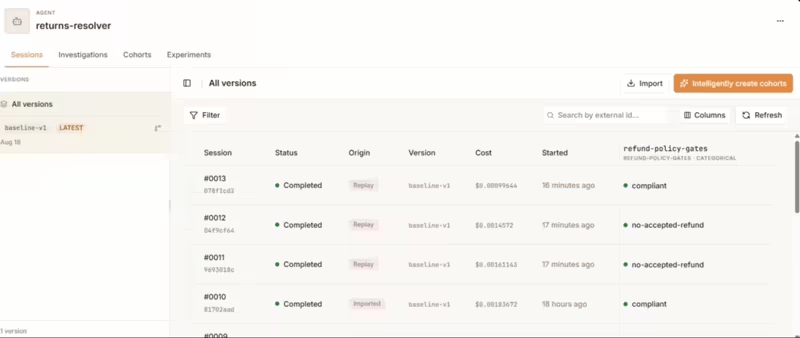
Kitaru stores one complete agent run as a session. Each session contains an ordered tree of typed nodes like llm_call, tool_call, subagent_call, or span, with inputs, outputs, tokens, and cost. People who judge the agent (your support leads and domain experts) get a complete run to review, annotate and replay instead of a messy collection of JSON spans.
Kitaru’s review flow centers on an investigation. A coding assistant like Claude Code, Codex, or Cursor can use Kitaru’s MCP server and skills to survey sessions. It samples roughly 15 to 30 sessions using random picks alongside coverage-based ones, prepares review questions, and links each question to the exact trace evidence.
The assistant then creates a review link to Kitaru’s UI. There, you or a domain expert can annotate the session as acceptable, problematic, or uncertain. You can also add annotations and pin answers to a JSON path or character span.
We recently added built-in deterministic diagnostics, too. It lets you flag mechanical signals like tool failures and repeated calls. They also catch malformed timelines, resource use, and model mismatches. Sure, they help narrow the session pile before a human review, but in no way do they decide whether the agent’s behavior was acceptable.
Opik
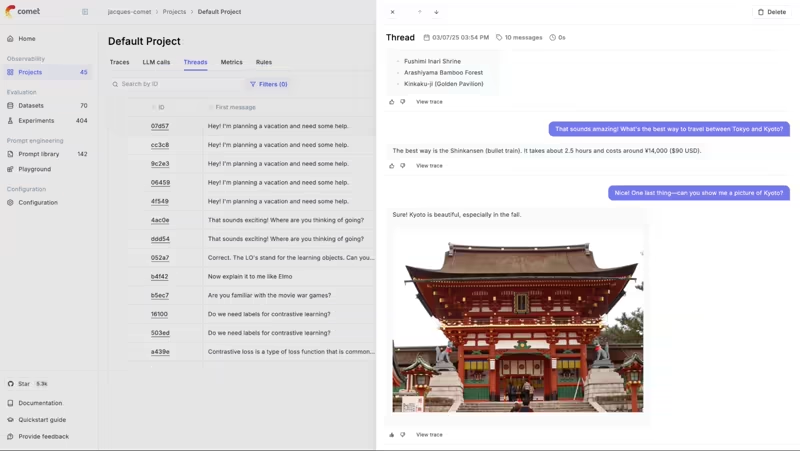
Opik’s Logs experience covers traces, spans, and conversational threads. Its thread shows each trace’s input and output in a readable format, and clicking the View Trace button opens the underlying span tree for a closer look.
Ollie sits on top: Opik’s conversational AI assistant. It reads full span trees, compares bad runs with good ones, and helps investigate failures through chat. Pair your local codebase with opik connect, and Ollie can read source files, propose edits for your approval, and rerun your agent with those changes. From debugging to patching and regression testing, all stay in one workflow.
Opik gives domain experts annotation queues with a clean, easy-to-use design. If your engineering team wants to inspect a failure, trace it back to the code, test a fix, and save the case for future regression tests, that end-to-end loop is Opik’s strongest pitch.
Langfuse
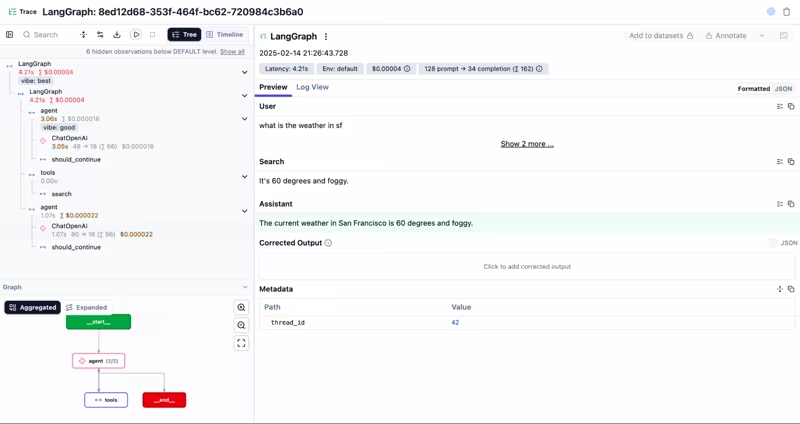
Langfuse renders each trace as a tree of observations, with formatted and JSON views. It groups related traces into sessions and can draw agent graphs, automatically for LangGraph and by inference for other frameworks.
However, the experience can get harder to read when traces carry a lot of agent state. Langfuse Assistant, however, helps with some of that analysis on Langfuse Cloud. Like it can answer questions, query traces and metrics, create datasets and dashboards, fetch failed observations, and cluster recurring errors using code in a sandbox.
Still, it does not pair with your local checkout, edit the agent, and rerun that code from the trace view.
For self-hosters, the Assistant is available in public beta but requires a configured AI model and worker, so setup is more involved than on Langfuse Cloud. Plus, some governance features like project-level RBAC and audit logs require the paid self-hosted Enterprise tier.
Winner: Opik, provided you’ve access to Opik Connect. Ollie turns the trace into a diagnosis, a diff, a re-run, and a regression case without leaving the page. Kitaru wins at evidence-backed review alongside the machine’s score.
Feature 2. Replaying Production Runs
Kitaru
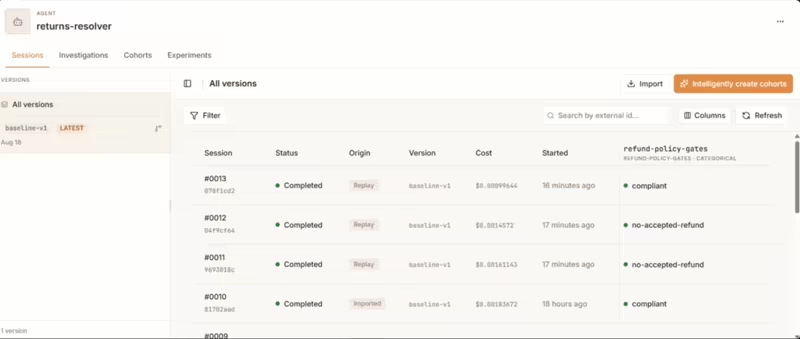
Replay is core to Kitaru. The agent’s real code starts again from the top. No partial or mid-run cut point; your agent recomputes its own side of the execution in full. Behind the curtains, the baseline session supplies the original input, and the tool policy decides how external calls are answered.
For an adapter that supports history replay, such as PydanticAI, a tool call like refund_payment(order=4821) can be matched against the recording and answered with its recorded result instead of calling the payment provider again.
The model still runs again, so a prompt or model change can send the agent down a different path. Before testing a change, we recommend replaying the run unchanged. That confirms a baseline before introducing another variable.
Once the baseline holds, you can fork one change at a time. Swap the model or prompt, change a parameter, or register modified code as a new agent version. Then compare the resulting session with the original.
Kitaru still needs an agent version that its worker can launch. Adapter capabilities also differ. For the current OpenAI Agents v2 adapter, replay substitution is limited to direct FunctionTools using passthrough or static. history, llm, hosted, MCP, programmatic, agent-as-tool, and handoff-target substitutions are rejected. This adapter also does not support run_streamed or token/event streaming.
Opik
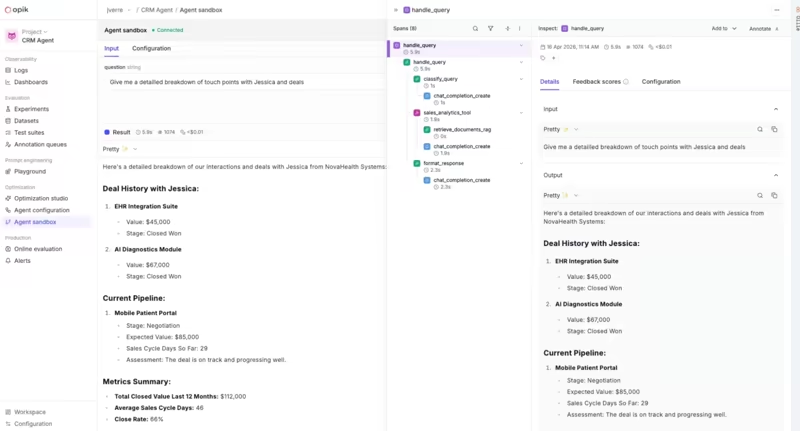
Opik can run your agent again, and that separates it from Langfuse’s playground flow. Still, it cannot rerun the agent against the external state captured in the original trace. Kitaru can, by the way.
With Ollie and opik connect, the new run uses the same input as the failed trace. The Agent Playground can also execute a registered entrypoint locally and send the new trace back to Opik.
However, the re-run recreates the inputs. Opik does not automatically substitute the tool outputs captured in the original trace. On rerun, tool behavior comes from your connected agent or test code, so calls may hit live systems unless you mock, stub, or redirect them yourself.
Opik’s evaluate() follows the same model. Your task runs again against dataset inputs. That is still useful for many failures. It is just a different test that doesn’t carry forward the external state captured in the original run.
Langfuse
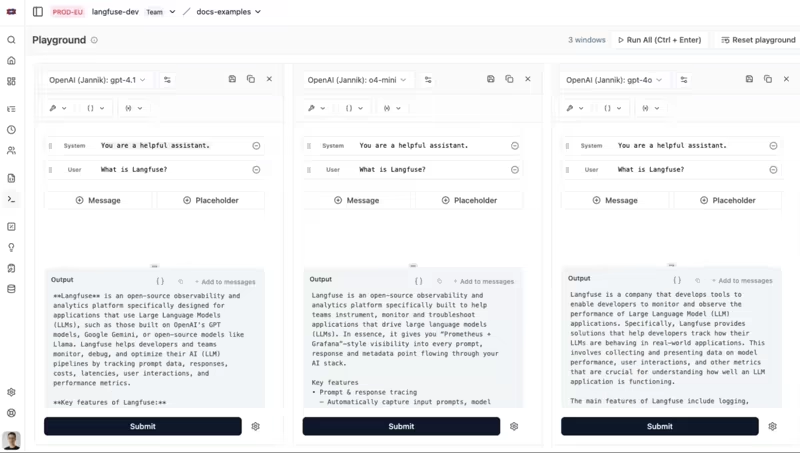
Langfuse offers two main ways to run a test. In the playground, you can open a generation, change the prompt or model, and rerun the LLM call. You can also manually mock tool responses for OpenAI ChatML-formatted tool observations.
For full application or agent logic, Langfuse uses SDK experiments. There, run_experiment takes your dataset, task function, and evaluators. The task function runs your application again, while your application remains responsible for external tool calls.
So while Langfuse can rerun an LLM call or your app against dataset cases. It does not recreate the external state from the original production run.
Winner: Kitaru. This is the one axis where the difference is in miles. Of all three, Kitaru runs your agent’s code against recorded tool results. Opik can run it against live tools, and Langfuse can run a model call in the Playground or through an experiment, but your task code still owns external tools.
Feature 3. Control Over Tool Calls During Testing
Kitaru
A replay is only safe when you decide upfront what each tool should do. Kitaru’s tool policy combines a default behavior with per-tool rules and supports four modes:
history: Return a recorded result for a matching tool call.static: Return a configured result.passthrough: Execute the live tool (also the default when no policy is set).llm: Ask a model to produce a plausible tool result.
The more important setting is what happens when the candidate calls something that never appeared in the baseline. With on_miss="fail", Kitaru stops before making a live call. error_result returns a controlled tool error and lets the agent react, while passthrough executes the live tool.
A miss is not necessarily a bug. It tells you the candidate has moved outside the behavior captured in the baseline. Your team can then decide whether to treat that divergence as a failure, provide a static result, or mark the replay as inconclusive.
For side-effecting tools, the safer pattern is history with on_miss="fail". That prevents an unexpected call from reaching a live service during replay.
Opik
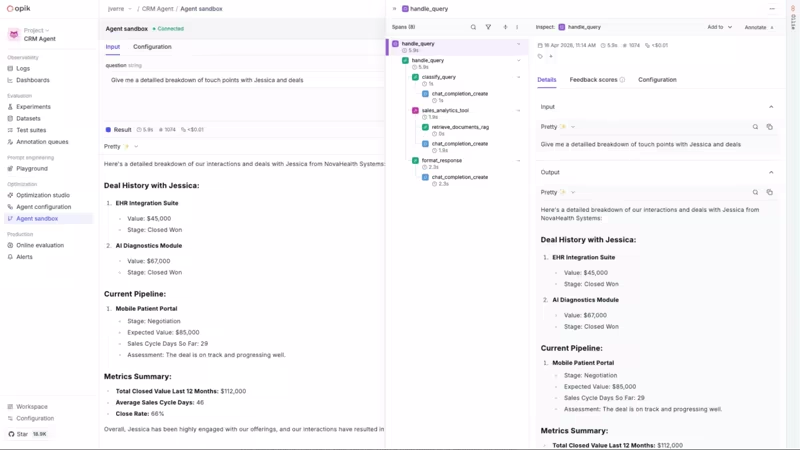
Opik does not replay against recorded tool history, so it has no equivalent to Kitaru’s replay policies.
In the Agent Playground and under Ollie, your agent handles its tools. The same applies to evaluate() and test suites, where the task is your function. If you need a fake search client, refund fixture, or patched database call, you add it to the test setup yourself.
Opik can evaluate the resulting trace and score step-level behavior. Its Guardrails can also screen production inputs and outputs. Neither controls what a tool returns during a test, so tool substitution still remains part of your app or test code.
Langfuse
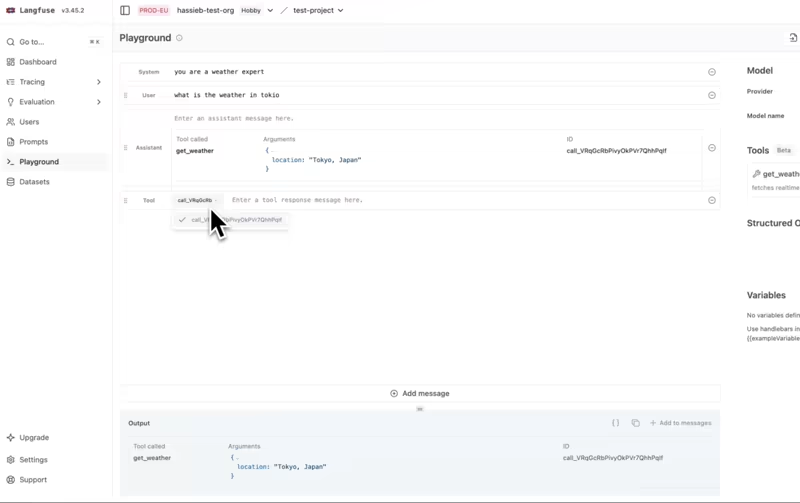
Langfuse gives you manual tool mocks in the playground. You define a tool schema and type the response you want the model to see.
For an agent run through run_experiment, tool behavior stays in your application code. Langfuse does not provide a replay policy for deciding how to handle a tool call that was absent from the source trace.
Winner: Kitaru. Opik and Langfuse leave tool behavior to your test setup. Kitaru makes it a declared, per-tool policy with an explicit answer for the unrecorded call.
Feature 4. Regression Testing in CI/CD
Kitaru
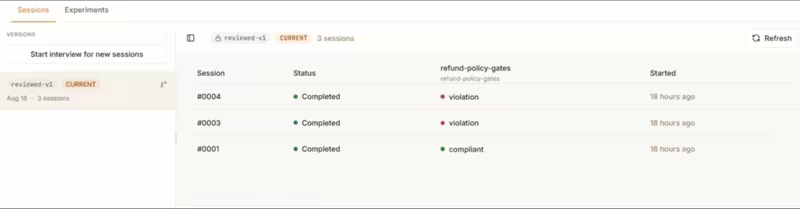
Kitaru turns selected production sessions into a regression population through cohorts. Each cohort version is an immutable list of session IDs, so you can test against the same set of production-derived cases every time.
You can mix confirmed failures with successful counterexamples so a fix does not solve one case by breaking another. An experiment stores the candidate change, tool policy, and evaluator selection. Each experiment run pairs that definition with a cohort version and agent version. It then creates one replay per session.
The current CLI can wait for the run and return a nonzero exit code on failure, so you can use it as part of a CI gate.
Kitaru does not ship a first-party GitHub Action. Your evaluator decides to pass or fail at the session level, and your CI code decides what aggregate result is good enough to ship.
You also grow the cohort by creating a new immutable version when a confirmed production failure deserves a permanent place in the suite.
Opik
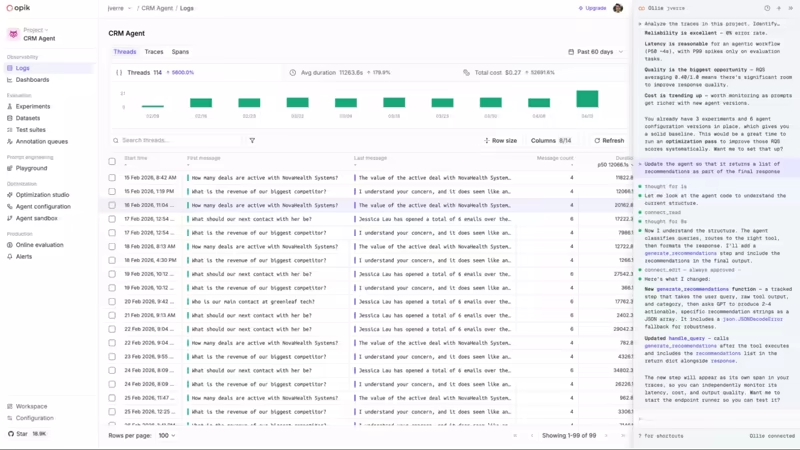
Opik’s test suites are built for this loop. A failing production trace can become a test item through Ollie, the UI, or the SDK. Assertions can describe what each case must do, and suite runs produce pass/fail results.
The CI layer is yours. Run the suite from your normal test process and fail the job when the pass rate drops below the threshold you accept.
Opik does not currently list a first-party GitHub Action for test-suite gating, so the gate is whatever test runner you already use.
Langfuse
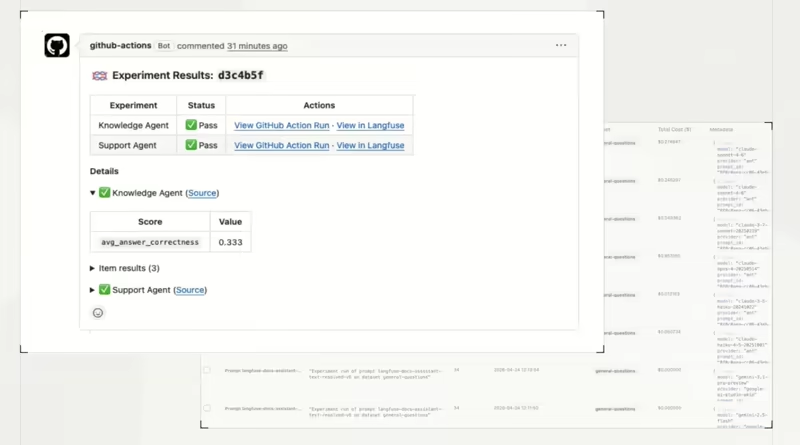
Langfuse provides the only first-party GitHub Action of the three. You can turn an observation into a dataset item with + Add to dataset, while retaining a link to the source trace.
Its langfuse/experiment-action runs experiment scripts in GitHub Actions and posts results directly to the pull request. It reports pass, regression, or error status alongside experiment scores. If a score crosses your threshold, your script can raise a RegressionError and fail the job.
The threshold logic still lives in your script, and the task function executes your application again. So this is not a replay against recorded tool history. But if you want a visible quality gate on every pull request without much CI setup, Langfuse offers the shortest path.
Winner: Langfuse. It gives you the cleanest path from a production-derived test case to a red check on a pull request. Choose Kitaru when the regression test needs to rerun the agent against controlled production tool history, even if that requires a little more CI setup.
Opik vs Langfuse vs Kitaru: Pricing
Kitaru
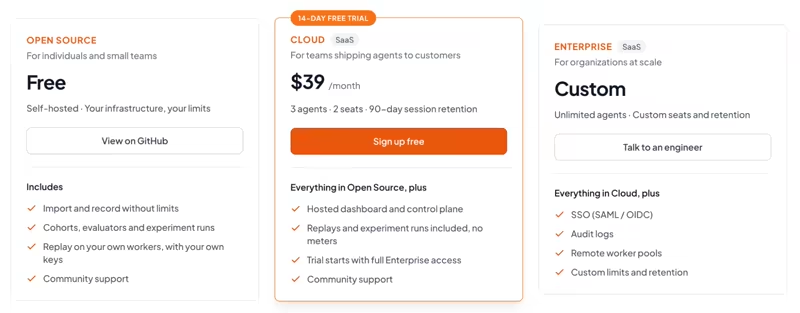
Kitaru offers a free-to-self-host, open-source version, with absolute freedom in limits. You can import and record without usage caps, and run replay or evaluation work on your own workers.
Other than that, we offer two paid plans:
- Cloud: $39 per month (14-day trial)
- Enterprise: Custom
Opik
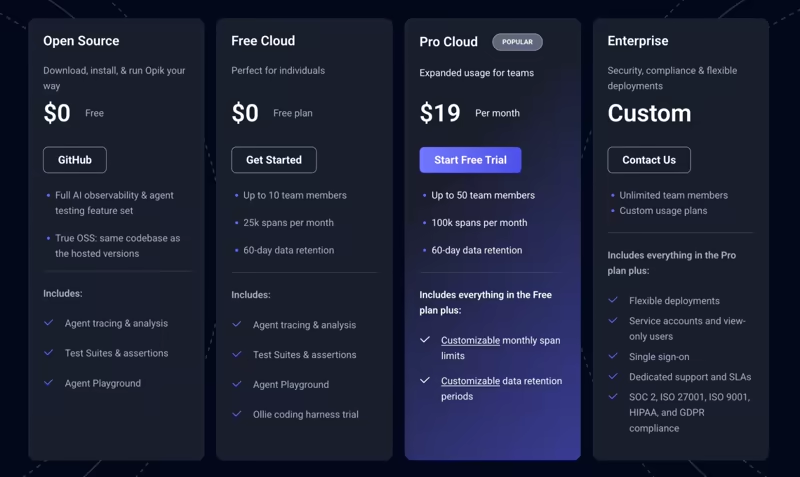
Opik currently has four tiers: Open Source ($0), Free Cloud ($0; 25k spans/month and 60-day retention), Pro Cloud ($19/month; 100k spans/month and 60-day retention), and Enterprise (custom pricing).
Ollie Chat is available across the plans. Opik Connect is not included in the open-source tier; on Free Cloud and Pro Cloud it starts as a trial and then requires purchased tokens. Separately, hosted Opik usage is metered in spans: Free Cloud includes 25k spans/month and Pro Cloud includes 100k.
Langfuse
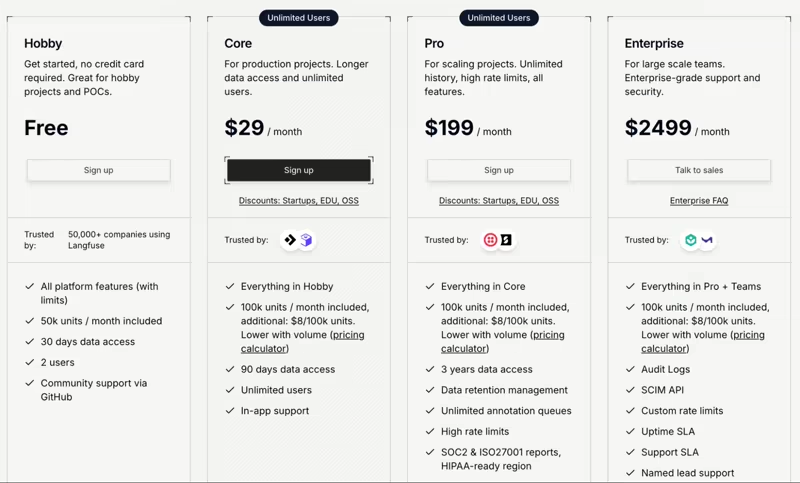
Langfuse’s open-source version lets you self-host all core Langfuse features for free without usage limits on the core OSS feature set. Its cloud pricing is unit-based and starts at:
- Hobby: Free
- Core: $29 per month
- Pro: $199 per month
- Enterprise: $2,499 per month
Final Recommendation: Which One Should You Choose?
Choose Opik if you want the shortest path from a failing trace to a code change and a new test run. Ollie is the strongest assistant here for engineers who want diagnosis and source access in one loop. The same flow can carry an approved patch into a rerun and regression case.
Choose Langfuse if you want a broad open-source observability and evaluation stack, strong self-hosting, and a packaged GitHub Actions path for experiment gates. Its Cloud Assistant can now do serious project-wide analysis. It can even cluster failed observations, so it is no longer just a Q&A layer over traces.
Choose Kitaru if the problem starts after you have the trace. You want to replay the actual agent on a production-derived case, control whether each tool call uses history or goes live, and compare one candidate change against the same recorded evidence.
In short, Opik and Langfuse can score what your agent did, Opik can run it again live, and Kitaru can run it again against what it saw.
If you have an agent in production, traces in one of those stores, and a model or prompt change you are nervous to ship on Friday afternoon, try Kitaru with the 14-day Cloud trial, or self-host the open-source version for free.