
On this page
AI agents are only as capable as the environments they can operate in. An agent that writes code but can’t execute it is like a chef who can read recipes but has no kitchen. This is why cloud sandboxes have become critical infrastructure for teams building agentic AI systems.
Both E2B and Daytona give AI agents a place to run code safely in isolated cloud environments. But their approach to this process differs. E2B runs each sandbox in a Firecracker microVM with a dedicated kernel per session. Daytona uses Docker containers with a shared host kernel and focuses on persistent, stateful workspaces.
In this E2B vs Daytona comparison, we break down the two platforms across sandbox lifecycle, code execution, output handling, resource limits, and pricing. By the end, you’ll know which sandbox fits your stack.
E2B vs Daytona: Key Takeaways
E2B is an open-source cloud infrastructure built specifically for AI agent code execution. It uses Firecracker microVMs to give every sandbox a dedicated kernel and hardware-level isolation. The platform focuses on fast, ephemeral sandbox sessions (E2B reports ~150 ms cold starts) and says 88% of Fortune 100 companies have signed up to use E2B for agentic workflows.
Daytona is an open-source sandbox platform that pivoted from development environment management to AI agent infrastructure in early 2025. It uses Docker containers for sub-90 ms sandbox creation and persistent sandboxes with configurable auto-stop/auto-archive/auto-delete policies (including an archived cold-storage state).
E2B vs Daytona: Maturity and Lineage
The history and backing behind these platforms help frame their strengths and where they’re headed.
| Metric | E2B | Daytona |
|---|---|---|
| First public release | 2023 | Open source: March 2024 (enterprise: late 2023) |
| GitHub stars | ~11k (core SDK) | ~60.5k |
| Forks | ~778 | ~5.1k |
| Contributors | 33 (core SDK) | 211 |
| License | Apache 2.0 | AGPL-3.0 |
| Notable proof points | 88% of Fortune 100 signed up; public case studies with Perplexity, Hugging Face, Groq, and Manus | 50k+ GitHub stars; strategic investment from Datadog, Figma Ventures |
Note: The data in the table above is current as of February 2026 and may change over time.
E2B vs Daytona: Feature Comparison
Here’s a high-level overview of how the two platforms compare across key dimensions:
| Feature | E2B | Daytona |
|---|---|---|
| Sandbox Lifecycle Management | Running → Paused → Killed; fast state persistence | Running → Stopped → Archived → Deleted; configurable lifecycle + ephemeral mode |
| Command and Code Execution | Shell + multi-language interpreter; shared context | Process + session model; background tasks + isolated interpreter |
| Stdout / Stderr Capture and Streaming | Real-time streaming via callbacks; structured results | Streaming logs + session log retrieval; structured execution output |
| Resource Limits | Up to 8 vCPU / 8GB RAM; no GPU support | Up to 4 vCPU / 8GB RAM (higher on request); GPU support available |
| Pricing | $100 free credits; $150/mo Pro + usage billing | $200 free credits; pay-as-you-go usage billing |
Now let’s compare each feature head-to-head.
Feature 1. Sandbox Lifecycle Management
How a sandbox is created, paused, resumed, and destroyed determines how well it fits into an agentic workflow. Both E2B and Daytona offer full programmatic lifecycle control, but with different models.
E2B
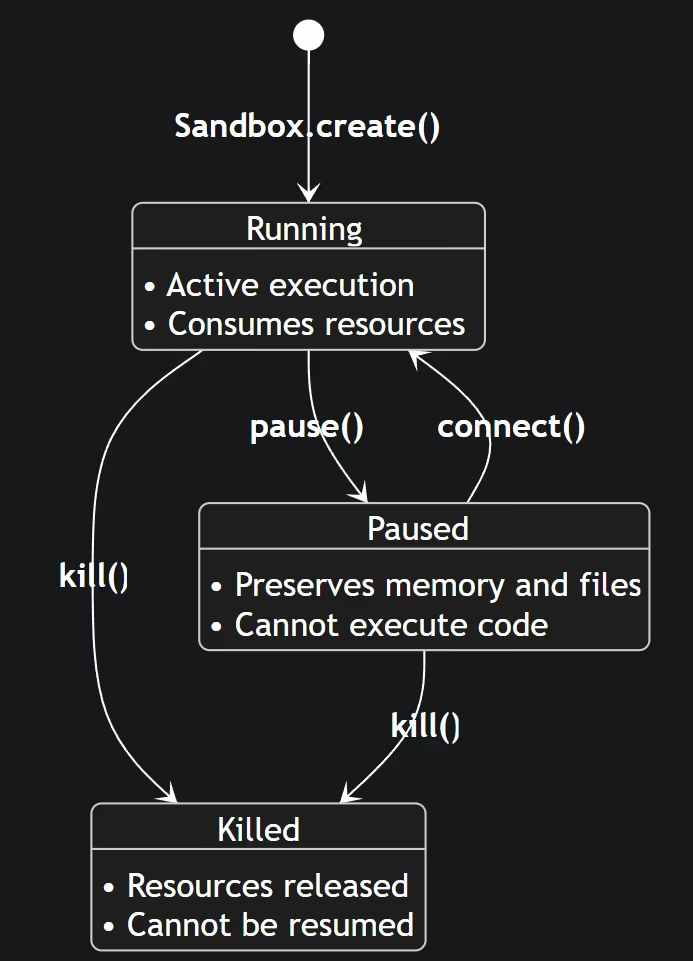
E2B sandboxes follow a straightforward state machine: Running → Paused → Killed.
You create a sandbox with Sandbox.create(), and it starts running immediately. By default, a sandbox times out after 5 minutes of inactivity, but you can customize this to run up to an hour on the Hobby plan or 24 hours on the Pro plan.
E2B recently introduced sandbox persistence (currently in public beta). This functionality lets you pause a sandbox and resume it later with the full state intact, including:
- Filesystem
- Memory
- Running processes
- Loaded variables
Pausing takes about 4 seconds per GiB of RAM, and resuming takes 1 second.
import { Sandbox } from '@e2b/code-interpreter'

// Create a sandbox with a 60-second timeout
const sandbox = await Sandbox.create({ timeoutMs: 60_000 })

// Extend the timeout later
await sandbox.setTimeout(300_000) // 5 minutes from now

// Shut down early when done
await sandbox.kill()
E2B also supports auto-pause (currently in Beta), where sandboxes automatically pause instead of shutting down after the timeout expires. This is helpful for agent sessions that are idle between interactions but need to retain state.
Note: Continuous runtime limits apply. A sandbox can run for up to 24 hours on the Pro tier before it must be paused, and up to 1 hour on the Hobby tier.
Daytona
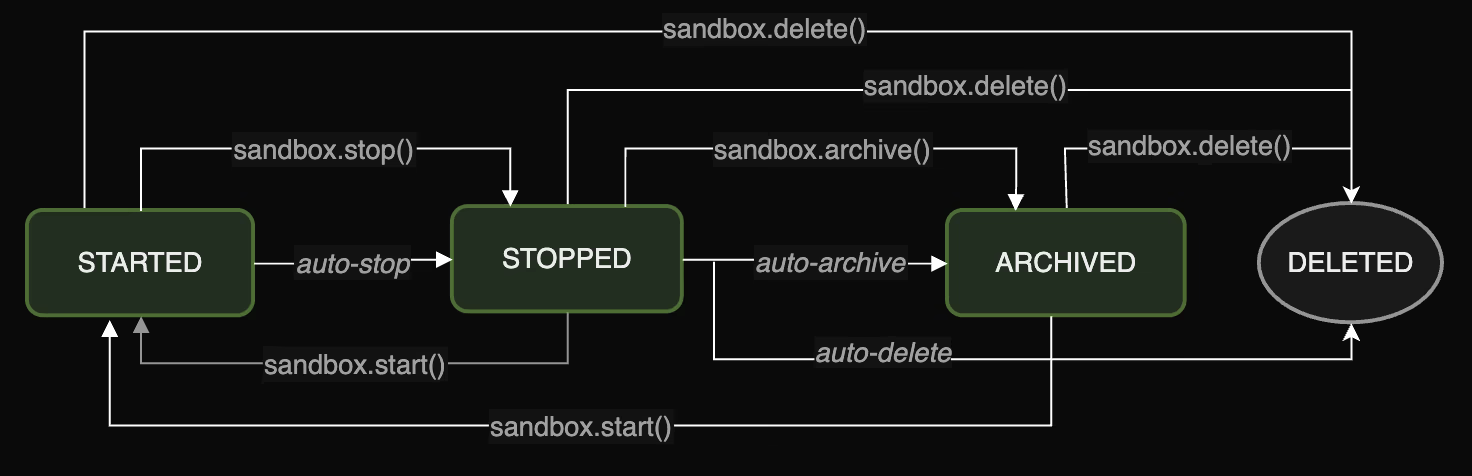
Daytona sandboxes have a richer set of states: Running → Stopped → Archived → Deleted.
The default sandbox auto-stops after 15 minutes of inactivity and auto-archives after 7 days of being stopped. Each state has different resource implications:
| State | vCPU | Memory | Storage | Description |
|---|---|---|---|---|
| Running | ✅ | ✅ | ✅ | Counts against all limits |
| Stopped | ❌ | ❌ | ✅ | Frees CPU and memory, storage persists |
| Archived | ❌ | ❌ | ❌ | Data moved to cold storage, no quota impact |
| Deleted | ❌ | ❌ | ❌ | All resources freed |
Daytona’s lifecycle automation is configurable. You can set auto-stop intervals, auto-archive intervals, and even auto-delete intervals to match your workflow.
from daytona import Daytona, DaytonaConfig, CreateSandboxBaseParams

daytona = Daytona(DaytonaConfig(api_key="YOUR_API_KEY"))

sandbox = daytona.create(CreateSandboxBaseParams(
    language="python",
    auto_stop_interval=30,  # auto-stop after 30 min
))

# Keep it alive during active use
sandbox.refresh_activity()

# Stop manually when done
sandbox.stop()
What’s more, the platform also supports ephemeral sandboxes that auto-delete when stopped, something useful for one-off agent tasks where you don’t need to retain any state.
Bottom line: E2B’s lifecycle is simpler and optimized for short-lived, ephemeral execution. Daytona offers a finer-grained lifecycle state with built-in automation for long-lived sandboxes. If your agents need sandboxes that survive across sessions (days or weeks), Daytona’s model is more mature. If your agents spin up sandboxes, run code, and tear them down in seconds, E2B’s model is cleaner.
Feature 2. Command and Code Execution
The ability to run code and shell commands inside a sandbox is the core reason these platforms exist. Both E2B and Daytona support this functionality, but the APIs and capabilities differ.
E2B
E2B provides two execution interfaces: shell commands and code interpretation.
For shell commands, use sandbox.commands.run():
import { Sandbox } from '@e2b/code-interpreter'

const sandbox = await Sandbox.create()
const result = await sandbox.commands.run('ls -la /home')
console.log(result.stdout)
For code execution with a persistent interpreter context, use sandbox.runCode():
from e2b_code_interpreter import Sandbox

with Sandbox() as sandbox:
    sandbox.run_code("x = 1")
    execution = sandbox.run_code("x += 1; x")
    print(execution.text)  # outputs 2
The code interpreter supports Python, JavaScript/TypeScript, R, Java, and Bash.
Each runCode() call shares context with previous calls, so variables and definitions persist within the session. This is exactly what you need for multi-step agent workflows where each code execution builds on the last.
The platform also supports an interactive PTY (pseudo-terminal) with full bidirectional input, ANSI color support, and session persistence. With this, you can disconnect and reconnect to running PTY sessions, which is useful for long-running processes.
Daytona
Daytona separates code execution from command execution through its process interface.
For running code in a specific language runtime:
from daytona import Daytona, DaytonaConfig, CreateSandboxBaseParams

daytona = Daytona(DaytonaConfig(api_key="YOUR_API_KEY"))
sandbox = daytona.create(CreateSandboxBaseParams(language="python"))

response = sandbox.process.code_run('print("Hello from Daytona!")')
print(response.result)
For running shell commands:
response = sandbox.process.exec(
    'echo "Hello World"',
    cwd="/home/daytona",
    timeout=10
)
print(response.result)
Daytona also introduces the concept of sessions - long-running background processes that maintain state between commands. This feature lets you create a session, execute multiple commands within it, and retrieve logs later. It’s particularly useful for agents that need to set up environments, install dependencies, and then run code across multiple interactions.
On top of that, Daytona provides a dedicated CodeInterpreter class for Python that supports isolated interpreter contexts (separate globals), with methods to create, delete, and list contexts. For other languages, use the codeRun method from the Process interface.
The runCode() method on the code interpreter supports onStdout, onStderr, and onError callbacks for real-time feedback.
E2B supports interactive PTY sessions for bidirectional terminal I/O.
Daytona emphasizes session-based command execution with log streaming and retrieval.
Bottom line: E2B’s code interpreter is slightly more polished for quick code execution with its multi-language support and shared context model. Daytona’s session-based architecture gives more control for complex, multi-step workflows where you need persistent background processes and stateful command execution.
Feature 3. Stdout/Stderr Capture and Streaming
When your agent runs code, it needs to read the output. Both platforms support capturing and streaming stdout and stderr, but the mechanisms vary.
E2B
E2B supports output streaming through callbacks on both commands.run() and runCode():
import { Sandbox } from '@e2b/code-interpreter'

const sandbox = await Sandbox.create()

await sandbox.runCode(`
import time
import sys
print("Processing started")
time.sleep(2)
print("Warning: slow operation", file=sys.stderr)
time.sleep(2)
print("Processing complete")
`, {
  onStdout: (data) => console.log('stdout:', data.line),
  onStderr: (data) => console.error('stderr:', data.line),
})
Each output event includes the line content, a timestamp, and an error flag indicating whether it came from stderr. E2B also supports an onResult callback for rich output types like matplotlib charts, tables, and other visual artifacts.
For interactive use cases, E2B’s Pseudo-terminal provides real-time bidirectional streaming. Output is delivered via an onData callback as it happens, and you can send input back to the terminal using sendInput().
Daytona
Daytona offers similar stdout/stderr callbacks on its code interpreter:
const result = await sandbox.codeInterpreter.runCode(
  'print("hello world")',
  {
    onStdout: (msg) => console.log('stdout:', msg.output),
    onStderr: (msg) => console.error('stderr:', msg.output),
  }
)
For session-based execution, Daytona provides getSessionCommandLogs() with two modes: a synchronous call that returns all logs at once (with stdout, stderr, and combined output fields), and an asynchronous streaming mode with separate onStdout and onStderr callbacks.
Daytona also exposes ExecutionResult objects that contain stdout, stderr, and an optional error information with full tracebacks. The process.codeRun() method returns an ExecuteResponse with exitCode, result (stdout), and artifacts (including matplotlib chart metadata).
Bottom line: Both platforms handle output capture well. E2B’s streaming model is slightly more ergonomic for code interpreter use cases with its unified callback approach and rich result types. Daytona’s session-based log retrieval is more powerful for complex workflows with multiple commands.
Feature 4. Resource Limits
How much compute you can give each sandbox, and how many sandboxes you can run at once, is critical for production workloads.
E2B
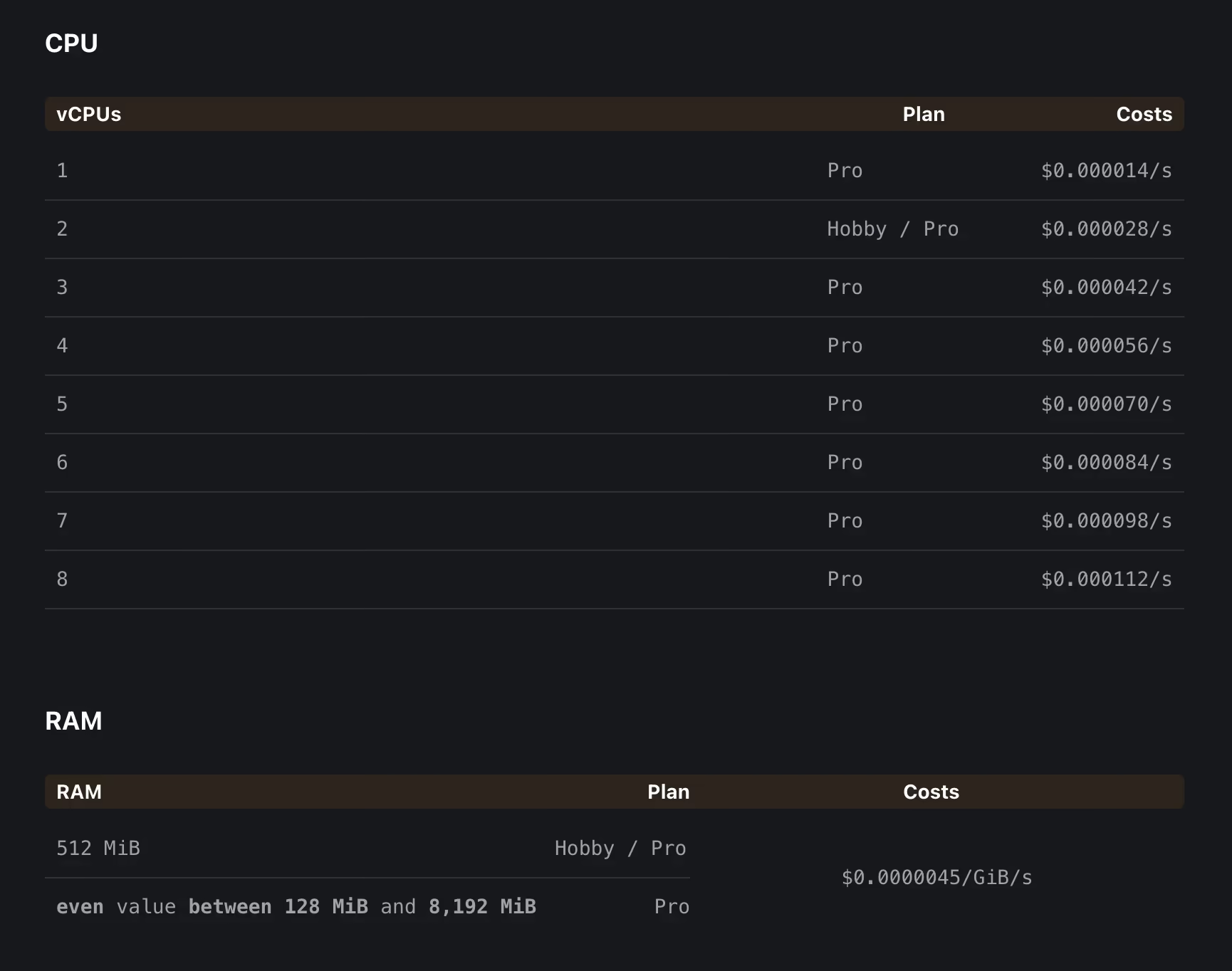
E2B sandboxes default to 2 vCPUs and 1 GB RAM. If you sign up for the Pro plan, you can customize CPU (1-8 vCPUs) and RAM (512 MiB to 8,192 MiB) when building custom templates.
Concurrency limits:
- 20 Sandboxes on Hobby plan
- Up to 100 on Pro tier (higher limits available via Enterprise)
Storage:
- Hobby plan: 10 GB
- Pro plan: 20 GB
E2B does not offer GPU support.
Daytona
Daytona defaults to 1 vCPU, 1 GB RAM, and 3 GiB disk. The per-sandbox maximum is 4 vCPUs, 8 GB RAM, and 10 GB disk; you can contact support for higher limits.
Organization-wide resource pools are tiered:
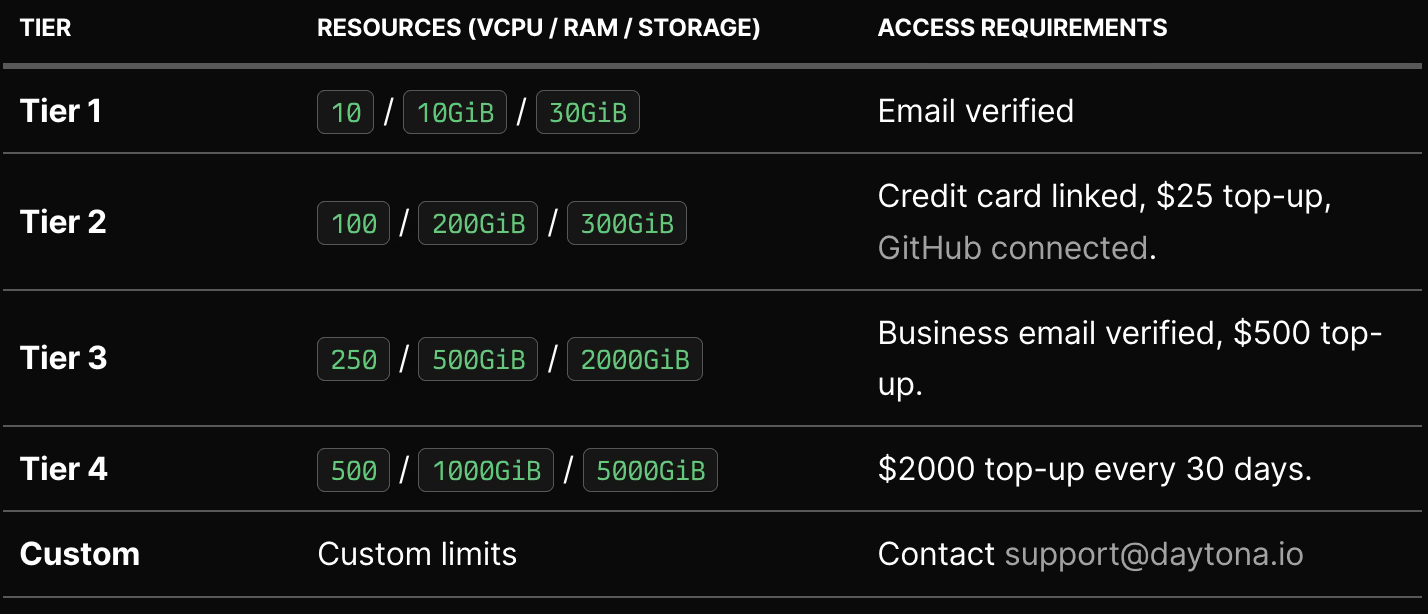
Daytona also offers GPU support with multiple GPU configurations available. Rate limits are also tiered, ranging from 300 sandbox creations per minute on Tier 1 to 600 on Tier 4.
Bottom line: E2B offers higher per-sandbox compute (up to 8 vCPU, 8 GiB RAM) while Daytona caps at 4 vCPU and 8 GB RAM per sandbox by default. However, Daytona provides larger organization-wide resource pools and GPU access. If you need GPU compute for agent workloads, Daytona is currently the only option between the two.
E2B vs Daytona: Pricing Comparison
Both platforms use usage-based pricing with free tiers, but the structures differ.
E2B
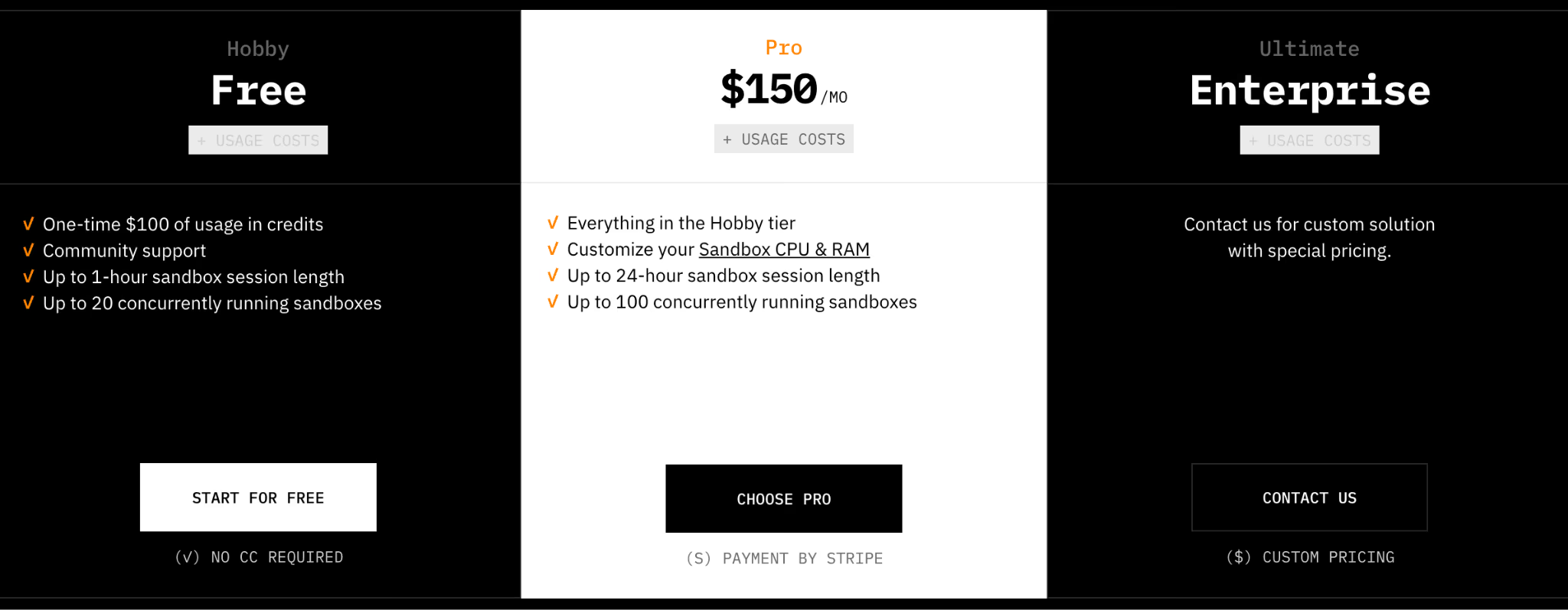
E2B offers a free plan that offers:
- One-time $100 of usage in credits
- Community support
- Up to 1-hour sandbox session length
- Up to 20 concurrently running sandboxes
To use the platform to its full potential, you can upgrade to:
- Pro: $150 per month + usage cost
- Enterprise: Custom pricing
Usage is charged per second of running sandbox time:
- vCPU: $0.000014/s per vCPU
- Memory: $0.0000045/GiB/s
There’s no charge for paused or killed sandboxes. Storage is included in the plan (10 GB Hobby, 20 GB Pro).
Daytona
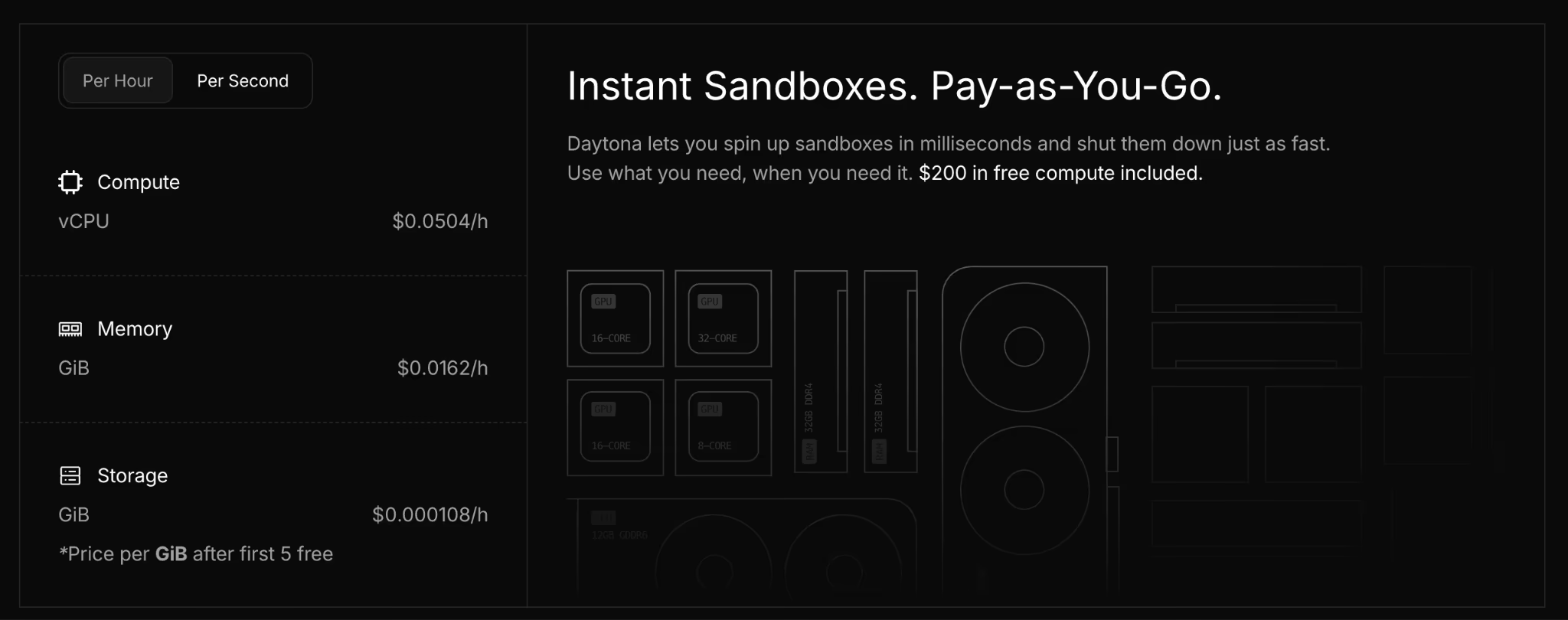
Like E2B, Daytona also lets you start for free. But uses a pay-as-you-go pricing model with explicit per-second unit prices for:
- vCPU: $0.0000140/s ($0.0504/h)
- Memory: $0.0000045/GiB/s ($0.0162/h)
- Storage: $0.00000003/GiB/s ($0.000108/h), first 5 GB free
Free credits: $200 included at signup. Startup credits up to $50,000 are available.
The per-second rates for vCPU and memory are effectively identical between the two platforms. The main pricing difference is structural: E2B charges a $150/month base fee for Pro features like longer sessions and higher concurrency, while Daytona charges purely based on usage with no subscription tier gating features.
E2B vs Daytona: Which One Is a Better Sandbox for You?
Both products can work well; the right choice depends on the shape of your platform problem.
If we reduce the decision to a few practical questions:
Do you need memory snapshot semantics (pause/resume that preserves running processes)?
E2B is explicit that pausing preserves the filesystem and memory state, including running processes and loaded variables. Daytona focuses more on workspace retention, stop/archive/delete, and persistent volumes.
Do you want timeouts to be your primary control plane, or policies?
E2B is timeout-first and pairs it with pause/resume and billing stop conditions. Daytona is policy-first and offers auto-stop, auto-archive, and auto-delete intervals with clear defaults.
Does open-source licensing constrain your deployment path?
E2B’s repo is tagged Apache-2.0; Daytona’s is AGPL-3.0. Even if you do not plan to modify anything, platform teams often need a clear story for legal and procurement. AGPL is designed to enforce source availability for modified versions run over a network, so it is a conversation to have early.
Whether you choose E2B or Daytona, the sandbox is just one piece of your agentic AI infrastructure. The harder problem is the outer loop: orchestrating the pipelines that prepare data, run agents, evaluate outputs, and feed results back into improvement cycles.
This is where ZenML comes in.
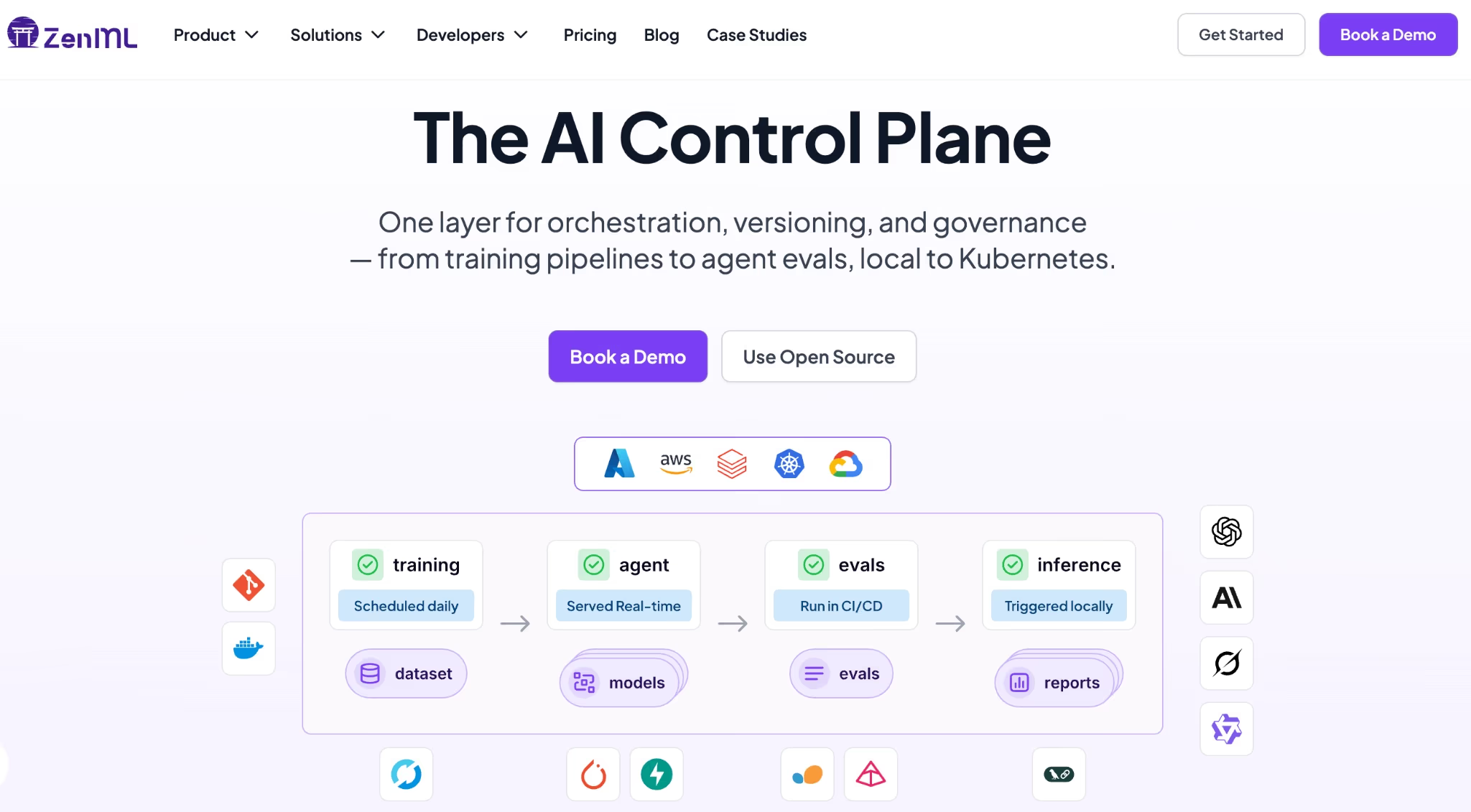
ZenML is a pipeline-first MLOps and LLMOps framework that can wrap your entire agent workflow, including the sandbox execution step, into a reproducible, versioned pipeline. Each run is tracked with full artifact lineage, so you know exactly which data, prompts, and agent configurations produced which results.
Sandboxes will soon be a stack component in ZenML, making it easy to plug in E2B or Daytona as the execution backend for agents that run code.
With ZenML, you keep the sandbox provider you trust for isolation and execution while gaining the orchestration, tracking, and reproducibility layer that turns agent experiments into production systems.