
On this page
You have an OpenAI Agents SDK agent.
It has instructions, tools, maybe handoffs, maybe approval gates. It works locally. The model reads a customer message, calls a tool, reads the result, maybe calls another tool, then returns an answer.
from agents import Agent, function_tool

@function_tool
def lookup_order(order_id: str) -> str:
    return f"Order {order_id}: delayed, ETA Friday"

@function_tool
def shipping_policy(status: str) -> str:
    return "If weather-delayed, wait 48 hours after ETA before replacing."

agent = Agent(
    name="customer_support_agent",
    instructions=(
        "You are a careful customer support assistant. "
        "Always look up the order and shipping policy before answering."
    ),
    model="gpt-5-nano",
    tools=[lookup_order, shipping_policy],
)
That is a good harness. OpenAI Agents SDK knows how to drive the agent: which model to call, which tools exist, when a tool needs approval, how handoffs work, how run state is represented, and how SDK tracing behaves.
Then the agent leaves your laptop.
Not in the naive sense of “someone put a Python script on a server and hoped.” Most teams get further than that. They wrap it in FastAPI. They run it in a worker. They put it on Kubernetes. They add retries around the obvious network calls. Maybe they already store OpenAI RunState somewhere for approval flows.
That gets you a long way. It does not quite give you a runtime.
A support run has already looked up order ORD-1007, checked the shipping policy, and drafted most of the answer. Then it reaches a sensitive action: issue a refund, cancel a shipment, send an email, apply account credit. That action needs a human.
The reviewer is at lunch, or worse, they are in a different time zone and reply tomorrow.
You do not want a Kubernetes pod sitting around for nineteen hours because one approval is pending. You also do not want to throw away the run, restart the agent, and hope it does not redo work or duplicate side effects.
OpenAI did not fail here. The SDK exposes approval interruptions and resumable RunState. That is the right SDK-level primitive.
The harder question is operational: where does that interrupted state live, who owns the wait, what gets retried, what gets replayed, and what wakes the workflow back up when the approval arrives?
That is what Kitaru adds.
We added the OpenAI Agents SDK adapter because we like the SDK. Agents, tools, handoffs, approvals, traces, resumable state: those are exactly the pieces people want to use. Kitaru should not make an OpenAI agent less OpenAI-shaped. It should give that agent run somewhere durable to live.
Harness and runtime are different jobs
OpenAI Agents SDK is the harness. It knows how the agent behaves.
Kitaru is the runtime. It knows how the workflow survives.
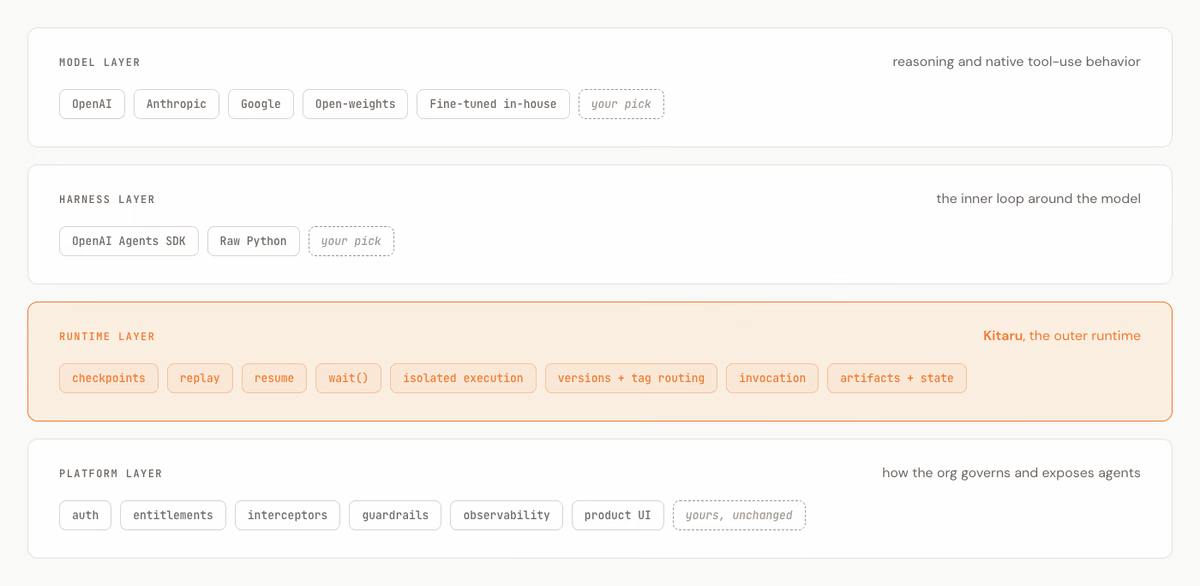
Once an agent is on real infrastructure, you start asking questions that are awkward to answer with only a web server, a queue, and ad hoc retry code:
- What remembers that a tool call already succeeded?
- What happens when a run needs approval and the human is offline for a day?
- Can the worker release its pod while it waits?
- Can replay reuse completed boundaries instead of rerunning the whole agent?
- Where does interrupted run state live after the process exits?
- What can another developer, service, or agent inspect later?
OpenAI already gives you SDK primitives for some of this. The Agents SDK has human approval interruptions and resumable RunState. Kitaru composes with those primitives. An OpenAI interruption can become a Kitaru workflow wait. Parts of an OpenAI run can become Kitaru checkpoint boundaries.
The SDK still drives the agent loop. Kitaru gives the loop a runtime around it.
The adapter boundary
The main entry point is KitaruRunner.
from kitaru import flow
from kitaru.adapters.openai_agents import KitaruRunner, OpenAIRunRequest

# The runtime default is checkpoint_strategy="calls".
# This example uses runner_call because it returns one clean flow result.
runner = KitaruRunner(agent, checkpoint_strategy="runner_call")

@flow
def support_flow(customer_message: str) -> str:
    result = runner.run_sync(OpenAIRunRequest.start(customer_message))
    return str(result.final_output)
The interesting part is what does not change. The OpenAI agent is still an OpenAI agent. The instructions, tools, model settings, handoffs, approvals, and SDK-native resume behavior stay in the SDK.
KitaruRunner only decides where Kitaru can put durable workflow boundaries around the SDK run.
There are two strategies:
runner_callputs one Kitaru checkpoint around the outer OpenAIRunner.run(...)orRunner.run_sync(...)call.calls, the runtime default, wraps supported model calls and supported localFunctionToolcalls as peer checkpoints under the Kitaru flow.
Neither strategy is the grown-up one. They answer different questions.
If you want one clean value back from flow.run(...).wait(), start with runner_call. If you want smaller replay units and per-call records, use calls.
When an approval becomes a workflow wait
This is the part I care about most for production agents, because it is where runtime and infrastructure stop being abstract.
A model reaches a refund tool. The tool needs approval. OpenAI Agents SDK returns an interrupted result with pending approvals. The SDK can convert that result to RunState; later, after a decision, the SDK can resume from that state.
Kitaru adds the workflow shape around that SDK mechanism. In a Kubernetes setup, that means the run can stop occupying the worker while it waits. The pending state lives in Kitaru. The wait is a workflow object. When the approval arrives, Kitaru can resume the execution instead of relying on the original process still being alive.
OpenAI SDK returns an interrupted result
→ SDK result exposes pending approvals and can be converted to RunState
→ Kitaru stores a Kitaru-safe envelope around the serialized RunState
→ wait_for_approval(result, ...) opens a Kitaru wait
→ the Kitaru run can pause without keeping the same Python process alive
→ a human approves or rejects later
→ Kitaru builds OpenAIRunRequest.resume(...)
→ KitaruRunner deserializes the RunState and applies the decision
→ the OpenAI SDK resumes the run
The adapter does not hand-wave state. It serializes the SDK’s RunState with RunState.to_json(...), wraps that JSON in an OpenAIRunStateEnvelope, and records the openai-agents SDK version plus any context codec information. On resume, Kitaru validates the envelope, calls RunState.from_json(...), applies the approval or rejection decision, and gives the state back to the SDK.
That is the difference between “the approval was somewhere in a Python process” and “this workflow has a saved interruption that can resume later.”
from kitaru import flow
from kitaru.adapters.openai_agents import (
    KitaruRunner,
    OpenAIRunRequest,
    wait_for_approval,
)

# runner_call gives the approval flow two clear runner boundaries:
# one call returns status="interrupted", then one resumed call completes.
runner = KitaruRunner(agent, checkpoint_strategy="runner_call")

@flow
def support_with_approval(prompt: str) -> str:
    result = runner.run_sync(OpenAIRunRequest.start(prompt))

    if result.status == "interrupted":
        resume_request = wait_for_approval(
            result,
            name="approve_openai_tool",
            timeout=600,
        )
        result = runner.run_sync(resume_request)

    return str(result.final_output)
The same Python process, worker, or Kubernetes pod does not need to sit there babysitting the approval:
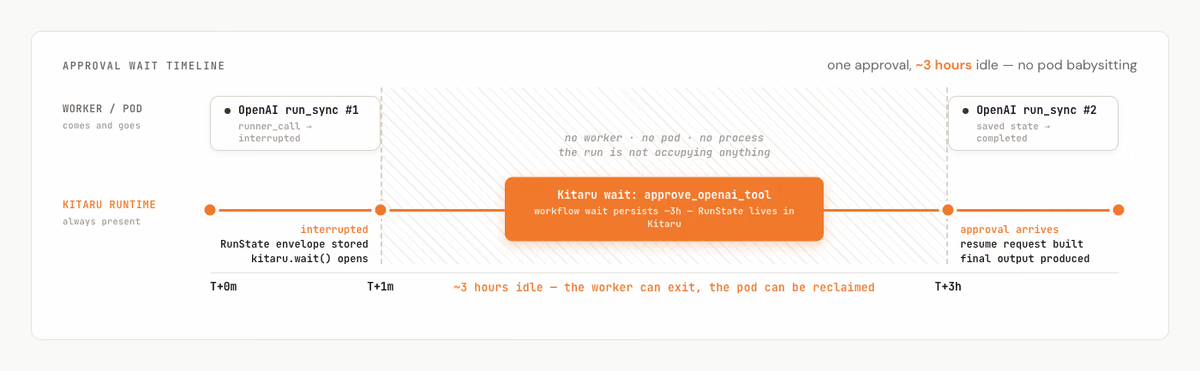
Kitaru is not pausing OpenAI somewhere inside a hidden loop. The SDK returns an interrupted result. Kitaru stores the resumable state, opens a workflow wait, and later asks the SDK to resume.
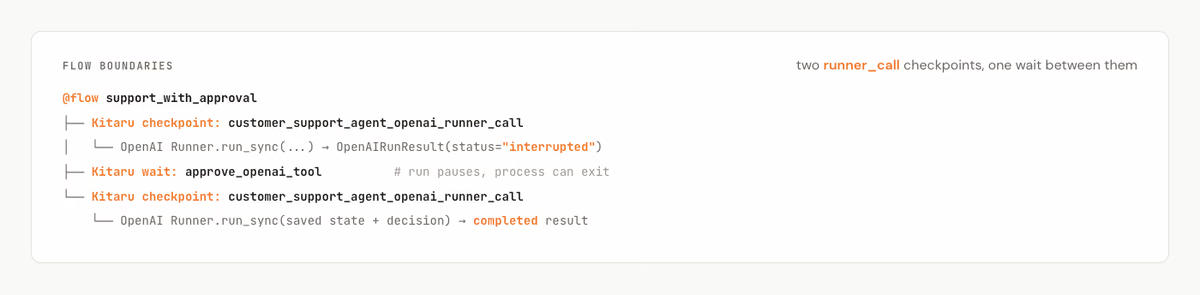
Choosing the replay boundary
Approvals are one production problem. Replay is another.
Suppose the OpenAI run completes, but the next workflow step fails. Maybe you write a report and the filesystem is gone. Maybe you notify a customer and the API returns 500. Maybe you save a structured record and the database connection drops.
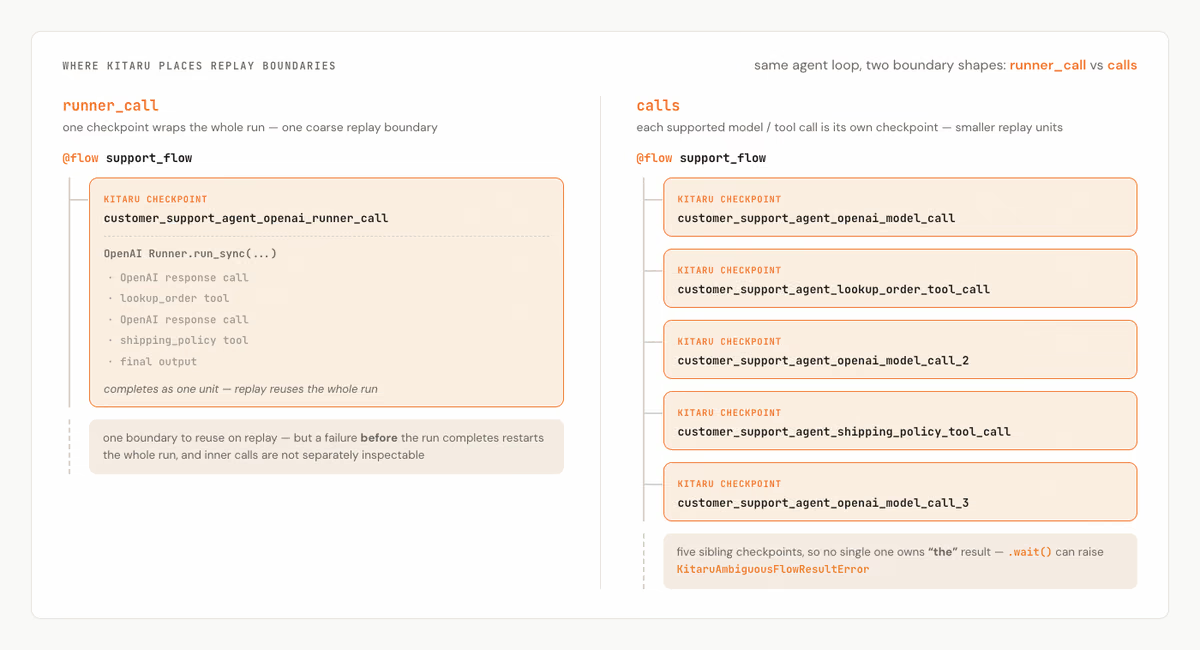
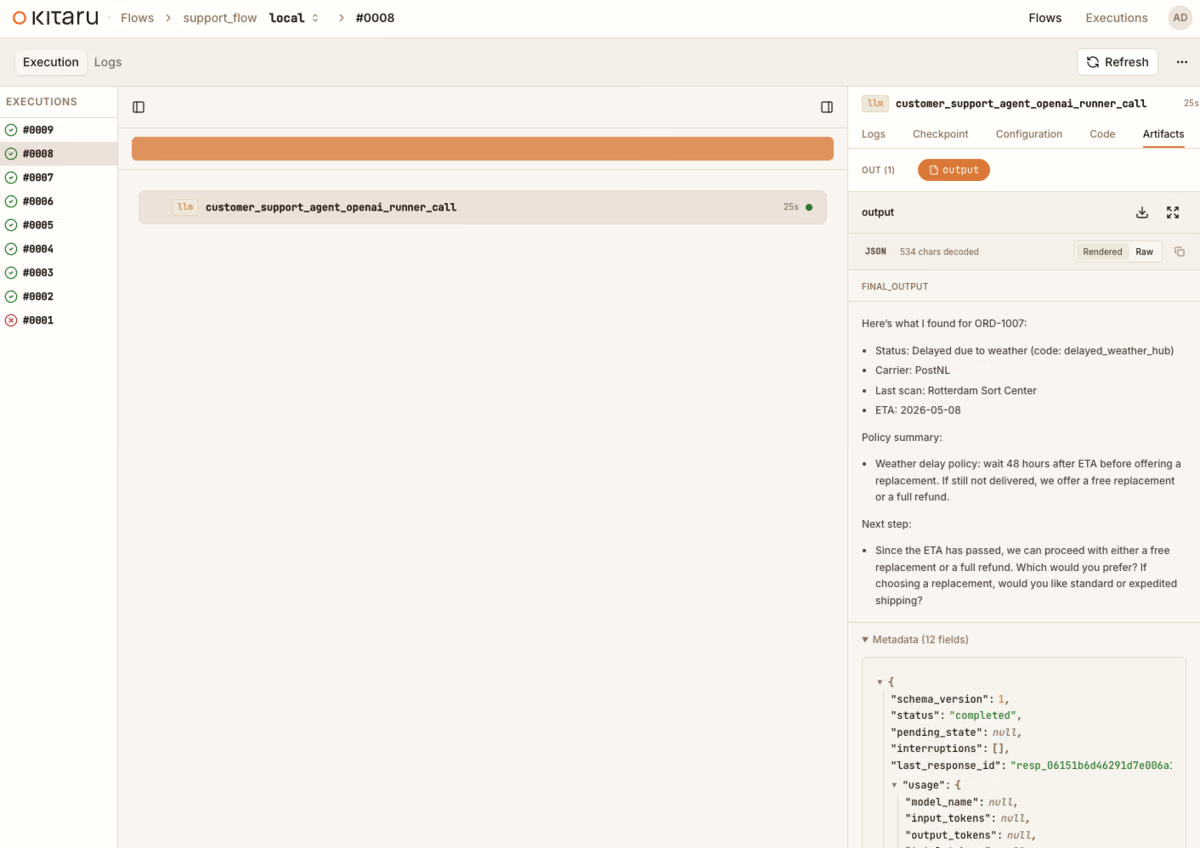
With runner_call, the completed OpenAI run is one Kitaru checkpoint. Replay does not need to ask the agent to do the same whole run again.
@flow support_flow
└── Kitaru checkpoint: customer_support_agent_openai_runner_call
    └── OpenAI Runner.run_sync(...)
        ├── OpenAI response call
        ├── lookup_order tool
        ├── OpenAI response call
        ├── shipping_policy tool
        └── final output
In the real example run, the terminal output shows exactly that outer boundary:
Kitaru: Checkpoint `customer_support_agent_openai_runner_call` started.
...
Kitaru: Checkpoint `customer_support_agent_openai_runner_call` finished in 23.982s.
This is coarse, but it is easy to reason about. If the runner call completes, Kitaru has one completed boundary to reuse. If the seventh internal SDK action fails before the runner call completes, there is no completed outer checkpoint yet, so replay starts the runner call again.
Sometimes that is fine.
Other times, you want smaller boundaries. That is what calls is for.
@flow support_flow
├── Kitaru checkpoint: customer_support_agent_openai_model_call
├── Kitaru checkpoint: customer_support_agent_lookup_order_tool_call
├── Kitaru checkpoint: customer_support_agent_openai_model_call_2
├── Kitaru checkpoint: customer_support_agent_shipping_policy_tool_call
├── Kitaru checkpoint: customer_support_agent_openai_model_call_3
└── flow body completes, but no single checkpoint owns "the" final result
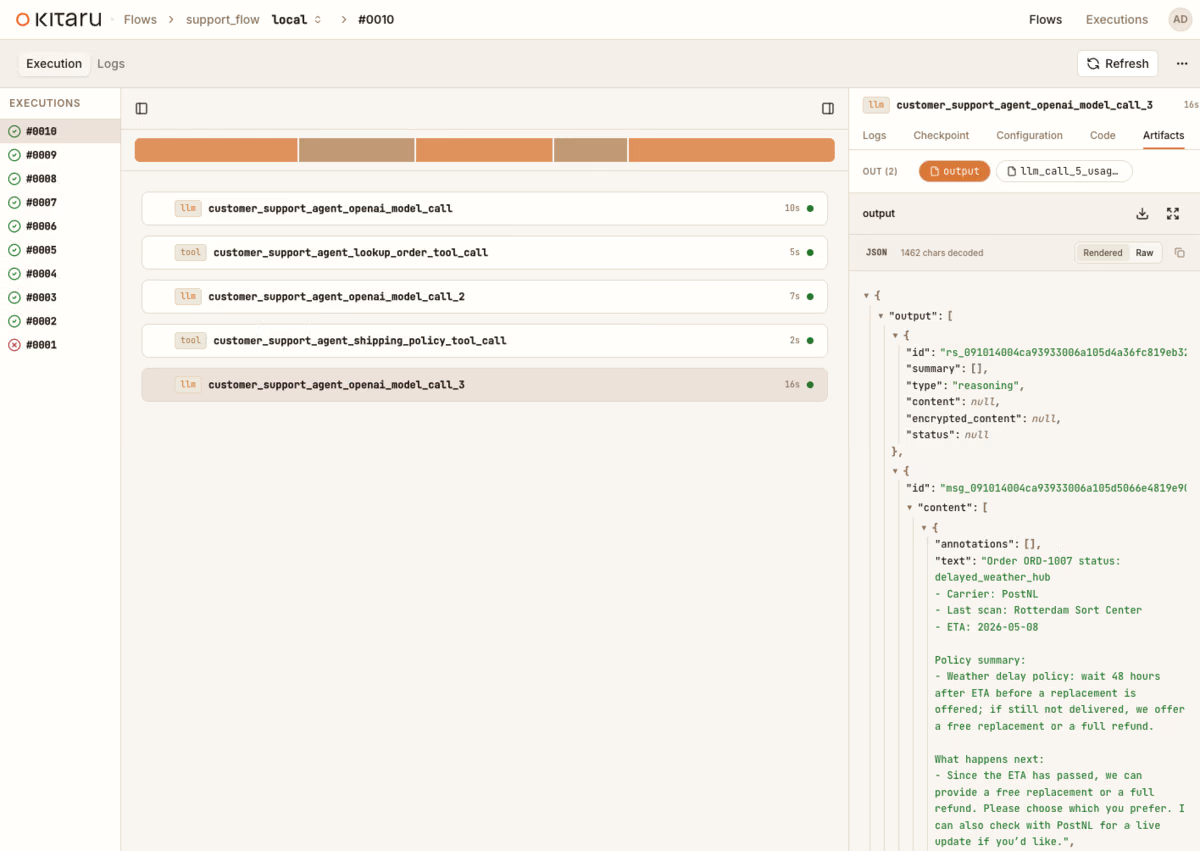
In calls mode, Kitaru wraps the supported model and local FunctionTool call boundaries it can actually stand around. If call 6 fails, calls 1 through 5 can already have saved Kitaru checkpoint outputs. That matters when calls are expensive, flaky, or useful to inspect individually.
There is a tradeoff. Those call checkpoints are peers under the flow. There may not be one obvious terminal checkpoint that represents “the” final result. In that case, flow.run(...).wait() can raise KitaruAmbiguousFlowResultError.
That error is not the adapter being fussy. It is Kitaru refusing to guess which sibling checkpoint should count as the result of the whole flow. In the example run, Kitaru names the five terminal checkpoints and points you back to the UI or KitaruClient for per-checkpoint outputs.
The rule is simple enough:
- Use
runner_callwhen you want one clean returned value and one coarse replay boundary. - Use
callswhen smaller supported model/tool replay units and per-call records matter more.
Both modes keep OpenAI Agents SDK in charge of the agent loop. The difference is where Kitaru places replay boundaries.
If you want calls mode and still need a final durable result, add an explicit downstream Kitaru checkpoint after the OpenAI run returns. Do not wrap the OpenAI run itself in a checkpoint. calls mode needs room to open its own inner checkpoints.
from kitaru import checkpoint, flow

@checkpoint
def persist_support_answer(answer: str) -> str:
    # Save or normalize the final answer here if you want a terminal artifact.
    return answer

@flow
def support_flow(customer_message: str) -> str:
    result = runner.run_sync(OpenAIRunRequest.start(customer_message))
    return persist_support_answer(str(result.final_output))
What you can inspect later
Retry is only one part of durability. The other part is evidence.
When OpenAI tracing is enabled and available, it remains the SDK-native view of the agent run. It can show spans, tool calls, model generations, handoffs, and other SDK details. Kitaru does not replace that.
Kitaru stores the workflow record around the run: checkpoints, checkpoint outputs, wait/resume state, replay context, and adapter metadata.
Think of it as two views of the same run:
OpenAI tracing
  what happened inside the SDK-native run

Kitaru runtime record
  what completed, what can replay, what is waiting, what state can resume
That record is also useful because Kitaru is meant to be agent-native. The Kitaru MCP server exposes tools for listing executions, inspecting a specific execution, reading logs, providing input to a waiting run, retrying failures, replaying from checkpoints, and reading artifacts. The separate kitaru-skills repository packages Claude Code skills for learning Kitaru, scoping durable workflow boundaries, and authoring Kitaru flows.
So a debugging session does not have to start with somebody pasting a traceback into Slack. An agent can ask Kitaru what ran, where it failed, what artifacts exist, what logs are available, and whether the run is waiting for input.
The capture policy matters, especially for support data. By default, the OpenAI adapter captures useful debugging and resume context: input, final output, run state, interruption payloads, usage when available, and adapter event/run-summary metadata. Raw response items are off by default.
That default is convenient. It may also be too much for your application. If customer messages or approval payloads are sensitive, narrow what Kitaru captures.
from kitaru.adapters.openai_agents import KitaruRunner, OpenAICapturePolicy

runner = KitaruRunner(
    agent,
    checkpoint_strategy="calls",
    capture=OpenAICapturePolicy(
        save_input=False,
        save_final_output=True,
        save_run_state=True,
        save_interruption_payloads=True,
        save_response_items=False,
        save_usage=True,
    ),
)
In runner_call mode, the whole OpenAI run appears as one Kitaru checkpoint. The final answer is visible as the checkpoint output.
In calls mode, Kitaru records supported model and tool calls as separate checkpoints. That gives more inspection points, but no single checkpoint is automatically ‘the’ flow result.
The value is not that Kitaru has another trace. The value is that the run becomes something you and your agents can operate: retry, replay, inspect, resume, and connect to other tools.
Where the boundary is
The adapter is useful because it is precise about where Kitaru can add durability. This is less a list of apologies than a contract: OpenAI owns the SDK behavior, Kitaru owns the workflow runtime around the boundaries it can safely wrap.
calls mode covers supported model calls and supported local FunctionTool calls. It does not mean every hosted tool, MCP call, handoff, approval, or SDK-internal action becomes a Kitaru checkpoint. The approval bridge works at the OpenAI interruption / RunState layer. Call checkpointing is narrower: Kitaru checkpoints only the model/tool boundaries it actually wraps.
calls mode also needs to run from the flow body. Do not put it inside another user checkpoint. The adapter needs room to open model/tool checkpoints, and it raises KitaruUsageError if checkpoint_strategy="calls" is used from inside an existing checkpoint.
Adapter-managed checkpoints currently reject runtime="isolated", because the synthetic checkpoint closures hold live OpenAI SDK objects such as agents, tools, model providers, and run config. Those objects are not safe to ship into an isolated runtime boundary today.
Resume is intentionally strict. If the OpenAI run has application context that must survive an interruption, that context needs to be reconstructible. Kitaru defaults to strict_context=True, so it should fail loudly rather than save resume state it cannot load later. It also defaults to strict_sdk_version=True, so a pending run captured under one openai-agents version will not silently resume under another unless the user opts out after checking compatibility.
Kitaru also does not make external side effects exactly-once. If a tool charges a card and then crashes before returning, Kitaru cannot make the payment provider forget that the charge happened. Side-effectful tools still need idempotency keys, careful design, or checkpoint opt-outs.
This boundary discipline is part of the design. We do not want the adapter to make OpenAI Agents SDK less OpenAI-shaped. We want OpenAI-shaped runs to survive production time.
Where this fits
Use the OpenAI Agents SDK adapter when you already like the OpenAI harness and want a workflow runtime around it:
- support agents with approval gates,
- research agents with expensive intermediate calls,
- long-running runs that should survive process or pod loss,
- workflows where final outputs, pending state, usage, and replay context need to remain inspectable,
- platform teams standardizing runtime behavior across more than one agent harness.
Start with runner_call if you want one clean checkpoint around the run. Use calls when smaller supported model/tool replay units matter. And when the agent needs a human, let the same Python process stop: the OpenAI interruption can become a Kitaru workflow wait, and the SDK run can resume when the human is ready.
If you already use OpenAI Agents SDK, keep your agent code. Wrap the run with KitaruRunner, choose the boundary that matches your production failure mode, and give that OpenAI-shaped run a runtime.
The point is not to make OpenAI Agents SDK less OpenAI-shaped.
The point is to let that OpenAI-shaped run survive real production time.
Try it yourself
The repository includes a real OpenAI Agents SDK integration example, one which focuses on replay boundaries rather than approval gates. A customer asks about ORD-1007, the agent calls lookup_order, then calls shipping_policy, and Kitaru records the run.
That keeps the example small enough to run quickly while still showing the adapter’s main boundary choice: one runner_call checkpoint versus several supported call-level checkpoints.
From the repository root:
uv sync --extra local --extra openai-agents
uv run kitaru init
export OPENAI_API_KEY='sk-...'
uv run python examples/integrations/openai_agents_agent/openai_agents_adapter.py
By default, the example uses checkpoint_strategy="runner_call", so the adapter’s OpenAIRunResult becomes the flow’s terminal output and .wait() returns cleanly.
To compare the two strategy shapes, run:
OPENAI_AGENTS_COMPARE_CALLS=1
uv run python examples/integrations/openai_agents_agent/openai_agents_adapter.py
That runs the runner_call path first, then runs the calls path and prints the expected ambiguity error if .wait() cannot choose one terminal result. If you already ran the default example once, the runner_call checkpoint may be reused from Kitaru state; in our comparison run it printed Checkpoint customer_support_agent_openai_runner_call cached.
In our run, the calls strategy produced five terminal checkpoints: customer_support_agent_lookup_order_tool_call, customer_support_agent_openai_model_call, customer_support_agent_openai_model_call_2, customer_support_agent_openai_model_call_3, and customer_support_agent_shipping_policy_tool_call.
The point is not that one strategy wins. The point is that the boundary is visible. We’d love you to give the example a try and use the adapter with your own pre-existing agents built with the OpenAI Agents SDK!