
On this page
You already have a LangGraph graph.
It has nodes, edges, state, a thread_id, maybe a checkpointer, maybe an interrupt(...) for human approval. It works. A support ticket comes in, the graph classifies it, looks up context, asks for approval if needed, and returns a decision.
That graph is valuable. It is also not the whole product.
In production, the graph usually sits inside a larger workflow:
load ticket
→ run LangGraph review graph, possibly pausing for approval
→ persist summary
→ notify customer or reviewer
→ expose artifacts to humans, services, or other agents
The graph may finish perfectly and the next step may fail. The report write times out. The notification payload is malformed. The pod disappears after the model work is already done. Without a durable outer boundary, the easiest way back is often to start the script again and ask the graph to redo work it already completed.
Kitaru adds that outer boundary. LangGraph stays in charge of the graph; Kitaru records and runs the durable Python workflow around it. That means replaying completed work is only part of the story. The same execution also becomes something your team — and your own development agents — can inspect later: checkpoints, logs, artifacts, summaries, failed boundaries, and production-vs-local context are all available through Kitaru’s UI, SDK, CLI, and MCP server instead of disappearing into a terminal scrollback or a one-off trace.
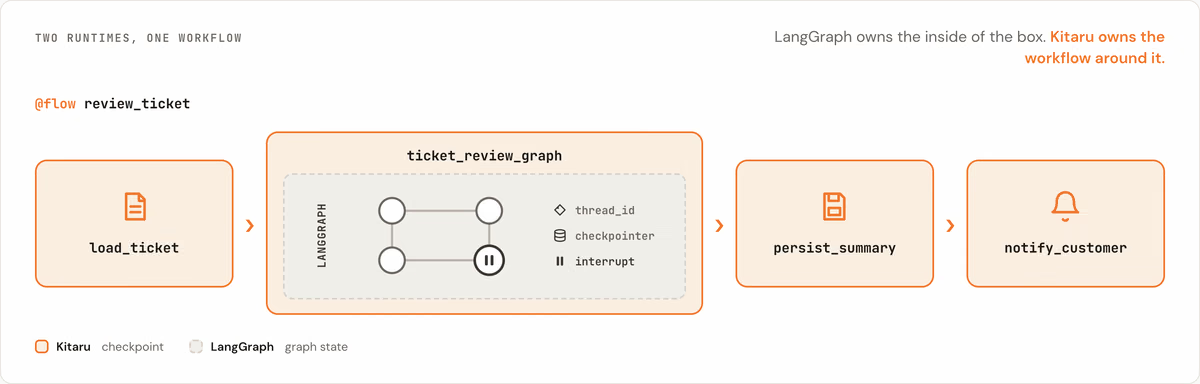
LangGraph is not just a thin harness around a model call. It has real runtime concepts: graph state, checkpointers, threads, interrupts, stores, graph-local replay, and long-running execution semantics. Kitaru should not pretend to take those over. The Kitaru LangGraph adapter is useful precisely because it draws a smaller and more honest boundary: keep LangGraph in charge of graph state, and put Kitaru around the workflow that runs it.
The default boundary: one graph call, one Kitaru checkpoint
The default LangGraph adapter strategy is graph_call.
In plain language:
one completed graph.invoke(...) = one Kitaru checkpointThat means Kitaru treats the outer graph invocation as the durable unit. A graph-like object here means something with invoke(...) or ainvoke(...): a compiled LangGraph graph, or a LangChain agent runnable that follows the same shape.
A minimal Kitaru flow looks like this:
import kitaru
from kitaru import checkpoint, flow
from kitaru.adapters.langgraph import KitaruGraphRunner, LangGraphRunRequest

runner = KitaruGraphRunner(
    graph,
    name="ticket_review_graph",
    checkpoint_strategy="graph_call",  # default, explicit here for clarity
)

@checkpoint
def persist_summary(summary: dict) -> dict:
    kitaru.save("summary__ticket_review", summary, type="context")
    return summary

@flow
def review_ticket(ticket_id: str) -> None:
    result = runner.invoke(
        LangGraphRunRequest.start(
            {"ticket": ticket_id},
            thread_id=ticket_id,
        )
    )

    if result.status == "completed":
        persist_summary(
            {
                "thread_id": result.thread_id,
                "output": result.output,
            }
        )
Kitaru is not stepping into LangGraph’s node-level replay system here. It is doing something simpler: if the outer graph-call checkpoint completed, Kitaru replay of the larger workflow can reuse the saved LangGraphRunResult instead of invoking the graph again.
Concretely:
First run:
load_ticket ✓ → graph_call ✓ → persist_summary ✗

Replay:
load_ticket reused or rerun by its own policy
→ graph_call result reused
→ persist_summary retried
The useful thing is not to pretend Kitaru can replay every hidden LangGraph node. The useful thing is to remember that the graph call already finished.
This is why graph_call is the boring default on purpose. It works at the boundary every compatible graph has: the outer call. LangGraph still owns what happens inside that call — nodes, state, checkpointer snapshots, stores, interrupts, and where graph-local resume continues.
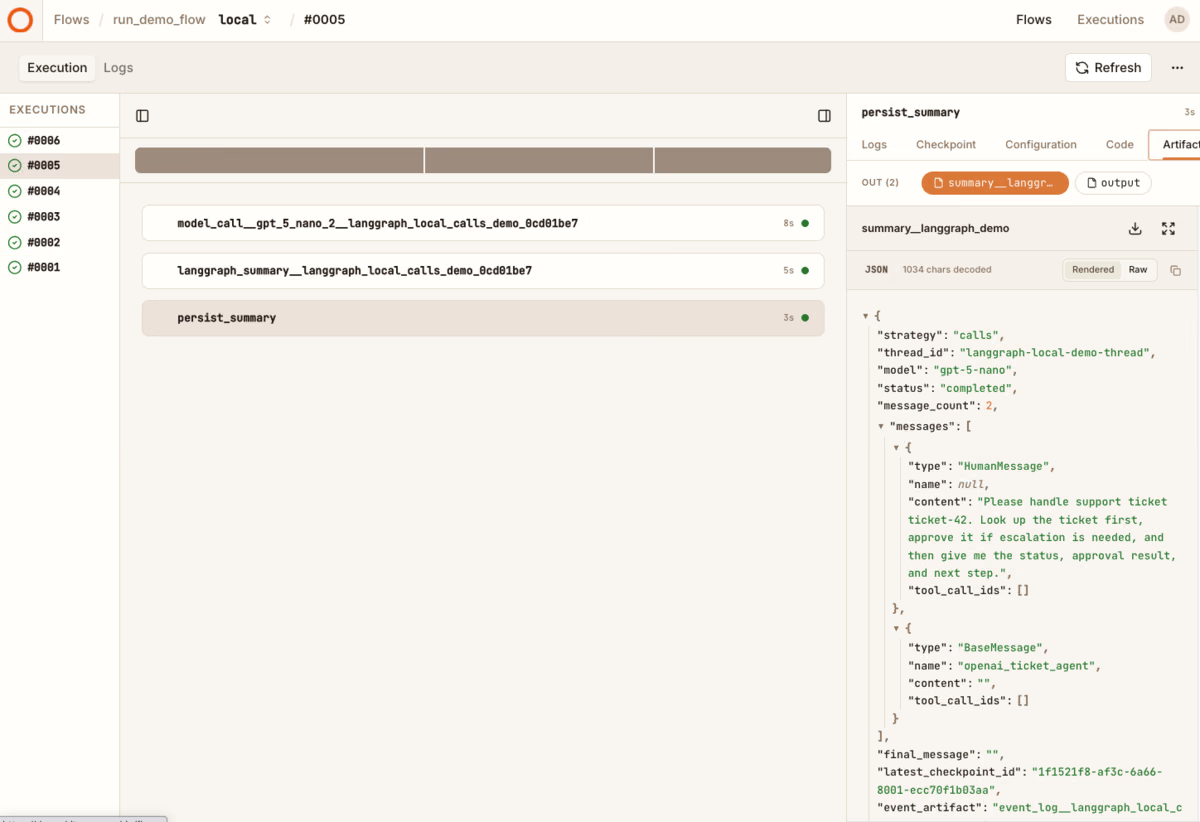
The thread_id is the important little detail that makes this honest.
Think of thread_id as the label on LangGraph’s folder. Start writes into that folder. Resume opens the same folder. Change the label, and LangGraph is looking somewhere else.
LangGraph checkpointer
├── thread_id="ticket-17"
├── thread_id="ticket-42"  ← start and resume both go here
└── thread_id="ticket-99"
Kitaru records and preserves that graph-owned identity, but it is not a Kitaru execution ID. The Kitaru execution is the outer workflow. The thread_id is how LangGraph finds its own graph state.
That split matters even more when a graph pauses for human input.
Interrupts stay LangGraph-owned; waits become Kitaru-owned
LangGraph already has a good primitive for human-in-the-loop graph execution: interrupt(...). A node calls interrupt(...), LangGraph saves graph state through its checkpointer, and the graph waits until you resume it with a Command(resume=...) value using the same thread_id.
Kitaru does not replace that. Instead, the adapter turns the interrupted graph result into something the outer workflow can durably wait on.
The chain looks like this:
LangGraph node calls interrupt(...)
→ LangGraph checkpointer records graph state
→ adapter returns LangGraphRunResult(status="interrupted")
→ Kitaru opens a durable wait at flow scope
→ human or service provides input later
→ adapter builds Command(resume=...)
→ runner.invoke(...) resumes the same thread_id
In code:
from kitaru import flow
from kitaru.adapters.langgraph import (
    KitaruGraphRunner,
    LangGraphRunRequest,
    wait_for_interrupt,
)

runner = KitaruGraphRunner(graph, name="ticket_review_graph")

@flow
def review_ticket(ticket_id: str) -> None:
    result = runner.invoke(
        LangGraphRunRequest.start({"ticket": ticket_id}, thread_id=ticket_id)
    )

    if result.status == "interrupted":
        resume_request = wait_for_interrupt(
            result,
            schema=bool,
            question="Approve this ticket escalation?",
        )
        result = runner.invoke(resume_request)

    if result.status == "completed":
        persist_summary(result.output)
LangGraph creates the graph-local pause and records graph state through its checkpointer. Kitaru turns the returned interrupted result into a durable workflow wait.
That means the worker does not need to sit idle while a human is at lunch, asleep, or in a different queue. The Kitaru run can pause, release compute, and resume when input arrives. The resumed graph still uses LangGraph’s own resume mechanics.
There is one important LangGraph caveat here: when a graph resumes from an interrupt, LangGraph re-enters the node where interrupt(...) was called. Code before the interrupt can run again. That is LangGraph’s graph-local behavior, not something Kitaru erases. Side effects before interrupt(...) should be idempotent, or moved to safer boundaries.
A simple way to remember the split:
LangGraph decides where the graph paused. Kitaru makes the surrounding workflow pause durable.
Smaller boundaries with calls mode
Sometimes the outer graph-call boundary is too coarse.
For example, suppose you built a LangChain agent on top of LangGraph with create_agent(...). You may want Kitaru checkpoints around the model calls and local tool calls inside that agent, not just around the outer graph invocation.
That is what checkpoint_strategy="calls" is for.
But this mode is intentionally narrow. Kitaru can checkpoint a model or tool call only when it is physically standing around the call that runs it. In the LangGraph adapter today, that means synchronous LangChain model/tool handler calls that pass through KitaruLangGraphMiddleware.
from langchain.agents import create_agent
from langgraph.checkpoint.memory import InMemorySaver

from kitaru.adapters.langgraph import KitaruGraphRunner, LangGraphRunRequest
from kitaru.adapters.langgraph.langchain import KitaruLangGraphMiddleware

agent_graph = create_agent(
    model=model,
    tools=[lookup_ticket, approve_ticket],
    middleware=[KitaruLangGraphMiddleware()],
    checkpointer=InMemorySaver(),
)

runner = KitaruGraphRunner(
    agent_graph,
    name="ticket_agent",
    checkpoint_strategy="calls",
)

result = runner.invoke(
    LangGraphRunRequest.start(
        {"messages": [{"role": "user", "content": "Handle ticket-42"}]},
        thread_id="ticket-42",
    )
)
The mechanism is simple once you picture the doorway:
LangChain is about to call the model or tool
        ↓
Kitaru middleware receives (request, handler)
        ↓
Kitaru opens a checkpoint
        ↓
inside that checkpoint, the middleware calls handler(request)
        ↓
the model or tool runs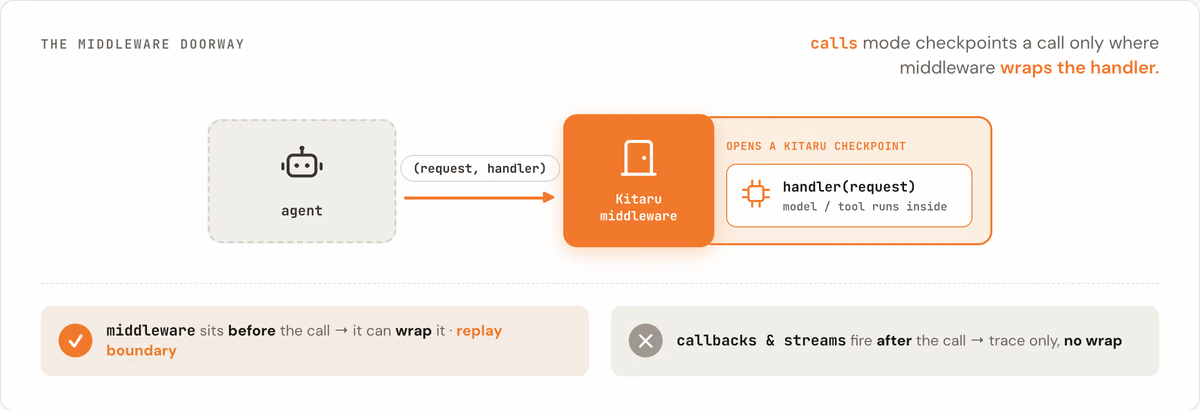
This is why middleware can become a replay boundary and callbacks cannot.
A callback says, “a tool call started” or “a tool call ended.” That is useful for a trace. But it is not the same as owning the Python call that performs the work. If Kitaru only hears that send_slack_message already happened, it cannot safely make replay skip or deduplicate that Slack message.
Middleware is different. The middleware receives the handler before the call happens. It can open a Kitaru checkpoint, call the handler inside it, and let Kitaru record the result.
So the rule is:
Callbacks and streams are traces, not replay boundaries.
This is not a complaint about callbacks or streams. They are useful. They explain what happened. They are just not the same thing as a callable boundary Kitaru can rerun or reuse.
The no-middleware case is worth saying plainly: checkpoint_strategy="calls" without KitaruLangGraphMiddleware is not magic introspection. The graph may run, and Kitaru may still record aggregate run metadata where it has execution context, but true model/tool Kitaru checkpoints only appear when a Kitaru-aware wrapper is actually around the handler.
That restraint is deliberate. Granularity is useful only when it is real.
Checkpointers: local demos vs production durability
The sharpest boundary in this integration is the LangGraph checkpointer.
Kitaru checkpoints persist Kitaru workflow boundaries. LangGraph checkpointers persist graph-internal state. These are different layers.
This matters in the most concrete possible way:
Pod A starts a LangGraph graph with InMemorySaver.
The graph reaches interrupt(...).
Kitaru turns the interrupted result into a durable workflow wait.
Pod A disappears.
A human approves later.
Kitaru resumes the flow on Pod B.
Pod B has the same code and the same Kitaru execution.
But Pod B does not have Pod A's memory.
LangGraph cannot find the old in-memory thread state.
Kitaru remembered the workflow. LangGraph’s in-memory checkpointer forgot the graph.
That is not a Kitaru bug and not a LangGraph bug. It is the boundary doing exactly what the boundary says. InMemorySaver is excellent for local examples, tests, and quick demos. It is not restart-durable across process or container loss.
For production graph resume, use a persistent LangGraph checkpointer or store, as described in the LangGraph persistence docs. Kitaru can make the outer workflow durable, but LangGraph’s own checkpointer remains the thing that stores graph state, interrupt position, and graph-local resume data.
This is the most important trust-building point in the whole adapter:
Kitaru remembers the workflow. LangGraph’s persistent checkpointer remembers the graph.
What you can inspect in Kitaru
When the adapter runs inside a Kitaru execution context, it can persist event-log and run-summary artifacts for the graph invocation.
Those artifacts answer operational questions:
- Which graph ran?
- Which
thread_iddid it use? - Did the graph call complete, interrupt, or fail?
- Which latest LangGraph checkpoint metadata was observed, where available?
- Which Kitaru checkpoint boundary completed?
- In
callsmode, which sync model/tool calls passed through the middleware seam? - Which user-facing artifacts did the workflow save?
- What changed between a local development run and the production run that failed?
- What context can another agent inspect without you manually pasting logs into a chat window?
The default capture policy is metadata-first. It is meant to be useful without dumping full graph state into Kitaru artifacts. If your graph state contains prompts, tool outputs, customer data, or secrets, be deliberate before opting into deeper capture such as full state values.
This is also where Kitaru’s agent-native story matters. The execution is not just a page in a dashboard. Through Kitaru’s MCP server, an assistant or debugging agent can query executions, inspect checkpoints, read artifacts, fetch logs, and compare what happened in development with what happened in production. That changes the debugging loop from “paste me the traceback” to “look at this failed execution and tell me which boundary broke.”
Failed graph calls still follow the adapter contract: failures can be recorded in events and run summaries where persistence is available, while the graph call itself may propagate an exception to user code. Do not think of the adapter as swallowing graph failures into a returned object in every case. Think of it as giving the Kitaru execution a durable trail of what the adapter could observe and persist.
This is also where Kitaru fits alongside LangSmith rather than replacing it. If you already use LangSmith traces for LangGraph or LangChain runs, keep them. Kitaru is not trying to be your graph trace UI. Kitaru is giving the larger workflow a durable runtime surface: checkpoints, replay, waits, artifacts, deployment, and invocation.
A small responsibility map is clearer than a feature scoreboard:
| Concern | LangGraph keeps owning | Kitaru adds |
|---|---|---|
| Graph state | Nodes, edges, state schema, thread checkpoints | Records which graph call ran and which Kitaru boundary completed |
| Thread identity | thread_id and checkpointer lookup | Requires and preserves thread_id in adapter requests |
| Human interrupt | interrupt(...), graph pause point, resume semantics | kitaru.wait(...) bridge and workflow-level suspension |
| Replay | Graph-local replay / time travel | Replay of Kitaru workflow checkpoints around graph calls |
| Model/tool calls | LangChain / LangGraph execution | Optional sync call checkpoints via Kitaru middleware |
| Observability | LangSmith / LangGraph traces if used | Kitaru event logs, run summaries, artifacts, execution metadata |
| Deployment | LangGraph Platform or your own service | Kitaru flow deployment, versioning, and self-hosted runtime |
If your whole company is standardized on LangGraph plus the hosted LangGraph/LangSmith stack, Kitaru may add less. Kitaru becomes more interesting when LangGraph is one framework inside a broader Python platform with Pydantic AI, OpenAI Agents SDK, Claude Agent SDK, custom loops, and non-agent workflow steps.
The point is not to replace LangGraph Platform or LangSmith traces. The point is to let LangGraph runs participate in Kitaru’s broader workflow runtime.
Try it
The repo includes a LangGraph adapter example with two paths.
Start with the local graph_call demo. It uses a tiny LangGraph graph with interrupt(...), needs no model provider API key, and shows the outer boundary:
uv sync --extra local --extra langgraph
uv run kitaru init
uv run kitaru login
uv run examples/integrations/langgraph_agent/langgraph_adapter.py --strategy graph_call
That demo:
- starts a Kitaru flow;
- runs a local LangGraph graph;
- pauses at a
request_decisionnode; - resumes with a
Command(resume=...)request; - records two graph-call checkpoints;
- saves a readable
summary__langgraph_demoartifact.
Then try the OpenAI-backed calls demo:
uv sync --extra local --extra langgraph-openai
uv run kitaru init
uv run kitaru login
export OPENAI_API_KEY='sk-...'
export LANGGRAPH_AGENT_MODEL='gpt-5-nano'  # optional override
uv run examples/integrations/langgraph_agent/langgraph_adapter.py --strategy calls
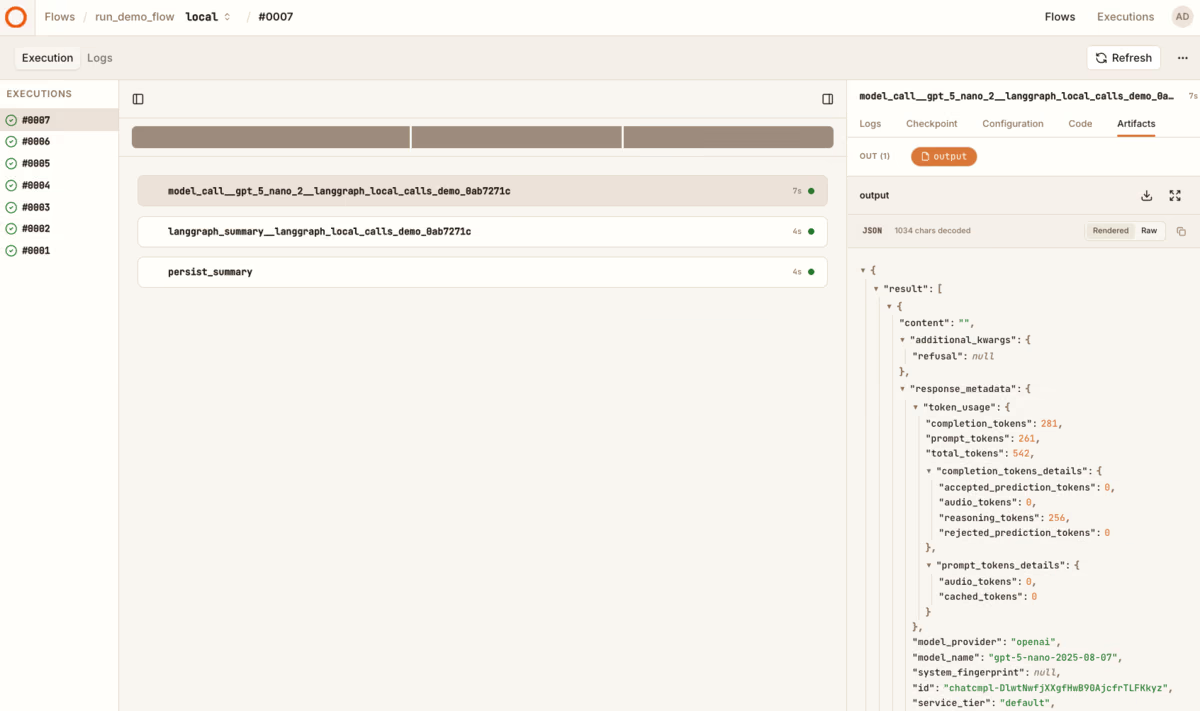
That demo builds a LangChain support agent with deterministic local ticket tools and KitaruLangGraphMiddleware. You should see model-call checkpoints, a tool_call__lookup_ticket_... checkpoint when the model follows the lookup instruction, and a langgraph_summary__... checkpoint. Depending on the model’s exact behavior, you may also see a tool_call__approve_ticket_... checkpoint.
The full guide is here: LangGraph Adapter.
If your LangGraph graph is still a local experiment, LangGraph’s own checkpointer may be all you need. If that graph is becoming one step in a larger production workflow — surrounded by loading, reporting, approval, notification, artifacts, deployment, and replay — Kitaru gives that outer workflow a durable runtime without taking graph state away from LangGraph.
Keep LangGraph in charge of graph state. Put Kitaru around the workflow that runs it.