
On this page
Inngest makes background work easy to start. You write a function, pick what triggers it, wrap the risky parts in steps, and then let the platform handle retries and saved states.
That model came from the world of background jobs and product events, and so for that shape of work, Inngest fits well. Agent loops, however, can be a different story.
In Inngest, an agent that reasons for twenty turns is not one execution. There are dozens. Every model call, tool call, retry, and wait becomes a line item. Your step boundaries set the cost curve of your agent.
So we went looking so you don’t have to. We reviewed 8 Inngest alternatives for long-lived agents. We break each one down by run search, workload isolation, and duplicate prevention. We also looked at features, pricing, pros, and cons.
A Quick Overview of the Best Inngest Alternatives
- Why look for alternatives: Inngest charges for the function run and each step. Agent loops with many model and tool calls can burn through execution quotas faster than ordinary background jobs.
- Who should care: AI platform and backend teams that need better search or tenant isolation. Replay and cost control matter too.
- What to expect: Eight alternatives to Inngest, from agent runtimes like Kitaru to durable execution platforms like Temporal and Restate. We also cover DBOS, Hatchet, and Trigger.dev.
The Need for an Inngest Alternative?
Inngest works well when a function has a small number of durable steps. The fit becomes less tidy when an agent creates a long, changing loop at runtime.
1. Cost Increases With Every Agent Step
Inngest’s pricing is built around per-step economics. It counts the function run and every durable step as separate executions, so model calls, tool calls, and waits all add to the total when you place them in their own steps.
Take a 20-turn agent, for example, with one model call and one tool call per turn. That equals 40 step executions plus the function run itself, so roughly 41 executions for a single agent run. That’s before you add retries, sub-agents, or follow-up jobs.
More steps improve recovery but at the cost of execution volume and a bigger bill. Before long, you’re choosing step boundaries based on cost as much as failure recovery.
The Pro plan, at $99 per month, includes 1 million executions and 100 concurrent steps. On the surface, these numbers look generous, until a highly autonomous agent enters the chat and makes a dozen tool calls for a simple request.
2. Agent Loops Must Fit Inngest’s Step-Based Execution Model
External API calls, database work, and other non-deterministic operations belong inside step.run() for Inngest to persist and memoize them. That is a reasonable contract, and it is the same contract that makes the retries work.
However, the friction comes from agent behavior. An agent may choose its next tool call at runtime. In Inngest, each call needs its own durable step. You can group several calls inside one step, but they then share the same recovery boundary.
So you end up translating an emergent loop into step vocabulary, while still adding stable step IDs and step boundaries around that behavior.
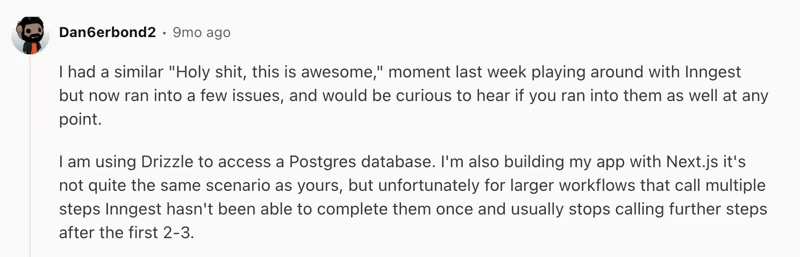
This complexity had users question Inngest’s looping system. One developer reported a rougher experience with a larger multi-step workflow:
3. Step Orchestration Can Introduce Latency
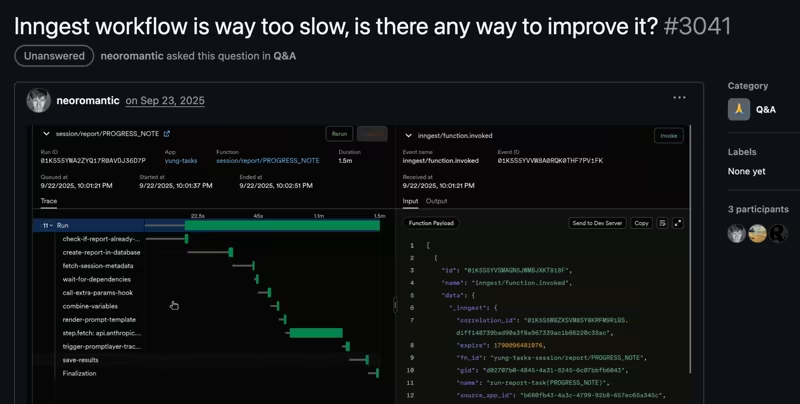
Users raised latency concerns in Inngest’s GitHub discussions throughout last year. Inngest has reduced this overhead with client-side checkpointing.
In the TypeScript SDK, consecutive steps can now run within the same request, including on supported serverless hosts.
For the lowest latency, Inngest also offers Connect. It keeps a persistent outbound connection between Inngest and a pool of long-running workers, which avoids the cold starts and request handoffs common in serverless execution. It’s a good piece of engineering, but it comes with some bottlenecks.
Connect remains in public beta, requires a long-running server, does not support serverless targets like AWS Lambda or Vercel, and Python support is still in beta.
So the low-latency path exists, but it asks you to give up the serverless model that made Inngest attractive in the first place.
Evaluation Criteria
We evaluated each Inngest alternative against three areas that decide whether a durable execution layer survives or fails once agent traffic grows:
- Production observability and run search: Can you find a failed run by customer or tenant? We looked for tools that help you break down your run via search tags, filters, and lets you inspect calls, retries, and state changes from one place.
- Workload isolation and scale: Can you separate busy tenants from customer-facing work? We looked at namespaces and queues. We also compared worker pools, concurrency keys, rate limits, and tenant fairness.
- Idempotency and duplicate prevention: Can a retry send the same email twice or charge the same card again? We compared workflow IDs, idempotency keys, deduplication windows, and replay rules.
What are the Top Alternatives to Inngest?
| Inngest alternative | Best for | Key features | Pricing |
|---|---|---|---|
| Kitaru by ZenML | Long-running Python agents | - Checkpoints and replay - Pause and resume - Agent SDK adapters | - Free open-source edition - Paid plans start at $399 per month |
| Temporal | Backend workflows | - Search Attributes - Namespaces, Workflow ID, and policies - Event history replay | - Self-host free - Paid plans start at $100 per month |
| Trigger.dev | TypeScript-first background jobs and agents | - Idempotency scopes - Per-tenant queues and tags - Checkpoint and resume primitives | - Free tier - Paid plans start at $10 per month |
| Restate | Durable services and keyed agent sessions | - Idempotency keys - Virtual Objects - Durable calls and timers | - Free tier - Paid plans start at $75 per month |
| Hatchet | Multi-tenant task queues | - Concurrency keys - Tenant fairness - Rate and slot controls | - Free Developer tier - Paid plans start at $500 per month |
| DBOS | Postgres-backed workflows | - Postgres checkpoints - Durable queues - Conductor control panel | Free open-source library Paid plans start at $99 per month |
| LangGraph | Stateful graph-based agents | - Checkpointers and threads - Time travel - Human-in-the-loop review | - Free Developer plan - Plus costs $39 per seat each month |
| Camunda | BPMN processes across people and systems | - Process visibility with Operate - Zeebe job workers - Multi-tenancy support | Free open-source; Custom pricing |
1. Kitaru by ZenML
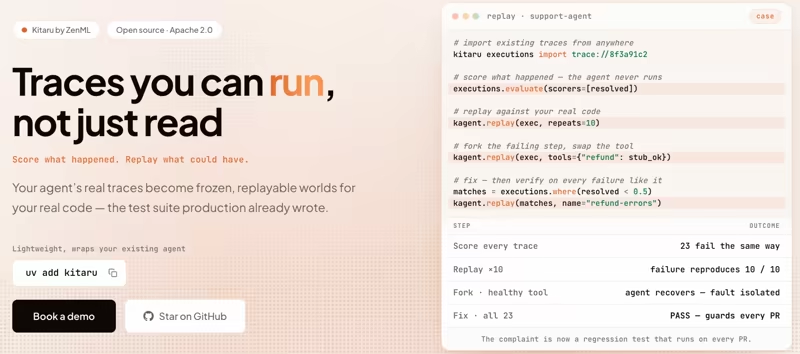
Kitaru, from ZenML, is an open-source runtime for durable Python agents. It is the best Inngest alternative if your unit of work is an agent run rather than an application event.
Kitaru sits underneath your existing orchestrator, wraps ordinary Python, and records the run as a series of checkpoints. You keep the loop in Python and add durable boundaries where they matter.
Where this pays off against Inngest is billing and shape. You are not charged per step by an external platform when you self-host, and you do not have to translate an emergent agent loop into named steps that a memoizer can understand.
Here are some features that made Kitaru a good Inngest alternative:
Feature 1. Checkpointing and Replay
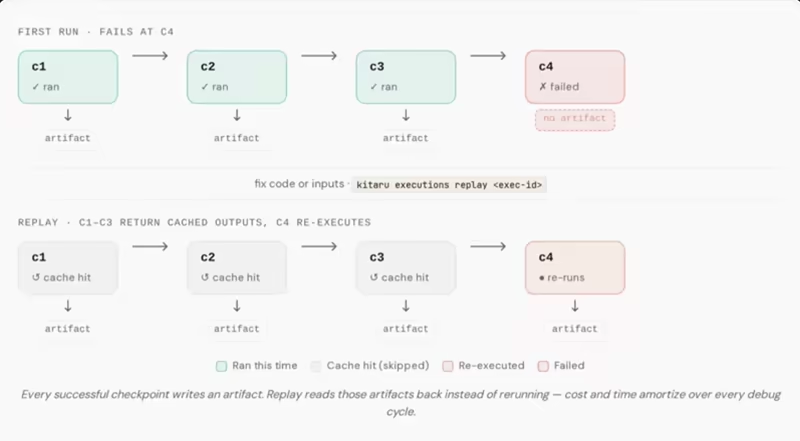
Kitaru marks durable boundaries with a @checkpoint decorator inside a @flow. Every checkpoint is a durable unit of work whose output is persisted automatically, and every model and tool call is recorded.
If a run fails halfway through, Kitaru can replay from a chosen checkpoint and read from earlier saved outputs instead of re-burning every model call before it. You can also swap the model, change a prompt, substitute a tool result, and compare the new path against the original.
The recorded run becomes a test case you can rerun rather than a read-only log. For anyone who has tried to reproduce a bad agent decision from last Tuesday, that difference is what separates guessing from testing.
Feature 2. Pause Without Holding Compute
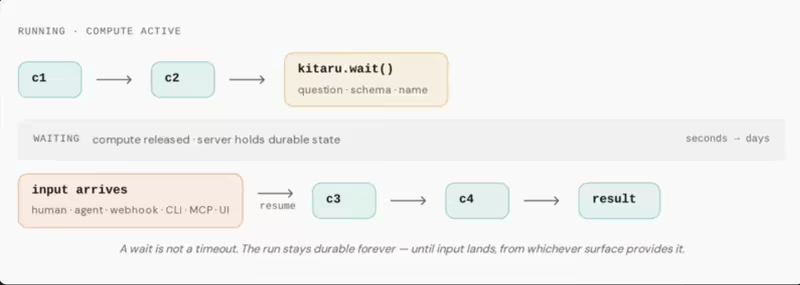
Kitaru provides a kitaru.wait() primitive so you can pause a flow until a human or another system provides input. Kitaru releases compute while waiting and restores the same execution later. This fits approval gates, delayed callbacks, and agent tasks that extend hours or days.
Inngest solves the same problem with step.waitForEvent() and sleeps, and both approaches avoid holding a process open.
The difference is where the pause lives. In Inngest, you resume through an event. In Kitaru, the pause stays within the agent’s control flow, so a three-day approval gate reads like the agent logic and not a separate event re-entry point.
Feature 3. Run Under the Agent Framework You Already Use
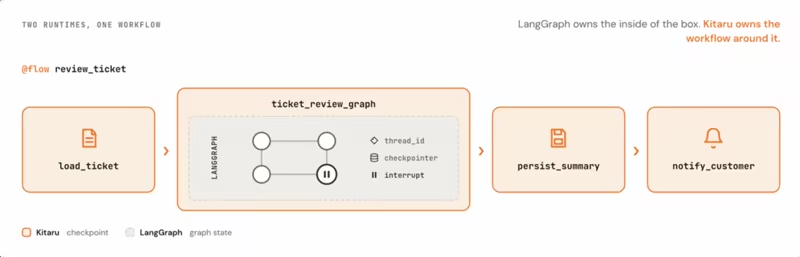
Kitaru ships adapters for common Python agent SDKs like PydanticAI, the OpenAI Agents SDK, the Claude Agent SDK, and Gemini. Google ADK, LangGraph, and raw Python are supported too.
That matters for adoption costs. Most of you evaluating an Inngest alternative already have working agent code, the question is: how much of the existing agent has to be rewritten before it can survive a crash?
Kitaru keeps those changes small. You add an adapter or checkpoint boundaries while retaining your SDK, prompts, tools, and core business logic.
Feature 4. Self-Hosted State, Artifacts, and Isolation
Kitaru is self-host-first. The open-source edition can run in your own VPC. You can point it at S3, GCS, or Azure Blob storage. No mandatory SaaS control plane between you and your agent’s data.
On the isolation criterion, Kitaru runs on infrastructure stacks that include Kubernetes, Vertex AI, SageMaker, and AzureML, so you separate workloads with the primitives your platform team already operates. Checkpoint outputs persist as typed, versioned artifacts with lineage. The observability story therefore covers both the execution and the data it produced.
Pricing
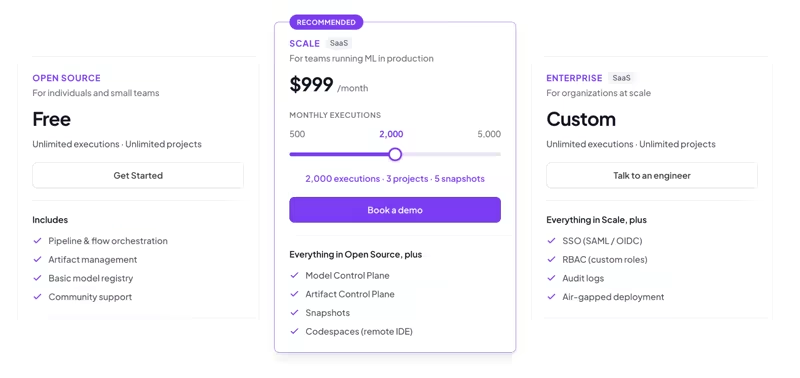
Kitaru is free and open-source under Apache 2.0. If you want the managed control plane on top, ZenML offers three plans that cover both ZenML for ML pipelines and Kitaru for durable agents:
- $399 per month for 500 monthly executions, with 1 project and 1 snapshot
- $999 per month for 2,000 monthly executions, with 3 projects and 5 snapshots
- $2,499 per month for 5,000 monthly executions, with 10 projects and 20 snapshots Beyond that, an Enterprise plan lifts the caps on executions and projects. You can talk to an engineer on our team if that is the tier you are sizing for.
Pros and Cons
Kitaru is at its best when the work is a long-running Python agent. It gives you checkpoints, replay with overrides, wait(), artifact lineage, and a dashboard for inspecting runs. You get all of that without a deterministic replay contract and without a per-step meter shaping your architecture.
The honest tradeoffs are maturity and scope. Kitaru is younger than Inngest, Temporal, or Camunda. It is also Python-only and focused on agents, not for every background job in your product. If you need a polyglot backend platform or a formal business process may be better served by another tool on this list.
Read more on: Kitaru vs Inngest
2. Temporal
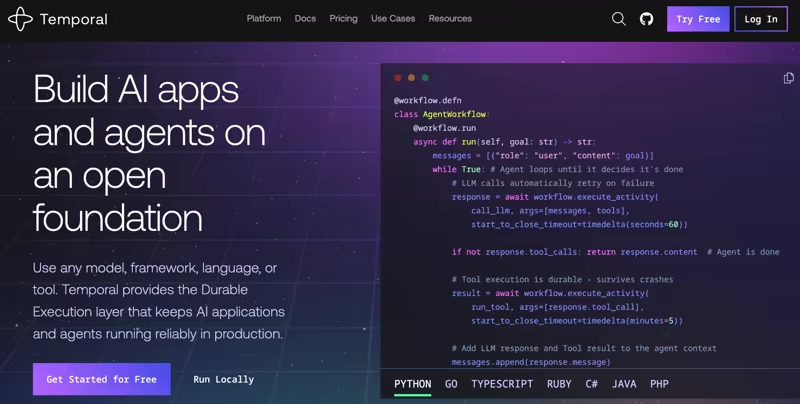
Temporal is the most established durable execution platform in this category. It’s built around workflows, activities, workers, and task queues, and suits backend workflows where recovery rules and duplicate prevention need tight control.
Features
- Search production runs with default fields such as Workflow ID, workflow type, execution status, task queue, and start or close time. Add custom Search Attributes such as customer ID, tenant ID, or order ID, then combine them in SQL-like List Filters to find specific workflow groups.
- Isolate workloads with Namespaces that separate workflow IDs, configuration, and resources. Traffic in one Namespace does not affect other Namespaces on the same service. You can pair them with task queues when you need tighter control over workload delegation.
- Prevent duplicates with Workflow ID Conflict and Reuse policies. You can reject the new request, return the existing run, or terminate and replace it. Reuse policies control whether a closed workflow ID can run again.
- Temporal records each workflow event, it can read and replay completed activity results after a failure or worker restart. This lets long-running workflows continue from their last recorded state instead of starting over.
Pricing
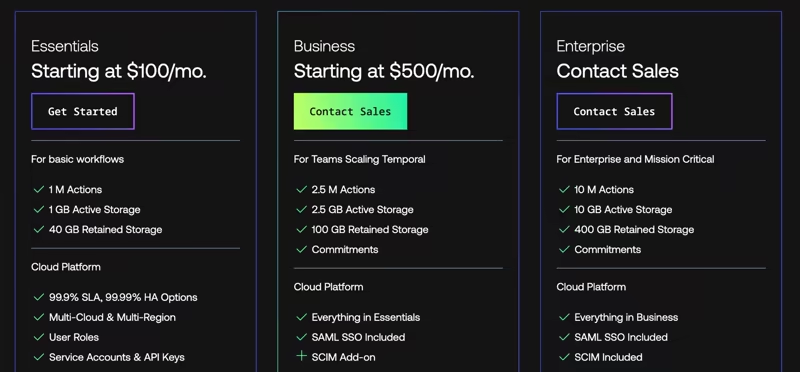
Temporal can be self-hosted for free. Temporal Cloud is consumption-based on actions and storage, with three paid tiers:
- Essentials: from $100 per month
- Business: from $500 per month
- Enterprise: custom pricing
Pros and Cons
On our evaluation, Temporal is the most complete tool here after Kitaru. It has tight control over run search, workload boundaries, and workflow identity. If you are replacing Inngest because you outgrew its observability, this is a good and direct upgrade.
The cost is its programming model. Workflow code must remain deterministic during replay, so LLM calls, APIs, and other non-deterministic work belong in activities. For an agent whose next tool call is decided by a model, it means restructuring the entire loop before run. Self-hosting is also an operational headache; you run a multi-service cluster and persistence layer.
Read more:
3. Trigger.dev
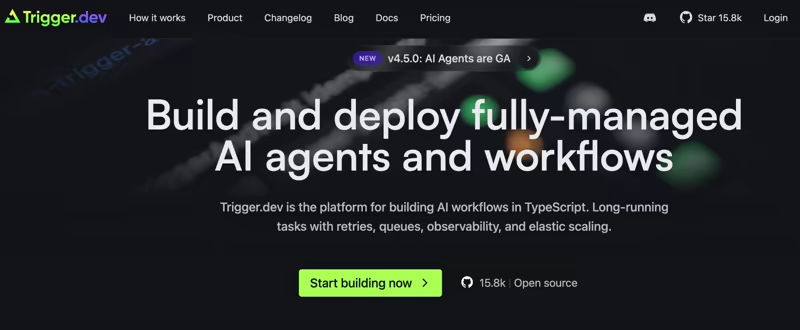
Trigger.dev is a TypeScript-first platform for long-running tasks, background jobs, and AI workflows. It is the closest like-for-like swap for Inngest if your team lives in TypeScript and your main complaint is cost or timeouts.
Features
- Prevent duplicate runs with idempotency keys that use run, attempt, and global scope. When the same key is repeated, Trigger.dev returns the existing run rather than starting another. By default, the key retention window is 30 days, though there’s an option to set different TTLs for each trigger.
- Create separate tenant queues with
concurrencyKey. Use a user ID or organization ID so each tenant has its own concurrency limit and a single busy customer does not consume all available slots. - Attach business context to runs with tags like customer IDs, project IDs, or environment names. You can filter those tags in the dashboard or through the SDK when tracing a specific customer or job.
- Pause and restore long-running tasks with built-in waitpoints and long waits. While a task waits for input, it releases its concurrency slot and does not incur compute charges for the idle period.
Pricing
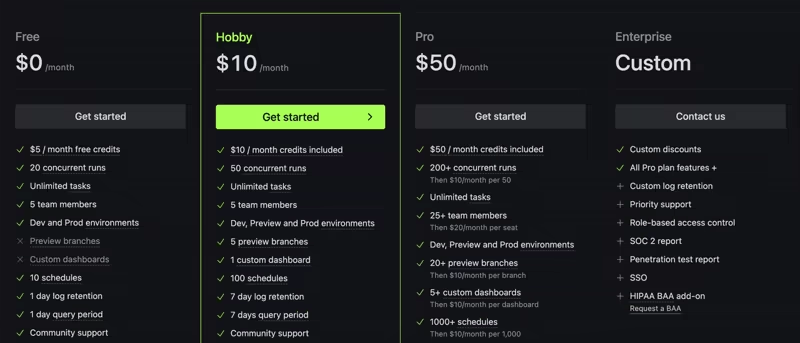
Trigger.dev uses a credits model plus per-second compute. Its Free plan includes $5 in monthly credits, 20 concurrent runs, and 5 team members. Apart from that, it has three paid plans:
- Hobby: $10 per month
- Pro: $50 per month
- Enterprise: custom pricing with SOC 2, RBAC, and priority support Note: Compute is billed per second of execution plus $0.000025 per run invocation.
Pros and Cons
Trigger.dev has a clear idempotency model and useful tenant queue controls better than any other tool on this list. The concurrencyKey parameter answers tenant fairness with a single option on the trigger. On the billing side, Trigger.dev does not charge for every internal step the way Inngest counts executions.
However, each task run started on managed workers carries an invocation fee, so child tasks still contribute to the bill. Because Trigger.dev is TypeScript-first, if your agents are built on PydanticAI or the OpenAI Agents SDK in Python, you will feel that mismatch every day.
4. Restate
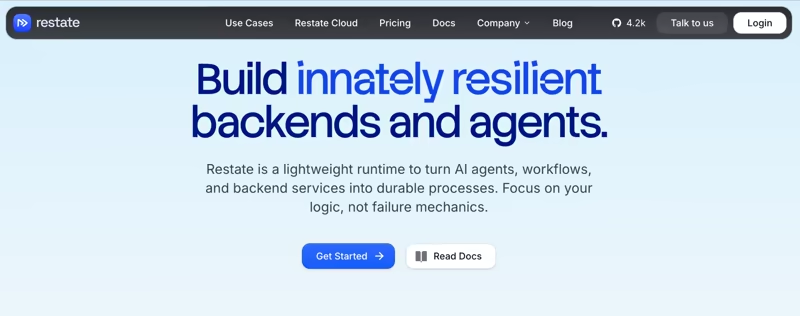
Restate is a lightweight, code-first runtime for durable services, workflows, and AI agents. It ships as a single binary. That makes it the least operationally demanding self-hosted option in this comparison.
Features
- Deduplicate requests with the
Idempotency-Keyheader. Restate stores completed responses for 24 hours by default and returns them when the same key is invoked again. Without an explicit key, controlled idempotent sharding protects only retries of the same in-flight request, not separate requests sent later. - Model agent sessions as Virtual Objects with a unique key and persistent state. Requests for the same key run one at a time, while different keys run in parallel. A session, customer, or task ID can serve as the key and create a natural boundary for concurrency and isolation.
- Resume durable actions after failures by recording service calls, timers, and agent steps as part of the execution history. When a worker crashes or restarts, Restate continues from saved progress instead of repeating the full workflow.
Pricing
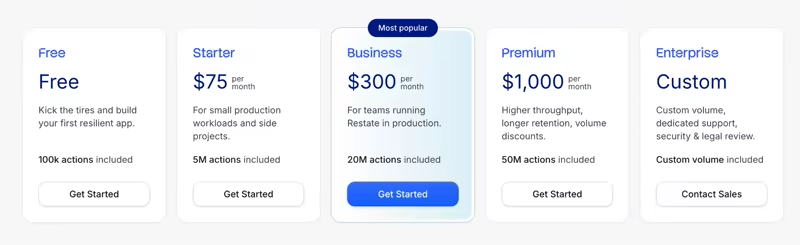
Restate is open source and self-hostable. Restate Cloud is a fully managed serverless offering with a free tier, and four paid plans:
- Starter: $75 per month
- Business: $300 per month
- Premium: $1000 per month
- Enterprise: Custom pricing
Pros and Cons
Restate is strong when your durable work lives close to backend services. Virtual Objects give Restate a clean answer to per-session state and concurrency, and the single binary is also easier to run than a large cluster. Restate also turns idempotency on by default, which most platforms leave to the developer.
The trade-off is the service model. Your team must adopt Restate’s service and virtual object model, and that is a real shift if your agents are plain Python loops. Idempotency keys work, but it does not deduplicate across separate requests.
You may want to read next: Kitaru vs Restate
5. Hatchet
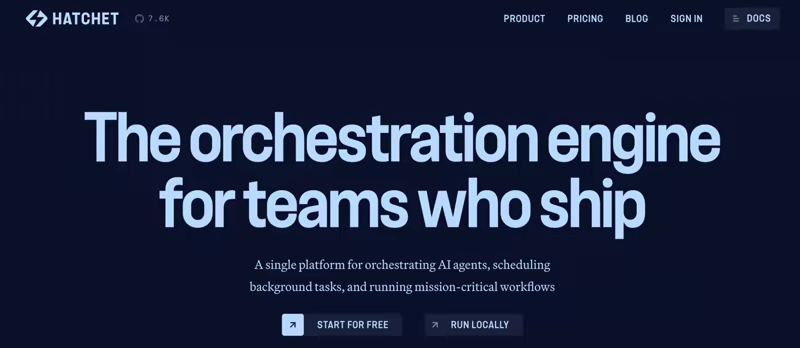
Hatchet is an open-source task queue with durable execution and strong multi-tenant controls. It gives you control over how work is queued, retried, and distributed across tenants. Of everything on this list, it’s the best fit here when one noisy customer can crowd out everyone else.
Features
- Control fairness with CEL-based concurrency keys built from workflow inputs or metadata. For example, you can use
input.user_id + ':' + additional_metadata.foobarto group related runs, and then set a limit to it. When the key represents a tenant, every customer gets its own quota, so one busy account cannot consume all available capacity. - Distribute queued work fairly among concurrency groups with group-based queue strategies, like round-robin, that keep rotating work across groups so the busiest key doesn’t need to take every slot.
- Resume durable tasks after interruptions by recording progress in a durable event log. Tasks can pause for a timer, an external event, or a child task, then continue from the last saved point instead of restarting the full workflow.
- Tune throughput separately for heavy and light work with rate limits and task slot cost, expensive runs can consume more slots than small ones. This helps the queue reflect the real cost of each workload.
Pricing
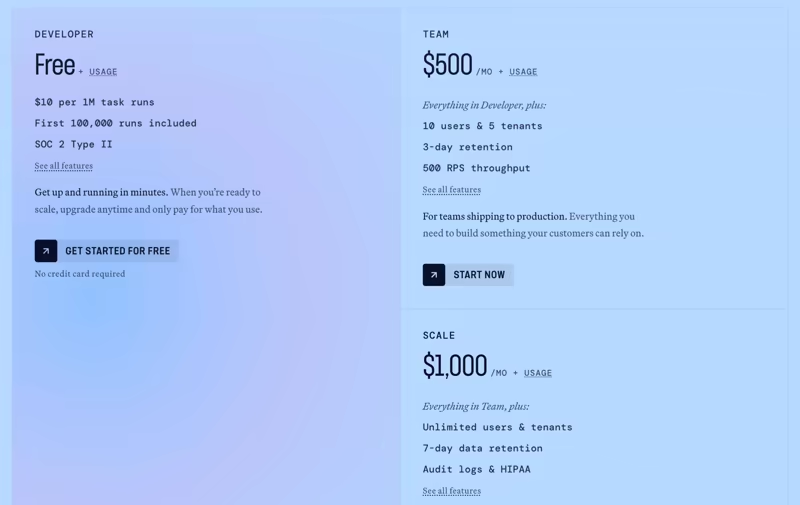
Hatchet is open-source and free to self-host. Hatchet Cloud also provides a free developer plan with 100,000 task runs included and $10 per 1M runs after. Other than that, Hatchet Cloud has three paid plans:
- Team: $500 per month
- Scale: $1,000 per month
- Enterprise: Custom pricing
Pros and Cons
Hatchet gives multi-tenant teams fine control over queues and capacity. Concurrency keys plus round-robin dispatch give you multi-tenant fairness as a first-class configuration. The queue-based model also eases migration from Celery or BullMQ.
However, the entry point is high. Hatchet’s team plan provides three-day data retention, which is short if you are debugging intermittent agent failures. The $500 entry point for paid cloud is also the highest on this list. Besides, its durable tasks expect work to fit checkpoints and queues, so it is not a free-form Python agent loop either.
Related read: Kitaru vs Hatchet
6. DBOS
DBOS is a durable execution library that stores workflow state in Postgres. It is a good Inngest alternative when you already trust Postgres and would rather not add another orchestration service to your architecture.
Features
- Store workflow state in Postgres by saving inputs, step outputs, schedules, and queue data in the system database. You get a single source of truth for each run, and your team can inspect workflow records with tools they already use for Postgres.
- Recover through step-level memoization. On recovery, DBOS skips steps that are already finished and reruns only the incomplete work. Since unfinished steps may run again, side effects like payments or emails should use idempotent code.
- Manage workload volume with durable queues that keep jobs in Postgres until workers are ready to process them. You can set concurrency and rate limits at which workflows are dequeued, then use partitioned queues to apply separate limits for each tenant, customer, or workload type.
- Observe and manage runs in Conductor, a console that shows active workflows, completed runs, and queued tasks. Plus, a Prometheus-compatible metrics endpoint for Datadog or Grafana.
Pricing
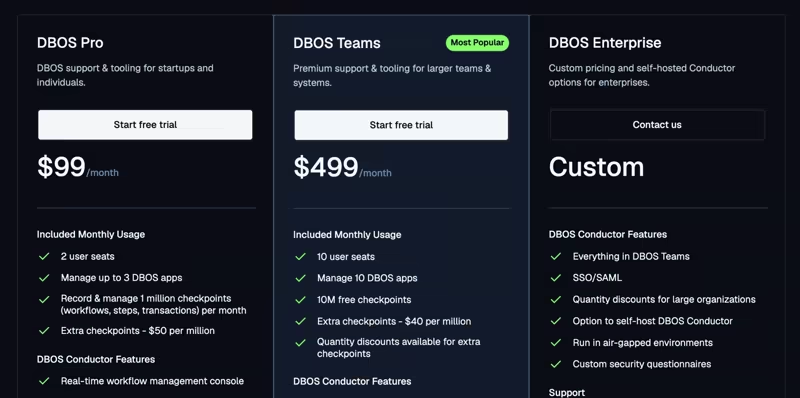
DBOS Transact is free and open source for TypeScript, Python, Go, and Java. Paid tooling and support plans are also available:
- Pro: $99 per month for 2 seats
- Teams: $499 per month for 10 seats
- Enterprise: Custom pricing
Pros and Cons
The Postgres-first model is the appeal. You get durability, a queryable state store, and a familiar operational surface without running a separate cluster. The Prometheus endpoint also means DBOS binds into monitoring you already have. For a backend team, that is one less system to operate.
If your agent produces large artifacts, model outputs, and sandboxed execution results, routing all of it through Postgres is not the natural fit. Checkpoint pricing is another concern for agent loops. A chatty agent can therefore recreate the same per-step economics that pushed you away from Inngest. At the agent scale, checkpoint volume becomes a real cost line item.
Also read: Kitaru vs DBOS
7. LangGraph

LangGraph is LangChain’s open-source framework that takes a graph-based approach for building long-running, stateful AI agents. You define nodes, edges, and state transitions, then add persistence through checkpoints.
Features
- Save thread state after each step with checkpointers that record the graph’s current state. Those snapshots let you resume after an interruption, recover from a failure, and run human-in-the-loop approval flows.
- Use time travel to inspect previous state snapshots and restart from an earlier checkpoint. You can replay the saved state as is or change selected values before continuing. This is the closest thing to Kitaru’s replay, though it operates on graph state and not on recorded model and tool calls with overrides.
- Organize agent execution through assistants, threads, and runs. Assistants store the agent’s configuration, threads keep the conversation and state, and the run executes work against that thread. Together, they separate setup, memory, and execution into clear parts.
Pricing
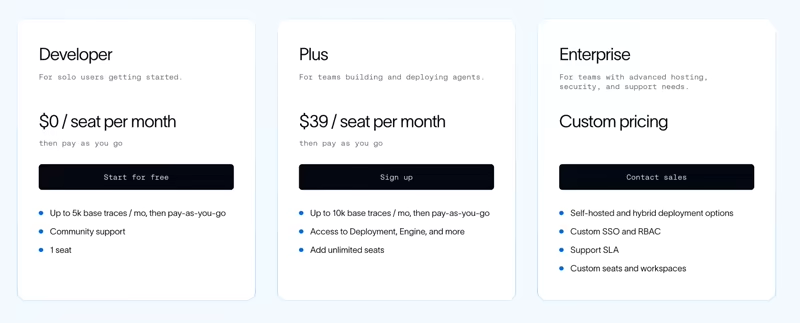
LangChain offers a free developer plan with up to 5k base traces per month. Then pricing is seat-based plus usage:
- Plus: $39 per seat per month
- Enterprise: Custom Pricing
Pros and Cons
If your agents are already LangGraph graphs, deploying them here takes no rewrite. LangSmith also gives you tracing and failure analysis over the same runs. The four deployment topologies give you a genuine self-hosting option, which not every managed agent platform offers.
Two things to weigh. First, production durability depends on a persistent checkpointer like PostgresSaver or SqliteSaver. The in-memory MemorySaver loses everything on restart. Second, self-hosted and hybrid deployments are Enterprise-only, so the teams with the strictest data requirements face the highest price step.
Read more on LangGraph:
8. Camunda
Camunda is a process orchestration platform built around Business Process Model and Notation (BPMN), Zeebe job workers, and human tasks. It is good as an Inngest alternative when the workflow extends to people, systems, and agents, and when someone outside engineering needs to read the process.
Features
- Inspect running work in Camunda Operate. You can view running and completed process instances, resolve incidents, update variables, and retry or cancel instances in batch without restarting the process.
- Model approvals and assigned work as native BPMN steps instead of building separate callbacks around the workflow engine. Camunda can route tasks to specific users or groups, track their status, and continue the process after someone completes the required action.
- Execute external work with Zeebe job workers, which keep your business logic in your own services while the process waits at the task boundary. Camunda keeps the process state and sends work to the appropriate worker, while your application handles tasks like API calls, database updates, or agent actions.
- Separate customer workloads with tenant IDs attached to process definitions and instances. This lets SaaS teams run several customers on one Camunda installation while keeping process data, configuration, and access logically separated.
Pricing
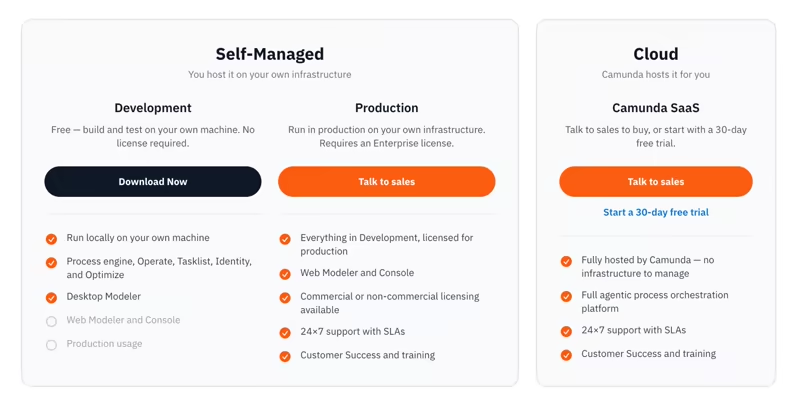
Camunda separates development from production. Self-Managed offers a free tier for local development, while production requires an Enterprise license.
On SaaS, you get a 30-day trial of the full platform, after which you can keep a free account limited to BPMN and DMN modeling or move to Enterprise.
Pros and Cons
Camunda is strongest when engineers, operations teams, and business owners must read the same process. Approvals, audit trails, compliance review, and stakeholder visibility are all first-class here. Besides, Operate’s incident handling and batch operations are good operational tooling.
The mismatch is the modeling layer. If the real work is a Python loop with frequent tool calls, it won’t map neatly to BPMN. Camunda’s free tier also does not cover production orchestration. Camunda can model an approval that lasts three weeks. It does not give you agent replay with changed prompts or model outputs.
Also read: Our Camunda alternatives breakdown.
The best Inngest alternatives for durable execution and AI agents
The right Inngest alternative depends on the shape of the work and the reason you are leaving.
- Choose Kitaru for long-lived Python agents. It adds checkpoints and replay, plus waits and self-hosted state without changing the agent framework.
- Choose Temporal when workflow search, isolation, and identity controls matter more than a light programming model.
- Choose Trigger.dev when your team writes TypeScript and wants a close replacement with clear idempotency and queue controls.
The case for switching gets stronger when the agent loop becomes the product. At that point, you need to find one failed run among millions.
Kitaru makes that easy by keeping the agent loop in Python while adding the runtime pieces production agents need. You can save progress, recover failed runs, pause for input, inspect each checkpoint, and replay a run with changes.
Even better, you can host our open-source edition for free, and then move to the paid control plane when the team needs shared operations and governance.
Book a demo with one of our engineers to see how Kitaru fits your agent stack.