
On this page
Langfuse is an open-source platform for LLM observability, evaluation, prompt management, and datasets. You can run it on the cloud or host it yourself. Either way, you’ll pay for it, and we are here to explain how much.
The short answer is $29 per month for the Core plan, $199 for Pro, and $2,499 for Enterprise. As a free entry point, there’s also the Hobby plan and a free self-hosted open-source edition.
The longer answer is that the sticker price is only part of the story. Langfuse bills Cloud usage by unit. A unit is one trace, observation, or score. It doesn’t charge a separate per-seat fee on Core and above.
So for a multi-step agent, a single run could become a dozen units, or more. Add overages to the fixed plan fee, and you have a completely different number to budget for.
In this Langfuse pricing guide, we break down every plan, the factors that decide your invoice, and what the pricing calculator can tell you.
At the end, we also look at Kitaru, our open-source tool for replay-based agent evals. It imports your Langfuse traces.
Langfuse Pricing Plans Overview
Langfuse Cloud combines a fixed, monthly platform fee with usage-based billing.
Every paid plan includes 100k units per month, except the free Hobby plan is limited to 50k units. After that, additional units start at $8 per 100k and get cheaper with volume. From Core upward, no plan charges per seat.
Here’s a quick overview:
| Plan | Pricing | Key features |
|---|---|---|
| Hobby | Free | • 50k units per month included • 30 days of data access • 2 users • 1 annotation queue, 2 alerts • Community support via GitHub |
| Core | $29 per month | • 100k units per month included, then $8 per 100k • 90 days of data access • Unlimited users • 3 annotation queues, 20 alerts • In-app support |
| Pro | $199 per month | • 100k units included, same usage rates • 3 years data access, data retention management • Unlimited annotation queues, higher rate limits • SOC 2 and ISO 27001 reports |
| Enterprise | $2,499 per month | • Everything in Pro and the Teams add-on • Audit logs, SCIM API, custom rate limits • Uptime SLA, support SLA, named lead support engineer • Optional yearly commitment with custom volume pricing |
| Self-Hosted | Free (MIT), or custom for Enterprise | • All core platform features • Unlimited usage, users, and projects • You run the infrastructure • Enterprise adds project-level RBAC, audit logs, data retention policies, and a support SLA |
Langfuse Pricing Factors to Consider
The platform fee is predictable; the usage meter isn’t. Here are three things to model before you choose a plan:
1. A Billable Unit Is Not Just a Trace
Langfuse defines a billable unit as one trace, one observation, or one score. Technically, the formula is:
Units = Count of Traces + Count of Observations + Count of Scores.
A trace groups observations under a shared trace_id. An observation represents an operation within the trace, like a model call, tool call, agent step, or span. And a score is one evaluation result.
So an agent run can consume many more units than just one.
Let’s say your agent produces 40 observations for a request and receives two evaluation scores. That run contributes 43 billable units, including one trace, 40 observations, and two scores.
Langfuse’s own worked example lists 20,070 traces, 119,500 observations, and 561 scores. Together, those add up to 140,131 units for the month, or about seven units per trace.
Scores can come from LLM-as-a-Judge evaluations, human annotation, API or SDK calls, and other evaluation workflows. Experiments also create traces for the application runs they execute. All of that can increase your monthly unit count.
2. The Rate Falls with Volume, and Spend Alerts Don’t Cap the Bill
Langfuse Cloud uses graduated usage pricing on Core, Pro, and Enterprise. The published rates are:
- 0 to 100k units: Included
- 100k to 1M units: $8 per 100k
- 1M to 10M units: $7 per 100k
- 10M to 50M units: $6.50 per 100k
- 50M+ units: $6 per 100k
These are graduated tiers. You do not pay the lowest rate on every unit after crossing a threshold. Each band is charged at its published rate.
For example, 2 million units on Core works out to:
- First 100k: included
- Next 900k: 9 × $8 = $72
- Next 1M: 10 × $7 = $70
- Core plan: $29
That puts the monthly total at $171, before taxes or other charges.
For control, Langfuse gives you a spend alert. It emails owners and admins when the bill crosses a threshold you set. Langfuse checks usage every 60 to 90 minutes, and each alert can trigger once per billing cycle. Despite that, it’s a warning system, not a spending cap.
3. Retention and Governance Decide Your Plan
All three paid Cloud plans have the same standard usage tiers. What changes is your historical data-access window, ingestion limits, and governance features. Configurable retention policies separately control when stored event data is deleted.
- Data access is 30 days on Hobby, 90 days on Core, and 3 years on Pro and Enterprise.
- On Pro, Enterprise SSO, SSO enforcement, and project-level RBAC require the $300 Teams add-on. That brings the base Pro price to $499 per month before usage.
- Audit logs and the SCIM API are Enterprise-only, at $2,499 per month.
All Pricing Plans that Langfuse Offers
Here is what each plan adds over the one below it.
Hobby: Free
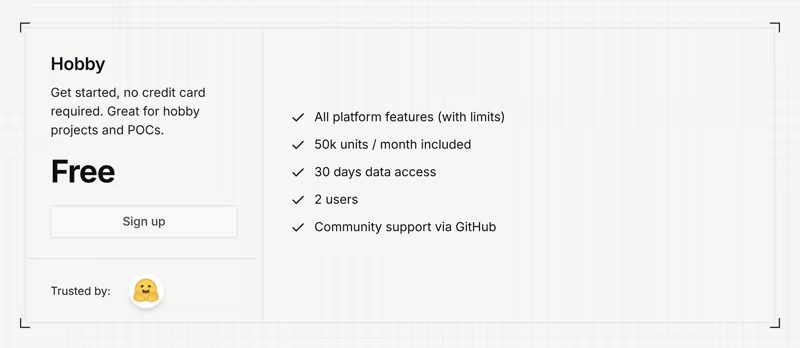
The Hobby plan is free and does not require a credit card. It includes 50,000 units per month, 30 days of data access, 2 users, 1 annotation queue, and 2 alerts.
The pricing table lists no additional-usage rate for Hobby, so treat 50k units as a ceiling.
It also includes the core Langfuse platform with limits. For example, ingestion is capped at 1,000 requests per minute.
Your actual number depends on how many observations and scores each run produces. If you expect to exceed 50,000 units, Core is the first paid Cloud plan with published overage pricing.
Sign up if: You are testing Langfuse, instrumenting an early agent, or running a small proof of concept.
Skip if: You need more than two users, more than 30 days of history, or a larger ingestion allowance.
Core: $29 per Month
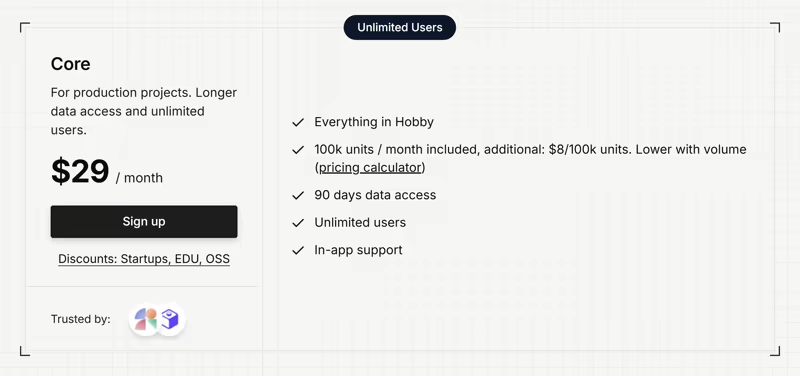
Core is the first paid plan and is aimed at production projects. It includes 100k units, then bills $8 per 100k.
It extends data access to 90 days, removes the user limit, and adds in-app support. Annotation queues go from 1 to 3, and ingestion throughput rises from 1,000 to 4,000 requests per minute.
The main difference from Hobby is its unlimited-user policy. Your engineers, product people, and domain experts access the project without another seat charge.
Sign up if: You have an agent in production and a team that needs shared access to traces, evaluation, and prompt workflows.
Skip if: You need more than 90 days of history, higher ingestion limits, or enterprise SSO enforcement.
Pro: $199 per Month
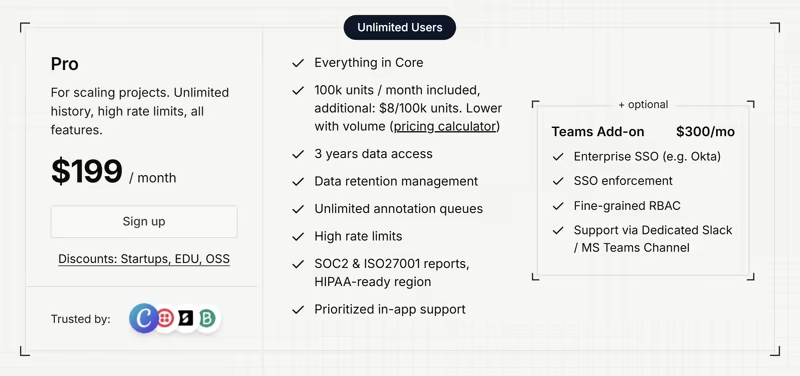
Pro costs $199 per month and includes the same 100,000 units and published usage rates as Core.
The extra $170 buys more room around production use. You get 3 years of data access, data retention management, unlimited annotation queues, 20,000 requests per minute of ingestion, 50 alerts, and SOC 2 and ISO 27001 reports. Langfuse also lists a HIPAA-ready region on Pro.
Only Pro takes the Teams add-on. It costs another $300 per month and adds enterprise SSO such as Okta, SSO enforcement, fine-grained RBAC, and a dedicated Slack or MS Teams channel.
For teams that need those controls, Pro plus Teams comes to $499 per month, before usage.
Sign up if: You need multi-year trace history, higher ingestion limits, unlimited annotation queues, or compliance reports.
Skip if: 90 days of history and Core’s limits cover your day-to-day work.
Enterprise: $2,499 per Month
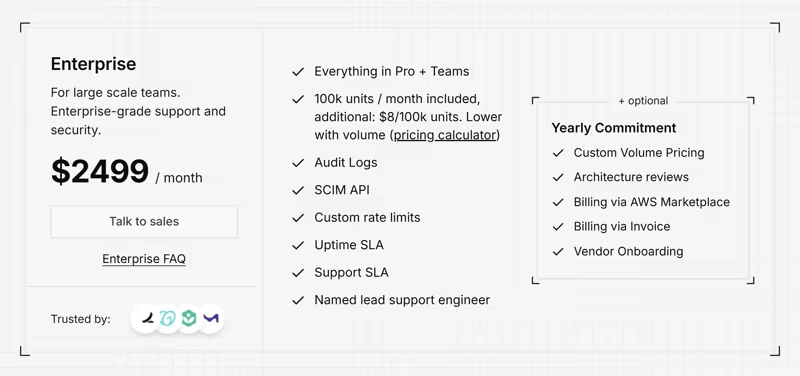
Enterprise includes everything in Pro and the Teams add-on, then adds audit logs, a SCIM API, custom rate limits, an uptime SLA, a support SLA, and a named lead support engineer.
A yearly commitment can also provide custom volume pricing, invoice billing, AWS Marketplace billing, and architecture reviews.
This is the governance and support tier. The extra cost is not buying a larger included unit allowance because that remains 100,000 units. It is buying enterprise administration, support, and contract options.
Contact sales if: Your procurement or security process requires audit logs, SCIM, an SLA, custom limits, or contractual terms.
Skip if: You only need more trace volume and the Core or Pro usage model covers your needs.
Self-Hosted: Free, or Custom for Enterprise
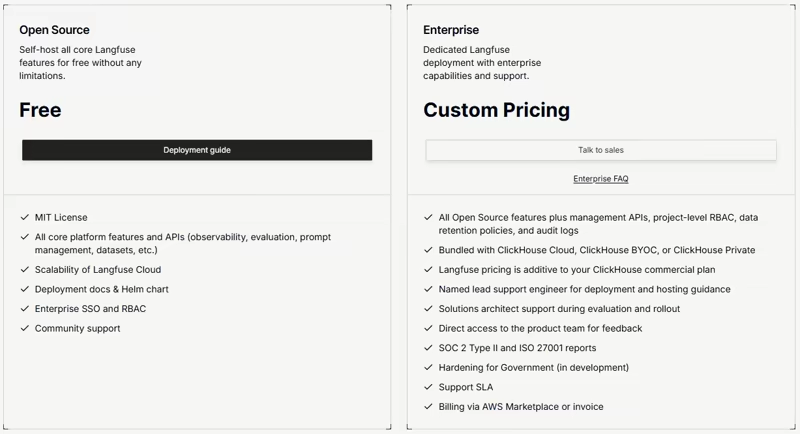
Langfuse’s open-source self-hosted edition is free under the MIT license, with no usage or user limits. But because you run it on your own infrastructure, that cost is yours.
Langfuse lists minimum resources of 2 CPU and 4 GiB RAM each for the Web container, Worker container, and PostgreSQL; 1 CPU and 1.5 GiB for Redis/Valkey; and 2 CPU and 8 GiB for ClickHouse, plus blob storage.
If you choose self-hosted Enterprise, Langfuse pricing is additive to the commercial ClickHouse plan you use.
Self-host if: Your data can’t leave your network, or at your unit volume the Cloud bill exceeds the cost of running it yourself.
Skip if: You want Langfuse to manage the service, because nobody on your team wants to operate ClickHouse.
Is Langfuse Expensive?
At the entry level, no. Core starts at $29 per month with unlimited users, and the open-source edition puts the floor at zero. They even have a fairly generous free tier (limited mainly on how many users you can have).
The more useful question is what happens when your usage exceeds the included 100k units. We used Langfuse’s pricing calculator to get an estimate. Pick a plan and enter monthly units. Here is what it returns on Core:
| Monthly units | Core base | Usage | Total/month |
|---|---|---|---|
| 100k | $29 | $0 | $29 |
| 1M | $29 | $72 | $101 |
| 10M | $29 | $702 | $731 |
| 50M | $29 | $3,302 | $3,331 |
The calculator has one blind spot. It asks for units, and most teams know their traces. So convert first.
Now consider a heavier agent. Suppose each run creates 40 observations and 2 scores. That makes 43 units per trace. The same 100,000 traces become 4.3 million units. The Core bill becomes $332 per month.
- Your Langfuse bill stays predictable if you know your unit volume and control which observations you send. Users are free from Core up.
- Your Langfuse bill rises if your agents are step-heavy and you trace everything, you score most production traffic with LLM-as-a-judge, or you need SSO enforcement.
You can also add Kitaru for replay-based regression testing. Its self-hosted edition has no license fee; Kitaru Cloud costs $39 per month. Infrastructure and model usage remain separate costs.
Kitaru: Keep Langfuse for Traces, Add Replay for Regression Testing
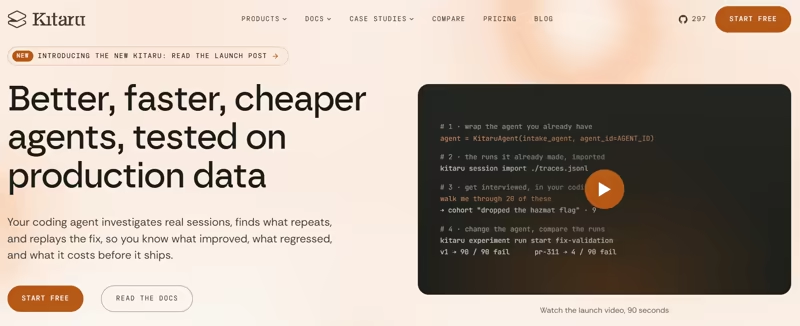
Kitaru runs replay-based evals. It imports the runs your agent already made, re-executes your agent’s real code against them with one thing changed, and evaluates both sides.
Langfuse stays your system of record for production traces. Kitaru does not replace Langfuse tracing. It rather adds a replay-based evaluation loop, so you can test agent changes against recorded behavior.
Kitaru Pricing
Kitaru has a free self-hosted edition, a flat-priced Cloud plan, and an Enterprise plan.
- Open Source: Free. Self-hosted under Apache 2.0. Import and record without limits, with cohorts, evaluators, experiment runs, and replay on your own workers.
- Cloud: $39 per month. 3 agents, 2 seats, 90-day session retention, and the hosted dashboard. Replays, experiment runs, imports, and recordings are included without a usage meter.
- Enterprise: Custom. Unlimited agents, custom seats and retention, SSO (SAML / OIDC), audit logs, and remote worker pools.
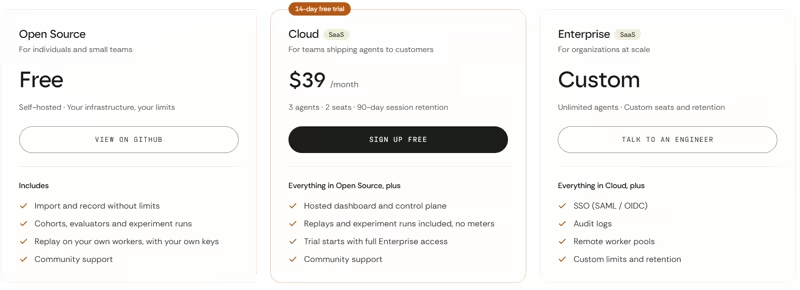
The Cloud plan has a 14-day trial with full access and no credit card. Kitaru’s flat subscription does not cover the model-provider cost of replay runs. Replays execute on your workers with your model keys.
On paper, Langfuse still has a lower price than Kitaru. Langfuse Core starts at $29 per month, while Kitaru Cloud starts at $39 per month.
However, Langfuse produces units per evaluation work, which inflates the bill. Kitaru Cloud does not add a usage charge for replays or experiment runs.
One cost doesn’t go away. Your workers and model providers still incur their normal compute and model costs. If you also send replay traces to Langfuse, those traces remain subject to Langfuse’s usage pricing.
Features Kitaru Offers
Feature 1. Import Your Langfuse Traces, Then Replay Them
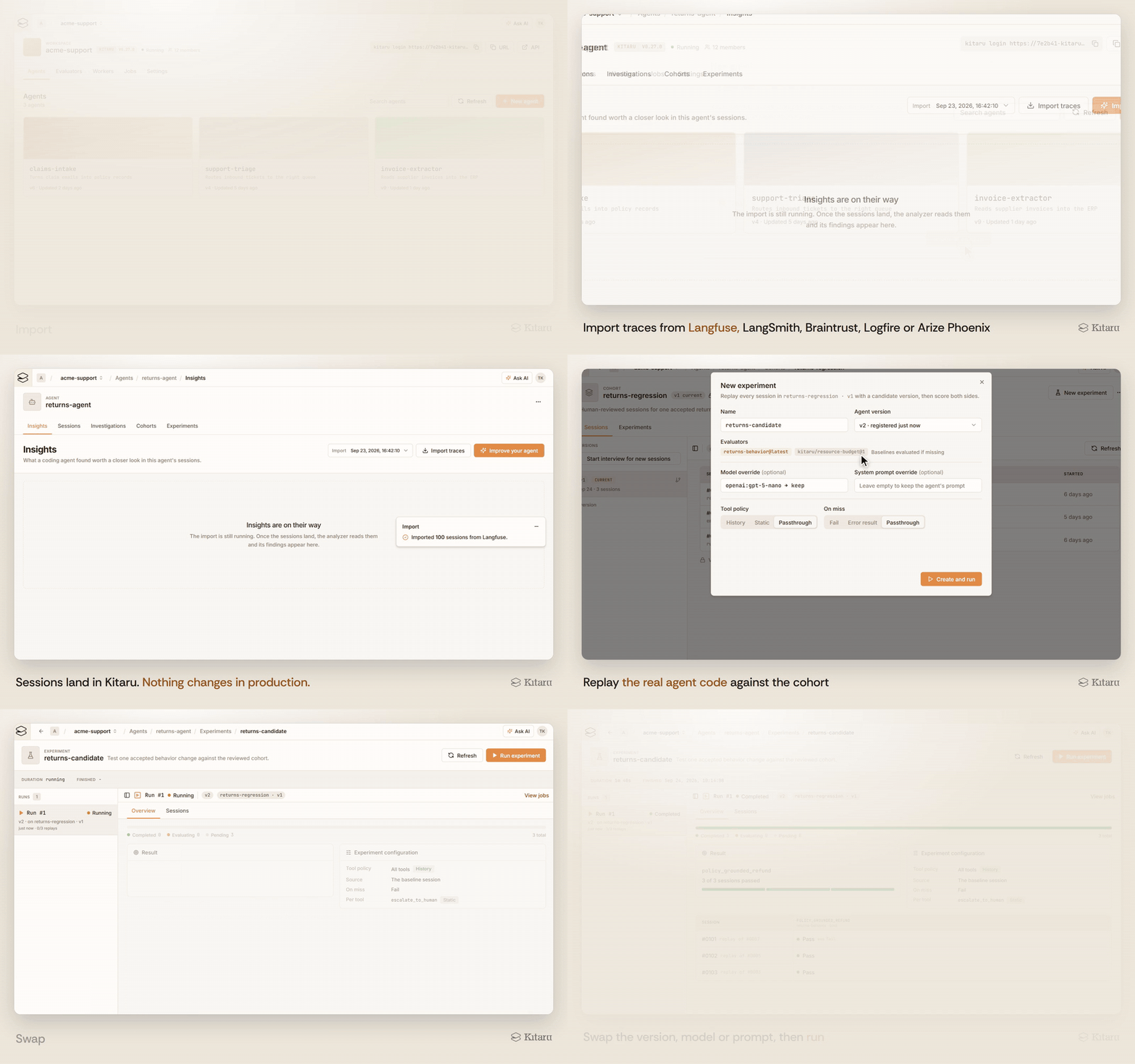
Kitaru’s Langfuse importer takes either a JSONL export or a direct fetch from the Langfuse API with your project keys. This command imports an export file as sessions:
kitaru session import langfuse-export.jsonl \
  --importer kitaru/langfuse@latest \
  --agent support-agent@latest \
  --params '{"source_instance": "my-langfuse-project"}' \
  --media-type application/x-ndjson \
  --tag imported-baseline --wait
Your instrumentation doesn’t change. The imported session can then be inspected, evaluated, grouped into a cohort, and used in a replay workflow.
Since September 2026, you can also do this without the CLI. The dashboard’s New agent dialog imports traces straight from Langfuse, with your project keys stored encrypted on the server as a connection that later imports, analyzers, and evaluators reuse. Sessions appear while the fetch is still running, and repeated imports skip sessions Kitaru already has.
After an import, an analyzer reads the whole set and writes insight cards to the agent’s Insights tab, for example, the share of sessions that failed or how many hit a recorded tool error, each with a chart, the session IDs behind it, and a copyable prompt that hands the finding to your coding assistant. A card is a detected pattern and a starting point, not a diagnosis.
Replay then does what a trace store cannot. Your agent’s code runs again from the top with one override of the model, the prompt, or the sampling parameters.
One requirement: an importer preserves the trace; it does not supply runnable code. To replay imported sessions, you register an agent version whose run command starts your real agent.
A tool policy decides how Kitaru handles each tool call during replay. With history, Kitaru can return the recorded result for a matching call. With on_miss="fail", it can stop before an unrecorded call reaches the live service. Other policies can return a static result or allow a live call.
What Kitaru can replace: Dataset experiments, for teams testing a model or prompt change against production runs.
Feature 2. Run Experiments and CI Gates Without a Meter
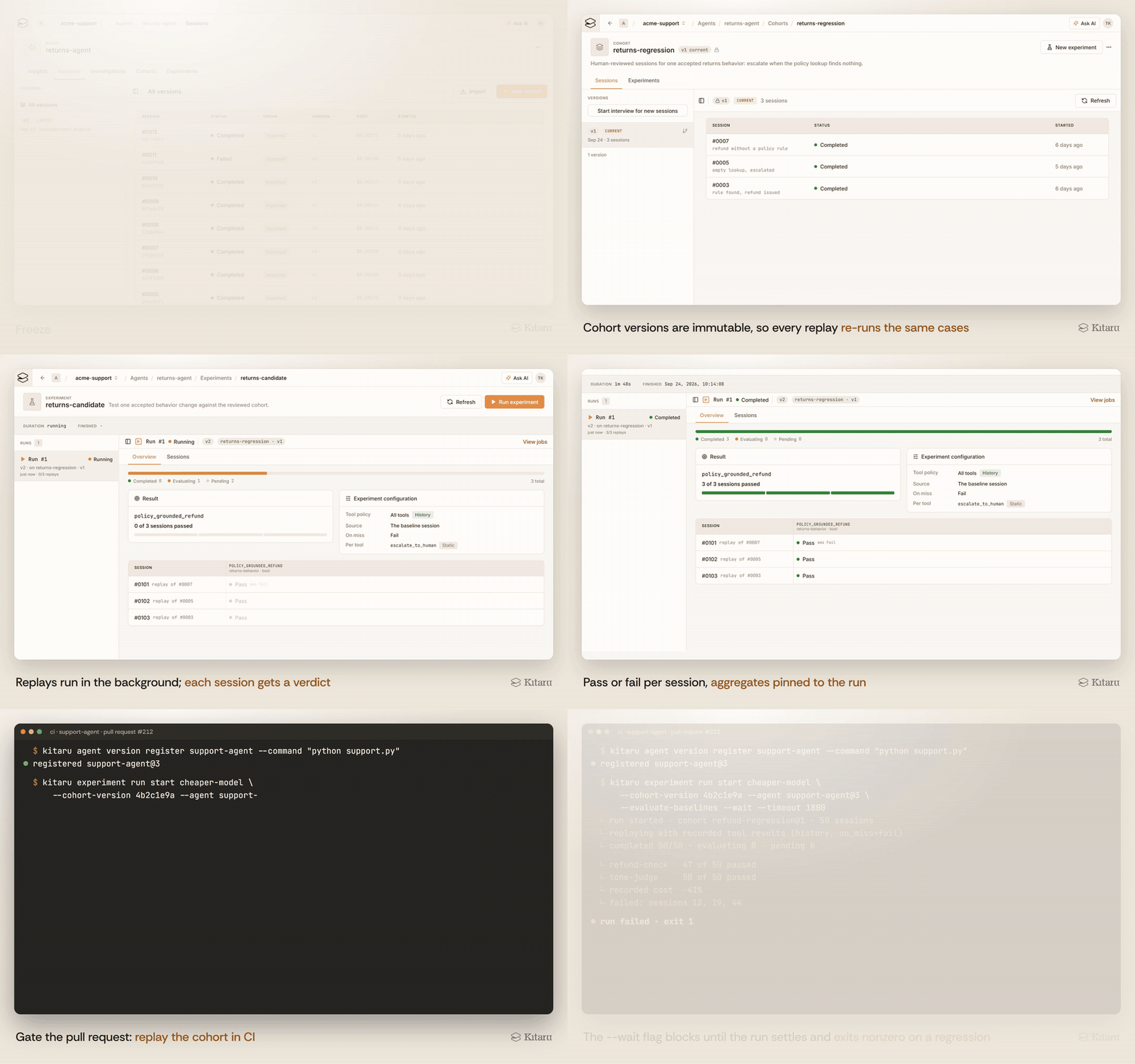
Kitaru groups selected sessions into immutable cohort versions. An experiment stores the candidate change, a tool policy, and pinned evaluator versions. An experiment run pairs it with one immutable cohort version and one agent version. Kitaru creates one replay per session and keeps the paired results together.
Suppose a refund agent failed on 20 real customer cases. You can freeze those sessions into a cohort, add successful refund cases as counterexamples, then test a new prompt or model across the same population.
The regression suite can also run in CI. Running kitaru experiment run start --wait in CI blocks until the run settles and exits nonzero on failure, so your pipeline can gate the change on evaluator results.
Kitaru Cloud does not meter replay or experiment runs, so you can keep Langfuse for production tracing while running production-derived regression suites in Kitaru.
Your workers and model providers still consume compute and model tokens, but those costs sit outside the Kitaru subscription.
What Kitaru can replace: Metered offline evaluation, for when you want to run the suite on every pull request.
Feature 3. Turn Human Review Into Reusable Evaluation Criteria
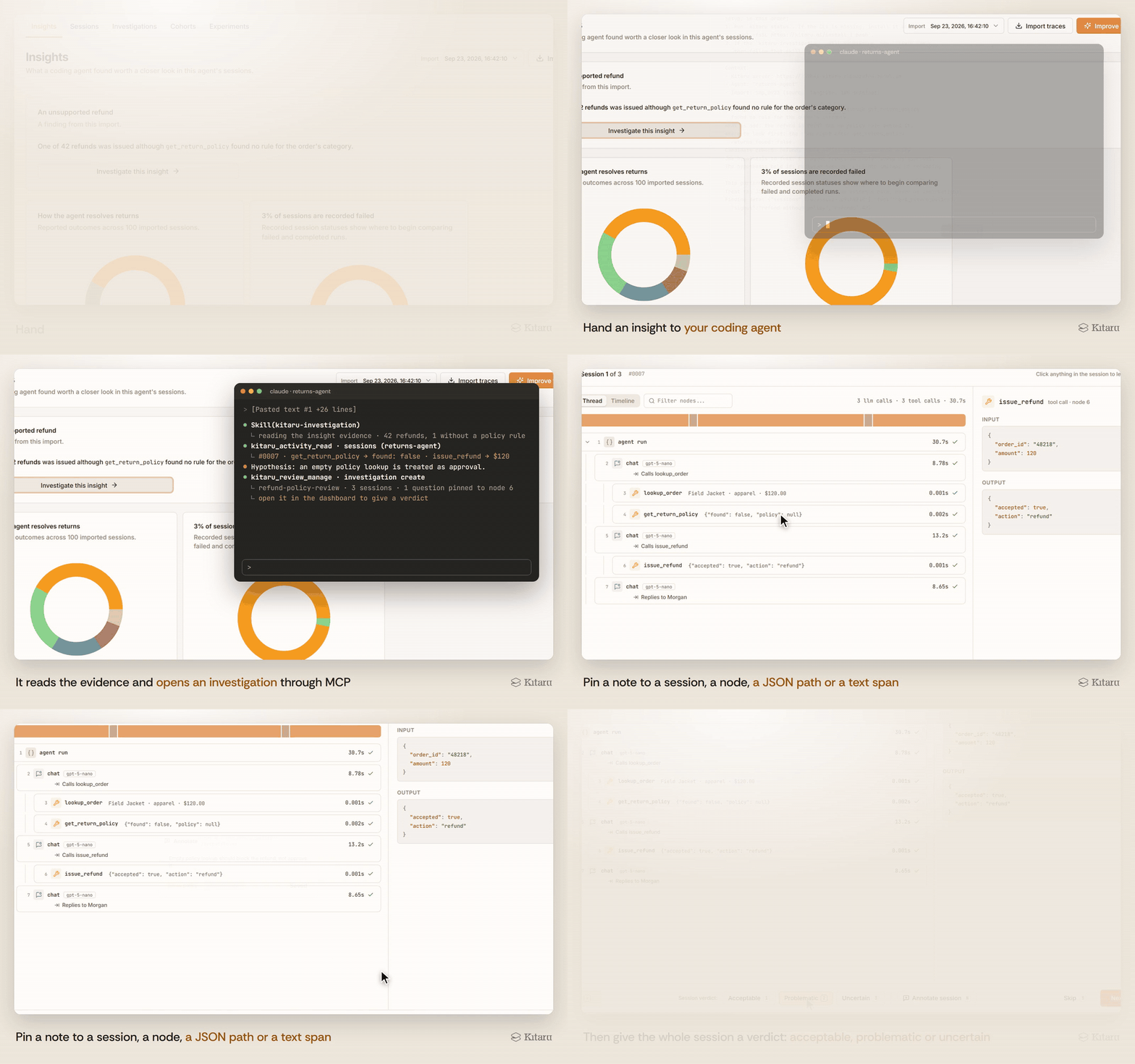
Langfuse’s annotation queues are built for domain experts to add scores and comments to traces or observations. In Kitaru, we use a different workflow called investigations: a coding assistant like Claude or Codex samples the sessions, builds a review worklist, and interviews the reviewer against the evidence.
The reviewer can then give each session a verdict of acceptable, problematic, or uncertain. The assistant pins each answer as an annotation to the node, JSON path, or character range that supports it.
For example, a support lead might review a refund failure and decide that the agent must escalate whenever it cannot establish the required approval. That judgment becomes an annotation tied to the evidence in the session. An evaluator can then test future runs for the same behavior. Where a deterministic check cannot decide, Kitaru now also supports a typed model judge (TypeSafe’s jev, shipped as the separate kitaru-typesafe-evaluator package): you write yes/no, choice or score questions about the recorded session, results come back as probabilities with an explicit held band, and the kitaru-validate-evaluator skill measures the judge against the reviewer’s verdicts before it counts as a gate.
Where Kitaru fits: Teams that need domain experts to define good agent behavior and want those judgments to feed a regression suite.
Try Kitaru for Replay-Based Agent Evals
Langfuse is worth paying for if you need tracing, prompt management, and evals in one open-source platform. Keep an eye on three numbers:
- Units per run, because traces, observations, and scores all count, and a long agent run is dozens of units.
- Volume, because rates fall from $8 to $6 per 100k, but a spend alert only sends an email.
- The governance line, because the $300 Teams add-on brings Pro to $499 per month, while audit logs and SCIM are included with Enterprise at $2,499 per month.
Here’s our practical buying advice.
- Choose Langfuse if you want one open platform to watch what your agents are doing and score it. You pay no seat fees, and you can self-host.
- Choose Kitaru alongside Langfuse if you have an agent in production, a model swap or prompt rewrite you are nervous about shipping, and Langfuse traces you are using only as a log.
If that’s you, pull last month’s Langfuse traces and replay one cohort with the model swapped.
Try Kitaru with the free hosted version.
Related reading: