
On this page
Most teams do not go looking for a Trigger.dev alternative because Trigger.dev is bad. They go looking because their agent is written in Python and their orchestrator is not. Trigger.dev was built for background jobs in a TypeScript codebase. So the moment your reasoning loop is PydanticAI or the OpenAI Agents SDK, you are wrapping Python in a Node.js task. The orchestration layer stops speaking the same language as the thing it orchestrates.
For this article, we reviewed the best alternatives to Trigger.dev that AI engineering teams actually shortlist when that mismatch shows up, and tested each against the failure modes that matter for agents rather than for cron jobs.
A Quick Overview of the Best Trigger.dev Alternatives
- Why look for alternatives: Trigger.dev is TypeScript-first. Parent task retries can repeat inline work, while standard replay starts a new run from the original payload.
- Who should care: AI engineers, agent developers, and platform teams that run Python workflows with costly model calls or side effects that should happen only once.
- What to expect: Seven Trigger.dev alternatives compared across language support, failure recovery, replay depth, hosting, and price.
The Need for a Trigger.dev Alternative?
Trigger.dev is a good background jobs platform. So many of the problems below are consequences of a product designed for TypeScript background work being used for Python agent work.
Reason 1. Python runs behind a TypeScript task
Trigger.dev tasks are defined through its JavaScript and TypeScript SDK. Python and dependencies can be installed in the task image and executed as a subprocess, but it is not first-class Python task authoring.
For a Python-heavy agent stack, this creates a permanent boundary between the orchestration and the agent code. You must pass data across processes, debug two runtimes, and keep task boundaries in TypeScript even when the reasoning loop lives in LangGraph, PydanticAI, CrewAI, or another Python framework.
On top of that, Trigger.dev cannot place native retries, queues, and task boundaries inside the Python code itself.
Reason 2. A failed task retry can restart parent logic from the beginning
Trigger.dev’s checkpointing is strongest around explicit waits and child tasks. Plus, waits longer than five seconds do not count toward compute.
However, retries or failed parent tasks behave differently. When a parent task fails, the retry starts the parent from the beginning. Inline operations before the failure may therefore run again. Trigger.dev can reuse completed child-task results when those subtasks are protected with idempotency keys, which is the pattern its durable-execution documentation recommends. That means Trigger.dev may run inline operations, like model or external tool calls, a second time.
Trigger.dev supports idempotency keys for these cases, but deliberately leaves it to you to decide which calls become child tasks and where duplicate protection belongs. If your team wants every model call, tool call, and agent step persisted by default, you may prefer a runtime built specifically for agents.
Reason 3. Standard replay starts a new run
Trigger.dev’s Replay feature creates a new task run using the previous run’s inputs. You can keep the original payload through the API or edit it in the dashboard, but the replay normally uses the current task version in the selected environment.
Trigger.dev also provides checkpoint-resume, through which a running task or session can resume after a wait or interruption. Still, they are not exposed as user-selectable historical checkpoints for experimentation.
Also, Trigger.dev cannot natively replay from an arbitrary step while keeping earlier outputs fixed. You can build branching yourself, but that requires your own conversation history, database state, actions, and frontend logic.
Evaluation criteria
We evaluated each alternative against three criteria that matter more for agent workloads than ordinary background jobs.
Failure recovery and durability
Agent runs often include costly model calls and activities that should not repeat after a failure. We compared how much workflow restructuring and idempotency logic each alternative demands before it is safe for agent work. Whether execution continues from the last completed step, restarts the parent task, or rebuilds state from recorded history.
Native language and runtime support
Language support affects how much orchestration code sits outside the agent itself. Trigger.dev’s Python extension setup works, but if your agent logic, evaluation code, and model SDKs are already Python, you are in for a permanent cross-language tax.
A Python team gets the cleanest setup when workflows, retries, queues, and durable steps live in the same runtime as the model and tool code. So we gave preference to tools that support first-class Python workflows.
Replay and agent testing depth
Trigger.dev’s only option for a replay or debug is a fresh run from the original payload. That’s icky when there are alternatives to Trigger.dev, like Kitaru, that let you reproduce production behavior, control external tool interactions, compare versions, and test changes across multiple sessions.
What are the Top Alternatives to Trigger.dev
Before the individual reviews, here is the shortlist side by side:
| Trigger.dev Alternative | Best For | Key Features | Pricing |
|---|---|---|---|
| Kitaru | Replay and evaluation of production agent sessions | Full-session replay against recorded tool history Baseline vs candidate evaluation Versioned evaluators Experiments across immutable production-derived cohorts | Free (open source, Apache 2.0) Paid plans start at $39/month |
| Inngest | Event-driven durable functions | Memoized step output across retries First-party Python, TypeScript, and Go SDKs Event triggers, sleeps, and waits | Free tier available Paid plans start at $99/month |
| Hatchet | Queues, workers, and task control | Replay a run from the failed step Editable step input before replay Fine-grained concurrency controls | Free tier available Paid plans start at $500/month |
| Temporal | Polyglot durable execution | Event-history-based deterministic replay Workflow reset to a specific event ID Per-activity retry policies | Free (self-hosted) Temporal Cloud starts at $100/month |
| Restate | Durable services and backends | Journal-based step recovery Durable state beside the service Six official SDK languages | Free tier available Paid plans start at $75/month |
| LangGraph | Stateful agent graphs | Checkpointed graph state per thread Time travel and forked branches Human-in-the-loop interrupts | Free tier available Paid plans start at $39/seat/month |
| Cloudflare Workflows | Edge-native durable steps | Durable multi-step execution on Workers Automatic step retries and state persistence Sleep and wait-for-event primitives | Free tier available Paid plans start at $20/month |
1. Kitaru by ZenML
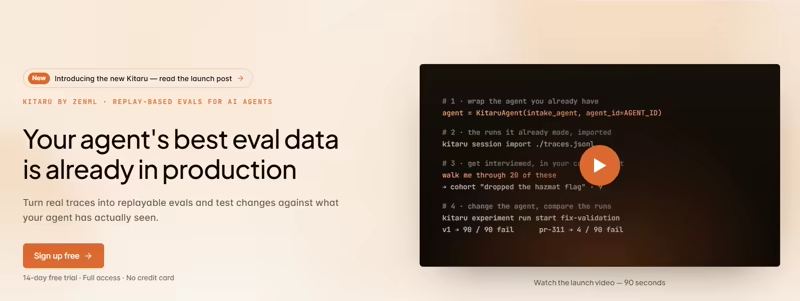
Kitaru is an open-source, self-hosted test bench for AI agents. It records or imports production sessions, reruns the agent code against controlled recorded tool history, and scores the new behavior against the original.
Instead of debugging from a fresh input every time, you can turn real agent failures into test cases you keep around. That is a useful distinction against Trigger.dev Replay, which creates a new run from an earlier payload.
Here are some key features Kitaru offers:
Feature 1. Turn a Production Failure Into a Reusable Test Case
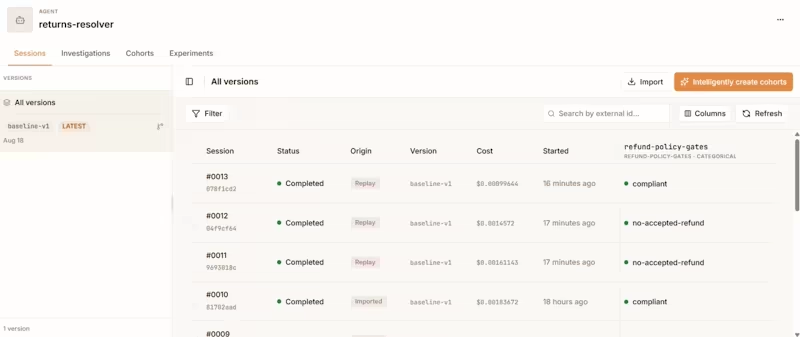
Kitaru and Trigger.dev react differently upon a production failure. Suppose an agent approves the wrong refund because it misread a policy returned by a tool.
- Trigger.dev reruns the task, but the new run may encounter different model responses or external state before reaching the same decision.
- Kitaru lets you save that production session and rerun the agent against its recorded tool history. The agent still executes from the beginning, but external interactions can be controlled by what happened in the original session.
Now the bad refund is not just an incident to inspect once. It becomes a repeatable case you can run again after changing a prompt, model, tool policy, or agent version.
Feature 2. Test Agent Changes Without Calling the Same Production Tools Again
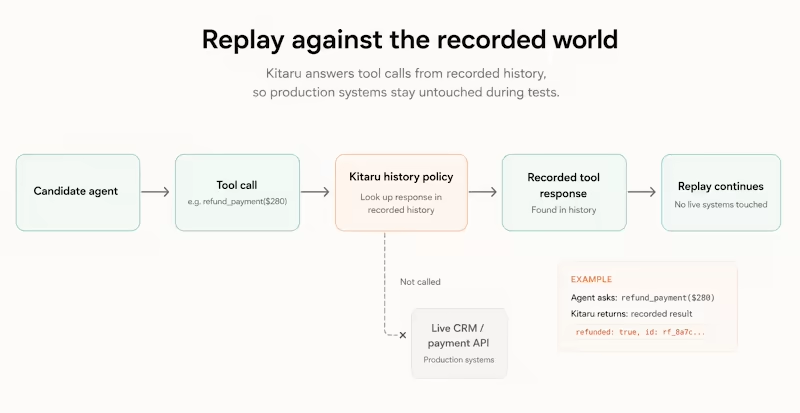
Replaying agent code against live tools can muddy a comparison. The CRM record may have changed, an API may return new data, or a tool with side effects may do something you never intended to repeat.
Kitaru uses recorded tool history to control those interactions during replay. If the agent asks for something already captured in the session, the replay can use that recorded response rather than depending on the current production system.
There is a catch worth knowing. If the candidate agent makes a tool request that does not match the recorded history, Kitaru may not have a safe response to provide. That replay can fail or end up inconclusive rather than quietly inventing one.
Feature 3. Check Whether the Fix Actually Improved the Agent
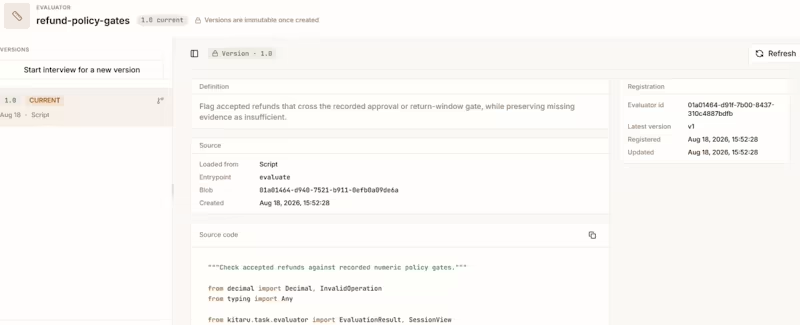
Two traces can look different without telling you which one is better. Kitaru adds versioned evaluators so the original behavior and the changed agent can be scored with the same test logic.
You might evaluate whether the final answer was correct, whether the agent chose an allowed tool, or whether it completed the task without violating a policy. The evaluator version is stored with the result, so you know which rules produced the score.
Before comparing versions, Kitaru recommends replaying the unchanged agent first. If the baseline itself cannot reproduce an acceptable result from the recorded session, you know the test case needs attention.
Feature 4. Experiment Across the Cohort
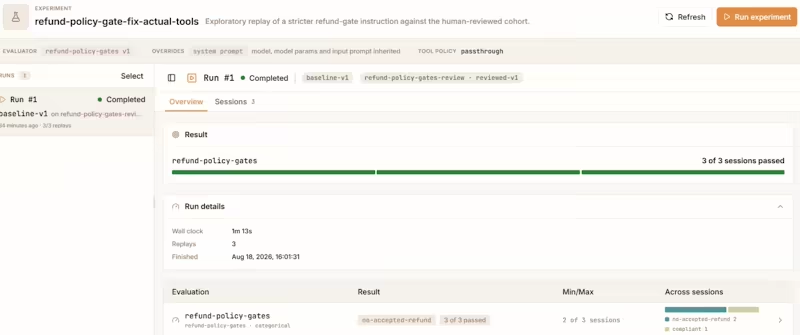
Fixing the session that sent you debugging at 11 p.m. is nice. It does not tell you what the same change does to the other 500 sessions your agent handles differently.
Kitaru groups sessions into versioned cohorts that stay fixed for an experiment. You can take a candidate agent and run it across a set such as refund requests, failed tool calls, or sessions where a particular evaluator scored poorly.
The result is closer to a regression suite built from production behavior. One troublesome session helps you understand the bug. A cohort tells you whether the fix travels well.
Pricing
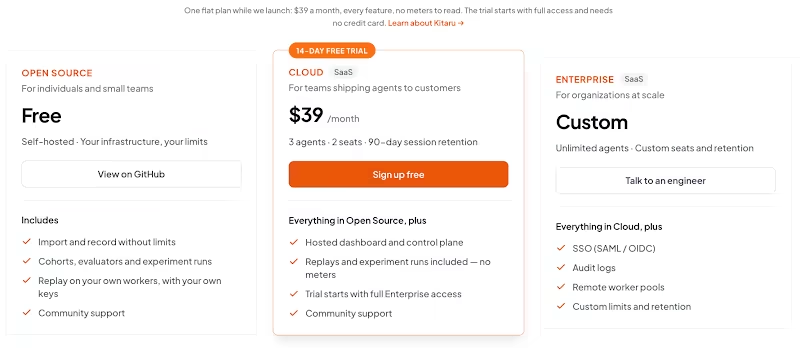
Kitaru is open source under the Apache 2.0 license and free to self-host. Its server uses FastAPI and PostgreSQL, while replay and experiment jobs can run on workers controlled by your team.
Apart from the open source version, we’ve two paid plans:
- Cloud: $39 per month; 3 agents, 2 seats, 90-day session retention, and no meters on replay and experiments.
- Enterprise: Custom; unlimited agents, custom seats, limits and retention, plus full enterprise governance.
Pros and Cons
Kitaru makes sense when your Trigger.dev problem starts after the run finishes. You already have the trace, but you need a repeatable way to test a fix against that production behavior and see whether the new agent performs better across similar sessions.
It is not a replacement for Trigger.dev queues, schedules, retries, or background task execution. Kitaru is also in Alpha, and replay quality depends on the recorded session. Tool-history misses and adapter differences can make some tests fail or produce an inconclusive result.
Related read: Kitaru vs Temporal
2. Inngest
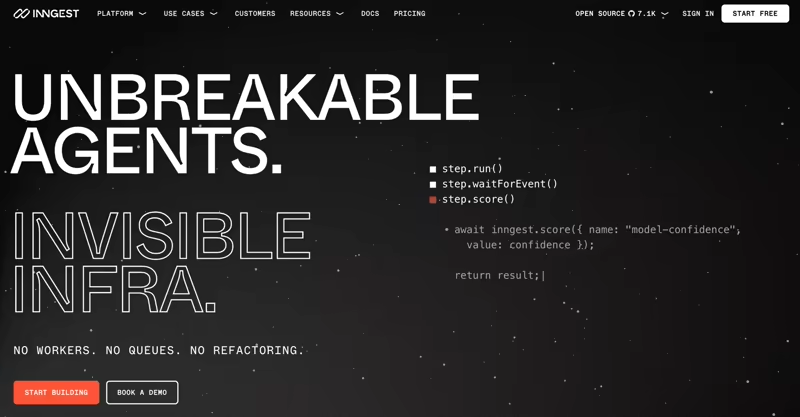
Inngest is an event-driven durable functions platform and the closest match to Trigger.dev, structurally. It supports first-party SDKs for Python, TypeScript, and Go, which makes it the easiest move when language support is what repels you from Trigger.dev.
Features
- Record each
step.run()output so Inngest can reuse it when a later step fails. Completed model calls, API requests, and tool actions do not need to run again, which keeps retries cheaper and avoids duplicate work. - Pause a function with sleeps, signals, and event waits until a user replies, a webhook arrives, or a delay elapses. It resumes from the waiting point once the condition is met, which fits approval flows, webhook callbacks, and human-in-the-loop processes.
- Trigger functions from webhooks, schedules, queues, or app events. Each workflow can also emit new events as it progresses, making it easier to connect agent runs with existing product actions and backend processes.
- Replay failed functions by creating new runs from the original events. You can filter those runs by status and time range, which is useful after an outage or bad deployment.
Pricing
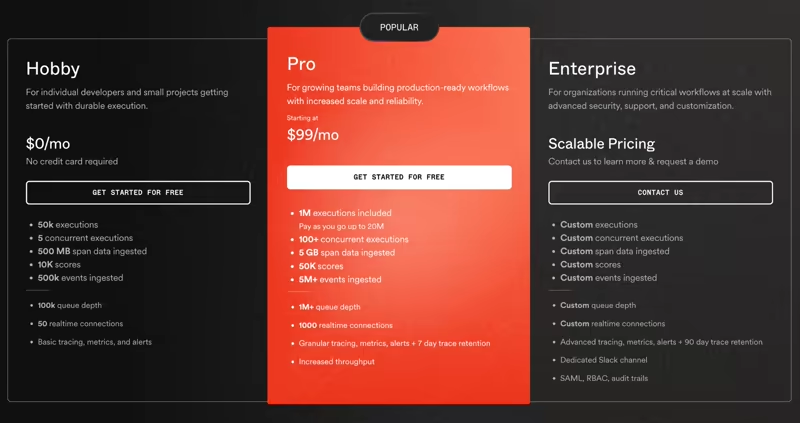
Inngest is source-available and can be self-hosted. It also offers a free hobby plan alongside two paid plans:
- Pro: $99 per month
- Enterprise: Custom pricing
Pros and Cons
Inngest solves Trigger.dev’s Python limitation without forcing you into a tool sprawl. Its memoized steps also make repeated inline work less likely, as long as you place model and tool calls inside step boundaries.
Where it stops short is replay fineness. Inngest Replay is a bulk recovery tool. It is good for rerunning broken functions after a fix, but it does not provide a built-in checkpoint fork for testing one changed prompt or tool result.
Related read: Kitaru vs Inngest
3. Hatchet
Hatchet is an open-source task and workflow platform built around workers and queues. It supports Python, TypeScript, Go, and Ruby, and it gives operators detailed control over concurrency, rate limits, and worker placement.
Features
- Write tasks and workers in Python, TypeScript, or Go, within the same app. Polyglot support is built-in and not a workaround, which gives you freedom to keep agent code and backend services in their existing runtimes.
- Replay a run from the step that failed and let Hatchet create a new workflow instance starting from that step, with the same input data. In the run details view, you can select a step and use the replay control. You can also edit the JSON input for that step before replaying.
- Control how many workers, queues, and tasks run at once. This matters when your models or internal services are rate-limited, because an agent fleet can exceed those limits without much traffic.
- Configure retries, backoff rules, and non-retryable errors beside each task definition. Temporary model or API failures can retry automatically while known business errors stop immediately. You get precise failure handling without wrapping every task in custom retry logic.
Pricing
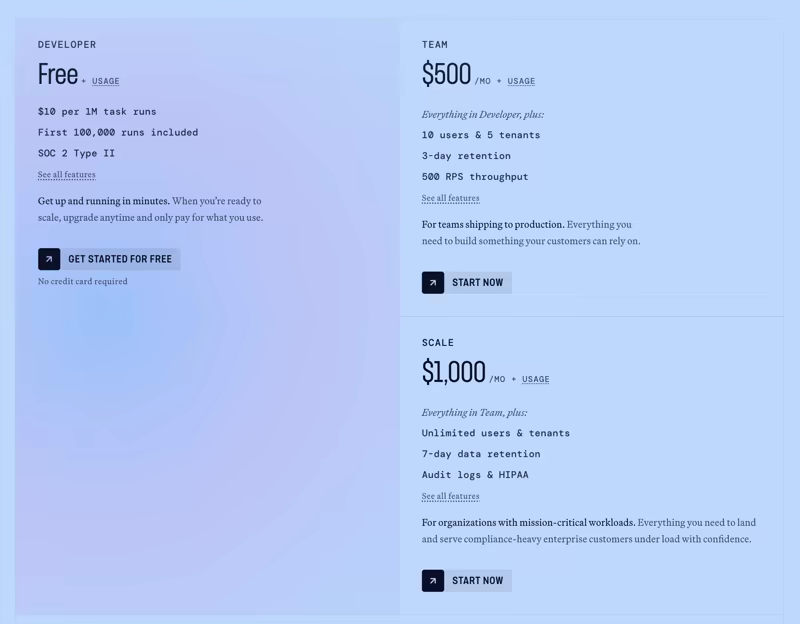
Hatchet is free and open source, and Hatchet Cloud has a free developer tier, plus usage-based tiers:
- Team: $500 per month
- Scale: $1,000 per month
- Enterprise: Custom pricing
Pros and Cons
Hatchet has the most precise replay story of the general-purpose engines here. Restarting from the failed step with an editable input is closer to agent debugging than a whole-run rerun. Also, the queue controls are better than what Trigger.dev exposes.
In contrast, Hatchet does not document a side-by-side replay flow, which keeps an entire earlier trajectory fixed while one recorded checkpoint changes. Pricing also steps up sharply. The jump from the Developer tier to Team is $500 per month, a lot for a small team that has outgrown the free tier but not much else.
Related read: Kitaru vs Hatchet
4. Temporal
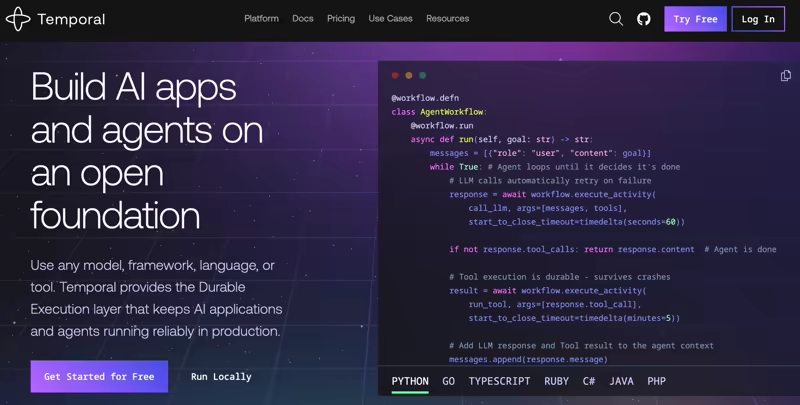
Temporal is the most established durable execution platform on this list. If Trigger.dev feels too light for what you are building and your agent durability covers many services, Temporal is a good pick.
Features
- Define workflows in Go, Java, TypeScript, or Python, among other SDKs. The orchestration logic stays in an ordinary function in your editor that you can test and version with the rest of the app code.
- Recover workflow state through deterministic replay of event history. It starts the Workflow code from the beginning, replays the Event History step by step, and uses that history to guide the code back to the exact state as before.
- Reset a workflow execution to a chosen event ID and create a new execution from that point. Temporal copies the event history up to that reset point and lets you control which events are reapplied afterward with
All,Signal, orNone. - Configure retry policies per activity, setting backoff behavior and which failures count as retryable, so an unreliable API call can retry without restarting unrelated work. This gives you better control over external activities.
Pricing
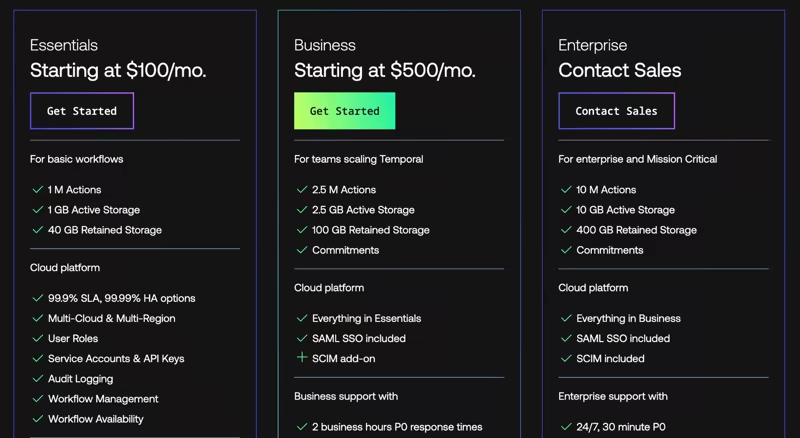
Temporal is free to self-host. Temporal Cloud has three tiers:
- Essentials: Starting at $100 per month
- Business: Starting at $500 per month
- Enterprise: Custom pricing
Pros and Cons
Choose Temporal when you need durable execution across several languages and services. Its event history and workflow reset features provide deep recovery controls, while activity boundaries isolate side effects.
That depth comes with rules. Workflow code must stay deterministic, side effects belong in activities, and versioning long-lived workflows becomes a real engineering discipline. Reset is also built for operational recovery and not purpose-built for a side-by-side comparison of agent paths. For a team whose entire problem is one Python agent, that is a lot of platform to absorb.
Related reads:
5. Restate
Restate is a lightweight runtime for durable services, workflows, and AI agents. It records completed operations in a journal, then uses that journal to skip work that has already finished after a crash.
Features
- Build durable services with official SDKs for TypeScript, Java, Kotlin, Python, Go, and Rust. That is the widest language coverage on this list, and Python is a first-class runtime rather than an extension.
- Recover through a journal of completed steps. Code automatically stores completed steps and resumes from where it left off when recovering from failures. This allows execution to continue from saved progress after a worker restarts.
- Keep durable state next to the service or virtual object that owns it. Agent session state, task progress, and tool outputs live with the execution path and let you create a natural boundary around each customer, session, or job.
Pricing
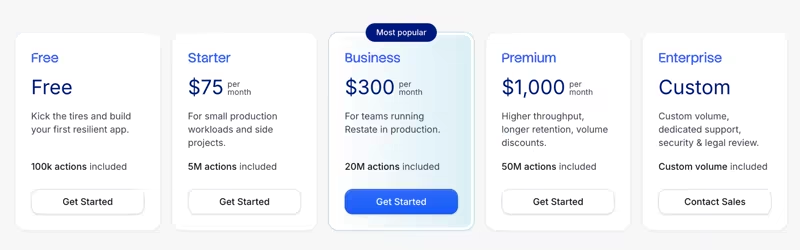
Restate is open source and free to self-host. Restate Cloud offers a diverse pricing model, starting with a free plan with 50K actions, and four paid plans:
- Starter: $75 per month
- Business: $300 per month
- Premium: $1,000 per month
- Enterprise: Custom pricing
Pros and Cons
Restate gives you durability without adopting a large platform, and the action-based pricing is unusually legible. The six-language SDK range suits agent backends that run Python agents and Java services in the same building.
The service and virtual-object model still requires a new way of structuring backend code. That is a real mental shift if you arrived wanting a task queue with better retries. History retention is also short on the lower tiers, at one to three days on Free and Starter. That constrains you if your debugging loop is slower than your retention window.
Related read: Kitaru vs Restate
6. LangGraph
LangGraph, from LangChain, is an open-source framework for stateful agents. It models agents as graphs of nodes and edges, while LangSmith Deployment provides managed hosting, traces, and operational controls.
Features
- Model agent behavior as a stateful graph of nodes and edges that represent tools, routers, decisions, and handoffs. Loops and branches become explicit structures and are easy to inspect and debug.
- Persist graph state with checkpoints per thread. An agent can pause, resume, and retain context across multiple turns or sessions. You can use this for conversational agents and workflows that need a long-lived state.
- Use time travel to inspect and branch past runs. You call
get_state_history()to list the checkpoints in a thread, thenupdate_state()on a chosen checkpoint to create a fork. This gives engineers a practical way to test another prompt, tool result, or routing decision. - Pause the graph before risky actions for human review. The same state continues after a reviewer approves or edits the proposed action, which gives oversight before sending messages, changing records, or calling sensitive tools.
Pricing
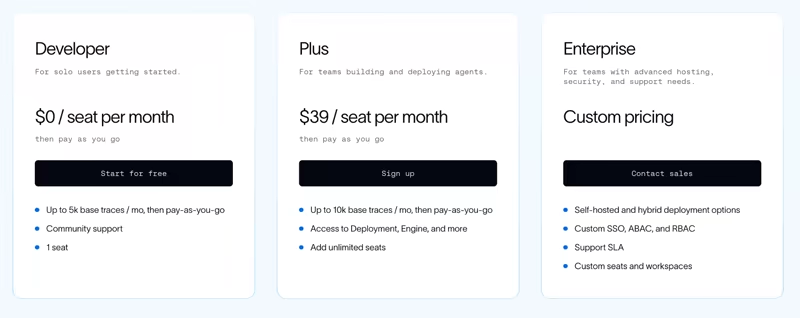
LangGraph is open source and free. LangSmith, the deployment layer, has a free developer plan, and then seat-based pricing:
- Plus: $39 per seat per month
- Enterprise: Custom pricing
Pros and Cons
If you’re already using LangChain, this is the least disruptive move off Trigger.dev. Its checkpoint history and branching API match the way agent developers think about state.
The catch is the cost after the fork. LangGraph re-executes every downstream node, so later model calls and API calls happen again. That is fine for a short graph and expensive for a long one. Durability also depends on the selected checkpointer and deployment setup. It does not make every step durable by default.
Related reads:
7. Cloudflare Workflows
Cloudflare Workflows builds durable multi-step code on Cloudflare Workers that automatically retry and persist state. It’s a natural choice for teams that already use Workers, R2, D1, and other Cloudflare services.
Features
- Break work into durable units with
step.do(), where each step’s state persists and retries independently. Execution survives across minutes to weeks without managing infrastructure. - Pause with
step.sleep(),step.sleepUntil(), orstep.waitForEvent(). The flow can wait for a timer, webhook, or human input and resume when the input arrives. You can build approval and callback flows without maintaining their own polling layer. - Pay nothing for idle time. Cloudflare bills for active CPU time; a Workflow that is waiting on a response to an API call, sleeping, or otherwise idle does not incur CPU time.
- Use the Workers runtime and Cloudflare bindings, including R2, D1, and other bindings, without running a separate orchestration service. This helps you keep durable execution close to your existing data and edge services.
Pricing
Workflows are billed on four dimensions: CPU time, requests, storage, and steps. The Free plan includes 3,000 workflow steps per day, then you can continue with any of the paid plans:
- Pro: $20 per month
- Business: $200
- Contract: Custom pricing
👀Note: Cloudflare has announced that billing for steps and storage begins no earlier than August 10, 2026, so the step and storage lines are not yet charged on Workers Paid.

Pros and Cons
If your stack is already on Cloudflare, Workflows is the cheapest durable execution you will find. Cloudflare now offers a Python Workflows SDK in beta, so the platform is no longer limited to JavaScript and TypeScript. The Python support is still new, which matters for teams that want a mature agent runtime today.
The problem is that the Python agent stack is as awkward as it is on Trigger.dev, and arguably more so given the Workers CPU-time limits. Replay is also not part of the model in the sense agent teams mean.
Wrapping Up
The right choice depends on what pushed you away from Trigger.dev:
- If the blocker is language, Inngest is the shortest move. First-party Python, memoized steps, and an event-driven model that will feel familiar coming from Trigger.dev.
- Suppose durability extends across services, choose Temporal or Restate. Temporal for depth and reset-to-event-ID, Restate for six SDK languages and pricing you can actually forecast.
- If you are already in LangChain, LangGraph with LangSmith Deployment. Just price in that a fork re-executes every node downstream of it.
Choose Kitaru when you want to turn real production agent sessions into repeatable tests, then compare agent changes against the same sessions with versioned evaluators.
Most tools on this list use replay mainly to recover or rerun workflow execution. Kitaru uses replay as an agent-testing primitive.
Star the project on GitHub, read the docs, or book a demo if your team needs a managed control plane through ZenML Pro.