
On this page
Temporal is a durable execution platform for applications that need to keep running correctly when services crash, APIs fail, networks time out, or workflows wait for hours, days, or months. The pitch is simple. Write your business logic as code, and Temporal makes sure the workflow can recover, replay, pause, and continue without losing state.
The real question for engineering teams is not whether Temporal is powerful. It is whether Temporal Cloud is worth the price.
Temporal pricing is not cheap in the way a $20 per month developer tool is cheap. It is also not expensive in the way an opaque enterprise platform can be expensive. It sits somewhere in the middle. Transparent enough to model, usage-based enough that you have to understand the drivers before committing.
In this Temporal pricing guide, we’ll break down the platform’s pricing plans, the cost factors that matter most for long-running agents, and whether the investment makes sense for your team.
At the end, we’ll also look at Kitaru by ZenML, our open-source alternative for Python-first teams building long-running background agents that need durable execution without adopting Temporal as a general-purpose workflow platform.
Temporal Pricing Plans
Temporal Cloud uses a combination of monthly plan fees and consumption-based pricing. Temporal Cloud is a consumption-based service where monthly invoices combine Actions, Storage, and a Cloud Plan.
| Plan | Pricing | Key features |
|---|---|---|
| Free Trial | $1,000 in Temporal Cloud credits | • Trial access to Temporal Cloud • Useful for testing workflows before committing • Good starting point for early evaluation |
| Essentials | Starts at $100/month | • 1M Actions included • 1 GB Active Storage • 40 GB Retained Storage • 99.9% SLA • User roles, service accounts, API keys, audit logging |
| Business | Starts at $500/month | • 2.5M Actions included • 2.5 GB Active Storage • 100 GB Retained Storage • SAML SSO included • Faster P0 response time • Support for workflow troubleshooting, worker configuration, and SDK implementation |
| Enterprise | Contact sales | • 10M Actions included • 10 GB Active Storage • 400 GB Retained Storage • SAML SSO included • SCIM included • 24/7 support, technical onboarding, design review, worker tuning, cost reviews |
| Startup Program | $6,000 in free Temporal Cloud credits | • For startups with less than $30M in funding • Free credits for Temporal Cloud • Access to support and expert advice |
| Pay-As-You-Go | Actions start at $50 per million Actions | • Usage-based pricing after included plan allocations • Volume discounts down to $25 per million Actions • Additional Active Storage at $0.042 per GBh • Additional Retained Storage at $0.00105 per GBh |
Temporal Pricing Factors to Consider
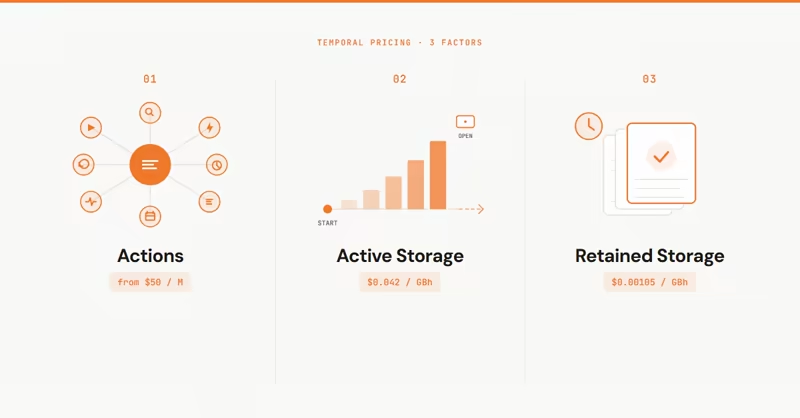
Temporal pricing is easy to underestimate if you only look at the base plan fee.
A background agent is not just one “run.” It can start a Workflow, call tools through Activities or other Temporal primitives, retry failed Activities, record Activity Heartbeats for long-running work, receive Signals, accept Updates, start Timers or Schedules, and keep Event History open for a long time. Each of those choices can affect cost.
Here are the three most important pricing factors to model before investing in Temporal.
1. Actions per Agent Run
Actions are the main unit of Temporal Cloud consumption. Temporal defines Actions as billable operations within Temporal Cloud, like starting Workflows, recording Heartbeats, or sending Signals.
Actions are largely grouped into Workflow, Activity, Timer, Signal, Query, Update, Schedule, and Nexus categories, while Export, Fairness, and Capacity are additional features billed as Actions. Actions that happen during Worker-side Workflow Replay do not count as billed Actions.
For a normal backend workflow, this is already important. For an AI agent, it is even more important.
Temporal’s pay-as-you-go Actions pricing starts at $50 per million Actions. The price steps down with volume.
Temporal can be reasonable for moderate workloads, but the cost is not “per agent run”. It is a set of billable operations inside that run.
Bottom line: If your agent takes 5 steps and rarely retries, Temporal may feel affordable. If your agent has 40 tool calls modeled as Activities or other Temporal primitives, aggressive Activity retries, frequent Activity Heartbeats, Signals, Updates, Schedules, or advanced features like Fairness or Provisioned Capacity, Actions can become the main cost driver. Worker-side Workflow Replay itself is not billed as Actions.
2. Long Running Active Storage Cost
Temporal stores the event history of an open Workflow Execution. A Workflow Execution can exist for a few seconds, a day, a month, or even forever; while the Workflow is open, its event history is counted as Active Storage.
This matters a lot for background agents.
A simple workflow that starts and finishes in 30 seconds may not create a major Active Storage bill. But agents often wait for human, another agent, or a webhook approval. They wait because the whole point of background agents is that they do not need to finish immediately.
Temporal lists additional Active Storage at $0.042 per GBh after included plan allocations. The risk is not just duration it’s duration + history size.
If your agent keeps large histories, stores large payloads in Workflow arguments or Activity results, produces many events, or stays open for long periods, Active Storage becomes a real factor. For teams building agents that stay alive for days, this should be modeled early. Also note that Temporal Cloud has a 2 MB max payload limit for a single request, a 4 MB Event History transaction limit, and Workflow Event History limits of 51,200 Events or 50 MB.
Bottom line: Temporal is strong for long-running workflows, but “long-running” is not free. Open workflow history is billed as Active Storage after your plan allocation.
3. Retained Storage After Workflows Finish
When a Workflow finishes, Temporal Cloud stores its Event History for the Retention Period set per Namespace. Temporal Cloud sets the default Retention Period to 30 days, and it can be configured between 1 and 90 days. Temporal describes common uses of retained workflow history as compliance, debugging, workload refresh, and business analytics. This matters for AI teams because agent runs are not disposable.
If an agent gives a wrong answer, you want to inspect what happened. If a customer asks why an action was taken, you may need to reconstruct the run. If a model update changes behavior, you might want to compare past runs. If a long-running automation fails in production, you want the history available for debugging.
Temporal lists Retained Storage at $0.00105 per GBh after included plan allocations.
The per-GBh price is much lower than Active Storage, but large volumes of retained histories still add up. This is especially true if you retain many agent runs for auditability, customer support, replay analysis, or compliance.
Bottom line: Retained Storage is useful, but it becomes part of your AI operations cost if you treat every agent run as something that must be kept for debugging and governance.
All Pricing Plans that Temporal Offers
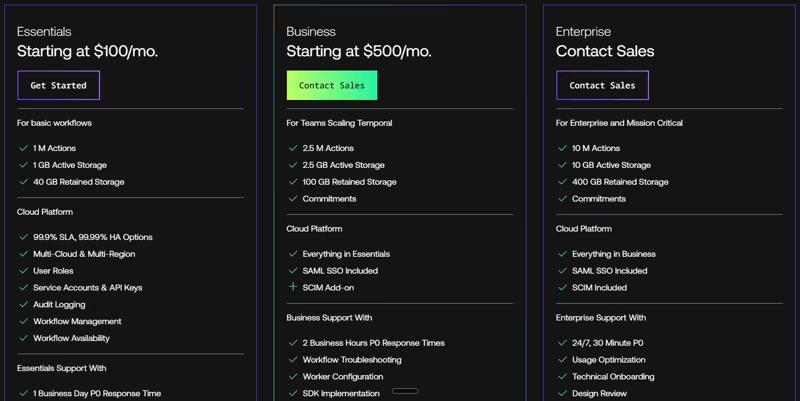
Temporal has self-hosted open source, Cloud trial credits, paid Cloud plans, a startup program, and usage-based pay-as-you-go pricing.
Let’s break down each option.
Free: $1,000 in Credits
Temporal offers $1,000 in free Temporal Cloud credits so you and your team can try the platform before committing to a paid plan.
You can use the credits to test:
- How your workflows map to Temporal Workflows and Activities.
- How many Actions your workflows generate.
- How much Active Storage your long-running workflows use.
- How much Retained Storage you need for debugging or auditability.
- Whether your team is comfortable with the Temporal programming model.
The important thing is to use the trial like a cost experiment, not a feature demo. Run a few realistic workflows, check usage, and project what happens at production scale.
Sign up if: You want to evaluate Temporal Cloud with real workflows and understand the Action/Storage model before paying.
Skip if: You only want to run a local prototype. In that case, self-hosted Temporal may be enough for early experimentation.
Essentials: Starts at $100 per Month
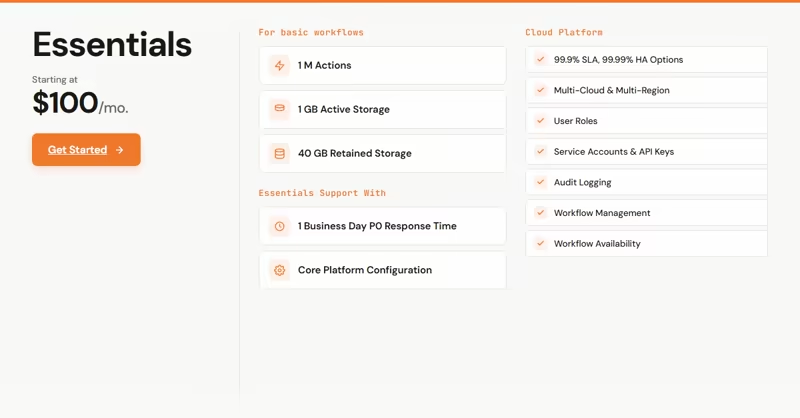
Essentials is the entry-level paid Temporal Cloud plan for basic workflows. It is priced at the greater of $100/month or 5% of Temporal Cloud consumption, and includes 1M Actions, 1 GB Active Storage, and 40 GB Retained Storage.
With this plan, you also get the core Cloud Platform features: 99.9% SLA, high availability options, multi-cloud and multi-region, user roles, service accounts, API keys, audit logging, workflow management, and workflow availability.
For small teams, this is a reasonable starting point. $100 per month is not a massive platform fee if Temporal is handling critical workflow reliability for you.
But you have to be realistic about the included allocation. 1M Actions sounds like a lot until you model what each agent run actually does.
For example, if one agent run generates 100 Actions, 1M Actions gives you about 10,000 runs before overages. If one agent run generates 1,000 Actions because it uses many tools, retries, waits, signals, and updates, the same 1M allocation gives you only about 1,000 runs.
Sign up if: You have a small production workload, basic workflows, or an early agent system where reliability matters but volume is still modest.
Skip if: You need SAML SSO, faster support, or higher included allocations from the start.
Business: Starts at $500 per Month
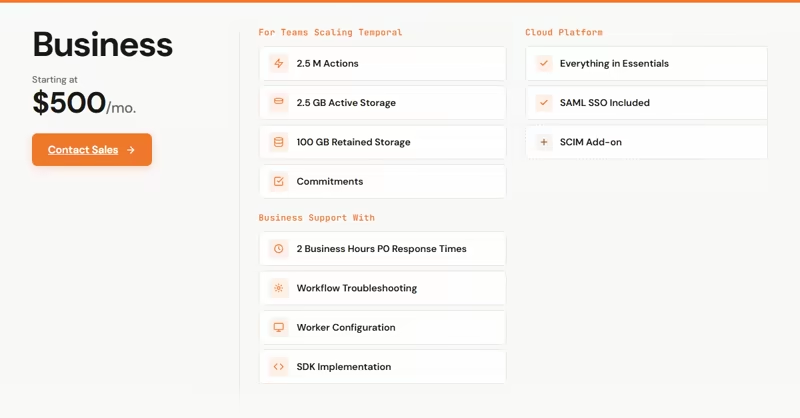
Temporal’s Business plan starts at $500 per month and is aimed at teams scaling Temporal production deployments. It includes 2.5M Actions, 2.5 GB Active Storage, and 100 GB Retained Storage. It also adds SAML SSO and improves support response times. This is the plan where Temporal starts to feel serious for production teams.
The jump from $100 to $500 per month is meaningful, but so are the additional features. SAML SSO matters for teams that need centralized access control and better support matters when Temporal is running production workflows. More included Actions and Storage matter when usage starts to scale.
For AI teams building background agents, Business is probably the first plan that feels like a proper production tier. You get more breathing room, better support, and security features that most companies expect once a tool sits on the production path.
One thing to note - Business plan is priced at the greater of $500/month or 10% of Temporal Cloud consumption. So if your usage grows heavily, the plan fee can become a percentage of usage spend rather than only the flat minimum.
Sign up if: You are running production workflows, need SAML SSO, and want better support for Temporal implementation and worker configuration.
Skip if: You are still proving the use case and do not need enterprise-grade access control yet.
Enterprise: Contact Sales
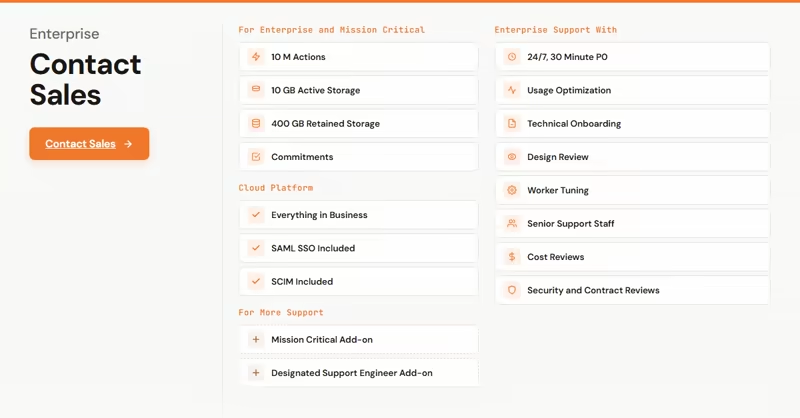
Enterprise is the sales-led tier for enterprise deployments with stringent uptime needs. Temporal’s Enterprise plan includes 10M Actions, 10 GB Active Storage, and 400 GB Retained Storage. It also includes SAML SSO and SCIM.
The bigger value is not just the higher allocation. It is the support package.
The Enterprise plan includes 24/7 P0 support, a 30-minute P0 response target, usage optimization, technical onboarding, design review, worker tuning, senior support staff, cost reviews, and security and contract reviews.
This is useful if Temporal becomes part of the core reliability layer for your business. If your workflows handle payments, order fulfillment, provisioning, compliance workflows, or critical AI agents, the support and design review may justify the price.
For agent teams, Enterprise plan starts making sense when you need:
- High-volume Actions
- Long-running workflow storage at scale
- SCIM and centralized identity management
- Cost reviews and usage optimization
- Support for worker tuning and production architecture
- Contract/security review for enterprise procurement
Sign up if: Temporal is becoming a mission-critical platform layer and you need enterprise support, governance, and higher included allocations.
Skip if: You are a small team building one narrow agent workflow and do not need the broader enterprise workflow platform.
Temporal Startup Program: $6,000 in Free Credits
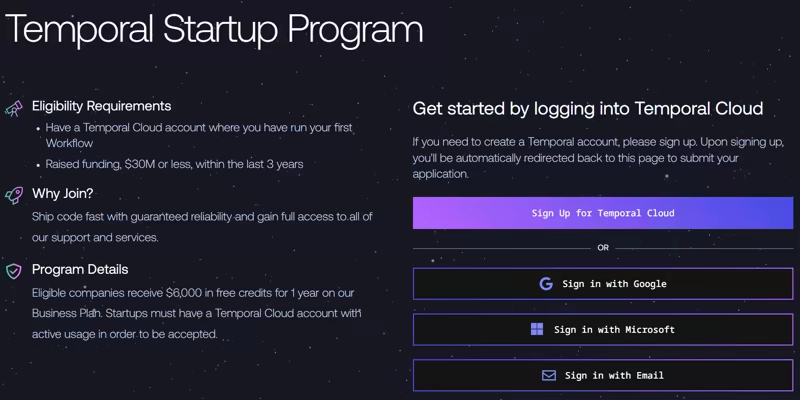
Temporal also offers a Startup Program. The program offers $6,000 in free Temporal Cloud credits to startups with less than $30M in funding within the last 3 years. This is a strong option if you are an early-stage company building on Temporal and want enough runway to test real production usage without immediately absorbing the full Cloud bill.
Apply if: You are a startup under the funding threshold and expect Temporal to become part of your production architecture.
Skip if: You are not eligible, or if you only need local experimentation with self-hosted Temporal.
Pay-As-You-Go
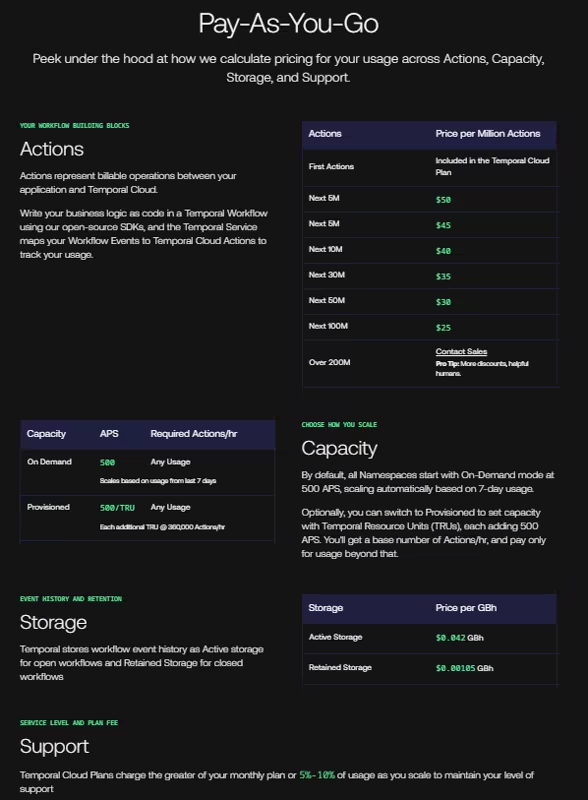
Pay-As-You-Go is how Temporal bills usage beyond the included allocations in your plan. Once you exceed the Actions and Storage allocations in your base tier, Temporal charges based on consumption.
Actions start at $50 per million and get cheaper with volume.
Storage is billed separately: additional Active Storage is $0.042 per GBh, and additional Retained Storage is $0.00105 per GBh.
Temporal also has pricing mechanics for Capacity Modes. By default, Namespaces use On-Demand mode, starting at 500 APS and scaling based on recent usage. If you switch to Provisioned Capacity, you can set capacity using Temporal Resource Units, with each additional TRU adding 500 APS and carrying minimum hourly Action requirements when underutilized.
This is powerful, but it also means you have to understand the operational profile of your workflows.
Pay-as-you-go works well when:
- Usage grows gradually
- You can estimate Actions per workflow
- Your storage footprint is controlled
- You don’t need heavy provisioned capacity
It gets harder when:
- Agent runs vary wildly in number of tool steps
- Retries spike during model/provider outages
- Long-running workflows remain open for days
- Human-in-the-loop waits keep Workflow Histories open longer, increasing Active Storage exposure even when the workflow is not burning compute
- Teams turn on advanced features without modeling cost
Use it if: You understand your workflow usage and want pricing to scale with consumption.
Be cautious if: You have unpredictable agent behavior and cannot yet estimate Actions, Active Storage, or Retained Storage.
Is Temporal Expensive?
Temporal is not cheap, but it is also not automatically expensive.
The fair answer: Temporal is expensive if you only need a task queue, and reasonable if you need durable execution for critical, long-running workflows.
That distinction matters.
If your team just needs to run background jobs, basic cron tasks, or simple async queues, Temporal feels heavy. You’ll pay for a platform and programming model that is more than your workload needs.
But if your application needs long-running state, retries, human approvals, signals, timers, and visibility into stuck workflows, Temporal becomes much easier to justify.
But remember, Temporal is also a broad durable execution platform. That means your team has to adopt the Temporal model: Workflows, Activities, Workers, Task Queues, Signals, Updates, Timers, and the surrounding operational model. That is worth it if Temporal becomes your reliability backbone across many systems. It may be too much if your immediate problem is narrower. “My Python agent died at step 6 and I don’t want to restart from step 1.”
Kitaru by ZenML: A Temporal Alternative for Your Long-Running Python Agents
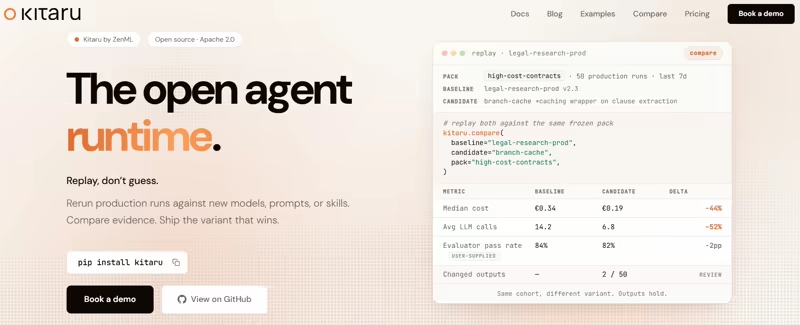
Kitaru, a product of ZenML is for Python-first teams building long-running background agents who want durable execution without adopting Temporal as a general-purpose workflow platform.
Temporal is broader. It is a mature durable execution platform for workflows, activities, task queues, timers, across many application types. Kitaru is narrower by design. It focuses on the runtime layer around Python agents: checkpoints, replay, resume, wait(), artifact lineage, versioned deployments, and self-hosted execution around the harness you already use.
Kitaru Pricing
Kitaru’s pricing is also simpler. The full SDK is open source under Apache 2.0 and free forever. The Open Source plan includes primitives like flow, checkpoint, wait, llm, save/load, framework adapters, dashboard, and more.
Kitaru is one of the two products that ZenML offers. Apart from the open-source version, we offer two plans. Both these plans give you access to both ZenML (for ML pipelines) and Kitaru (to run durable AI agents).
The Scale plan starts at $399 a month, which gives you 500 executions, 1 project, and 1 snapshot.
The Scale plan has 2 more variants
- $999 per month - 2,000 executions, 3 projects, 5 snapshots
- $2,499 per month - 5,000 executions, 10 projects, and 20 snapshots
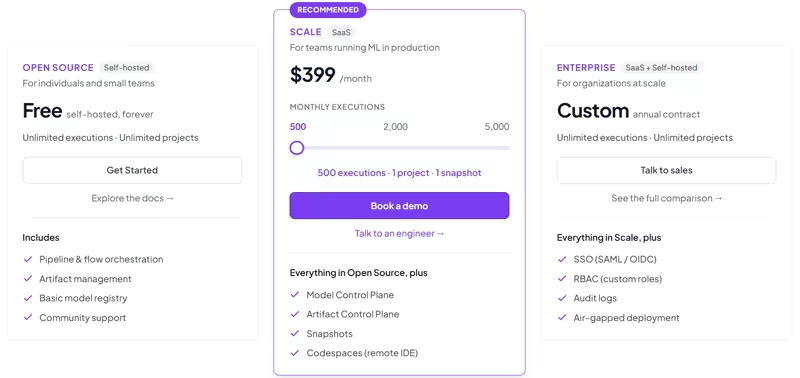
Apart from the Scale plan, ZenML also offers an Enterprise plan (SaaS offering + Self-hosted) that gives you access to more premium features. You can talk to us if you want to know more about our Enterprise offering.
Features Kitaru Offers
Kitaru is not trying to replace every Temporal use case. It can replace the Temporal layer for some Python-agent teams whose primary need is checkpoint-based recovery, replay, wait/resume, and artifact lineage around agent runs, rather than a general-purpose, polyglot workflow platform.
Here’s what our platform offers:
Feature 1. Durable Workflow Execution with Flow and Checkpoint
In Temporal, you typically model your system using Workflows and Activities; it means adopting Temporal’s programming model.
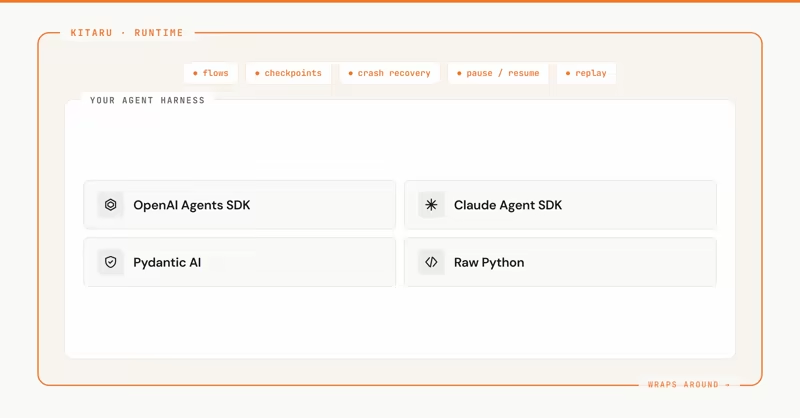
Kitaru takes a more agent-native approach. Instead of forcing teams to model the agent as Temporal Workflows and Activities, Kitaru lets teams wrap normal Python agent steps with flows and checkpoints.
You can add Kitaru around OpenAI Agents SDK, Claude Agent SDK, Pydantic AI, and raw Python. The core idea: you keep the inner agent harness your team already picked, while Kitaru adds the runtime around it.
That matters because agent teams often do not want to rewrite their agent into a workflow engine. They want to keep the agent loop, tool calls, prompts, and SDKs they already use, and add durability around the expensive parts.
What Kitaru can replace: Temporal’s durable workflow layer for Python agent runs where you primarily need reliable execution boundaries, not a full general-purpose workflow platform.
Feature 2. Checkpoint-Based Recovery
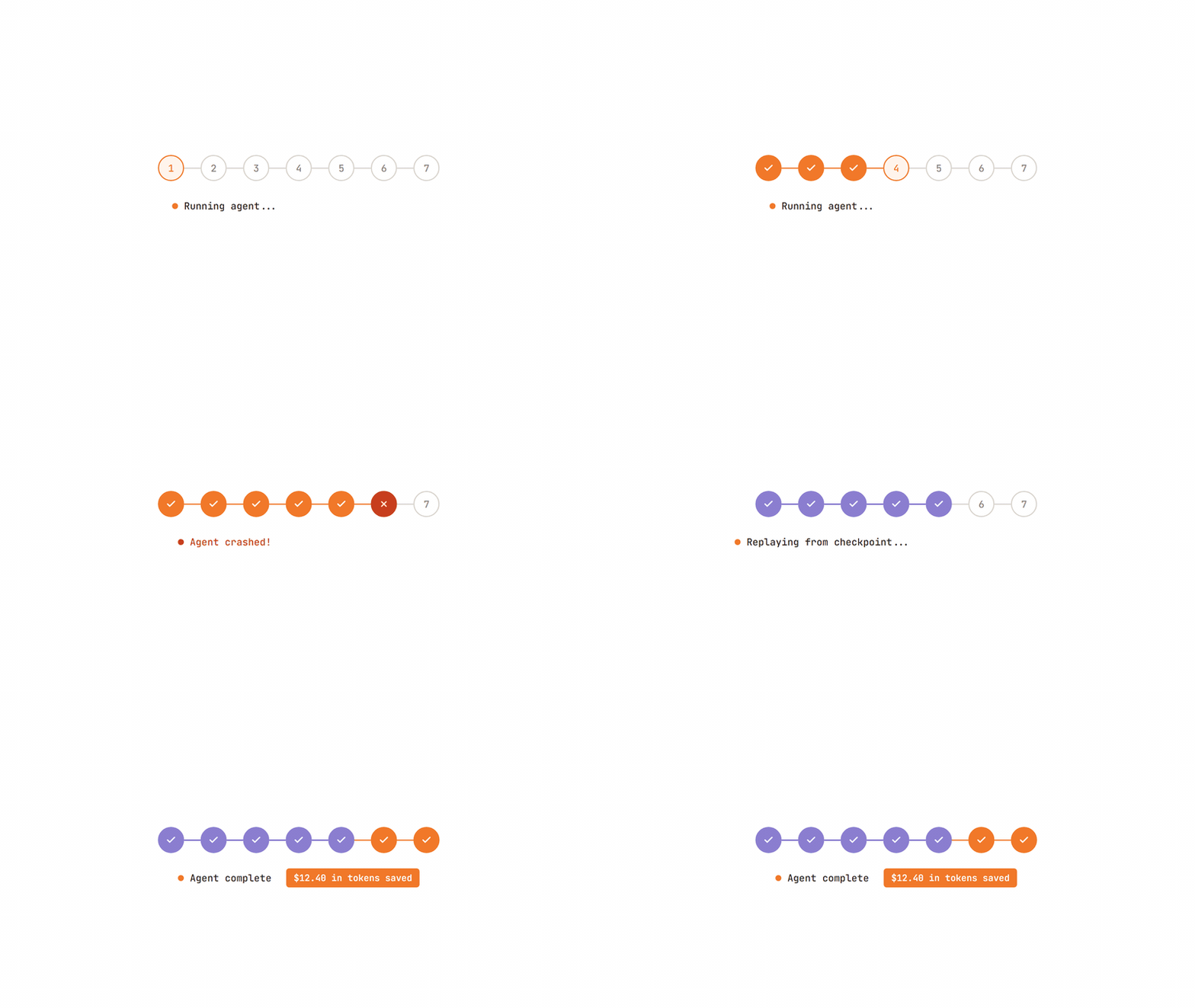
Temporal’s core pitch is that Workflows resume after crashes or infrastructure failures. More precisely, Temporal persists Event History and uses replay to reconstruct Workflow state. It does not restore a memory snapshot at every line of code; the Worker re-runs Workflow code against recorded history until it reaches the prior state.
Kitaru can replace that recovery layer for agent runs through checkpoints.
Every checkpoint persists the output of a step. If the agent crashes at step 7, Kitaru can replay from the checkpoint boundary: completed checkpoints before that boundary return cached outputs, while the failed checkpoint and downstream work re-execute.
In Kitaru, checkpoint outputs are written as artifacts, so teams can fix the issue and replay from the failed boundary instead of re-burning upstream model and tool calls.
This matters especially for LLM agents because model calls and paid tool calls are often the expensive boundary. Temporal can also avoid re-running completed Activities during Workflow replay because Activity results are stored in Event History. The difference is that Kitaru makes the durable boundary an ordinary Python checkpoint and captures agent artifacts, prompt/response records, and LLM metadata as first-class runtime records.
What Kitaru can replace: A general-purpose Temporal workflow layer for Python-agent teams that want checkpoint-based recovery, replay, and artifact capture directly around agent steps.
Feature 3. Humans, Agents, Webhooks-in-the-loop
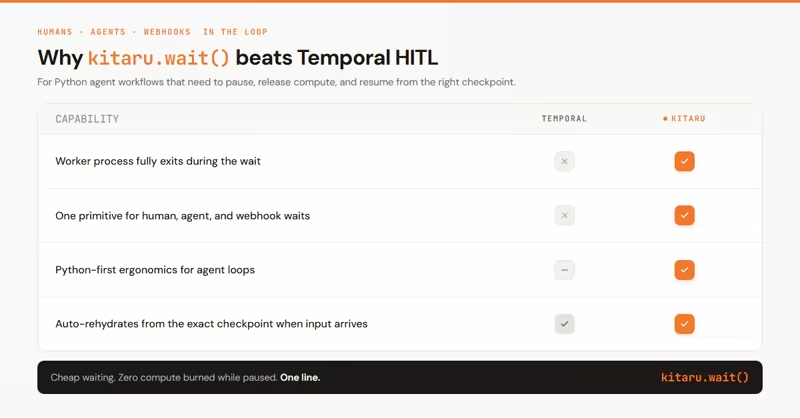
Temporal supports long-running workflows and human-in-the-loop patterns.
Kitaru’s equivalent is kitaru.wait().
We think that “Cheap Waiting” is the ability to wait on a human, another agent, or a webhook without burning compute. In Kitaru, wait() can move the execution into a waiting state after the polling timeout, release compute, and resume when input is supplied later.
That is exactly the kind of primitive agent teams need.
For example:
- A legal review agent waits for a human to approve a clause.
- A research agent waits for another agent to return sources.
- A customer-support agent waits for a webhook from an external ticketing system.
You can build these patterns in Temporal. But if your problem is specifically “pause this Python agent until input arrives, then resume from the right checkpoint”, Kitaru gives you the primitive directly.
What Kitaru can replace: Temporal human-in-the-loop waits for Python agent workflows where the wait needs to release compute and resume the same durable run later.
Wrapping Up
Temporal is worth investing in if your team needs a mature, battle-tested durable execution platform for critical workflows.
It gives you the primitives serious distributed systems need. If you are orchestrating payments, order fulfillment, infrastructure provisioning, compliance processes, or many classes of backend workflows, Temporal’s pricing can be justified.
For AI agent teams, the decision is more nuanced.
If you need a general durable execution platform across many application types, Temporal is a strong choice. If your primary need is narrower, durable execution for long-running Python agents, then adopting Temporal may be more platform than you need.
Kitaru is built for that narrower problem.
It gives Python-first agent teams the runtime layer they keep rebuilding: flow, checkpoint, wait(), replay, resume, artifact lineage, versioned deployments, self-hosted execution, and a dashboard for agent runs. The open-source plan is free forever under Apache 2.0, and Enterprise adds the governance, scale, and support features teams need when agents move into production.
So my practical buying advice:
Choose Temporal if you want a broad durable execution platform for many workflow types.
Choose Kitaru if your team is building long-running Python agents and wants checkpoint-based recovery, replay, resume, human waits, and agent-native execution without adopting a full workflow platform.
If you’re building production agents and want durable execution without the overhead of a general workflow system, Kitaru is worth trying first.
Related reading: