
On this page
Braintrust combines tracing, evaluations, experiments, and production monitoring for AI applications and agents. Its pricing looks simple and tiered, but that’s only the platform fee. Committing without understanding the usage and overage charges might soon stress you with a huge bill.
Usage and overage charges can push the bill higher, and there is no hard spending cap. So whether Braintrust feels affordable depends on how much data you ingest, how heavily you score, and which plan features you need.
In this Braintrust pricing guide, we’ll break down each plan, the usage meters that affect your bill, and the workloads that can push costs up. We’ll also look at Kitaru by ZenML for teams that want to replay real agent runs and test changes against them.
Braintrust Pricing Plans
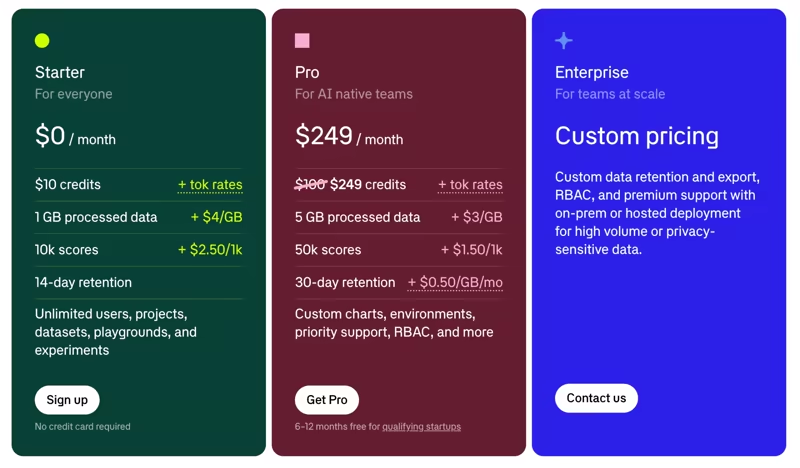
Braintrust’s pricing model is a mix of a platform fee plus usage charges: Starter is free, Pro costs $249 per month, and Enterprise has custom pricing. All plans offer unlimited users, projects, playgrounds, experiments, and datasets.
Here’s a quick overview:
| Plan | Pricing | What you get |
|---|---|---|
| Starter | $0 per month | • $10 per month in model credits • 1 GB processed data, then $4 per GB • 10,000 scores, then $2.50 per 1,000 • 14-day retention • Unlimited users, projects, datasets, playgrounds, and experiments |
| Pro | $249 per month | • $249 per month in model credits • 5 GB processed data, then $3 per GB • 50,000 scores, then $1.50 per 1,000 • 30-day retention, extendable at $0.50 per GB per month • Custom charts, environments, dataset snapshots, sandbox evals, and unlimited human review scorers |
| Enterprise | Custom pricing | • Custom model credits and discounted token rates • Custom limits on processed data, scores, and retention • SAML and OIDC SSO, custom permission groups, and audit logging • SaaS, BYOC, and self-hosted deployment • SOC 2 attestation, a BAA, and a custom DPA |
Braintrust Pricing Factors to Consider
Braintrust pricing is easy to underestimate if you only read the platform fee, because the platform fee is not what scales. Usage is where you slip, and the reason why this article exists.
Here are the three factors to model before committing.
1. Processed Data Is Measured at Ingestion
Per the billing FAQ, Braintrust defines processed data as the total bytes ingested across logs, experiments, and datasets. That includes inputs and outputs, prompts, metadata, traces and spans, datasets, and attachments.
Because usage is counted at ingestion, the meter runs when you send data, not when you store it. Deleting a trace or applying a retention policy later does not reduce your usage. Once the bytes arrive, they are counted for that calendar month.
Starter includes 1 GB per month and charges $4 per GB after that. Pro includes 5 GB and charges $3 per GB.
2. Scores are Metered Separately, One Score at a Time
Scores are used to measure the results of offline or online evaluations run in Braintrust. Each recorded score increases your monthly count by one.
So if you run five scorers against one output, that’s five scores, not one. Run the same scorers on production traffic and your regression dataset, and you’ve doubled the count. Add another scorer, and you add another billable score.
Therefore, the number that matters is traces multiplied by scorers, counted across your online and offline evaluation workflows.
Starter includes 10,000 scores per month and charges $2.50 per additional 1,000. Pro includes 50,000 and charges $1.50 per additional 1,000.
3. Retention Is Short, and Extending It Is a Separate Charge
Braintrust’s Starter plan retains data for 14 days. Pro keeps it for 30 days, and allows keeping it longer at $0.50 per GB per month. Custom retention policies are gated behind the Enterprise plan.
For a logging tool, 30 days is defensible. For an evaluation tool, it is short, very short, because evaluation questions tend to arrive late. Three reasons why this irks everyone:
- Without paid extended retention, if a customer disputes something your agent did six weeks ago, the trace would no longer be available on Pro.
- If you want to compare this quarter’s agent behavior against last quarter’s, the baseline is gone.
- If a regulator or an internal audit asks you to reconstruct a decision, you are working from whatever you exported.
Braintrust does offer export automations, but those sit on the Enterprise tier alongside audit logging and custom retention.
All Pricing Plans that Braintrust Offers
Braintrust has a free Starter plan, a paid Pro plan, and a sales-led Enterprise plan. Let’s break down each one and focus on what each tier adds that the one below it does not have.
Starter: $0 per Month
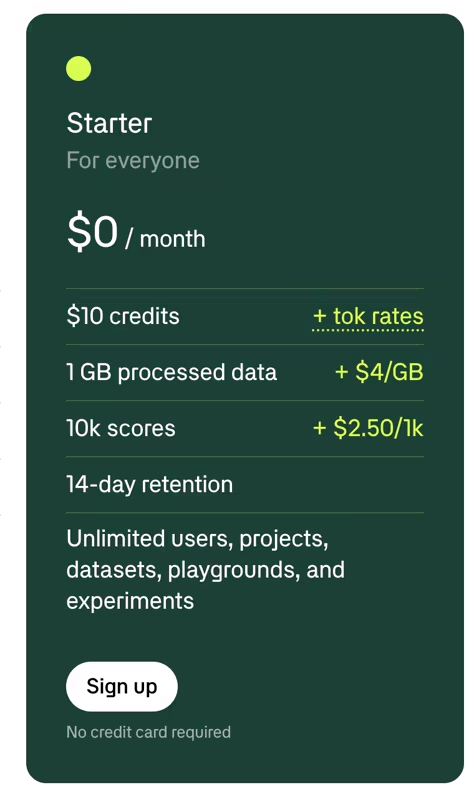
Starter replaced the old Free plan in March 2026. There is no platform fee, nor a time and seat limit, and you get unlimited users, projects, datasets, playgrounds, and experiments.
What you get on top of that:
- $10 per month in model credits, plus token rates
- 1 GB of processed data per month, then $4 per GB
- 10,000 scores per month, then $2.50 per 1,000
- 14-day data retention
- Automated usage alerts at 80%, 90%, and 100% of included limits
Starter limits or misses several team features. For example, it limits to one human review scorer per project, owner-only permission groups, and Google-only SSO. There are no custom charts, environments, dataset snapshots, playground annotations, or sandbox evals, and deployment is Braintrust SaaS only.
For a team evaluating whether Braintrust fits, Starter is a fair deal. Unlimited seats on a free tier means you can put the whole team in the tool without procurement headaches.
Sign up if: You want to instrument a real agent and measure your actual traffic costs before paying anything.
Skip if: You need multiple human reviewers, separate environments, longer retention, or your team cannot use Google SSO.
Pro: $249 per Month
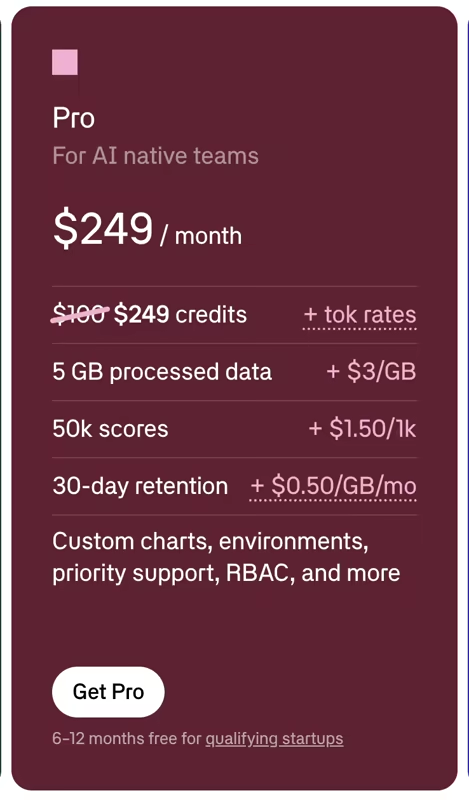
Pro is Braintrust’s main self-serve plan for production teams. It costs $249 per month and includes 5 GB of processed data plus 50,000 scores. Overage rates also fall to $3 from $4 per GB, and $1.50 from $2.50 per 1,000 scores. You also move from 14 days to 30 days of included retention, with extension available at $0.50 per GB per month.
Beyond the meters, Pro offers the most useful features, like:
- Custom charts and environments
- Dataset snapshots and sandbox evals
- Playground annotations
- Unlimited human review scorers, rather than one per project
- Owner, engineer, and viewer permission groups
- Priority email support and a click-through DPA
Still, it misses key features like audit logging, custom permission groups, export automations, custom retention, self-hosted or BYOC deployment, and even SSO is still Google-only.
Sign up if: You are running agents in production, you need more than one reviewer and more than one environment, and 5 GB plus 50,000 scores covers your month.
Skip if: Your blocker is SAML SSO, audit logs, or getting the data plane into your own cloud. Pro does not solve any of those, so the jump you actually need is to Enterprise.
Enterprise: Custom Pricing
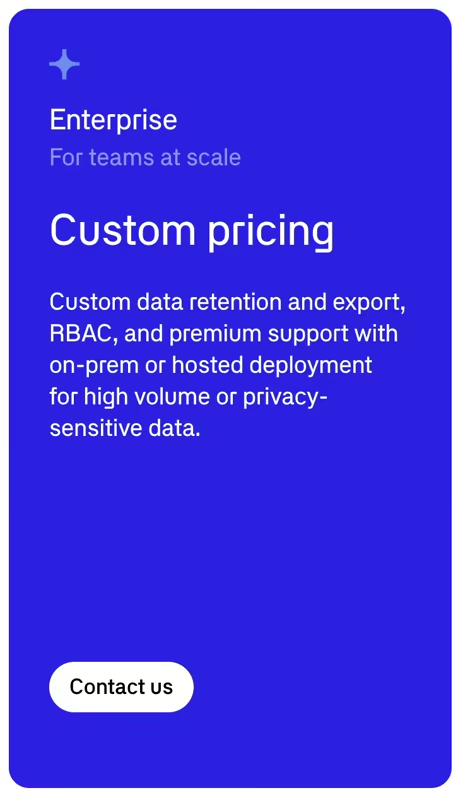
Enterprise is the sales-led tier, built for larger security and governance requirements. It adds custom limits on processed data, scores, and retention, plus covers everything that’s not on the Pro and Starter plans, like:
- Custom model credits and discounted token rates
- SAML and OIDC SSO, custom permission groups, and domain mappings
- Audit logging and export automations
- SaaS, BYOC, and self-hosted deployment
- Priority Slack support with guaranteed SLAs
- SOC 2 attestation, a BAA, and a custom DPA
Enterprise tier can become necessary before your usage becomes especially large. A security review asking for SAML, an audit trail, or customer-controlled infrastructure is enough to move you out of Pro.
Contact sales if: You are in a regulated domain, you need the data plane in your own infrastructure, or SSO and audit logging are driving the purchase.
Skip if: You are a small team that just needs tracing and evals, and the Pro limits cover mostly what’s been asked of you.
Braintrust’s Usage Calculator
Braintrust puts a calculator on its pricing page that estimates cost from monthly token volume and the percentage of traffic you score.
It estimates daily AI interactions, sampled traces, monthly quality checks, and the cost under each plan.
Imagine you’re running a customer support agent that uses 150,000,000 tokens per month at a 20% scoring percentage. That translates to roughly 625 AI interactions per day, 3,750 traces sampled, and 11,250 quality checks per month; on Starter, that comes out to $5.83, and on Pro to $249.00.
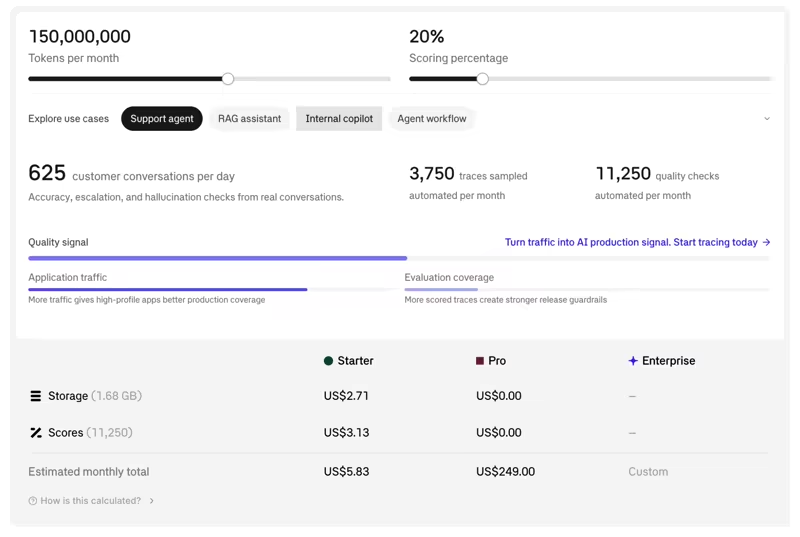
The example shows the calculator’s blind spot, though. Even at 150 million tokens per month, the calculator estimates a small Starter overage.
That’s when it assumes three quality checks per sampled trace, when in practice your team may run several scorers per output. Also, token volume is only an input to its estimate because Braintrust ultimately meters processed bytes and recorded scores. Metadata, tool payloads, attachments, and the number of scorers you run can all change the real bill.
Use it when: You need a first-order estimate and compare Starter against Pro at your volume.
Do not use it to: Set a budget. Compare plans with it, then validate the estimate using your own average trace size and evaluation strategy.
Is Braintrust Expensive?
No, Braintrust is not expensive to start. However, it can get expensive and harder to predict as your agent workloads grow.
Starter has no platform fee and unlimited users, while Pro costs $249 per month with added features. But since Braintrust does not charge per seat, both plans offer good value for larger teams.
Both primary meters are structurally aligned against agent workloads. Processed data is measured at ingestion, so the cost of a multi-turn agent can rack up within weeks. But price is only half the decision. You also need to consider what you want to do with those traces.
Braintrust works well for turning production traces into evaluation datasets and rerunning evaluation tasks with changed prompts or models, which can tell you that yesterday’s run scored badly. Kitaru goes further for replay-centric testing by re-executing an agent against recorded production context and tool history.
Kitaru by ZenML: A Braintrust Alternative for Replaying Real Agent Runs
Kitaru features built-in importers that work with Braintrust to import your production traces and historical logs.
Once you bring in your production histories, you can replay those runs against your real code. You can swap a model or change a prompt to see exactly how your agent’s behavior changes against real-world baselines.
Neither tool is a drop-in replacement for the other. Kitaru does not give you a live observability dashboard and an eval suite around it; instead, Kitaru lets you import executions your agent already performed, replay them with exactly one variable changed, and diff the result against the original.
That makes Kitaru more relevant when your evaluation work starts with production traces and ends with a question about agent behavior after a code, model, prompt, or tool change.
Kitaru Pricing
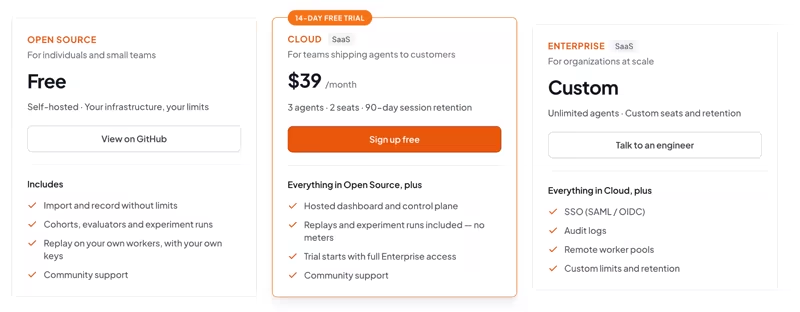
Kitaru is free to self-host under Apache 2.0, with unlimited recording and imports, cohorts, evaluators, experiment runs, and replay on your own workers.
Its hosted Cloud plan includes a 14-day free trial, followed by:
- Cloud: $39 per month; Includes 3 agents, 2 seats, 90-day session retention, and every feature.
- Enterprise: Custom; Unlimited agents, custom seats and session retention, plus the governance layer of SSO, role-based access, and audit.
Key Features Kitaru Offers
Kitaru is not trying to cover every Braintrust use case. It replaces the evaluation layer for teams whose central question is whether a change is safe to ship, rather than what happened last night.
Here’s what our platform offers.
Feature 1. Import the Traces You Already Have
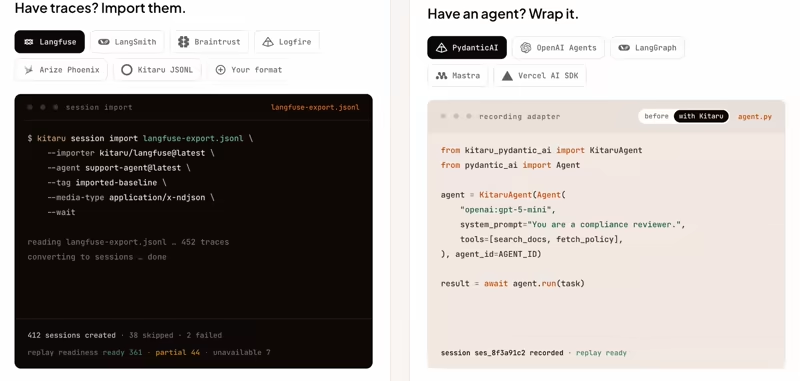
The adoption model is deliberately boring: you change nothing in production.
A single command imports executions from trace stores and exported trace files you already have. Once imported, those runs can be inspected, grouped into cohorts, and evaluated. Sessions with sufficient recorded information can also be used for replay.
That keeps the adoption path fairly small. If your production agent already writes traces somewhere else, you can start with those records instead of adding another tracing system to the application. You are not re-instrumenting an agent, adding a second SDK to your hot path, or asking for a deploy window to evaluate a tool.
What Kitaru can replace: The offline evaluation loop, for teams that already have a trace store and do not want a second one.
Feature 2. Replay a Real Run with One Thing Changed
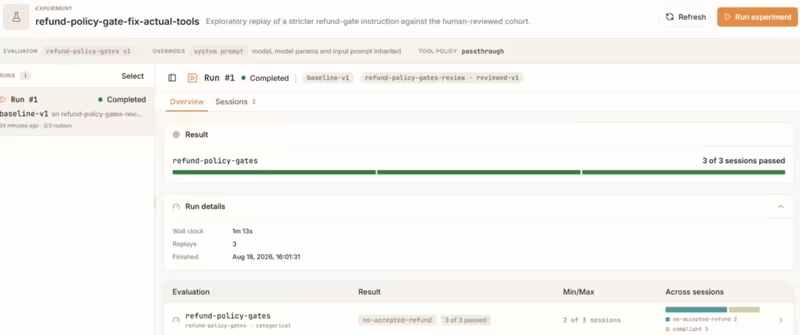
Kitaru records the information needed to reproduce an agent session, including model and tool interactions. During replay, the agent code runs again while recorded tool history recreates the external context of the original execution. You can then test a changed model, prompt, code path, or tool behavior against the same production case.
That is useful for answers that Braintrust misses, like: would the agent recover if this tool returned the right value, or does the cheaper model take the same path?
Kitaru compares the replay against the source execution across outputs, evaluator results, and other run-level differences, helping you see how a candidate change affects the same production case.
Where Kitaru overlaps with Braintrust: replay-centric experiments where the test unit is a recorded production session rather than a conventional dataset row.
Feature 3. Score What Happened, and What Could Have Happened
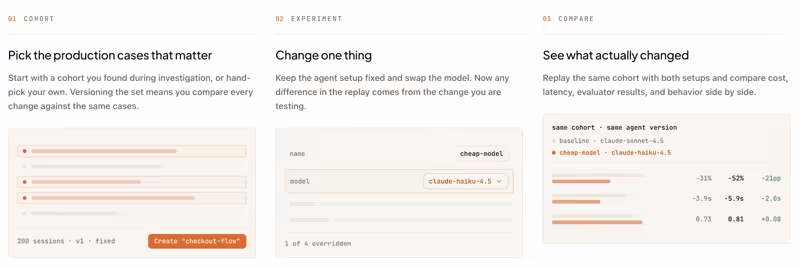
Scoring in Kitaru runs over executions, whether those executions are imported production runs or replays you just generated.
You can group production cases into cohorts, evaluate the original executions and their replays, and compare like-for-like on the cases you care about.
This is where the pricing models differ. Braintrust meters recorded scores after the plan allowance. Kitaru Cloud currently does not have a separate usage meter for scoring, imports, recording, replay, or experiment runs. Any model or API costs used by evaluators still apply.
Where Kitaru can reduce usage-based evaluation costs: teams running multiple evaluators across the same production-session cohorts without a separate per-score platform meter.
Feature 4. Run Regression Tests on Every Change
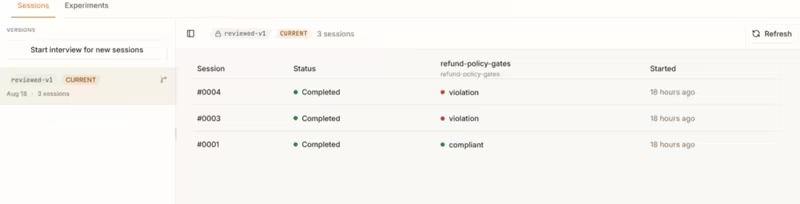
Once you have a cohort of production cases and evaluators built from them, the loop closes in CI.
A collection of production sessions can become a regression suite. You can run a Kitaru experiment against a candidate change and compare the baseline and candidate across the same fixed cohort and evaluators. Because you declare thresholds up front, the output is a pass or a fail rather than another dashboard to interpret.
Kitaru also exposes replay and diff over MCP, so a coding agent can run the loop itself. Adapters exist for Pydantic AI, the OpenAI Agents SDK, the Claude Agent SDK, Gemini, Google ADK, and raw Python, so the agent harness your team already chose stays where it is.
What Kitaru can replace: Much of the manual work between finding a production failure and turning it into a repeatable regression test.
Wrapping Up
Braintrust is worth paying for if you need production observability with datasets, scorers, and experiments attached. The Starter free plan is generous, plus unlimited seats on both the free and paid tiers are a real advantage, and $249 per month is a fair platform fee for growing teams.
Before you commit, pay attention to three things:
- Processed data, because it is measured at ingestion and multi-turn agent traces are large. Deleting data later does not help.
- Scores, because they are counted individually, so your bill scales with traces multiplied by scorers.
- The Enterprise line, because SAML SSO, audit logging, custom retention, data export, and self-hosting all sit above Pro. If any of those are procurement blockers, the $249 tier was never your tier.
Kitaru becomes more interesting when you want the recorded execution itself to become the test. It can replay a real run against your code, fork a checkpoint with one change, and turn groups of past runs into regression cases.
So the buying decision is less about which tool has the cheaper first paid plan.
Choose Braintrust if you want production observability, evaluations, datasets, human review, and experiments in one platform.
Choose Kitaru if you already have agent traces and want to reproduce production sessions, test candidate changes against recorded cases, and use those executions as regression tests.
If you want to see how Kitaru works against your own agent runs, just sign up for the open-source cloud version and try it out yourself.
Relevant reading: