
On this page
On July 13, 2026, Prefect announced an agreement to acquire Dagster Labs. The companies expect the transaction to close in the coming weeks and the combined company to operate under the Prefect name beginning in August 2026. Dagster OSS and Dagster+ remain supported under the Dagster name, with existing deployments, contracts, pricing, and support unchanged.
That makes this a good time to revisit the Dagster vs Airflow debate, with ZenML added as a third option. The three tools take quite different approaches to ML orchestration, and the differences matter more than a feature checklist suggests.
This article compares Dagster vs Airflow vs ZenML on features, integrations, pricing, and most importantly, where each tool fits.
Dagster vs Airflow vs ZenML: Key Takeaways
- Airflow: A task-first batch orchestrator, and the safe pick when your company needs one scheduler for many kinds of jobs. Its DAG model handles data and infrastructure work alike, with retries, sensors, and backfills built in.
- Dagster: An asset-first data orchestrator. It works well when your team thinks of datasets, tables, and models as products. Dagster records dependencies and materializations. It also supports checks and partitions, plus ownership and asset-state rules.
- ZenML: An ML and AI workflow layer that turns step outputs into versioned artifacts, records run context, and separates pipeline code from infrastructure. You can also run Airflow on ZenML, so the choice is not always either Airflow or ZenML. In some stacks, they solve different parts of the same problem.
What ML Pain Point Does Each Solve for You?
A comparison table can make these tools look more alike than they actually are. Their difference shows up in the object each one asks you to define first.
| Feature | Airflow | Dagster | ZenML |
|---|---|---|---|
| Outputs tracked as versioned artifacts (datasets, models, prompts) | ❌ XCom passes small values; storage stays external | Materialization events; you manage storage via I/O managers | ✅ Every step output auto-versioned |
| Trace a result back to its data, code, and config | Task history; dataset lineage needs OpenLineage | ✅ Asset graph and materialization history | ✅ Runs, steps, artifacts, and models linked by default |
| Skip unchanged expensive work | ❌ No general code-and-input-based output cache; tasks usually implement idempotency or their own caching | ✅ Asset code/data versions and persisted I/O-manager outputs can support memoization and selective materialization | ✅ Step caching enabled by default using code, parameters, and input artifacts |
| Selective reruns and historical backfills | ✅ Clear tasks, catch-up, backfills | ✅ Partitions and backfills | Step retries and cache; backfills come from the orchestrator |
| Event-driven triggers beyond cron | ✅ Assets, sensors, deferrable operators | ✅ Sensors and declarative automation | Delegated to the active orchestrator; HTTP endpoints for request-based runs |
| Run the same pipeline on different infrastructure without rewriting | ❌ DAGs are tied to Airflow | ❌ Code is tied to the Dagster runtime | ✅ Swap stacks: Airflow, Kubernetes, Vertex AI, SageMaker |
| First-party managed cloud | ❌ Third-party only (Astronomer, MWAA, Cloud Composer) | ✅ Dagster+ | ✅ ZenML Pro; execution stays in your infra |
Airflow
Airflow models a workflow as a directed acyclic graph, or DAG, made up of individual tasks. It controls when those tasks run, how they depend on one another, and what happens when a task fails.
This task-first model works well for batch ETL, data loads, reporting, and infrastructure jobs. Common examples include using Airflow to refresh a vector index, schedule batch inference, or run daily evaluation pipelines.
Airflow’s scheduler and task history cover day-to-day operations. While sensors, backfills, and provider packages add more control.
Airflow can track Asset events, Asset metadata, task state, and workflow dependencies, but it does not automatically turn prompts, datasets, or models into versioned ML artifacts. For experiment history, model registration, and complete artifact lineage, teams generally connect an experiment tracker, model registry, or ML metadata platform.
Dagster
Dagster treats assets as logical data products rather than temporary task outputs. An asset can be a table, file, dataset, feature set, or model. Its definition describes what should exist and how Dagster should produce it.
For instance, an AI stack might include an evaluation set, embedding table, prompt corpus, and model scorecard. Dagster will place these assets in the same graph, record their dependencies, and track each materialization.
Assets can also have checks, partitions, metadata, owners, and freshness rules. You can see whether an evaluation set is stale or why an index needs rebuilding. What remains separate is physical storage, experiment tracking, and model registry choices.
ZenML
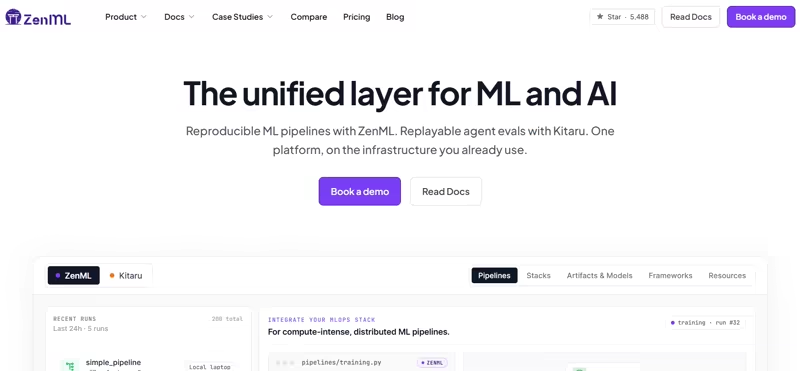
ZenML starts with pipeline steps. Every value returned by a step becomes an artifact linked to its producer and inputs. ZenML also records the pipeline run and any downstream steps that consume the artifact.
Materializers control how outputs are saved and loaded. Same for data frames, trained models, prompts, checkpoints, and evaluation results. ZenML stacks separate pipeline code from the systems that execute and store it.
That separation helps you move from local development to shared infrastructure without rewriting the pipeline around a new execution API. The active orchestrator still controls scheduling and compute behavior.
That was about the core pain points these tools solve; now, let’s compare them head-to-head for ML orchestration.
Comparing Features: Dagster vs Airflow vs ZenML
Feature 1. Artifact, Asset, and Output Lifecycle
Once a task finishes, each platform handles its output differently. The key difference is how much context each platform keeps after the task completes. Let’s find out.
ZenML
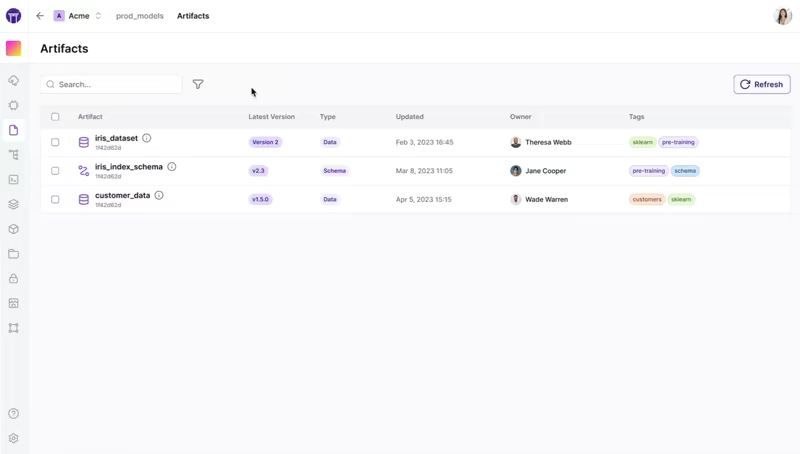
In ZenML, every step output becomes a versioned artifact. ZenML records which run created it, what inputs produced it, and which later steps consumed it.
Materializers handle how each artifact is serialized and loaded, while the artifact store holds the actual files or objects. For example, a data frame might be stored in cloud object storage, while a model could use a format suited to its framework. The pipeline step does not need to manage that storage logic directly.
Because ZenML keeps both the output and its context together, you can inspect old versions, reuse them in later runs, or pass them into another pipeline without adding separate tracking code. The same model also works for checkpoints, evaluation reports, and other pipeline outputs.
Also read: ZenML vs Flyte vs Airflow: What’s the Difference?
Dagster
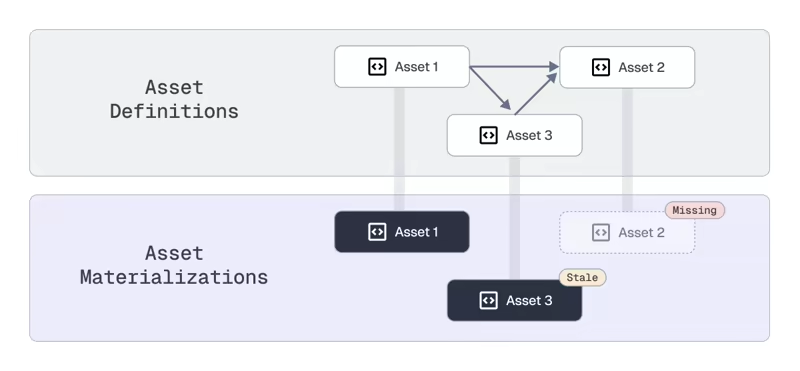
Dagster treats persistent data objects as assets. An asset can represent a table, dataset, file, embedding index, or stored model. You define how Dagster should produce it, while a materialization event records each time the asset is created or updated.
That history gives you more context than a simple ‘task succeeded’ status. You can see which upstream assets fed the output, when it last materialized, and whether downstream assets need another run. I/O managers handle how assets are written to storage and loaded again.
For example, one asset might live in Snowflake and another stored in S3. Dagster manages the handoff between computations, but your team still chooses the storage system, file format, and retention policy.
The asset graph brings these objects and their dependencies into one view. You can see what exists and how each asset connects to the rest of the system.
Airflow
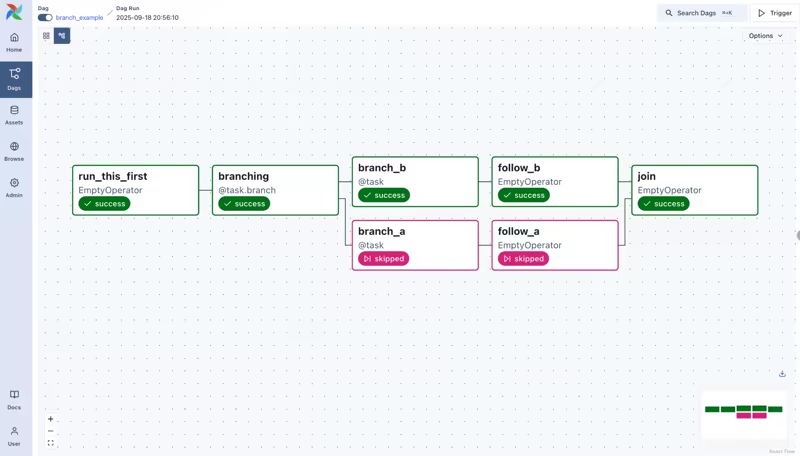
Airflow’s Assets are logical references to data that tasks produce or consume. They connect separate DAGs and let data updates trigger downstream work. For example, one DAG could publish an updated evaluation dataset as an Asset, and another could start only after that Asset changes.
Asset events can carry metadata and appear in the Asset graph. You can trace which DAG produced the object and which workflows depend on it.
However, Airflow does not manage the underlying object itself. The dataset, model file, or index still lives in an external system. XCom passes small values between tasks like IDs, paths, or status details, but it’s not designed for large datasets or model files. Those outputs usually go to an object store, warehouse, or database.
Your team still needs to define how outputs are named and versioned. Airflow coordinates the workflow, while the application and storage layer manage most of the output lifecycle.
Verdict: ZenML gives ML teams the most complete built-in lifecycle for step outputs. Dagster gives data teams the strongest asset catalog and materialization model. Airflow can reference outputs and pass small values, but the application owns most physical output management.
Feature 2. How These Platforms Reconstruct What Happened in Every Run - Lineage, Metadata, Reproducibility
Suppose an evaluation score drops after a pipeline update. To reproduce the earlier run, you need to know which code ran and what inputs it used. You also need enough context to recreate the same result.
ZenML
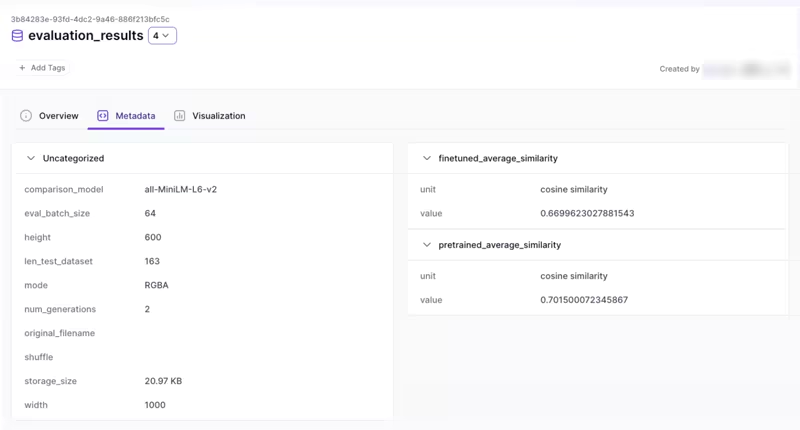
ZenML connects each pipeline run to its steps, inputs, outputs, and artifacts. Every artifact version is tied to the step that created it and the upstream artifacts used during that run.
You can open a past run and trace which dataset or prompt produced a result. The same view can show the model and configuration. This is useful when a score drops or an agent evaluation changes between releases.
Similarly, metadata can be recorded at several levels. You can also attach model metrics, dataset validation results, or deployment details to a run. Code repository support can capture the source commit, while stack information shows all active infrastructure components.
Together, this gives you a detailed record of how an output was produced. However, exact reproduction still depends on retaining the original inputs, package versions, and container images available.
Dagster
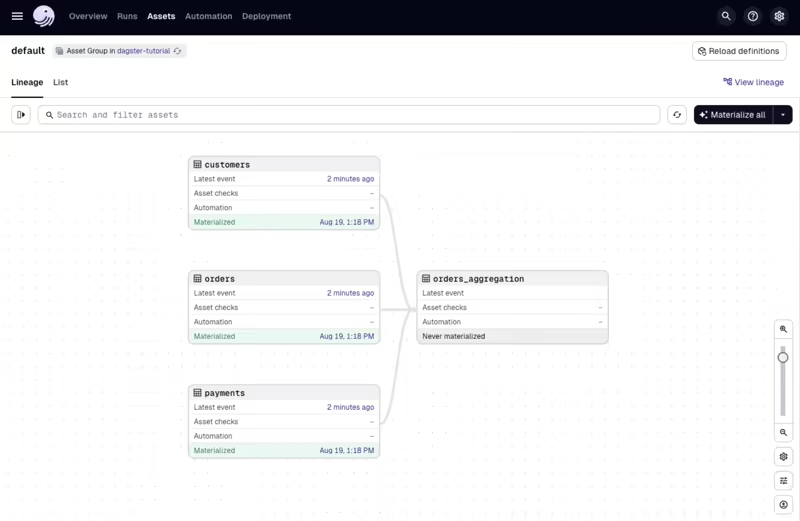
Dagster reconstructs a run through its asset graph and event history. Asset dependencies show which upstream datasets, tables, files, or models contributed to an output.
Each materialization event records when an asset was produced and can include runtime metadata like row counts, schemas, file paths, or validation results. Asset definitions may carry code versions, owners, tags, and descriptions.
Dagster also supports data versions and column-level lineage metadata when the integration provides that information. Suppose you run Dagster on an AI workflow, you can trace the source tables behind an evaluation dataset or identify which input led to an updated index.
You can also compare materialization history to see when an asset changed and what downstream assets were affected. Dagster gives you a strong record of asset relationships and updates.
Airflow
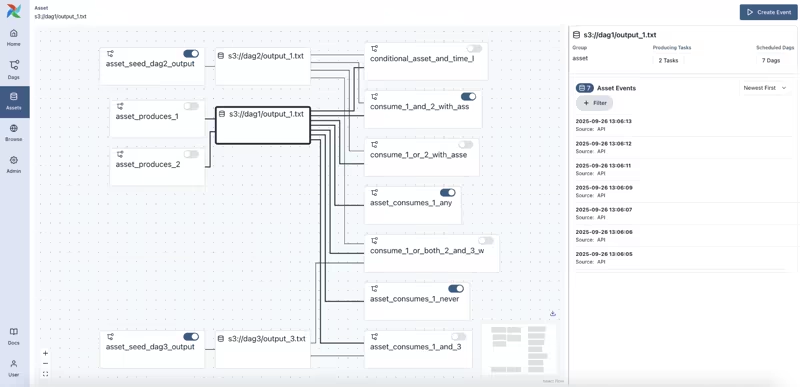
Airflow records task states, dependencies, and logs with each DAG run and task instance. This gets you a clear view of what ran, when it ran, and where it failed.
Airflow provides several operational views. The Grid view compares task-instance states across DAG runs and data intervals. The DAG Graph view shows task dependencies within a workflow. Separately, the Asset Graph shows Assets in context, including their upstream producers and downstream consumers.
With the official OpenLineage provider, Airflow can also send job and dataset events to an external lineage service.
Airflow 3 DAG Bundles can tie a DAG run to a particular workflow-code version when the selected bundle implementation supports versioning. For example, GitDagBundle supports version pinning, while local, S3, and GCS bundle implementations currently use the latest available code.
The remaining context usually lives outside Airflow. So while Airflow gives you a strong operational history, reproducing an ML result often depends on several connected tools.
Verdict: ZenML captures the most ML-specific context around each run. Dagster gives teams a detailed history of assets, dependencies, and materializations. Airflow explains how the workflow executes and can add dataset lineage, but full ML reproduction usually needs extra systems.
Also read: Prefect vs Airflow for ML Pipelines
Feature 3: Recovering without Starting from Scratch
Retries and selective reruns solve one set of failures. Caching and backfills solve another. A useful comparison has to separate them.
ZenML
ZenML supports retry policies at the step level. You can set the number of attempts a failed step should run again and how long ZenML should wait between attempts.
Suppose an evaluation step fails after preprocessing and training have finished. ZenML retries only that step without repeating the earlier work. Though the exact retry behavior still depends on the active orchestrator in the active ZenML stack.
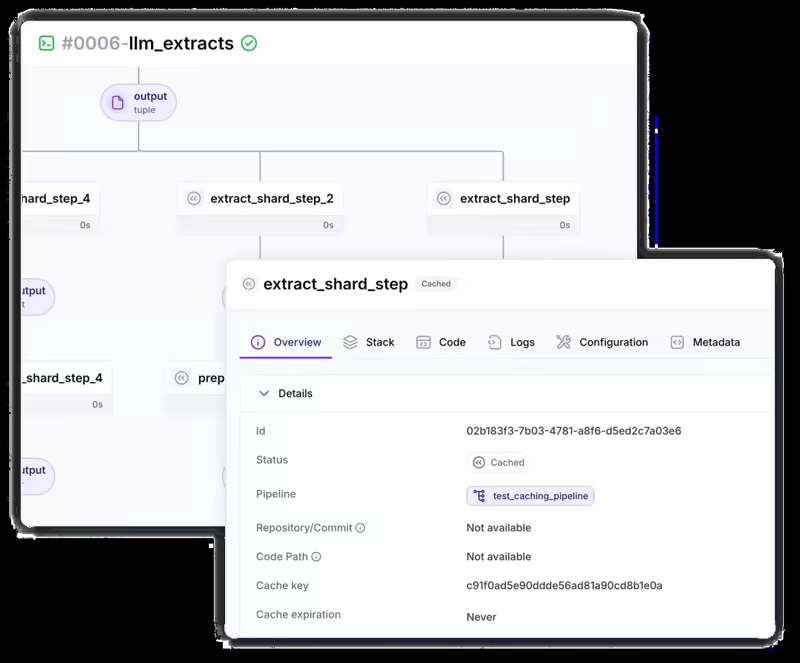
ZenML also enables step caching by default. Before a step runs, ZenML checks whether an earlier execution used the same code and configuration. When nothing relevant has changed, ZenML reuses the stored output instead of running the step again.
This is useful for costly feature preparation or embedding generation. It also saves repeated training and evaluation work.
ZenML cannot detect every change outside its artifact graph, though. A step that calls a live API or reads an external file may still return a different result even when the local inputs appear unchanged. In that case, you can disable caching for the step or pass the external state as an explicit input.
Dagster
Dagster supports retry policies for ops and assets. You can set the maximum number of retries and add delays or backoff rules. When a step fails because of a temporary API or warehouse issue, Dagster can rerun that unit and skip work that already succeeded.
This, however, depends on persisted outputs and on the configured I/O manager being able to load them again. If those outputs were not saved, Dagster may recompute earlier work.
You can also re-execute selected steps from a previous run. For example, if a model evaluation fails after feature generation and training, you can rerun the evaluation step and its downstream work instead of repeating the full pipeline.
Partitions give Dagster a structured way to recover historic data via filters like date, region, customer, or another key. Backfills can then materialize only the missing or outdated partitions. This gives Dagster a strong recovery for data products.
Airflow
Airflow supports task-level retries with configurable attempts, delays, and exponential backoff.
If a DAG fails, you can clear and rerun one task, its downstream tasks, or a larger section without restarting the full workflow.
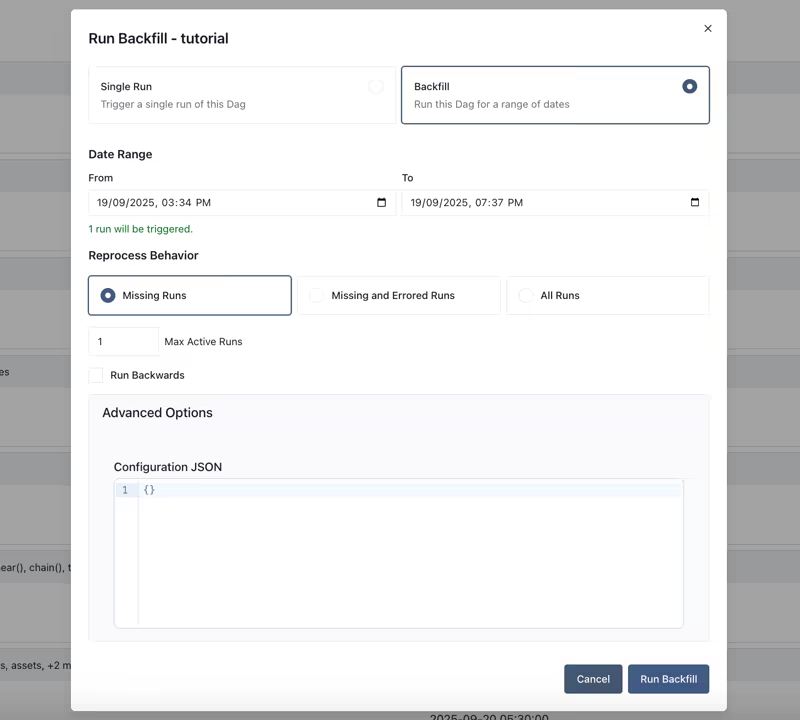
Its catch-up and backfill features are especially useful for historical processing. For example, you can rerun daily evaluations across the previous month after adding a new metric. Each interval becomes its own DAG run, so you can inspect failures and repeat only the affected dates.
Airflow does not provide general output caching based on code and input changes. Task outputs usually live in a warehouse, database, or object store. Tasks also need to be idempotent so retries do not create duplicate records or overwrite valid data.
Verdict: Airflow and Dagster offer stronger scheduler-level controls for selective reruns and historical backfills. ZenML gives your team a simpler way to reuse completed step outputs when training, embedding generation, or evaluation work is expensive.
Feature 4. Moving Beyond Cron to Event-Driven Automation
AI workflows rarely run on a fixed schedule. New labeled data might trigger retraining. A newly registered model could start evaluation, while an HTTP request could launch a deployed pipeline.
ZenML
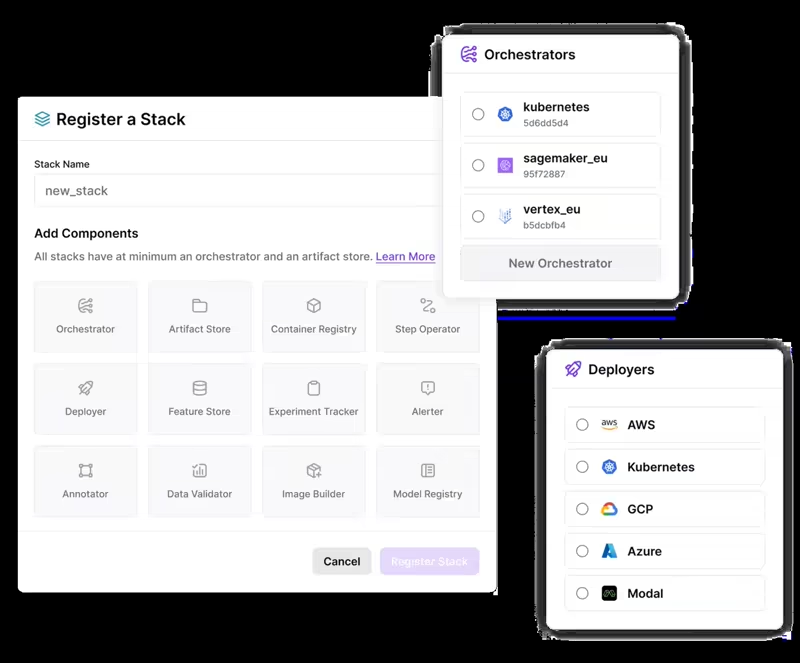
In open-source ZenML, you define a schedule on the pipeline and the active orchestrator executes it. Airflow runs cron and interval schedules through ZenML, Kubernetes uses CronJobs, and other orchestrators offer limited or no schedule support. This gives you one place to express the schedule, but behavior varies by backend, and updating or deleting a schedule can still mean touching the underlying orchestrator.
ZenML Pro replaces that model with triggers, conditions that start a pipeline automatically and are managed by ZenML itself rather than the backend. Schedule triggers handle cron expressions, fixed intervals, and one-off runs, with start and end times, concurrency rules, and run limits. Platform event triggers start a pipeline when something happens inside ZenML, such as another pipeline completing, so retraining can flow straight into evaluation without external glue code.
Because triggers attach to pipeline snapshots rather than living in pipeline code, you can update or delete a schedule at any time from the dashboard or API, or point it at a new snapshot, and every triggered run shows up as a normal tracked run. For request-driven work, a Deployer component can also expose a pipeline as a long-running HTTP service, where each request starts a new tracked pipeline run.
Dagster
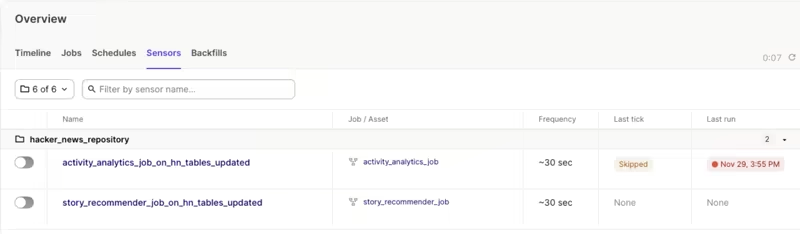
Dagster supports cron schedules and sensors for work that depends on time or an external event. A sensor might react when a file arrives, a job finishes, or another system sends a notification.
Its declarative rules take the model further. For instance, a condition can request a run when an asset is missing or when an upstream dependency changes. It can also apply cron-based rules when a fixed schedule still makes sense.
In an AI stack, that could mean rebuilding an index after its source corpus changes or rerunning evaluations when a new model asset appears.
Airflow
Airflow supports cron schedules and custom timetables. Sensors wait for external conditions and deferrable operators move idle waiting to the triggerer, which frees a worker slot until the event occurs.
Airflow also supports asset-aware scheduling. A downstream DAG can run after one asset update or after a condition across several assets is met. External systems can push Asset events through the API, while Asset Watchers monitor outside sources.
Airflow 3 is no longer just a cron-only scheduler. It can respond to Asset updates, external events, and long waits, though you’d still design the Asset and trigger rules.
Verdict: Dagster has the most asset-centered trigger model. Airflow covers time schedules and sensors, plus deferred waits, Assets, and external events. ZenML OSS delegates schedules to the orchestrator, while ZenML Pro adds managed schedules and pipeline-event triggers that work the same on any backend.
Dagster vs Airflow vs ZenML: Integrations
Each platform approaches integrations differently. ZenML connects tools across the ML lifecycle. Dagster brings external systems into its asset graph. Airflow gives DAGs operators and hooks, plus sensors and triggers.
ZenML
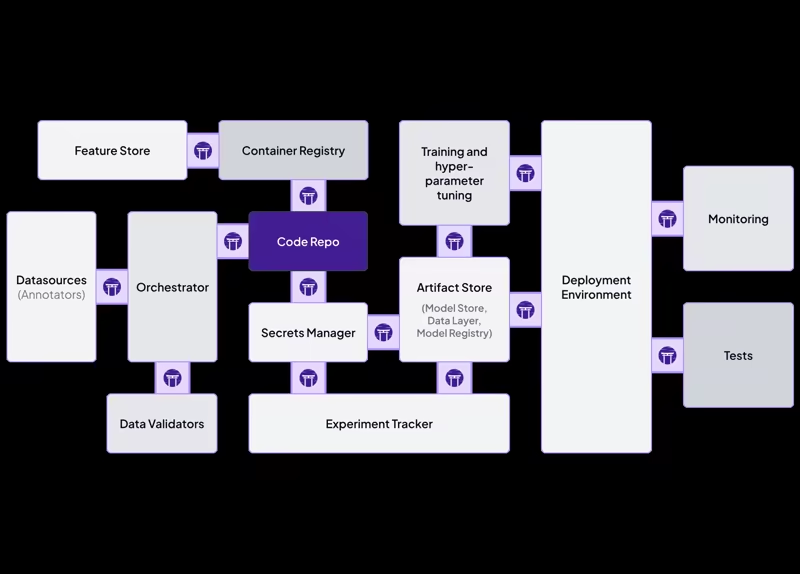
ZenML organizes integrations as stack components. Each component handles one part of the pipeline, so you’re free to choose your own execution, storage, tracking, and deployment services without tying pipeline code to one vendor.
ZenML’s core integration stack includes:
- Orchestrators: Airflow, Kubernetes, Kubeflow, Vertex AI, SageMaker, Azure ML, and Databricks
- Artifact stores: Amazon S3, Google Cloud Storage, Azure Blob Storage, and local storage
- Experiment trackers: MLflow, Weights & Biases, and Comet
- Feature stores and validation: Feast, Great Expectations, Evidently, and Deepchecks
- Agent frameworks: LangGraph, PydanticAI, CrewAI, and the OpenAI Agents SDK
This structure works well for AI teams that already use several ML services. You can run the same ZenML pipeline on different orchestrators and still keep the artifact model and pipeline logic consistent.
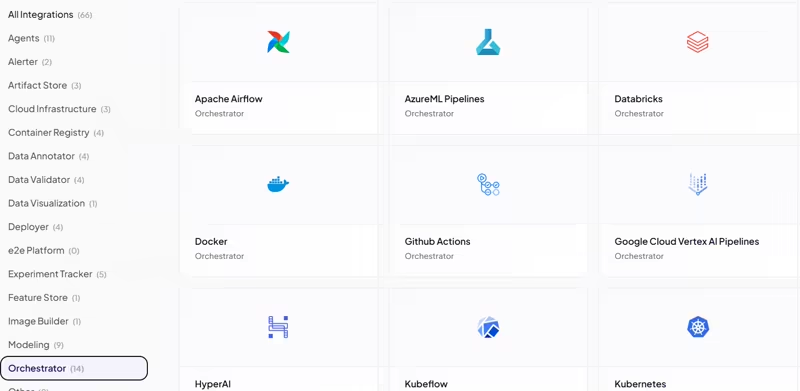
👀 Note: Support depth varies between components, so it is worth checking the setup and feature coverage for each service.
Dagster
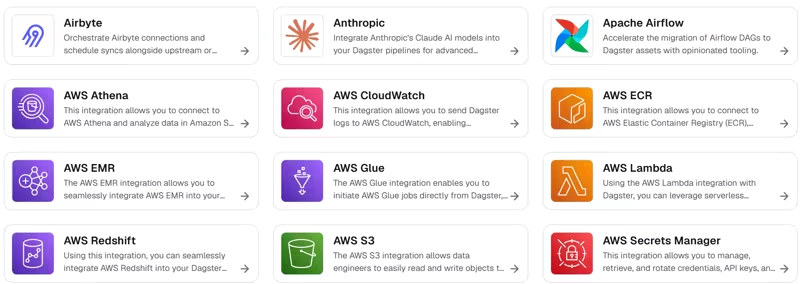
Dagster’s integrations focus on data platforms and the systems that produce or consume assets. Many connectors can represent external tables, datasets, and transformation jobs inside Dagster’s asset graph.
Dagster’s integrations include:
- Data warehouses: Snowflake, BigQuery, Redshift, and DuckDB
- Transformation tools: dbt and SQLMesh
- Data ingestion: Fivetran, Airbyte, and dlt
- Compute platforms: Databricks, Kubernetes, and AWS services
- ML tools: MLflow, Weights & Biases, and Modal
- Storage and databases: Amazon S3, PostgreSQL, MySQL, and cloud object stores
Airflow
Airflow uses provider packages to connect DAGs with external services. These packages contain operators, hooks, sensors, triggers, and connection types that developers can use directly in task definitions.
Airflow’s ecosystem covers:
- Cloud platforms: AWS, Google Cloud, and Microsoft Azure
- Warehouses and databases: Snowflake, BigQuery, Redshift, PostgreSQL, and MongoDB
- Data processing: Spark, Databricks, dbt, and Kubernetes
- Messaging and events: Kafka, Amazon SQS, and Google Pub/Sub
- Data transfer: SFTP, HTTP, cloud storage, and database transfer operators
- ML services: SageMaker, Vertex AI, Azure Machine Learning, and MLflow
Verdict: Airflow offers the widest coverage across cloud, data, and infrastructure services. Dagster works best when connected systems appear in a shared asset graph. ZenML focuses more closely on the tools ML and AI teams use for execution, tracking, storage, and deployment.
Dagster vs Airflow vs ZenML: Pricing
Budgeting for these tools might be tricky because of how they price usage. Here’s a quick breakdown:
ZenML
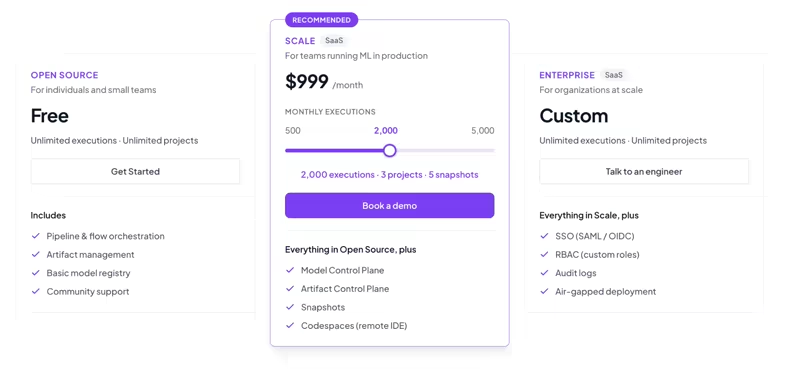
ZenML is open-source and free to use under the Apache 2.0 license. For growing teams wanting a managed space, ZenML offers usage-based plans:
- $399 per month: 500 executions, 1 project, 1 snapshot
- $999 per month: 2,000 executions, 3 projects, 5 snapshots
- $2,499 per month: 5,000 executions, 10 projects, 20 snapshots
- Enterprise: Custom pricing
Dagster
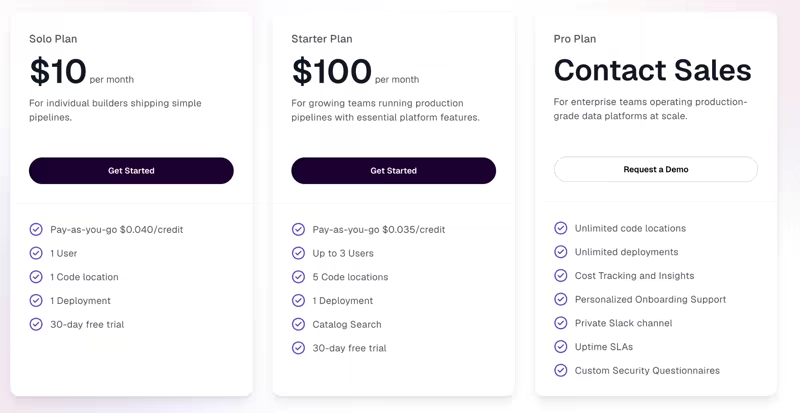
Dagster OSS is free under Apache 2.0, along with three paid plans:
- Solo Plan: $10 per month
- Starter Plan: $100 per month
- Pro Plan: Custom pricing
👀 Note: Prefect is acquiring Dagster, so pricing might change.
Airflow
Apache Airflow is free under the Apache 2.0 license. The real cost comes from the metadata database and scheduler. Workers and logs add to it.
Final Recommendation: Which Platform Fits Your Team?
The final choice comes down to what you need to inspect after a failed or incorrect run.
- Choose Airflow when your company already runs it or needs one scheduler for batch jobs.
- Choose Dagster when data assets sit at the center of your platform. Prefect’s announced acquisition does not remove Dagster as an option yet: Dagster OSS and Dagster+ remain supported and available to new customers.
- Choose ZenML when the main challenge is tracking the ML lifecycle (the ‘outer loop’) around each run.
ZenML and Airflow are not always direct substitutes. ZenML can use Airflow as its orchestrator, so platform teams can keep their existing scheduler while ML engineers work with ZenML’s artifact and pipeline model.
What’s next: