
On this page
Trigger.dev pricing looks simple on paper. There is a Free plan, two paid self-serve plans, and a Custom plan for larger teams. But it’s easy to underestimate what you’ll actually pay. For that, you need to separate plan fees from monthly usage.
Your plan controls limits and features, and your usage controls billing. So ultimately, your monthly bill depends on task volume. Run duration and machine size matter just as much. It also gets tricky to estimate costs once you’re running high-volume jobs, media tasks, or agent workloads with bursts.
We did the math, so you don’t have to. In this guide, we break down Trigger.dev pricing plans, the math, and the workload patterns that might spike your bill while you sleep.
Trigger.dev Pricing Plans
Trigger.dev Cloud has four plan tiers: Free, Hobby, Pro, and Enterprise. Each plan includes monthly usage credits that are often equal to the plan’s value. Once usage exceeds credits, paid plans continue running, and Trigger.dev bills for the extra compute.
Here’s a quick overview of Trigger.dev’s pricing model:
| Plan | Pricing | Key Features |
|---|---|---|
| Free | Free |
|
| Hobby | $10/month |
|
| Pro | $50/month |
|
| Enterprise | Custom pricing |
|
Trigger.dev Pricing Factors to Consider
Trigger.dev can be cheap for some workloads and costly for others. A one-second webhook task has a different cost profile from a five-minute media job. The difference comes down to workload shape and duration.
Here’s what you must factor in before committing:
1. Workload Cost Depends on Both Compute Seconds and Run Count
Trigger.dev charges in two parts: compute time and run invocation.
Take Trigger.dev’s own example. On the default Small-1x machine at $0.0000338/second, a 10-second task run 100 times per day costs:
1 run = (10 x $0.0000338) + $0.000025 = $0.000363
Across a 30-day month:
100 runs/day x 30 days x $0.000363 = $1.09
That feels affordable if you’re a small or mid-size business. A few thousand short tasks per month can fit comfortably within the Free or Hobby credits.
However, the math changes when you increase workflow duration or volume. For instance, a single 60-second task on Small-1x would cost $0.002053 per run. 10,000 task runs per month would cost about $20.53. At 100,000 runs per month, it becomes about $205.30.
Bottom line: Trigger.dev is priced around execution time and run count. Both significantly increase costs, regardless of the plan you choose. Before you compare it with Temporal or Inngest, model your average run duration. Do the same for n8n or a self-hosted queue.
2. Machine Size Can Change the Bill Faster Than Run Count
Apart from run time and count, machine size is another factor to consider in Trigger.dev pricing.
The default Small-1x machine costs $0.0000338/sec, while Medium-2x costs $0.0001700/sec. That costs you about 5x more per second.
For 10,000 runs/month at 60 seconds each:
| Machine | Monthly Cost |
|---|---|
| Micro | ~ $10.39 |
| Small-1x | ~ $20.53 |
| Medium-2x | ~ $102.25 |
| Large-2x | ~ $408.25 |
That jump is easy to miss, and this is where you can overpay. Medium-2x costs about 5 times more per second than Small-1x. Similarly, Large-2x costs about 20 times more per second than Small-1x.
If a task only needs a bigger machine for rare payloads, do not set the larger machine as the default for every run. Use the smallest machine that works for normal traffic, then override the machine for heavier payloads.
3. Short Tasks Can Make the Per-Run Fee More Visible
If your code triggers thousands of tiny jobs one by one, the run fee becomes a real part of the bill.
Trigger.dev charges $0.000025 per run, or $0.25 per 10,000 runs. For very short jobs, that fee becomes visibly significant.
For example: 100,000 runs/month at 1 second each on Small-1x:
compute = 100,000 × 1 × $0.0000338 = $3.38
run fees = 100,000 × $0.000025 = $2.50
total = $5.88
In this case, the run fee is about 43% of the bill.
This means high-volume, short jobs need a different comparison lens. A million one-second runs on Small-1x could cost about $58.80. That’s still reasonable for many production apps, but it is not ‘free because each job is tiny.’
This is also why grouping work into fewer task runs can matter. If your business logic can safely process multiple items inside one run, you reduce invocation fees. But if you use Trigger.dev’s batchTrigger(), remember it still converts the batch into individual runs, so it helps with API limits and burst handling, but does not remove per-run invocation costs.
All Pricing Plans that Trigger.dev Offers
Trigger.dev offers four pricing plans: Free, Hobby, Pro, and Enterprise.
The right plan depends less on task count and more on environments, team members, schedules, dashboards, and concurrent runs.
Let’s break down each plan.
Free Plan
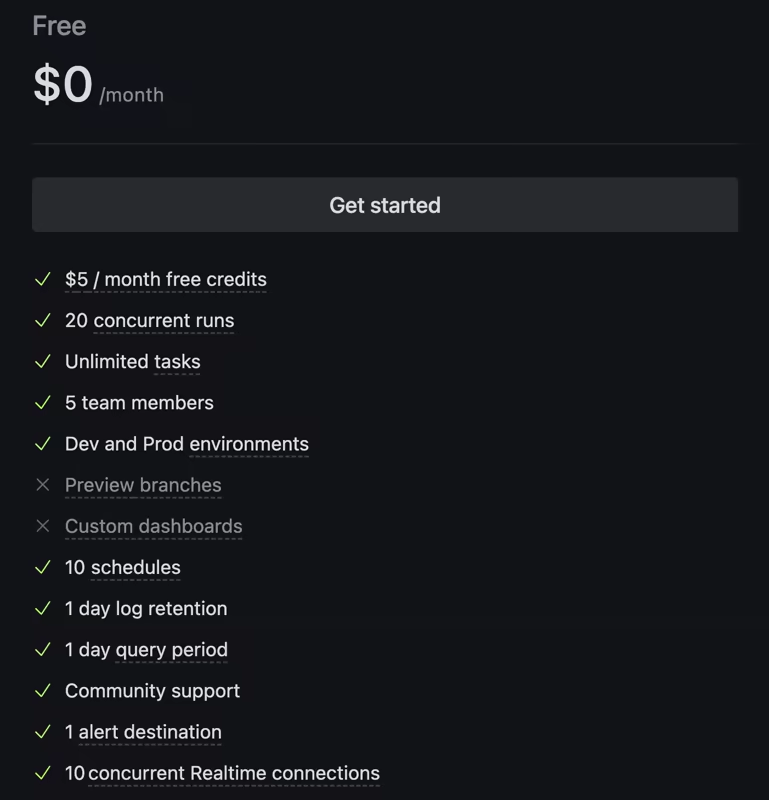
The Free plan includes $5 in monthly usage credits. You get 20 concurrent runs and unlimited tasks, which is pretty generous for a free tier.
It supports up to 5 team members and 10 schedules. On top of that, you’ll have 1 day of log retention and query period, community support, 1 alert destination, and 10 concurrent Realtime connections.
Overall, it’s a great way to try out Trigger.dev with real workloads. You’re not limited in how many tasks you can create, and you can even use it in production while you’re getting a feel for things.
Those $5 in credits can actually stretch further than you might expect. For example,
- Using the Small-1x 10-second workflow, $5 covers about 13,774 runs per month
- Using the Small-1x 60-second workflow, $5 covers about 2,435 runs per month.
The main constraint is what happens after the credits run out. On the Free plan, you need to upgrade to keep tasks running after the included credits are used.
Best if: You are testing Trigger.dev, building a small product, or trying to measure your first few task costs.
Skip if: You already have production traffic and you cannot allow runs to stop after the free credits are used.
Hobby Plan - $10 per Month
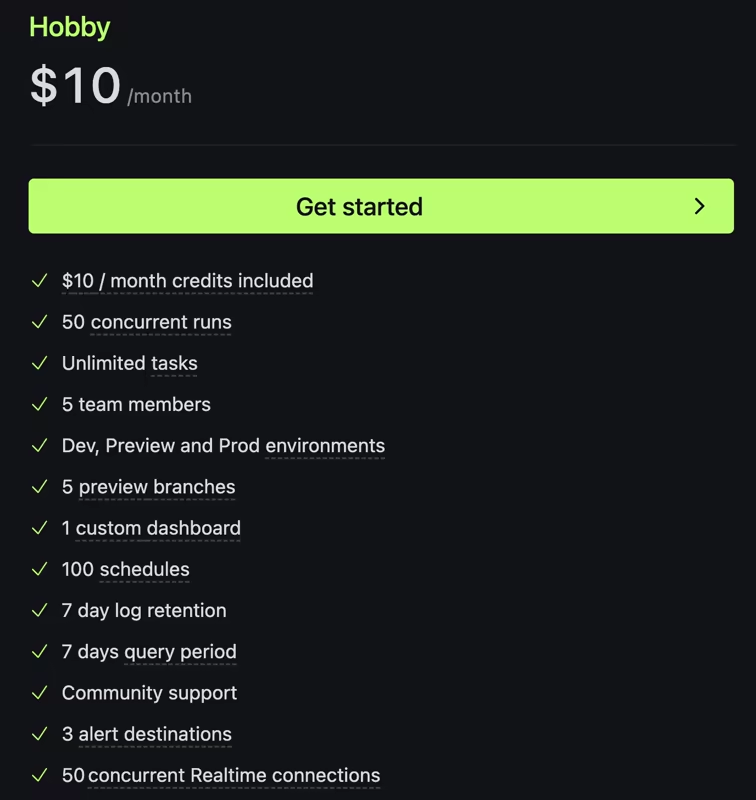
Trigger.dev’s Hobby plan costs $10 a month and makes sense for small production use. You get $10 in usage credits, 50 concurrent runs, and unlimited tasks.
You can add up to 5 team members, set up 100 schedules, and work with preview environments, including 5 preview branches and 1 custom dashboard. You also get 7 days of log retention, plus community support, 3 alert destinations, and 50 concurrent Realtime connections. If you need it, there’s also a HIPAA BAA add-on.
In terms of usage, that $10 credit can go a decent way. For example, at Small-1x, $10 covers about 27,548 runs per month if each run lasts 10 seconds. For 60-second runs on the same machine, it covers about 4,870 runs per month.
Best if: You run a small app, need preview environments, and want production tasks to keep running past the Free plan’s limits.
Skip if: You need dedicated Slack support or more than 50 concurrent runs. Also skip it if you need more dashboards or longer log retention.
Pro Plan - $50 per Month
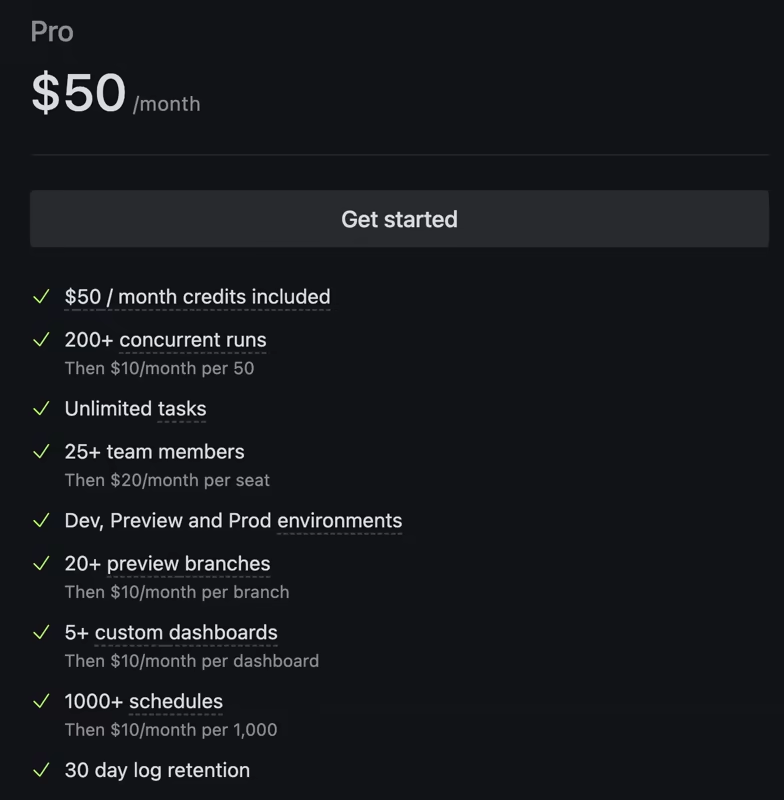
Trigger.dev’s Pro plan costs $50 per month, and you get $50 back in usage credits. Up from the Hobby plan, you get 200+ concurrent runs and room for 25+ team members.
It also gives you 20+ preview branches, 5+ custom dashboards, and over 1,000 schedules. All is adequate for a mid-size team of 15-20 members to collaborate.
On top of that, there are 30 days of log retention and query history, plus dedicated Slack support. You’ll also have access to 100+ alert destinations, 500+ concurrent Realtime connections, AWS PrivateLink, and a HIPAA BAA add-on if you need it.
If you’re running it in production and need better visibility, more concurrency, and quicker support, this is the plan that fits.
At this level, add-ons become visible on your bill, and here’s why it matters:
- Trigger.dev charges $10/month per 50 extra concurrent runs beyond the Pro limit.
- $20/month per extra team seat beyond 25.
- Extra preview branches and dashboards cost $10/month each.
- Extra schedules cost $10/month per 1,000 beyond the included 1,000.
As for usage, the $50 credit covers about 137,741 runs per month at 10 seconds each on Small-1x. At 60 seconds each, it covers about 24,354 runs per month.
Best if: Trigger.dev is a core part of your production setup and you need stronger team features, longer logs, higher concurrency, or dedicated support.
Skip if: Your workload is still small and you don’t need those extra limits or features just yet.
Enterprise Plan - Custom Pricing
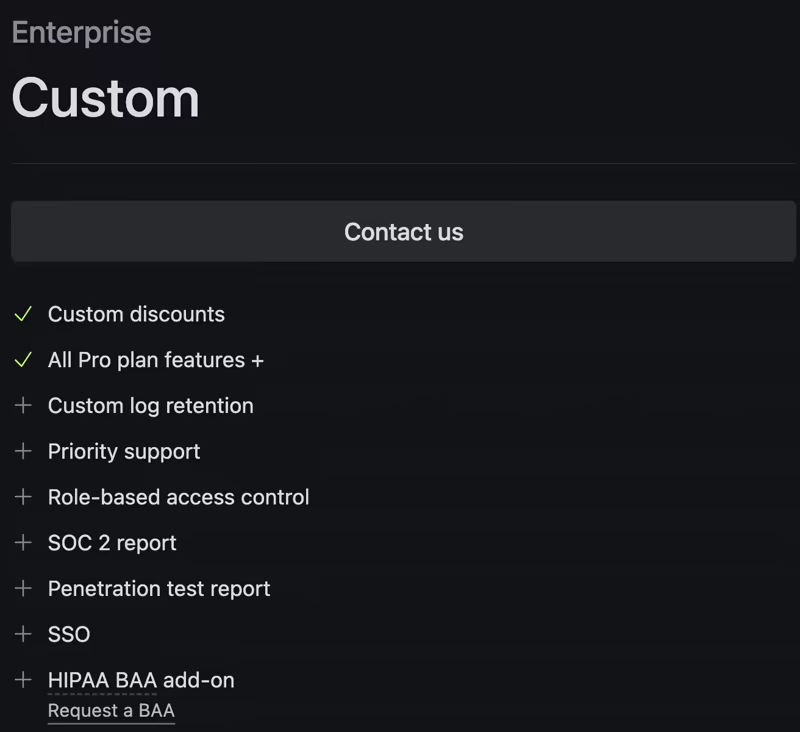
The Custom plan is for larger teams with enterprise needs. It includes all Pro plan items plus custom discounts and log retention. It also adds priority support and enterprise-grade security features like RBAC, SSO, and security reports.
Custom limits also make sense if you have predictable high usage and want volume-based pricing.
Best if: You need SSO, RBAC, or SOC 2 paperwork. It also fits teams that need custom retention or discounts.
Skip if: You only need more usage. In that case, Pro with usage overages and add-ons may be enough until procurement or security needs become real.
Is Trigger.dev Expensive?
Trigger.dev is affordable when your tasks are small and medium background jobs and TypeScript AI workflows. It’s less attractive when you run long compute-heavy tasks or those simple enough that a self-hosted queue can do the job with less spend.
Let’s understand this with some examples.
For a 10-second Small-1x task, 100 runs per day costs about $1.09 per month. Even 10,000 runs per month cost about $3.63. That’s justifiable.
For a 60-second Small-1x task, 100,000 runs per month cost about $205.30. If your tasks create business value, Trigger.dev is still reasonable for your production system.
For a 60-second task on machine size Medium-2x, 100,000 runs/month cost about $1,022.50. At this point, you need to ask harder questions, whether or not:
- Every run truly requires Medium-2x
- Light and heavy payloads can be separated
- Tasks can be batched or use idempotency keys
- Max duration can prevent runaway tasks
If you’re still unsure, here is a practical way to estimate your bill:
- Pick your top 5 task types by monthly run count.
- Measure average active compute time per task.
- Note the machine size each task really needs.
- Add the $0.000025 run fee.
- Multiply by the expected monthly run count.
- Add plan add-ons for seats and concurrency. Include dashboards, schedules, or retention, too.
Once you have a number, compare it with the cost of operating your own worker stack.
For many teams, Trigger.dev is worth paying for because it removes operational work. You get managed workers and durable execution without running your own worker stack.
For teams with strict cost ceilings and simple workloads, self-hosting may be cheaper. Trigger.dev is open source, so you can self-host if you have the engineering time and infrastructure comfort.
Kitaru: A Trigger.dev Alternative for Your Long-Running Python Agents
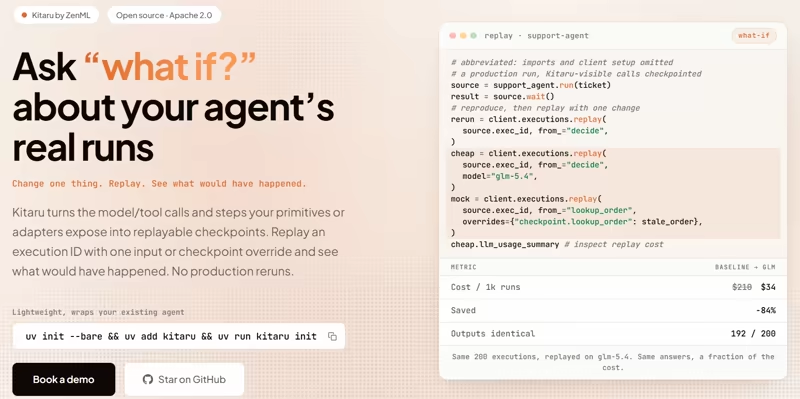
Kitaru from ZenML, is a newer, open-source runtime for durable Python agents. It’s a Trigger.dev alternative for Python-first agent teams that care most about checkpoint recovery, replay, and self-hosted agent execution. It helps you handle crashes, replay runs, pause and resume work, track artifacts, and keep everything under your own control with self-hosting.
Kitaru Pricing
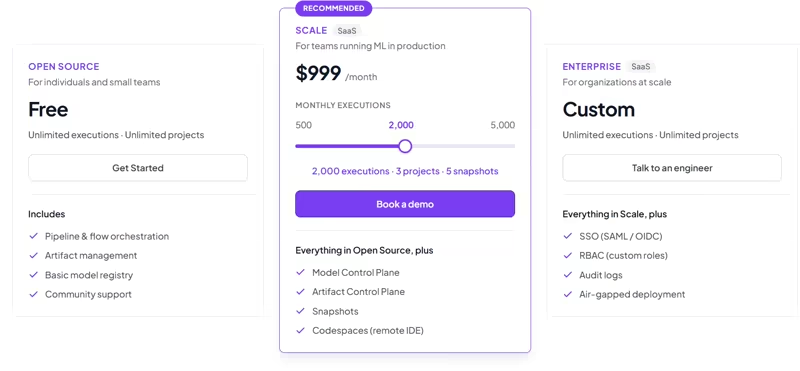
Kitaru is the agent workspace covered by ZenML Pro, alongside the ZenML workspace for ML pipelines. Kitaru’s core product is free and open source under Apache 2.0. Apart from the open-source version, ZenML offers two paid tiers that give you a managed control plane for both ZenML (for ML pipelines) and Kitaru (to run durable AI agents).
ZenML’s Scale plan starts at $399 a month, which gives you 500 executions, 1 project, and 1 snapshot.
The Scale plan has 2 more variants:
- $999 per month: 2,000 executions, 3 projects, 5 snapshots
- $2,499 per month: 5,000 executions, 10 projects, and 20 snapshots
Use Kitaru open source if: You are a Python-first agent team and want to add checkpoints, replay, wait/resume, and dashboard visibility in your own environment.
Use ZenML Pro if: You want the managed plane across ML pipelines and agent runs, with governance controls for a team setting.
Here are some key features that Kitaru offers:
Feature 1. Checkpoint-Based Recovery for Python Agents
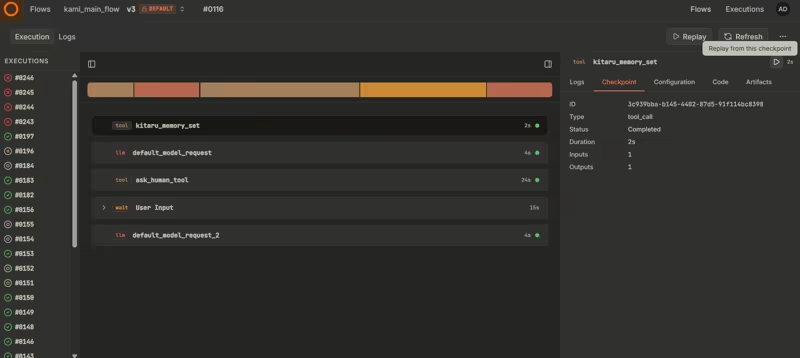
The Kitaru pain point is simple. An agent can run for 45 minutes, spend money on model calls and tool calls, then fail right before it finishes. Without saved progress, you restart from the beginning and pay again.
Kitaru fixes this with checkpoints.
Kitaru lets you wrap normal Python steps with durable boundaries. You don’t force the whole agent into a workflow engine model. If the agent crashes at step 15, completed checkpoints stay saved. You fix the issue and resume from the failed boundary.
That matters because the expensive work is often not CPU time. It is model calls, paid APIs, browser steps, and tool outputs.
Trigger.dev also has durable execution for tasks and no timeout limits. The difference is where each product fits best. Trigger.dev is strongest for TypeScript-first tasks, managed execution, and JavaScript app integration. It can run Python scripts from inside TypeScript tasks. Kitaru fits when the agent itself is Python-first and you want checkpoints/replay around the existing Python agent stack.
Feature 2. Wait, Resume, and Replay Without Redoing Earlier Work
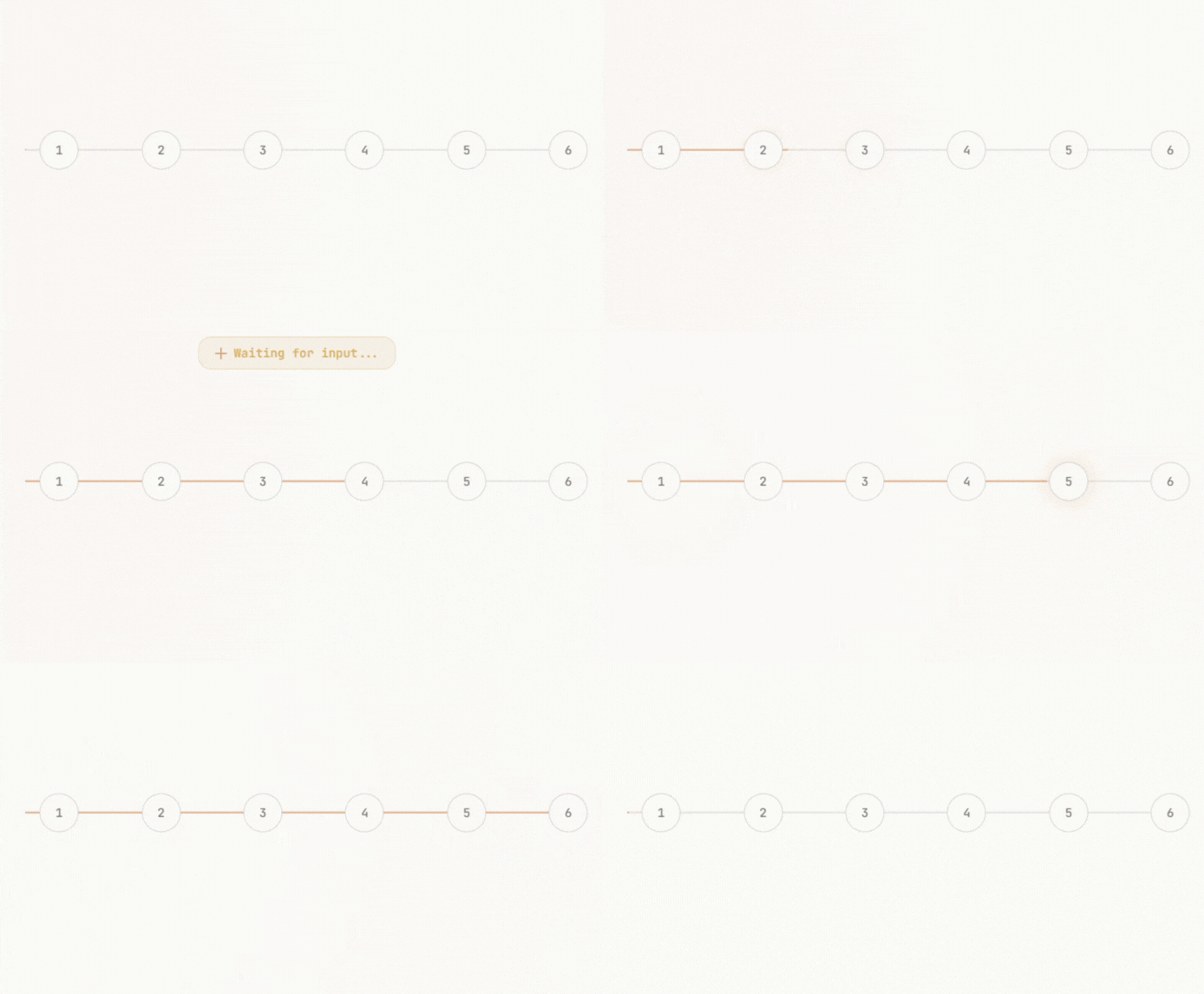
Long-running agents often wait. They wait for human approval, a webhook, another agent, or a scheduled moment.
Trigger.dev’s built-in waits longer than 5 seconds are checkpointed and do not count toward compute usage. Kitaru also treats waiting as part of the agent runtime problem. It lets a run pause and later resume without keeping expensive compute resources active the whole time.
Kitaru’s replay model is also useful for debugging. If a run fails because an input was wrong, a model call behaved badly, or a tool returned bad data, you can replay from a saved point and inspect the run path.
For platform teams, this helps with two problems at once: engineers do not lose work after crashes, and leaders get a better view of agent spend.
Feature 3. Runs in Your Cloud and Works With Your Existing Agent Stack
Many AI teams cannot send agent data to an ordinary cloud SaaS. Banks, healthcare teams, insurance companies, defense teams, and enterprise platform teams often need workloads to run inside their own cloud account.
Kitaru’s answer is a self-hosted execution. It can run locally, on Kubernetes, and in cloud environments while keeping data in your own storage.
It is also built to sit under agent SDKs instead of replacing them. You keep the framework or SDK you already use and add Kitaru underneath for checkpointing, replay, waiting, isolation, and deployment.
Trigger.dev can also self-host, but its main Cloud product runs tasks on managed infrastructure. Kitaru’s strongest fit is the team that wants a Python agent runtime inside its own environment from day one.
Wrapping Up
Trigger.dev pricing is not hard to understand, but it is easy to misread. For short tasks, Trigger.dev can be very affordable. For long CPU-heavy jobs on large machines, the cost rises quickly.
My advice will be to model real workloads before choosing a plan. Do not price every task as if it uses the default machine. Do not ignore run count, retries, duplicate triggers, or machine size. For waits, model only active compute time, since Trigger.dev’s built-in waits longer than 5 seconds are checkpointed and do not count as compute usage.
If you are building Python-first agents and your core worry is recovery after failure, Kitaru is worth a look. It gives you checkpoints and replay. It also gives you wait/resume, artifact lineage, and self-hosted control.
Related reading: