
On this page
Today, apps driven by microservices and AI agents are demanding a new kind of reliability that traditional batch orchestrators, like Airflow, struggle to provide.
This is where Temporal, a durable execution platform, enters the picture.
While Airflow excels at scheduling DAGs of tasks, Temporal ensures that your code executes reliably, even in times of failures and pushbacks, making it the go-to for long-running, stateful applications.
In this Temporal vs Airflow comparison, we break down the key differences in architecture, features, and use cases to help you decide which tool belongs in your stack.
P.S. We also discuss how an MLOps platform like ZenML can help you leverage these orchestrators within a unified ML lifecycle.
Temporal vs Airflow: Key Takeaways
- Temporal: Takes a code-first approach where you write workflows as stateful functions that can run for long periods without breaking. It records every step so the workflow can resume cleanly after crashes, restarts, or worker loss. With built-in timers, retries, and signals, it fits event-driven systems, long-running business flows, and ML pipelines that need dependable recovery.
- Airflow: Uses a DAG-based model built for scheduled, batch-style pipelines. Tasks run independently, with status tracked in the metadata database and data passed through XComs. Its large provider ecosystem and familiar Python DAGs make it a strong choice for ETL and ML workflows that run on fixed schedules and rely on ready-made integrations.
- Key Difference: Airflow is about scheduling tasks to run at a specific time. Temporal is about guaranteeing the completion of code that might take milliseconds or months to finish.
- How ZenML fits in: While Airflow and Temporal handle execution, ZenML manages the machine learning lifecycle (artifacts, lineage, reproducibility) that sits on top of these orchestrators.
Temporal vs Airflow: Maturity and Lineage
Before comparing features, it is helpful to understand the development trajectory and ecosystem of each tool.
| Metric | Temporal | Airflow |
|---|---|---|
| First public release | V1.0 – Sept 2020 (Founded 2019) | 2015 (Airbnb), Apache Top-Level Project 2019 |
| GitHub stars | ~17k+ | ~43k+ |
| Forks | ~1.2k+ | ~16k+ |
| Commits | 8,100+ | 34,600+ |
| Core philosophy | Durable Execution: ‘Fault-oblivious’ stateful code that guarantees completion. | Scheduled Workflows: DAG-based orchestration for batch data processing. |
| Notable proof points | Used by Uber, Netflix, Stripe, and Coinbase for critical transactional workflows. | Used by virtually every data team (Adobe, Airbnb, etc.) for ETL and ML pipelines. |
Apache Airflow is a veteran in the orchestration space. It was started at Airbnb in late 2014 and open-sourced in 2015.
Temporal is newer. It evolved from Uber’s Cadence project and was officially launched as an open-source platform in late 2019.
Although Temporal is younger than Airflow, it has quickly gained traction in domains needing highly reliable, long-running workflows.
Temporal vs Airflow: Features Comparison
Before we begin with a detailed comparison, here’s a table with a high-level summary of the architectural differences between Temporal and Airflow:
| Feature | Temporal | Airflow |
|---|---|---|
| Core Paradigm | Durable execution of stateful code. Workflows are defined as code functions. | Batch-oriented orchestration. Workflows are defined as DAGs of tasks. |
| State and Persistence | Stateful: The server persists the full execution history and can ‘replay’ code to rebuild state after failures. | Stateless Tasks: Tasks are stateless units. State is passed via XCOMs (metadata) or external storage. |
| Time Characteristics | Long-running: Workflows can sleep for months or wait for external signals indefinitely without consuming worker resources. | Scheduled: Optimized for cron-based schedules. Long waits require ‘Sensors’ that occupy worker slots or rely on deferrable operators. |
| Failure Handling | Deterministic Retries: Automatic, infinite retries with compensation logic (Sagas). | Retry Policies: Configurable retry counts and delays. Requires manual ‘backfills’ for missed runs. |
Feature 1: Core Paradigm and Primary Use Cases
While both are orchestrators, the fundamental difference lies in what you are trying to orchestrate.
Temporal
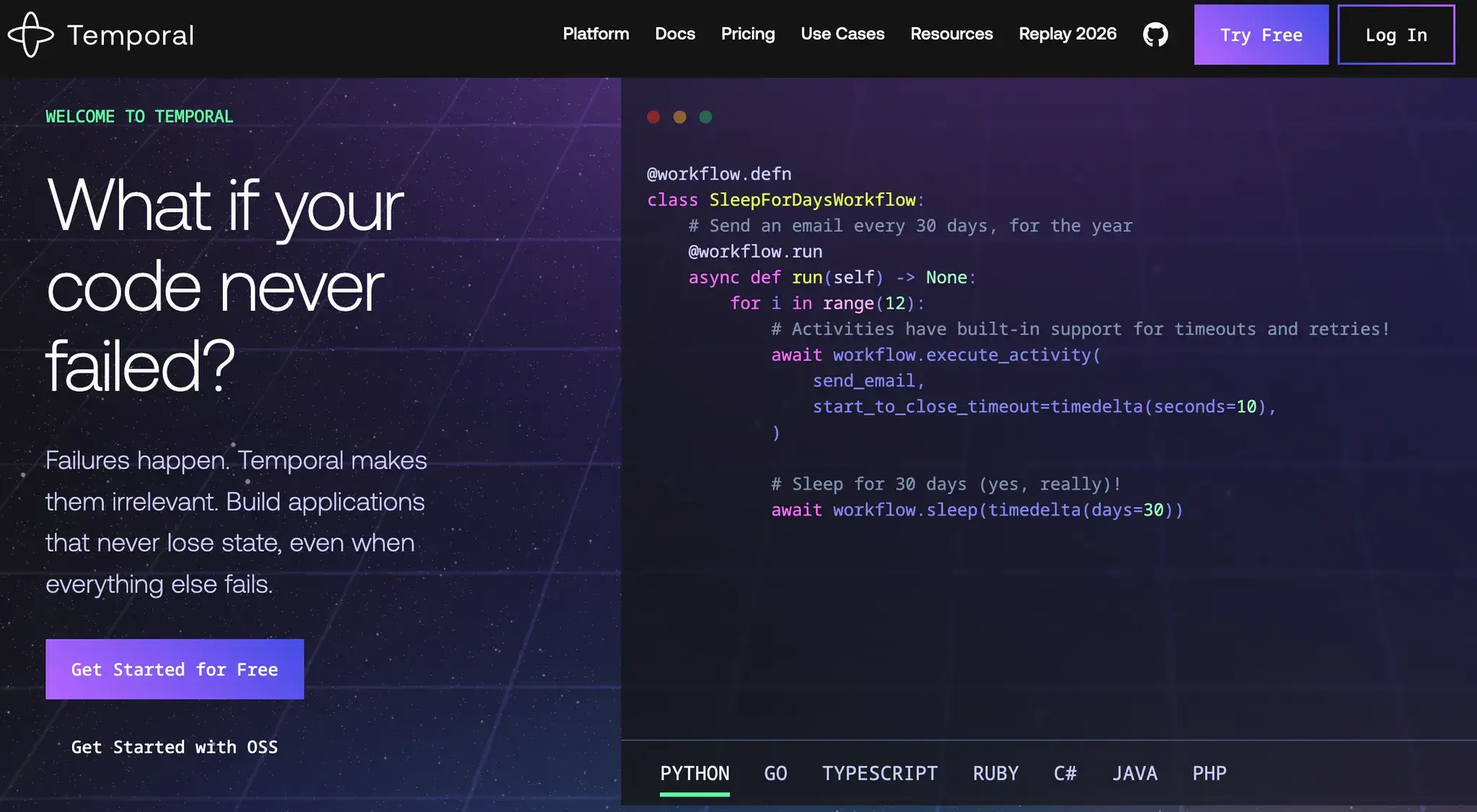
Temporal treats each workflow as a durable stateful function. You write workflows as regular code in any language, like Java, Go, Python, etc., and the Temporal platform handles execution and recovery.
For example, a Temporal workflow in Python might look like:
from temporalio import workflow
from datetime import timedelta

@workflow.defn
class GreetingWorkflow:
    @workflow.run
    async def run(self, name: str) -> str:
        # Call an activity named 'greet' defined elsewhere
        return await workflow.execute_activity(
            greet,  # Activity function
            name,  # input parameter
            start_to_close_timeout=timedelta(seconds=30),
        )
Here, GreetingWorkflow is a durable workflow class. Even if the service restarts after, say, 5 minutes, the workflow execution will resume from where it left off, still returning the final greeting.
This ‘workflow-as-code’ model puts developers in control of the logic, without having to manage retries, checkpoints, or external state persistence. This makes Temporal ideal for:
- Microservices Orchestration: Coordinating complex transactions across multiple services (e.g., ‘Order Placed’ > ‘Charge Payment’ > ‘Ship Item’).
- Long-Running Processes: Workflows that may take days or months, such as a user onboarding campaign or a subscription billing cycle.
- Event-Driven Workflows: Reacting to external signals (e.g., a user clicking a link) in real-time.
Notably, Temporal’s documentation highlights its popularity in AI/ML contexts.
Airflow
Airflow is a workflow scheduler. It structures workflows as DAGs of independent tasks designed to run on schedules or triggers. It’s the industry standard for:
- ETL/ELT Pipelines: Moving data from S3 to Snowflake every night at 12 AM.
- Batch Analytics: Running a daily report generation script.
- ML Model Training: Retraining a model every week using fresh data.
For example, a simple Airflow DAG might be:“
from airflow import DAG
from airflow.operators.bash import BashOperator
from airflow.decorators import task
from datetime import datetime, timedelta

with DAG("example_dag", start_date=datetime(2022,1,1), schedule="0 0 * * *") as dag:
    hello = BashOperator(task_id="hello", bash_command="echo Hello")

    @task()
    def process_data():
        print("Processing data...")

    hello >> process_data()
It’s the heart of the modern MLOps stack for batch-oriented pipelines. However, Airflow was not built for endlessly-running processes; tasks are expected to finish within their scheduled run.
Bottom line: Use Airflow if your tasks are ‘file moving’ or ‘query running’ on a schedule. Use Temporal if your tasks are ‘business logic executing’ that involves transactions, user interactions, or unpredictable wait times.
📚 Also read: Prefect vs Airflow
Feature 2: Workflow Model: Stateful vs DAG-based
Temporal
# Conceptual Temporal Workflow in Python
from datetime import timedelta
from temporalio import workflow

@workflow.defn
class SubscriptionWorkflow:
    @workflow.run
    async def run(self, user_id: str):
        # This workflow handles a monthly subscription
        await workflow.execute_activity(
            "charge_credit_card",
            user_id,
            start_to_close_timeout=timedelta(minutes=5)
        )

        # Durable timer: sleeps for 30 days without consuming resources
        await workflow.sleep(timedelta(days=30))

        # The code resumes here automatically after 30 days
        await workflow.execute_activity("send_renewal_email", user_id)xv
Temporal workflow execution is stateful by design. Behind the scenes, Temporal automatically maintains an event history for every running workflow.
For example, when you code a workflow, you can store local variables and call activities; Temporal ensures these variables and calls are deterministic and persistent.
If a worker crashes, Temporal restarts the workflow on a new worker and ‘replays’ the history to restore the exact state variables before the crash. In other words, workflows behave like persistent state machines.
Airflow
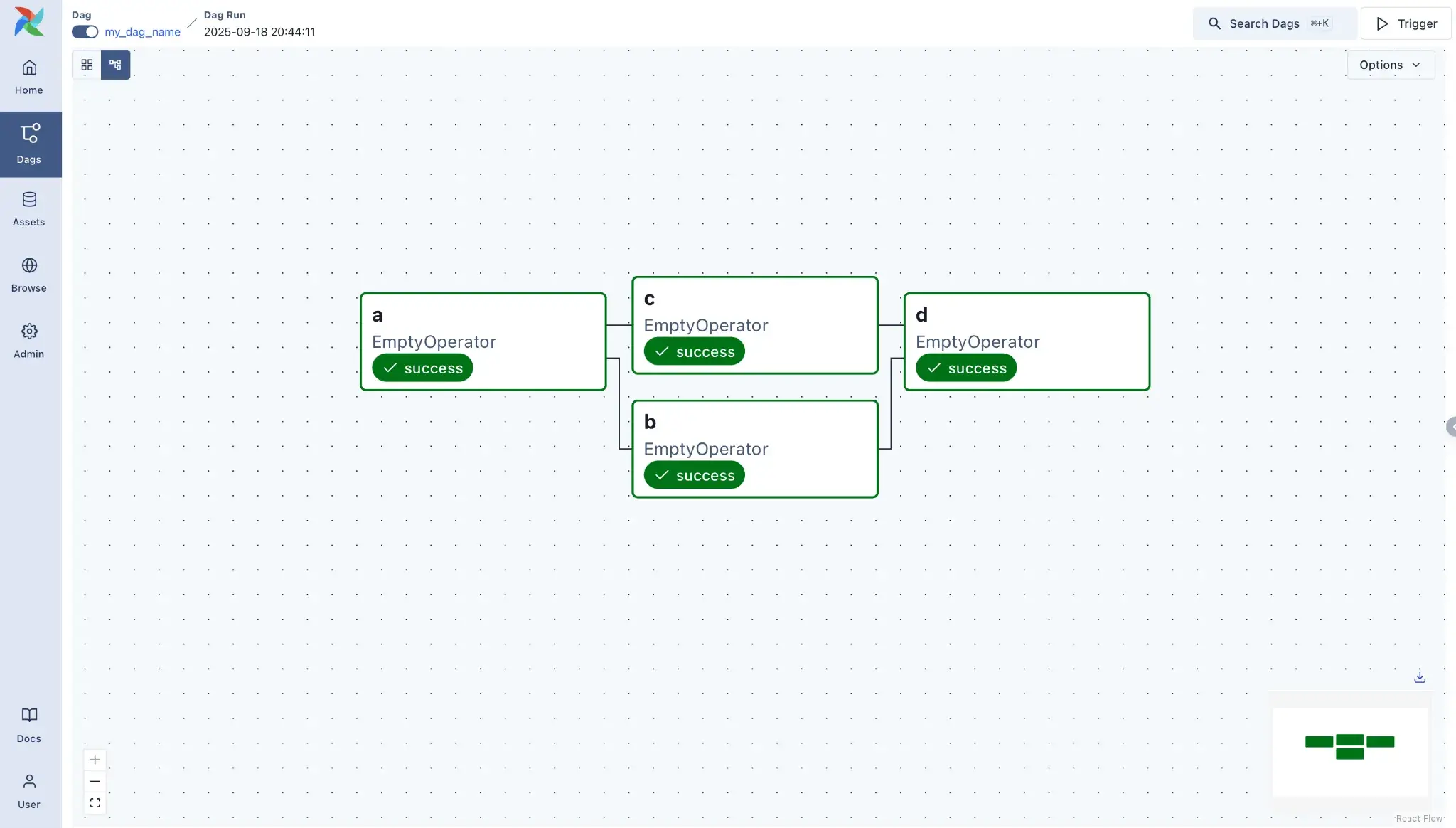
Airflow models workflows as Directed Acyclic Graphs (DAGs). You define dependencies between tasks, but unlike Temporal, Airflow does not maintain the internal variables of your Python script across tasks.
To put this into context, when a DAG is triggered, Airflow creates a new DAG Run and spawns fresh Task Instances for each task. Each task is executed in isolation and then forgotten, except for logging its status to the metadata database.
Any long-term state or data must be externalized by writing either to a database or cloud storage.
Bottom line: Temporal preserves variable state automatically via history replay. Airflow tasks are stateless and rely on the database or external storage to pass context.
Feature 3. Time Characteristics: Long-Running vs Scheduled Batch
Temporal
Temporal treats time as a durable object and has support for arbitrarily long waits. A Temporal workflow can sleep or wait on a timer for days, months, or even years without consuming worker resources.
For example, use the API await workflow.sleep(days=365) and the worker process will actually detach for a year. The workflow state persists in the Temporal server database. When the year is up, the server wakes up a worker to continue the execution.
This makes Temporal ideal for human-in-the-loop or event-driven systems where the workflow might pause for a user action or an external event. For instance, an order fulfillment workflow could wait for inventory availability or manual approval without breaking anything under the hood.
Airflow
Airflow is built around the concept of execution_date. Its scheduling model is fundamentally time-triggered. A DAG is typically tied to a schedule or triggered via an API. Workflows start and end within defined windows.
Though this makes Airflow best for cron-like periodic runs, one-off backfills, or manual triggers, you can say it’s built for finite batch workflows and not for long-lived processes.
If a workflow needs to wait until a future time or condition, Airflow usually uses sensors or relies on external scheduling. For example, an ExternalTaskSensor might wait until a file appears or an external process finishes, but each sensor check is itself a separate task run.
Bottom line: Temporal handles waits of any length through built-in timers. Airflow is built around scheduled runs and uses sensors or external triggers for waits.
Feature 4. Failure Handling, Retries, and Exactly-Once Behavior
Temporal
One of the core design principles of Temporal is that an Activity failure will never directly cause a Workflow failure.
That’s why Temporal provides deterministic execution. If an Activity fails, let’s say an API is down, the SDK automatically retries failed activities according to a policy you define. An exception will be retried until either it succeeds or a retry limit is reached; only then would the workflow see an error.
Crucially, if the entire worker node crashes, the workflow doesn’t fail; it simply pauses and resumes on another node exactly where it left off.
Airflow
Airflow supports retries at the task level. Each task/operator defines its own retry policy via parameters like retries and retry_delay.
For instance, a PythonOperator or sensor can be declared with retries=3, retry_delay=timedelta(minutes=5), and Airflow will automatically re-run that task up to 3 times if it fails. If a task still fails after exhausting retries, the DAG run is marked as failed, unless you set up failure callbacks.
However, if the scheduler itself goes down or the database locks up, you may need manual intervention or ‘backfills’ to fix missed runs. Airflow relies on tasks being idempotent (safe to run multiple times) because it cannot guarantee exactly-once execution as strictly as Temporal’s event history can.
Bottom line: Temporal makes error handling part of the application logic. Airflow treats error handling as a configuration parameter for task scheduling.
Temporal vs Airflow: Integration Capabilities
Temporal
Temporal is SDK-centric. There are official SDKs for Go, Java, Python, TypeScript, .NET, Ruby, and PHP.
Temporal does not offer ‘plug-and-play’ operators in the same way Airflow does; instead, an activity is just a function call that could invoke an HTTP API, query a database, run machine learning inference, etc.
For example, if you want to call Snowflake, you write a Python function that uses the Snowflake connector and wrap it in a @activity.defn decorator.
Airflow
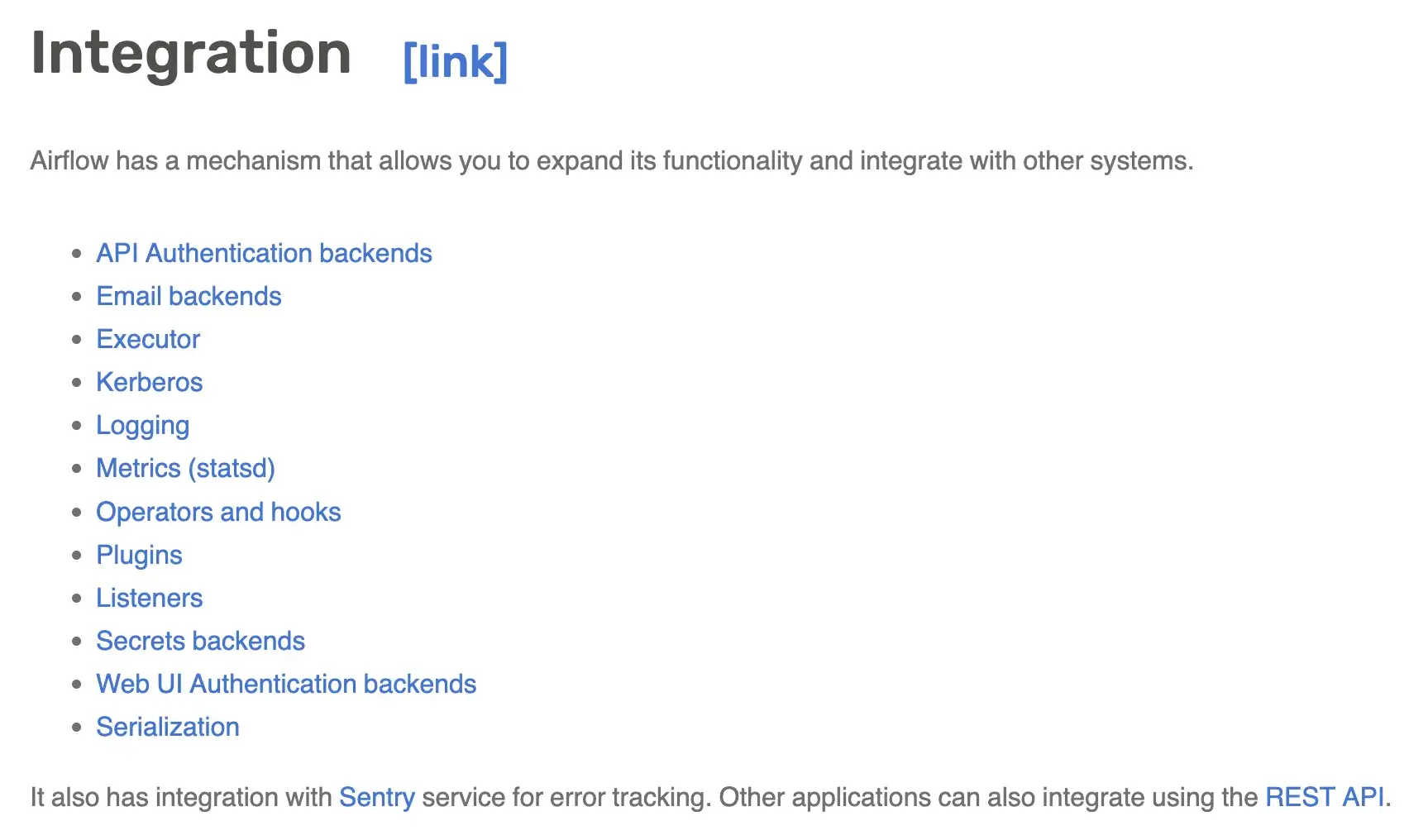
Airflow has a massive ecosystem of 60+ pre-built providers, including Amazon, Google, Azure, Databricks, Snowflake, Slack, and OpenAI.
You simply import SnowflakeOperator or SageMakerOperator and configure it with YAML-like parameters. You rarely need to write the low-level connection code yourself.
Airflow also integrates with execution backends: it can use Celery, Kubernetes, or other executors to run tasks. On the community side, Airflow has monitoring, logging, and authentication integrations and a built-in Web UI. Because Airflow is part of the Apache Foundation, there are also many enterprise support options and managed offerings that tie into it.
Temporal vs Airflow: Pricing
Temporal
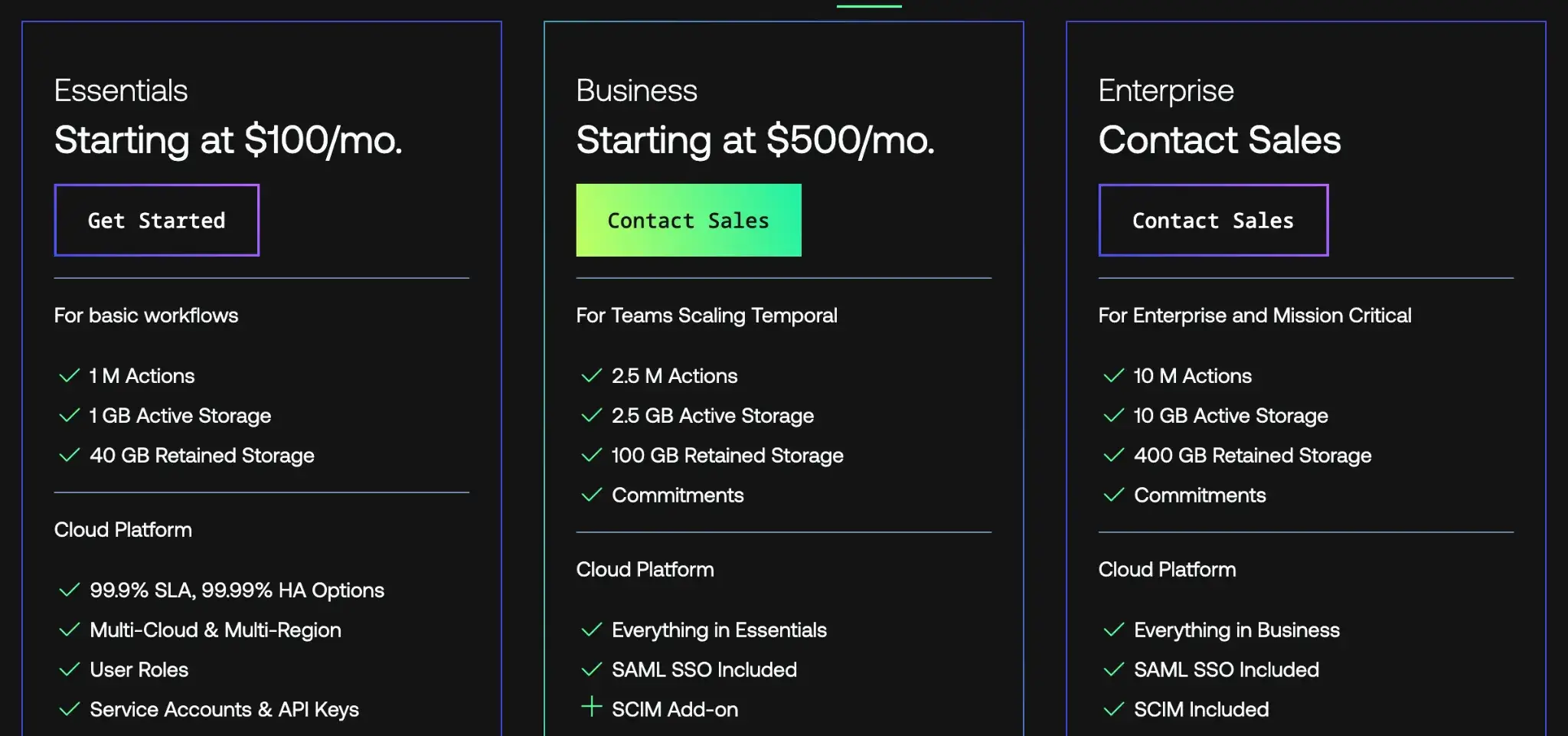
The core Temporal platform is completely open source (MIT license) and can be self-hosted at no cost. Temporal also offers Temporal Cloud, a hosted SaaS version with paid plans as follows:
- Essentials: $100 per month
- Business: $500 per month
- Enterprise: Custom pricing
Airflow
Apache Airflow is entirely open-source under the Apache license, so the software itself has no license cost. You can install and run Airflow for free on any server or Kubernetes cluster.
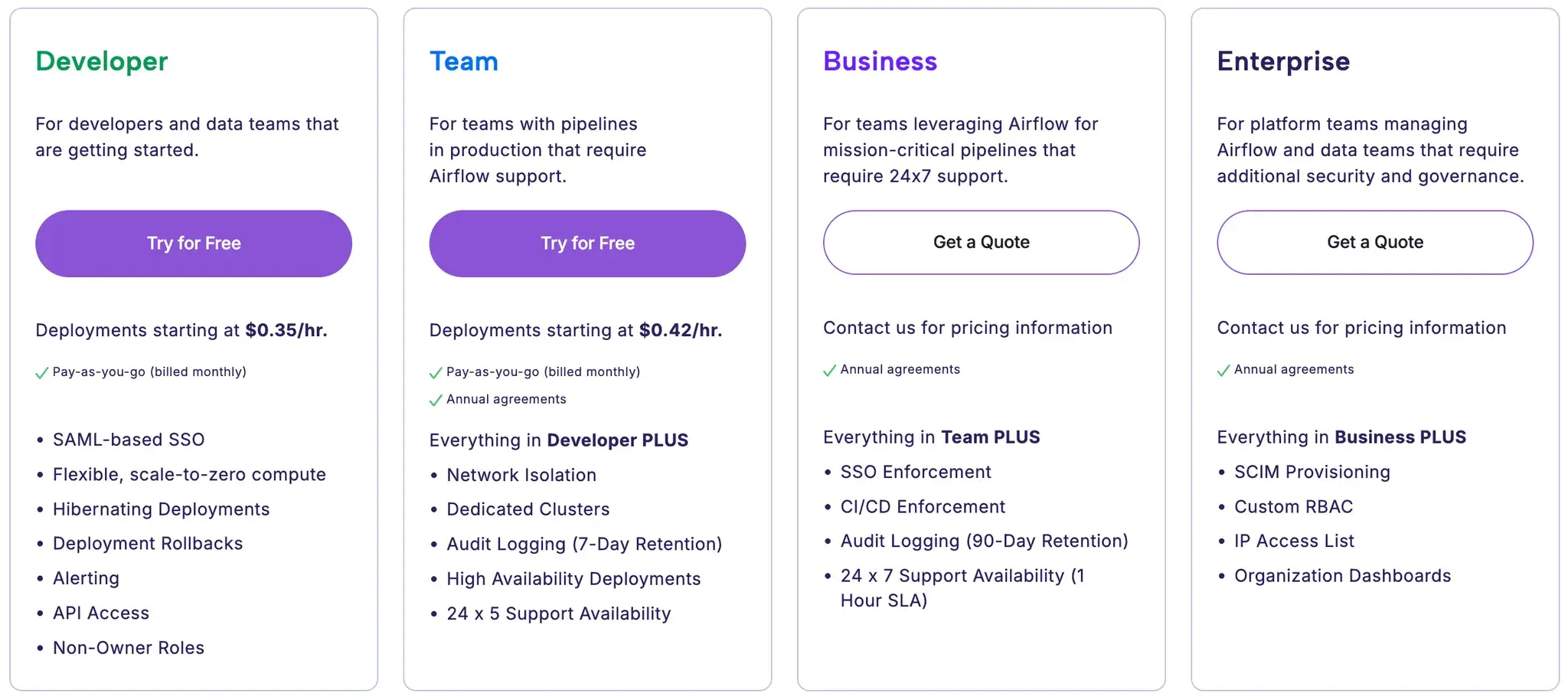
But for managed services, you can visit the Astronomer website. It offers 4 usage-based pricing plans to choose from:
- Developer
- Team
- Business
- Enterprise
How ZenML Extends Existing Orchestrators with ML-Native Capabilities
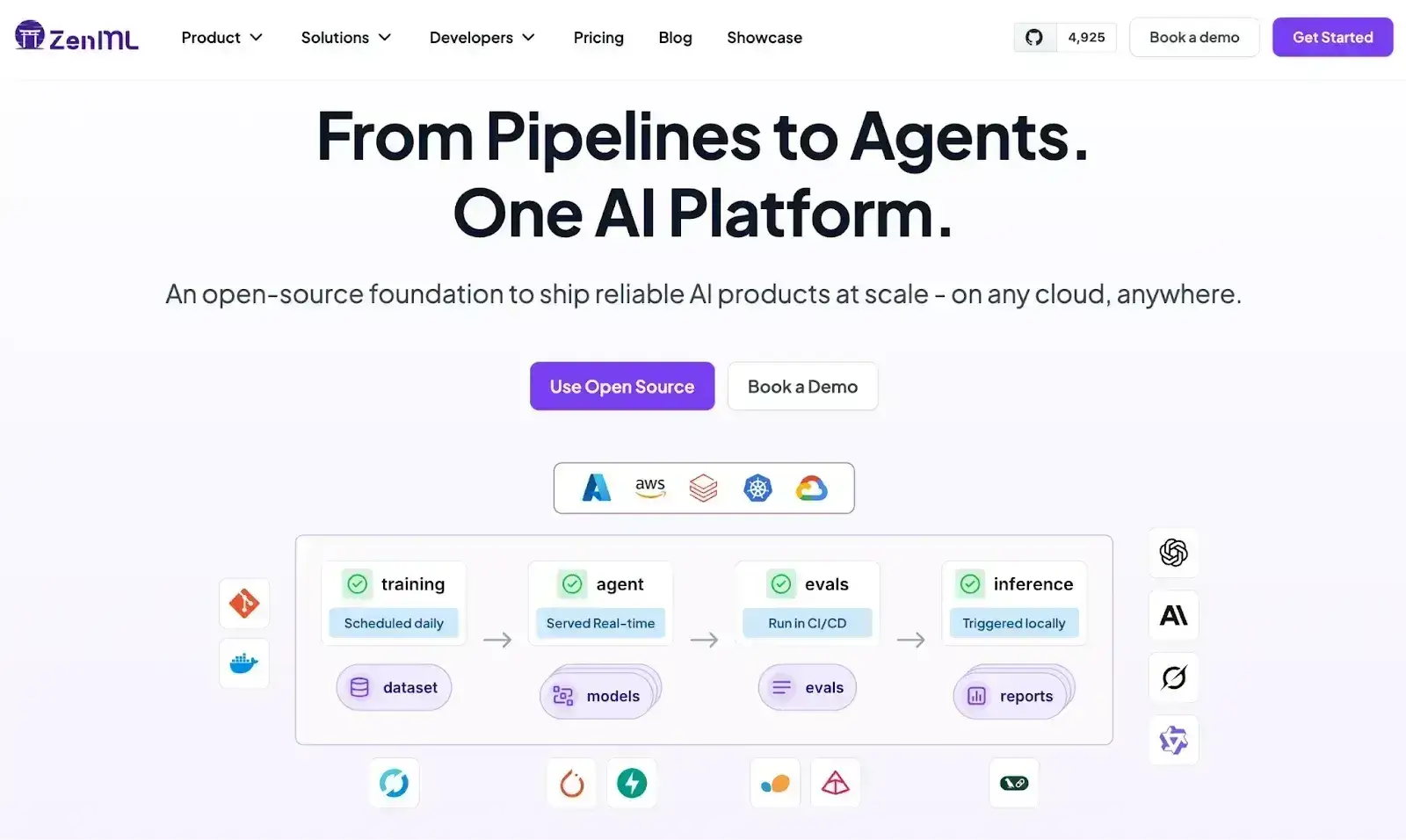
While Temporal and Airflow handle task execution, they don’t inherently understand the Machine Learning lifecycle. They treat a ‘model training’ task the same as a ‘send email’ task; they just run it.
This is where ZenML acts as the ‘Outer Loop’ or the unifying MLOps layer.
ZenML is an orchestrator-agnostic MLOps framework. It allows you to define ML pipelines in simple, portable Python code and then deploy them to any orchestrator, including Airflow, with a single command.
Why use ZenML with Airflow (and others)?
- Artifact and Lineage Tracking: When Airflow runs a task, it doesn't automatically version the data it produces. ZenML automatically versions every artifact (datasets, models, plots) passing through your pipeline, giving you full lineage.
- Orchestrator Abstraction: You can run a ZenML pipeline locally (on your laptop) for debugging, and then switch the ‘Stack’ to run the exact same code on Airflow in production. You don't need to rewrite your code into a DAG file manually; ZenML compiles it for you.
- Model Management: ZenML integrates with model registries (like MLflow) and deployment tools, creating a bridge between the orchestrator (Airflow) and the rest of the MLOps stack.
ZenML vs. Temporal? ZenML does not yet have a native Temporal orchestrator integration, but the two are complementary. You might use Temporal to handle the high-reliability ‘Inner Loop’ of an AI Agent (managing tool calls and user interactions), while wrapping that entire agent workflow in a ZenML pipeline to track the agent’s performance, version its prompts, and manage the deployment lifecycle.
What’s more, ZenML acts as a lightweight MLOps framework in this stack. It adds a non-intrusive metadata and orchestration layer to track agent performance, version prompts, and manage the deployment lifecycle without imposing the heavy infrastructure burden often associated with monolithic MLOps platforms.
📚 More relevant articles to read:
Wrapping Up the Temporal vs Airflow Discussion
The choice between Temporal and Airflow depends on whether your problem is one of scheduling or reliability.
- Choose Airflow if you are building classic data engineering pipelines (ETL/ELT), need to run tasks on a strict schedule (e.g., 'daily reports'), and want access to a vast library of pre-built operators for third-party tools.
- Choose Temporal if you are building microservices, AI agents, or applications that require durable state management, long-running processes (days/months), and complex compensation logic in code.
- Use ZenML when you need to manage the ML lifecycle (experimentation, artifact tracking, reproducibility) on top of your orchestrator. ZenML brings MLOps best practices to Airflow, allowing you to run robust, versioned ML pipelines without getting bogged down in infrastructure boilerplate.