
On this page
As enterprise machine learning initiatives scale, managing the lifecycle of models across separate AWS accounts for development, staging, and production environments becomes increasingly complex. This separation of environments—while essential for security, compliance, and resource isolation—creates significant operational challenges in the model promotion process.
Industry leaders like Aviva have implemented serverless MLOps platforms using Amazon SageMaker and the AWS Enterprise MLOps Framework, achieving remarkable cost reductions compared to on-premises solutions. However, the manual promotion process between AWS accounts often creates bottlenecks, delays model deployment, and introduces unnecessary operational overhead.
This article explores best practices and modern solutions for streamlining model promotion across multiple AWS accounts, ensuring governance without sacrificing agility.
The Cross-Account Challenge
Organizations with mature ML practices typically implement a multi-account strategy with distinct AWS accounts for:
- Development/Experimentation: Where data scientists build and test models
- Staging/QA: Where models undergo validation and compliance checks
- Production: Where approved models serve business-critical applications
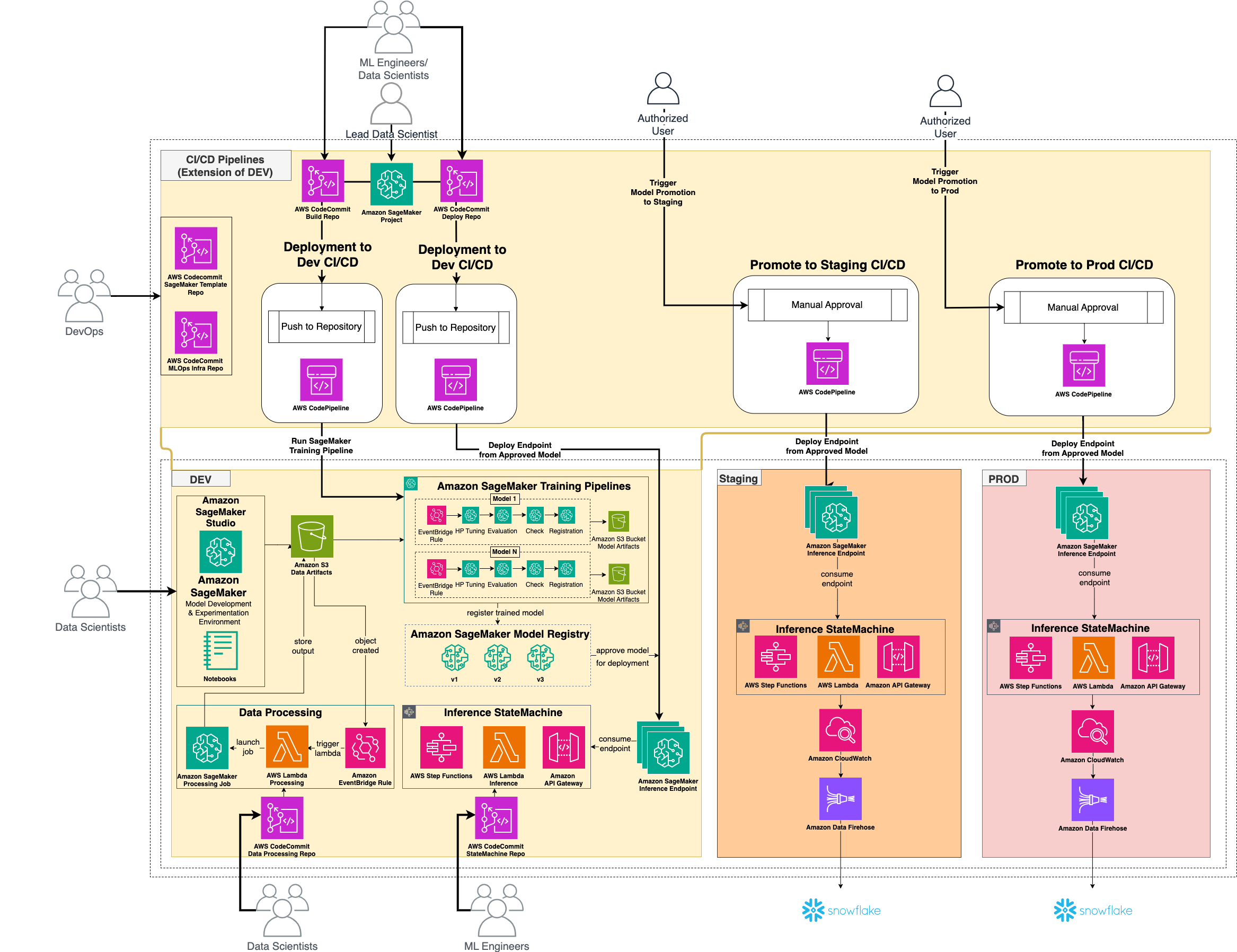
While this separation provides essential guardrails, it introduces several challenges:
- Manual Model Promotion: Teams must manually export models from one account, validate them, and re-import them into the target account
- Inconsistent Environments: Configuration drift between accounts leads to "works in development, fails in production" scenarios
- Governance Complexity: Tracking model lineage and ensuring compliance across account boundaries
- Limited Visibility: No unified view of model performance across environments
- Resource Duplication: Redundant infrastructure and pipeline definitions across accounts
These challenges are especially acute for organizations managing dozens of models in production, where manual processes quickly become unsustainable.
<h2 class="main-title">10 Critical MLOps Challenges and How ZenML Solves Them</h2>

<h3 class="challenge-title-1">
    <span class="number">1</span>
    Complex Pipeline Definition Languages
</h3>


<svg class="challenge-icon" xmlns="http://www.w3.org/2000/svg" viewBox="0 0 24 24" fill="none" stroke="currentColor" stroke-width="2" stroke-linecap="round" stroke-linejoin="round">
    <circle cx="12" cy="12" r="10"></circle>
    <path d="M15 9l-6 6"></path>
    <path d="M9 9l6 6"></path>
</svg>
The Problem:
AWS MLOps implementations can require multiple different contexts across different libraries and SDKs, from YAML to Python, which can get overwhelming for managing efficiency at scale. For example, to create a single training workflow, one might have to write local scripts, push to CodeCommit, then write a CI workflow that compiles into a Sagemaker pipeline SDK.

<svg class="challenge-icon" xmlns="http://www.w3.org/2000/svg" viewBox="0 0 24 24" fill="none" stroke="currentColor" stroke-width="2" stroke-linecap="round" stroke-linejoin="round">
    <path d="M12 22c5.523 0 10-4.477 10-10S17.523 2 12 2 2 6.477 2 12s4.477 10 10 10z"></path>
    <path d="m9 12 2 2 4-4"></path>
</svg>
ZenML's Solution:
ZenML provides a simple Python SDK that feels natural to data scientists:
from zenml import step, pipeline

@pipeline
def training_pipeline(data_path):
    processed_data = preprocess_data(data_path)
    # Rest of the pipeline in plain Python...

# This can now run locally or on Sagemaker
2 Lack of Centralized Visibility
<svg class="challenge-icon" xmlns="http://www.w3.org/2000/svg" viewBox="0 0 24 24" fill="none" stroke="currentColor" stroke-width="2" stroke-linecap="round" stroke-linejoin="round">
    <circle cx="12" cy="12" r="10"></circle>
    <path d="M15 9l-6 6"></path>
    <path d="M9 9l6 6"></path>
</svg>
The Problem:
In traditional multi-account AWS setups, teams have no unified view of models across environments. Each AWS account has its own separate dashboards, metrics, and logs, making it difficult to track models through their entire lifecycle without custom solutions.
<svg class="challenge-icon" xmlns="http://www.w3.org/2000/svg" viewBox="0 0 24 24" fill="none" stroke="currentColor" stroke-width="2" stroke-linecap="round" stroke-linejoin="round">
    <path d="M12 22c5.523 0 10-4.477 10-10S17.523 2 12 2 2 6.477 2 12s4.477 10 10 10z"></path>
    <path d="m9 12 2 2 4-4"></path>
</svg>
ZenML's Solution:
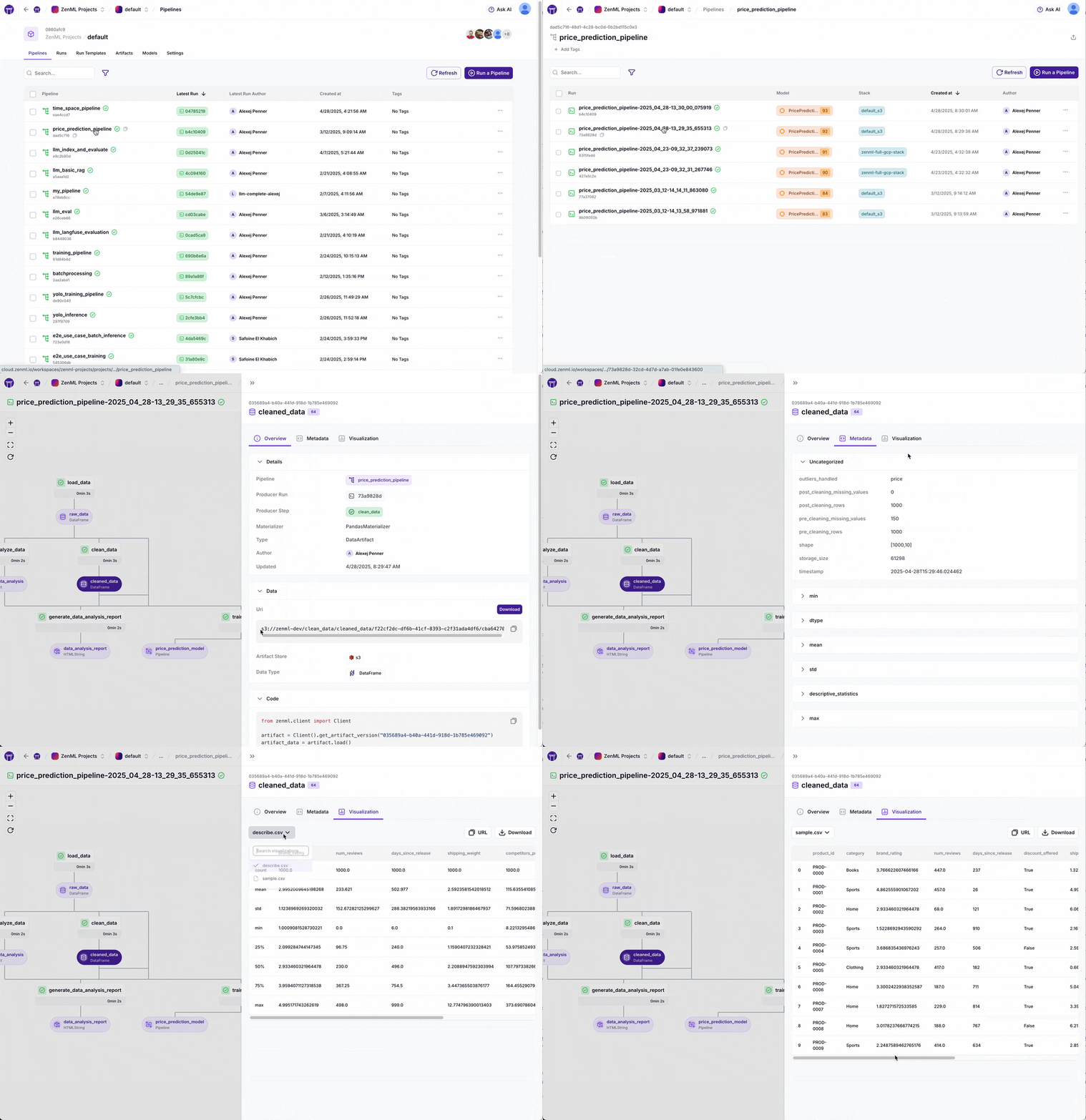
ZenML provides a central dashboard that shows all pipelines, models, and metrics across every environment. This unified view allows teams to:
- Track model lineage from development to production
- Compare model performance across environments
- Monitor deployment status across all accounts
- Manage approvals from a central location
3 Configuration Management for Different Personas
<svg class="challenge-icon" xmlns="http://www.w3.org/2000/svg" viewBox="0 0 24 24" fill="none" stroke="currentColor" stroke-width="2" stroke-linecap="round" stroke-linejoin="round">
    <circle cx="12" cy="12" r="10"></circle>
    <path d="M15 9l-6 6"></path>
    <path d="M9 9l6 6"></path>
</svg>
The Problem:
Different team members (data scientists, ML engineers, DevOps) need different configurations across AWS accounts, creating significant overhead and often leading to environment inconsistencies.
<svg class="challenge-icon" xmlns="http://www.w3.org/2000/svg" viewBox="0 0 24 24" fill="none" stroke="currentColor" stroke-width="2" stroke-linecap="round" stroke-linejoin="round">
    <path d="M12 22c5.523 0 10-4.477 10-10S17.523 2 12 2 2 6.477 2 12s4.477 10 10 10z"></path>
    <path d="m9 12 2 2 4-4"></path>
</svg>
ZenML's Solution:
ZenML’s stack concept allows each team member to work with configurations tailored to their role:
# Step 1: Test in development environment
zenml stack set dev-stack  # Configuration for data scientists (#3)
python run.py train --insurance_claim_pipeline --data sample_claims.csv

# Step 2: Validate in staging environment
zenml stack set staging-stack  # Switch environments seamlessly (#6)
python run.py  train --insurance_claim_pipeline --data validation_claims.csv

# Step 3: Deploy to production
zenml stack set prod-stack  # Works across AWS accounts (#7)
python run.py  deploy --pipeline insurance_claim_pipeline --endpoint claims-api
4 Dependency Management Across Environments
<svg class="challenge-icon" xmlns="http://www.w3.org/2000/svg" viewBox="0 0 24 24" fill="none" stroke="currentColor" stroke-width="2" stroke-linecap="round" stroke-linejoin="round">
    <circle cx="12" cy="12" r="10"></circle>
    <path d="M15 9l-6 6"></path>
    <path d="M9 9l6 6"></path>
</svg>
The Problem:
Slight variations in package versions between AWS accounts can cause models to behave differently in production than in development, leading to unexpected failures and inconsistent results.
<svg class="challenge-icon" xmlns="http://www.w3.org/2000/svg" viewBox="0 0 24 24" fill="none" stroke="currentColor" stroke-width="2" stroke-linecap="round" stroke-linejoin="round">
    <path d="M12 22c5.523 0 10-4.477 10-10S17.523 2 12 2 2 6.477 2 12s4.477 10 10 10z"></path>
    <path d="m9 12 2 2 4-4"></path>
</svg>
ZenML's Solution:
ZenML containerizes pipeline steps to ensure identical dependencies:
@step(settings={"docker": DockerSettings(parent_image="custom-ml-image:1.2.3")})
def train_insurance_model(claim_data):
		...
    return model

@step(settings={"docker": DockerSettings(requirements=["torch"])})
def deploy_model(model):
		...
    return model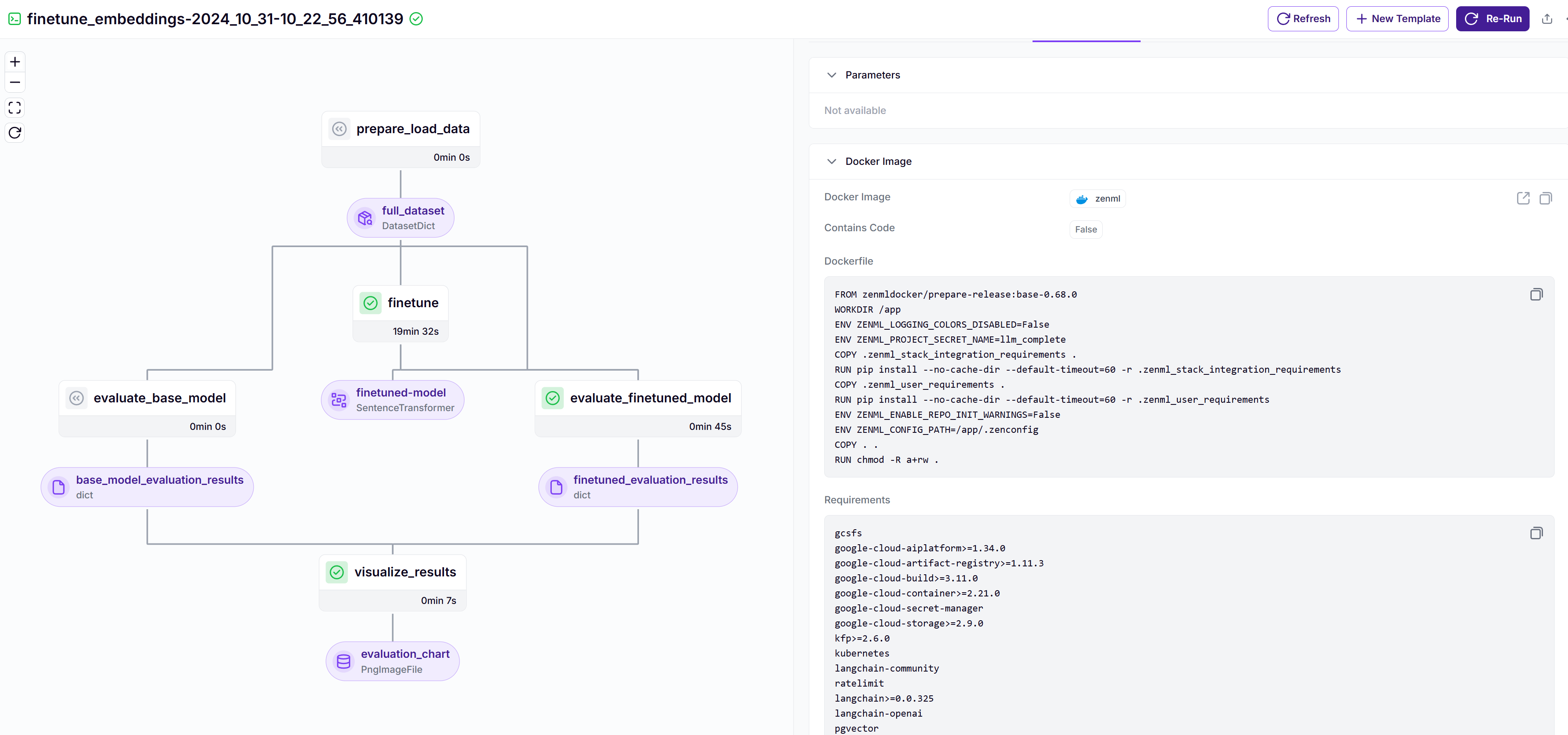
5 Pipeline Orchestration Complexity
<svg class="challenge-icon" xmlns="http://www.w3.org/2000/svg" viewBox="0 0 24 24" fill="none" stroke="currentColor" stroke-width="2" stroke-linecap="round" stroke-linejoin="round">
    <circle cx="12" cy="12" r="10"></circle>
    <path d="M15 9l-6 6"></path>
    <path d="M9 9l6 6"></path>
</svg>
The Problem:
While AWS has many amazing tools, authoring AWS Sagemaker pipelines can be cumbersome for data scientists to create and maintain, especially across multiple AWS accounts. The business and infrastructure logic can easily get mixed up.
# Infrastructure configuration - VPC settings
vpc_id = "vpc-1234abcd"
subnet_ids = ["subnet-1234abcd", "subnet-5678efgh"]
security_group_ids = ["sg-1234abcd"]
network_config = NetworkConfig(
    vpc_id=vpc_id,
    subnet_ids=subnet_ids,
    security_group_ids=security_group_ids,
    enable_network_isolation=True
)

# Infrastructure configuration - IAM roles and S3 buckets
role = "arn:aws:iam::123456789012:role/SageMakerExecutionRole"
bucket = "insurance-claims-ml-123456789012"
kms_key = "arn:aws:kms:us-west-2:123456789012:key/1234abcd-12ab-34cd-56ef-1234567890ab"

# Infrastructure configuration - SageMaker session
sagemaker_session = sagemaker.Session(
    boto_session=boto3.Session(region_name="us-west-2"),
    default_bucket=bucket
)

# Create the pipeline - pulling everything together
pipeline = Pipeline(
    name="ClaimsProcessingPipeline",
    steps=[preprocessing_step, training_step, model_step],
    sagemaker_session=sagemaker_session,
)

# Submit the pipeline
pipeline.upsert(role_arn=role)
execution = pipeline.start()<svg class="challenge-icon" xmlns="http://www.w3.org/2000/svg" viewBox="0 0 24 24" fill="none" stroke="currentColor" stroke-width="2" stroke-linecap="round" stroke-linejoin="round">
<path d="M12 22c5.523 0 10-4.477 10-10S17.523 2 12 2 2 6.477 2 12s4.477 10 10 10z"></path>
<path d="m9 12 2 2 4-4"></path>
</svg>
ZenML's Solution:ZenML automatically generates proper DAGs from simple Python functions and separates the infrastructure-level configuration with the Stack concept.
zenml orchestrator register aws_dev_sagemaker_orchestrator \
--role arn:aws:iam::123456789012:role/SageMakerExecutionRole \
--bucket insurance-claims-ml-123456789012
zenml stack register dev_stack -o dev_sagemaker_orchestrator -o dev_artifact_store
zenml stack set dev_stack@pipeline
def claims_processing_pipeline():
data = ingest_claims_data()
features = extract_claim_features(data)
model = predict_repair_cost(features)
# ZenML automatically figures out the execution order
claims_processing_pipeline() # Will run on dev_stack6 Local Development vs. Cloud Execution Gap
<svg class="challenge-icon" xmlns="http://www.w3.org/2000/svg" viewBox="0 0 24 24" fill="none" stroke="currentColor" stroke-width="2" stroke-linecap="round" stroke-linejoin="round">
<circle cx="12" cy="12" r="10"></circle>
<path d="M15 9l-6 6"></path>
<path d="M9 9l6 6"></path>
</svg>
The Problem:Data scientists develop locally but deploy to AWS cloud environments, creating a significant gap between development and production workflows that leads to “works on my machine” problems.
<svg class="challenge-icon" xmlns="http://www.w3.org/2000/svg" viewBox="0 0 24 24" fill="none" stroke="currentColor" stroke-width="2" stroke-linecap="round" stroke-linejoin="round">
    <path d="M12 22c5.523 0 10-4.477 10-10S17.523 2 12 2 2 6.477 2 12s4.477 10 10 10z"></path>
    <path d="m9 12 2 2 4-4"></path>
</svg>
ZenML's Solution:
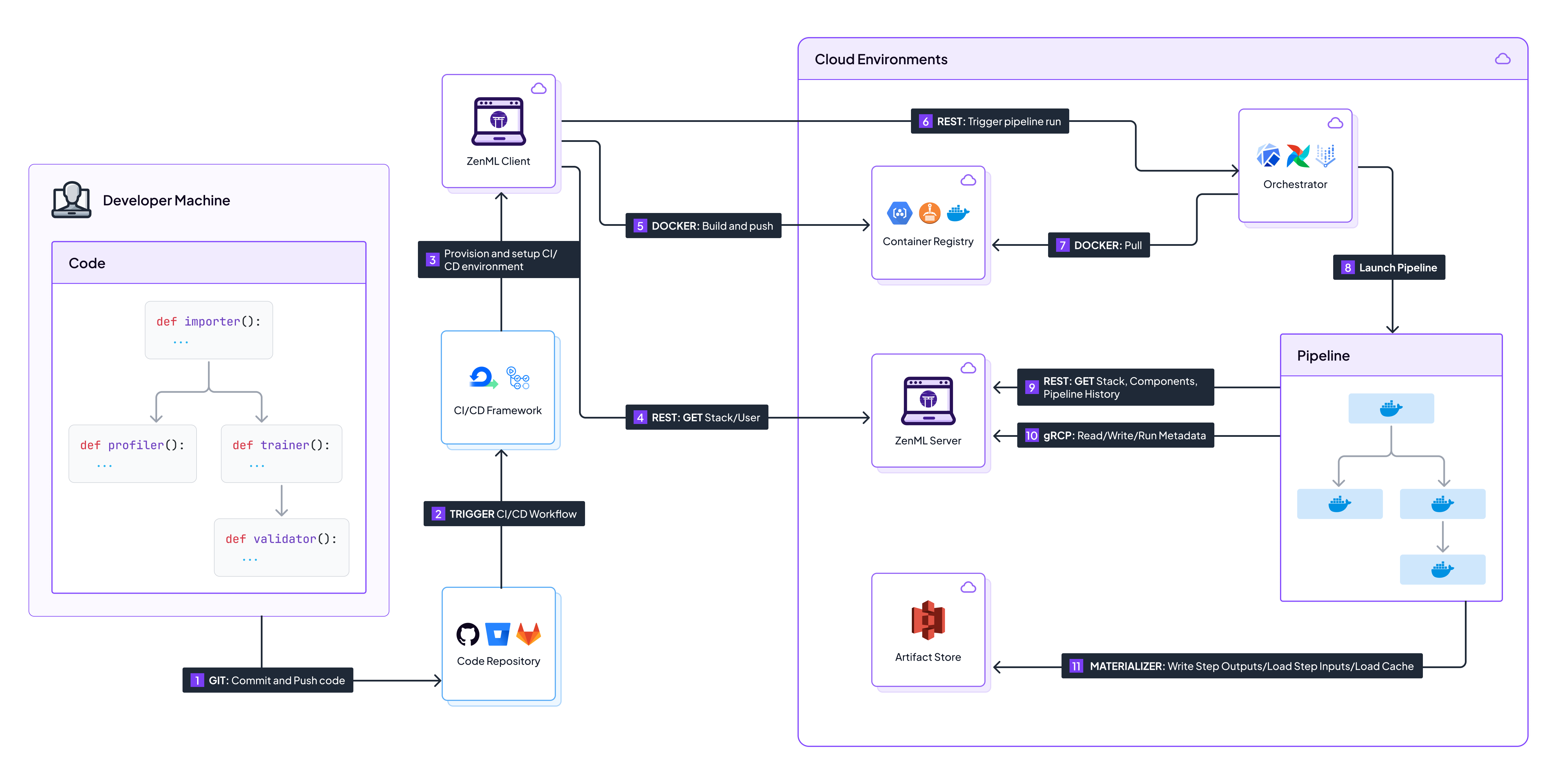
ZenML allows the exact same code to run locally or in any AWS account:
7 Hybrid and Multi-Cloud Deployments
<svg class="challenge-icon" xmlns="http://www.w3.org/2000/svg" viewBox="0 0 24 24" fill="none" stroke="currentColor" stroke-width="2" stroke-linecap="round" stroke-linejoin="round">
    <circle cx="12" cy="12" r="10"></circle>
    <path d="M15 9l-6 6"></path>
    <path d="M9 9l6 6"></path>
</svg>
The Problem:Many organizations operate across multiple cloud providers or maintain hybrid environments, which creates complexity when trying to maintain consistent ML operations.
<svg class="challenge-icon" xmlns="http://www.w3.org/2000/svg" viewBox="0 0 24 24" fill="none" stroke="currentColor" stroke-width="2" stroke-linecap="round" stroke-linejoin="round">
    <path d="M12 22c5.523 0 10-4.477 10-10S17.523 2 12 2 2 6.477 2 12s4.477 10 10 10z"></path>
    <path d="m9 12 2 2 4-4"></path>
</svg>
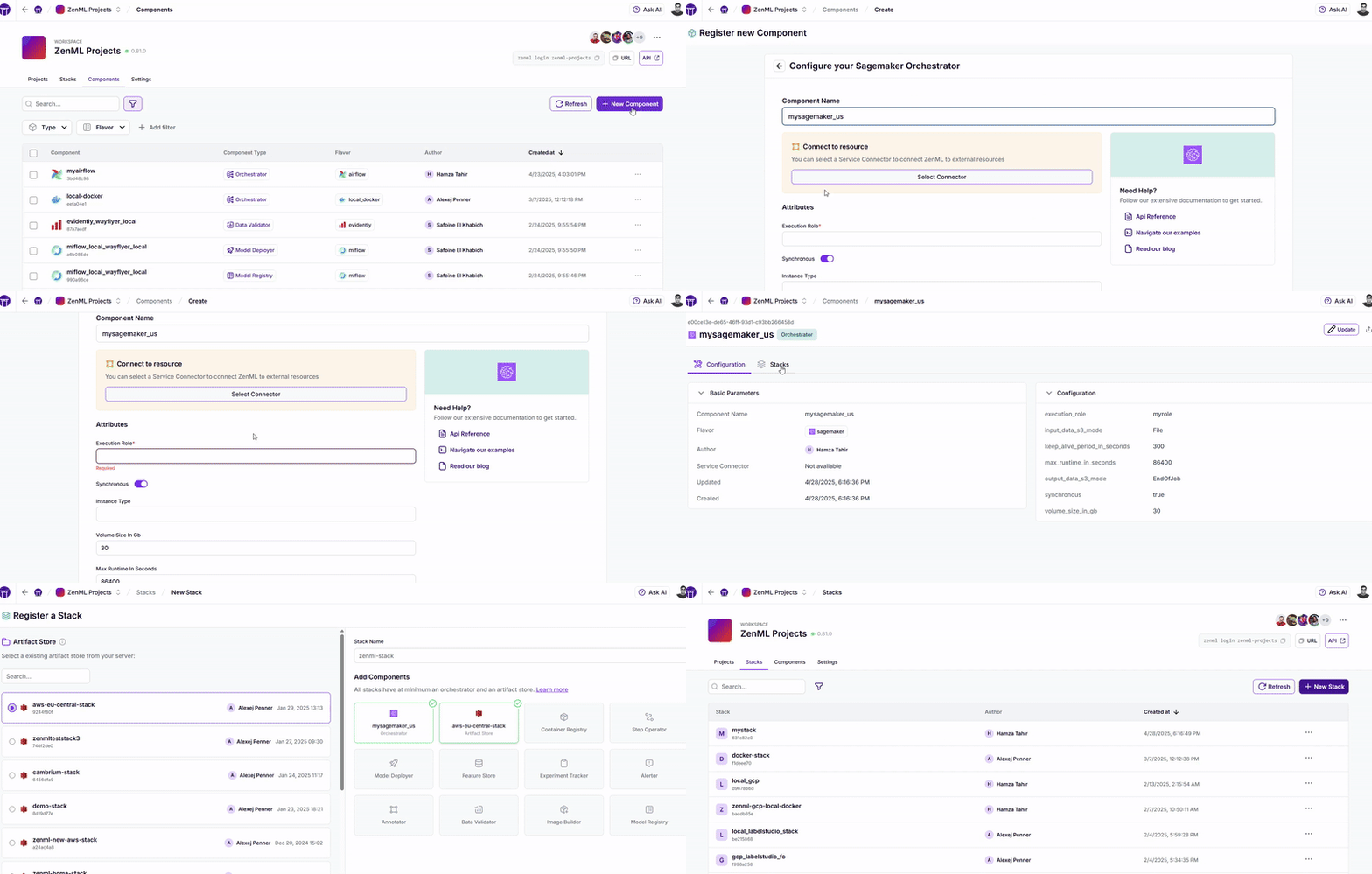
ZenML's Solution:ZenML’s stack abstraction layer allows the same pipelines to run seamlessly across different cloud providers using detailed stack configurations. See this animation to see how easily we can configure stack components for different providers across different regions with a few clicks (you can also do this via Terraform or API):
8 Model Governance and Compliance
<svg class="challenge-icon" xmlns="http://www.w3.org/2000/svg" viewBox="0 0 24 24" fill="none" stroke="currentColor" stroke-width="2" stroke-linecap="round" stroke-linejoin="round">
    <circle cx="12" cy="12" r="10"></circle>
    <path d="M15 9l-6 6"></path>
    <path d="M9 9l6 6"></path>
</svg>
The Problem:Regulated industries like financial services and insurance companies face strict regulatory requirements that are difficult to enforce consistently across separate AWS accounts. This creates challenges for model reproducibility, audit trails, and compliance verification.
<svg class="challenge-icon" xmlns="http://www.w3.org/2000/svg" viewBox="0 0 24 24" fill="none" stroke="currentColor" stroke-width="2" stroke-linecap="round" stroke-linejoin="round">
    <path d="M12 22c5.523 0 10-4.477 10-10S17.523 2 12 2 2 6.477 2 12s4.477 10 10 10z"></path>
    <path d="m9 12 2 2 4-4"></path>
</svg>
ZenML's Solution:ZenML enables model governance through specialized pipeline steps that can be appended to any pipeline, generating compliance reports and visualizations automatically. Furthermore, integrations with data validation tools like Evidently make this even easier:
# Configure the Evidently visualization step with regulatory requirements
@step
def regulatory_visualization_step(compliance_report, drift_report):
"""Generates visualization dashboards for regulatory review"""
# Create interactive dashboard
dashboard = RegulatoryDashboard()
dashboard.add_bias_metrics(compliance_report.bias_metrics)
dashboard.add_drift_analysis(drift_report)
dashboard.add_model_explainability(compliance_report.shap_values)
# Export to standard formats required by regulators
dashboard.export_pdf("regulatory_compliance_report.pdf")
dashboard.export_html("interactive_compliance_dashboard.html")
return dashboard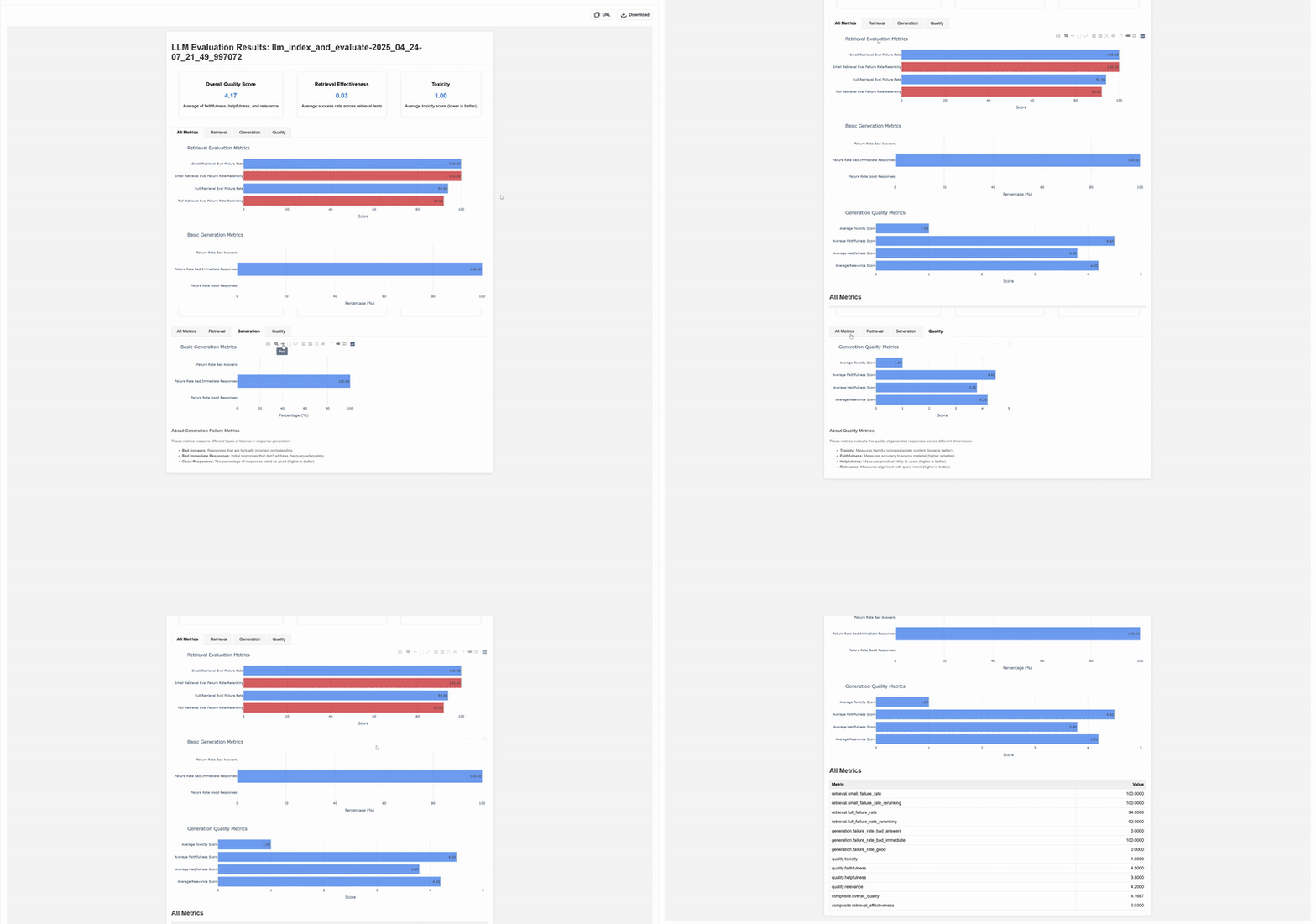
This approach allows organizations to implement “data-quality gates & alerting easily,” as mentioned in their case study, while Brevo has leveraged similar techniques to become “a safer platform, fighting against fraudsters and scammers.” The visualizations and reports generated serve as crucial documentation for audit purposes while ensuring consistent governance across all AWS environments.
9 Cost Management and Resource Optimization
<svg class="challenge-icon" xmlns="http://www.w3.org/2000/svg" viewBox="0 0 24 24" fill="none" stroke="currentColor" stroke-width="2" stroke-linecap="round" stroke-linejoin="round">
    <circle cx="12" cy="12" r="10"></circle>
    <path d="M15 9l-6 6"></path>
    <path d="M9 9l6 6"></path>
</svg>
The Problem:ML operations across multiple AWS accounts often result in inefficient resource allocation and unnecessary cloud costs.
<svg class="challenge-icon" xmlns="http://www.w3.org/2000/svg" viewBox="0 0 24 24" fill="none" stroke="currentColor" stroke-width="2" stroke-linecap="round" stroke-linejoin="round">
    <path d="M12 22c5.523 0 10-4.477 10-10S17.523 2 12 2 2 6.477 2 12s4.477 10 10 10z"></path>
    <path d="m9 12 2 2 4-4"></path>
</svg>
ZenML's Solution:
ZenML enables fine-grained control over resource allocation for each step:
@step(settings={"resources": ResourceSettings(cpu=2, memory="4Gi")})
def preprocess_data(raw_data):
# Uses minimal resources for preprocessing
return processed_data
@step(settings={"resources": ResourceSettings(gpu=1, memory="16Gi")})
def train_model(processed_data):
# Uses GPU only for the training step
return model10 Experiment Tracking and Reproducibility
<svg class="challenge-icon" xmlns="http://www.w3.org/2000/svg" viewBox="0 0 24 24" fill="none" stroke="currentColor" stroke-width="2" stroke-linecap="round" stroke-linejoin="round">
    <circle cx="12" cy="12" r="10"></circle>
    <path d="M15 9l-6 6"></path>
    <path d="M9 9l6 6"></path>
</svg>
The Problem:Tracking experiments across multiple AWS accounts and ensuring reproducibility is challenging without centralized systems.
<svg class="challenge-icon" xmlns="http://www.w3.org/2000/svg" viewBox="0 0 24 24" fill="none" stroke="currentColor" stroke-width="2" stroke-linecap="round" stroke-linejoin="round">
    <path d="M12 22c5.523 0 10-4.477 10-10S17.523 2 12 2 2 6.477 2 12s4.477 10 10 10z"></path>
    <path d="m9 12 2 2 4-4"></path>
</svg>
ZenML's Solution:
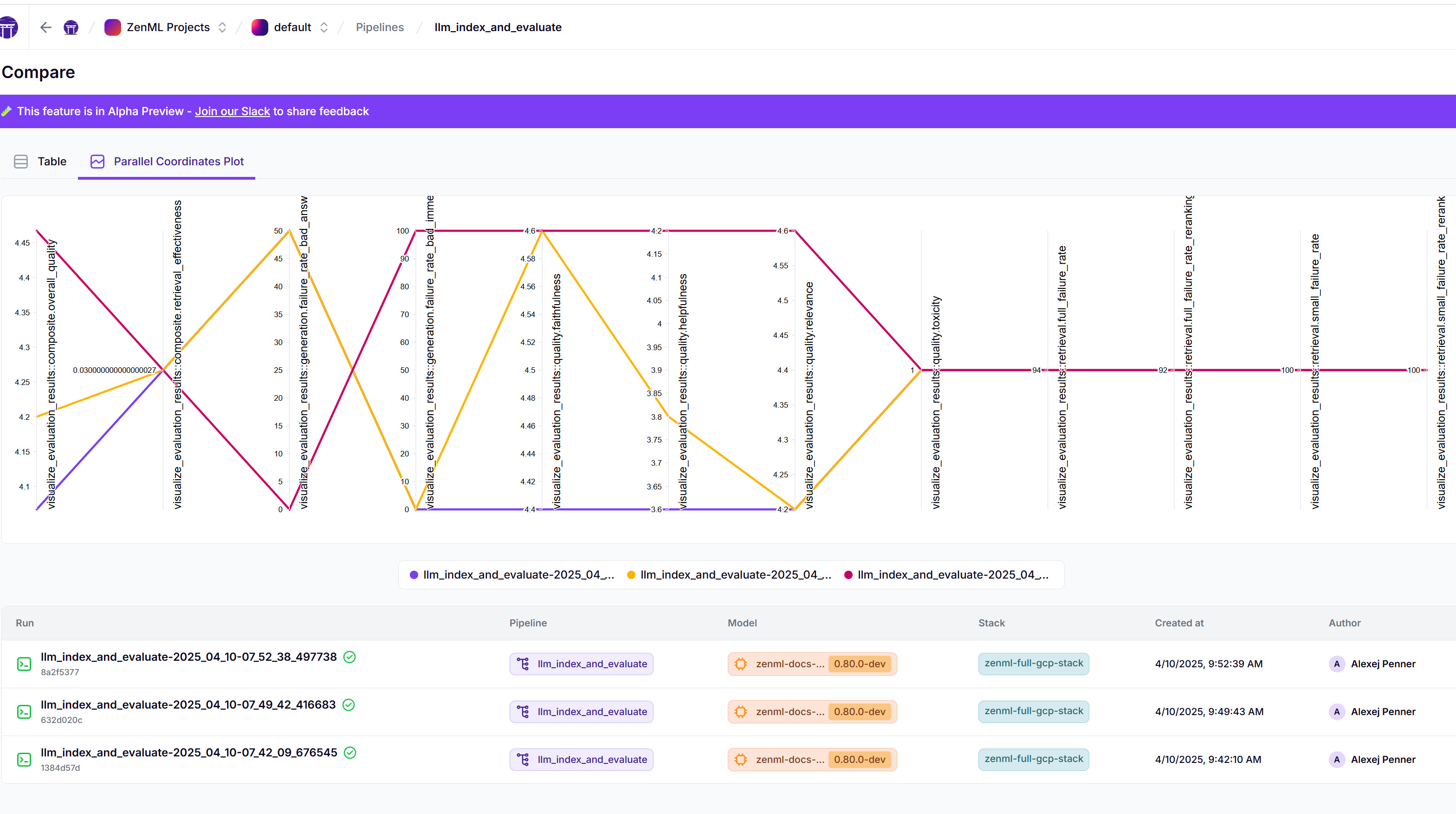
ZenML provides consistent experiment tracking regardless of where experiments run:
@step
def train_model(params: Dict[str, Any]):
    # Parameters, metrics, and artifacts are automatically tracked
    model = train_with_params(params)
    log_metadata(metadata={"accuracy", model.accuracy})
    return model
You can then compare metadata easily in one interface across stacks and models:
Transforming MLOps Across AWS Accounts
Organizations implementing modern MLOps solutions across multiple AWS accounts have achieved remarkable improvements, as evidenced by real-world case studies. Brevo (formerly Sendinblue) reduced its ML deployment time by 80%, taking what was once a month-long development-to-deployment process and dramatically shortening it. Similarly, ADEO Leroy Merlin decreased their time-to-market from 2 months to just 2 weeks—a 75% reduction. Both companies have successfully deployed multiple models into production (5 models for Brevo and 5 for ADEO, with the latter targeting 20 by the end of 2024).
These implementations have yielded significant operational benefits: ADEO’s data scientists gained autonomy in pipeline creation and deployment, eliminating bottlenecks between teams, while Brevo achieved enhanced team productivity with just 3-4 data scientists independently handling end-to-end ML use cases. Additionally, both organizations reported improved business outcomes, including better fraud targeting for Brevo and seamless cross-country model deployment for ADEO. These real-world results demonstrate how proper MLOps implementation can transform operations across multiple environments while maintaining necessary governance and security controls.
Modern MLOps for Multi-Account AWS
As organizations scale their ML operations across AWS accounts, they need solutions that address these 10 critical challenges. ZenML provides a comprehensive approach that allows data scientists to focus on ML innovation rather than infrastructure complexity.
ZenML’s Python-first approach, stack-based architecture, and unified dashboard enable teams to maintain all the security and governance benefits of multi-account AWS setups while dramatically reducing operational overhead and accelerating time-to-value.
To learn more about how ZenML can transform your cross-account MLOps strategy, make a free account on ZenML Pro or try our open-source project on GitHub.