
On this page
Imagine running a successful test two months ago but forgetting how it worked. Or that error which you found during an experiment, but now it’s deep within a pile of other experiments, and you’re about to scale to production.
A great machine learning model is built through trial and error. The process creates a trail of hard-to-maintain experiments, datasets, models, and runtime configs.
This is where the tool sprawl begins. You search for that one perfect tool that caters to your MLOps production needs. Two tools that might come up in this search journey are MLflow and ClearML.
In this ClearML vs MLflow guide, we break down the differences between these two platforms and also compare ZenML (this is our tool) with the two. We explain which one best fits your specific MLOps maturity stage and how they can potentially work together.
ClearML vs MLflow vs ZenML: Key Takeaways
**🧑💻 **ClearML is an integrated platform (tracking + orchestration + data/model management) that you can run hosted or self-hosted, including VPC/on‑prem/hybrid setups. Its architecture is designed to let teams adopt only the modules they need and integrate with existing tools. The main trade-off is that if you adopt ClearML Agents/Queues/Pipelines as your execution layer, ClearML tends to become the central control plane for runs and orchestration.
**🧑💻 **MLflow is the industry standard for logging metrics and parameters, but lacks native orchestration for complex pipelines. It focuses on tracking results rather than controlling the execution flow.
**🧑💻 **ZenML fits teams that want reproducible pipelines with artifact lineage as a default outcome. You define steps, run pipelines on your chosen orchestrator, and ZenML records inputs, outputs, and metadata for each run. It’s a strong pick when you want repeatable execution across environments, and you plan to grow from ad hoc runs into scheduled, testable workflows.
ClearML vs MLflow vs ZenML: Features Comparison
| Feature | ClearML | MLflow | ZenML |
|---|---|---|---|
| Experiment tracking | Comes with rich UI, run comparison, system metrics, strong “experiment manager” feel | Has a simple API and UI, widely supported autologging | Captures run metadata as part of pipeline execution, and can also forward metrics to external trackers |
| Reproducibility metadata | – Strong capture of code, configs, and environment context – Run cloning is central to the workflow | Reproducibility depends on how you structure projects and environments | – Has versioned artifacts and metadata store per pipeline run – Caching and lineage help replay old runs |
| Artifact management | Artifacts and datasets live with runs, and the storage backend is configurable | Artifact store with a clear structure per run, and the registry is the main lifecycle feature | Artifacts are first-class outputs of steps, and versions and lineage are core to the model |
| Orchestration | Agents and pipeline constructs for remote runs and queued execution | Not an orchestrator; pairs with Airflow, Kubeflow, and other MLOps frameworks | Pipeline execution across backends is the core feature |
| Integrations | Broad ML framework support, plus execution backends via agents | Broadest compatibility as a tracking layer and packaging format | Stack-based integrations for orchestrators, stores, trackers, deployers, validators, and more |
Feature 1. Experiment Tracking, Run Metadata, and Reproducability
All three tools support experiment tracking, but they differ in how strongly they enforce reproducibility.
ClearML
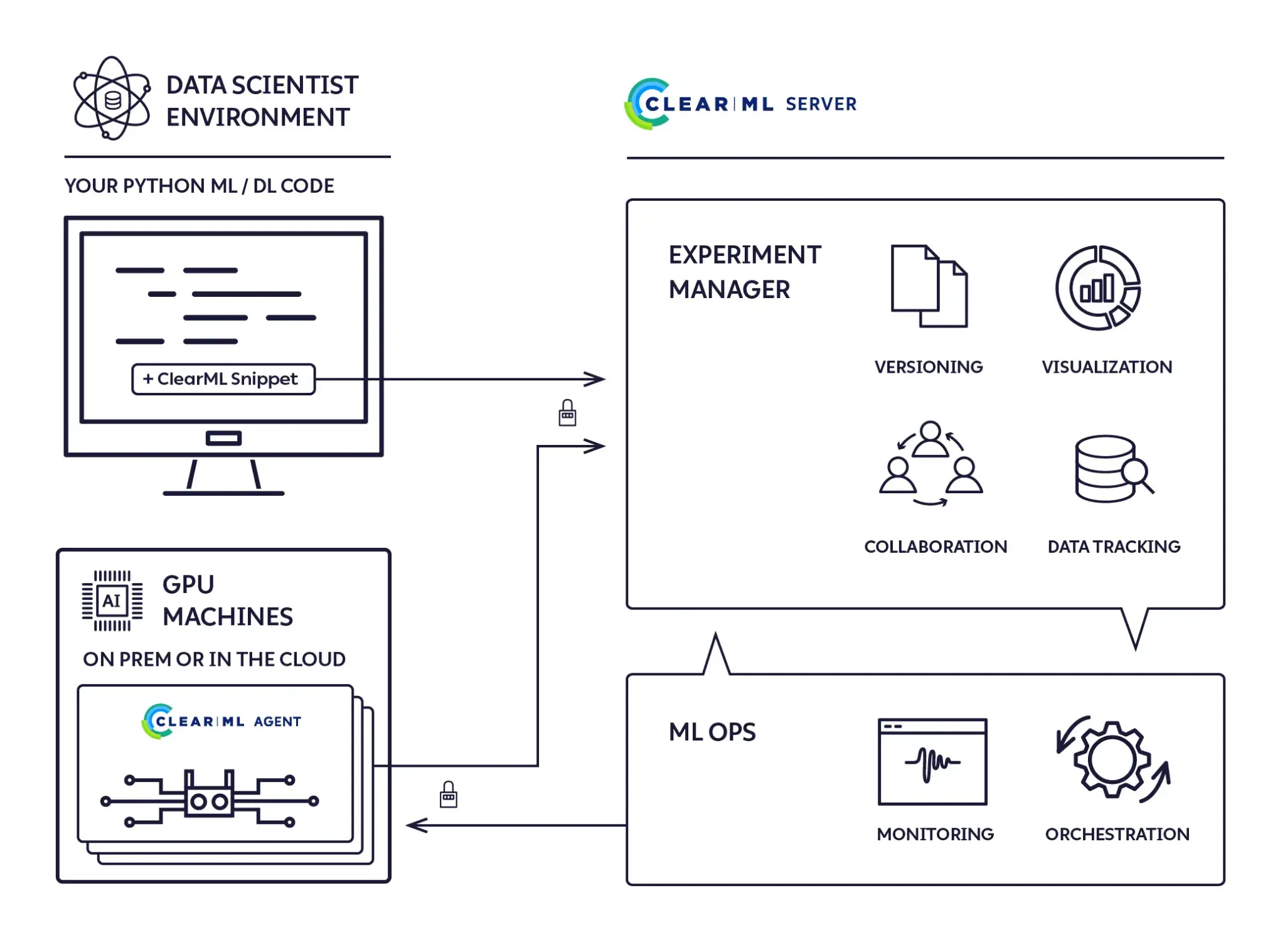
ClearML approaches experiment tracking and reproducibility as a single, tightly integrated workflow.
When you initialize a ClearML task, it automatically captures metrics, parameters, console logs, plots, and system-level resource usage without requiring extensive manual instrumentation. This makes it easy for teams to treat ClearML as a central experiment hub rather than a passive logging layer.
Reproducibility is one of ClearML’s strongest areas. Each run captures the Git commit hash as well as any uncommitted code changes, allowing teams to reproduce raw experimental states that were never formally checked into version control.
ClearML also records runtime configuration and environment details and supports cloning an existing run to re-execute it with identical settings or small parameter tweaks.
At a workflow level, ClearML emphasizes experiment replay and comparison through its UI, including side-by-side run views, parameter editing, and remote execution via ClearML Agents. This design works particularly well for teams that want strong guarantees around experiment traceability without building custom tooling around Git, containers, and schedulers.
MLflow
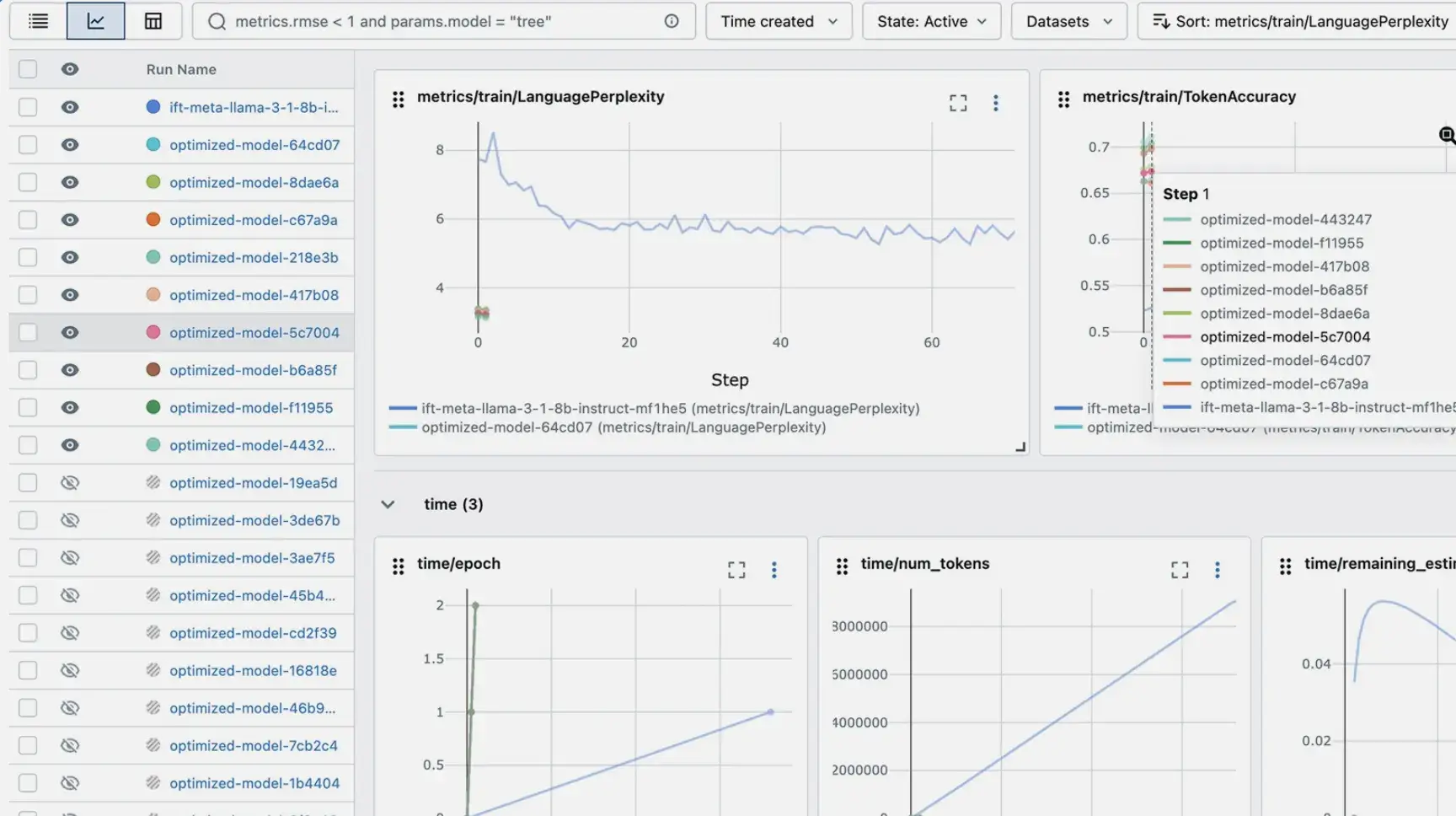
MLflow is widely regarded as the industry standard for experiment tracking due to its simplicity and ecosystem support. It provides a clean API for logging parameters, metrics, and artifacts, along with a lightweight UI for browsing and comparing runs. Most teams interact with MLflow by explicitly instrumenting their training code, although the autolog() feature can automate this for many popular ML frameworks.
MLflow makes reproducibility possible but does not enforce it. By default, it may log the Git commit hash, but code snapshots, environment capture, and data versioning depend on team discipline and external tooling such as Git and Docker. As a result, MLflow often serves as a tracking layer rather than a full reproducibility system.
Where MLflow stands out is later in the lifecycle. The Model Registry provides a structured way to manage trained models, including versioning and stage transitions, making it easier to deploy or serve models in consistent environments.
ZenML
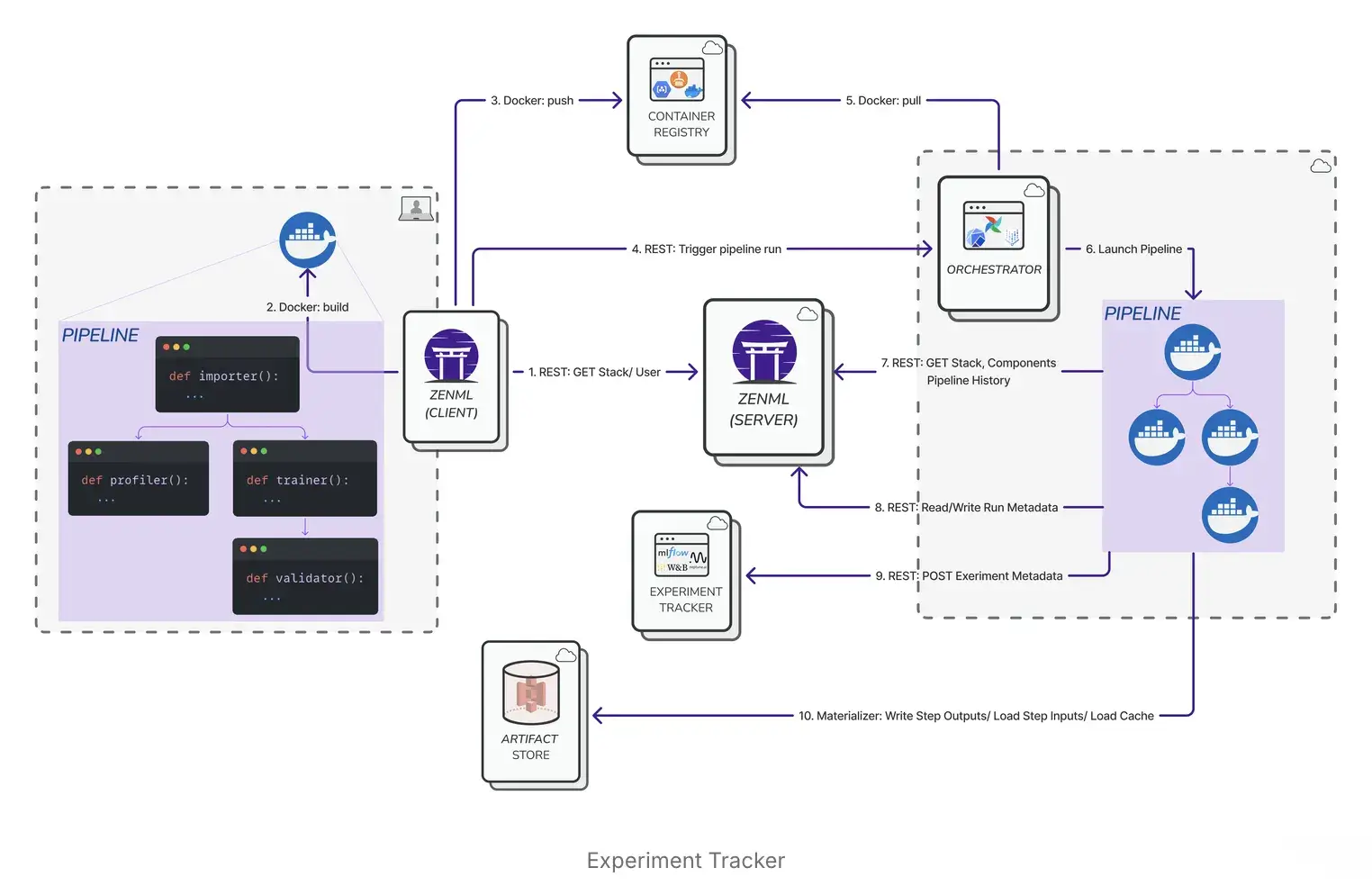
ZenML treats experiment tracking and reproducibility as outcomes of structured pipeline execution rather than standalone concerns. Instead of wiring logging calls into scripts, ZenML captures metadata automatically as part of pipeline runs. Each step’s inputs, outputs, parameters, and artifacts are recorded, creating a durable execution record.
Reproducibility is enforced at the pipeline level through built-in mechanisms, including:
- Pipeline Snapshots (ZenML Pro) can create immutable snapshots that include the pipeline DAG, code, and configuration (and container images)
- Versioning pipeline configuration separately from logic
- With remote orchestrators or step operators, ZenML builds Docker images to run pipelines in an isolated environment.
ZenML also integrates with both MLflow and ClearML via its stack abstraction. This allows teams to retain familiar tracking UIs while ZenML manages lineage, execution context, and reproducible pipelines underneath, making it well-suited for teams transitioning from experimentation to production workflows.
Bottom line: ClearML offers the strongest experiment-level reproducibility, MLflow provides a lightweight and widely adopted tracking layer, and ZenML enforces reproducibility at the pipeline level by default. If you want repeatable, auditable runs without relying on conventions, ZenML is the most robust option.
Feature 2. Orchestration
Orchestration is where the tools diverge most clearly. MLflow relies on external systems, ClearML includes tightly integrated native orchestration, and ZenML is built around orchestration as a first-class concept that spans environments and execution backends.
ClearML
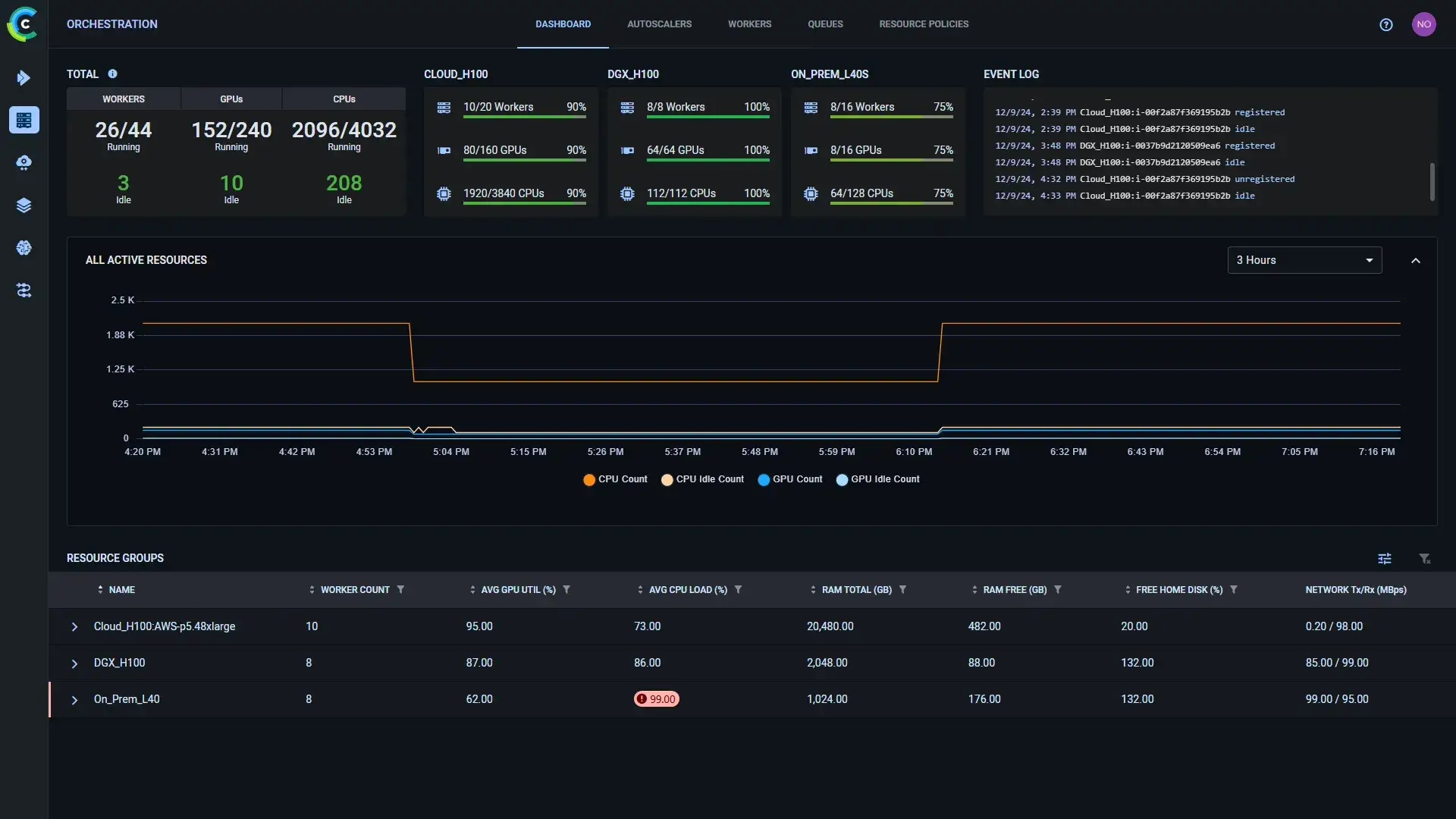
ClearML includes built-in orchestration capabilities centered around tasks and agents. Experiments can be queued and executed remotely by ClearML Agents running on registered machines or clusters, enabling distributed execution without introducing a separate workflow engine. It also supports pipeline constructs for defining multi-step workflows and controlling execution order.
Because orchestration is tightly coupled to the ClearML platform, teams that adopt ClearML orchestration typically rely on its native agents, queues, and scheduling mechanisms. This makes ClearML convenient as an all-in-one system, but it assumes ClearML remains the central execution layer.
MLflow
MLflow is intentionally not an orchestration tool. It focuses on tracking results and managing models, leaving execution control to external systems. Training jobs are typically orchestrated using the likes of Airflow, Kubeflow, or custom scripts, with MLflow embedded as a tracking layer inside those workflows.
This separation keeps MLflow lightweight and flexible, but orchestration concerns such as scheduling, retries, and environment provisioning live entirely outside the platform’s scope.
ZenML
# zenml integration install kubeflow
# zenml orchestrator register kf_orchestrator -f kubeflow ...
# zenml stack update my_stack -o kf_orchestrator

from zenml import pipeline, step

@step
def preprocess_data(data_path: str) -> str:
    # Preprocessing logic here
    return processed_data

@step
def train_model(data: str):
    # Model training logic here
    return model

@pipeline
def my_pipeline(data_path: str):
    processed_data = preprocess_data(data_path)
    model = train_model(processed_data)

# Run the pipeline
my_pipeline(data_path="path/to/data")
Orchestration is a first-class concern in ZenML and a core part of its value proposition. ZenML treats pipelines as the unit of execution and is designed to run them consistently across environments. Through its stack abstraction, ZenML can delegate execution to different backends without requiring changes to pipeline code.
In practice, ZenML orchestration enables teams to:
- Start with local execution and evolve to scheduled, distributed runs
- Swap orchestrators (for example, from local to Airflow or Kubernetes) via configuration
- Maintain reproducibility and lineage regardless of where pipelines run
ZenML sits above the execution layer, coordinating runs and dependencies while enforcing repeatable execution, which makes orchestration a stable foundation rather than an afterthought.
Bottom line: MLflow relies entirely on external orchestrators, ClearML includes native orchestration tightly coupled to its platform, and ZenML is built around orchestration as a first-class concept across environments. ZenML stands out when workflows need to scale and evolve without rewriting pipelines.
Feature 3. Artifact Management
Machine learning doesn’t end with metrics – the artifacts are just as important. How each platform handles artifact management is a key differentiator.
ClearML
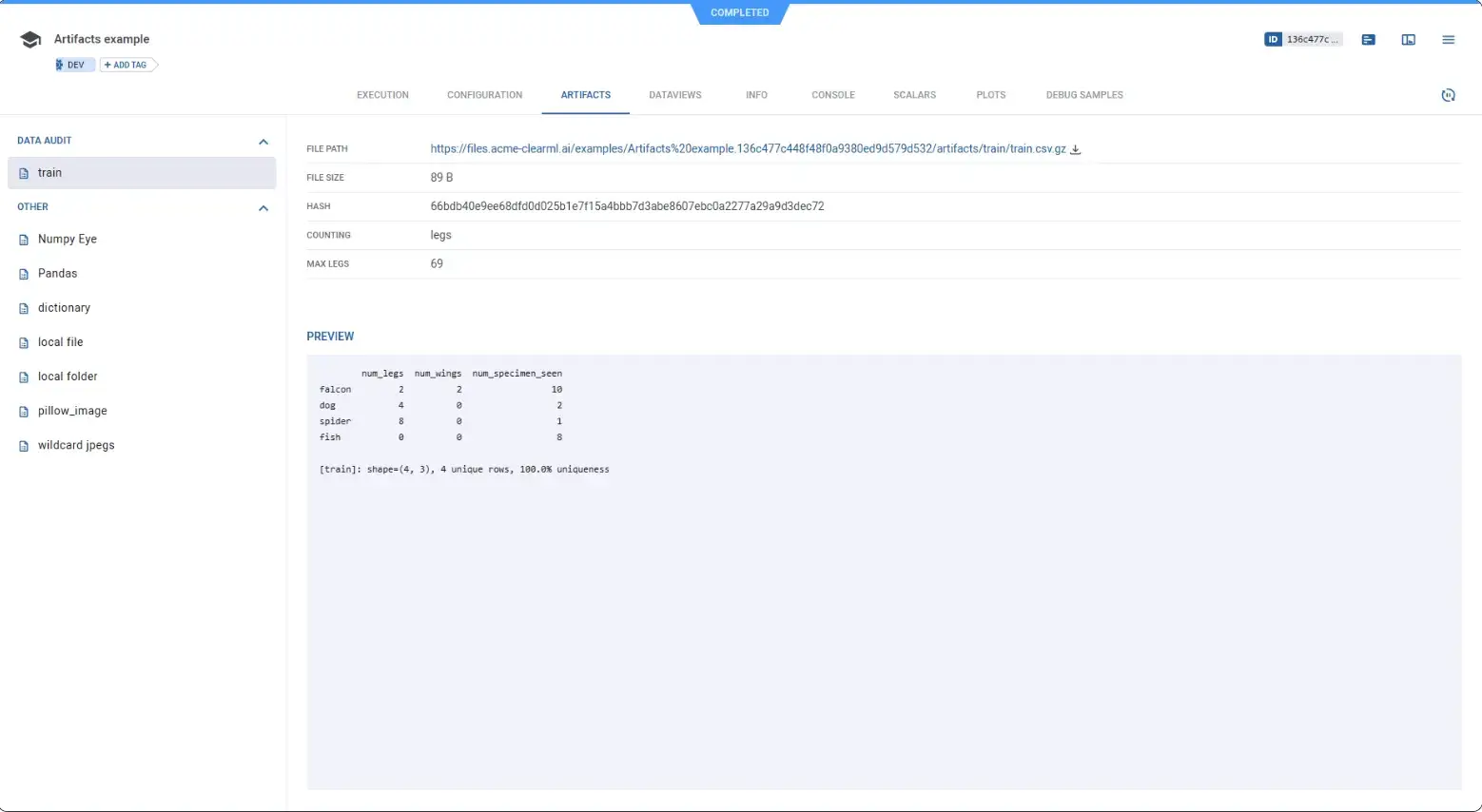
ClearML offers a flexible artifact management system. When a ClearML task produces output files, you can use the platform’s SDK to upload those as artifacts associated with the task.
In fact, ClearML automatically captures model files from popular frameworks: for example, if your code is using PyTorch and saves model.pth, ClearML will notice and log it unless you disable that.
A big advantage is that ClearML doesn’t mandate a single storage backend. You can upload models and data to the ClearML server or configure it to store them in S3, GCS, or Azure Blob Storage.
ClearML supports dataset versioning and lineage through its Datasets functionality (the WebApp shows dataset versions and lineage graphs for datasets created with clearml v1.6+).
Separately, ‘Dataviews’ (part of ClearML Hyper-Datasets) is an Enterprise feature that provides query-based views, debiasing, and richer dataset slicing over remote data.
ClearML’s dataset versioning computes file hashes to identify changes relative to parent dataset versions, enabling differential versioning and efficient uploads. In Hyper-Datasets, if an identical file (same content hash) is already registered, ClearML can link to the existing remote file instead of uploading it again. For artifacts and models, ClearML supports configurable remote storage backends and also caches downloaded content to avoid repeatedly downloading the same objects.
MLflow
MLflow’s artifact store is straightforward. Each run has an artifacts directory. Every time you log an artifact with mlflow.log_artifact() or when MLflow autologs model files, those files are stored in a subfolder corresponding to the run ID in the artifact URI location.
The tool doesn’t add a lot of structure beyond that. That simplicity is why it’s easy to adopt, and why it scales as a building block.
MLflow’s Model Registry provides a structured way to manage model versions and metadata. Historically it supported fixed ‘stages’ (Staging/Production/Archived), but Model Stages are now deprecated and slated for removal. The recommended direction is to use model version tags and model version aliases (for stable named references like “champion”), and to model environments via separate registered models and access controls.
ZenML
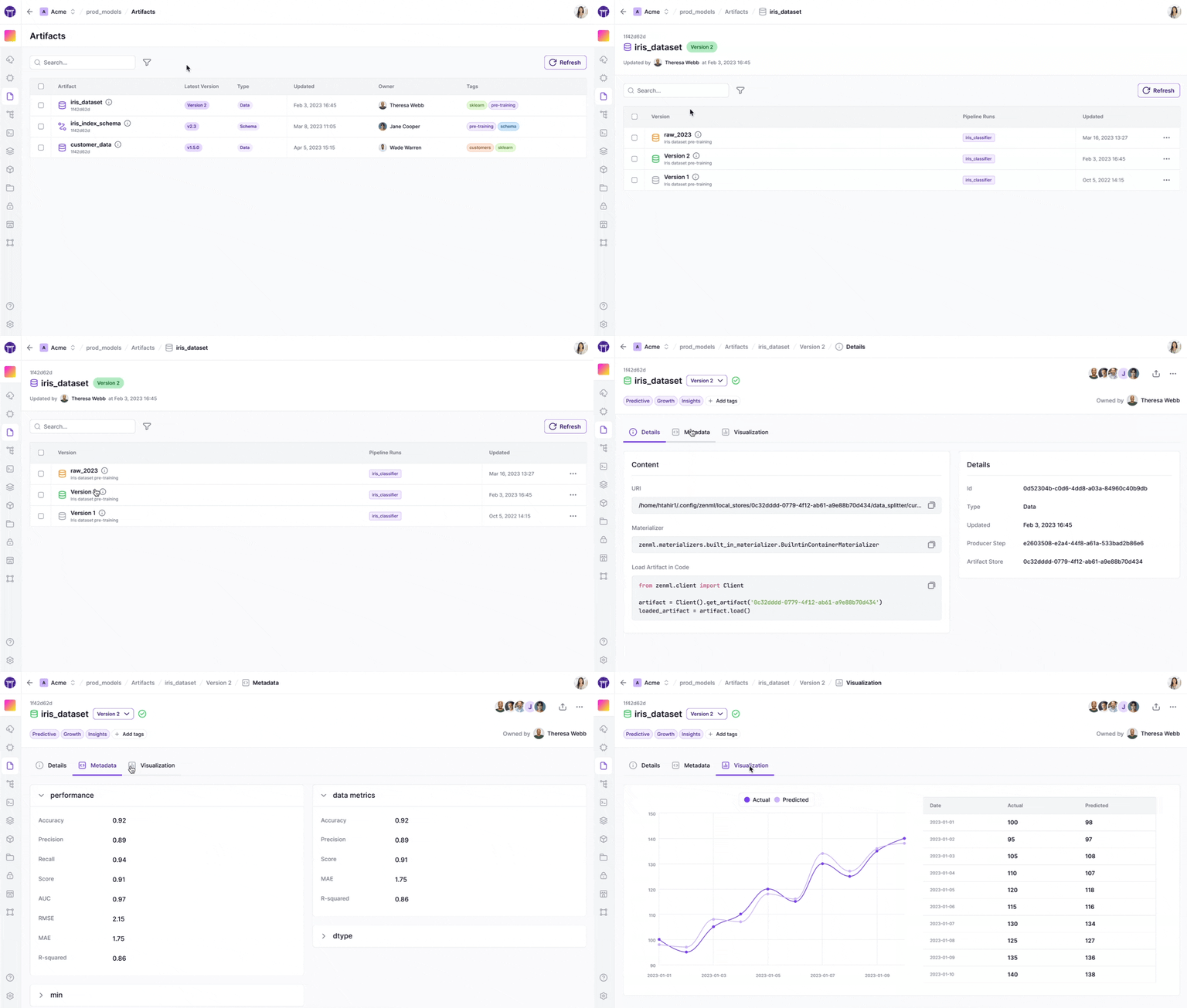
ZenML treats artifacts as the outputs of steps, with versioning and lineage built in. The design works brilliantly for teams who want to reuse artifacts across pipelines, compare pipeline runs, and keep the full chain from raw data to model output. It also keeps pipeline code cleaner.
ZenML introduces the concept of Materializers. These are responsible for ingesting in-memory objects like Pandas DataFrames and models, storing them in the artifact store, and reading them back for downstream steps.
This design means you spend less time writing storage glue and just return objects from your step functions; rest assured, ZenML knows how to persist them.
Automatic lineage tracking is a highlight. ZenML knows exactly which upstream artifacts were used to produce a downstream artifact. It uses this to enable step caching: if you run a pipeline and a step’s inputs haven’t changed, ZenML will skip executing the step and reuse the artifact from a previous run.
ClearML vs MLflow vs ZenML: Integration Capabilities
No tool exists in a vacuum. The ability to integrate with your existing cloud stack is a tell on how extensible the tool is.
ClearML
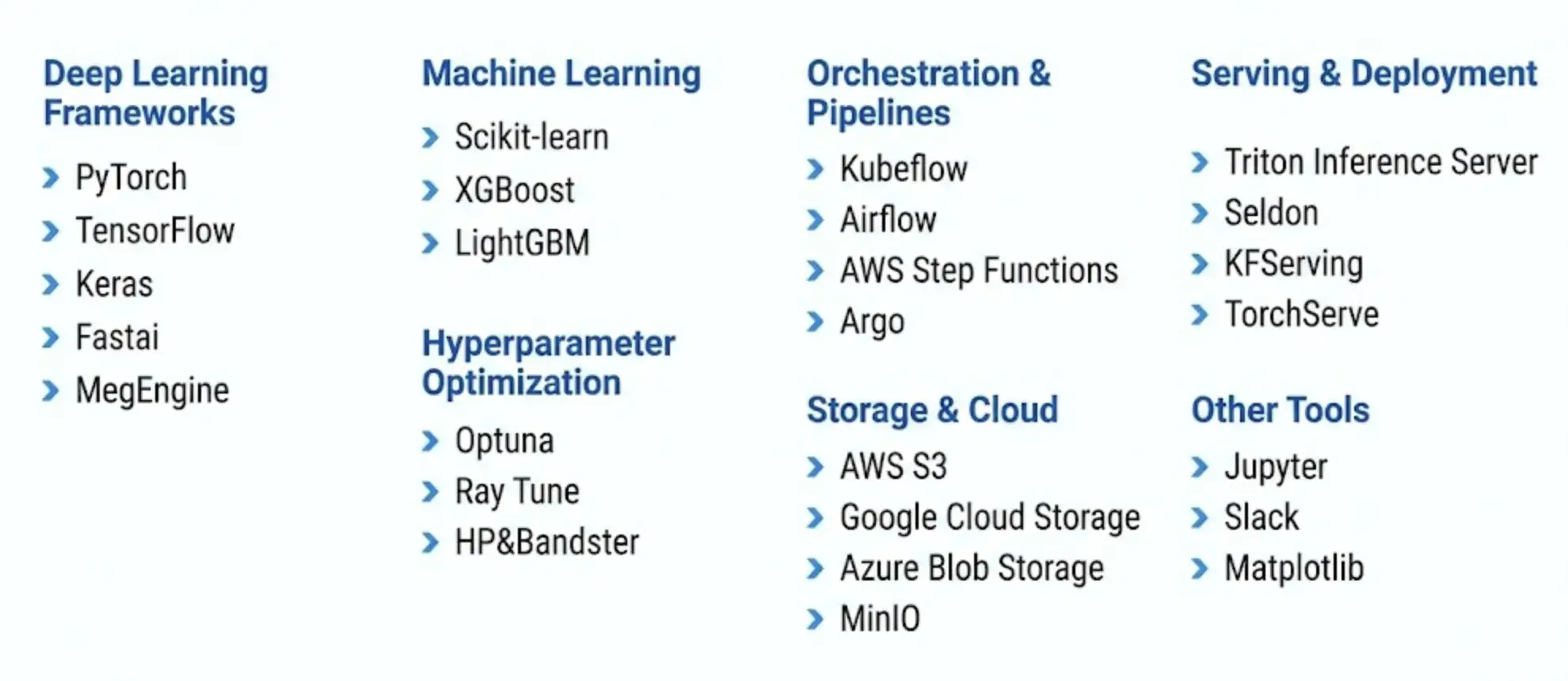
While it integrates with many frameworks like PyTorch, TensorFlow, and more, it’s designed to be the center of your MLOps universe. It has its own orchestration agents, data management, and serving. This can be powerful, but it can also lead to lock-in if you prefer using other specialized tools.
Here’s a list of ClearML integrations as of publishing this article.
MLflow
MLflow is highly modular and has a massive plugin ecosystem. It integrates with almost everything, including Airflow, Kubernetes, Databricks, and major cloud providers.
For deployment, MLflow supports local model serving and containerization workflows, and it includes integrations such as SageMaker via mlflow.sagemaker. Deploying to Azure ML is typically done via the Azure ML integration library (azureml), and MLflow’s broader deployment story is plugin-based via mlflow.deployments (many targets require installing a compatible plugin).
However, these integrations often require you to write the glue code yourself.
ZenML
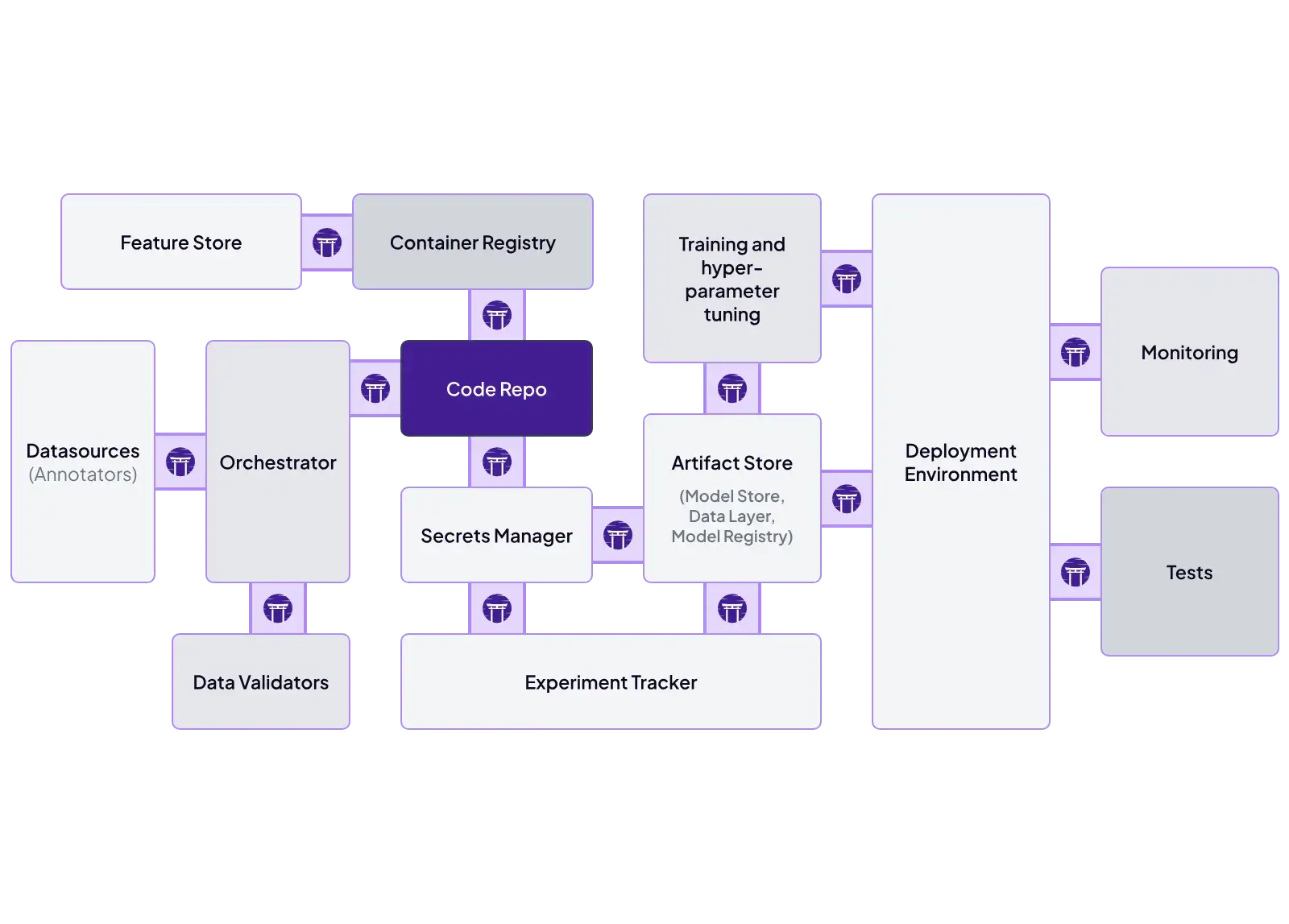
ZenML is built specifically to be the glue. Its architecture is based on Stack Components. You can define a stack that uses:
- Orchestrator: Airflow, Kubeflow, Docker, etc.
- Experiment Tracker: MLflow, Weights & Biases, TensorBoard, etc.
- Model Deployer: BentoML, Databricks, Seldon, etc.
These are just a few; you can learn about the complete list of integrations here: ZenML integrations.
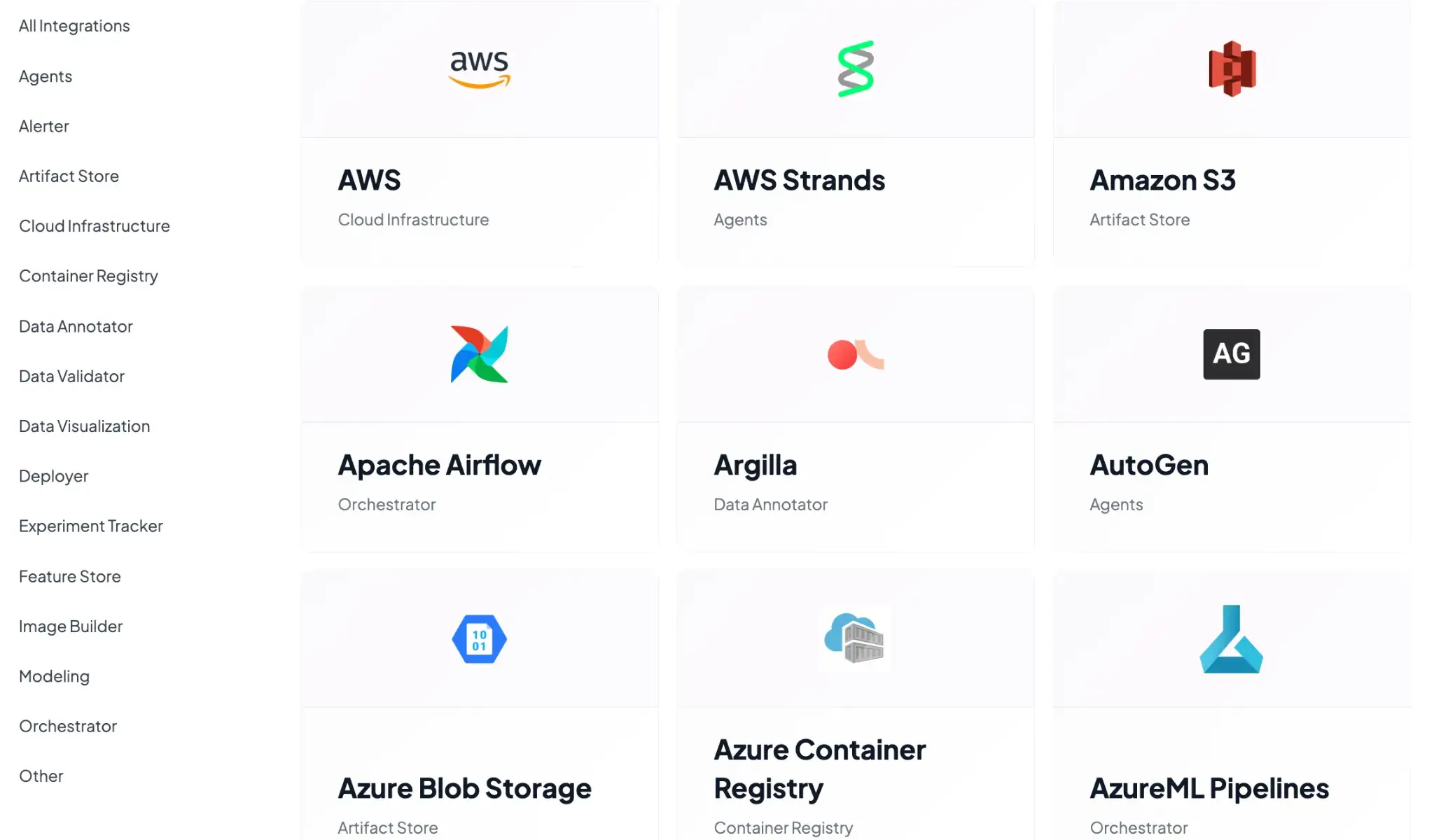
This allows you to mix and match the best tools for the job. You can swap out the orchestrator from a local runner to Kubernetes by changing a single CLI command, without touching your pipeline code.
ClearML vs MLflow vs ZenML: Pricing
Budget is always a factor for production teams. So here’s how pricing for the three - ClearML, MLflow, and ZenML differ.
ClearML
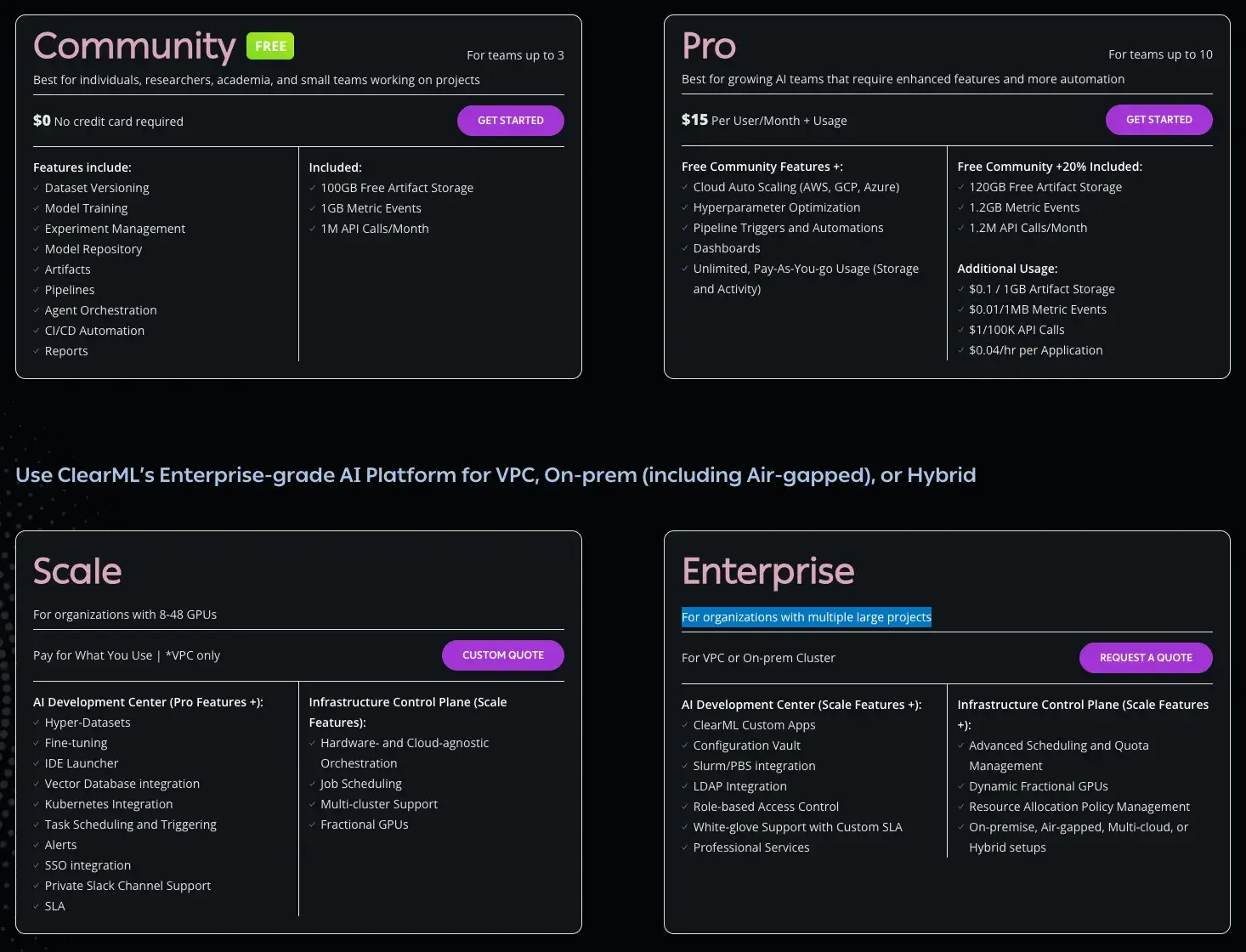
ClearML has a free (self-hosted) plan and two paid plans to choose from:
- Community (Free): Free for self-hosted users (unlimited) or hosted on their SaaS (limited usage). It includes core experiment-tracking and orchestration features.
- Pro ($15/user/month): Adds managed hosting, unlimited scale, and better user management features.
- Scale (Custom): For larger deployments requiring VPC peering, advanced security, and priority support.
- Enterprise (Custom): For organizations with multiple large projects
MLflow
MLflow is open-source and free to use. You can self-host it, which incurs infrastructure and maintenance costs. Managed MLflow services, like those on Databricks or AWS, charge based on the compute and storage resources you consume.
ZenML
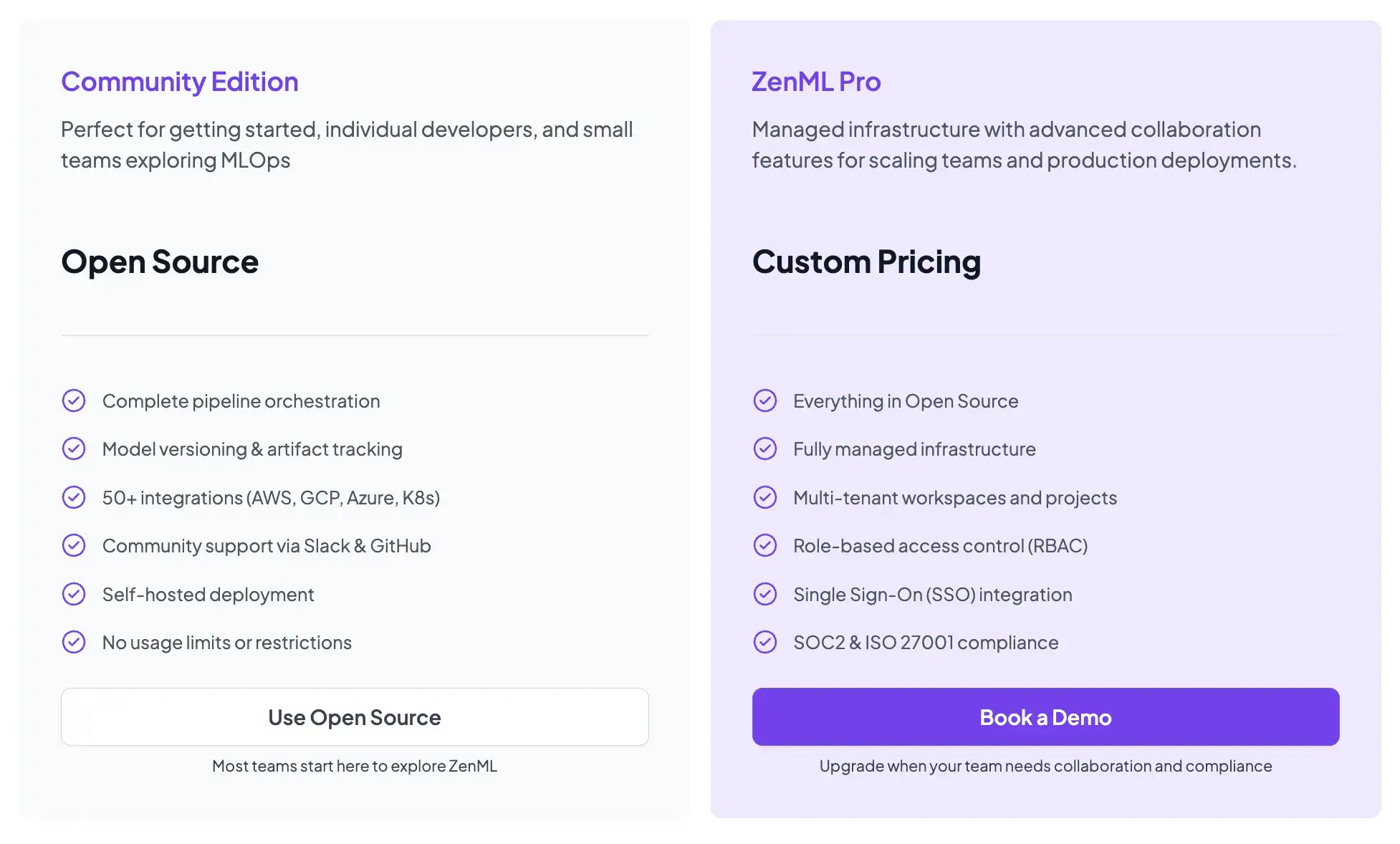
ZenML is also open-source and free to start.
- Community (Free): Full open-source framework. You can run it on your own infrastructure for free.
- ZenML Pro (Custom pricing): A managed control plane that handles the dashboard, user management, and stack configurations. This removes the burden of hosting the ZenML server yourself.
How ZenML Manages the Outer Loop in MLOps for Production Teams
While ClearML and MLflow are powerful tools, they often focus on the ‘Inner Loop’ of development, iterating on models, and logging results.
ZenML manages the Outer Loop. It governs the entire lifecycle of the model, from data ingestion to deployment.
By using ZenML, you treat your entire MLOps process as a pipeline.
ZenML integrates the ‘Inner Loop’ tools (like MLflow for tracking) as steps within this larger process. This gives you the best of both worlds: the specialized tracking capabilities of MLflow combined with the rigorous orchestration and reproducibility of ZenML.
Read about how ZenML integrates with MLflow to streamline your ML workflows: ZenML X MLflow
📚 Relevant articles to read:
- Kubeflow vs Mlflow vs ZenML
- MLflow vs WandB vs ZenML
- Metaflow vs Mlflow vs ZenML
- Temporal vs Airflow vs ZenML
- Airflow vs Kubeflow vs ZenML
Which One’s the Best MLOps Framework for Your Business?
Choosing between these three depends on the scope of your problem.
Choose MLflow if you primarily need a robust, industry-standard experiment tracker and model registry. It is the best choice if you already have a mature orchestration setup (like Airflow) and just need a place to log metrics.
Choose ClearML if you want a unified platform that handles everything from tracking to remote execution out of the box. It is ideal for computer vision teams who need rich media logging and want to avoid setting up complex infrastructure.
If you want reproducible pipelines with artifact lineage and expect your workflows to evolve into scheduled runs across diverse infra, pick ZenML. It’s built for production teams who want repeatable execution and a durable record of what ran.