
On this page
Modern ML platforms increasingly revolve around long-running, failure-prone batch pipelines involving feature extraction, large-scale training, and evaluation. These workloads stress orchestration systems in different ways than real-time services.
Kubeflow, SageMaker Pipelines, and ZenML all address this space, but at different layers of the stack.
In this Kubeflow vs SageMaker vs ZenML article, we compare the three head-to-head across architecture, developer experience, and features to help you decide which tool fits your platform needs.
Kubeflow vs SageMaker vs ZenML: Key Takeaways
🧑💻 Kubeflow**: **A Kubernetes-native platform for running containerized ML pipelines at scale. Kubeflow is a strong fit for GPU-heavy training and large fan-out experiments, but requires significant Kubernetes and platform engineering investment.
🧑💻 SageMaker: A fully managed orchestration service where pipeline steps map to SageMaker job primitives. Well-suited for AWS-centric teams that prefer job-level execution and managed control planes over cluster ownership.
🧑💻 ZenML: A Python-first MLOps + LLMOps framework that defines ML-native pipelines and translates them to existing orchestrators such as Kubeflow or SageMaker. Best for teams that want portable pipeline code and consistent metadata without committing to a single execution backend. A notable advantage over Kubeflow and SageMaker is how quickly you can debug and resume workflows when something breaks.
Kubeflow vs SageMaker vs ZenML: Features Comparison
| Feature | Kubeflow | SageMaker Pipelines | ZenML |
|---|---|---|---|
| Orchestration Engine and Execution Substrate | Kubernetes-native; pods executed via workflow controllers. | AWS-managed control plane; steps become SageMaker jobs. | No native engine; compiles pipelines to selected backend. |
| Resource Controls for Heavy Batch Workloads | Pod-level CPU/memory/GPU, node selectors, affinities, taints/tolerations. | Instance type and count per step; coarse concurrency caps. | Inherits backend model; per-step offload via Step Operators. |
| Artifacts, Metadata, and Lineage | Built-in ML Metadata (MLMD) per run. | S3-backed locations and registry. | Automatic artifact and metadata tracking; unified lineage across backends. |
The table above summarizes the high-level differences. Below, we examine each feature in detail.
Feature 1. Orchestration Engine and Execution Substrate
For batch ML systems, the orchestration engine determines where computation runs, who owns scheduling, and how pipeline steps are materialized into executable units. This choice directly affects scalability, failure behavior, and operational burden.
Kubeflow
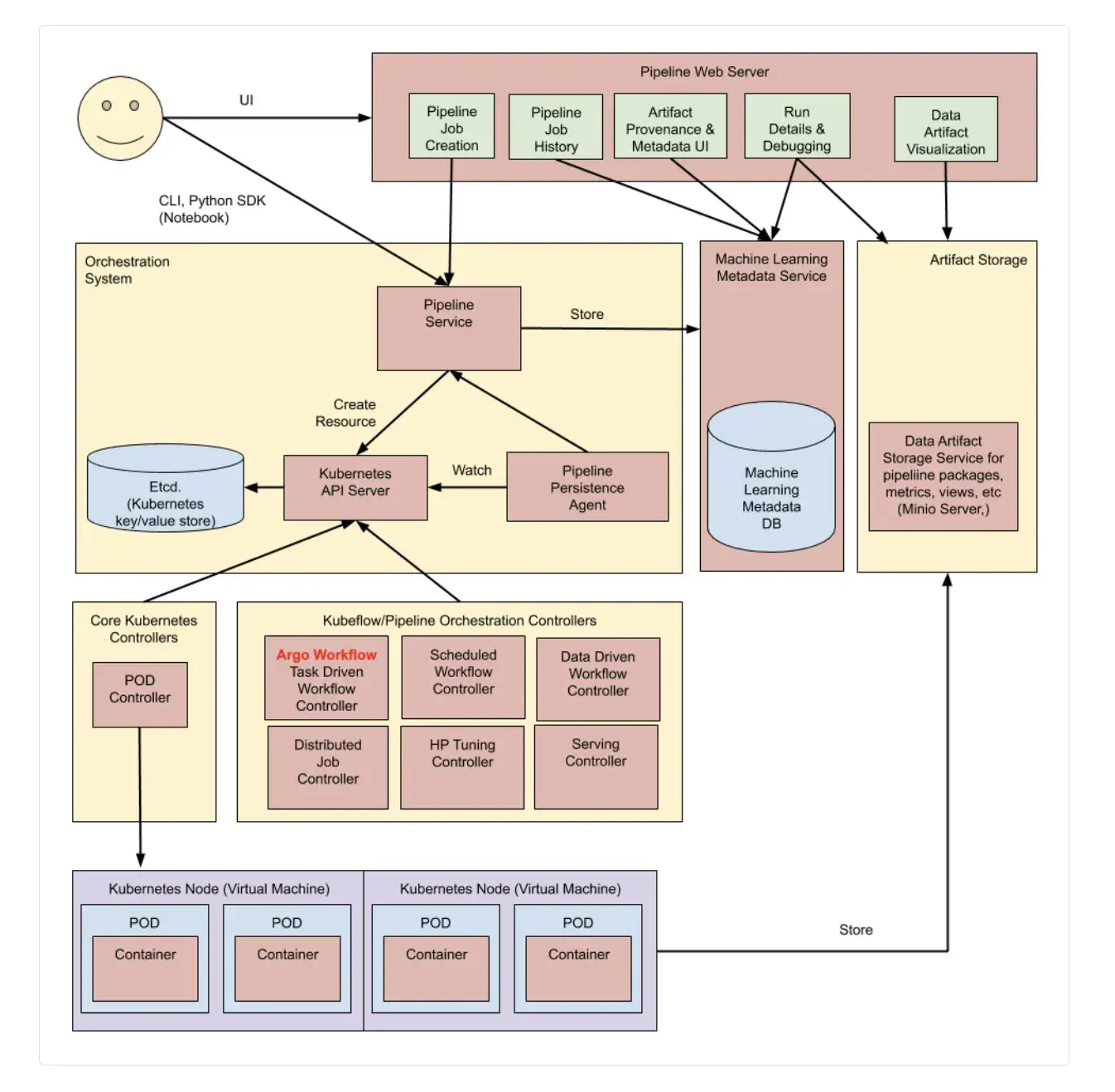
Kubeflow Pipelines (KFP) runs ML workflows as Kubernetes workloads. You define a pipeline in Python using the KFP SDK and compile it into a pipeline package that the KFP API can execute.
In modern Kubeflow installations (KFP v2, included since Kubeflow Platform 1.8), the compiler produces a KFP Intermediate Representation (IR) YAML specification rather than an Argo Workflow YAML. The KFP backend then materializes that spec into Kubernetes resources to run the pipeline.
In many Kubernetes deployments, KFP uses a workflow engine (commonly Argo Workflows) under the hood: the pipeline is represented as a workflow custom resource, and the workflow controller creates Kubernetes Pods to execute each task. Kubernetes handles pod scheduling and node-level failures, while the workflow engine handles task ordering and retries.
SageMaker
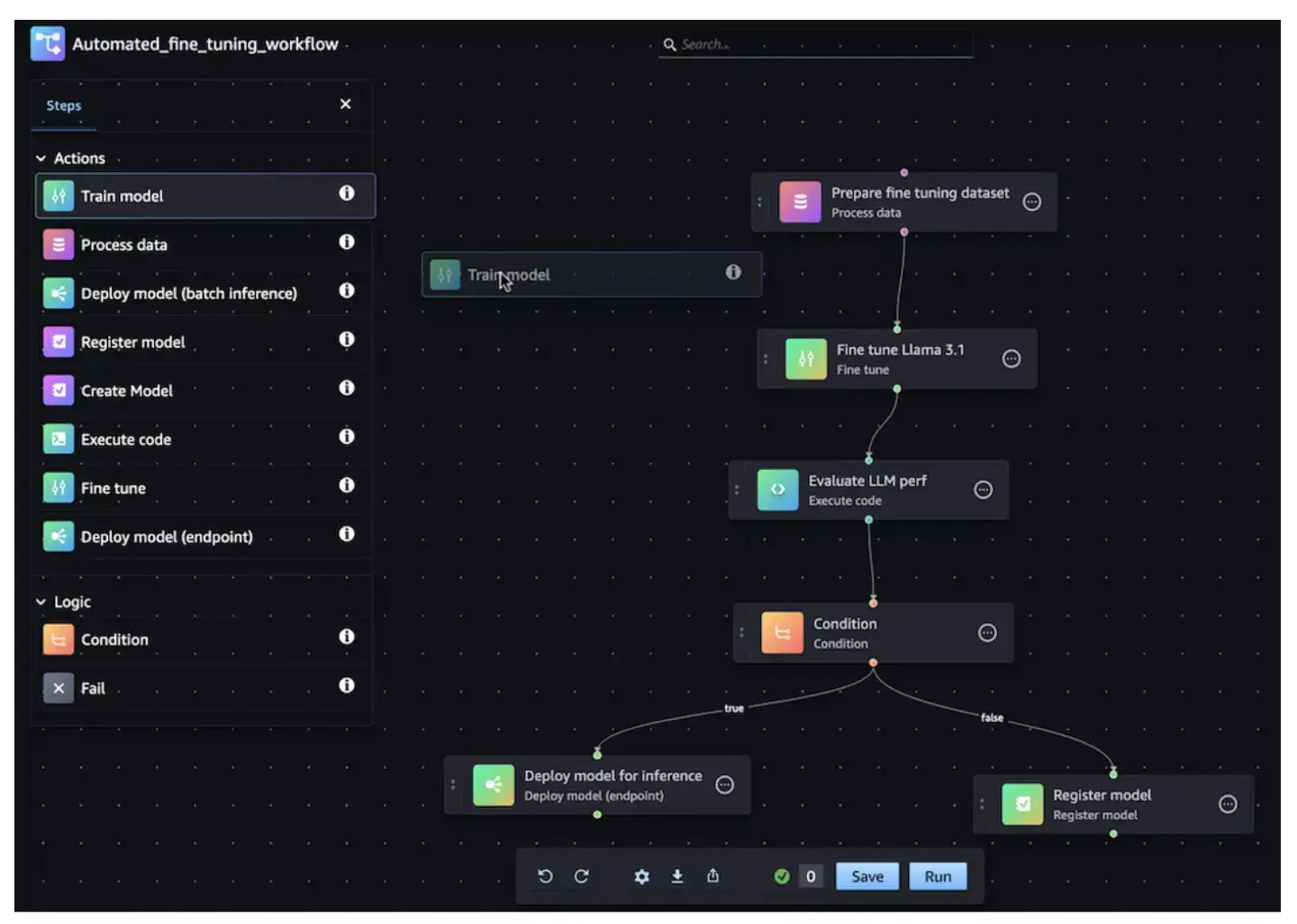
SageMaker Pipelines is a fully managed workflow orchestration service. Unlike Kubeflow, where you manage the cluster, SageMaker provides a managed orchestration layer where AWS owns the control plane.
It creates and manages the compute resources for you on demand. You just declare the pipeline DAG, and AWS schedules the steps. The SageMaker service itself handles scheduling, retries, and execution state.
Execution is step-scoped, and infrastructure is provisioned per step. A ProcessingStep launches a short-lived processing job on the instance type you specify. A TrainingStep spins up training infrastructure with an explicit instance shape and count.
Pipelines pass data between steps through persisted storage, typically S3. The orchestration layer tracks dependencies and runs state externally from the execution environment.
However, the trade-offs are structural and matter at scale:
- Scheduling is instance-based, not pod-based. You choose instance types rather than expressing placement constraints like node selectors, affinities, or queue priorities.
- Data flow is storage-centric, typically via S3, which favors durable batch pipelines but limits low-latency handoff or data-local execution.
- Debugging happens at the job boundary, through SageMaker job logs and metadata, not through Kubernetes objects or schedulers.
SageMaker Pipelines works best for teams that want reliable batch orchestration without operating clusters and are comfortable trading fine-grained scheduling control for AWS-managed execution.
ZenML
ZenML delegates orchestration to pluggable orchestrators. You define pipelines in standard Python, and ZenML translates them into the native format of your target backends like Kubeflow Pipelines, Airflow, or SageMaker Pipelines.
Pipelines and steps are defined using @pipeline and @step decorators. The result is a Python-native DAG with explicit data dependencies, but no references to pods, jobs, or instance types. For example, a simple ZenML pipeline might look like:“
from zenml import pipeline, step

@step
def load_data() -> pd.DataFrame:
    # Load or generate dataset
    ...

@step
def train_model(data: pd.DataFrame) -> Model:
    # Train a model using the data
    ...

@pipeline
def training_pipeline():
    data = load_data()
    model = train_model(data=data)
This decoupling allows you to write code once and run it anywhere. You might use a local orchestrator for fast debugging and switch to the Kubeflow or SageMaker orchestrator for production without rewriting your pipeline logic. Scheduling, retries, and task execution are handled by that backend, not by ZenML.
This design decouples pipeline code from the execution substrate. The same pipeline can run locally for development and on Kubeflow or SageMaker in production by changing the stack configuration, not the code.
It has concrete implications for production systems:
- Execution engines remain external: You still need Kubernetes, Airflow, SageMaker, or any orchestrator to run workloads at scale.
- Operational complexity is shifted, not removed: ZenML reduces the need to write platform-specific glue code, but you must operate both ZenML’s control layer and the underlying orchestrator.
- Portability is explicit: The same pipeline definition can target different execution environments without refactoring, which is valuable when workloads move between local, on-prem, and cloud setups.
ZenML fits teams that want reproducible, pipeline-shaped ML systems while avoiding tight coupling to a single orchestration or infrastructure layer.
Bottom line: For orchestration engine and execution substrate:
- Kubeflow offers the strongest control if you want pipelines to be native Kubernetes workloads.
- SageMaker Pipelines is best when you want AWS to own the control plane and job execution lifecycle.
- ZenML wins on flexibility by letting you keep a single pipeline definition while targeting either Kubeflow or SageMaker without rewriting code.
Feature 2. Resource Controls for Heavy Batch Workloads
Batch ML workloads often require explicit control over hardware components like CPU, memory, and accelerators. Poor resource modeling may lead to stalled pods or wasted GPUs.
Kubeflow
Kubeflow inherits Kubernetes resource modeling. For each pipeline step, you can specify CPU, memory, and GPU requests and limits.
You can also apply:
- Node selectors and affinities to target specific node pools
- Taints and tolerations for isolation
- PriorityClasses and quotas at the cluster level
Suppose that one step requires a GPU, you can add a constraint in the pipeline definition:“
# Using the Kubeflow Pipelines SDK to request a GPU for a task
task = task.add_node_selector_constraint(accelerator="nvidia.com/gpu") \
           .set_accelerator_limit(1)
This is particularly relevant for mixed workloads where contention or noisy neighbors can destabilize long-running training jobs.
Kubeflow can also coordinate distributed training via Kubeflow’s training operators. Historically, this was done with framework-specific CRDs like TFJob, PyTorchJob, and MPIJob, but newer Kubeflow Trainer v2 APIs introduce a unified TrainJob interface (with runtime definitions) that replaces those older CRDs while providing migration paths.
SageMaker
In SageMaker, resource control is defined per job. For each step, you select an instance type and instance count. This is simple and predictable.
For example, a preprocessing step might run on an ml.m5.2xlarge, while a training step uses an ml.p4d.24xlarge with multiple GPUs. SageMaker provides that capacity on demand when the step executes.
While this is easier than managing Kubernetes manifests, it’s less flexible. You cannot share a GPU across steps or express topology constraints. For cost optimization, SageMaker supports Managed Spot Training for training jobs, but it’s opt-in: you explicitly configure a training job to use EC2 Spot Instances and set waiting/run limits (often with checkpointing) so interruptions can be handled. SageMaker also supports automatic scaling for deployed endpoints (inference), but pipeline processing and training steps run with the fixed instance count you specify for each job.
This is useful for pipelines with multiple heavy stages, but it does not provide queueing, prioritization, or fairness beyond that cap. Besides, there is no user-visible scheduling priority or placement logic. Jobs generally start as soon as capacity is available, subject to account quotas and regional availability.
Retries operate at the job level: a failed step is rerun as a new job, rather than rescheduled within a shared execution environment.
ZenML
By default, ZenML inherits the resource model of its configured orchestrator. On Kubernetes, it translates configuration into Pod specs (requests/limits, node selectors); on SageMaker, it maps to InstanceTypes.
ZenML offers flexibility through both orchestrators and step operators. You can run entire pipelines on Kubernetes using the Kubernetes or Kubeflow orchestrator, or selectively route individual steps to a different backend using step operators. For example, preprocessing runs on Kubernetes while training offloads to a SageMaker job.
Operationally, this enables hybrid pipelines:
- Per-step infrastructure selection rather than committing the entire pipeline to one environment.
- Clear failure boundaries, since each step runs as a discrete unit in its target backend.
- Backend-native resource control with Kubernetes handling pod placement and SageMaker handling instance provisioning.
ZenML delegates queues or priorities to the underlying orchestrator and does not impose its own scheduling layer.
While this hybrid approach optimizes hardware use, it increases operational surface area. Teams must manage multiple execution environments that must be configured, authenticated, and monitored.
Because ZenML pipelines can run as Kubernetes workloads, they can benefit from advanced AI schedulers on Kubernetes, such as NVIDIA KAI Scheduler (the open-sourced Run:ai scheduler). These schedulers can add capabilities like GPU sharing, queueing, and gang scheduling on top of standard Kubernetes behavior.
KAI Scheduler was open-sourced by NVIDIA (originally developed within the Run:AI platform) and adds AI-centric scheduling primitives that Kubernetes lacks. These include fractional GPU requests, queue-based quotas and priorities for multi-team governance, and gang scheduling for distributed jobs. Standard Kubernetes hands over an entire GPU card the moment a container requests one, even if the workload needs only a fraction of its memory.
📚 Read this guide to know about NVIDIA KAI Scheduler.
With KAI Scheduler, ZenML pipelines can request fractional GPUs and share physical GPUs across multiple concurrent steps. This lets teams run more pipelines on the same GPU infrastructure without rewriting ML code. ZenML provides a ready-to-use reference implementation in its kai-k8s-zenml repository that demonstrates how to configure Kubernetes orchestrators to work with KAI’s fractional allocation.
Bottom line: For resource controls of heavy batch workloads, Kubeflow provides the most precise resource control through pod-level requests, placement rules, and scheduler primitives. SageMaker is simpler but coarse, with instance-type–based allocation and limited concurrency controls. ZenML is strongest for hybrid scenarios, where different steps in one pipeline must run on different infrastructures.
Feature 3. Artifacts, Metadata, and Lineage
For any serious ML pipeline, keeping track of what you ran, with which data, parameters, and results, is critical for reproducibility. Let’s compare how Kubeflow, SageMaker, and ZenML handle artifact tracking and metadata lineage.
Kubeflow
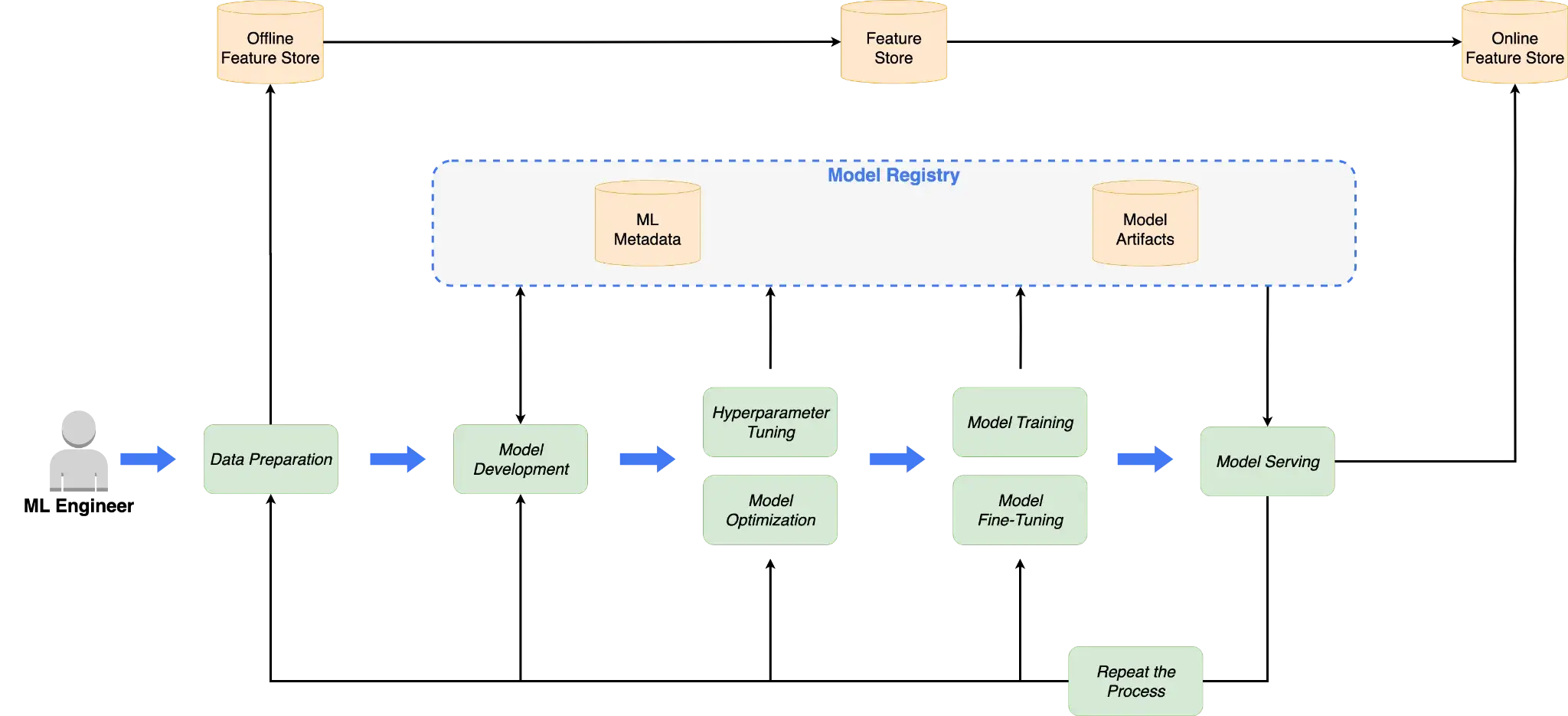
Kubeflow Pipelines integrates ML Metadata (MLMD) to track artifacts and their lineage through pipeline runs. When you execute a Kubeflow pipeline, the system automatically logs metadata for each step to a central store, typically MySQL.
The Kubeflow Pipelines UI visualizes this as a Directed Acyclic Graph (DAG) of the lineage with links between steps and artifacts so you can trace a model artifact back to the producing run and its recorded inputs (datasets/artifacts, parameters, and the container image used for each component). If you want commit-level provenance, it’s common to record a Git SHA (or image digest) as a parameter or custom metadata property so it appears alongside the run.
For example, if Step A outputs a data file and Step B consumes it, Kubeflow can display that linkage, and you can click on artifacts in the UI.
While powerful, MLMD is complex to query and manage. The metadata is tightly coupled to the Kubeflow ecosystem. Visualizing results often requires developers to write metadata in specific file formats for the UI to render them correctly. Furthermore, custom queries often require interacting with MLMD APIs rather than simple SQL.
SageMaker
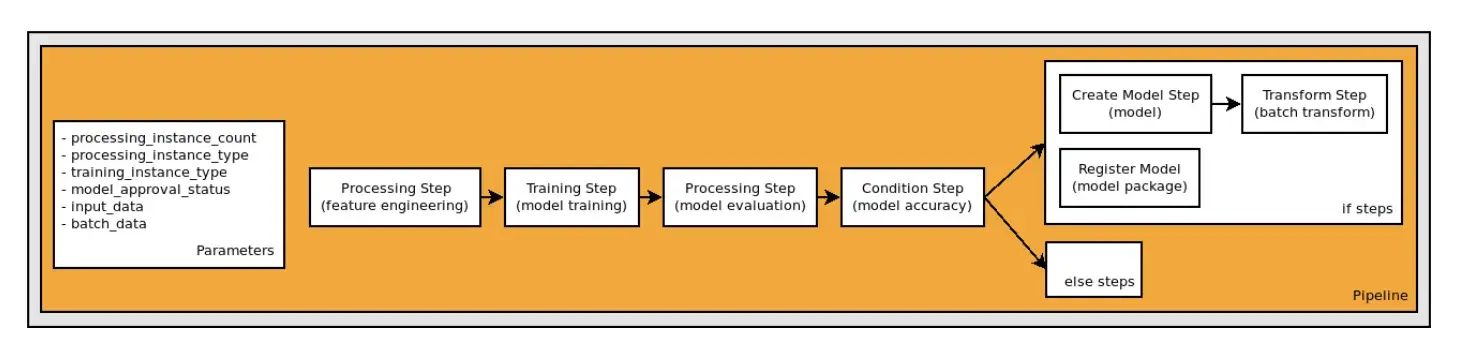
SageMaker provides managed lineage tracking (SageMaker Lineage) alongside services like the Model Registry. Lineage represents Artifacts (URI-addressable objects such as datasets, models, or container images), Actions (jobs like Processing or Training), and Contexts (groupings such as pipeline runs). Artifacts are typically stored in systems like S3 and referenced by URI, while the lineage graph itself is stored and managed by SageMaker.
All the steps and artifacts in a pipeline are recorded in SageMaker’s metadata stores. In SageMaker Studio, you can visually trace the pipeline execution and see for each step what data went in and what came out.
For regulated industries, this system provides solid auditability without requiring custom instrumentation. Every ProcessingJob or TrainingJob executed within a Pipeline automatically registers its input S3 URIs and output artifacts to the lineage store.
It’s very useful for compliance and reproducibility, and it’s nicely integrated into the Studio UI, but strictly scoped to the AWS ecosystem. Steps executed outside of SageMaker, like local pre-processing or external data warehouse queries, are invisible to the lineage graph unless manually injected via the API.
ZenML
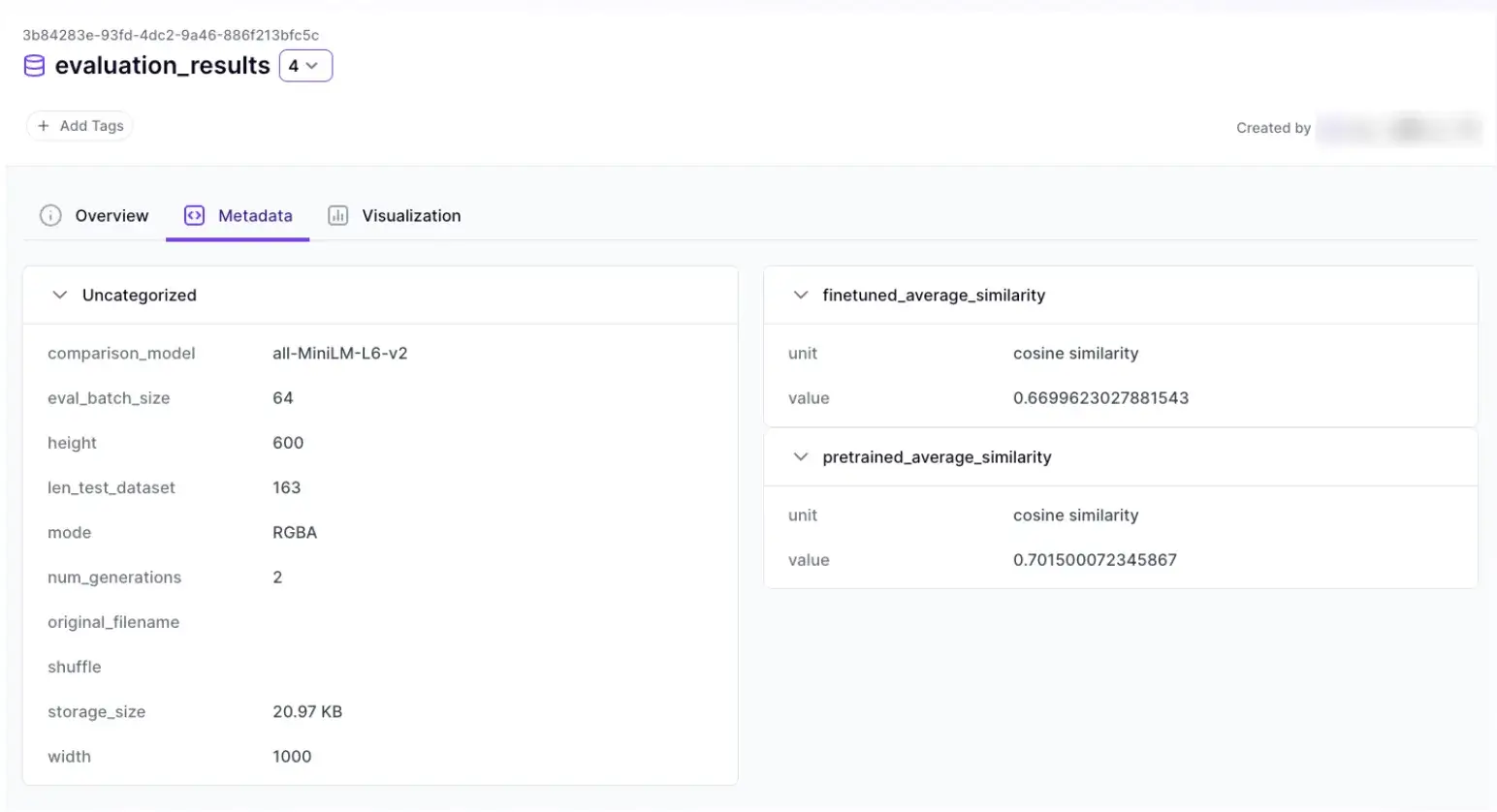
ZenML treats Metadata and Lineage as first-class citizens. Every step automatically serializes inputs and outputs to an artifact store and records lineage in a relational metadata backend.
Unlike Kubeflow’s tightly coupled MLMD, ZenML decouples artifact persistence from execution logic.
The engineering advantage is that ZenML’s lineage graph spans orchestration boundaries. If one step runs on Kubernetes and another on SageMaker, ZenML maintains a single, unified lineage trace. This provides a cohesive view for debugging distributed workflows that fragmented tools cannot offer.
The ZenML Dashboard allows you to visualize this lineage graph, inspect artifacts, and trace back from a model to the specific pipeline run that produced it, along with recorded metadata such as environment details and (when a code repository is connected or the project is Git-tracked) the commit hash associated with that run.
Bottom line: If you care about long-term reproducibility, cross-platform workflows, and end-to-end lineage without ecosystem lock-in, ZenML is the strongest choice.
Kubeflow vs SageMaker vs ZenML: Integration Capabilities
Your pipelines often need to interface with external systems. Here’s how Kubeflow, SageMaker, and ZenML each integrate with the broader ecosystem of tools and services.
Kubeflow
Kubeflow integrates deeply with the Cloud Native (Kubernetes) ecosystem but lacks the rich library of plug-and-play connectors found in tools like Airflow.
Kubeflow integrates tightly with Kubernetes-native systems:
- KServe for serving
- Katib for tuning
- Istio and Dex for networking and auth
External systems usually require building containers with the relevant SDKs. There is no large catalog of prebuilt connectors. Cloud access relies on Kubernetes-to-IAM identity mapping, which must be configured by the platform team.
SageMaker
SageMaker integrates deeply with AWS services:
- S3, ECR, Feature Store, Model Registry
- IAM for identity and access
- CloudWatch for logs and metrics
External integrations typically run inside jobs via SDKs. The integration surface is AWS-first.
ZenML
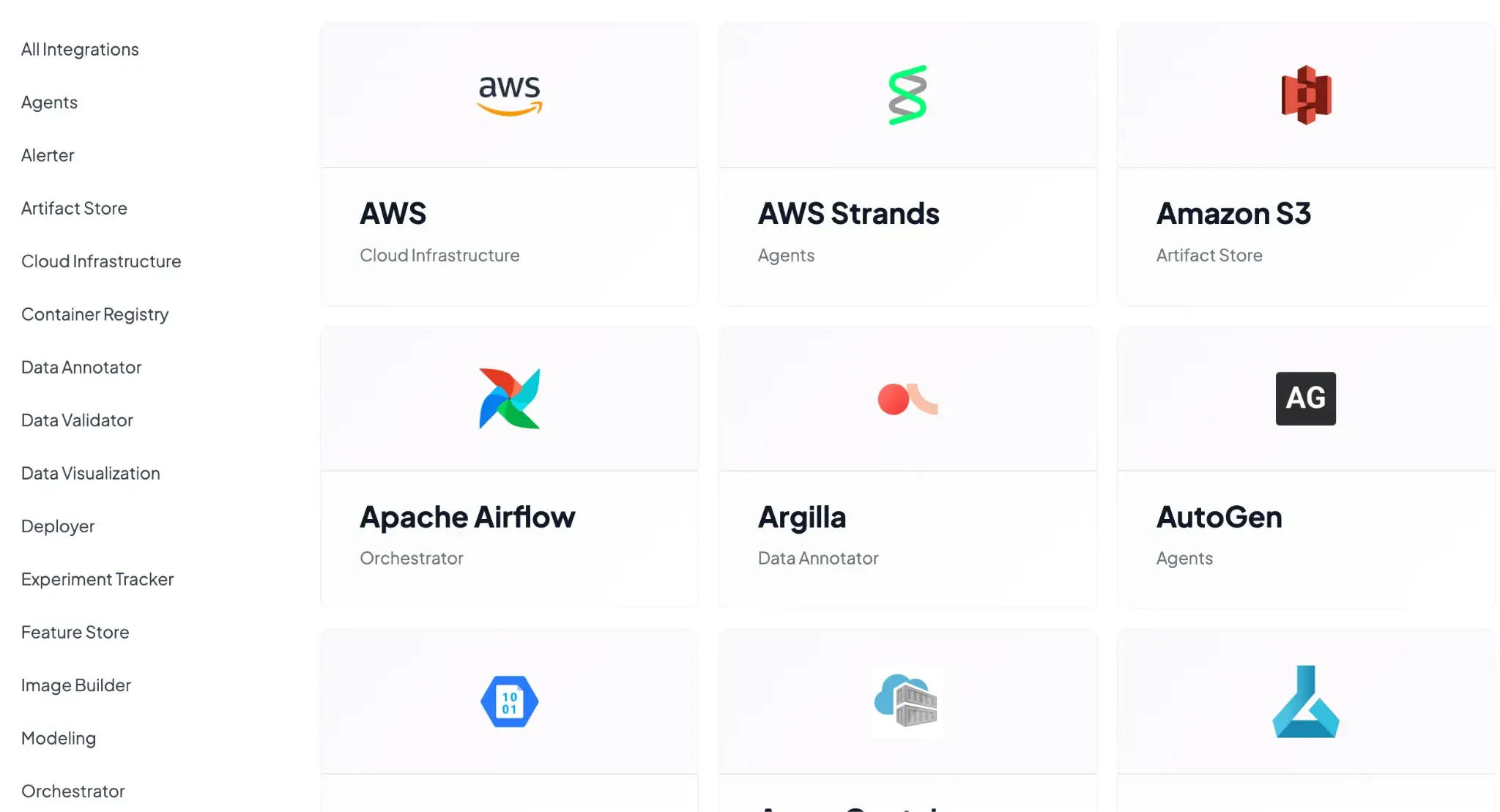
ZenML is built as an integration hub by design. Its architecture revolves around the idea of a Stack, where each component of your ML stack can be plugged in. Common built-in integration patterns include:
- Orchestrators: Airflow, Kubeflow, Tekton, and SkyPilot for execution management.
- Experiment Trackers: Native hooks for MLflow, Weights & Biases (W&B), and Neptune to log metrics alongside pipeline runs.
- Step Operators: Offloading specific tasks to SageMaker, Vertex AI, or AzureML while keeping the main loop on a lighter orchestrator.
- Model Serving: Deploying artifacts via KServe, Seldon Core, or MLflow Deployment.
ZenML centralizes configuration while execution happens in external systems. You are also free to write your own custom integrations to whatever tool we don’t support out of the box.
Kubeflow vs SageMaker vs ZenML: Pricing
Kubeflow
Kubeflow is free, but setting up and maintaining it on a raw K8s cluster is difficult.
If you want a managed option on Google Cloud, Vertex AI Pipelines is a serverless orchestrator that runs ML pipelines defined using the Kubeflow Pipelines (KFP) SDK or TFX. It delivers KFP-style pipeline execution without you operating a Kubernetes cluster, but it is not a managed deployment of the full Kubeflow platform.
Pricing typically includes a pipeline execution fee (starting at $0.03 per pipeline run) plus the cost of any infrastructure and services your pipeline components use (for example: training VMs, Dataflow, and storage).
SageMaker
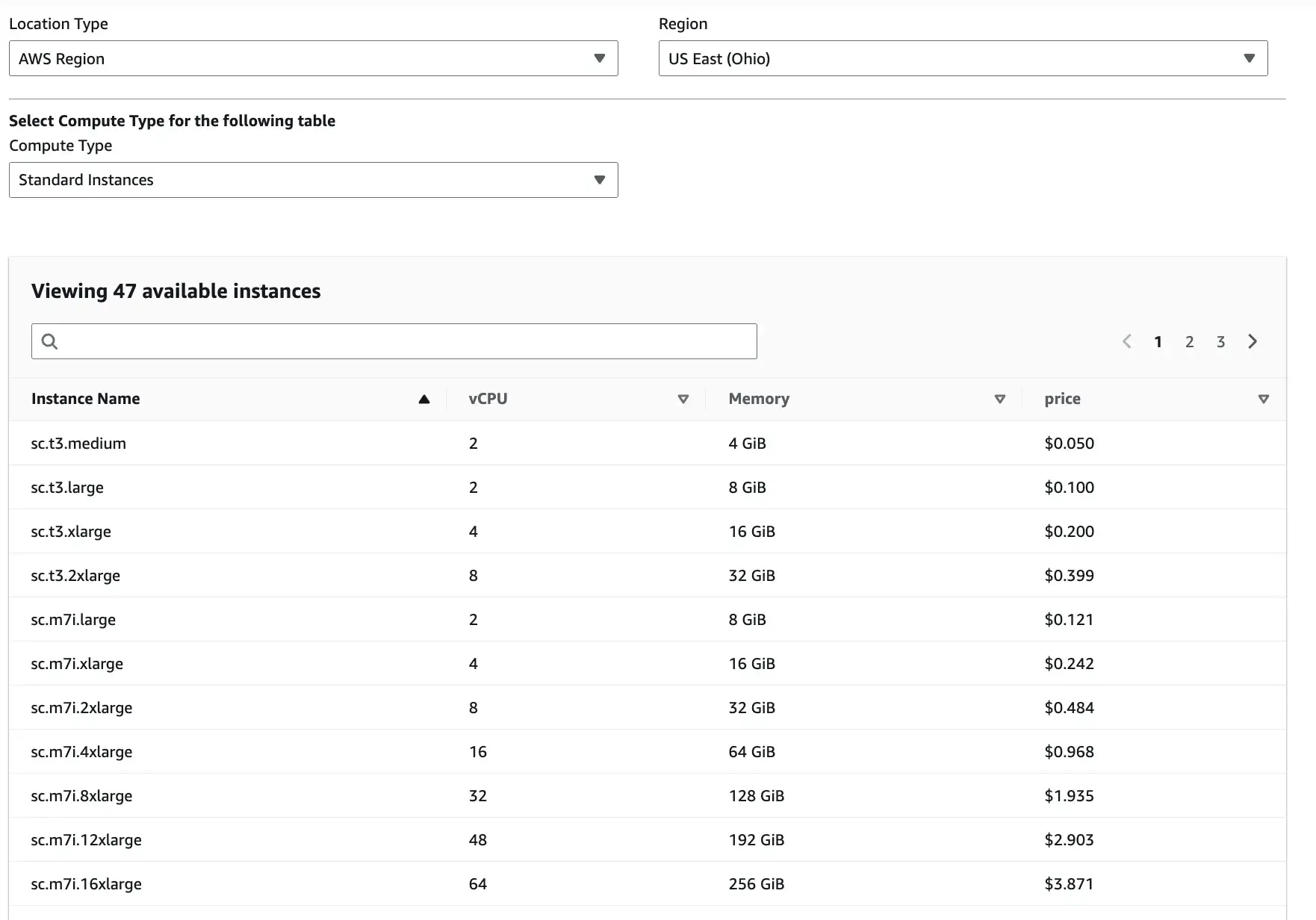
SageMaker uses pay-as-you-go pricing. You pay depending on the Location type, Region, and compute type you select.
Apart from these three inputs, there are slight overhead costs as well. For instance, Studio itself has no extra UI fee, but you pay for storage and any apps/jobs/instances you run from Studio.
ZenML
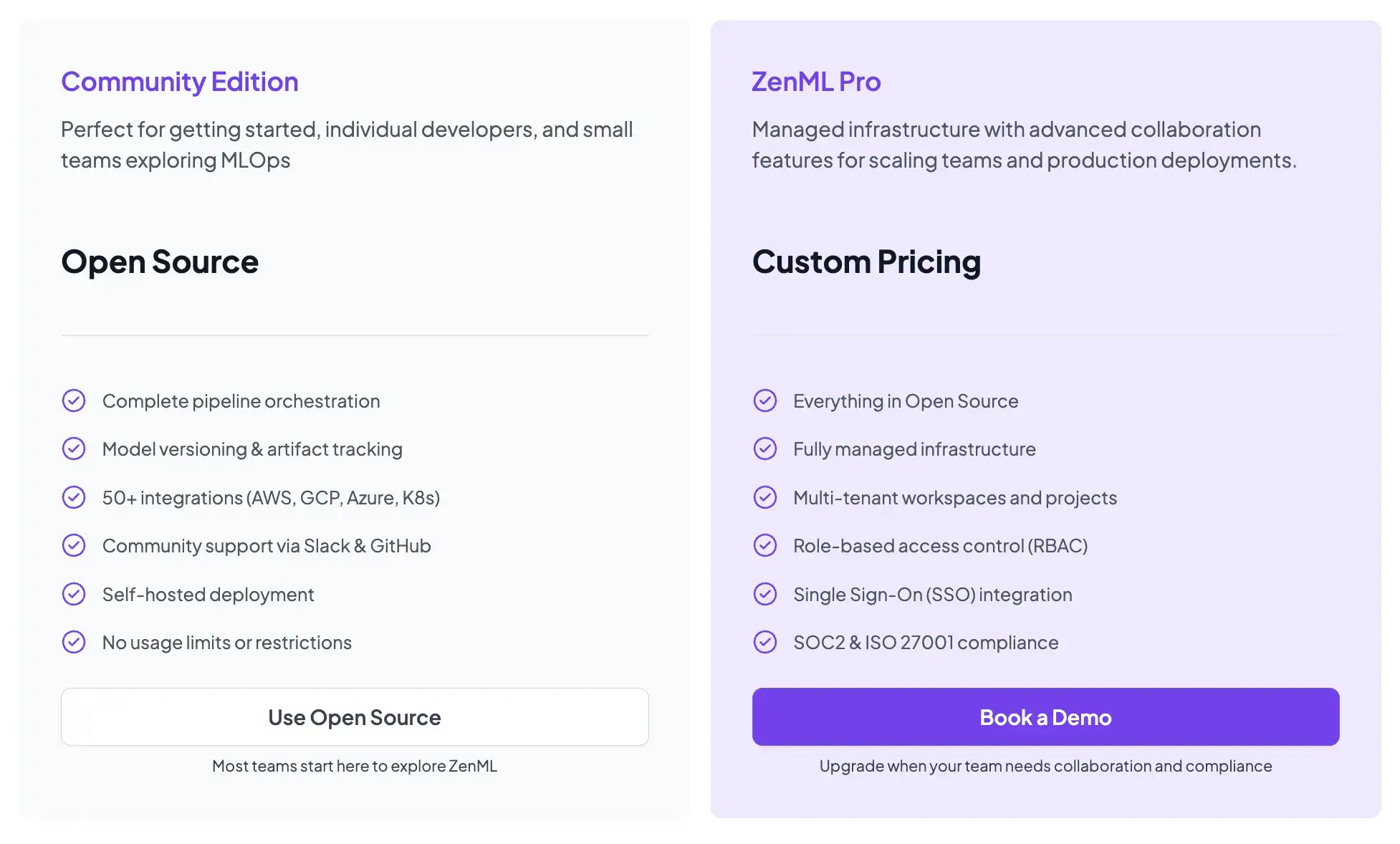
ZenML is also open-source and free to start.
- Community (Free): Full open-source framework. You can run it on your own infrastructure for free.
- ZenML Pro (Custom pricing): A managed control plane that handles the dashboard, user management, and stack configurations. This removes the burden of hosting the ZenML server yourself.
Wrapping Up
The choice between Kubeflow, SageMaker, and ZenML is not necessarily an ‘either/or’ decision. It is about choosing the right layer of abstraction for your team.
- Choose Kubeflow if: You are a platform engineering team deep into Kubernetes, needing absolute control over infrastructure and high-scale parallel execution.
- Choose SageMaker if: You are an AWS-centric shop that wants to minimize infrastructure management and is willing to pay a premium for a fully managed service.
- Choose ZenML if: You want the flexibility to use both. ZenML allows you to design ML-native pipelines in Python and deploy them to Kubeflow for scale or SageMaker for specialized compute, without locking your code into a specific vendor.