
On this page
The MLOps landscape is crowded. From open-source experiment trackers to fully managed cloud platforms to pipeline-first frameworks, ML teams today face no shortage of options when building their production ML infrastructure.
The challenge isn’t finding a tool; it’s finding the right one. Each MLOps solution brings a fundamentally different philosophy to the table. Some prioritize lightweight experiment tracking, others offer end-to-end managed services, and still others focus on orchestrating reproducible workflows across your existing stack.
This guide provides a detailed comparison of MLflow vs SageMaker vs ZenML; three tools that represent these different philosophies, across the capabilities that matter most: experiment tracking, model management, evaluation workflows, integrations, and pricing.
If you’re an ML engineering team evaluating your MLOps stack, this article will help you cut through the noise. You will understand not just what each tool does, but how it approaches the problem, so you can make an informed decision based on your team’s workflow, infrastructure, and goals.
MLflow vs Sagemaker vs ZenML: Key Takeaways
🧑💻 MLflow: For teams that want experiment tracking and a model registry without adopting an end-to-end MLOps platform. MLflow has simple logging, works with most ML libraries, and supports local runs or a shared tracking server.
🧑💻 AWS SageMaker: For AWS-first teams that want a managed ML suite for training, tracking, and hosting. SageMaker integrates tightly with AWS and supports end-to-end workflows within a single environment. But beware, costs can grow fast, and switching from AWS to another framework can be a pain.
🧑💻 ZenML: For teams that want repeatable ML pipelines that can run across different tools and infrastructure. ZenML standardizes reproducibility, lineage, and collaboration while integrating with orchestrators, trackers, and deployers. You still choose and run the underlying components.
MLflow vs Sagemaker vs ZenML: Features Comparison
To understand how MLflow, SageMaker, and ZenML stack up, let’s first compare their core functionalities in a table:
| Parameter | MLflow | AWS SageMaker | ZenML |
|---|---|---|---|
| Experiment tracking + run metadata | - Comes with a strong tracking layer. - Logs params, metrics, and artifacts via the Tracking server and UI. | Tracking depends on the Studio experience: SageMaker Experiments (Experiments → Trials → Trial Components) is available in Studio Classic. Experiments in Studio. | - Treats each pipeline run as an experiment. - Tracks step inputs/outputs by default. |
| Model registry + governance | - Model Registry supports versions, tags, and model version aliases. - Governance depends on hosting (OSS vs managed). | Model Registry uses Model Package Groups (to group versions) and Model Packages (individual versions), with an approval status and IAM-based access controls. | - Model Control Plane manages models, versions, and stages tied to pipeline runs. - Governance depends on deployment. |
| Evaluation workflow | Logs evaluation results, but does not have native workflow automation. | Evaluation usually runs as a pipeline or job step, with metric outputs used for gates. | Evaluation is a pipeline step by design. Stores outputs as artifacts, making eval repeatable and comparable across runs. |
| Integrations | Tool-agnostic and easy to embed across stacks | Deep AWS integration; external integrations are possible but secondary. | Stack-based integrations across tools without rewriting pipelines. |
Feature 1. Experiment Tracking and Run Metadata
Experiment tracking captures each run so you can reproduce results later. It includes a metadata store for parameters and metrics, an artifact store for outputs, and a UI for searching and comparing runs.
MLflow
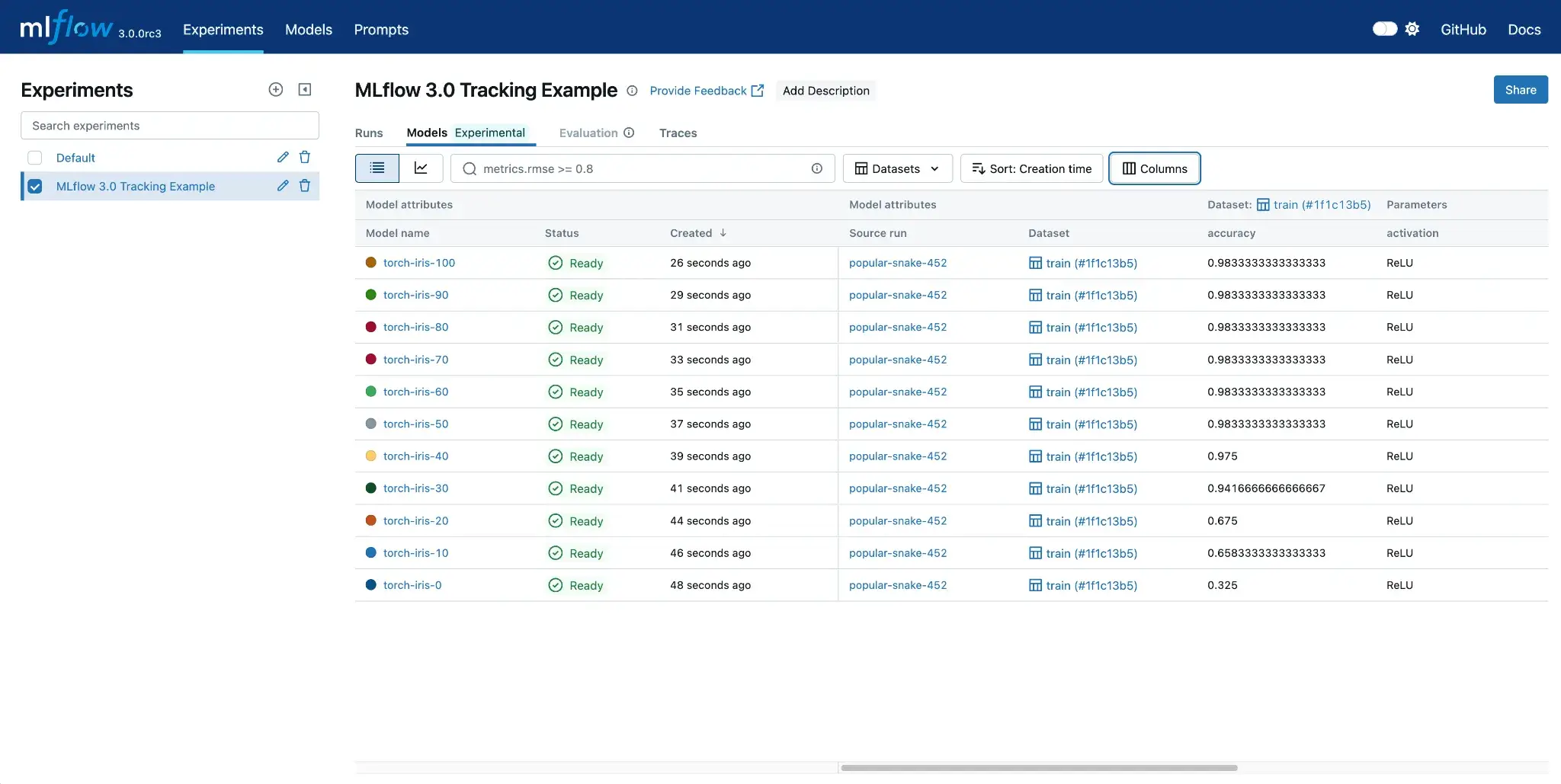
Experiment tracking is the core MLflow use case. By default, MLflow logs to a local mlruns directory, but it can be configured to use a centralized tracking server for team use.
MLflow provides a simple API to log runs, parameters, metrics, and artifacts.
For example, you can do so by using the Python API:“
import mlflow

mlflow.set_experiment("MyExperiment")  # create or set current experiment
with mlflow.start_run():
    mlflow.log_param("alpha", 0.5)
    # ... train model ...
    mlflow.log_metric("rmse", 0.76)
    mlflow.log_artifact("model.pkl")
This creates a run under MyExperiment and stores both metrics and artifacts. The MLflow UI makes it easy to compare runs and filter by metric values, with features like searching for runs by metric, visualizing metrics over time, and downloading artifacts.
MLflow also supports autologging. One call to mlflow.autolog() can automatically capture common metrics and parameters from libraries like scikit-learn, TensorFlow, and PyTorch, reducing boilerplate.
📚 **Read how **MLflow compares to ZenML and Kubeflow
Sagemaker
SageMaker offers multiple experiment tracking paths depending on the Studio experience you use. SageMaker Experiments (with the Experiments → Trials → Trial Components hierarchy) is available via SageMaker Studio Classic.
In the updated Studio experience, AWS recommends using SageMaker’s MLflow integrations (including managed MLflow) for experiment tracking and the MLflow UI. It organizes metadata in a hierarchy: Experiments → Trials → Trial Components.
When you run jobs via the SageMaker SDK, you can associate them with an Experiment and Trial.
Here’s an example:
from sagemaker.experiments import Experiment, Tracker

# Create an experiment
experiment = Experiment.create(experiment_name="mnist-classification")

# Launch a training job (estimator) with experiment tracking
estimator.fit(inputs, experiment_config={
    'ExperimentName': experiment.experiment_name,
    'TrialName': "trial-1",
    'TrialComponentDisplayName': "Training"
})
SageMaker then tracks parameters, metrics, artifacts, and job context. It can also capture lineage between steps, which improves traceability across training and downstream steps. All the logged data is indexed and searchable.
SageMaker Studio provides the UI for comparing experiments side by side and visualizing all your runs.
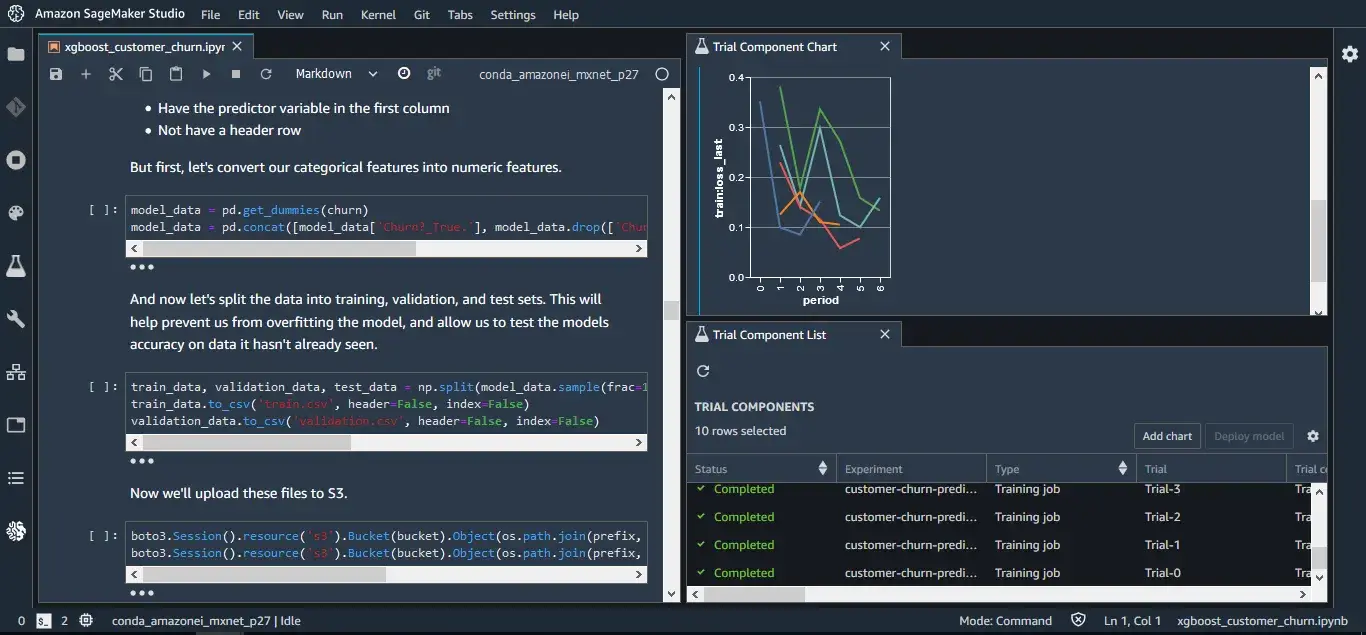
If you’re already using AWS, there’s no extra server needed to maintain SageMaker. However, it’s tightly coupled with running your workloads on SageMaker. If your training runs outside AWS, or you want a UI outside Studio, MLflow and other trackers on the market are more flexible.
ZenML
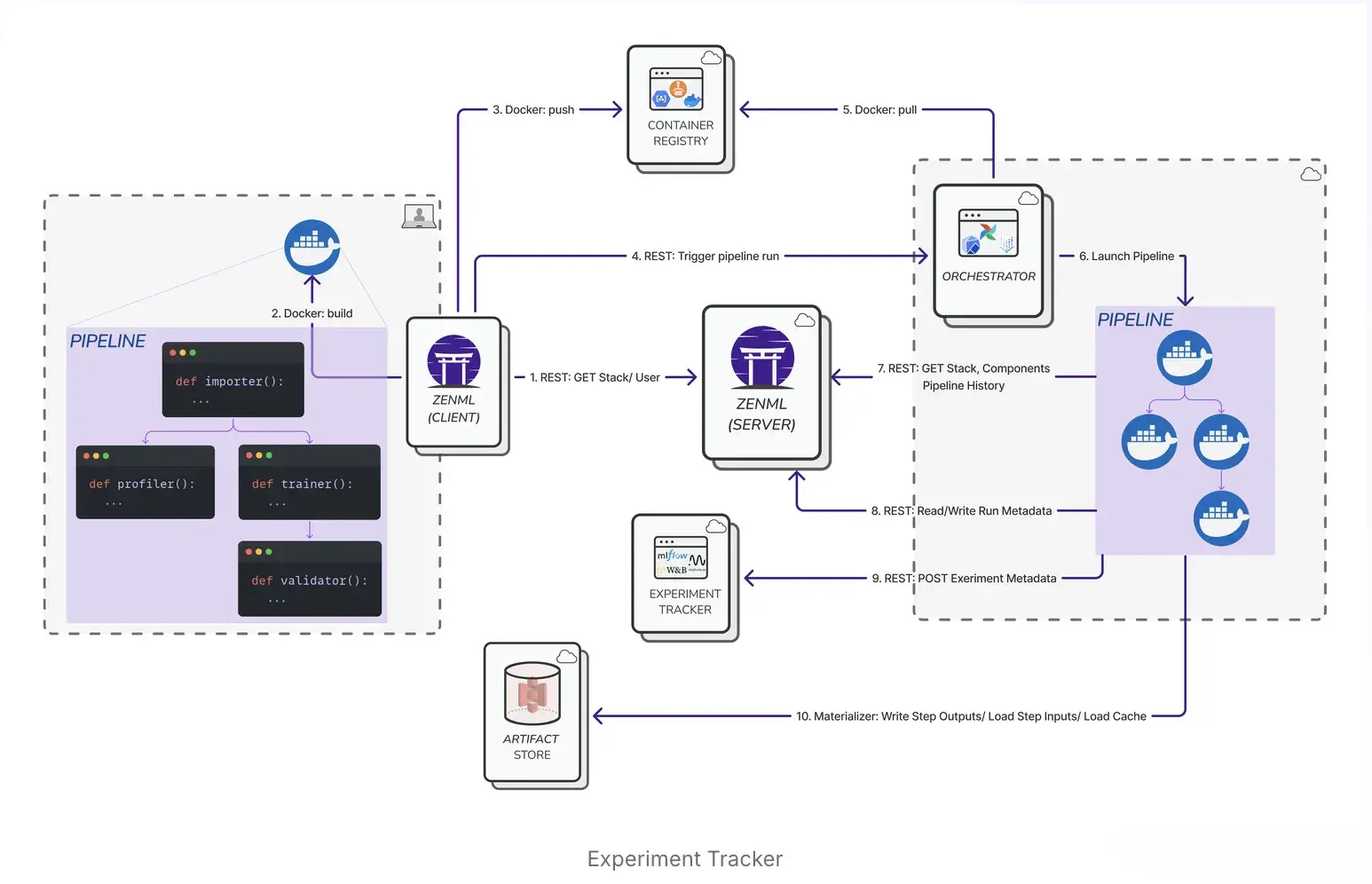
ZenML auto-tracks everything in your ML workflow. Basically, it considers each pipeline run as an experiment and automatically records what happened at each step.
For example, if your pipeline has a data prep step and a training step, ZenML will version the data artifact output from prep, the model artifact from training, and tie them to that pipeline run. If you connect a code repository integration, ZenML can automatically capture the commit hash (and other git context) associated with a pipeline run, alongside execution metadata in the metadata store and artifacts in the artifact store.
You can inspect runs in the ZenML Dashboard and compare executions across parameters and outputs.
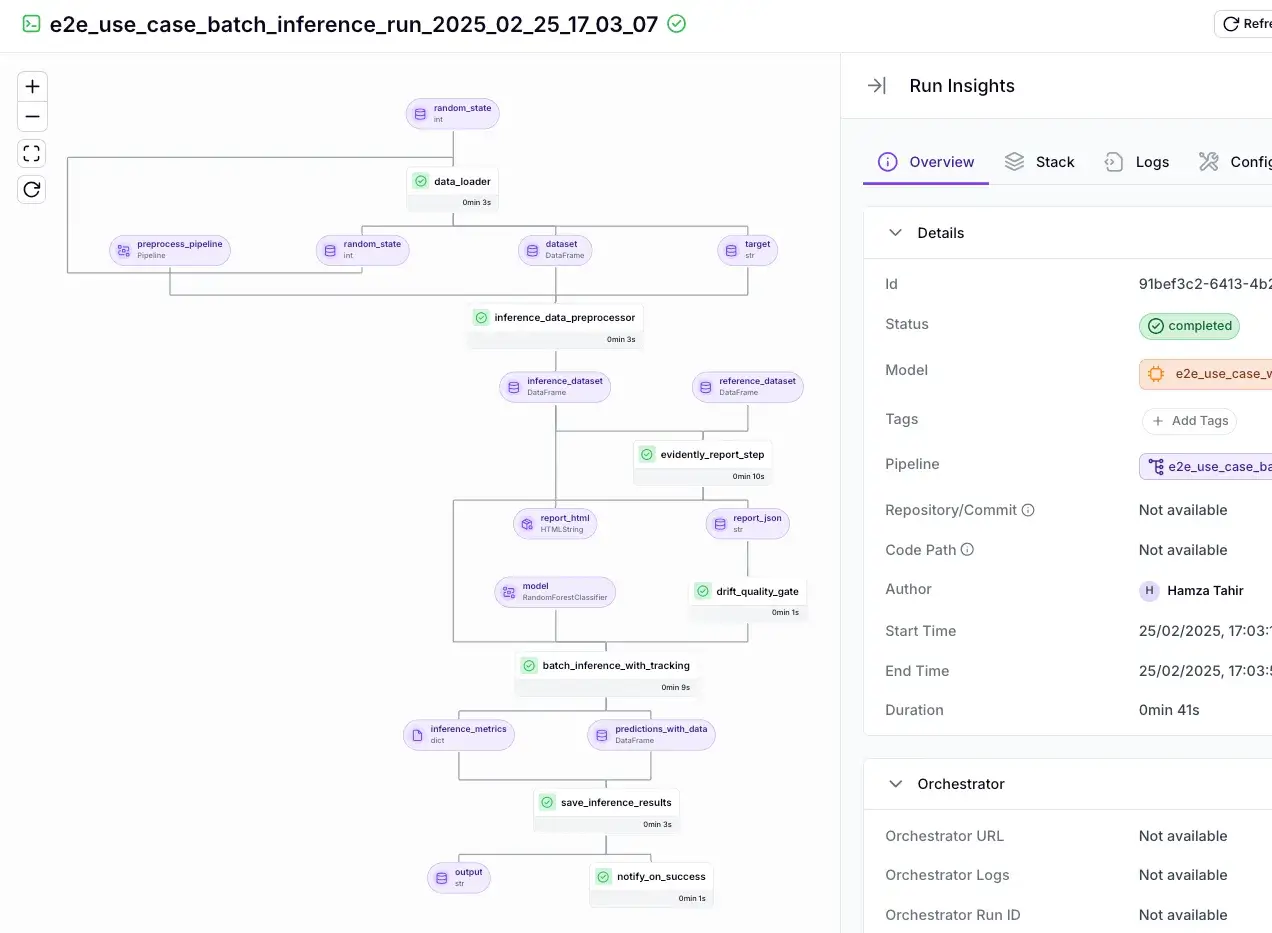
ZenML can also plug into external experiment trackers like MLflow, Weights & Biases, and Comet. When configured, ZenML logs to the external tracker while still storing pipeline lineage.
For instance, you can add an MLflow trace to your ZenML pipeline:“
from zenml import pipeline, step

@step(experiment_tracker="mlflow_tracker")
def train_model(X_train, y_train, X_test, y_test):
    import mlflow
    mlflow.autolog()            # MLflow auto-logging for model training
    model = ...  # train model on X_train, y_train
    # Log a custom metric
    mlflow.log_metric("test_accuracy", model.score(X_test, y_test))
    return model

@pipeline
def training_pipeline():
    train_model()
Bottom line: ZenML provides strong experiment tracking through pipeline-level lineage and artifact tracking. It tracks every pipeline run end-to-end, including step inputs/outputs, artifacts, and lineage. MLflow is strong for run logging, but it depends on your workflow design for context. SageMaker tracks well inside AWS jobs but stays tied to SageMaker execution.
Feature 2. Model Registry and Governance
A good model registry organizes trained models, versions them, and controls promotion toward deployment. In enterprise settings, governance features like access control, approval workflows, and lineage are critical for compliance.
Let’s see how all three tools approach this:
MLflow
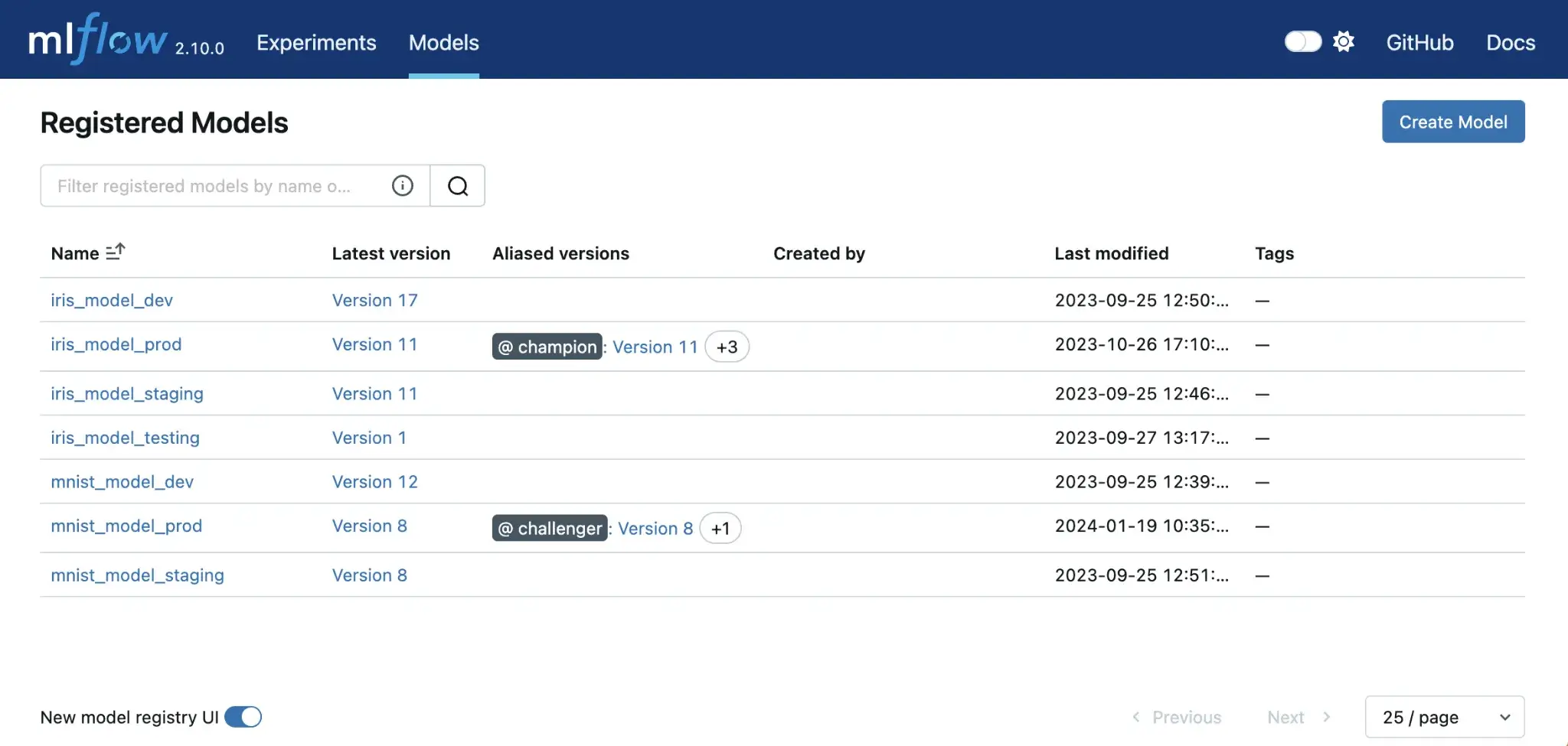
MLflow offers a Model Registry that supports model versioning and promotion. You can register a model from a run under a name, and MLflow creates versioned entries automatically, like v1, v2, v3, and so on.
Each version can store metadata like descriptions and tags, and you can assign labels to specific versions. MLflow also links each model version to the originating run, which helps with debugging and audit trails.
Governance depends on how you host MLflow. The open-source registry provides the mechanics, but approvals and access control usually come from your hosting setup or a managed MLflow service. MLflow does not automatically deploy a model when you promote it in the registry (for example, by assigning a production alias). Deployment typically requires separate CI/CD or orchestration around your registry events.
SageMaker
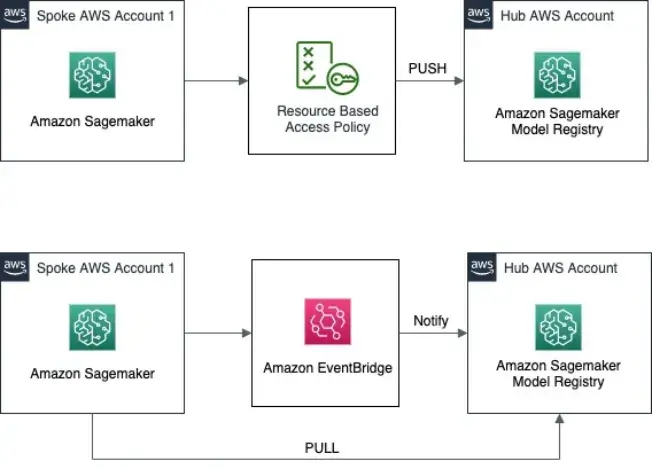
SageMaker Model Registry is designed for governance. It supports an approval status on model packages that teams commonly use as a deployment gate, and IAM policies can be used to control who is allowed to register models, update approval status, or deploy.
SageMaker also supports a built-in promotion workflow. Each model version can have an approval status of pending, approved, or rejected. This approval workflow is commonly used as a gate before deployment.
Key registry capabilities include:
- Versioning and metadata: Track versions with training metrics, environment details, and optional documentation, including Model Cards.
- Governed promotion: Use approval status to control which models can ship.
- Deployment hooks: Deploy directly from the registry to SageMaker endpoints, or trigger CI/CD flows when a model gets approved.
- Access control: Use AWS IAM policies to control who can register models, change approval status, or deploy.
The trade-off is tight coupling to AWS. Artifacts usually live in S3, and inference runs in SageMaker-compatible containers. But if you’re already training on SageMaker, the registry-to-deployment path is clean and well-managed.
ZenML
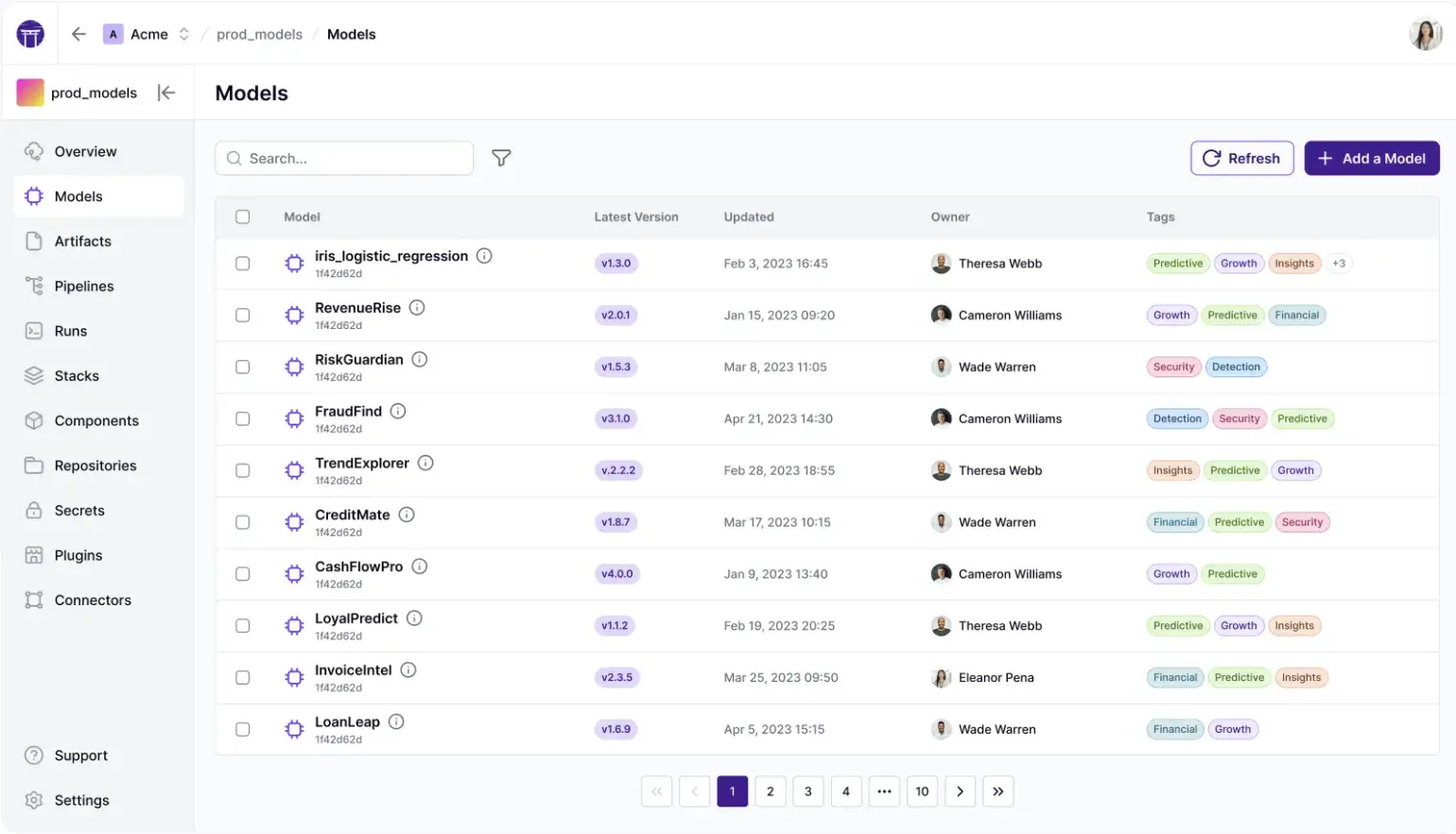
In ZenML, there are two related concepts. The technical model is the trained model artifact (the weights / model files) stored in your artifact store. Separately, ZenML also has a Model entity that groups pipelines, runs, artifacts, and metadata into one business-level unit. This broader Model is what you manage in the Model Control Plane (dashboard in ZenML Pro).
Within that Model entity, you track model versions, where each version can be connected to the pipeline run that produced it and the artifacts it depends on. This gives you end-to-end lineage from a production model version back to the run context and upstream artifacts (datasets, parameters, and other outputs captured as artifacts).
ZenML also supports lifecycle stages such as staging, production, and archived, plus a latest alias. A key advantage is cross-pipeline reuse. One pipeline can register a model, while another pipeline can fetch the latest production model directly from the control plane. That means your inference or batch-scoring workflows can reference models by name and stage, rather than by file path.
The core registry features work in open source via CLI/SDK, while ZenML Pro adds a richer UI to browse models, versions, metrics, and related runs in one place.
Bottom line: SageMaker leads on approvals and IAM-based controls. MLflow offers a clean registry and run-level lineage, but governance depends on hosting. ZenML connects models directly to the pipeline lineage and supports stage-based promotion (staging, production, archived), but enterprise-grade controls like RBAC and SSO are available only with ZenML Pro, not the open-source version.
Feature 3. Evaluation Workflow (Native Eval vs Pipeline-Based Eval)
Evaluation is not a one-off metric calculation. In production workflows, evaluation typically involves a repeatable process of evaluating on fixed datasets, comparing results against baselines, generating reports, and gating promotion based on thresholds.
MLflow
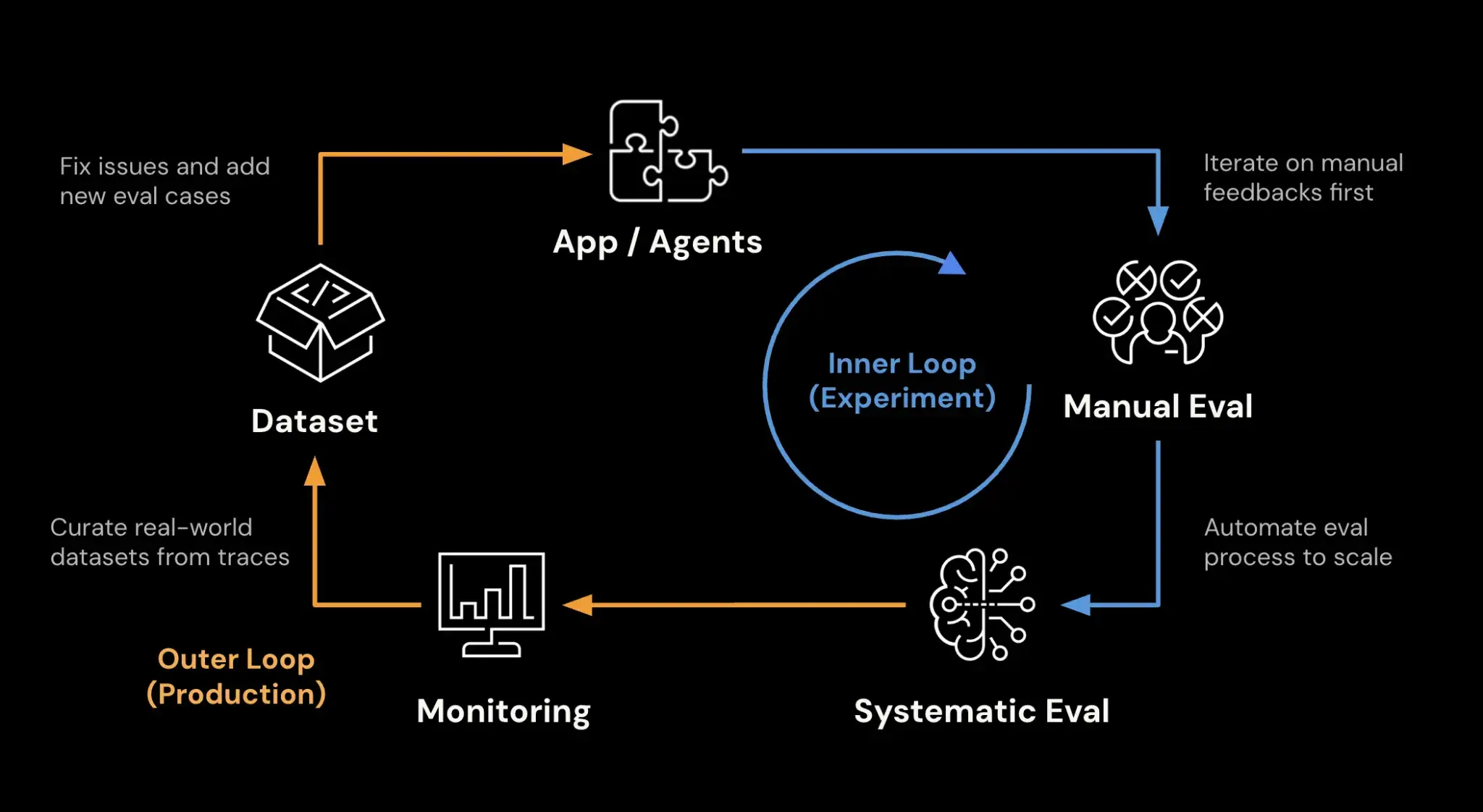
MLflow primarily logs evaluation results rather than orchestrating evaluation workflows. You run your evaluation code, calculate the metrics, and send them to MLflow to visualize.
MLflow provides evaluation tooling via mlflow.models.evaluate() and mlflow.genai.evaluate() for LLM/agent eval, which evaluates an MLflow-formatted model on a dataset and logs standard outputs automatically. It works best when your evaluation needs fit the built-in evaluators; custom logic is required.
Workflow-wise, MLflow does not enforce how evaluation should run. Some teams evaluate inside the training script; others run evaluation as a separate job or notebook that loads the model, for example via mlflow.pyfunc.load_model, and logs results back to the tracking server.
Because MLflow does not orchestrate multi-step workflows, teams often pair it with Airflow, Prefect, or CI/CD pipelines to automate evaluation and gate promotions.
Sagemaker
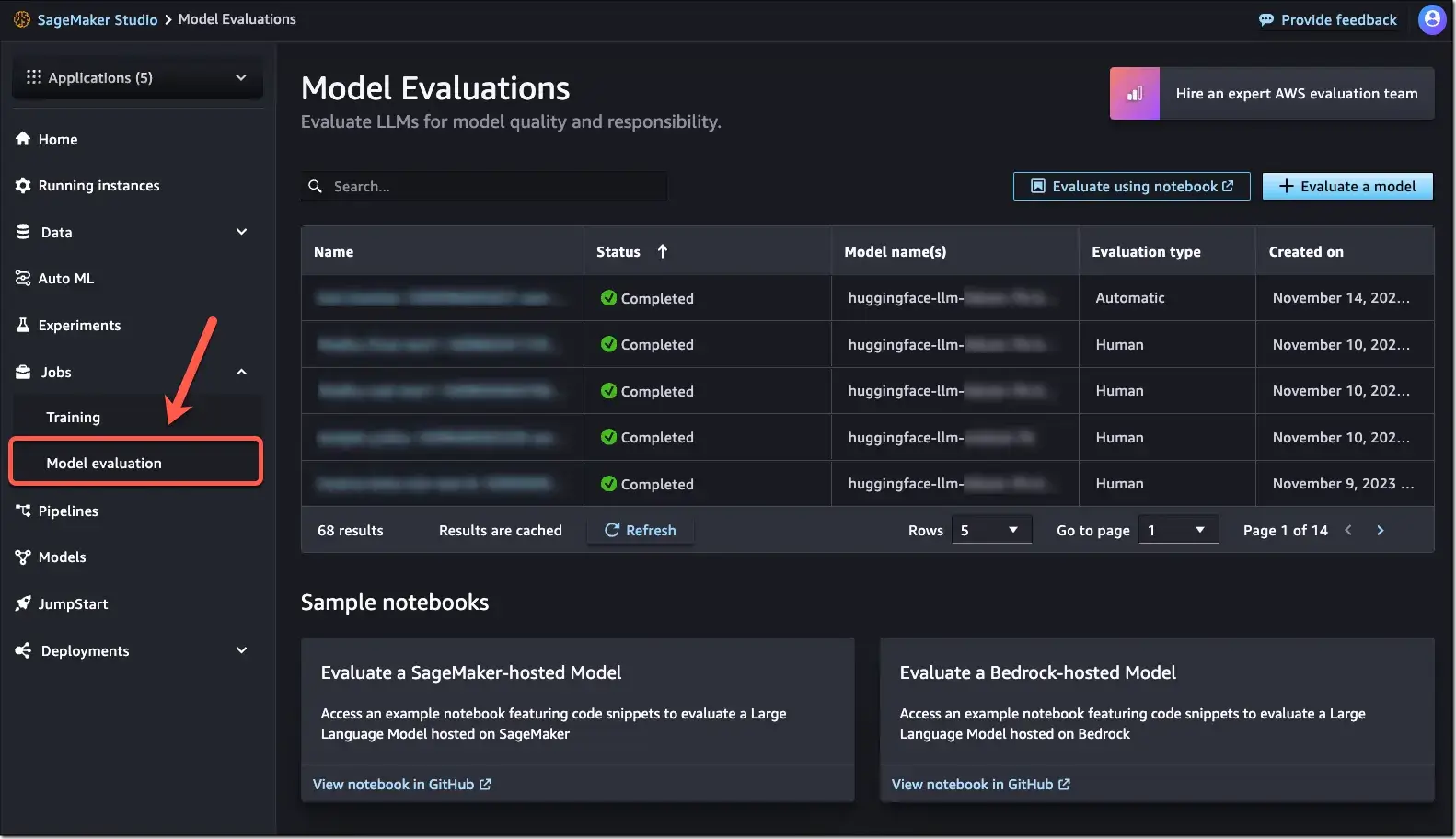
SageMaker evaluation usually happens through training scripts or pipelines. You incorporate evaluation into your workflow:
- During training, scripts can evaluate on validation data and emit metrics. SageMaker logs these to CloudWatch and can surface them in SageMaker Experiments.
- In SageMaker Pipelines, evaluation is commonly a dedicated Processing Step after training. The evaluation step writes metrics to S3 (often as JSON), and pipelines use those metrics for gating steps like model registration or deployment.
- For manual evaluation, you can run notebooks, batch transform jobs, or temporary endpoints to test inference and performance. SageMaker provides the infrastructure, but you still write the evaluation logic.
SageMaker also includes purpose-built evaluation tooling, like Clarify for bias/explainability and Model Monitor for drift and production checks. However, the workflow is often configuration-heavy and tied to AWS infrastructure.
ZenML
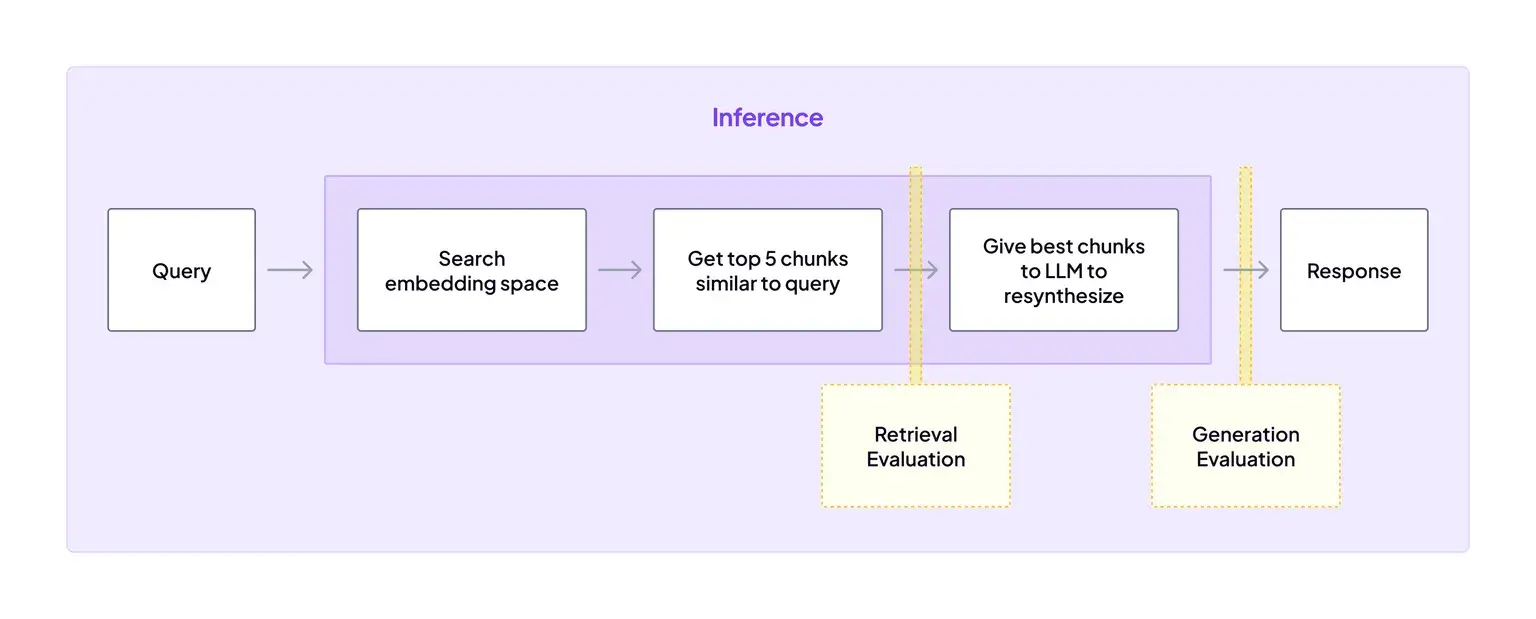
ZenML auto-tracks pipeline runs, artifacts, and lineage. Metrics and reports are tracked when you log your steps, log/return them, and you can also forward them to MLflow/W&B via stack components.
Because ZenML tracks artifacts, the outputs of this eval step are automatically versioned and stored in the artifact store, just like any other step output.
This ensures that evaluation is part of the same reproducible process as training. If the evaluation step fails, the pipeline can stop automatically, preventing a bad model from reaching the registry.
Bottom line: ZenML wins for repeatable evaluation because every evaluation is a pipeline step, so metrics and reports become tracked artifacts you can compare across runs. SageMaker supports evaluation well through pipeline/job steps, but you still manage the evaluation logic and outputs. MLflow mainly logs evaluation results, but automation requires external orchestration.
MLflow vs Sagemaker vs ZenML: Integration Capabilities
No MLOps tool lives in isolation. How well these solutions integrate with the rest of your stack and third-party tools is a key consideration.
MLflow
MLflow fits well in mixed stacks because it stays lightweight and tool-agnostic. You can drop it into notebooks, scripts, CI/CD, or orchestrated pipelines to track runs and manage models without changing how you train.
Key MLflow integrations
- ML frameworks: scikit-learn, PyTorch, TensorFlow, XGBoost (via autologging)
- APIs: REST API for custom workflows and internal tooling
- Orchestrators/CI: Airflow, Jenkins, GitHub Actions (log runs from jobs)
- Serving/deployment: local REST server, Docker container deployment
- Cloud platforms: Databricks (managed MLflow), Azure ML integration
- AWS: Deploy models to SageMaker via
mlflow.sagemaker(legacy, limited flexibility compared to native SageMaker Pipelines).
SageMaker
SageMaker integrates best when your stack already runs on AWS. It connects directly to AWS data, security, and monitoring services. External integrations exist, but AWS is the native center of gravity.
Key SageMaker integrations:
- Storage + data: S3, Redshift, DynamoDB
- Security + networking: IAM, VPC, Secrets Manager
- Monitoring + logs: CloudWatch
- Workflow + automation: SageMaker Pipelines, AWS Lambda (pipeline steps)
- Model quality: SageMaker Clarify (bias/explainability), Model Monitor (drift)
- External hooks (optional): trigger jobs via Airflow operators, log runs to MLflow/W&B inside training jobs
ZenML
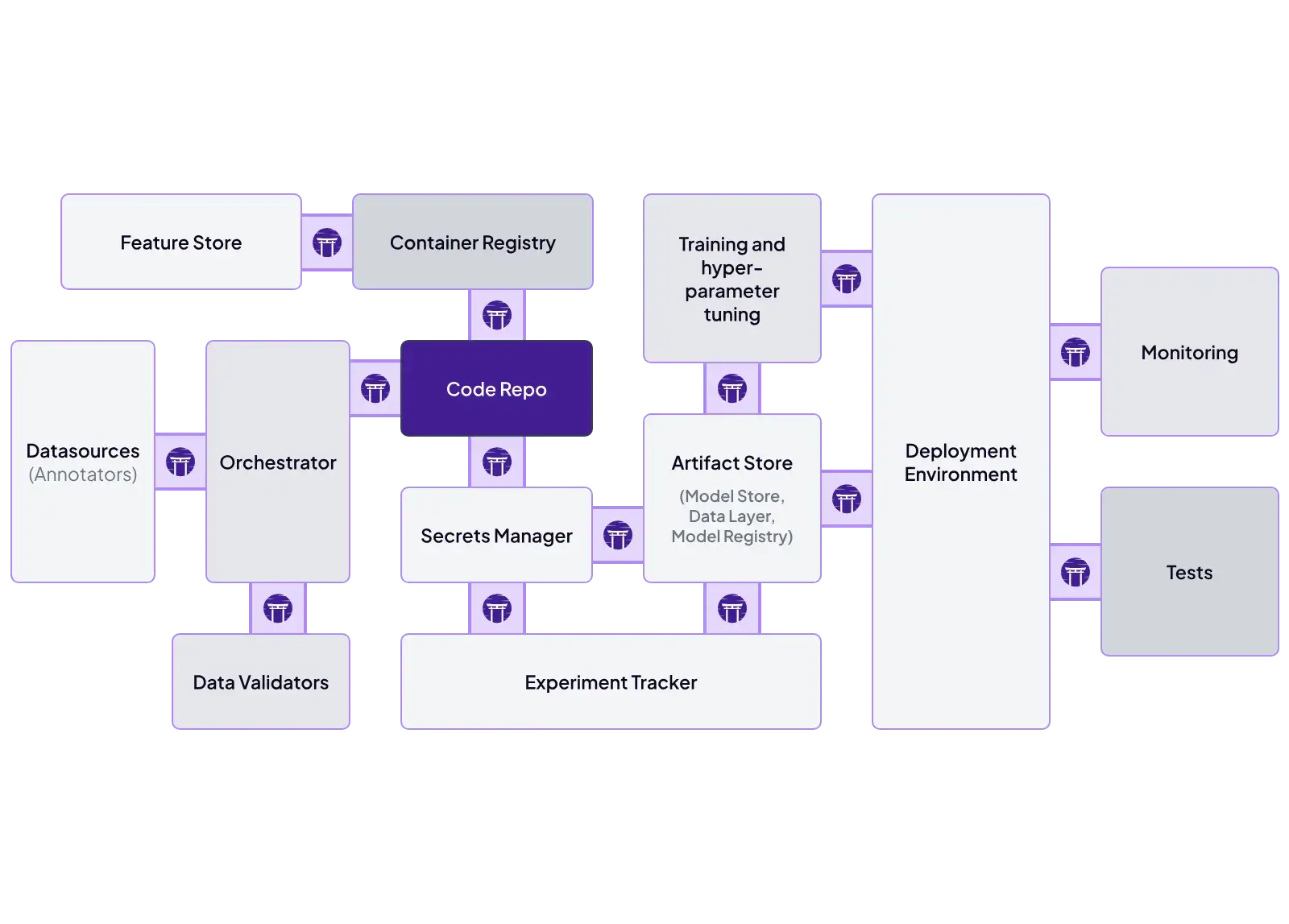
ZenML is built as an integration layer. You define pipelines once and swap tooling through stack components.
Key ZenML integrations:
- Orchestrators: Airflow, Kubeflow, Argo Workflows, AWS Step Functions
- Experiment tracking: MLflow, Weights & Biases, Comet
- Deployers: Docker, Kubernetes, GCP Cloud Run
- Cloud training/compute: SageMaker step operator, Vertex AI step operator, Azure ML support
- Validation + quality: Great Expectations (data checks)
- Automation/ops: alerts and pipeline hooks (for example, Slack notifications)
MLflow vs SageMaker vs ZenML: Pricing
MLflow
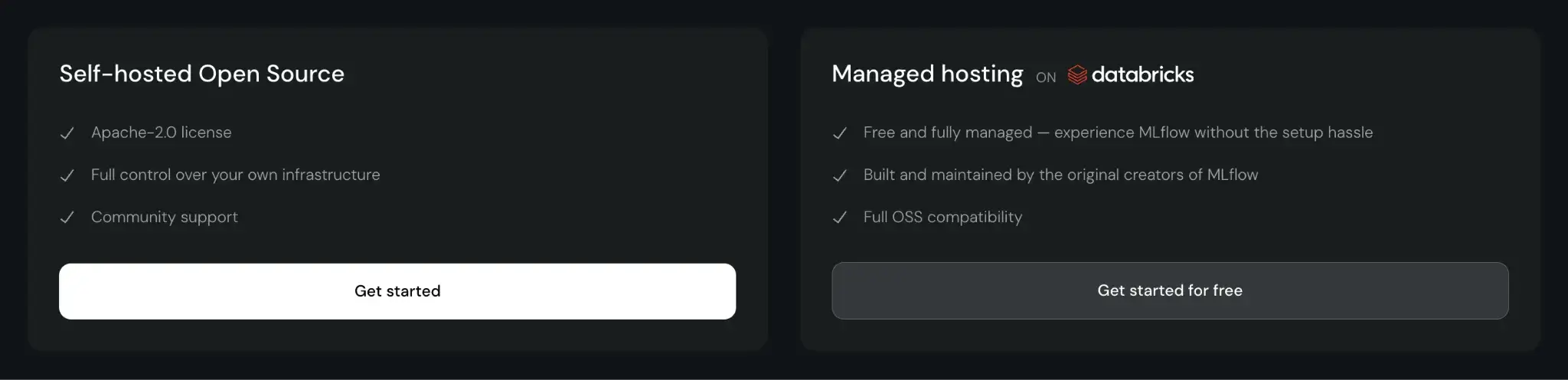
MLflow is open-source and free to use. You can self-host it, which incurs infrastructure and maintenance costs. Managed MLflow services, like those on Databricks or AWS, charge based on the compute and storage resources you consume.
SageMaker
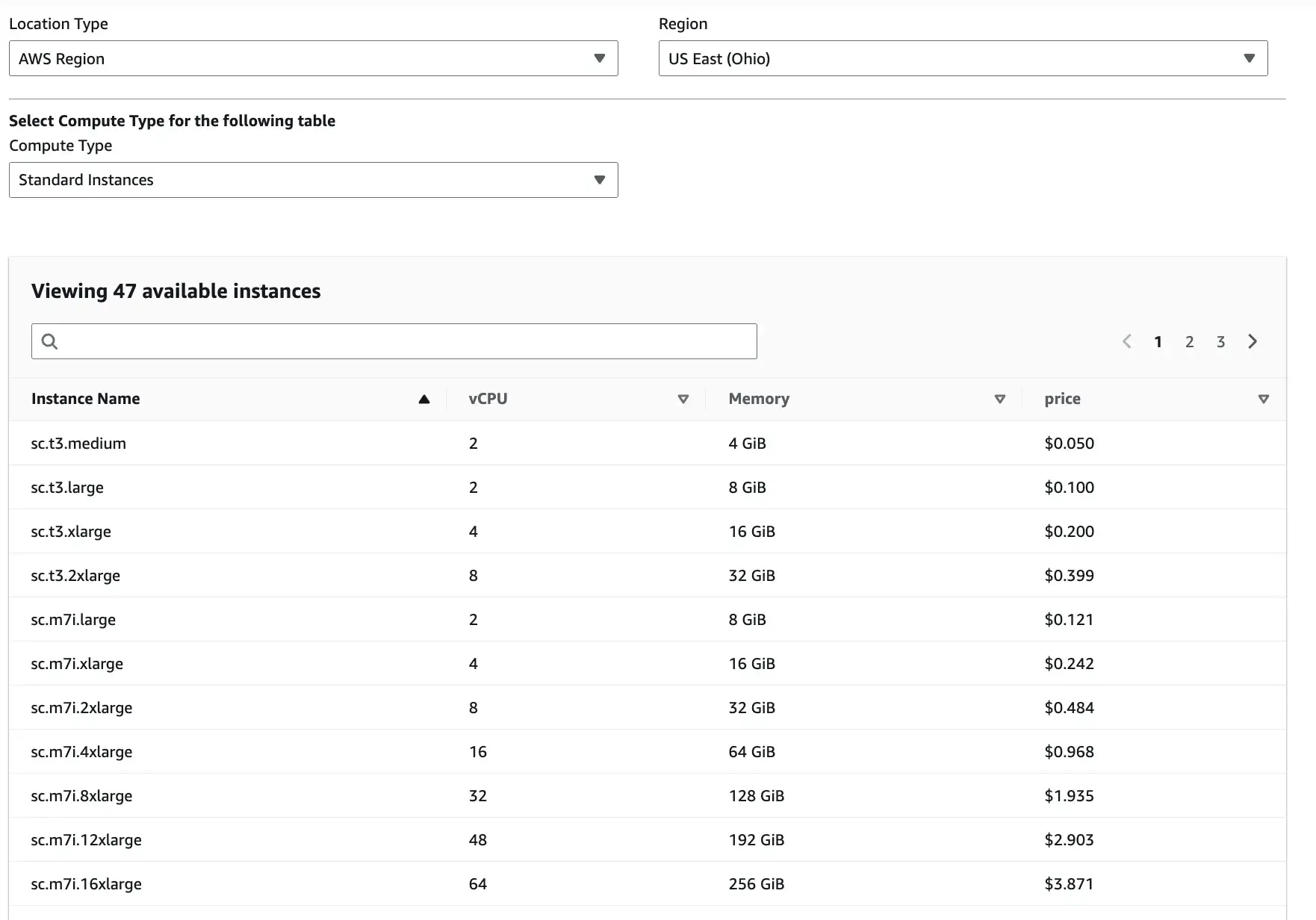
SageMaker uses pay-as-you-go pricing. You pay depending on the Location type, Region, and Compute type you select.
Apart from these three inputs, there are slight overhead costs as well. For instance, Studio itself has no extra UI fee, but you pay for storage and any apps/jobs/instances you run from Studio.
ZenML
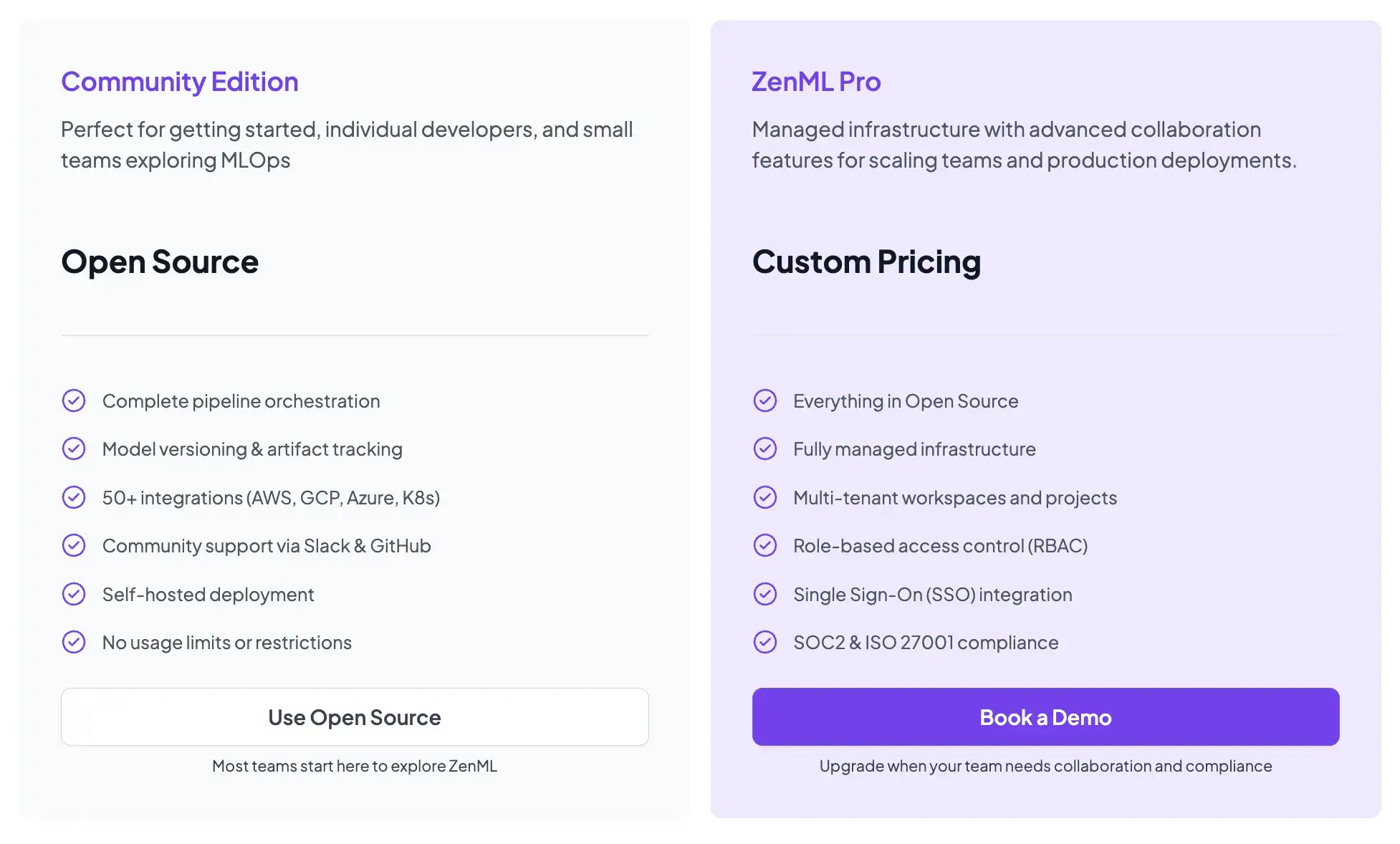
ZenML is also open-source and free to start.
- Community (Free): Full open-source framework. You can run it on your own infrastructure for free.
- ZenML Pro (Custom pricing): A managed control plane that handles the dashboard, user management, and stack configurations. This removes the burden of hosting the ZenML server yourself.
How ZenML Takes Care of the MLOps Outer Loop
ZenML solves a different problem than MLflow and SageMaker. MLflow tracks experiments and manages model versions. SageMaker gives you managed training and deployment inside AWS. ZenML focuses on the MLOps outer loop: turning ML code into repeatable, production workflows.
Instead of introducing another orchestrator, ZenML sits on top of existing backends. You write pipelines once in Python, then run them on Airflow, Kubeflow, Argo, or cloud services by switching the stack. Your pipeline code stays stable.
Here’s what ZenML takes care of in the outer loop:
- Decouple code from infrastructure: Swap execution backends without rewriting pipeline logic.
- Track artifacts and lineage: Store step inputs/outputs automatically and trace models back to data and code.
- Standardize workflows: Enforce consistent training, evaluation, and promotion steps across the team.
- Support hybrid execution: Run different steps on different systems, be it local, Kubernetes, SageMaker, and others.
- Enable repeatable evaluation: Treat evaluation as a pipeline step and track reports as artifacts.
📚 Read relevant ZenML articles:
Which One’s the Best MLOps Framework for Your Business?
Ultimately, choosing between MLflow, SageMaker, and ZenML comes down to your organization’s needs and existing environment:
- Choose MLflow if: You are a small team or a solo practitioner who needs a simple, effective way to track experiments without overhead.
- Choose SageMaker if: You are fully committed to AWS and need a heavy-duty, managed platform that supports compliance and massive scale through AWS-managed infrastructure.
- Choose ZenML if: You want to build portable, reproducible pipelines that can run anywhere. It is a great choice if you want to use the best features of MLflow and SageMaker without being locked into a single way of working.