
On this page
Choosing the right workflow engine between n8n vs Temporal vs ZenML is like choosing between three entirely different philosophies.
Temporal is good for long-running, mission-critical workflows, ZenML dominates purpose-built ML pipelines, and n8n offers the fastest path to automation for teams wanting visual workflows with AI integrations.
With all three platforms adding substantial AI capabilities, the need to differentiate between them hasn’t been greater.
This guide compares n8n, Temporal, and ZenML across architecture, developer experience, and features to help you decide which tool fits your platform needs.
n8n vs Temporal vs ZenML: Key Takeaways
**🧑💻 **n8n: A low-code, node-based workflow automation tool. It’s good at connecting disparate APIs and automating business logic. Best suited for operations teams and simple AI agent orchestrations where speed of implementation matters more than rigorous engineering control.
**🧑💻 **Temporal: A durable execution platform for code. It guarantees workflow completion even in the presence of failures, with automatic state reconstruction from event history. Best suited for backend engineers building production-grade services that require state management, retries, and long-running processes.
**🧑💻 **ZenML: An MLOps framework designed specifically for the machine learning lifecycle. It sits on top of orchestrators to manage artifacts, lineage, and model versioning. Unlike other pipeline frameworks, ZenML does not impose opinions on the orchestration layer. You write pipelines locally and then deploy them on any orchestrator defined in your stack.
n8n vs Temporal vs ZenML: Features Comparison
Before we go knee-deep into comparison, here’s an at-a-glance comparison table:
| Feature | n8n | Temporal | ZenML |
|---|---|---|---|
| Approach | Visual workflows; config-driven | Code-based workflows require Temporal servers | Python pipelines and steps; runs on existing orchestrators |
| State and Persistence | Execution state stored in a database; manual resume | Full event history stored; automatic replay of workflow code | Metadata store + artifact store track all outputs; step caching for reuse |
| Failure Handling | Error workflows and node-level retry on fail options; no global retries | Automatic retries for failed Activities; workflow code must be deterministic for replay | Automatic step-level retries configurable; pipeline execution modes for fail-fast vs continue |
| Kubernetes and Scaling | Queue mode for scaling: separate main and worker pods with Redis + Postgres; multi-main HA in enterprise | Temporal server is a cluster; workers run as scalable microservices | Kubernetes-native: each pipeline step runs in its own pod via ZenML's K8s orchestrator; no need to manage a separate scheduler service |
Feature 1. State, Durability, and ‘Resume After Failure’
In a long-running ML pipeline, you don’t want to lose progress when something fails. The fundamental difference between these tools lies in how they handle state persistence and recovery.
| Platform | How State is Preserved | What Happens After Failure | Practical Limits |
|---|---|---|---|
| Temporal | Event history replay: every action is logged as an event, and the workflow rebuilds its state by replaying this history | Automatic recovery with exact state reconstruction. The workflow resumes precisely where it left off. | 51,200 events per workflow execution. Long-running workflows may need to use continue-as-new to reset the counter. |
| n8n | Database execution records: each node's status and output is stored in the database | Manual retry from the failure point. You select the failed node and re-run from there. | Limited by database storage capacity. No hard event limit per workflow. |
| ZenML | Caching + metadata tracking: step outputs (artifacts) are stored and tracked with full lineage | Automatic cache-based skip and quick resume. On rerun, ZenML can reuse cached outputs for steps whose code and inputs haven't changed, so the rerun typically starts at the first uncached or previously failed step. | Limited by artifact store capacity (S3, GCS, local disk). No hard limit on pipeline length. |
n8n
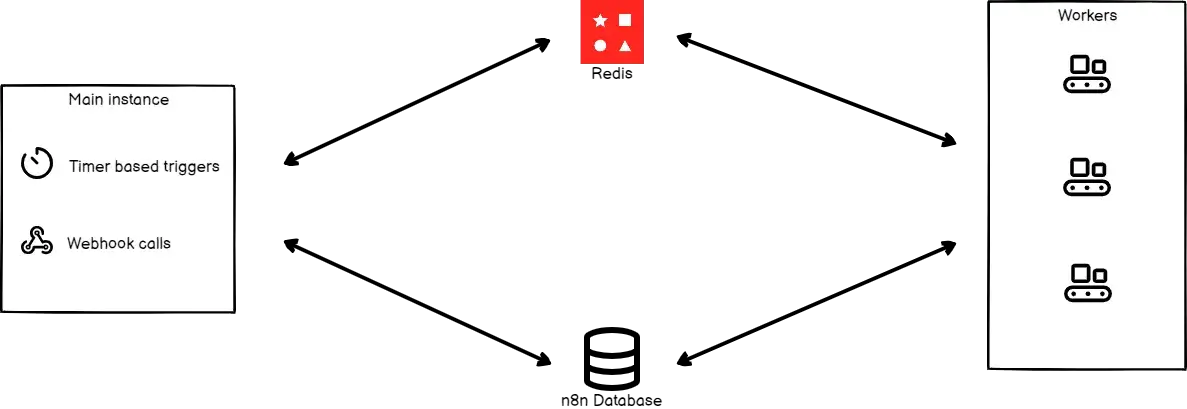
n8n doesn’t maintain a long-lived state inside its execution nodes, but it records workflow runs in a database for post-hoc inspection. Execution records land in PostgreSQL (or SQLite for small deployments) and include the full workflow snapshot, per-node outputs, and timestamps.
Each workflow execution appears in the Executions list with status, node-level details, and error output. If a run fails, you can open that execution to see exactly which node broke and why. However, n8n lacks automatic checkpoint/resume functionality. In most cases, resuming a failed flow requires manual intervention or designing the workflow to handle partial failures from the start (for example, making nodes idempotent or adding explicit retry loops).
For lightweight cross-execution persistence, $getWorkflowStaticData('global') lets you stash small values (counters, cursors, tokens) that survive between runs. You can also attach an Error Trigger node so failures invoke a separate workflow for alerting or cleanup. But these are manual configurations; there’s no built-in recovery or rollback mechanism.
Production deployment typically pairs Postgres with Redis. Postgres persists workflow definitions and execution history, while Redis (in queue mode) buffers tasks and enables multi-worker scaling. This combination provides durability for completed steps and distributes load, but it doesn’t give you Temporal-style automatic replay. If a worker fails mid-execution, the tasks in Redis may be retried, but n8n won’t reconstruct the in-memory state from event history. Incomplete runs will still require manual diagnosis and re-trigger.
Temporal
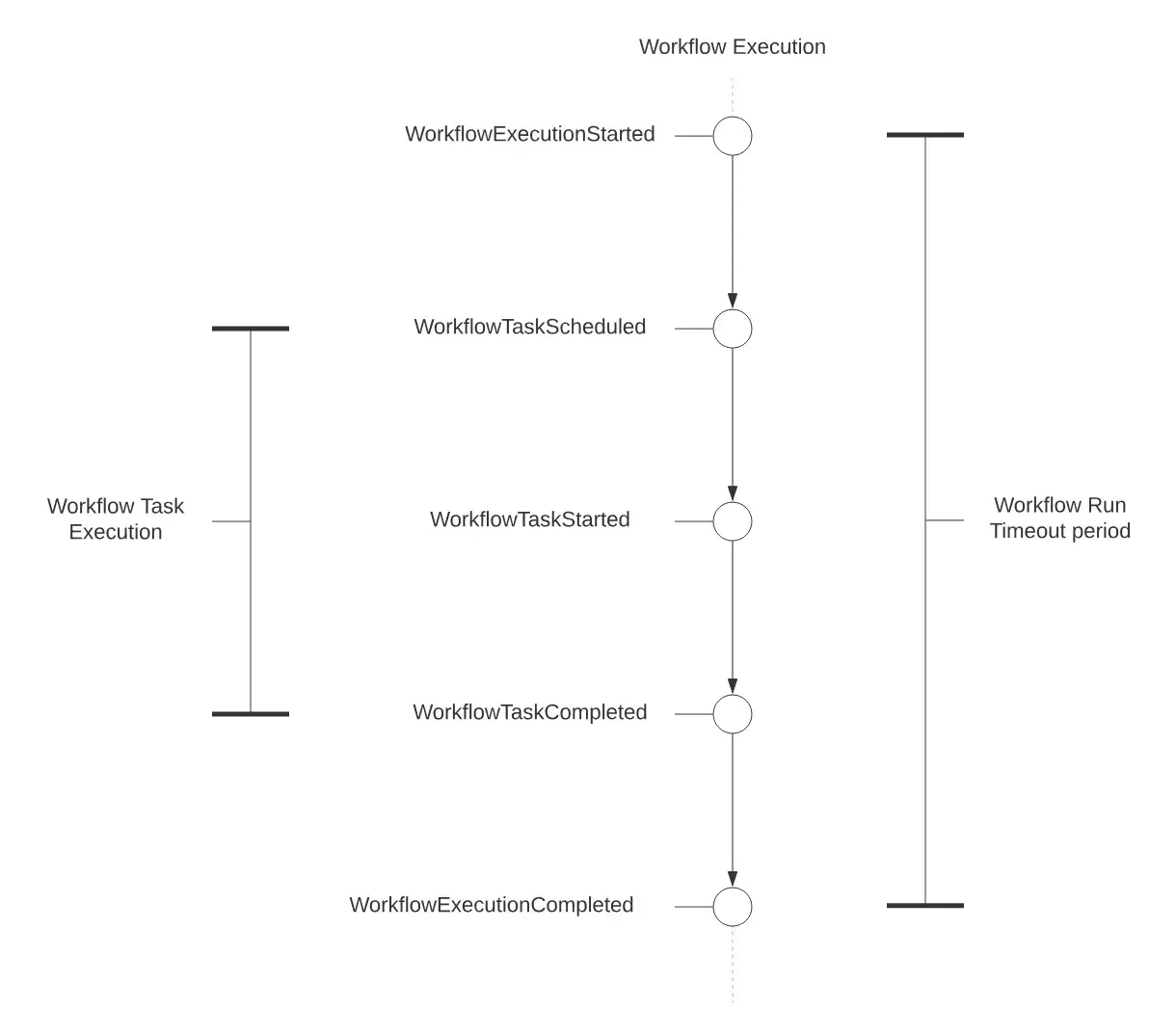
Temporal provides the strongest durability model through its Event History mechanism. Every workflow execution stores a persistent event history in Temporal’s backend database.
When an AI worker crashes, the system replays the Event History deterministically to reconstruct the exact state. When a worker crashes, Temporal replays the workflow’s event history to reconstruct state and reuses previously recorded Activity results, so already completed Activities are not re-executed just because of replay.
However, Activities can still execute more than once due to retries and timeouts, so external side effects should be designed to be idempotent or protected with deduplication.
To illustrate: a workflow that fails after 100 successful LLM calls can resume from step 101 without re-executing anything. The Event History limit is 51,200 events per execution, with Continue-as-new available for longer workflows. This makes it very attractive for long-winded, mission-critical processes.
This model requires discipline; workflow code must remain deterministic so replay works correctly. In return, you get true resume-after-failure behavior. If a worker dies, another worker picks up the workflow automatically without manual restarts or custom recovery logic.
👀 Note: While Temporal’s durability model is powerful, it introduces significant complexity for teams whose primary concern is running Python-based AI workflows. The requirement for deterministic workflow code, understanding of event sourcing patterns, and the mental overhead of separating Activities from Workflows creates a steep learning curve. For AI engineers who simply want to run Python pipelines reliably, this abstraction level may be unnecessarily high.
ZenML
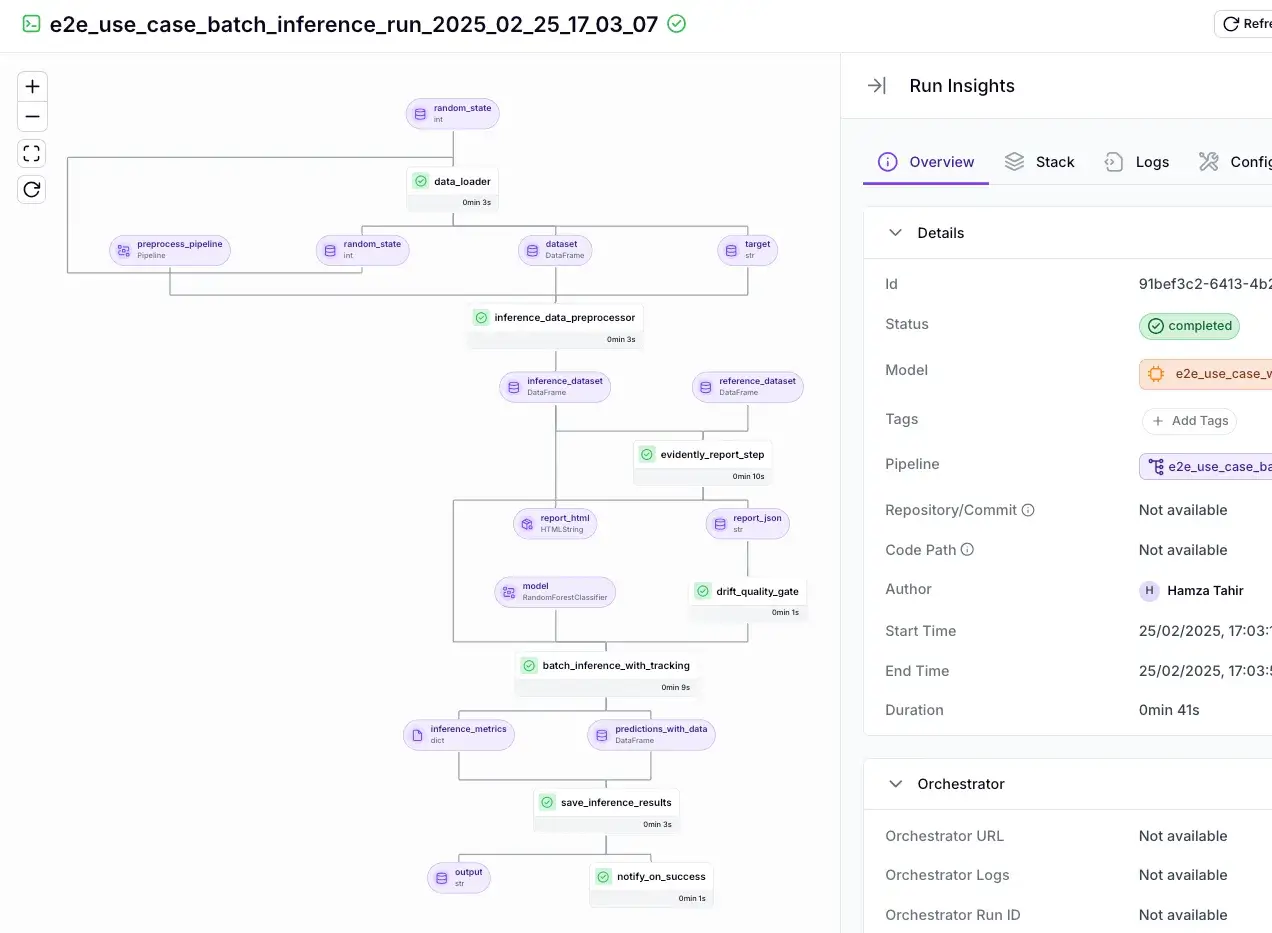
ZenML approaches durability through intelligent caching rather than checkpointing. It automatically stores artifacts (datasets, models, plots) and lineage in an artifact store like S3, GCS, etc., and ZenML knows which artifact came from which step of which run.
Since every step is cached and versioned, you can restart a pipeline, and ZenML will detect if certain steps have unchanged inputs and skip re-running them. If a pipeline fails halfway, all outputs from successful steps remain available. You can inspect the ZenML Dashboard’s visual DAG and timeline views for debugging.
For example, if your data ingestion step succeeded and your model training step crashed, the ingested data artifact is still available and logged in ZenML’s catalog, and the pipeline run is marked as failed at the training step.
ZenML also enables you to quickly resume pipelines and restart steps from exactly where they failed.
Rather than requiring you to re-run the entire pipeline or manually reconstruct state, ZenML’s caching mechanism automatically identifies which steps completed successfully and skips them on the next run, allowing execution to continue from the first failed step with minimal effort.
Bottom line: Temporal wins for code-level durability with automatic resume. n8n provides basic durability (logging to a database) but lacks automatic resume; it’s up to you to restart or handle errors via separate workflows. ZenML strikes a middle ground for ML workflows: it won’t magically replay a code function, but it tracks all intermediate results and metadata for straightforward retry without losing work.
Feature 2. Failure Handling: Retries, Backoff, and ‘What Fails Fast’
No workflow is perfect. Things will go wrong, from transient network glitches to exceptions in code. A good orchestration engine provides mechanisms to handle failures: automatic retries, the ability to fail fast or continue on partial failure, and timeout/backoff configurations.
n8n
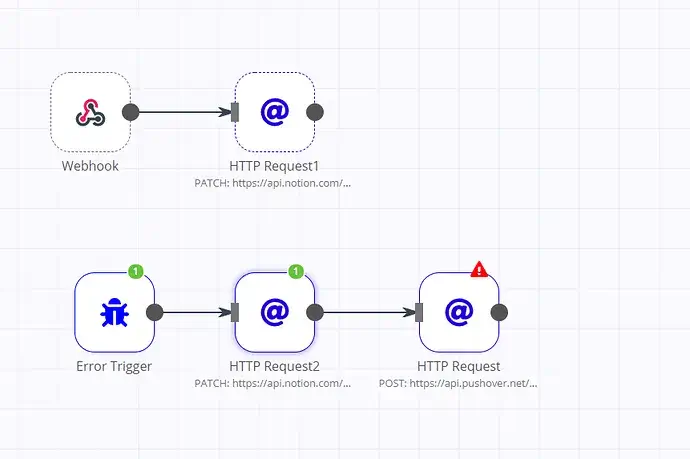
n8n handles failures through Error Workflows triggered by an Error Trigger node. This won’t “fix” the failed run, but it gives you a clean way to send alerts, log details, or run cleanup steps.
For automatic retries, many n8n nodes have built-in retry settings. For example, the HTTP Request node supports Retry on Fail, where you can set max attempts and delay between tries.
You can also implement custom retries by looping. For instance, if you want exponential backoff, you might chain a node to check for failure, then delay and re-invoke a sub-workflow. But this is manual work and increases the complexity of your n8n workflow graph.
This works well for transient errors, but it’s still node-level behavior. n8n doesn’t have a global workflow retry policy or native exponential backoff across the whole flow.
Temporal
Temporal treats failure handling as a first-class concern. Instead of forcing you to write retry loops and backoff logic, every activity in Temporal has an automatic retry policy.
If an Activity throws an exception or times out, Temporal catches that and retries the Activity without failing the overall workflow, according to a configurable policy.
Key retry capabilities:
- Automatic Activity retries by default: If an Activity fails or times out, Temporal retries it without failing the whole workflow.
- Exponential backoff out of the box: Retries start at a small delay and increase over time up to a cap.
- Configurable retry policies: You can set max attempts, initial interval, max interval, and decide which errors should or shouldn't retry.
- Timeout-aware behavior: If an Activity hits configured timeouts, Temporal treats it as a failure and applies the retry policy.
- Scoped failures: A single flaky call doesn't derail the full workflow unless it keeps failing beyond retry limits.
Here’s a small illustration of Temporal’s retry in action (pseudocode using Temporal’s Python SDK):“
from temporalio import workflow, activity

@activity.defn
async def flaky_step(x: int) -> int:
    # Simulate a task that might fail intermittently
    if random.random() < 0.3:
        raise Exception("Transient error, will be retried by Temporal")
    return x * 2

@workflow.defn
class MyWorkflow:
    @workflow.run
    async def run(self, input: int) -> int:
        # Execute the activity with default retry policy (exponential backoff)
        result = await workflow.execute_activity(
            flaky_step, input,
            schedule_to_close_timeout=timedelta(seconds=30)
        )
        return result
In the above code, flaky_step might fail randomly. Temporal will automatically retry it (with delays) until success or until 30 seconds elapse. The workflow only gets an exception if all retries within 30 seconds fail.
One nuance, though, is that workflows themselves don’t retry by default. Temporal expects your workflow code to orchestrate retries at the Activity level, and to catch exceptions when you want custom fallback behavior.
ZenML
ZenML offers step-level retry configuration with built-in exponential backoff. You can specify that a given step should retry, say, 3 times with a certain delay, and ZenML will ensure that if that step fails, it is re-run.
If a ZenML step fails and retries are exhausted (or not configured), that step is marked as failed. Whether the rest of the pipeline continues depends on the execution mode:
- FAIL_FAST stops immediately
- STOP_ON_FAILURE allows in-progress parallel steps to finish, but prevents starting new ones
- CONTINUE_ON_FAILURE continues running independent branches that don’t depend on the failed step.
In all cases, the overall run is marked as failed if any step fails.
By default, ZenML uses CONTINUE_ON_FAILURE for local and Kubernetes orchestrators. You can override the mode per pipeline if you prefer fail-fast behavior.
ZenML’s failure handling is oriented around graceful pipeline degradation and targeted retries. You won’t get infinite automatic retries like Temporal (unless you explicitly set a high retry count), but you have control to make your pipeline robust.
Bottom line: In terms of failure-handling sophistication, Temporal leads with its automatic activity retries and rich timeout/retry policies. ZenML offers smart resume capability for expensive ML compute jobs via caching.
Feature 3. Kubernetes Execution Model and Deployment Topology
All three platforms support Kubernetes deployment, but their architectures reflect different design philosophies and scaling characteristics.
n8n
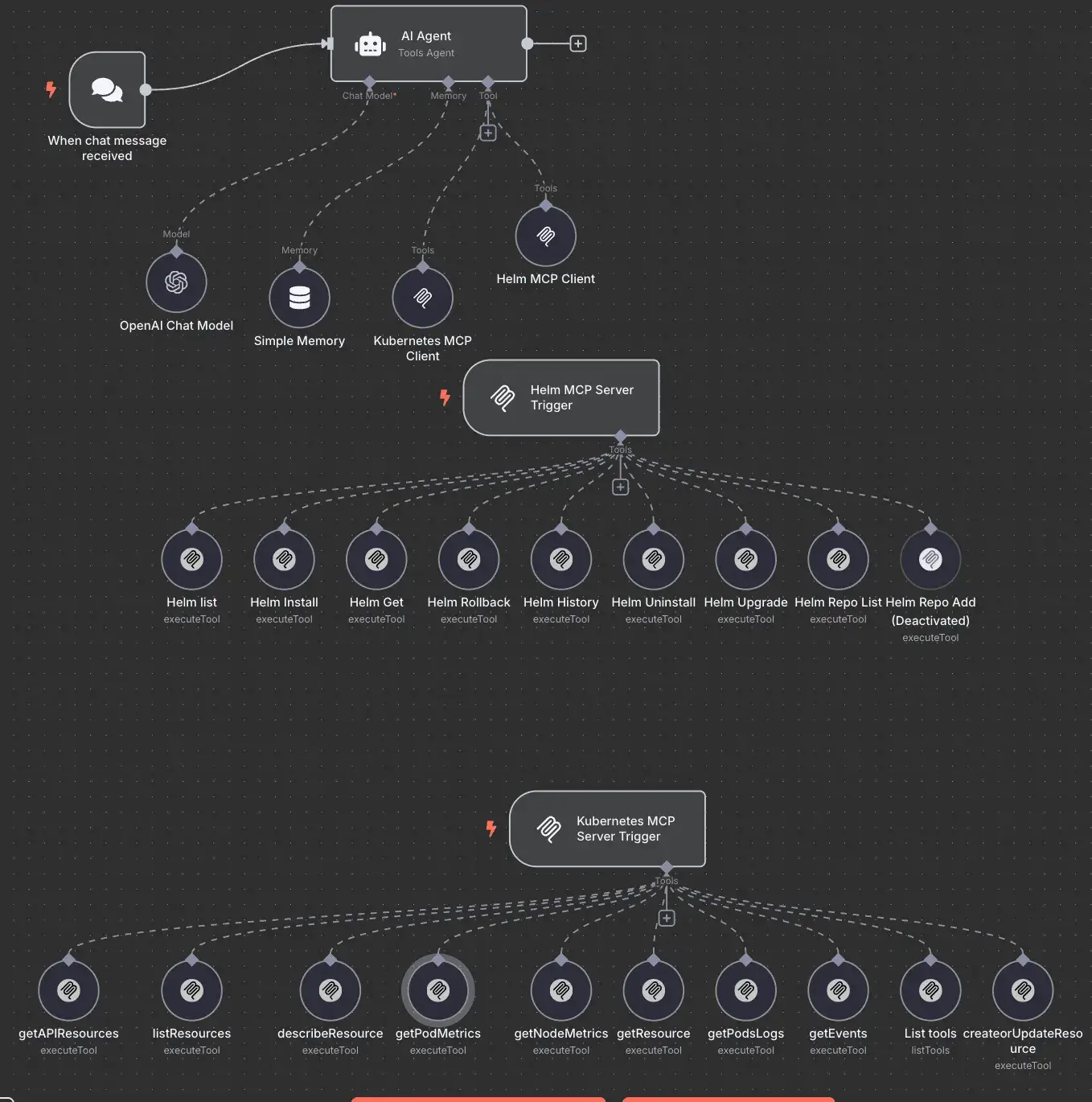
n8n uses a queue mode architecture that separates workflow scheduling from execution. A production deployment typically includes:
- Main pod(s): Handles the UI, REST API, webhooks, and timer/schedule triggers. In queue mode, this pod generates execution records but does not run workflows itself.
- Worker pods: Pull execution jobs from Redis via n8n’s Redis-backed queue (configured through the
QUEUE_BULL_*settings), execute them, and write results back to the database. - PostgreSQL: Stores workflow definitions, credentials, execution logs, and all persistent state. Required for queue mode (SQLite is not supported).
- Redis: Acts as the message broker for the Bull queue. Holds only job metadata while executions are pending or running.
The scaling model is straightforward: add worker pods to increase throughput. Each worker runs as a separate Node.js process with configurable concurrency (parallel executions per worker). Workers must share the same encryption key and have access to both Redis and PostgreSQL.
For high availability (enterprise tier), n8n supports multi-main setups with leader/follower election coordinated through Redis. The leader handles at-most-once tasks like timers, pollers, and execution pruning. If the leader becomes unresponsive, a follower takes over. You can also deploy dedicated webhook processors behind a load balancer to handle high webhook volume without competing for resources with the main UI layer.
Temporal
Temporal’s architecture is more microservices-oriented. The temporal server is actually a suite of 4 services:
- Frontend: Rate limiting, routing, authorization
- History: Workflow state persistence
- Matching: Task queue dispatching
- Worker: Background processing
In practice, the open-source Temporal Server is often run as a single unified service for simplicity, but large deployments might separate them for scaling.
On Kubernetes, you might package your workflow code into a Docker image and run it as a Deployment or Job. These workers connect to the Temporal Frontend service via gRPC and poll for tasks.
A typical production setup on K8s:
- Temporal Server (as 1–N pods, potentially with each service type scaled separately)
- One Deployment per worker service/application (e.g., if you have workflows for data ingestion, run a Deployment of those workers; if another set of workflows for model training, that could be a separate Deployment)
Workers register themselves via task queues, and the Temporal server distributes tasks to them.
ZenML
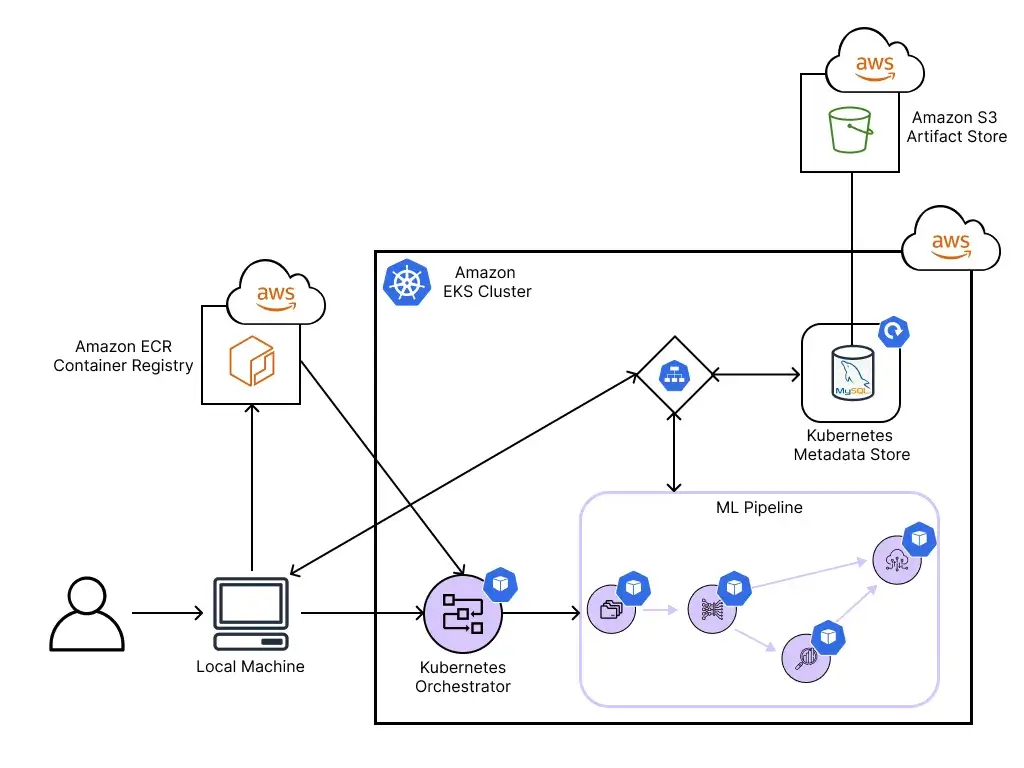
ZenML’s Kubernetes model differs significantly from Temporal and n8n. It’s a Python framework where Kubernetes serves as a pluggable execution backend rather than a persistent runtime.
Execution architecture
ZenML’s Kubernetes orchestrator is just one of many supported execution backends. ZenML integrates with a wide range of orchestrators, including Airflow, Kubeflow Pipelines, AWS Step Functions, Google Cloud Vertex AI, Azure ML, Tekton, and more.
This flexibility means you can write your pipeline once and deploy it on whichever orchestrator fits your infrastructure.
When using the Kubernetes orchestrator specifically, each pipeline step runs in its own Kubernetes pod.
An orchestrator Job (upgraded from raw pods in version 0.84+) coordinates step execution by traversing the pipeline DAG in topological order. When a step completes, the orchestrator Job spawns the next eligible step pods based on dependency resolution. After the final step finishes, all resources terminate. You’re not maintaining a long-running scheduler service between pipeline runs.
This architecture supports automatic restarts and state reconstruction if the orchestrator Job fails mid-pipeline. The shift from pods to Jobs in recent versions also enables configurable retry behavior at both the orchestrator and step level.
Data passing between steps
Steps do not share memory. When a step produces output, ZenML serializes the data through a materializer and writes it to a remote artifact store (S3, GCS, Azure Blob, etc.). Downstream steps deserialize their inputs from the same store. This design means each step is fully isolated and can run on different nodes without shared filesystem requirements. It also means step failures don’t corrupt the in-memory state for other running steps.
Infrastructure requirements
Unlike Kubeflow, ZenML’s Kubernetes orchestrator requires no platform installation on the cluster. There’s no MySQL database, no MinIO dependency, and no Argo controller.
ZenML communicates directly with the Kubernetes API to create Jobs and pods. However, production use requires a remote ZenML server deployment. The orchestrator authenticates against this server to fetch pipeline definitions, register runs, and track artifacts. A local ZenML installation will not work correctly with the Kubernetes orchestrator.
n8n vs Temporal vs ZenML: Integration Capabilities
The breadth and nature of integrations reflect each platform’s target audience and primary use cases.
n8n
n8n boasts the largest integration count with 400+ built-in nodes and ~5,800+ community nodes on npm.
n8n’s LangChain-based AI nodes include an AI Agent (Tools Agent) workflow pattern plus other agent-style nodes (for example, ReAct and OpenAI Functions, depending on version).
👀 Note: Some older agent variants like SQL Agent were removed in February 2025, so SQL-style querying is typically done by combining database nodes with agent tools rather than a dedicated SQL Agent node.
LLM providers include OpenAI, Anthropic, Google Gemini, Mistral, Groq, DeepSeek, and self-hosted Ollama. Vector stores span Pinecone, Weaviate, Qdrant, PGVector, Milvus, and more.
Additionally, HTTP Request and Webhook nodes enable connection to any REST API.
Temporal
Temporal focuses on language SDK breadth rather than pre-built connectors. Official SDKs cover 7 languages: Go, Java, Python, TypeScript, .NET, PHP, and Ruby. The TypeScript, Python, and .NET SDKs share a common Rust-based Core SDK.
Activities serve as the integration point for external systems: any code that might fail or have side effects belongs in an Activity. The recent OpenAI Agents SDK integration (Public Preview) adds an activity_as_tool helper that converts Temporal Activities to OpenAI-compatible tools for durable AI agent orchestration.
ZenML
ZenML uses a stack-based integration model with 50+ integrations organized by component type. Popular integrations include:
- Data Sources / Feature Stores: Snowflake, BigQuery, Feast
- Experiment Trackers: MLflow, Weights & Biases, Comet (ZenML pipelines can automatically log metrics)
- Model Deployment: BentoML, Seldon, SageMaker
- Orchestrators: Airflow, Kubeflow, AWS Step Functions (in case you want ZenML to run on those backends)
- Cloud Resources: AWS, GCP for provisioning resources or using managed services
- LLMOps/GenAI tools: Integrations for LangChain, HuggingFace, and LLM providers
n8n vs Temporal vs ZenML: Pricing
All three tools have free/self-hostable options, but their licensing models differ. Temporal and ZenML are open-source projects you can self-host. n8n is source-available under n8n’s fair-code Sustainable Use License (SUL) and offers a free self-hosted Community Edition, with license restrictions that limit certain commercial redistribution and hosted offerings.
n8n
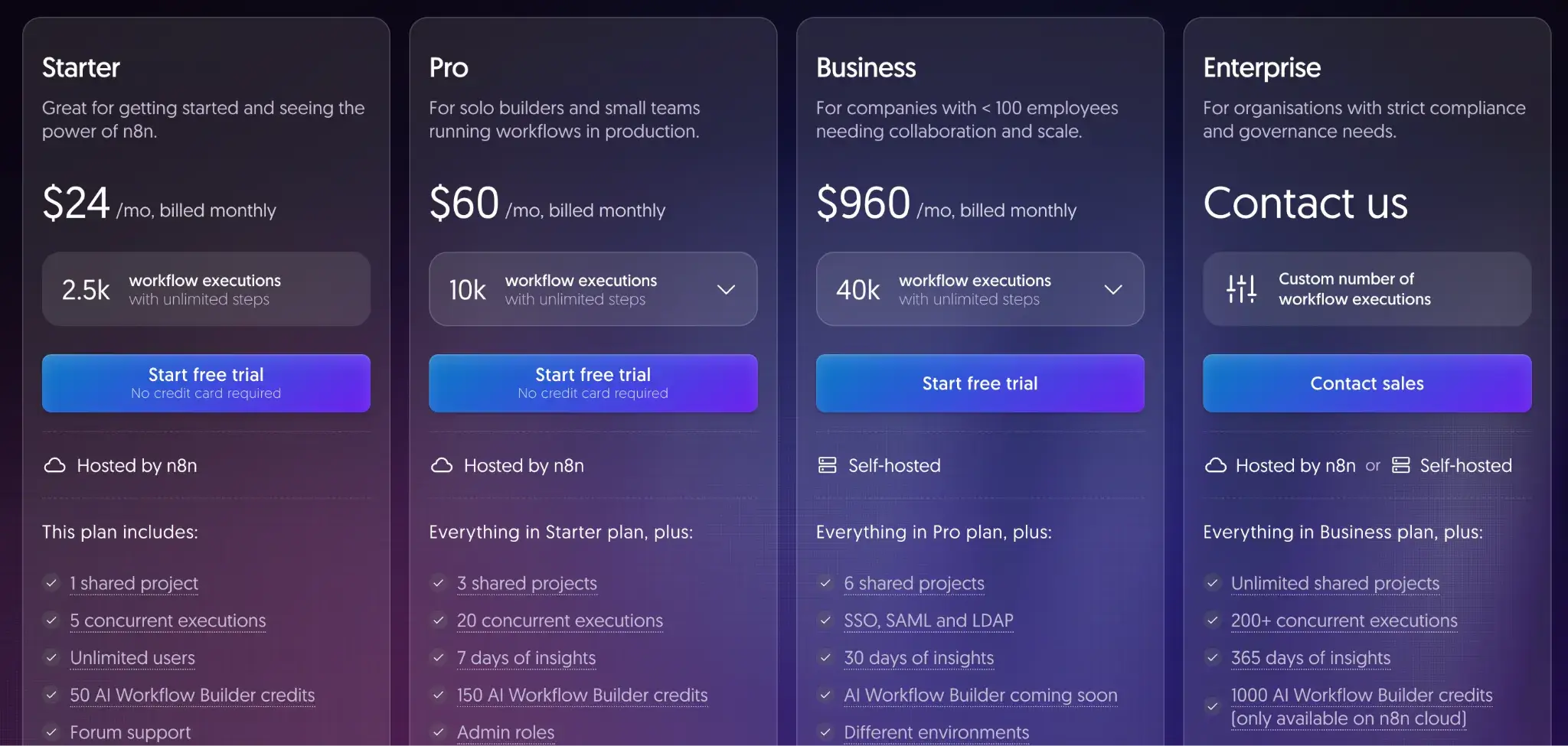
Other than the self-hosted plan I talked about above, n8n offers the following paid plans (with free trials):
- Starter: $24 per month
- Pro: $60 per month
- Business: $960 per month
- Enterprise: Custom pricing
Temporal
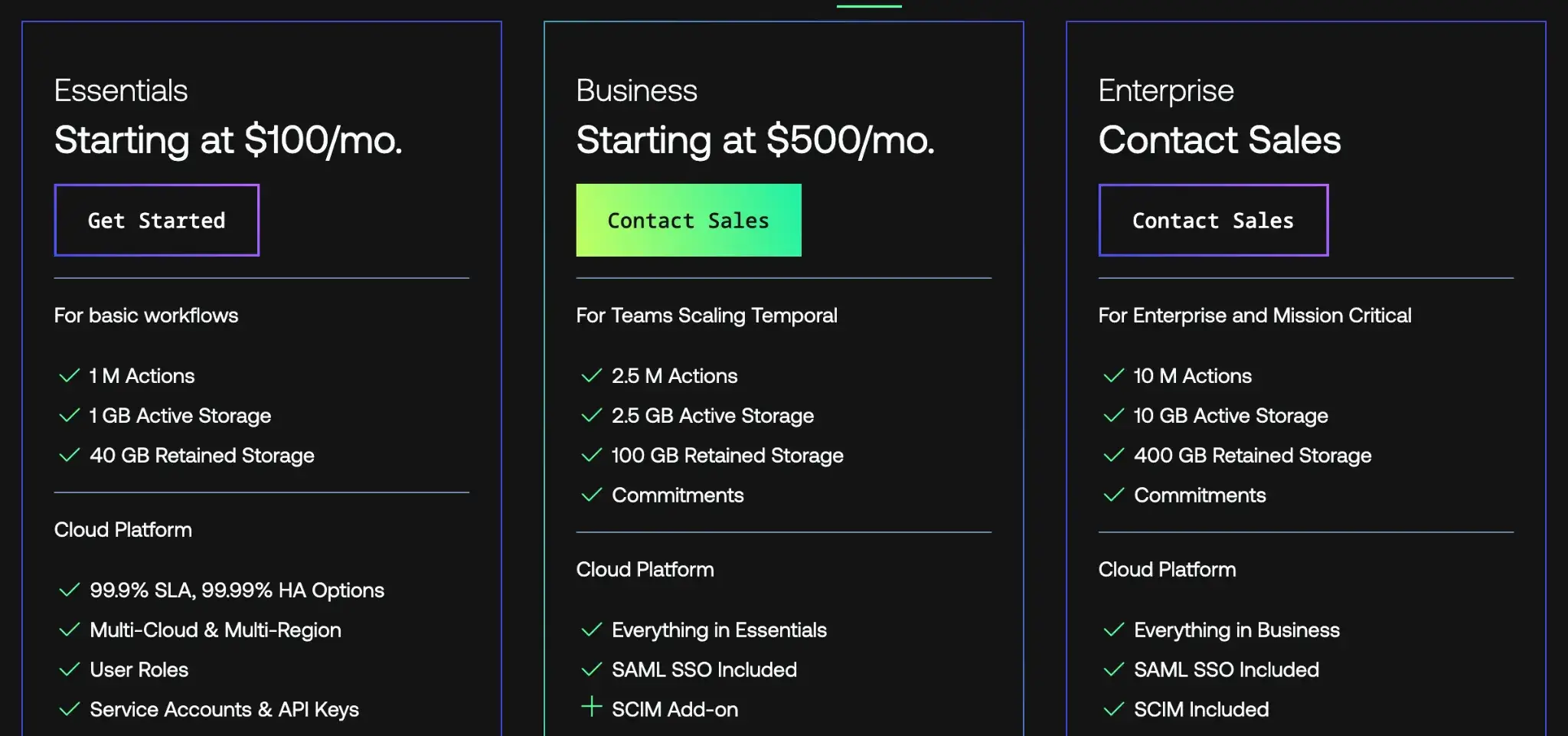
The core Temporal platform is completely open source (MIT license) and can be self-hosted at no cost. Temporal also offers Temporal Cloud, a hosted SaaS version with paid plans as follows:
- Essentials: $100 per month
- Business: $500 per month
- Enterprise: Custom pricing
ZenML
ZenML is also open-source and free to start.
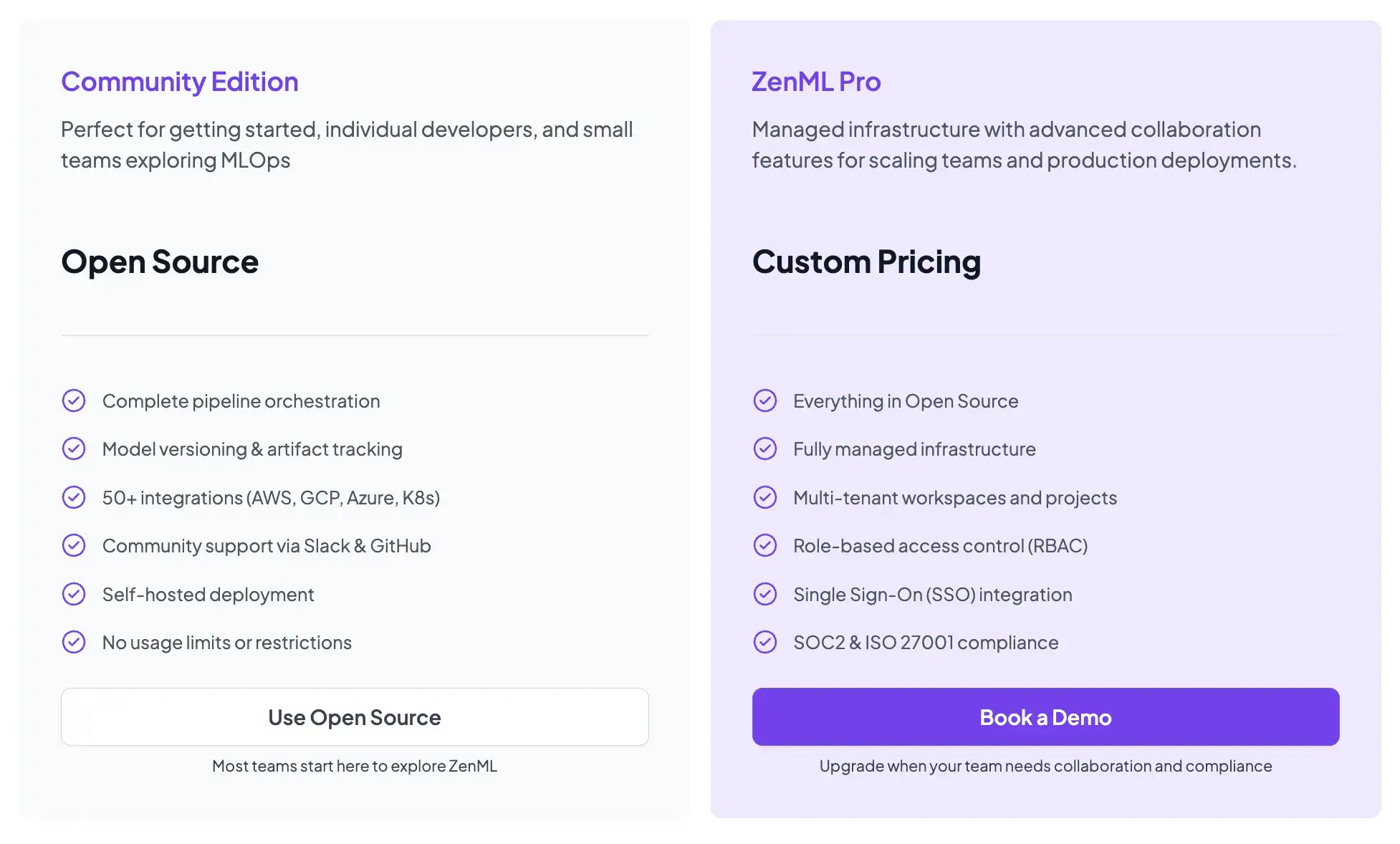
- Community (Free): Full open-source framework. You can run it on your own infrastructure for free.
- ZenML Pro (Custom pricing): A managed control plane that handles the dashboard, user management, and stack configurations. This removes the burden of hosting the ZenML server yourself.
📚 Relevant blogs you must read:
When You are Better Off with a Code-Based MLOps/LLMOps Workflow Automation Frameworks
The choice between visual/no-code and code-first approaches has significant implications for ML/AI teams building production systems.
No-code and low-code tools like n8n work well for quickly automating tasks and integrating services. They excel at connecting SaaS APIs, sending notifications, and building simple automation chains. However, for complex ML and LLMOps workflows, I’ve seen teams frequently hit walls that require code-based frameworks to solve.
Complex Branching and Iteration
ML workflows involve nested loops and conditional paths that visual builders struggle to represent.
Let’s consider hyperparameter tuning: you need to run the same training logic hundreds of times with different configurations while tracking each result.
In n8n, you’d represent this as a sprawling graph with loop nodes, delay nodes, and conditional branches that becomes nearly impossible to modify.
A grid search over 5 hyperparameters with 4 values each produces 1,024 combinations. In Python, that’s a nested loop with Optuna or Hyperopt handling the search strategy. In a visual builder, you’re starting at a canvas that no longer fits on screen.
Versioning and Reproducibility
ML requires traceability across three interconnected dimensions: code, data, and outputs. When a model degrades in production, you need to answer:
- Which training data was used?
- What preprocessing was applied?
- Which hyperparameters were selected?
- What code version produced the model?
Visual workflow definitions stored as JSON blobs don’t integrate cleanly with Git’s branching and merging model. They generate merge conflicts that require manual resolution of node positions and connection IDs.
Code-based pipelines fit naturally into version control. ZenML tracks artifacts and lineage automatically, linking each pipeline run to a specific code commit, input data hash, and output model version.
Testing and CI/CD Integration
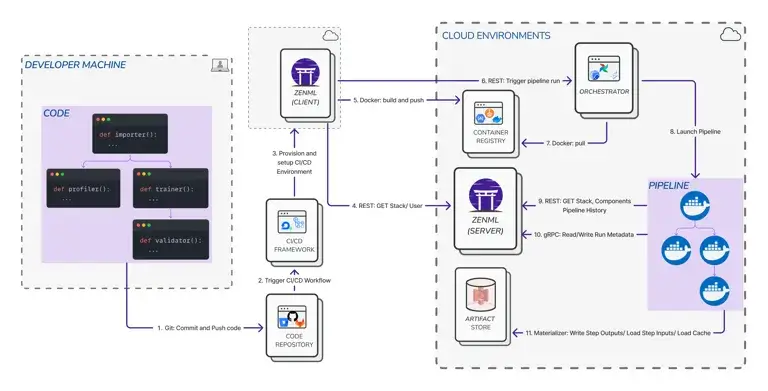
Code workflows can be unit tested, integration tested, and deployed via standard CI/CD pipelines. You can write tests that verify your feature engineering logic produces expected outputs. What’s more, you can run linting, type check, and set up pre-commit hooks that catch errors before they reach production.
No-code tools typically force manual testing via point-and-click execution in a visual debugger. Automating regression tests for a visual workflow requires exporting it to JSON, parsing that JSON in a test harness, and simulating execution.
Extensibility
When you need new evaluation logic or a custom integration, code frameworks let you write a Python function and call it. In no-code tools, your options are limited:
- Wait for someone to build a node
- Embed scripts inside "code" nodes that break your visual abstraction
- Give up on the requirement
Embedded scripts create maintenance debt. They’re invisible in the visual representation but critical to execution. They don’t benefit from IDE support or type checking.
Why is ZenML the Code-Based ML/LLM Ops Framework You Should Use?
ZenML addresses ML concerns that general-purpose tools miss. It’s code-based, so you get all the benefits above, but it simplifies MLOps by providing abstractions for artifact tracking, experiment comparison, and deployment management.
Instead of writing hundreds of lines of glue code to log experiments, checkpoint models, and track data lineage, ZenML handles that with decorators and configuration.
It integrates with experiment trackers like MLflow and Weights & Biases. It supports multiple orchestration backends. It provides a dashboard for visualizing pipeline runs and comparing metrics.
Get this: Temporal is purpose-built for durable execution and reliable distributed systems. n8n is purpose-built for visual automation and API integration.
But ZenML is purpose-built for ML. When you’re building production ML systems, specialized tooling matters.
📚 Learn more about ZenML:
Wrapping Up
The choice between n8n, Temporal, and ZenML depends on who you are and what you are building.
- Choose n8n if: You are automating business operations, connecting SaaS APIs, or building simple AI agents where visual clarity is key.
- Choose Temporal if: You are building the backend infrastructure for a high-scale application where transaction integrity and long-running reliability are non-negotiable.
- Choose ZenML if: You are an ML team building production AI systems. You need the reproducibility of code, the visibility of a dashboard, and the specialized power of artifact tracking.