
On this page
Data Version Control (DVC) is a popular open-source tool for versioning datasets, models, and machine learning experiments, but it isn’t without limitations. Since lakeFS acquired DVC in November 2025, some teams have taken the opportunity to re-evaluate whether DVC is still the best fit for their workflows; especially if they want a more UI-first or data-lake-native approach.
In this article, we explore 8 DVC alternatives covering everything from large-scale data lake versioning to experiment tracking platforms.
We break down each option’s key features, pricing, and pros/cons so you can decide which tool addresses DVC’s gaps for your ML projects.
DVC Alternatives Overview
- Why look for a DVC alternative: DVC is Git-centric and CLI-first. While it offers optional UIs (a VS Code extension and DVC Studio), teams that want a web-native, collaboration-first experience may prefer other tools.
- Who should care: ML engineers, data scientists, and MLOps teams who need better support for big data versioning, collaborative experiment tracking, or a more intuitive UI.
- What to expect: The 8 alternatives below span data lake versioning tools (Apache Iceberg, Delta Lake, Apache Hudi), experiment tracking platforms (MLflow, Weights & Biases, ClearML), and hybrid solutions like ZenML and Dolt.
👀 Note: DVC changed stewardship in 2025 after lakeFS acquired the project. DVC remains open source. Still, for risk-averse teams, a stewardship change is a natural time to double-check the long-term roadmap, support model, and product direction, and evaluate alternatives in parallel.
The Need for a DVC Alternative?
DVC works well for many ML teams, but its design choices create friction as projects grow. Here are the three main reasons you and your team might start looking for alternatives.
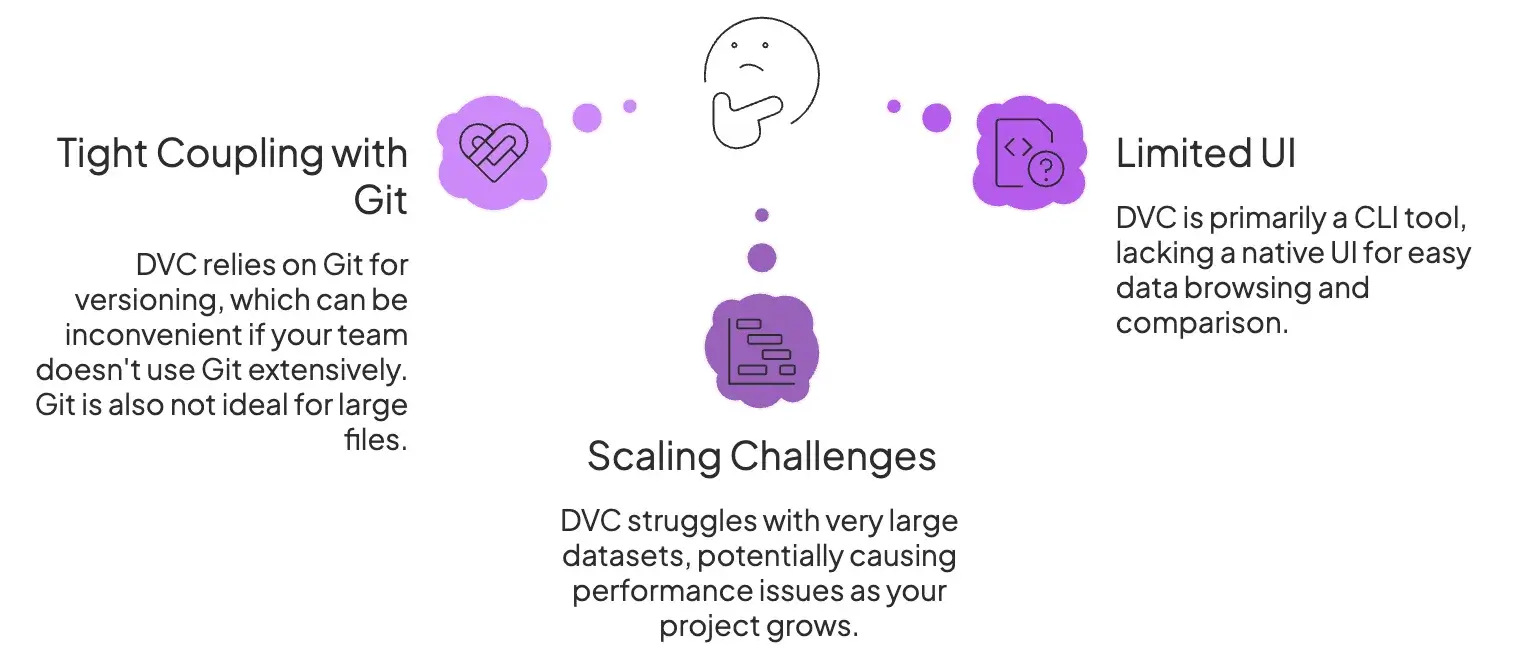
Reason 1. Tight Coupling with Git
DVC builds on Git to version your code and lightweight metadata files (like dvc.yaml and .dvc pointers), while storing large data outside Git in a dedicated cache and optional remote storage. This Git-centric workflow works well if your team already collaborates through repos, branches, and pull requests, but it can feel constraining if you want a data-first workflow that isn’t organized around Git.
For experiment tracking, DVC does not require a Git commit for every run. The dvc exp workflow can track and compare experiments without forcing you to commit each run, even though Git remains the underlying coordination layer.
While Git isn’t designed to store large, rapidly changing binaries, DVC avoids putting the data itself into Git by storing it in a cache and optional remote storage. The tradeoff is that Git still anchors the workflow through versioned metadata and repo-based collaboration, which can be limiting for teams that want a more data-native interface and collaboration model.
Reason 2. Scaling Challenges with Very Large Data
DVC is capable of handling tens of thousands of files or moderate dataset sizes well. But, its performance starts degrading when you task it with managing hundreds of millions or billions of objects. This won’t happen at the start, but it will definitely be a bottleneck when you scale.
Reason 3. Limited Built-in UI or User Experience
DVC is primarily a command-line tool. It lacks a native web UI that might’ve helped you browse the dataset, visualize version history, or compare experiments (unless you use the separate DVC Studio Service).
This CLI-first approach is efficient for coders, but not for teams that want to inspect data changes via the terminal.
Due to this limitation, you are forced to pair DVC with additional tools or look for an alternative that comes with a polished interface.
Evaluation Criteria
When evaluating DVC alternatives, we focused on these three core criteria:
1. Data Model and Versioning Semantics
The two primary questions we found answers to for this criterion are:
- What entities does the tool version (files and directories, tabular datasets, machine learning models, or something else) support?
- Does it use familiar version control concepts like commits, branches, tags, and merges?
We also looked at whether a ‘commit’ captures a consistent point-in-time snapshot of multiple data objects, which is important for reproducibility in ML pipelines.
2. Storage Backends and Portability
We examined which storage systems each tool supports and how easily data can be moved. For this criterion, we shortlisted frameworks based on the questions below:
- Does the tool work with cloud object stores (S3, GCS, Azure), on-prem NAS, HDFS, etc.?
- Can you migrate or copy the versioned data to a new storage location without breaking history?
- Can you use multiple remotes or buckets for different environments, like dev, test, and production?
We gave extra points to tools that avoid lock-in by using open formats or that allow mix-and-match storage options.
3. Scale and Performance Characteristics
Finally, we compared how each alternative performs at scale. This includes:
- Handling many small files vs. a few large files efficiently.
- Support for incremental updates; storing diffs or optimized merges rather than full copies of each version was a major consideration.
- Checkout or version switching speed under load, and whether the tool allows parallel operations, concurrency control, and avoids bottlenecks when multiple users or processes access the data.
An ideal DVC alternative should gracefully scale to large datasets with features like data chunking, parallel syncing, and robust locking/conflict resolution.
With these criteria in mind, let’s dive into the top alternatives to DVC and see how they stack up.
What are the Top Alternatives to DVC in MLOps?
Here’s a quick table that summarizes the best DVC alternatives in the MLOps space.
| Alternatives | Key Features | Best for | Pricing |
|---|---|---|---|
| ZenML | - Pipeline-based artifact versioning - Multi-cloud support - Built-in experiment tracking | Teams wanting unified ML/agent workflows | Free (open source) Pro plans available |
| Apache Iceberg | - Immutable snapshots - ACID transactions - Engine-agnostic (Spark, Trino, Flink) | Petabyte-scale data lake versioning | Free (Apache 2.0) |
| Delta Lake | - Transaction log (Delta log) - Time travel queries - Schema enforcement | Spark-centric big data environments | Free (open source) |
| Apache Hudi | - Record-level upserts - Incremental pulls - COW and MOR storage modes | Streaming ingestion with versioning | Free (Apache 2.0) |
| Dolt | - Git-style branching for SQL - MySQL-compatible queries - Push/pull remotes | Collaborative dataset curation | Free core Hosted from $50/mo |
| MLflow | - Experiment tracking - Model registry - Language-agnostic APIs | Teams needing experiment logging | Free (open source) |
| W&B Artifacts | - Checksum-based versioning - Automatic lineage tracking - Cloud or reference storage | Teams already in the W&B ecosystem | Free tier Pro $60/mo |
| ClearML | - ClearML Data module - Built-in orchestration - Model registry | An all-in-one MLOps platform needs | Free (self-hosted) Pro $15/user/mo |
1. ZenML
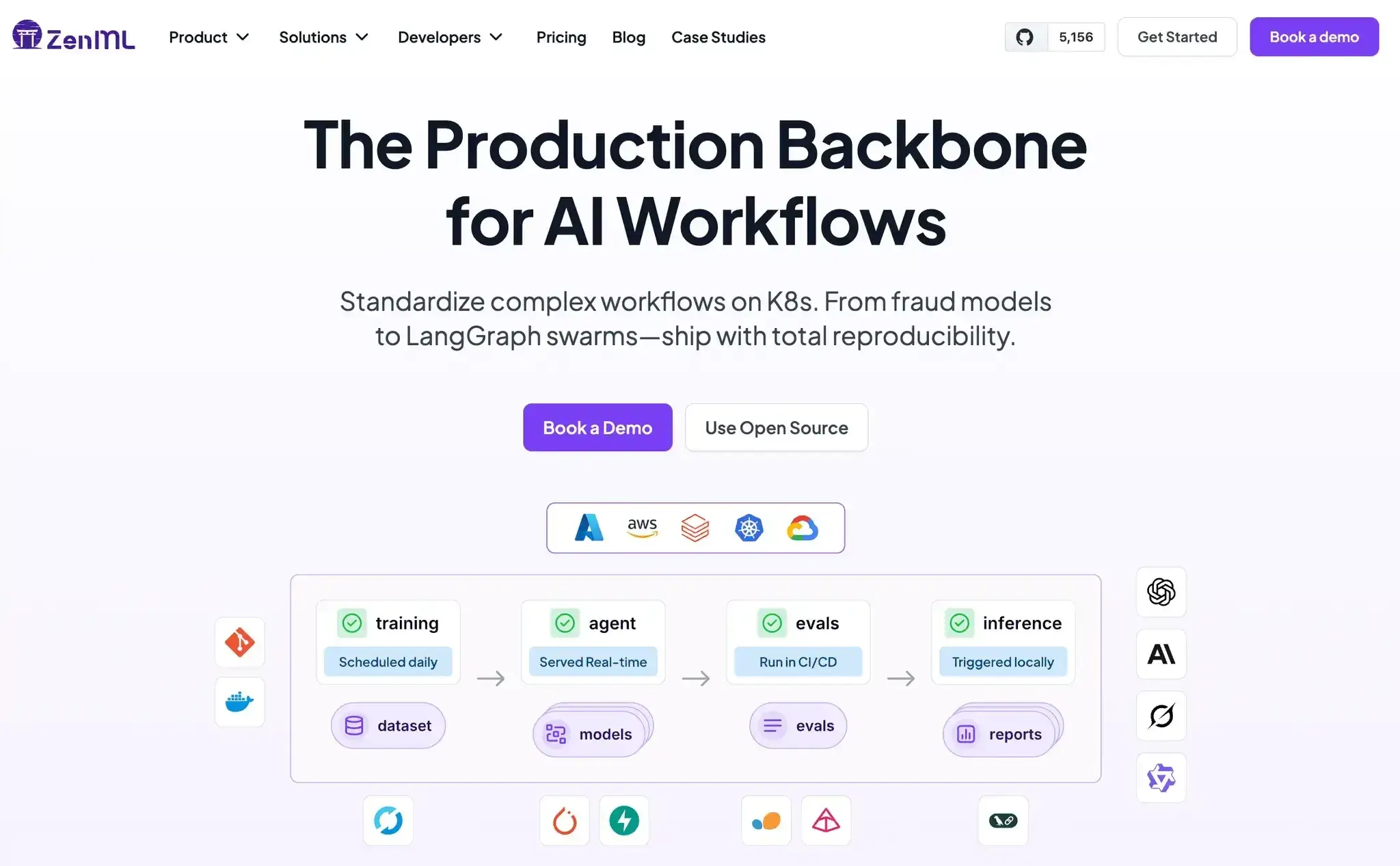
ZenML is an open-source MLOps + LLMOps framework that takes a pipeline-centric approach to managing experiments, data, and models. It treats data and artifact versioning as part of a broader machine learning workflow, whereas DVC is mainly a standalone data versioning and experiment tracking tool tied to Git.
How Does ZenML Compare to DVC?
As mentioned earlier, DVC is Git-centric and CLI-first, but it can track experiments without requiring a Git commit for every run (via dvc exp commands). For visualization, DVC offers a VS Code extension and an optional web UI via DVC Studio (free for individuals and small teams).
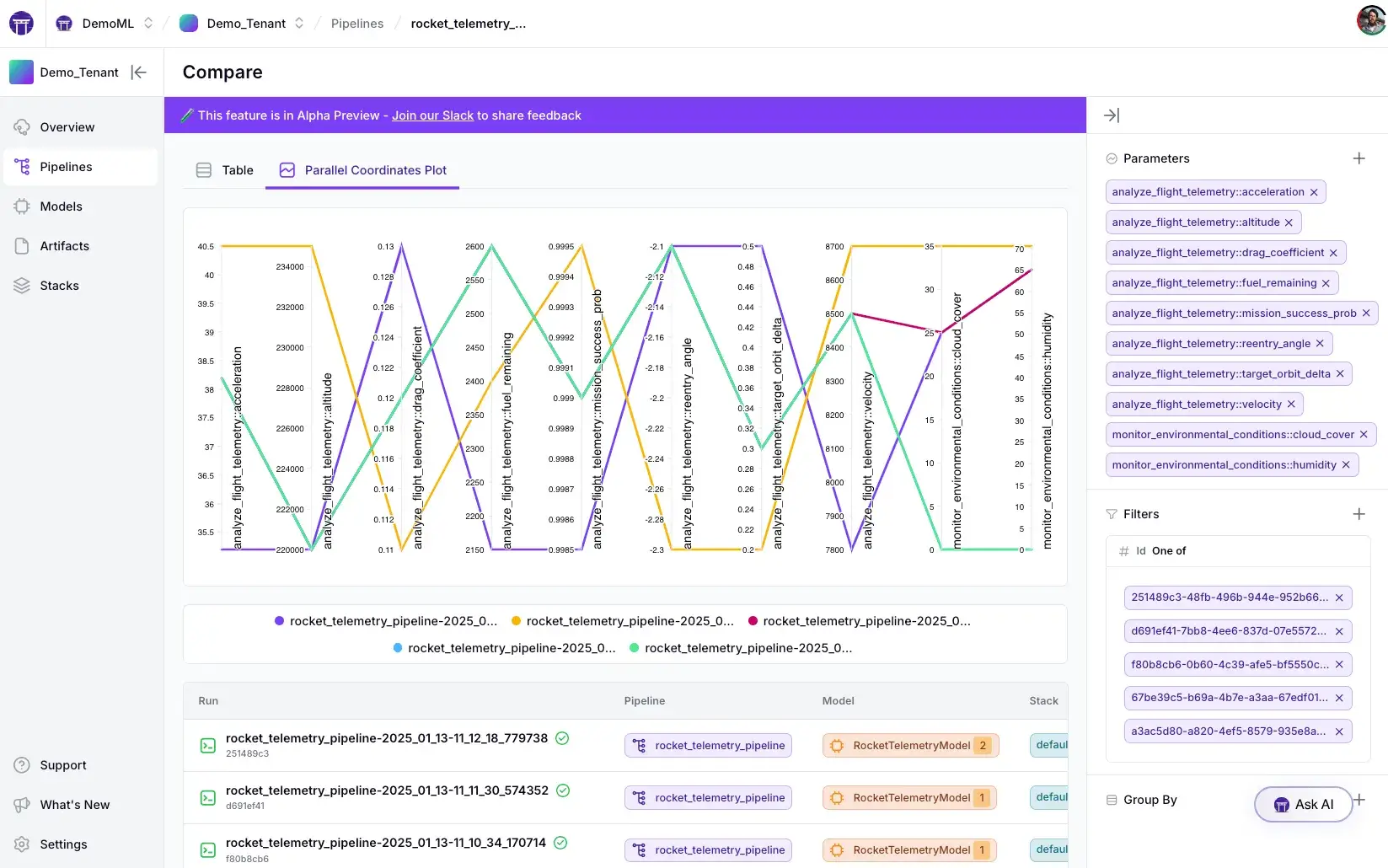
For the same use case, ZenML offers an integrated approach: it automatically logs every run’s metadata and provides an optional web UI to compare experiment runs. This means that with ZenML, you get pipeline-level experiment tracking without needing to manage metrics files in Git.
ZenML is especially strong in scenarios where you want to orchestrate complex ML pipelines and have all artifacts versioned in context. It’s less Git-centric, so you aren’t forced to use Git for workflow logic.
In fact, ZenML integrates with dedicated experiment tracking tools like MLflow, WandB, Comet, and more, as optional stack components, or you can use ZenML’s native experiment tracker.
📚 Read about this experiment tracker in our New Dashboard Feature guide.
One area where DVC has an edge is deduplication at the file level. DVC uses a content-addressable cache, so unchanged files can be reused across versions and only changed files need to be pushed or pulled. However, DVC does not do block-level “diff” storage inside a single file, so if a large file changes, a new full version of that file is stored.
ZenML takes a different approach. It versions your artifacts and makes it easy to use them across workflows, but it doesn’t perform the same level of granular data layering that DVC does.
If your primary concern is storage efficiency for frequently updated datasets, DVC’s architecture handles that better. ZenML’s strength lies in workflow integration rather than optimized data storage mechanics.
Let’s now look at some features that ZenML offers:
Key Feature 1. Pipeline and Artifact Lineage
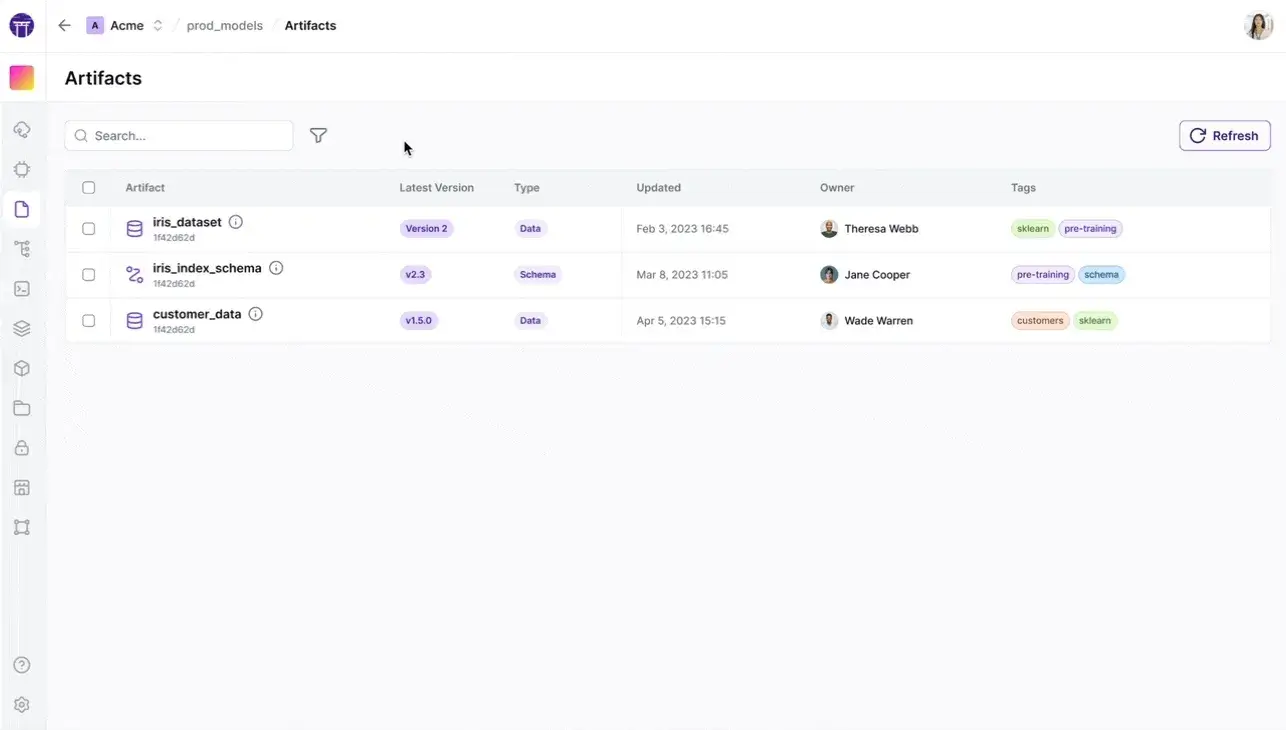
Every pipeline step’s output is automatically captured as a versioned artifact in an artifact store (for example, S3, GCS, or local FS).
ZenML tracks the relationships between steps and artifacts, creating a complete data lineage for each pipeline run. This ensures you can trace which data version produced which model, similar to DVC’s data-provenance, but at a pipeline level.
Key Feature 2. Experiment Tracking and Metadata
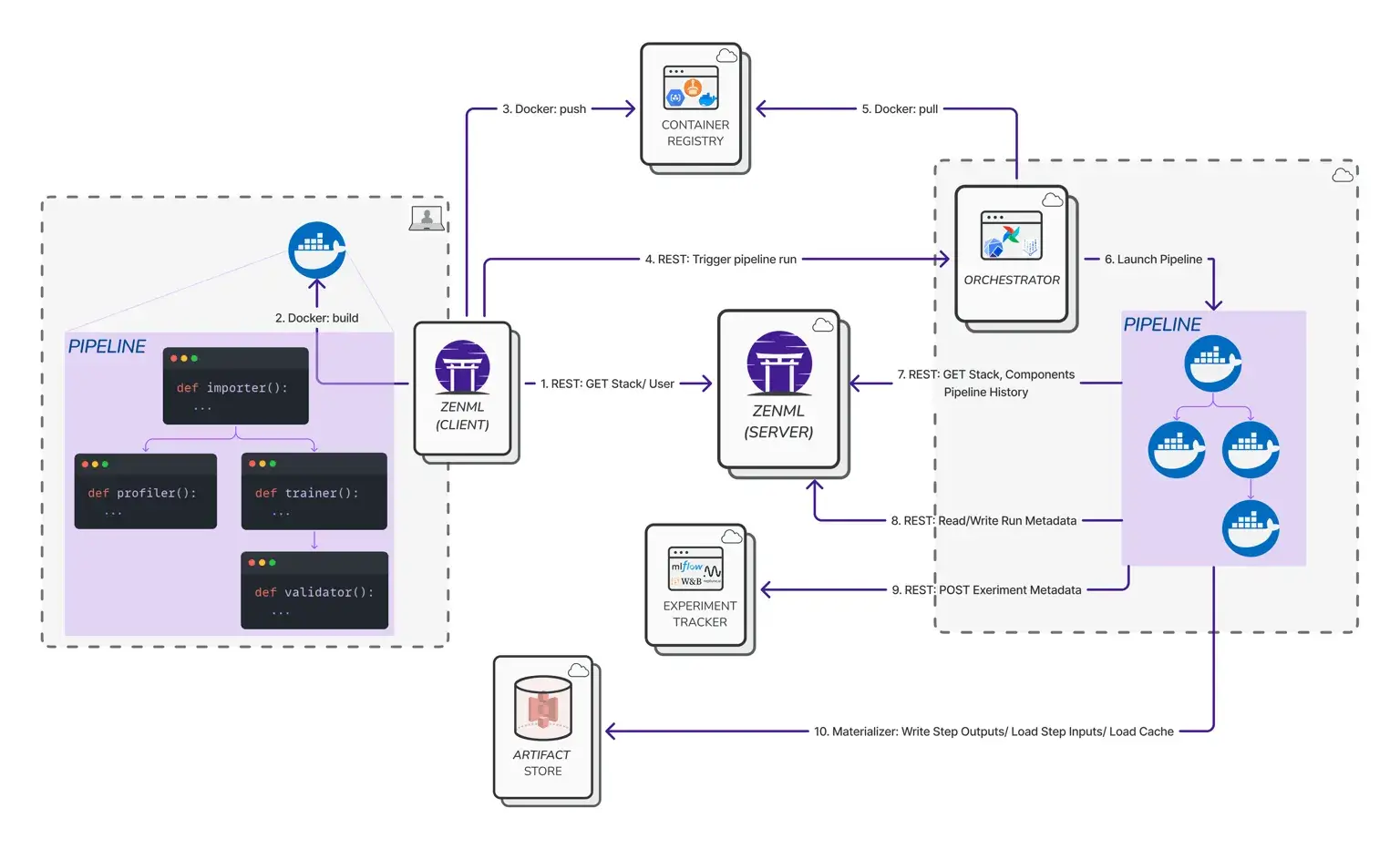
ZenML logs parameters, metrics, and metadata for each run without any custom code. You plug in experiment tracking integrations (like MLflow or Comet) or use ZenML’s native tracking.
The ZenML Pro dashboard allows in-depth experiment comparisons – for example, side-by-side pipeline run metrics and even parallel coordinates plots to analyze differences across runs.
This addresses DVC’s lack of UI by providing a convenient way to compare experiments and metrics visually.
Key Feature 3. Flexible Stack Components
ZenML is very extensible: you can mix and match orchestrators - Airflow, Kubeflow, Argo, etc., Artifact stores - local disk, AWS S3, GCP, Azure, metadata stores, container registries, and experiment trackers in a ‘stack’ configuration.
You can create and manage these stacks through the CLI:“
# List all stacks
zenml stack list

# Register a new stack with minimal components
zenml stack register my-stack -a local-store -o local-orchestrator

# Register a stack with additional components
zenml stack register production-stack \
    -artifact-store s3-store \
    --orchestrator kubeflow \
    --container-registry ecr-registry \
    --experiment-tracker mlflow-tracker
Or through the Python API:“
from zenml.client import Client

client = Client()
# List all stacks
stacks = client.list_stacks()

# Set active stack
client.activate_stack("my-stack")
This flexibility means you’re not locked into one cloud or platform – you can run pipelines on your laptop or scale out to Kubernetes, and switch storage backends without rewriting your code. DVC similarly supports multiple storage backends, but doesn’t handle orchestration; ZenML covers both.
Pricing
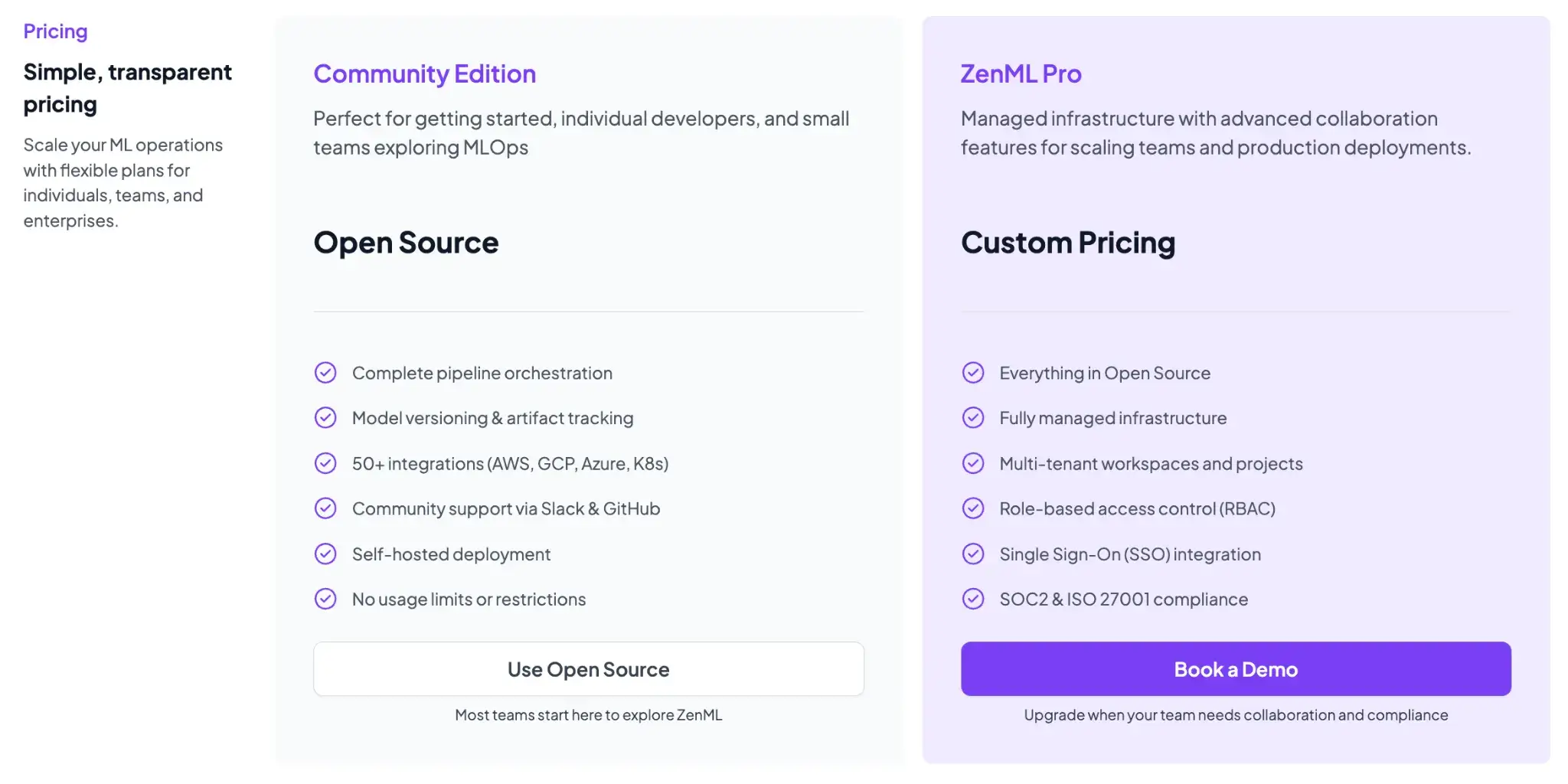
ZenML is free and the core framework can be self-hosted at no cost. For teams that want managed deployment and enterprise features, ZenML offers ZenML Pro (and enterprise options), with pricing based on deployment and scale.
These paid plans include features like SSO, role-based access control, premium support, and hosting, but all the core functionality remains free in the open-source version. Essentially, you can start with ZenML’s free tier and only consider paid options if you need advanced collaboration or want ZenML to manage the infrastructure for you.
Pros and Cons
ZenML’s biggest advantage is its end-to-end approach; it marries data versioning with pipeline orchestration and experiment tracking. This means fewer moving parts, and you’re not stitching together DVC for data, plus Git for code, MLflow for experiments, etc.
Our framework is also good at quickly going from a simple Python script to a reproducible pipeline, thanks to our simple decorator-based APIs.
On the downside, adopting ZenML is a bigger commitment than using a lightweight tool like DVC. You have to structure your code as ZenML pipelines/steps, which introduces some learning curve and refactoring overhead if you’re migrating from a pure script-based workflow.
2. Apache Iceberg
Apache Iceberg is an open table format platform that enables data versioning on data lakes with full ACID transactions, high scalability, and flexible schema evolution. In contrast to DVC, which tracks individual files in a Git-like manager, Iceberg operates at the level of tables (structured datasets) and is designed for big data scenarios.
Features
- Automatically creates an immutable snapshot of the entire table on each write operation. Each snapshot is a consistent point-in-time view of all the data.
- Brings full ACID guarantees (Atomicity, Consistency, Isolation, Durability) to data lakes. Multiple writes can occur safely without corrupting the table state.
- Supports branching and tagging of tables (via snapshot references), so you can experiment against an isolated branch and later promote those changes by updating the table reference.
- Iceberg is designed to be engine-agnostic. You can query or modify tables with Spark, Trino/Presto, Flink, Hive, Snowflake, and more.
Pricing
Apache Iceberg is completely open source (Apache License 2.0) and free to use. There’s no license fee – you can deploy Iceberg in your data lake environment on your own infrastructure.
Pros and Cons
The main advantage of Iceberg as a DVC alternative is massive scalability and reliability. It’s built to handle petabyte-scale datasets with billions of files, far beyond what DVC’s architecture can comfortably manage.
But Iceberg isn’t an end-to-end ML experiment tool; it’s focused on data storage. You would likely use Iceberg in conjunction with other tools (e.g., use Iceberg for your features/dataset store, but use something like MLflow or ZenML for experiment tracking).
3. Delta Lake
Delta Lake is another open-source data lake table format, initially developed by Databricks, that brings ACID transactions and versioning to big data. Like Iceberg, Delta Lake is all about reliability and performance for large datasets on cloud storage.
Feature
- Delta Lake’s core offering is a transaction log (the ‘Delta log’) that records every change to the data. This enables serializable isolation for concurrent writes – your ETL jobs won’t step on each other.
- The platform makes it simple to query older versions of your dataset. You can specify a timestamp or version numbers in your query to access/revert to earlier data.
- Delta Lake is designed for petabyte-scale tables. It stores table metadata in a transaction log (commit JSON files) and periodically writes Parquet checkpoint files to keep reads efficient as the log grows.
- Can enforce schemas, for example, you can prevent new columns or mismatched data types from sneaking in unless explicitly allowed.
Pricing
The Delta Lake format is open-source (since 2019, it’s been donated to the Linux Foundation). You can use it for free by enabling the Delta library in Apache Spark or other engines.
In practical terms, if you are running Spark jobs on EMR, Databricks, or any Spark cluster, using Delta just means including the Delta Lake package – no extra charge.
Pros and Cons
Delta Lake’s pros include its maturity and ecosystem integration. It’s a battle-tested format used in thousands of Databricks deployments and enjoys broad compatibility with Spark and other big data frameworks.
However, it doesn’t have built-in branching mechanisms like Iceberg. You can simulate branches by copying data or using separate directories, but it’s not a first-class feature.
4. Apache Hudi
Apache Hudi (Hadoop Upserts Deletes and Incrementals) is an open-source data lake platform originally developed at Uber. Like Iceberg and Delta, Hudi manages large datasets on cloud storage with ACID guarantees, but Hudi’s distinguishing focus is on streaming ingestion and incremental processing.
Features
- Built to handle record-level updates on big datasets. It offers two storage modes: Copy-On-Write (COW) and Merge-On-Read (MOR). In MOR mode, incoming updates are written to delta files and merged with base data on read, allowing fast ingestion of updates without rewriting entire files.
- Has the ability to perform incremental pulls, i.e., consume only the changes since a given checkpoint. Hudi tracks changes to the dataset in a timeline.
- Provides ACID transactions similar to Delta and Iceberg – commits are atomic and isolated. It also has built-in schema evolution support, allowing you to add new columns or evolve the schema as needed, while maintaining older version compatibility.
- Includes services to manage the data layout over time. Compaction (for MOR tables) will merge delta log files with base files asynchronously so that query performance stays good.
Pricing
Apache Hudi is 100% open source under the Apache License. Like the other table formats, using Hudi won’t cost you anything aside from the infrastructure to run it.
Pros and Cons
Hudi is often the top choice when your workflow involves continuous or real-time data ingestion with versioning. For ML pipelines that consume streaming data or do frequent incremental training, Hudi’s ability to ingest data with low latency and then let you query the latest state or changes is a big win.
But Hudi’s flexibility also leads to complexity. There are many moving parts: different table types (COW vs MOR), background services to schedule, tuning parameters for compaction frequency, indexing, etc. Getting the best performance requires careful configuration based on your use case.
5. Dolt
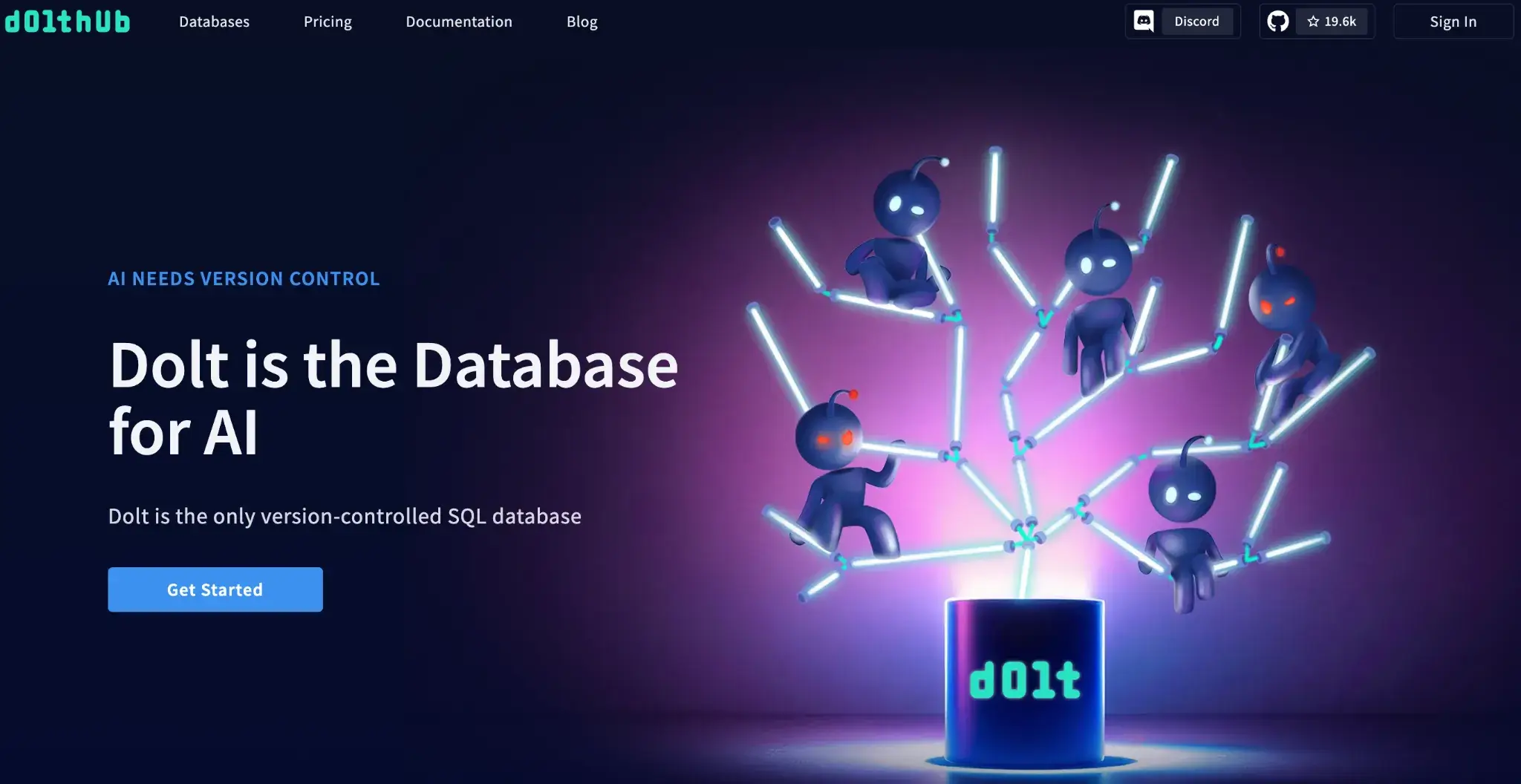
Dolt is a DVC alternative that brings Git-like version control directly into a relational database. It’s often described as ‘Git for Data’: Dolt lets you fork, clone, branch, and merge datasets as if they were code, using SQL as the interface.
Features
- Dolt is a MySQL-compatible database where every table is versioned. You can branch the database, make some changes, and then merge those changes back into the main branch with a Git-style three-way merge.
- Uses the concept of remotes like Git. You can
dolt pushandpullto sync your database with a remote repository. - You can query Dolt database with standard SQL. This means you can plug in tools or do analysis right on the versioned data.
- Internally, Dolt uses a novel Prolly Tree data structure that’s a mix of B-tree and Merkle tree to store table data and allow diffs/merges.
Pricing
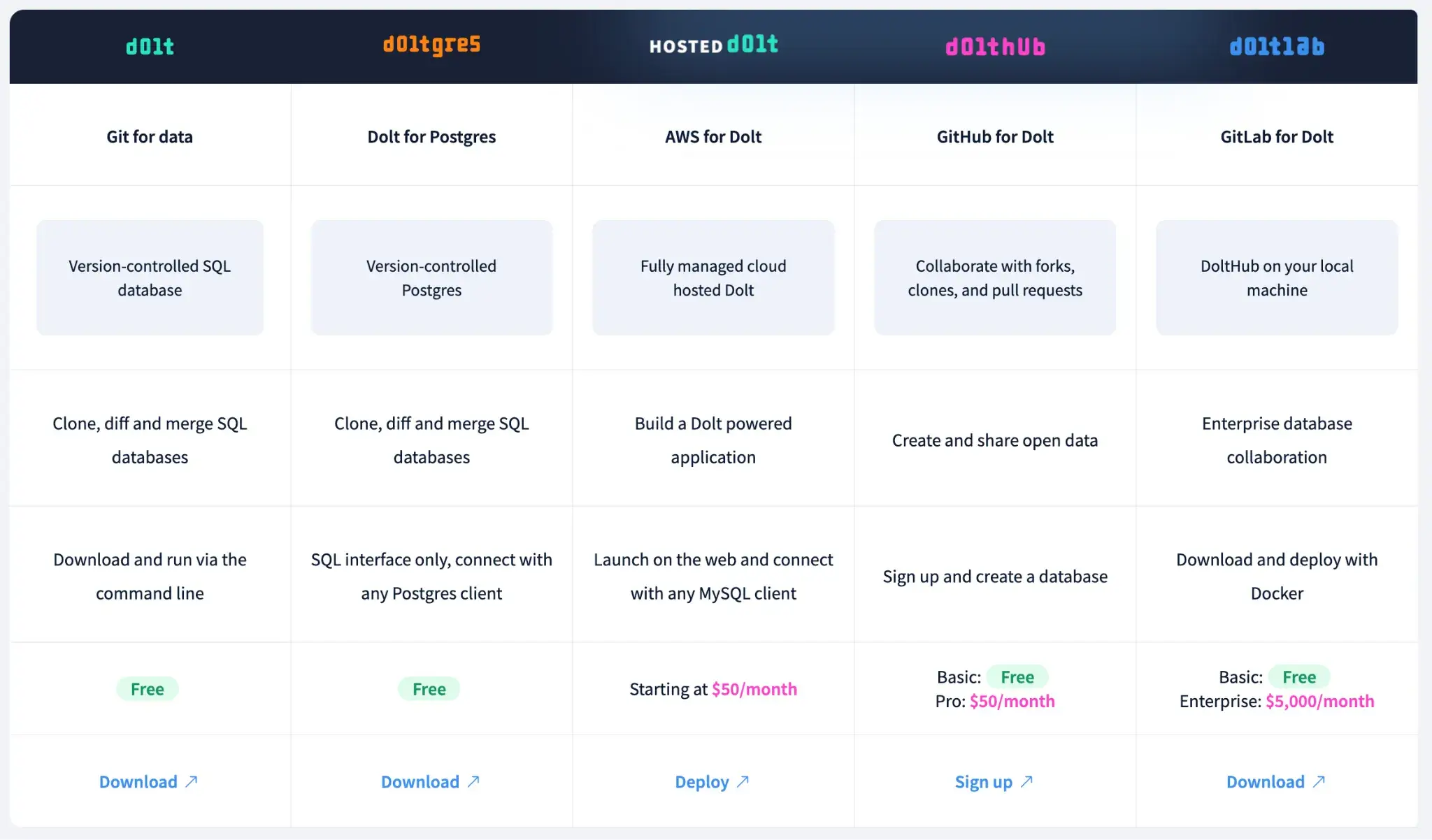
Dolt has several plans to choose from:
- Dolt and Doltgres: Free and open source
- Hosted Dolt: Starting at $50 per month
- DoltHub: Basic is free, Pro starts at $50 per month
- DoltLab: Basic is free, Enterprise is $5,000 per month
Pros and Cons
Dolt’s approach is very powerful for collaborative data curation. If your ML project involves a team collectively building a dataset, think labeling data, or aggregating from multiple sources, Dolt provides a transparent way to manage contributions.
The major limitation is that Dolt is a relational SQL database: it’s best for structured, tabular datasets where Git-like branching and merging are valuable, and it’s not a substitute for data-lake table formats or unstructured blob storage at the petabyte scale.
6. MLflow
MLflow is one of the most widely used platforms for experiment tracking and model management. It isn’t a data versioning tool per se, but it is often considered an alternative or complement to DVC when the primary need is tracking ML experiments rather than datasets.
Features
- Provides an easy way to log parameters, metrics, artifacts, and code versions from your ML code. With a few lines of code, you instrument your training script to log, for example, the hyperparameters, the training accuracy/loss per epoch, and any artifacts.
- Beyond experiment tracking, MLflow includes a Model Registry component. This allows you to version models (assign them names like ‘ClassifierV1’) and manage stages (e.g., Staging, Production).
- Works with any library and any programming language; MLflow has REST APIs and clients in Python, Java, R, etc.
- Stores artifacts in a configurable artifact store (e.g., local filesystem, NFS, Amazon S3, Azure Blob Storage, Google Cloud Storage, or SFTP), while parameters/metrics/tags are stored in the tracking backend store.
Pricing
MLflow is open-source and free to use. The platform lets you host it on your own infrastructure at no cost. Many cloud providers and MLOps services incorporate MLflow; for example, Databricks offers MLflow as a managed service.
Pros and Cons
MLflow’s strength is in simplifying experiment tracking. You get a convenient UI and a well-known API, so much so that MLflow has become a de facto standard in many ML teams.
When viewed as a DVC alternative, MLflow has one big limitation: it does not version large datasets in the way DVC does. It doesn’t provide data management beyond logging files as artifacts.
📚 Read more about MLflow and its alternatives:
7. Weights and Biases Artifacts
Weights & Biases (W&B) is a popular cloud-based experiment tracking tool, and W&B Artifacts is its component for dataset and model versioning. W&B Artifacts serves as a DVC alternative to manage data if you’re already in the W&B ecosystem.
Features
- When you log a dataset as a W&B Artifact, the system calculates checksums for each file and keeps track of content changes.
- One powerful aspect is that W&B automatically tracks lineage: it knows which run used which artifact version and which run produced a given artifact.
- Logging an artifact is typically a few lines. Once logged, you can browse artifact contents in the W&B web UI, compare versions side by side, and even do minor exploration.
- Can either store data in W&B’s cloud or just store references in your own storage. For large datasets, a common pattern is to host the data in your cloud bucket and have the artifact point to it.
Pricing
You can either sign up for the Cloud-hosted or Privately-hosted WandB framework. The pricing plans differ depending on your choice.
Cloud-hosted:
- Free
- Pro: $60 per month
- Enterprise: Custom pricing
Privately-hosted:
- Personal: $0 per month
- Advanced Enterprise: Custom pricing
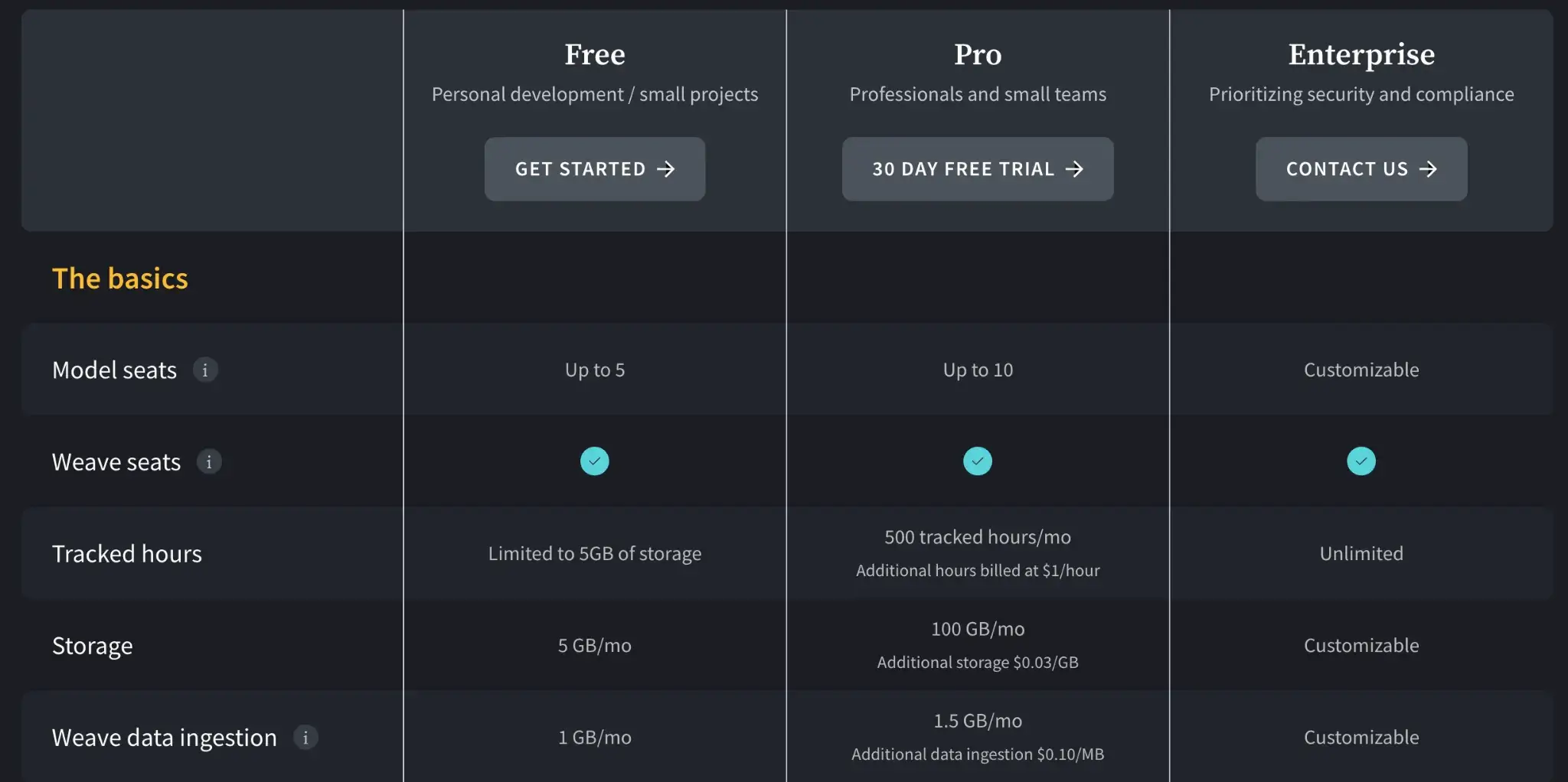
You can read about WandB’s pricing in detail in one of the guides we wrote: WandB Pricing Guide: How Much Does the Platform Cost?
📚 Other relevant guides:
Pros and Cons
W&B Artifacts make dataset versioning extremely convenient if you’re already using W&B. It’s basically zero setup – you use the W&B SDK in your training pipeline, and datasets/models get versioned and tracked.
The cost factor is what we think might make you choose a W&B Artifacts alternative. While DVC is free, W&B can get expensive for large teams and very large datasets once you exceed free limits.
8. ClearML
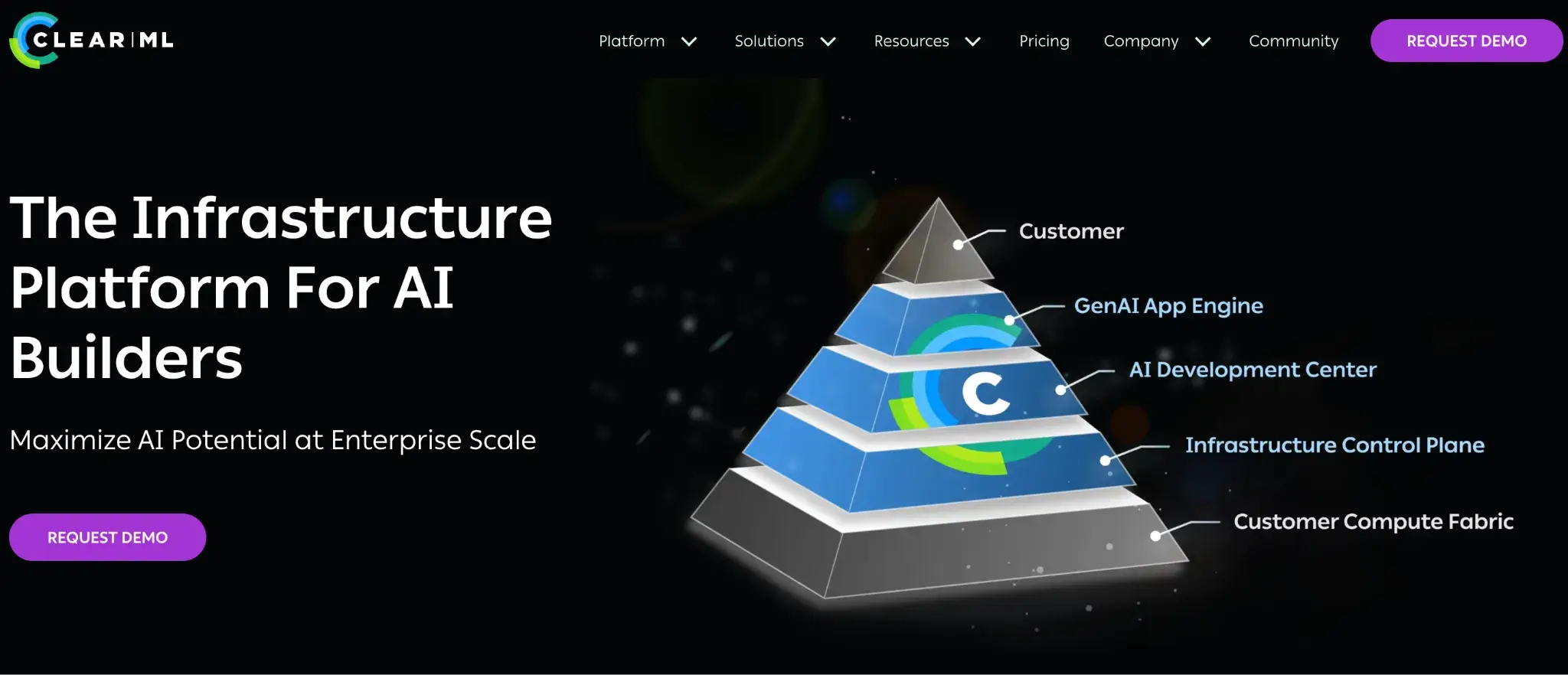
ClearML is an open-source end-to-end MLOps platform that covers experiment tracking, data and artifact versioning, pipeline orchestration, and much more. It’s a more comprehensive alternative to DVC that combines many capabilities under one roof.
Features
- Has a module called ClearML Data that allows you to version datasets and manage them. You can create a new dataset version by adding or removing files, and ClearML will store these files and maintain a version history with immutable hashes.
- Includes an experiment tracker that’s comparable to MLflow/W&B. With a few lines of integration, ClearML automatically logs metrics, hyperparameters, model checkpoints, stdout logs, and even system resource usage from your training script.
- Unlike DVC, ClearML comes with a built-in orchestration engine. You can deploy ClearML Agents on machines/servers to execute jobs, and schedule experiments or pipelines from the ClearML UI.
- Comes with a Model Registry/Repository where all trained models are saved and versioned.
Pricing
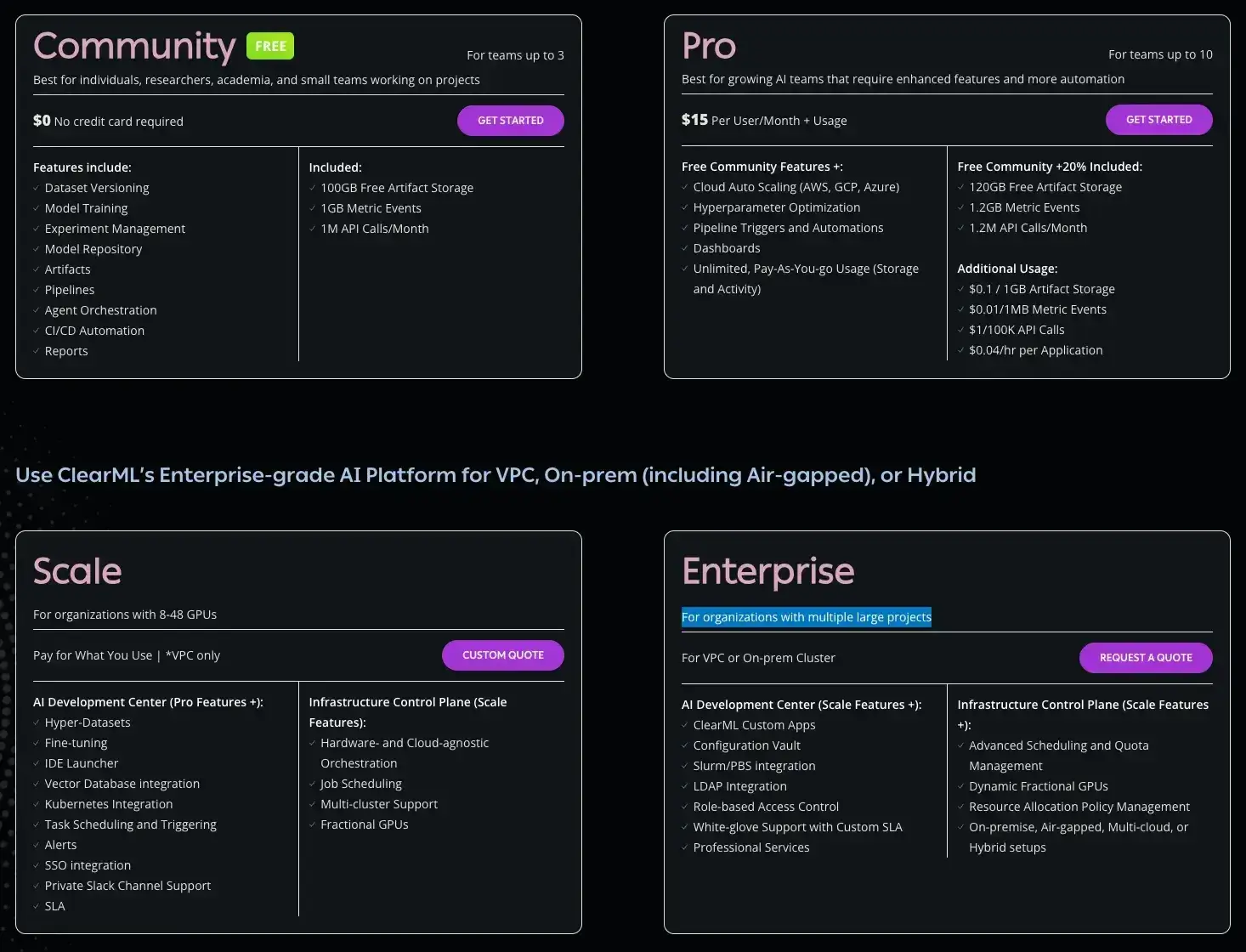
ClearML has a free (self-hosted) plan and two paid plans to choose from:
- Community (Free): Free for self-hosted users (unlimited) or hosted on their SaaS (limited usage). It includes core experiment-tracking and orchestration features.
- Pro ($15/user/month): Adds managed hosting, unlimited scale, and better user management features.
- Scale (Custom): For larger deployments requiring VPC peering, advanced security, and priority support.
Pros and Cons
ClearML’s all-in-one nature is a big plus for teams that don’t want to integrate many separate tools. You get experiment tracking, dataset versioning, and orchestration in one package (with one UI). ClearML has an open-source core that you can self-host. However, their hosted Pro and Scale/Enterprise tiers add additional automation and platform features (e.g., dashboards, pipeline triggers, and HPO UI), so self-hosting the open-source version may mean giving up some paid-tier capabilities.
The breadth of ClearML means it’s a larger system to set up. If you only wanted a simple data version control, pulling in a whole ClearML server might be overkill.
📚 Other relevant guides:
The Best DVC Alternatives for Large Datasets Management
Choosing a DVC alternative depends on where DVC’s design is creating friction for your team.
- For end-to-end ML workflows: Choose ZenML. It handles artifact versioning within pipelines, so you don't need separate Git commits to track experiments. The framework gives you lineage tracking and experiment comparison.
- For petabyte-scale tabular data: Choose Apache Iceberg. It operates at the table level with immutable snapshots and ACID guarantees. The format handles billions of files without the performance degradation DVC experiences at scale.
- For Spark-based environments: Choose Delta Lake. It brings time travel queries and transaction logs to your data lake. You can query any previous dataset version by timestamp or version number.