
On this page
Generative AI makes building an initial OCR proof-of-concept seem deceptively simple. Slap together a Python script, call an API or model, extract some text – done, right? While exciting, this initial step barely scratches the surface of what enterprises actually need: processing potentially millions of unstructured documents—invoices, contracts, IDs—reliably and at scale. This is where simple scripts shatter.
Beyond applying the AI model itself, the true hurdle lies in productionization. How do you handle batch processing efficiently? How do you version your data, models, and code together? What about automatic retries on failure, smart caching to save compute, or tracking every artifact and metric for reproducibility and compliance? Facing this harsh reality of scaling GenAI demands robust workflow orchestration.
While everyone talks about agents, high-value enterprise applications often lie in mastering these automated workflows. This is precisely where ZenML excels. As a platform built from the ground up to automate, manage, and scale complex data pipelines, ZenML provides the necessary structure for demanding tasks like GenAI-powered batch OCR. This includes built-in support for versioning, automatic retries, smart caching, artifact tracking, and seamless integration with various tools.
A Modular Framework for Multi-Model OCR
To demonstrate how ZenML transforms a promising OCR concept into a production-ready asset, I developed OmniReader: a flexible, scalable multi-model OCR workflow that orchestrates document processing pipelines, integrates various vision-language models, and tracks performance metrics to ensure reliable text extraction at scale.
The framework revolves around two core pipelines:
- Batch Processing Pipeline: Designed to efficiently process large document volumes, gathering outputs in a structured format while tracking key performance metrics.- Evaluation Pipeline: Compares outputs from different models against ground truth data using metrics like
CER,WER, and Levenshtein similarity to identify the most effective approach for specific needs.
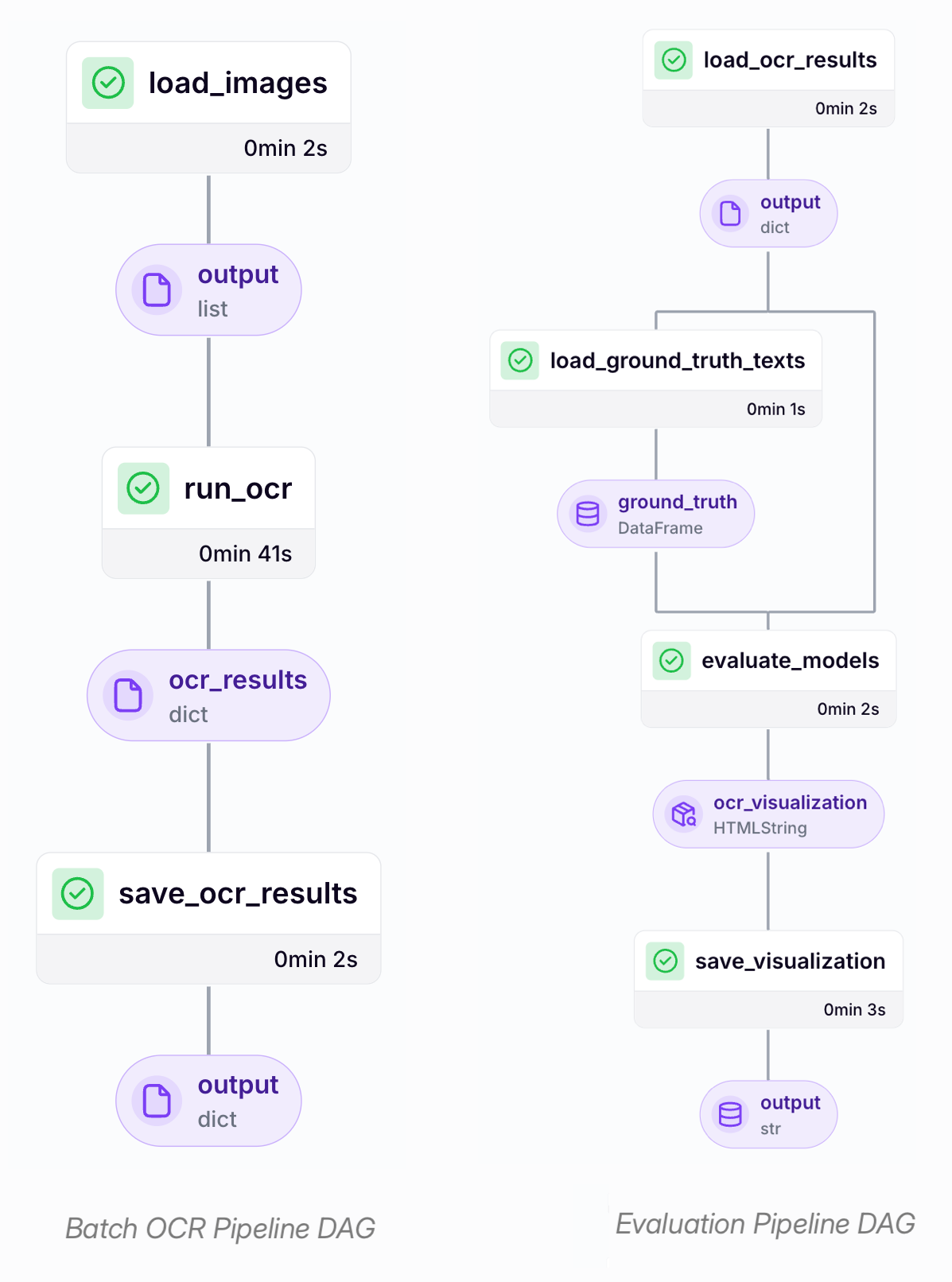
Let’s explore how these pipelines come together to create a resilient document processing system.
Batch OCR at Scale
The first core component is the batch processing pipeline, designed to handle the ingestion and processing of documents in large volumes. It systematically feeds images into the selected OCR models and organizes the extracted text into a consistent, structured format. This enables high-throughput document processing compatible with various models and forms the foundation for subsequent evaluation steps.
By integrating this workflow within ZenML, we gain critical production capabilities often missing from simple scripts:
- Automatic Retry Logic (via step options): Steps can be configured to automatically retry failed document processing attempts.- Smart Caching (via ZenML’s pipeline/step caching): Previously processed documents are skipped unless inputs have changed.- Error Isolation (step-level execution): Failures in individual pipeline steps or document batches can be isolated to avoid interrupting the entire job.- Artifact Versioning (via ZenML’s artifact tracking system): Outputs of each pipeline step are tracked and versioned across runs.- Resource Optimization (via orchestrator-level configuration or step operators): Computing resources (e.g., CPU, memory, GPU) can be specified at the pipeline or step level when using orchestrators.
Following each pipeline run, summary reports (generated by the generate_summary_report step) are automatically captured and stored within ZenML’s artifact store. This provides immediate visibility into the extraction results and overall process execution.
Developing a Unified Interface for Multi-Model OCR
A key requirement was enabling the OCR pipeline to seamlessly utilize various types of models—ranging from cloud-based APIs (like OpenAI) to locally hosted instances (via Ollama)—without altering the core workflow logic. These different model deployment patterns necessitate distinct interaction methods (e.g., specific SDK calls with API keys vs. direct HTTP requests to a local server).
Initially, I aimed to leverage the litellm library in conjunction with instructor to standardize API calls across various models. However, certain local Ollama models, particularly Gemma-3, weren’t fully supported yet. For quicker iteration with these specific models, I opted to interact directly with a locally running Ollama server instead.
I implemented a unified process_image function, which serves as a central routing mechanism to direct incoming requests to the appropriate model-specific handler based on the provided configuration:
This model-agnostic approach allowed new vision-language models to be integrated with minimal changes to the core pipeline structure. The run_ocr function further abstracts this logic, offering a consistent API that optimizes execution for various input scenarios (single/multiple images, single/multiple models) by leveraging parallel processing and batching when it’s advantageous:
Ultimately, this unified interface simplified the process of working with multiple models and enabled more efficient handling of large document volumes.
Evaluating OCR Model Performance
Once text has been extracted, the next step is to evaluate how different models perform. Our evaluation pipeline compares model outputs against ground truth and generates visualizations and metrics.
After extracting text using the batch processing pipeline, the second pipeline focuses on evaluating and comparing the performance of multiple models. It systematically assesses model outputs against ground truth data, and generates quantitative metrics and comparative visualizations.
This evaluation pipeline facilitated our transition from ad-hoc model selection to a more structured, data-driven approach. Its modular design separates the workflow into distinct steps, each focused on a specific evaluation task. This structure enhances flexibility, allowing for straightforward customization of evaluation criteria tailored to different document types or project requirements.
ZenML’s inherent capabilities were instrumental here. Its built-in tracking of artifacts and parameters provided clear traceability, making it easy to understand how results were generated. Furthermore, ZenML’s support for custom visualizations proved highly valuable. By casting HTML content (such as the html_string produced in the pipeline) as zenml.types.HTMLString, we could embed rich, interactive visualizations directly within the pipeline run’s artifacts, readily accessible through the ZenML dashboard.
For instance, the pipeline generates an HTML report that visually compares the overall performance across the evaluated models, serving as one such embedded artifact:
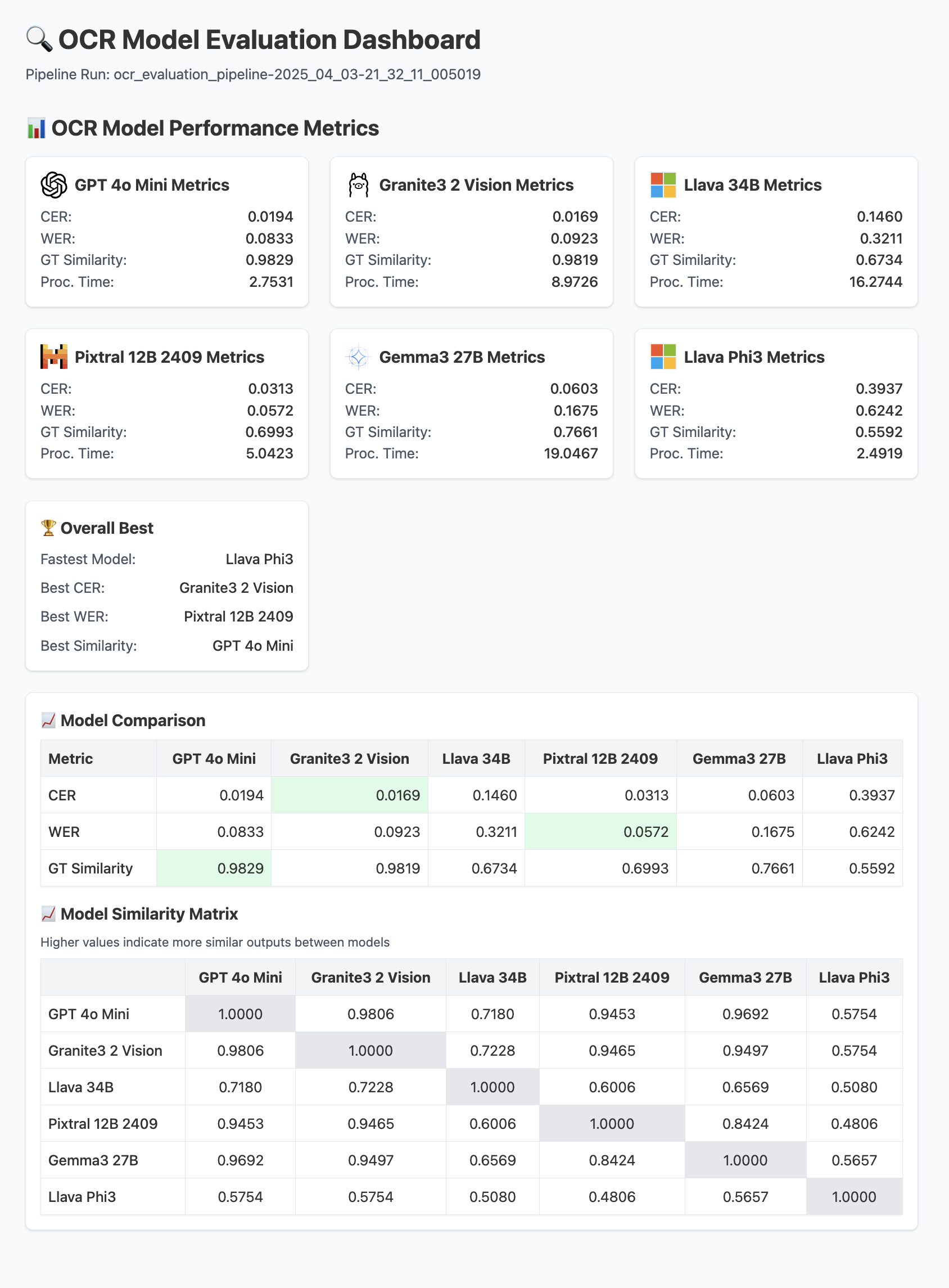
Beyond the overall comparison, the evaluation pipeline calculates detailed performance metrics for each model individually, including:
- Character Error Rate (CER): Quantifies accuracy at the character level.- Word Error Rate (WER): Measures accuracy based on word-level differences.- Ground Truth Similarity: Leverages the Levenshtein ratio to assess the overall alignment between the model’s output and the ground truth text.- Cross-Model Similarity: Compares the outputs of different models against each other to identify potential outliers or systemic inconsistencies.
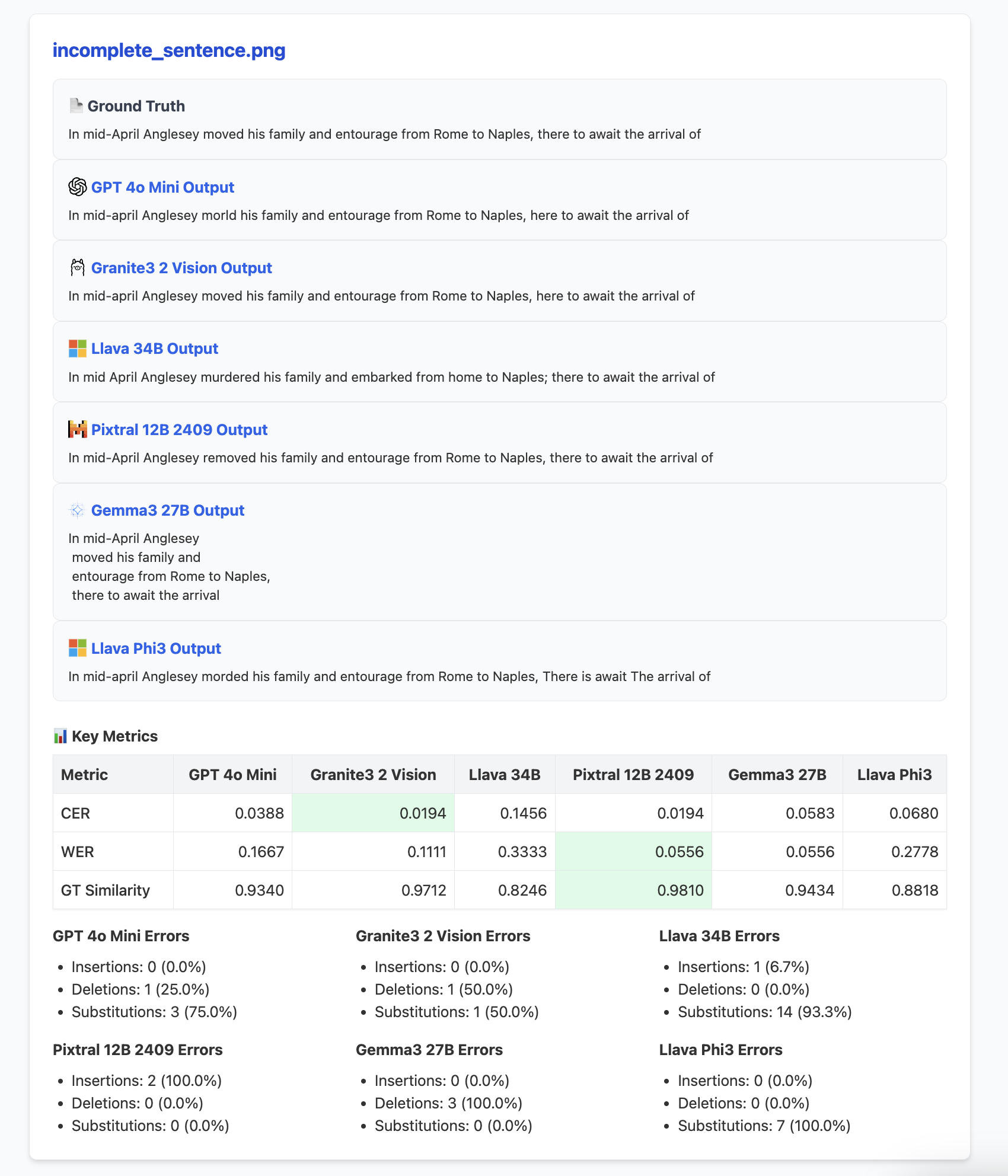
The intention of this framework is not to dictate a fixed set of metrics but rather to provide a reproducible and extensible foundation for model evaluation. Users can easily integrate new metrics, incorporate domain-specific validation rules, or adapt the evaluation logic entirely based on their unique needs.
Key Learnings
Developing and utilizing this multi-model OCR framework highlighted several practical considerations relevant to similar projects:
- Performance is Context-Dependent: OCR model performance varies considerably depending on the type, quality, and domain of the input documents. It is essential to test multiple models directly on representative content rather than assuming one model will universally outperform others.- Prompt Engineering Offers Value: Experimenting with and refining prompts, particularly tailoring them to specific document types or expected structures, can significantly improve extraction quality. Domain-specific context within prompts often leads to better results.- Objective Metrics Aid Selection: Quantitative metrics like
CERandWERprovide a valuable, objective basis for comparing model performance, effectively complementing subjective visual assessments of the output quality.
Try It Yourself
You can explore the OmniReader project and experiment with it by following these steps:
- Clone the project.2. Follow the setup and installation instructions detailed in the project’s
READMEfile.3. Run pipelines or launch the demo application:
The included Streamlit app provides an interactive UI for uploading documents, comparing the extraction results from different models side-by-side, and testing the impact of custom prompts on performance.
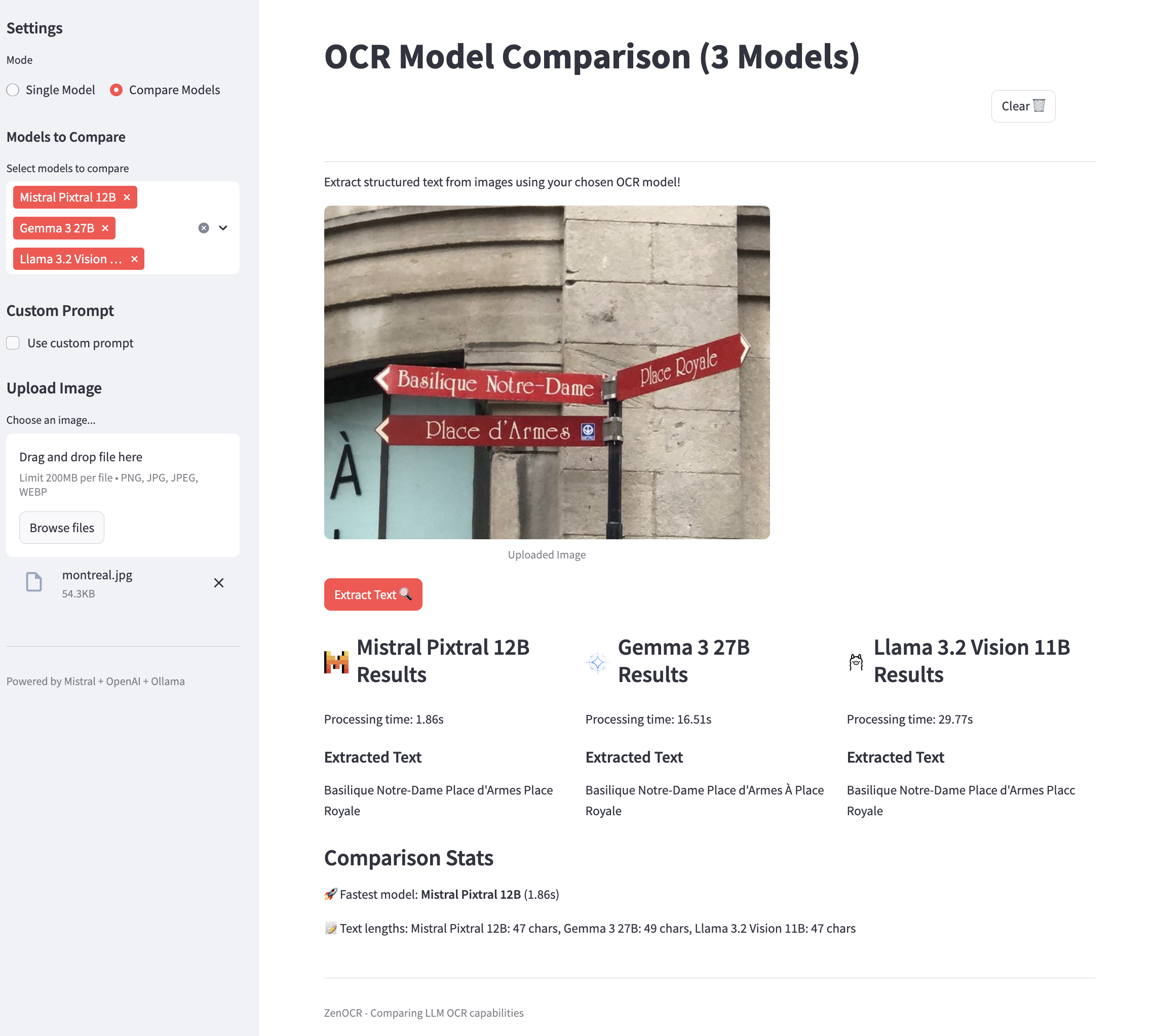
Final Thoughts
The OmniReader project demonstrates a practical approach to evolving from potentially fragmented OCR scripts towards a reliable and scalable pipeline architecture. By utilizing ZenML as the operational backbone, we gained crucial benefits in reproducibility, modularity, and visibility into model performance. Whether tackling document processing challenges in healthcare, finance, logistics, or other operational areas, we hope this framework serves as a useful reference for building and adapting robust, production-ready OCR solutions with greater confidence.