
On this page
Modern machine learning teams often find themselves drowning in ‘glue code,’ the messy, unmaintained scripts that stitch together data ingestion, model training, and deployment.
To solve this, teams turn to orchestration platforms.
You likely know Apache Airflow as the industry standard for data engineering. You know Kubeflow as the Kubernetes-native heavyweight for ML scaling. You probably know ZenML as the extensible framework that ties everything together.
While all three can run pipelines, they serve fundamentally different purposes in the ML stack.
In this Airflow vs Kubeflow vs ZenML article, we compare the three head-to-head across architecture, developer experience, and features to help you decide which tool fits your platform needs.
Airflow vs Kubeflow vs ZenML: Key Takeaways
- Apache Airflow: A mature, general-purpose workflow scheduler with strong support for retries, backfills, and monitoring. It integrates easily with data systems and cloud services through a large provider ecosystem. Not ML-native, so experiment tracking and model management need external tools.
- Kubeflow: A Kubernetes-native platform for running containerized ML pipelines at scale. Well-suited for GPU-heavy training, parallel experiments, and cluster-based execution. Powerful but complex, and requires solid Kubernetes expertise to operate.
- ZenML: A Python-first MLOps framework for building ML pipelines with built-in artifact tracking and lineage. It runs on top of orchestrators like Airflow or Kubernetes without modifying pipeline code. Best suited for teams that want ML-native structure without managing a full platform.
Airflow vs Kubeflow vs ZenML: Maturity and Lineage
To understand the current capabilities of these tools, one must first understand their origins.
| Metric | Airflow | Kubeflow | ZenML |
|---|---|---|---|
| First Public Release | Announced 2015 | 2018 (Google) | Early 2021 |
| GitHub Stars | 43.6k+ | 15.3k+ | 5.1k+ |
| Forks | ~16.1k | ~2.6k | ~562 |
| PyPI Downloads (last 30 days) | ~15 million | ~12.8 million | ~81,515 |
| Core Philosophy | Task-based orchestration. “Schedule anything” defined as a DAG of tasks. | Infrastructure-based. “Run ML workloads as containers on Kubernetes.” | Pipeline-based. Decouples ML code from the infrastructure it runs on. |
| Primary Audience | Data Engineers | DevOps / MLOps Engineers | ML Engineers & Data Scientists |
| Notable Proof Points | Originated at Airbnb and widely adopted across the industry for batch data workflows. | Used by Spotify, Bloomberg, and teams deeply invested in Kubernetes-native ML stacks. | Used by teams that need portable, reproducible, infrastructure-agnostic ML pipelines. |
Airflow is the oldest and has the most GitHub stars. It was created at Airbnb in 2014 to solve in-house data engineering headaches. Today, Airflow is widely adopted across large enterprises and is often the default scheduler for batch data workflows.
Kubeflow was announced/open-sourced in December 2017; its first release (0.1) was announced in 2018. An ambitious effort to bring Google’s ML pipeline practices to the open-source Kubernetes world. Though its user base is more niche and often comprises large enterprises and teams heavily invested in K8s
ZenML was released in early 2021. It’s the youngest and thus better reflects modern MLOps trends and challenges that neither Airflow nor Kubeflow has fully addressed. While new, its adoption is driven by the ‘modern data stack’ philosophy. More of why it’s a go-to tool for forward-thinking ML teams at JetBrains and more companies.
Airflow vs Kubeflow vs ZenML: Features Comparison
Here’s a quick overview of all three frameworks compared:
| Feature | Apache Airflow | Kubeflow | ZenML |
|---|---|---|---|
| Best Suited For | Data engineering, ETL, and batch processing teams. | Deep learning at scale; platform and infrastructure engineering teams. | MLOps, applied ML, and GenAI teams that need iteration speed. |
| Pipeline Abstraction | Python DAGs using operators (task-based). | Python DSL compiled to YAML (container-based). | Pythonic @step and @pipeline decorators (function-based). |
| Orchestration, Scheduling, and Execution | Native time-based scheduler with backfills. | Relies on Argo Workflows (on Kubernetes) for execution. | Orchestrator-agnostic (can run on Airflow, Kubeflow, or locally). |
| Artifact Tracking | None natively (requires XComs or manual S3 logging). | Basic artifact passing; metadata stored in MySQL/SQLite. | Native: automatically tracks inputs and outputs of every step. |
| Environment Handling | Python environment can become messy and conflict-prone. | Docker container per step (isolated but heavy). | Can build Docker images for remote execution when configured with an image builder and a remote orchestrator or step operator. |
Now let’s compare each feature head-to-head:
Feature 1. Pipeline Abstractions and Developer Experience
A big difference between Airflow, Kubeflow, and ZenML is how you write pipelines and tasks, and how smoothly you can express ML workflows in each.
ZenML
ZenML offers a developer experience that is closest to native Python development. You define workflows using two decorators:
@step: For individual units of work, such as data loading or model training.@pipeline: To connect those steps in execution order.
Each step is a normal Python function that returns objects, not file paths.
When a step runs, ZenML automatically records its inputs and outputs as artifacts. You don’t need to write code to save artifacts to a path. If a step returns a DataFrame or a trained model, ZenML serializes and stores it in a configured artifact store such as local storage, S3, or GCS. This is all configurable via ‘Stack’ components in ZenML.
Our ‘artifact-first’ mentality is natively aligned with how data scientists think about data flow.
Besides, ZenML can build containers for you when a step operator or orchestrator supports it, but production workloads still benefit from custom Docker images.
Here’s a simple end-to-end example that demonstrates the basic workflow:“
import numpy as np

from typing import Tuple

from zenml import step, pipeline

# Create steps for a simple ML workflow
@step
def get_data() -> Tuple[np.ndarray, np.ndarray]:
    # Generate some synthetic data
    X = np.array([[1, 2], [3, 4], [5, 6], [7, 8]])
    y = np.array([0, 1, 0, 1])
    return X, y

@step
def process_data(data: Tuple[np.ndarray, np.ndarray]) -> Tuple[np.ndarray, np.ndarray]:
    X, y = data
    # Apply a simple transformation
    X_processed = X * 2
    return X_processed, y

@step
def train_and_evaluate(processed_data: Tuple[np.ndarray, np.ndarray]) -> float:
    X, y = processed_data
    # Simplistic "training" - just compute accuracy based on a rule
    predictions = [1 if sum(sample) > 10 else 0 for sample in X]
    accuracy = sum(p == actual for p, actual in zip(predictions, y)) / len(y)
    return accuracy

# Create a pipeline that combines these steps
@pipeline
def simple_example_pipeline():
    raw_data = get_data()
    processed_data = process_data(raw_data)
    accuracy = train_and_evaluate(processed_data)
    print(f"Model accuracy: {accuracy}")

# Run the pipeline
if __name__ == "__main__":
    simple_example_pipeline()
Airflow
Airflow uses Directed Acyclic Graphs (DAGs) defined in Python.
You can use the classic approach of instantiating operators (e.g., PythonOperator, BashOperator, etc.) and explicitly wiring their dependencies. Or, use the newly introduced TaskFlow API with @dag and @task decorators.
Either way, Airflow’s abstraction is task-oriented: each task is a unit of work, and you compose them into a DAG with explicit >> or << dependency arrows or context managers.
For example, here is a simple Airflow DAG using the TaskFlow API:
from airflow.decorators import dag, task
from datetime import datetime

@dag(schedule_interval=None, start_date=datetime(2023,1,1))
def ml_pipeline():
    @task
    def load_data():
        # load or generate data
        return "/path/to/data.csv"

    @task
    def train_model(data_path: str):
        # training code here
        model_path = "/path/to/model.pkl"
        return model_path

    @task
    def evaluate(model_path: str):
        # evaluate the model
        accuracy = 0.95
        print(f"Model accuracy: {accuracy}")

    data = load_data()
    model = train_model(data)
    evaluate(model)

my_dag = ml_pipeline()
In this example, Airflow will run each task and handle retries on failure, logging, and related tasks. The core flexibility is that Airflow tasks can call any service or run any code.
However, Airflow lacks native concepts for ML workflows. For example, there’s no automatic passing of data artifacts between tasks. You either pass small data via return values/XCom, or explicitly read/write from a storage. Worst-case scenario, you end up writing code to log parameters in each MLflow task.
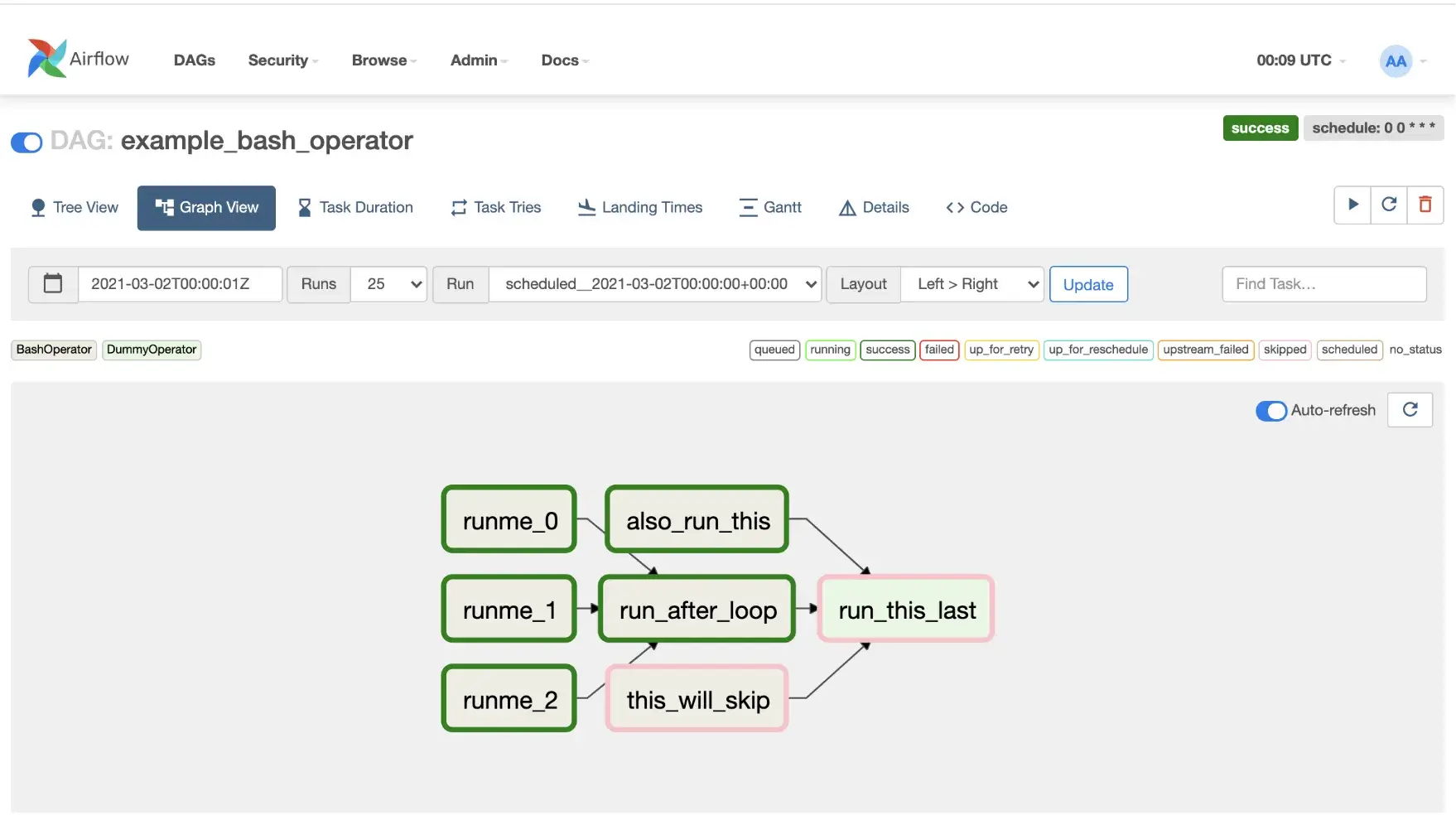
On the positive side, Airflow’s developer experience has improved with features like the UI’s Code View and Graph view, which help you visualize and debug DAGs.
Kubeflow
In Kubeflow, you define pipelines using the Kubeflow Pipelines SDK, a Domain-Specific Language (DSL) that compiles code into a static YAML or ZIP file.
Each step of a pipeline is a containerized component. You define clear inputs and outputs for every step, and Kubeflow schedules them as individual Kubernetes pods.
There are a couple of ways to do this:
- Lightweight Python components: Annotate a Python function with
@kfp.dsl.component(or usekfp.components.create_component_from_func) and the SDK will wrap it in a container. This is convenient for simple steps, but packages the source code and requirements each time. - Prebuilt container components: For more control, you might build a Docker image for, say, your data prep code or training code, and then write a component YAML that references that image and defines input/output arguments.
This enforces isolation between steps and makes execution predictable across runs. Data and model artifacts move between steps through shared storage and a metadata backend, not through in-memory Python objects.
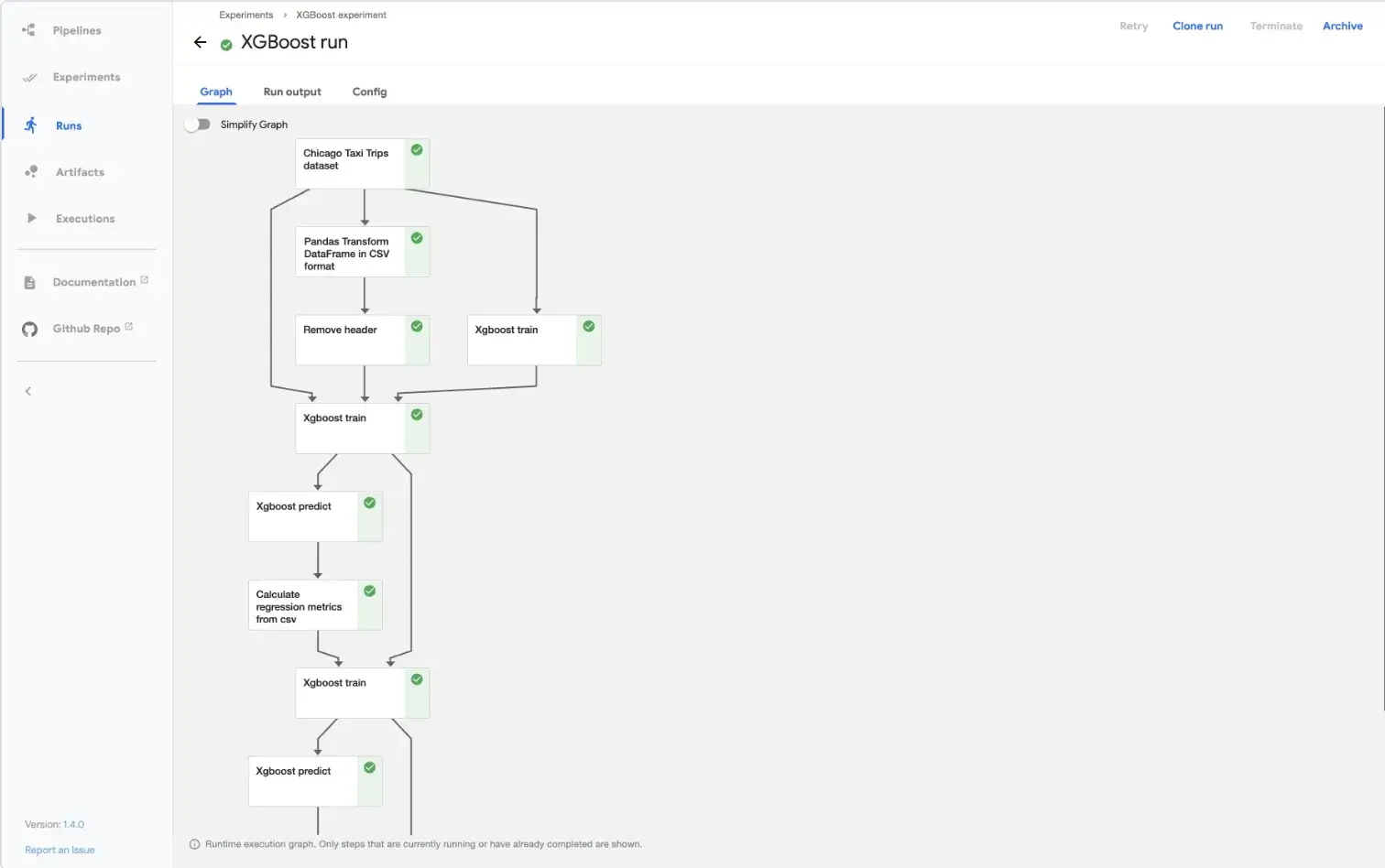
Kubeflow records execution metadata and artifact lineage for every run. The Kubeflow UI visualizes your pipeline’s DAG as it executes, similar to Airflow’s.
However, the need to containerize code for each step can slow down iteration. Debugging Kubeflow pipelines often requires inspecting complex YAML manifests and Kubernetes pod logs.
Bottom line: For ML teams, ZenML offers a superior developer experience. It allows data scientists to write standard Python code without worrying about Dockerfiles, YAML hell, or complex DAG operators. Airflow is excellent for data engineering but requires quite a lot of boilerplate for ML. Kubeflow is powerful but notoriously difficult to set up and iterate on.
Feature 2. Orchestration, Scheduling, and Execution Model
The orchestration engine determines how reliable, scalable, and responsive the system is.
ZenML
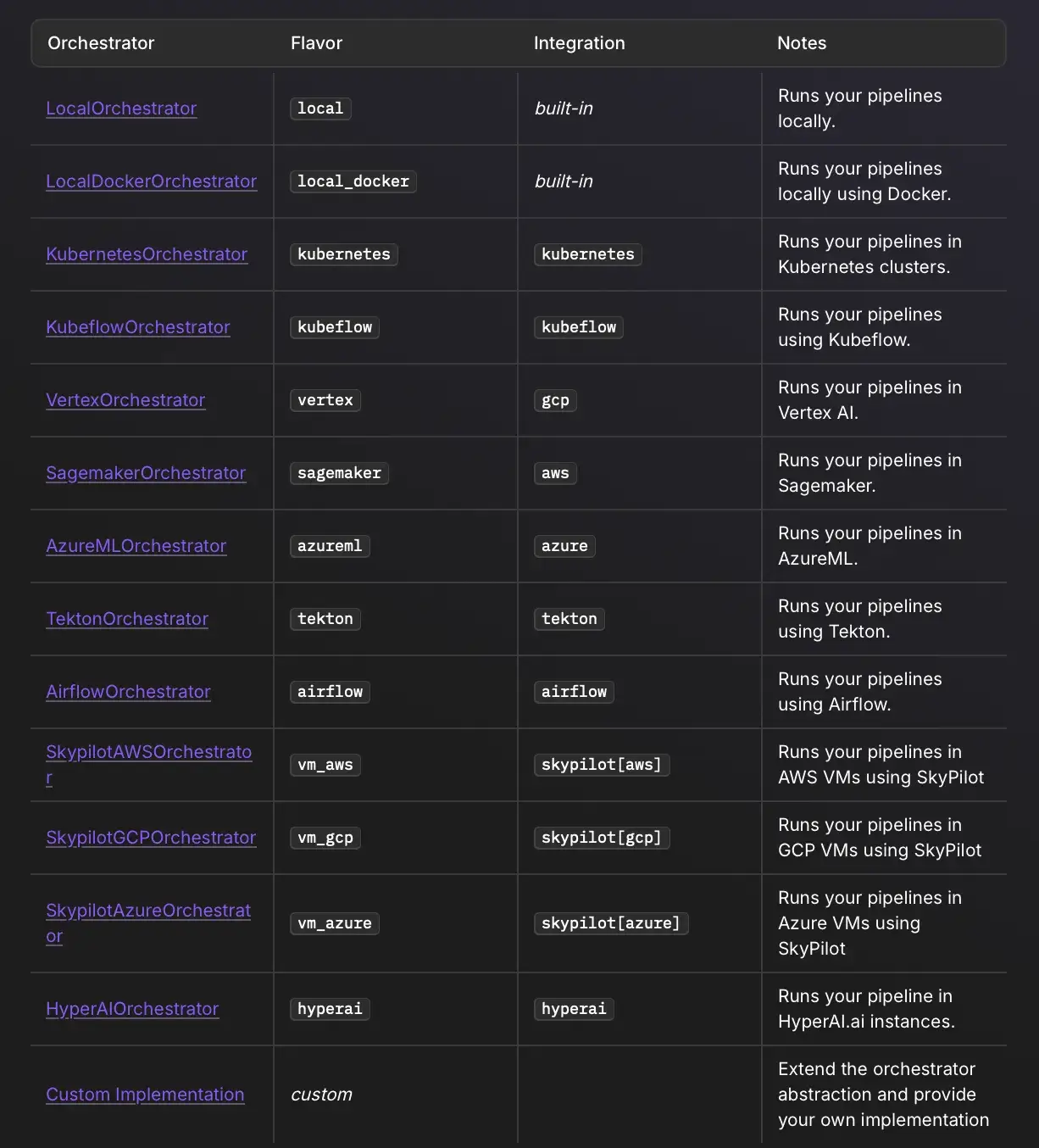
ZenML pipelines do not have their own execution engine. Instead, it delegates low-level orchestration to pluggable orchestrators, like:
- Airflow Orchestrator: ZenML generates an Airflow DAG for your pipeline and submits it to an Airflow server you have configured. You then rely on Airflow for scheduling, parallelism, retries, etc.
- Kubeflow Orchestrator: ZenML can translate your pipeline to a Kubeflow pipeline and run it on a Kubeflow Pipelines deployment. Then you get Kubernetes scalability.
- Others: There are connectors for Argo Workflows, AWS Step Functions, etc., and you can expect more to be added given ZenML’s 'bring your own stack' philosophy.
When it comes to scheduling, ZenML does not include a scheduler UI like Airflow’s. You would use the orchestrator’s scheduler.
But because ZenML uses pluggable orchestrators, it achieves the best of both worlds: Airflow’s scheduling and Kubeflow’s scalable execution.
The benefit here is flexibility. If you start with Airflow and later want to move to Kubeflow, ZenML makes that easier. You swap out the orchestrator, and your pipeline code remains the same.
Similarly, if a new orchestrator is introduced tomorrow, ZenML could add support for it, and your pipelines would gain that option.
Airflow
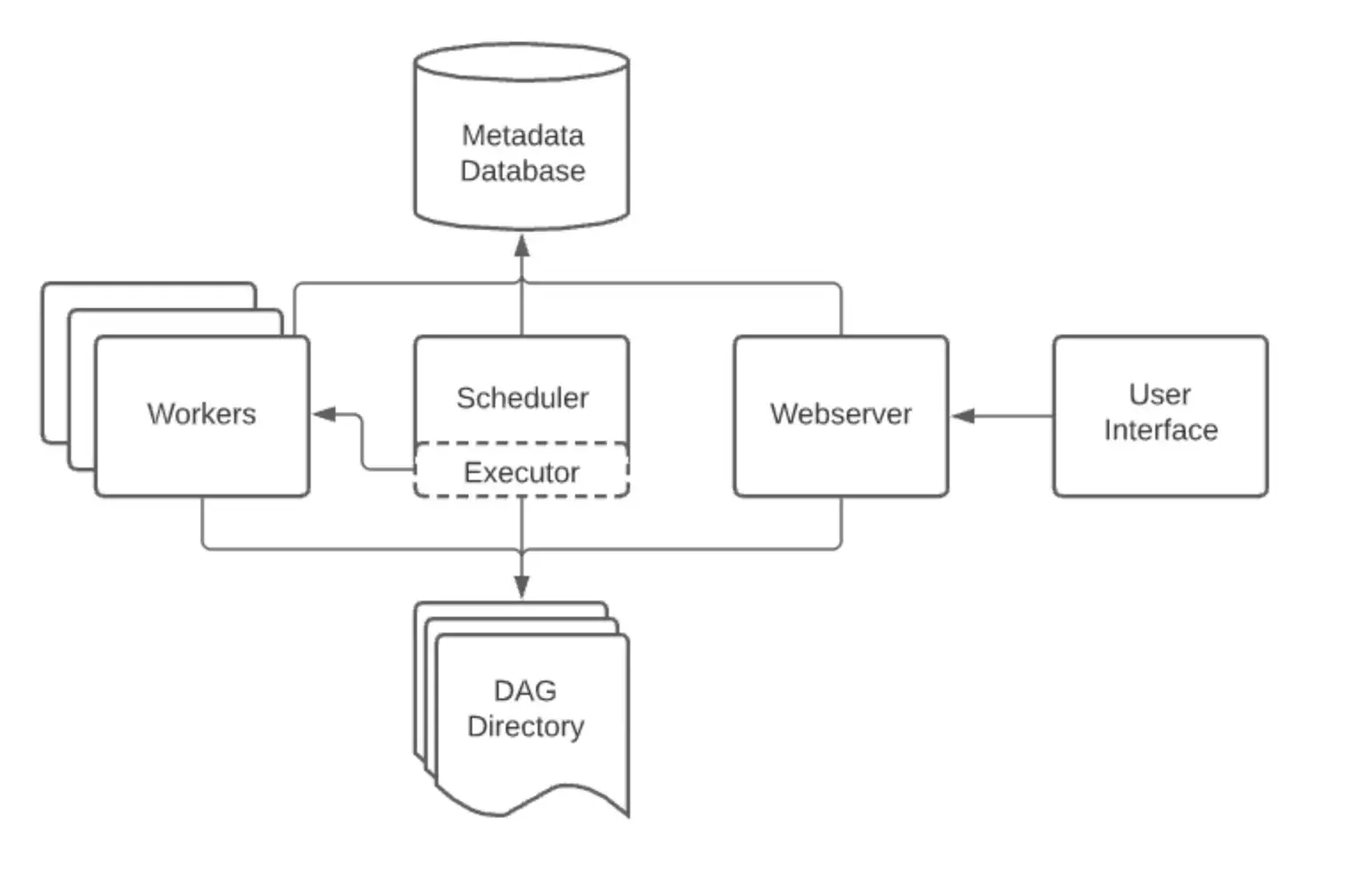
Airflow was built as a scheduler first and an executor second. Its scheduler is a highly sophisticated, multi-threaded loop designed to manage thousands of DAGs and tasks with support for:
- Backfilling: Run pipelines for past dates to process historical data.
- Retries and Alerts: Granular control over what happens when a task fails.
- SLA Monitoring: Alerts if a task takes too long.
Airflow 3.0 expands this with ‘Event-driven Scheduling,’ allowing DAGs to be triggered by external events.
Execution wise, tasks are distributed to Workers via a message broker (Celery) or spun up as pods in Kubernetes.
Airflow 3 introduces a service-oriented architecture with a Task Execution API that decouples task execution from the scheduler and reduces the need for components/tasks to access the metadata DB directly (using API-based communication instead).
However, Airflow’s worker architecture can be limiting for ML. Training a large model on an Airflow worker often leads to resource contention unless you offload the compute to a KubernetesPodOperator. The scheduler has limited visibility into the granular progress of the ML training loop inside that pod.
Kubeflow
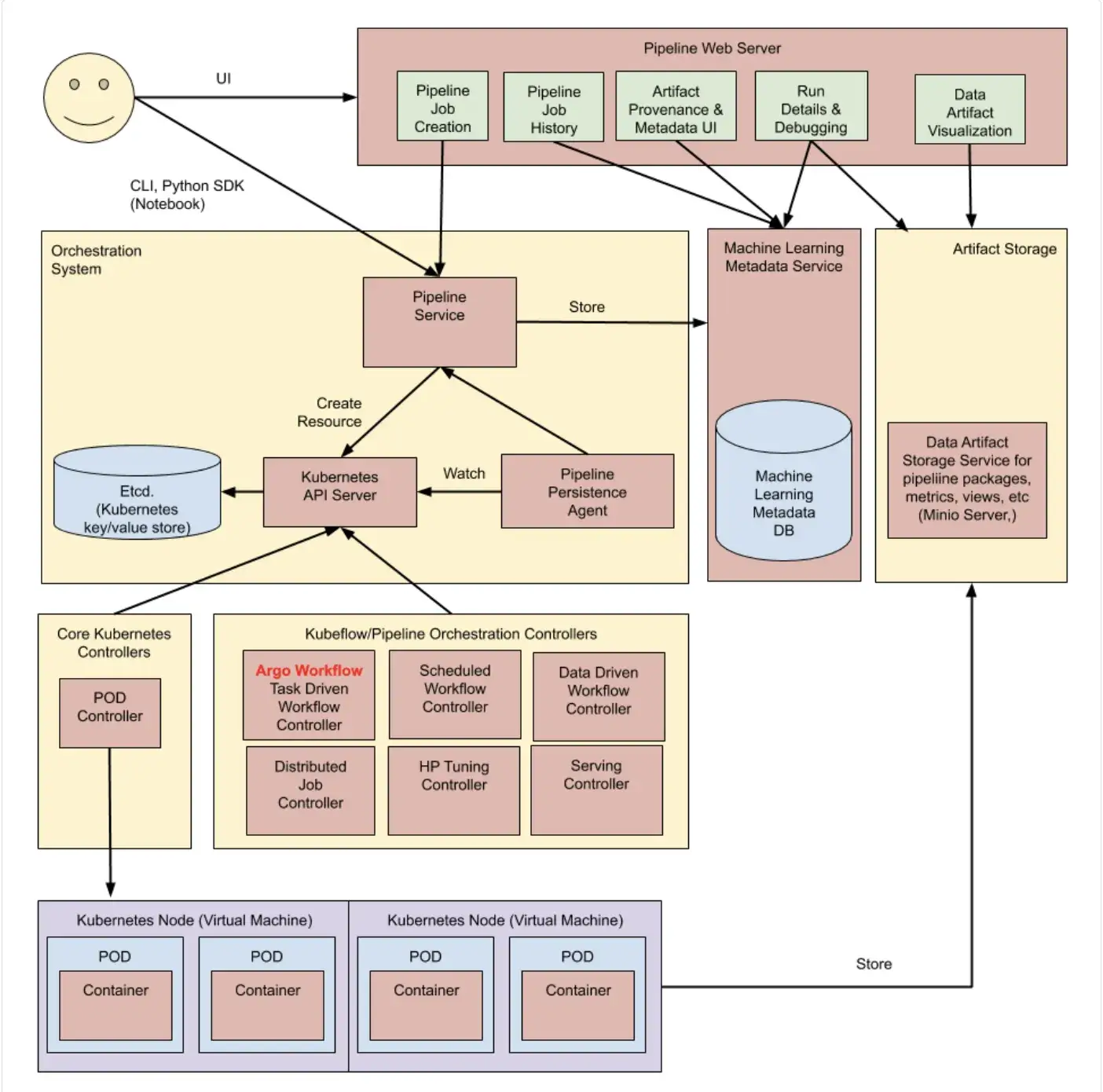
Kubeflow relies on the Kubernetes control plane to manage execution. It uses Custom Resource Definitions (CRDs) to define pipelines and the Argo Workflow engine to execute them.
Every step in a Kubeflow pipeline is a Kubernetes Pod. Each Kubeflow Pipeline run is a coordinated set of Kubernetes pods. It excels at two aspects:
- Scalability: It spins up a separate pod for every single step. If you need to train 100 models in parallel, Kubeflow handles this natively.
- Resource Management: Because it is native to Kubernetes, you can easily assign GPUs, TPUs, or specific memory limits to individual steps.
Kubeflow Pipelines offers basic scheduling through recurring runs, which you can define via the UI or API. These triggers are time-based and limited in scope, without advanced calendar logic like business days or complex intervals.
As a result, many teams rely on an external scheduler, often Airflow, to trigger Kubeflow pipelines.
Bottom line:
- If you need complex calendar scheduling and backfills, Airflow is the winner.
- If you need parallel execution on Kubernetes, Kubeflow is the winner.
- ZenML wins on flexibility; it allows you to switch between these backends based on your needs (e.g., use Airflow for nightly retraining and Kubeflow for large-scale grid search).
Feature 3. Experiment Tracking, Metadata, and Lineage
For ML workflows, keeping track of what you ran, with which data, parameters, and results, is extremely important. Let’s see how each tool approaches this:
ZenML
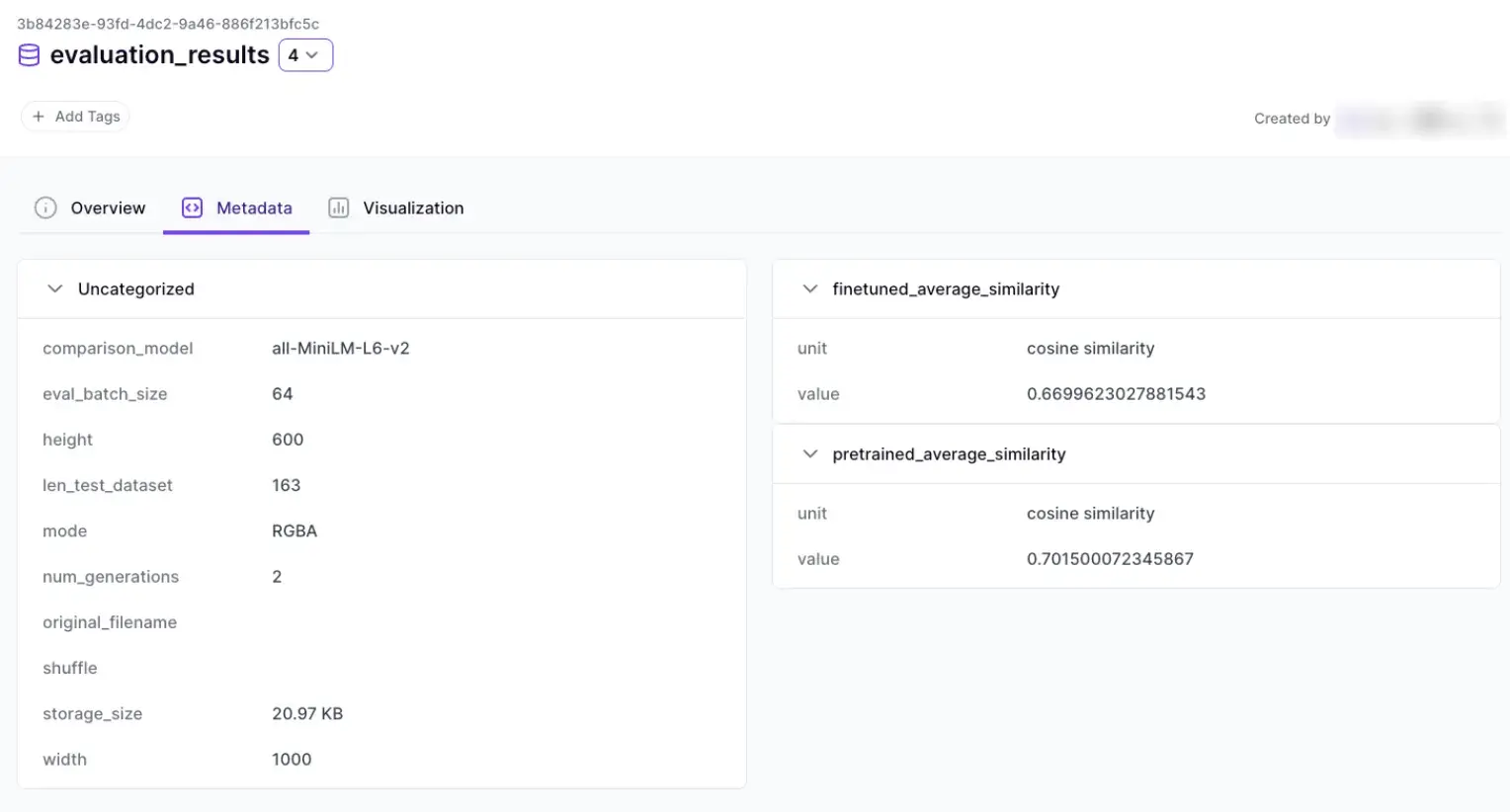
ZenML treats Metadata and Lineage as first-class citizens. Every time a step runs, ZenML automatically saves the inputs and outputs to an artifact store and links them in a metadata store.
Additionally, ZenML provides a dashboard UI for inspecting pipeline runs, artifacts, and lineage (availability and feature depth can depend on how ZenML is deployed and which plan you’re on).
For example, you can click on a pipeline run and see each step, its output artifacts, and then click an artifact to see which run and step produced it.
This is similar to Kubeflow’s lineage graph and is pretty useful for debugging and audit trails.
It also integrates natively with MLflow and Weights & Biases (W&B) for experiment visualization.
Moreover, ZenML abstracts the concept of artifacts. Whether the data is stored in AWS S3, Google Cloud Storage, or Azure Blob Storage, ZenML automatically handles versioning and retrieval. The system ensures that every pipeline run is immutable and reproducible by default.
Airflow
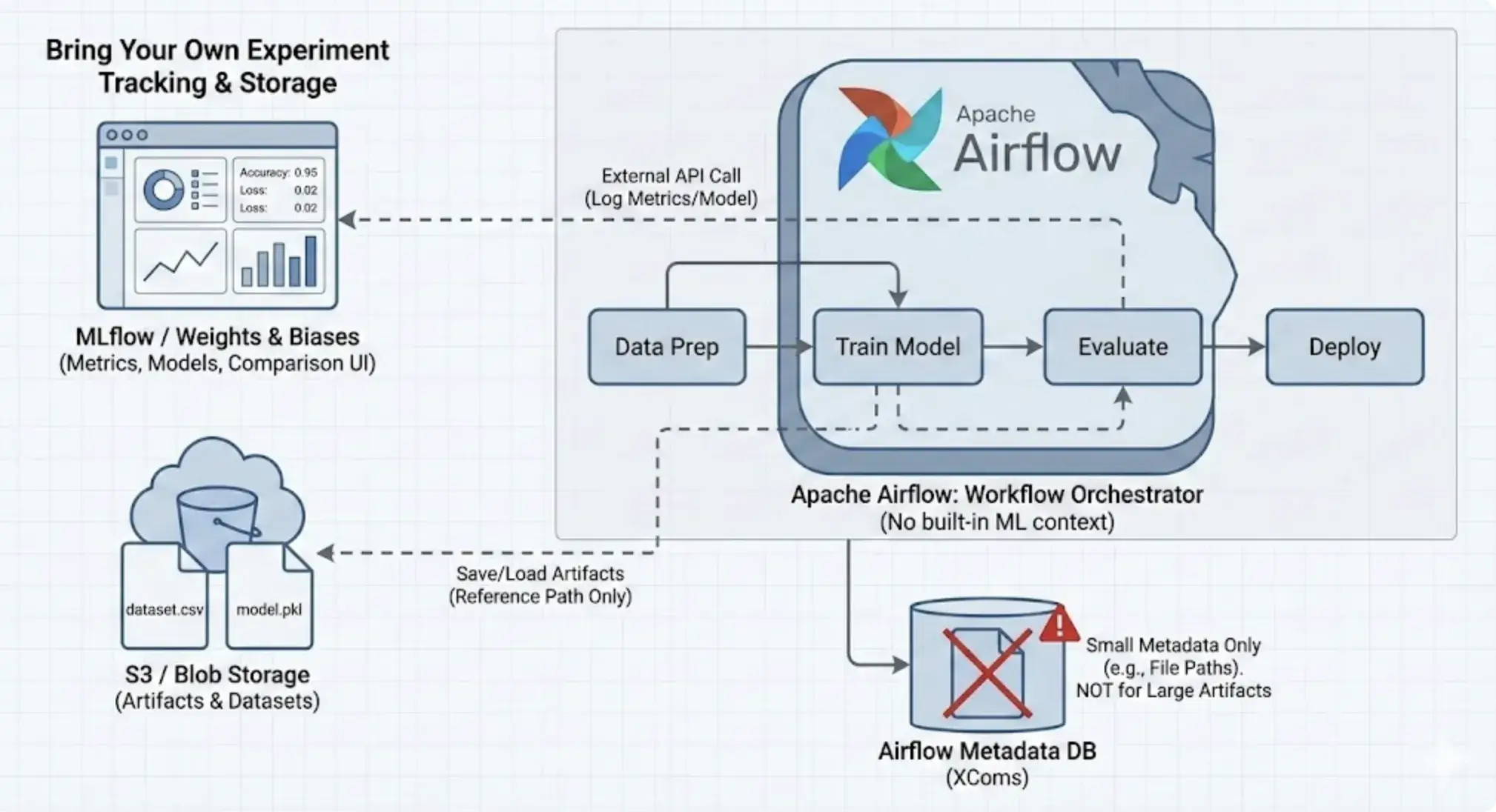
Airflow has no built-in concept of ML artifacts. It doesn’t inherently know that a file is a dataset or that a model was produced.
You can track hyperparameters or model versions by adding external calls to tools like MLflow. But there is no built-in UI for comparing ML experiments or visualizing metrics.
One relevant built-in Airflow concept is XCom, which allows tasks to pass small results to one another. You could store artifacts in Airflow’s metadata DB and then query it. These are stored in Airflow’s metadata DB. But that’s really stretching Airflow beyond its intended use.
So Airflow’s stance is basically ‘bring your own experiment tracking.’ Use Weight & Biases, MLflow, or even a spreadsheet – Airflow will just run the pipeline.
Kubeflow
Kubeflow includes a dedicated component, ML Metadata (MLMD), designed to track the lineage of ML artifacts.
When running a pipeline, KFP automatically logs artifacts, like models, datasets, and metrics, to the MLMD store. Moreover, Kubeflow’s UI can display evaluation artifacts, such as plots and metrics, when they are logged in supported formats during pipeline runs.
Kubeflow also has a Model Registry component/project that provides a central index for models, versions, and related metadata. It fills a gap between model experimentation and production activities. It provides a central interface for all stakeholders in the ML lifecycle to collaborate on ML models.
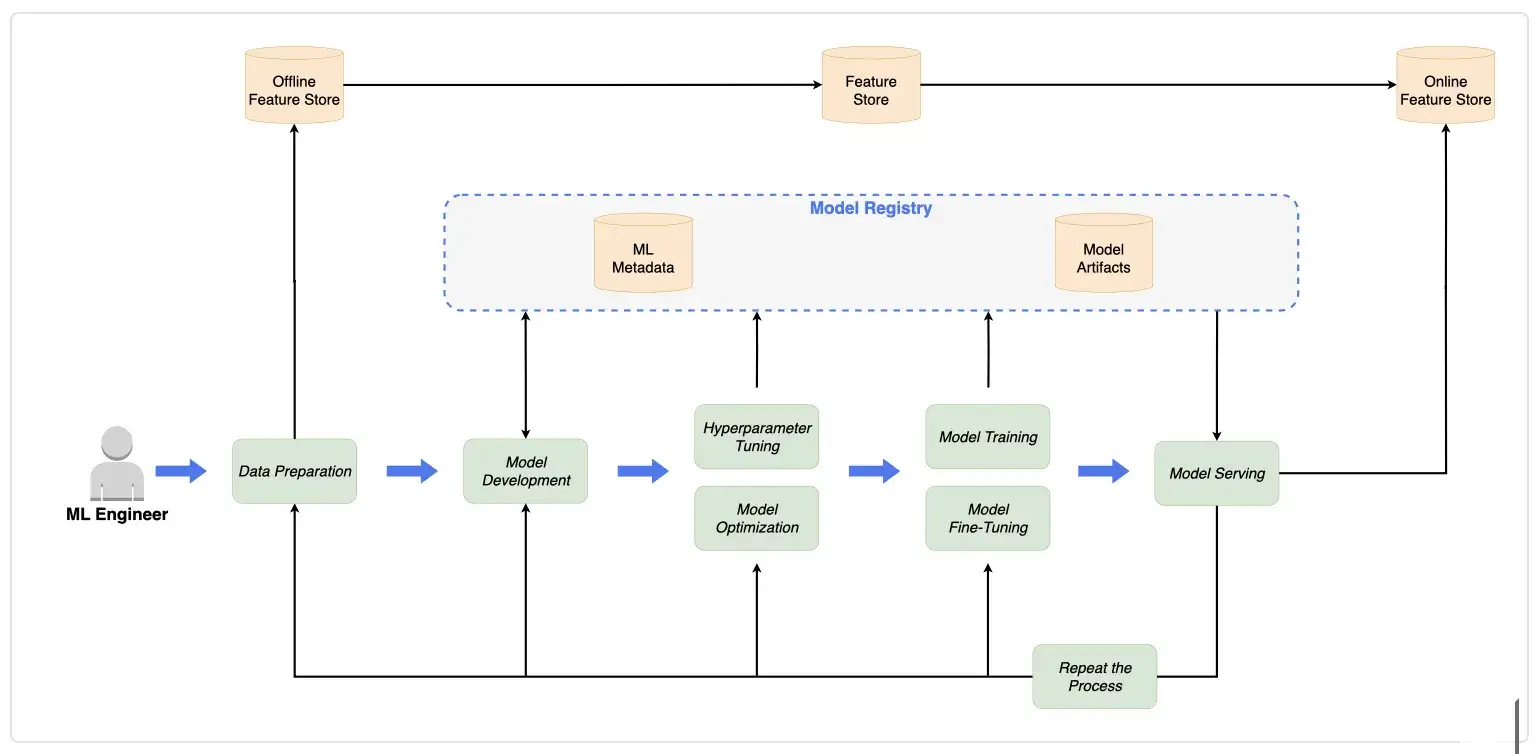
While powerful, MLMD is complex to query and manage. The metadata is tightly coupled to the Kubeflow ecosystem. The visualization capabilities, while strong, often require developers to write metadata in specific file formats for correct rendering.
Bottom line: ZenML offers the most comprehensive, automated lineage tracking. It bridges the gap between orchestration (running the code) and experiment tracking (saving the results).
Airflow vs Kubeflow vs ZenML: Integration Capabilities
No tool lives in isolation. Here’s how Airflow, Kubeflow, and ZenML integrate with external apps and tools.
ZenML
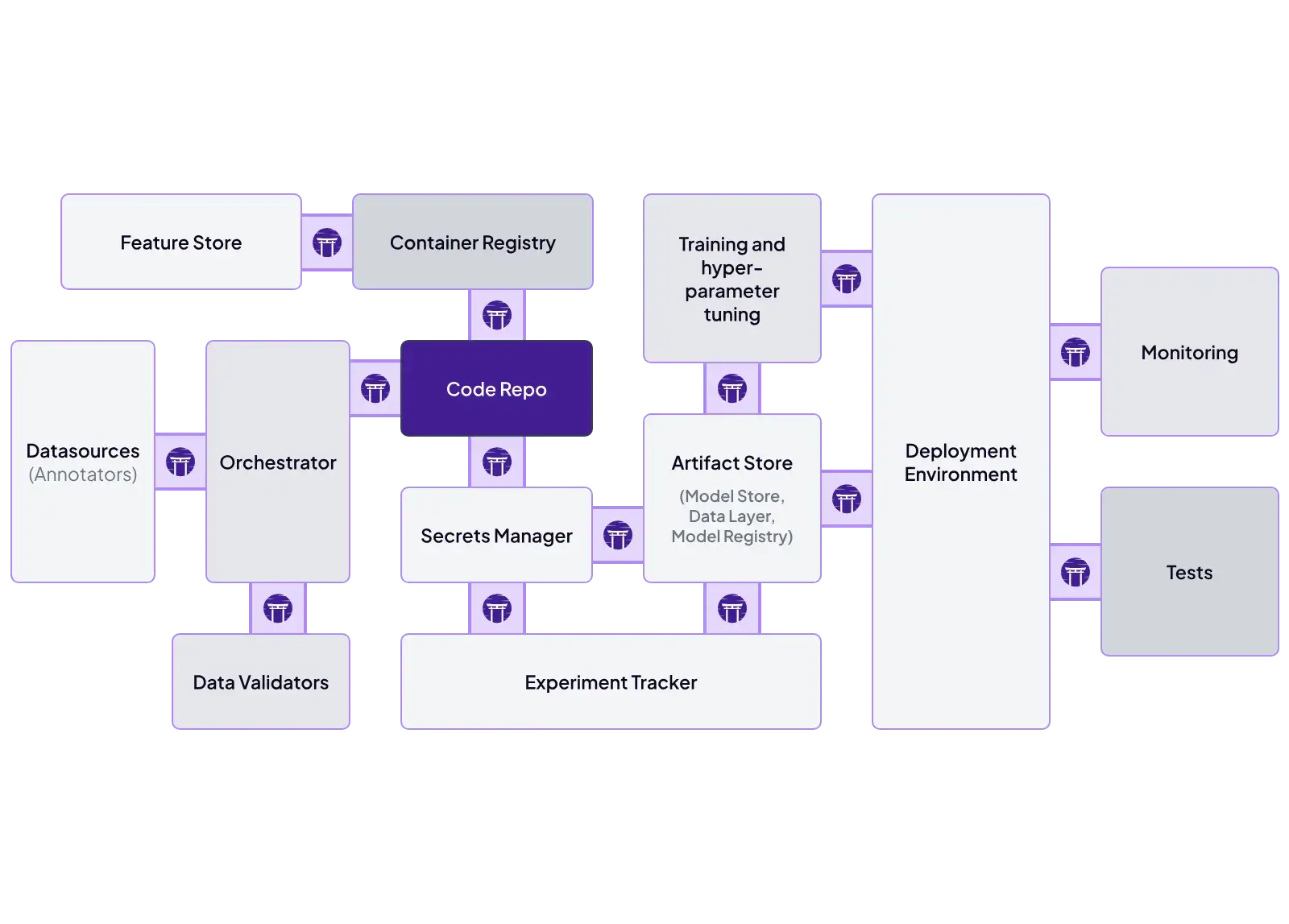
ZenML is designed as an integration hub. It features a ‘Stack’ concept where you can plug and play different tools:
- Orchestrator: Airflow, Kubeflow, Tekton, Skypilot.
- Experiment Tracker: MLflow, W&B, Neptune.
- Model Deployer: KServe, Seldon, MLflow Deployment.
- Step Operator: SageMaker, Vertex AI, AzureML.
Airflow
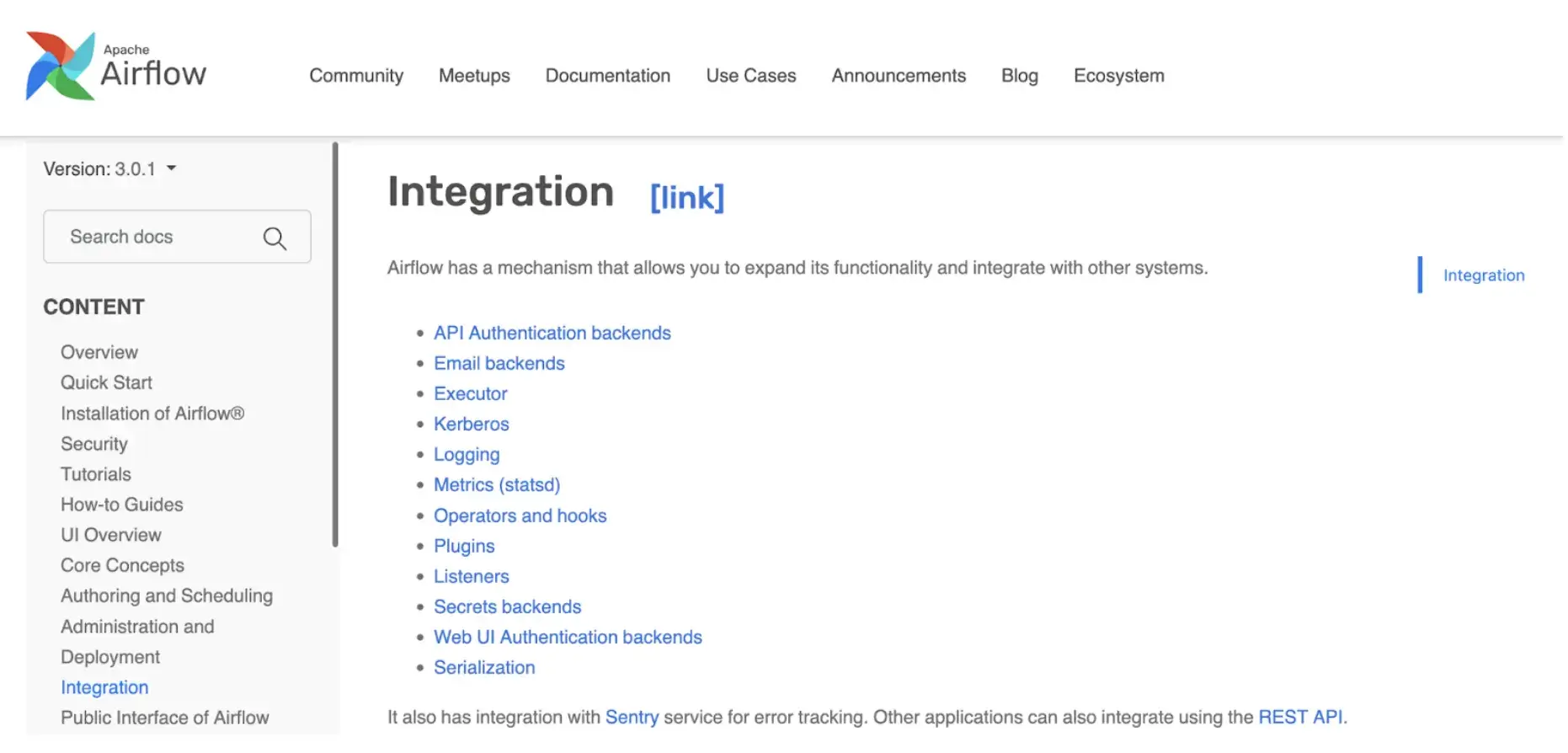
Airflow has a massive library of Providers. Whether you need to connect to Snowflake, Salesforce, AWS Redshift, or Slack, there is likely an Airflow Operator for it. This makes it the best tool for moving data into your ML system.
Kubeflow
Kubeflow integrates deeply with the Cloud Native (Kubernetes) ecosystem. It works well with Istio (networking), Dex (auth), and KServe (model serving). However, integrating non-K8s tools often requires custom hacking.
Airflow vs Kubeflow vs ZenML: Pricing
All three: Airflow, Kubeflow, and ZenML are open-source and free to use. The primary difference in pricing lies in overhead and operational costs.
ZenML
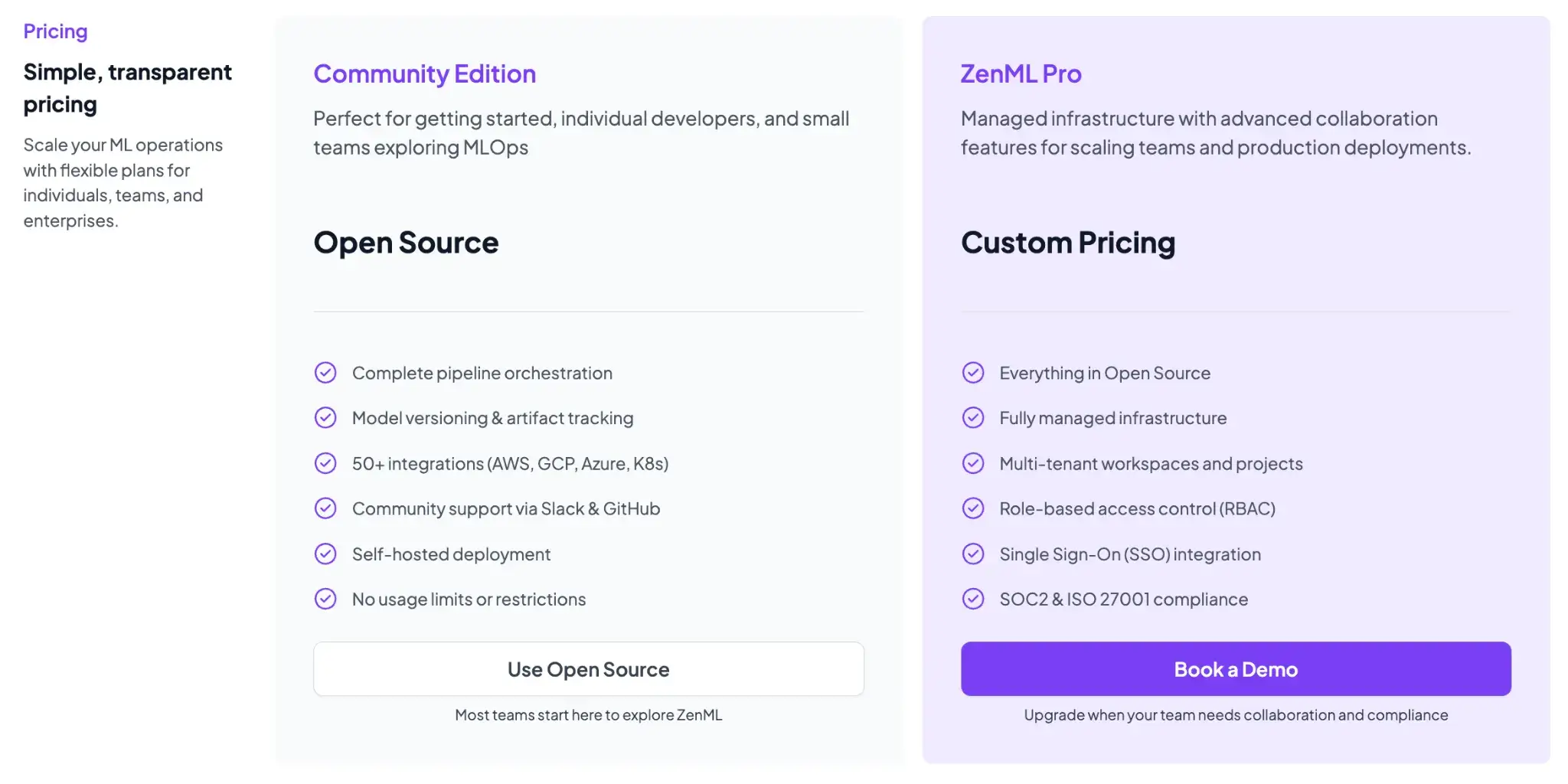
ZenML is free and open-source (Apache 2.0 License). The core framework, including the tracking, orchestration, and ZenML dashboard, can all be self-hosted at no cost. For teams that want a managed solution or enterprise features, ZenML offers business plans (ZenML Cloud and ZenML Enterprise) with custom pricing based on deployment and scale.
These paid plans include features like SSO, role-based access control, premium support, and hosting, but all the core functionality remains free in the open-source version. Essentially, you can start with ZenML’s free tier and only consider paid options if you need advanced collaboration or want ZenML to manage the infrastructure for you.
Airflow
Free to use, but you manage the scheduler, web server, and workers.
Services like Amazon MWAA (Managed Workflows for Apache Airflow) or Astronomer charge based on instance execution time, which can get expensive for idle clusters.
Read how Airflow compares with Prefect.
Kubeflow
Free, but setting up and maintaining Kubeflow on a raw K8s cluster is famously difficult.
Vertex AI Pipelines is a managed (serverless) service that can execute pipelines defined with the Kubeflow Pipelines framework (and TFX).
ZenML Doesn’t Replace Airflow or Kubeflow: It Makes Them Better for ML
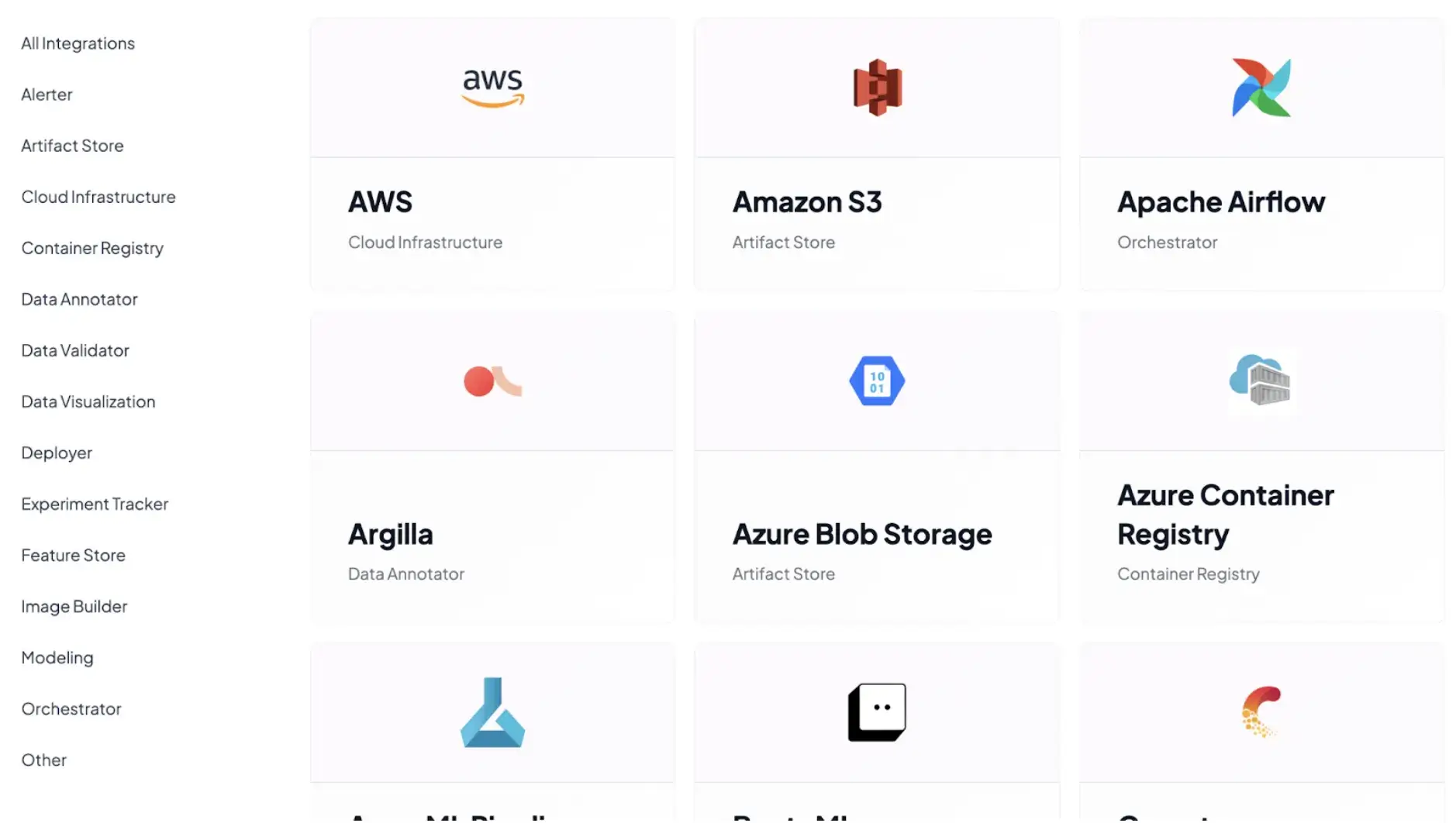
The real question for ML teams is not Airflow vs Kubeflow vs ZenML. It is whether you want to work directly at the orchestration layer or at the ML workflow layer.
Airflow and Kubeflow are excellent at what they do. Airflow is a proven scheduler. Kubeflow is a powerful Kubernetes-native execution platform. But neither was designed around how ML engineers actually think about pipelines: models, datasets, experiments, and lineage.
This is where ZenML fits in.
ZenML does not introduce yet another orchestrator. Instead, it sits on top of existing orchestrators and turns them into ML-native execution backends. When you use ZenML - Airflow or Kubeflow, handle scheduling, retries, and scaling. ZenML simply changes what you write and what you get out of it.
Instead of writing task-centric DAG code or container-heavy pipeline definitions, you define pipelines as Python functions with typed inputs and outputs. ZenML then takes care of artifact storage, versioning, and lineage; concerns that Airflow and Kubeflow leave to the user or external tools.
Using Airflow directly for ML often leads to glue code: manual artifact handling, custom MLflow logging, and fragile conventions.
Using Kubeflow directly often slows iteration due to containerization and YAML-heavy workflows. ZenML removes these friction points without taking away the strengths of either platform.
For ML engineers and data scientists, this layered approach is simply better. You keep the battle-tested orchestration you already trust, while gaining an ML-native abstraction that makes pipelines reproducible, inspectable, and portable by default.
Read how you can get started with using Airflow and Kubeflow inside of ZenML:
Which MLOps Framework is Best to Handle End-to-End Operations?
The choice between Airflow, Kubeflow, and ZenML is not necessarily an ‘either/or’ decision. It is about choosing the right layer of abstraction for your team.
- Choose Airflow if: You need robust calendar-based scheduling and backfilling.
- Choose Kubeflow if: You are a large enterprise platform team deep into Kubernetes and have dedicated DevOps engineers to maintain the cluster.
- Choose ZenML if: You want the best of both worlds. You want to run on Airflow or Kubeflow but want a cleaner, Pythonic developer experience.