
On this page
GPU clusters are expensive, but you know what’s even more expensive? Underutilized GPU clusters.
If you’re running AI workloads at any reasonable scale, you might have come across the question: How do you get more out of these GPUs without buying more?
And when we asked this question to many of our ZenML users, two platforms almost everyone referred to were Run:ai and ClearML. Both these platforms promise better GPU utilization, smarter scheduling, and resource management for AI teams. But they approach the platform from completely different angles.
My team and I decided to try both and compare them to see which one’s better.
In this Run:ai vs ClearML guide, we break down the differences across GPU orchestration, workload scheduling, resource policies, RBAC, integrations, and pricing. The goal here is to help you figure out which one actually fits your MLOps stack.
One important note before we get into it: these two platforms are not mutually exclusive. Run:ai has an integration with ClearML. So you can run Run:ai for GPU-level orchestration beneath ClearML’s MLOps layer. But most teams will pick one as their primary platform for compute management, and that’s the decision we’re helping you make here.
Run:ai vs ClearML: Key Takeaways
Run:ai: A purpose-built GPU orchestration and scheduling platform that focuses almost entirely on maximizing GPU utilization via advanced scheduling, fractional GPU allocation, and fairshare policies.
ClearML: A broader end-to-end AI infrastructure platform that spans the full ML lifecycle: experiment tracking, data management, orchestration, and GPU infrastructure management through its Infrastructure Control Plane.
Run:ai vs ClearML: Side-by-Side Features Comparison
| Feature | Run:ai | ClearML |
|---|---|---|
| GPU/Compute Orchestration | Kubernetes-native scheduler with fractional GPUs, GPU time-slicing, MIG support, topology-aware placement | Agent-based execution with dynamic GPU allocation, fractional GPU support (CFGI + MIG), silicon-agnostic |
| Workload Scheduling | Workload-aware scheduler operating at pod-group level; native workload types are Workspace, Training, and Inference, with distributed training supported under Training. | Queue-pulling agents; tasks are enqueued, and agents poll assigned queues for the next job |
| Queues and Resource Policies | Hierarchical project/department quotas per node pool; fairshare with over-quota distribution; priority-based preemption and reclaim | Ordered task queues with strict-priority or round-robin modes; enterprise Resource Policies with pools, profiles, and cross-cluster spillover |
| RBAC and Multi-Tenancy | Kubernetes-extended RBAC with predefined roles; multi-cluster management; trusted and untrusted tenant isolation models | Feature-based RBAC with access rules per resource type; enterprise multi-tenancy via dedicated K8s namespaces; SUSE k3k virtual cluster support |
| Integrations | Deep NVIDIA ecosystem; Kubeflow, Airflow, Argo, Ray, MLflow, ClearML; cloud providers (AWS, Azure, GCP) | Broad ML framework auto-logging; Kubernetes, Slurm, PBS, bare metal; Hugging Face, NVIDIA NIM/Dynamo; NVIDIA, AMD, Intel, Arm |
| Pricing | Commercial Run:ai pricing is not publicly disclosed; contact NVIDIA or a partner for a quote. KAI Scheduler is free under Apache 2.0. | Free community tier (unlimited self-hosted), Pro at $15/user/month, Scale and Enterprise tiers with custom pricing |
GPU/Compute Orchestration
This is where the tools differ most fundamentally.
Run:ai
Run:ai extends Kubernetes RBAC across multiple clusters from a single control plane. Authentication supports SAML, OIDC, and OpenShift. Access is assigned through roles scoped to Projects, Departments, Clusters, or the Account level. Because NVIDIA updated predefined roles in 2026, role names should be checked in the current docs before listing them explicitly.
Fractional GPUs are a cornerstone feature of Run:ai, as it divides GPU memory into dynamic chunks, so workloads can request any fraction between 0 and 1.0. If you have a small inference job that only needs 25% of an A100, you request gpu-fraction: 0.25 and Run:ai handles the rest. Multiple fractions can share a single physical GPU as long as the total allocation stays at or below 1.0.
Dynamic GPU Fractions take this further with a Request/Limit model. A workload can request a guaranteed fraction and specify a higher burstable limit:
gpu-fraction: 0.25        # guaranteed
gpu-fraction-limit: 0.80  # burstable when memory is available
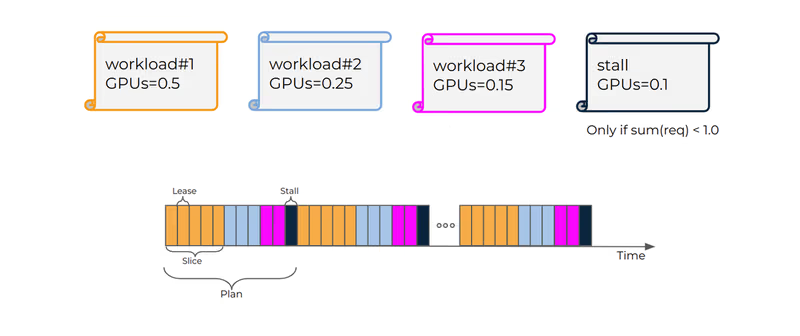
Run:ai also supports GPU time-slicing in two modes: strict time-slicing gives each workload exclusive full-GPU access for a limited lease time in each scheduling cycle.
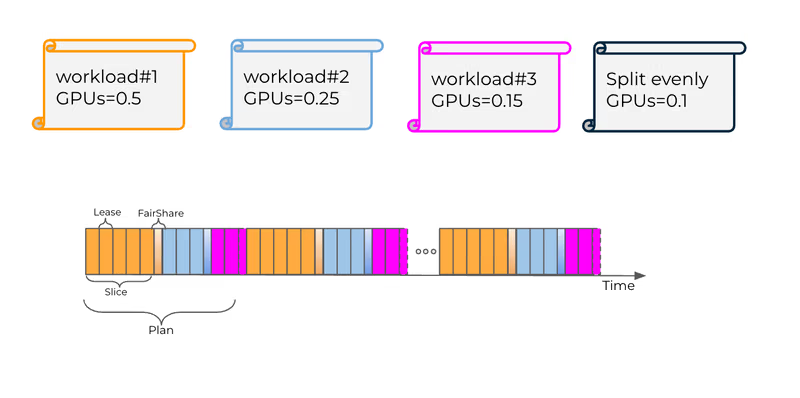
And fair time-slicing divides excess time slices equally among all workloads on a GPU.
What’s more, Run:ai provides topology-aware scheduling that considers NVLink domains, racks, and zones when placing multi-GPU workloads. For GB200 NVL72 and multi-node NVLink domains, there’s a dedicated GPU Network Acceleration configuration. MIG profiles, GPU memory swap, and bin-packing/consolidation strategies round out the picture.
ClearML
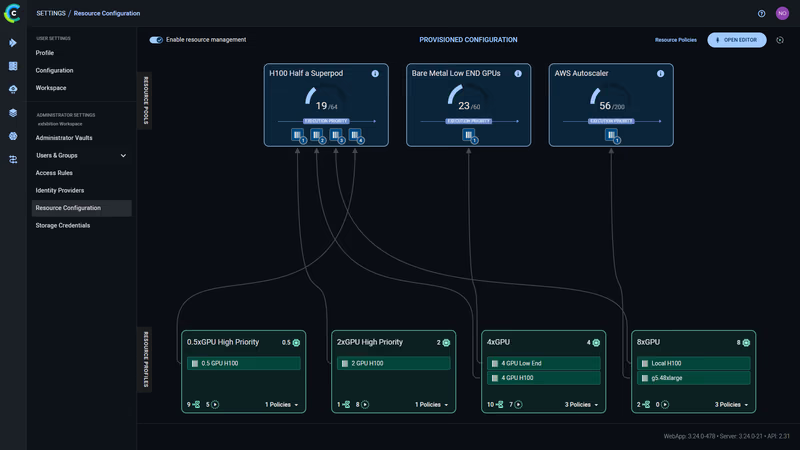
ClearML resource configuration
ClearML’s GPU orchestration is built on the ClearML Agent daemon. You install an agent on your worker machines, whether that’s bare metal, VMs, Docker containers, or Kubernetes pods.
The agent connects to the ClearML Server, listens on assigned queues, pulls tasks, and executes them while continuously reporting GPU utilization, memory, and other system metrics.
GPU assignment happens through CLI flags:
clearml-agent daemon --detached --gpus 0,1 --queue dual_gpu \
  --docker nvidia/cuda:11.0.3-cudnn8-runtime-ubuntu20.04
For dynamic allocation across a multi-GPU machine, the enterprise tier supports mapping queues to specific GPU counts:
clearml-agent daemon --detached --docker --dynamic-gpus \
  --queue 1xGPU=1 2xGPU=2 4xGPU=4 \
  --gpus 0,1,2,3,4,5,6,7
A single 8-GPU machine can now dynamically serve jobs requiring 1, 2, or 4 GPUs.
ClearML also supports fractional GPUs through two technologies: the ClearML Dynamic MIG Orchestrator for NVIDIA MIG-based fractions, and the ClearML Fractional GPU Injector for software-based slicing on non-MIG hardware. One significant differentiator here: ClearML is silicon-agnostic. It supports NVIDIA, AMD Instinct, Intel, and Arm accelerators, while Run:ai is tightly coupled to the NVIDIA ecosystem.
For Kubernetes environments, the K8s Glue Agent pulls jobs from ClearML queues and creates Kubernetes jobs from YAML templates with GPU discovery using node selectors.
Bottom line: Run:ai replaces the Kubernetes scheduler for GPU workloads with a purpose-built engine that understands GPU topology, fractions, and AI workload semantics at the infrastructure level.
ClearML layers an agent-based execution system on top of existing infrastructure, which gives it flexibility across different schedulers and hardware but less depth in GPU-specific scheduling intelligence.
Workload Scheduling
Run:ai
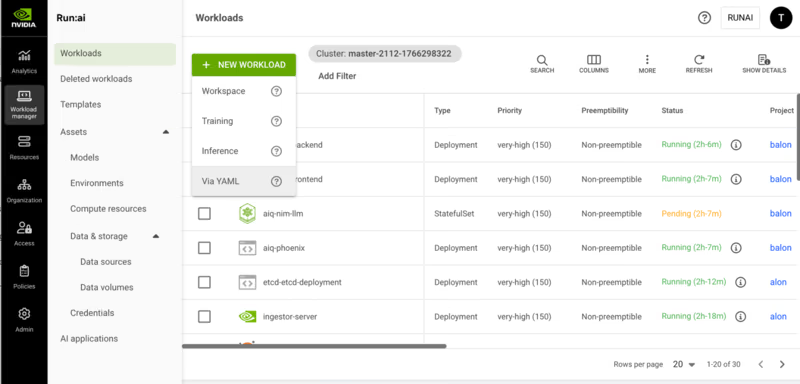
Run:ai’s scheduler is workload-aware and always operates at the pod group level rather than individual pods. Four workload types drive scheduling behavior:
- Workspaces (Interactive): Long-running sessions like Jupyter Notebooks. Non-preemptible by default.
- Training: Self-running batch workloads. Preemptible, designed to be interrupted and restored from checkpoints.
- Distributed Training: Multi-node training split across pods. Uses gang scheduling, which means all pods are scheduled together, or all remain pending.
- Inference: Production workloads with deployment-based replicas.
The scheduler uses node pools to group nodes via Kubernetes labels. Each pool gets its own scheduler instance with configurable placement strategies: bin-pack to consolidate workloads and maximize vacancy, or spread to distribute workloads for maximum per-workload resources.
Multi-level gang scheduling with hierarchical pod group structures is one of the most powerful features of Run:ai. It’s critical for frameworks like NVIDIA Dynamo inference, where you have gateway, prefill, and decoder functions, each with its own replica requirements.
ClearML
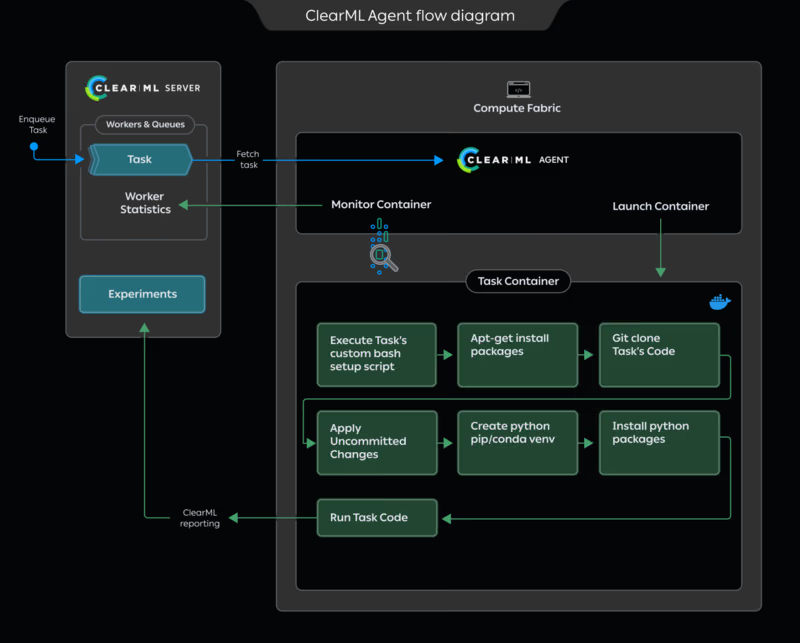
ClearML scheduling follows a different model entirely.
Tasks are enqueued via Task.enqueue(), Task.execute_remotely(), or the Web UI. Agents poll their assigned queues and pull the next task in order.
The agent supports multiple execution modes:
- Default mode runs a single task at a time, assuming the training job needs all machine resources.
- Services mode runs multiple parallel tasks, designed for lightweight controller jobs like pipeline controllers and hyperparameter sweeps.
- Docker mode launches a container per task for isolation.
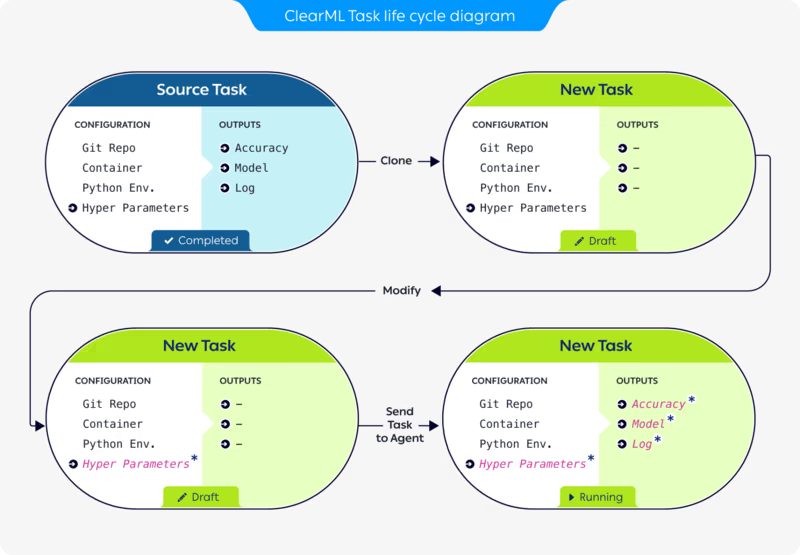
A distinctive ClearML feature: When you clone a task and modify its configuration in the UI before enqueuing, the agent respects the modified package requirements, command-line arguments, and hyperparameters without any code changes. This makes rapid experimentation very practical.
The agent also supports enterprise work schedule management via --uptime and --downtime flags, which control time spans when workers actively poll queues versus sit idle; something useful for cost optimization when running on cloud instances.
Queues, Priorities, and Resource Policies
Run:ai
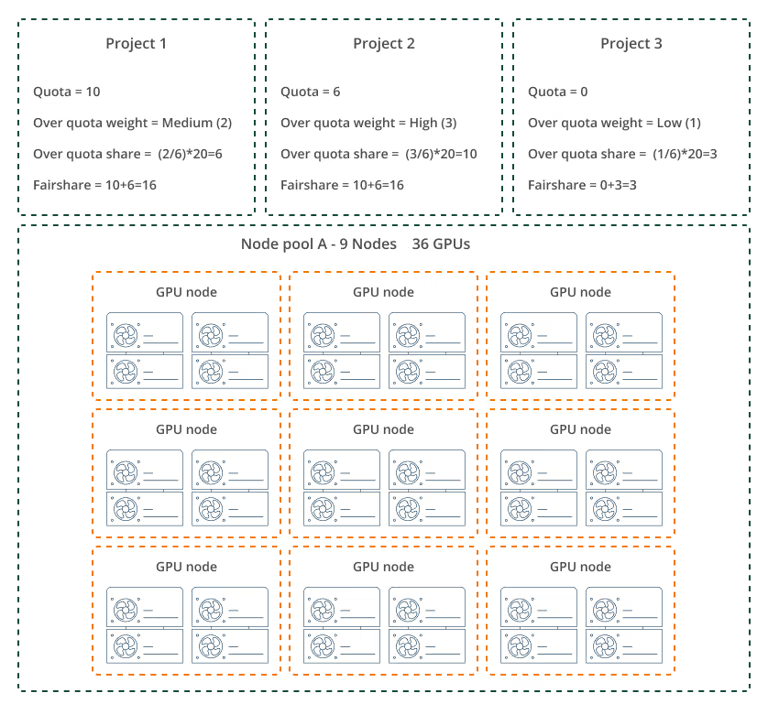
Run:ai implements a hierarchical queue system. A scheduling queue is created for each project/node-pool pair and department/node-pool pair. This enables per-pool quota, over-quota, and fairshare management at both organizational levels.
Each project receives a deserved quota of guaranteed resource allocations per node pool. Non-preemptible workloads can only be scheduled within this quota. Over-quota resources, the unused capacity in a node pool, can be accessed by preemptible workloads. The distribution follows a weighted formula:
Project Over-Quota = [Project Weight / Sum of All Weights] x Unused Resources
Priority and preemption are two separate parameters.
Priority determines scheduling precedence within a project.
Preemption policy determines whether a workload can be interrupted.
A workload with PriorityClass >= 100 is non-preemptible; below 100 is preemptible.
Run:ai also has a reclaim mechanism that returns resources from over-quota projects to those that deserve them based on fairness, not just priority.
ClearML
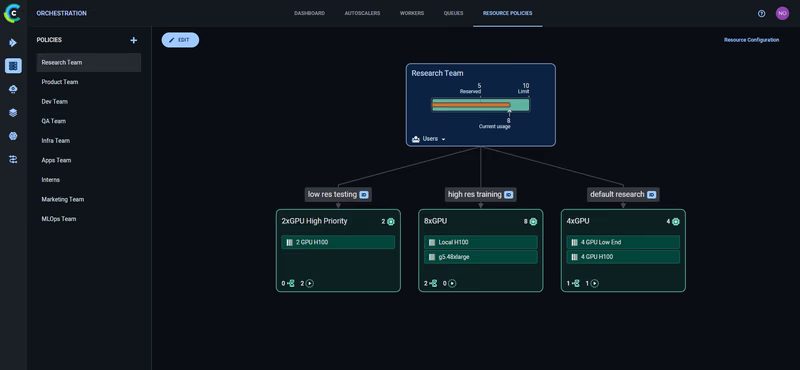
ClearML queues are ordered lists of tasks. When an agent services multiple queues, two modes are available: strict priority, where the agent empties higher-priority queues before touching lower-priority ones, and round-robin with the --order-fairness flag, where the agent rotates between queues pulling one task at a time.
The enterprise Resource Policies layer introduces three constructs:
- Resource Pools aggregate physical resources like K8s clusters or bare metal servers.
- Resource Profiles define per-job consumption like 0.5, 2, or 8 GPUs.
- Resource Policies assign quotas per user group with reserved resources, resource limits, and queue assignments.
Over-quota jobs can use idle capacity from other teams. When the owning team reclaims their reserved quota, over-quota jobs are automatically preempted with an abort callback for graceful shutdown.
Cross-cluster spillover can automatically shift jobs across infrastructure boundaries when primary resources are unavailable, for example, from on-prem to cloud or from high-end to lower-cost GPUs.
RBAC and Multi-Tenancy
Run:ai
Run:ai extends Kubernetes RBAC across multiple clusters from a single management plane. The access rule model follows: a subject is assigned a role in a scope. For example, “sam@company.com is a Department Admin in Department A.”
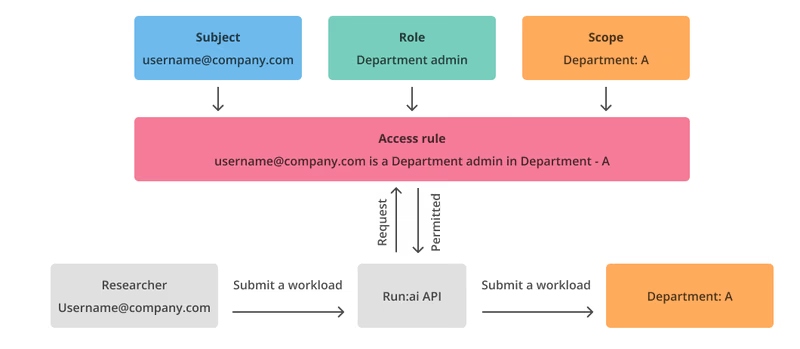
Run:ai authentication and authorization
Authentication supports SAML, OpenID Connect, and OpenShift. Run:ai provides predefined non-editable roles like System Admin, Department Admin, Research Manager, Researcher, and Viewer at various scopes, and Permissions follow a View/Edit/Create/Delete model.
The organizational hierarchy flows from Account to Cluster to Department to Project. A role assigned at any scope automatically applies to all descendant scopes.
For multi-tenancy, the platform supports two isolation models: trusted, where departments share a Kubernetes cluster with isolation via K8s policies, and untrusted, where each tenant gets a dedicated Kubernetes cluster with complete infrastructure-level separation.
ClearML
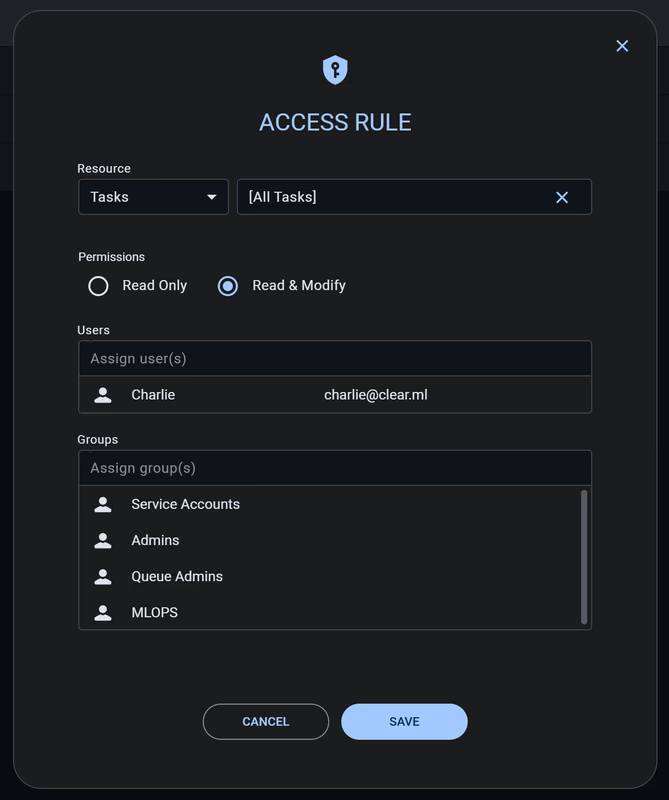
ClearML’s RBAC uses access rules that specify which users, service accounts, and user groups can access workspace resources. ClearML Access Rules currently cover Projects, Tasks, Models, Dataviews, Datasets, and Queues, with Read Only or Read & Modify permissions.
A distinctive feature the platform offers is the feature-based permission model. Instead of just controlling access to objects, ClearML controls capabilities per group. Features like user_management, queue_management, pipelines, resource_policy, and model_serving can be toggled independently for each group.
ClearML’s multi-tenancy uses dedicated Kubernetes namespaces per tenant, each with its own ClearML Agent and AI Application Gateway, and the network isolation uses Kubernetes Network Policies.
ClearML recently partnered with SUSE to support virtual Kubernetes clusters via k3k, where each team gets full cluster-admin access within their virtual cluster while IT controls physical nodes, storage, and GPU access at the parent cluster level.
Run:ai vs ClearML: Integrations
Run:ai
Run:ai’s integrations focus on the AI infrastructure and the NVIDIA ecosystem.
- Direct IDE integrations: Jupyter Notebooks, VS Code, and PyCharm.
- ML framework support: PyTorch, TensorFlow via Kubeflow TFJobs, XGBoost, and MPI jobs.
- Workflow orchestration integrations: Kubeflow, Apache Airflow, Argo Workflows, Ray via KubeRay, Apache Spark, MLflow, Seldon Core, and notably ClearML itself.
- Infrastructure partners: AWS, Azure, GCP, OCI, OpenShift, HPE, and VMware Tanzu, plus deep NVIDIA ecosystem integration with DGX Cloud, Base Command Manager, and GPU Operator.
The open-sourced KAI Scheduler includes built-in integrations for Kubeflow Training Operator, KubeRay, and Argo Workflows.
ClearML
ClearML’s integration surface is broader, reflecting its end-to-end platform nature.
- The “auto-magical” experiment logging works with PyTorch, TensorFlow, Keras, FastAI, XGBoost, LightGBM, MegEngine, and scikit-learn. Simply importing ClearML captures metrics, parameters, and artifacts without explicit logging code.
- Infrastructure support includes Kubernetes, Slurm with one-click Slurm-on-Kubernetes, PBS, Bare Metal, and Docker with cloud autoscalers for AWS and GCP.
- GenAI-specific integrations - Hugging Face, NVIDIA NIM, NVIDIA Dynamo, Gradio, and Streamlit.
- Hardware support is silicon-agnostic: NVIDIA, AMD Instinct, Intel, and Arm.
ClearML also has visualization integrations with TensorBoard and Matplotlib, and Operational integrations with Slack notifications and storage backends like S3, GCS, Azure Blob, and NFS.
Run:ai vs ClearML: Pricing Comparison
Run:ai
Commercial Run:ai pricing is not publicly disclosed. For current Run:ai pricing, contact NVIDIA or a partner. Separately, NVIDIA AI Enterprise is licensed per GPU and is available as a subscription, as a perpetual license with support, and through cloud marketplaces billed per GPU per hour.
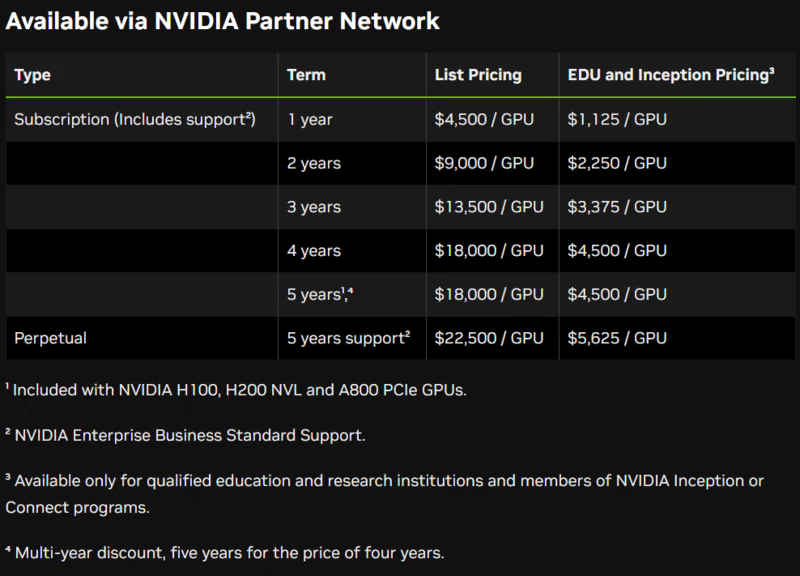
Selected NVIDIA H100 PCIe or NVL GPUs and H200 NVL GPUs include a five-year NVIDIA AI Enterprise subscription, with software activation required. NVIDIA AI Enterprise is also available in cloud marketplaces on a per-GPU, per-hour basis. Public NVIDIA docs do not support a blanket claim that this automatically bundles Run:ai in every case.
The KAI Scheduler core engine is free under Apache 2.0, but the full enterprise platform with the control plane, UI, and management features requires a commercial license. Standalone Run:ai pricing is not publicly disclosed. You can contact NVIDIA or a partner for a quote.
Practical implication: If your company is already standardizing on selected NVIDIA GPUs, you may already have NVIDIA AI Enterprise entitlements. But you should confirm Run:ai commercial terms separately with NVIDIA or a partner rather than assuming Run:ai is bundled.
ClearML
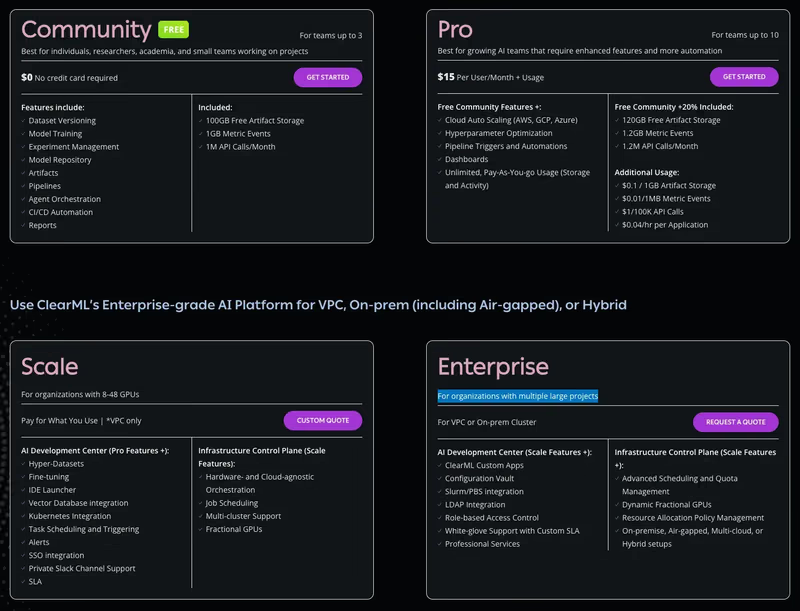
ClearML has a free (self-hosted) plan and two paid plans to choose from:
- Community (Free): Free for self-hosted users (unlimited) or hosted on their SaaS (limited usage). It includes core experiment-tracking and orchestration features.
- Pro ($15/user/month): Adds managed hosting, unlimited scale, and better user management features.
- Scale (Custom): For larger deployments requiring VPC peering, advanced security, and priority support.
Wrapping Up Run:ai vs ClearML Discussion: Which One’s a Better Fit For You?
Both Run:ai and ClearML solve real problems, but they operate at specific layers of the stack. Run:ai lives at the Kubernetes/GPU scheduling layer. ClearML spans broader MLOps territory with an agent-based execution model. The question most platform teams actually face isn’t “which one do I pick?”; it’s “what happens when my infrastructure isn’t just one layer?”
This is where ZenML’s new Resource Pools feature enters the picture.
Note: This feature is under development and will be launched in a few weeks for ZenML Pro users.
ZenML’s Resource Pools feature in ZenML Pro is a resource-aware scheduling system that operates at the workload level rather than the infrastructure level.
The core idea: platform teams create pools representing physical resources (GPUs today, with tokens and tool calls for AI agents planned), attach those pools to stacks via resource policies, and let data scientists simply declare how many resources they need and hit run.
Here’s what makes this interesting in the context of Run:ai and ClearML:
- Built-in borrowing and preemption: Like both Run:ai and ClearML’s enterprise tier, ZenML will support over-quota borrowing. If Team A has 2 reserved GPUs but no upper limit, it can borrow idle GPUs from Team B’s allocation. When Team B submits a job, Team A’s borrowed workload gets preempted automatically. The preempted pipeline is marked in the dashboard, and developers catch an exception to save checkpoints. Automatic re-queuing after preemption is on the near-term roadmap.
- Cross-stack, cross-cloud by default: Run:ai manages resources within Kubernetes clusters, and ClearML’s resource policies work across its agent infrastructure. ZenML’s resource pools will work across stacks, meaning you can queue and manage GPU workloads that span Databricks, Kubernetes, Vertex AI, or any other orchestrator in your environment. If your ML platform involves more than one compute backend (and at enterprise scale, it almost certainly does), this is a meaningful distinction.
Remember, ZenML is complementary and NOT competing. ZenML can actually run with Run:ai or ClearML. Because ZenML manages at the pipeline/workload level while Run:ai manages pods and GPU topology, they can be layered together. There are production deployments running both, ZenML handling cross-stack orchestration and governance, while Run:ai handles Kubernetes-level GPU placement underneath.
If your primary challenge is maximizing utilization on a single Kubernetes GPU cluster, Run:ai gives you the deepest scheduling intelligence.
If you need a full MLOps platform with flexible compute management across diverse hardware, ClearML covers more ground.
But if your reality is a multi-stack environment (Databricks here, Kubernetes there, maybe a cloud ML service somewhere else and so on) and you need a single governance layer with resource-aware scheduling across all of it, ZenML’s Resource Pools will address this gap that neither Run:ai nor ClearML fully covers on their own.