
On this page
Both Databricks and Snowflake are the leading cloud data platforms, but they take very different approaches.
Data teams frequently compare these two because one grew out of the big data AI world and the other from the enterprise data warehousing camp.
In this guide, we break down their key differences in architecture, ease of use, machine learning capabilities, integration options, and pricing. You’ll also learn how an MLOps orchestrator like ZenML can help you avoid vendor lock-in and get the best of both worlds.
Choosing wisely matters; it will impact how your team stores data, builds pipelines, and scales machine learning projects for years to come.
Databricks vs Snowflake: Key Takeaways
🧑💻 Databricks: A unified data lakehouse platform built on Apache Spark. It combines data lake flexibility with data warehouse performance using open formats (Delta Lake). Databricks supports Python, SQL, R, Scala, etc., and comes with native AI/ML features (e.g., managed MLflow) for an end-to-end machine learning lifecycle.
🧑💻 Snowflake: A fully managed cloud data warehouse offered as SaaS. It separates compute and storage, auto-scales for concurrency, and uses SQL as the primary interface. Snowflake now supports Python through Snowpark and offers Snowflake Cortex AI features, but these feel more like add-ons to its core analytics engine.
Databricks vs Snowflake: Feature Comparison
Below is a high-level comparison of how Databricks and Snowflake differ across major dimensions:
| Feature | Databricks | Snowflake |
|---|---|---|
| Architecture | – Lakehouse model combining data lakes and warehouses – Uses open formats on cloud object storage – Compute runs on Spark clusters | – Fully managed cloud data warehouse – Separate storage, compute, and cloud services layers – Storage is Snowflake-managed with limited direct file access |
| Ease of use | – Platform-style setup with cluster configuration required – Notebook-first workflow for engineers and data scientists – More flexibility but higher learning curve | – SaaS-style experience with minimal setup – Strong SQL-first interface and UI – Designed for fast onboarding and analyst productivity |
| Machine learning | – Built for ML workloads with native ML tooling – Supports large-scale training and feature engineering – Integrated model tracking and serving | – ML capabilities layered on top of analytics – Supports Python- and SQL-based ML workflows – Best suited for inference and light training |
| Governance | – Unified governance across data and ML assets – Fine-grained access control and lineage – Centralized catalog for tables and models | – Built-in governance with masking and tagging – Strong controls for data sharing and compliance – Well-suited for regulated analytics environments |
| Integrations | – Integrates with orchestration, MLOps, and BI tools – Strong support for streaming and batch pipelines – Fits into engineering-heavy data stacks | – Large ecosystem of ETL, BI, and data apps – Native ingestion and data sharing features – Optimized for analytics and reporting tools |
| Pricing | – Usage-based pricing tied to compute workloads – Costs vary by workload type and cluster size – Better suited for predictable, heavy compute | – Consumption-based pricing for compute and storage – Pay per warehouse usage with auto-scaling – Easier cost control for analytics workloads |
| How teams use it | Preferred for complex data engineering and ML training, and built for ML and platform teams. | Commonly used as the analytics system of record, built for analytics and finance teams. |
Feature 1: Architecture - Lakehouse vs Warehouse
The fundamental difference between Databricks and Snowflake lies in their architectural philosophies. Databricks pioneered the lakehouse approach, merging aspects of data lakes and data warehouses, whereas Snowflake is a modern cloud data warehouse built from the ground up for SQL analytics.
Databricks Architecture - Lakehouse with Open Data
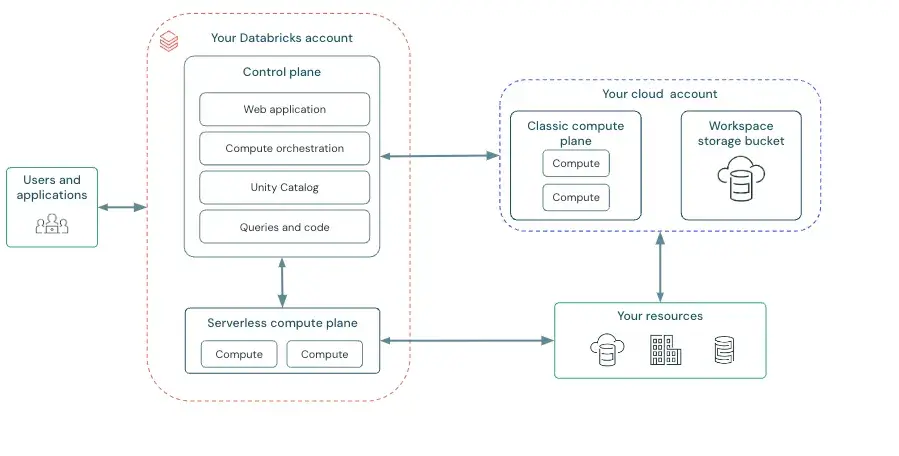
Databricks’s architecture is built on Apache Spark and the Delta Lake storage format. This means your data can live in files on inexpensive cloud object storage like S3, ADLS, Google Could Storage, and more while still behaving somewhat like a database.
The compute layer - Spark clusters - is separate and can scale independently. This decoupling of storage and compute is similar to Snowflake, but what’s important is that with Databricks, you retain direct access to data.
Under the hood, Databricks clusters run in your cloud account that’s managed by you or via Databricks SaaS, and you can choose instance types, GPUs vs CPUs, and even use spot instances for cost savings. This gives you flexibility but also means more hands-on management of clusters and configurations compared to Snowflake.
Snowflake Architecture - Managed Cloud Warehouse
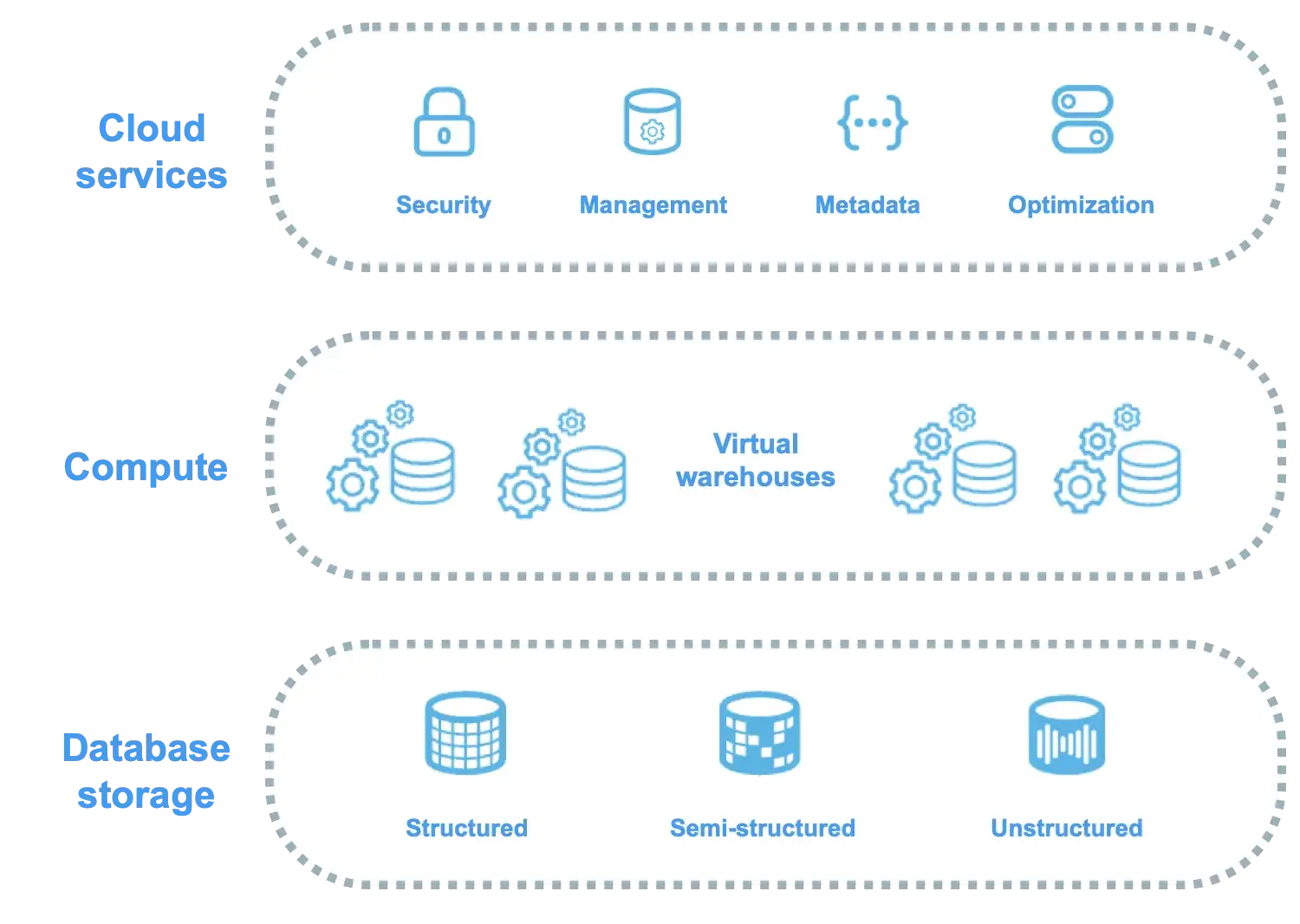
Snowflake’s architecture is a multi-cluster shared data design. It separates the system into three layers:
- Storage: Proprietary format managed entirely by Snowflake. You don’t see files or worry about file formats; Snowflake handles that, automatically compressing and organizing data.
- Compute: Comes in the form of a virtual warehouse, which is a cluster of compute nodes that you spin up via Snowflake’s interface to run queries.
- Cloud service: Coordinates almost everything around your query and your account. This includes authentication + access control, query parsing, optimization, and planning, metadata management, transaction management, and more.
This three-layered design gives Snowflake two unique strengths.
First, you never deal with infrastructure directly. You just size your warehouse (small, medium, large, etc.) and Snowflake provisions the necessary VMs in the background.
Second, the separation of compute means you can isolate workloads. For example, have an ‘ETL warehouse’ and a separate ‘BI reports warehouse’ so that heavy data loading doesn’t slow down your analysts’ queries.
One trade-off is that Snowflake’s storage layer is a walled garden. Snowflake generally delivers the best performance when data is loaded into Snowflake-managed storage.
That said, Snowflake supports querying data in external cloud storage using External Tables (read-only, with some performance trade-offs). More recently, Snowflake has expanded open-format access with Iceberg tables (and related capabilities), which can offer a more lakehouse-like experience for certain workloads.
Snowflake now supports external tables and Iceberg tables, so you can query data that remains in your cloud storage, while Snowflake manages the metadata and governance in Snowflake.
This means less flexibility with file formats and external tools compared to Databricks.
Bottom line: If you need an open architecture where you can use multiple engines and work with raw files, Databricks’s lakehouse gives you that freedom. If you prefer a turn-key managed service where all data lives in one high-performance engine, Snowflake’s warehouse gives you that simplicity.
Feature 2. Ease of Use - Cluster Management vs SaaS Simplicity
Databricks and Snowflake also differ greatly in day-to-day usability and the skills required to operate them.
Databricks - Powerful, But Some Assembly Required
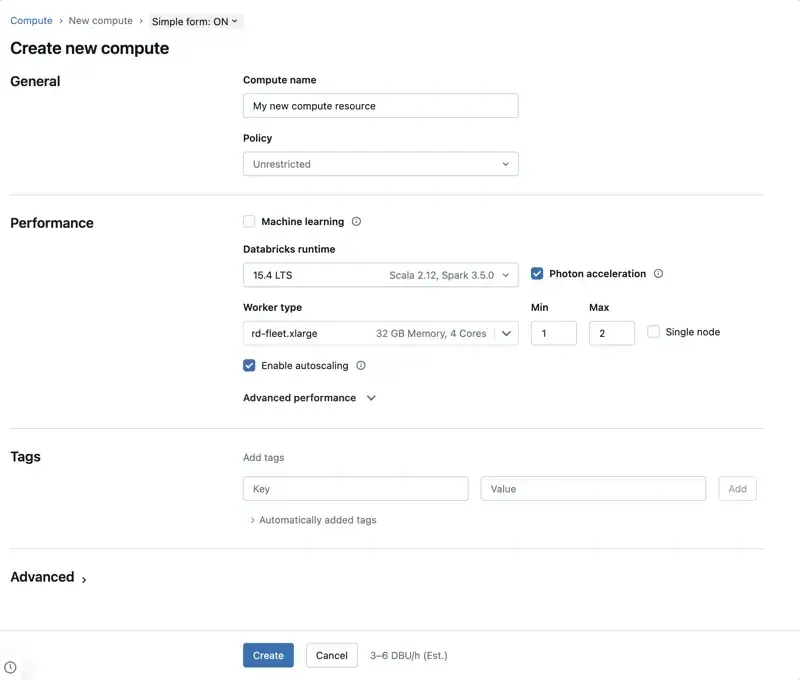
Using Databricks is a bit like getting a high-performance car: extremely capable, but you need to know what’s under the hood to drive it efficiently. As a PaaS offering, Databricks requires:
- Setting up clusters with appropriate compute specs
- Configuring networks or VPCs
- Managing things like clusters start/stop
And more.
There is a learning curve for new users to understand Spark concepts, cluster configurations, and the notebook environment. Data engineers often appreciate this flexibility, but pure data analysts may find it overkill.
But over the years, Databricks has put in significant efforts to improve ease of use. Its web workspace allows you to organize notebooks, datasets, ML experiments, and jobs in one UI.
The platform now offers an SQL editor and dashboards, so analysts can use Databricks with just SQL if needed.
Snowflake - ‘Near Zero’ Maintenance
Snowflake makes the infrastructure almost invisible. As a fully managed SaaS, Snowflake abstracts away virtually all hardware, software, and tuning tasks. You do not manage servers or even see them.
Getting started is as easy as:
- Creating an account
- Load data via a guided wizard or SQL COPY command
- Begin querying
Snowflake abstracts away most ongoing maintenance. It automatically manages storage layout via micro-partitioning and can automatically handle table reclustering when you use clustering keys, so there’s far less hands-on tuning than in many traditional warehouses.
The Snowflake web interface - Snowsight, is designed for ease of use: it provides worksheets where you can write SQL with autocomplete, and Snowflake Notebooks where you can run Python (Snowpark) end-to-end.
It also recently introduced Snowflake Copilot, an AI assistant that generates SQL queries from natural language.
All these features aim to make data analysis accessible to a broad range of users, not just engineers.
Bottom line: Snowflake feels like using a familiar database, just in the cloud, whereas Databricks feels like a development platform that you mold to your needs. Neither is ‘better’ universally; it depends on your team’s expertise.
Feature 3. Machine Learning Capabilities
Both Databricks and Snowflake come with machine learning, but the depth of their ML offerings differs significantly. Databricks was built with data science in mind from day one, while Snowflake is adding ML features on top of its analytics core.
Databricks - Built-in Machine Learning and MLflow
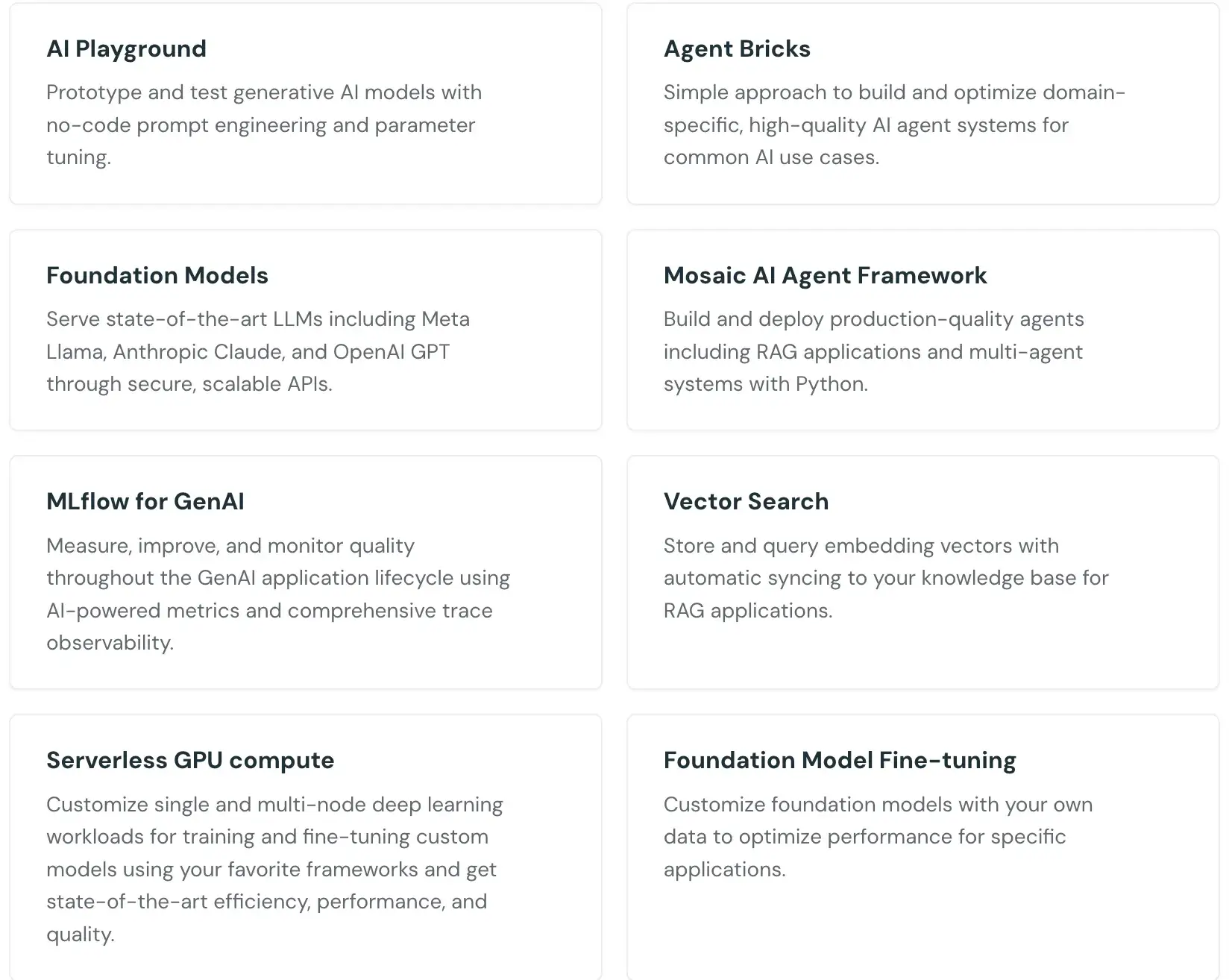
Databricks is arguably one of the most ML-friendly platforms available because it provides an integrated environment for the entire ML lifecycle. Key tools include:
- Managed MLflow for experiment tracking and model registry (Databricks is the co-creator of MLflow). Every run can log parameters, metrics, artifacts, and register models with versioning.
- Interactive notebooks (supporting Python, R, Scala, SQL) for developing and iterating on models with libraries like pandas, TensorFlow, PyTorch, scikit learn, XGBoost, etc. The notebooks integrate with Delta Lake, so you can load training data at scale with Spark and then train using ML libraries.
- Databricks Runtime for ML, a specialized Spark runtime that comes preloaded with popular ML/DL libraries and GPU support, saving time on environment setup.
- AutoML tools in Databricks that can automatically generate baseline ML models and notebooks; useful for quick starts.
- Model serving and job scheduling, so you can take a trained model and deploy it as a REST endpoint or batch inference job, all within Databricks.
For example, using MLflow on Databricks might look like this:“
import mlflow.sklearn
from sklearn.ensemble import RandomForestClassifier

mlflow.set_experiment("/Shared/churn_prediction")  # set MLflow experiment
with mlflow.start_run():
    # Train a model
    model = RandomForestClassifier(n_estimators=100, max_depth=5)
    model.fit(X_train, y_train)
    # Log parameters and metrics
    mlflow.log_param("n_estimators", 100)
    mlflow.log_param("max_depth", 5)
    from sklearn.metrics import roc_auc_score
    mlflow.log_metric("auc", roc_auc_score(y_test, model.predict_proba(X_test)[:,1]))
    # Log the model itself
    mlflow.sklearn.log_model(model, artifact_path="models/rf_model")
On Databricks, this code automatically records an experiment run in MLflow, including all metrics, parameters, and the model artifact version.
Snowflake - SQL Analytics with Emerging ML Features
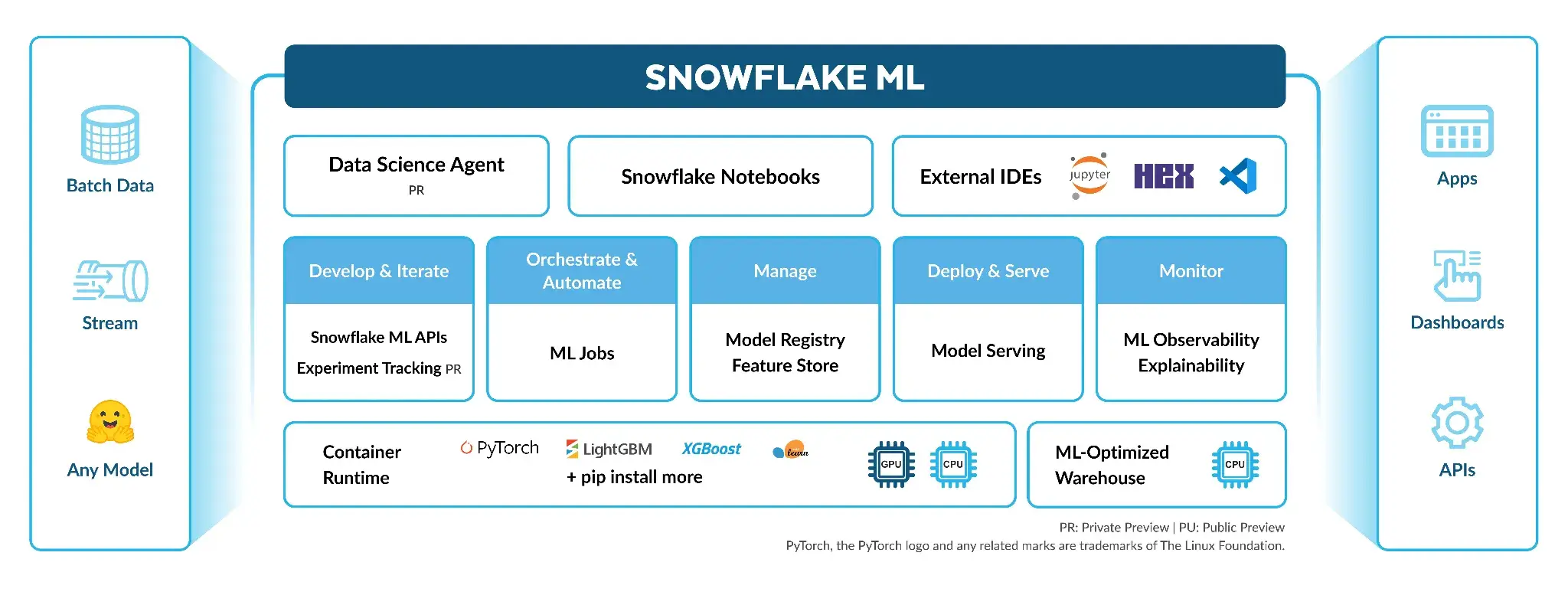
Snowflake’s heritage is in SQL analytics, so it traditionally wasn’t used for model training. However, recognizing the importance of data science, Snowflake has introduced features to support ML workflows:
- Snowpark for Python: Allows you to write Python code that executes inside Snowflake’s engine. With Snowpark, you can create UDFs (user-defined functions) or stored procedures in Python, and apply them to your data in parallel.
- Snowflake ML Functions: In 2024, Snowflake introduced high-level ML functions that let you do things like
CREATE SNOWFLAKE.ML.FORECASTto train a model, then<model_name>!FORECASTto generate predictions – essentially automated model training for certain use cases. These are aimed at analysts who want quick insights without coding an ML algorithm. - Snowflake Cortex: A suite of AI/ML services within Snowflake’s ‘AI Cloud’ initiative. It includes features like:
- Cortex AI Functions: Built-in large language model functions that you can call in SQL.
- Cortex ML: Tools to train and deploy your own models entirely in Snowflake. Snowflake has been developing capabilities like a feature store, model registry, and the concept of a Snowflake-managed ML training environment.
- Cortex ‘Analyst’ and ‘Search’: Provides AI-driven natural language query and search over data.
Despite these additions, Snowflake is still not an ML development environment in the same sense as Databricks. Training a complex model in Snowflake is not practical; you would more likely train externally, maybe in Databricks, and then use Snowflake for scoring or data storage.
Bottom line: Databricks is a stronger choice for pure ML development with full Python/ML library support and integrated tracking.
Feature 4. Governance - Unity Catalog vs Horizon
As data platforms mature, governance and security have become paramount. Both Databricks and Snowflake have introduced a comprehensive governance layer - Unity Catalog for Databricks and Horizon for Snowflake, but with slightly different scopes.
Databricks - Unity Catalog
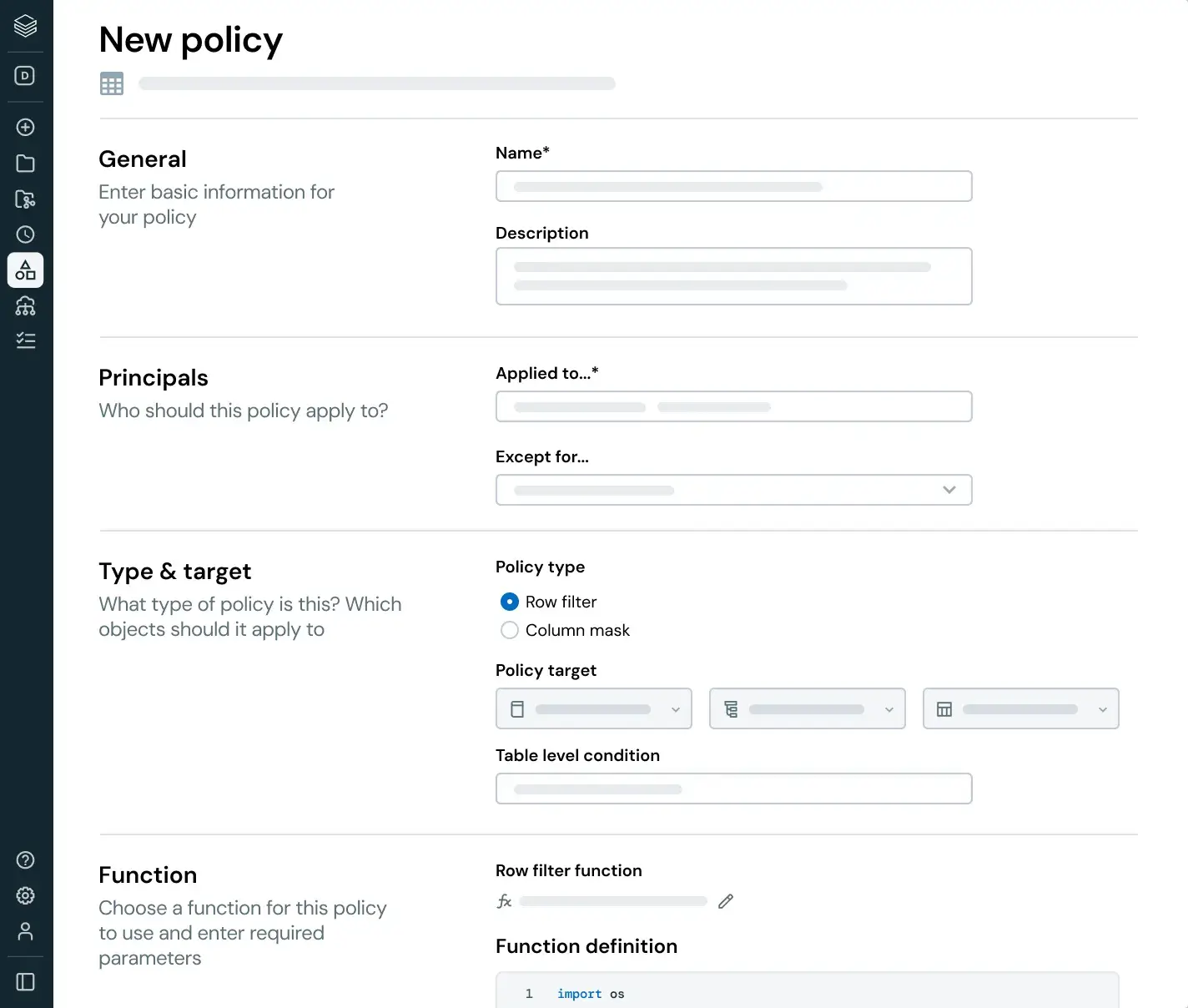
Databricks Unity Catalog is a unified governance solution for all data assets in the Databricks Lakehouse. It provides a single interface to govern tables, files, ML models, and more across multiple workspaces and cloud accounts. Some key capabilities of Unity Catalog include:
- Fine-grained access control: Set permissions at the catalog, schema, table, view, column, and even row level.
- Centralized metadata and auditing: Unity Catalog becomes the central metastore for Databricks, so all your workspace’s metadata and user access logs funnel through it.
- Data lineage: Automatically captures lineage information as data flows through notebooks and jobs. So you can visualize how data in Table X was used to create Table Y or model Z.
- Integrations with cloud security: Supports things like identity federation and integration with cloud IAM roles.
Unity Catalog turns Databricks from a ‘wild west’ of notebooks into a more enterprise-controlled environment. It is especially valuable in multi-tenant setups where you have many teams sharing a lakehouse but need strong isolation and auditing.
Snowflake - Horizon Catalog
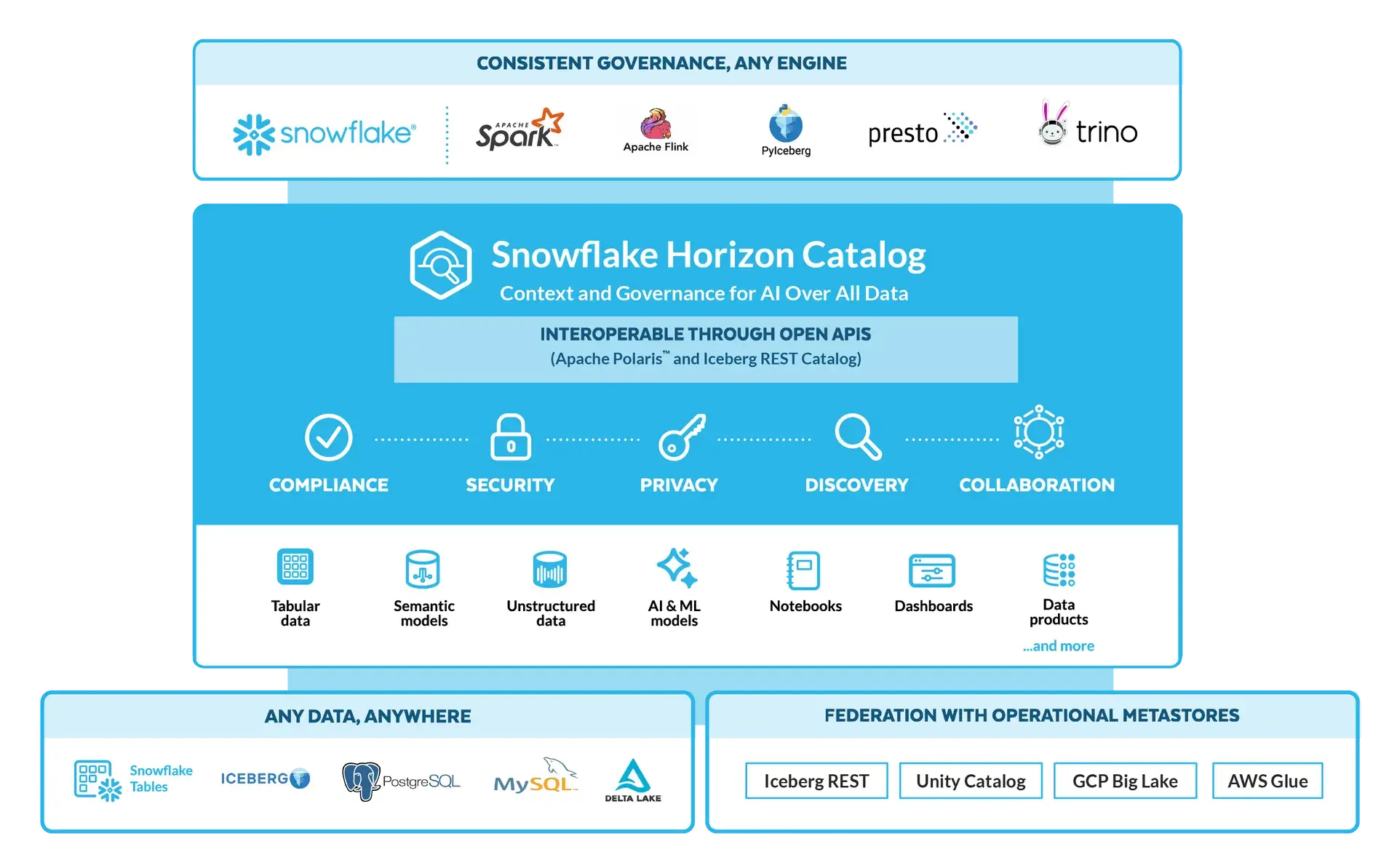
Snowflake’s Horizon catalog is a newer addition that extends Snowflake’s governance beyond the traditional database catalog. The platform already has robust security features, but Horizon aims to provide a unified governance plan across diverse data sources. Here’s what Horizon offers:
- Cross-source governance: Horizon Catalog lets Snowflake govern not just native Snowflake tables, but also external data like Iceberg Tables or even Databricks Delta tables in a unified way. This is part of Snowflake’s strategy to break down data silos.
- Central policy engine: Horizon provides a single place to define policies for compliance and privacy: things like PII tagging, data retention rules, and data sharing agreements (clean rooms). Snowflake’s governance capabilities include data classification (automatically detecting sensitive data patterns), object tagging, and a ‘Trust Center’ where data stewards can monitor policies.
- Data masking and anonymization: Building on Snowflake’s existing Dynamic Data Masking and Tokenization features, Horizon makes it easier to apply these at scale.
- Audit and observability: Snowflake already logs usage extensively. Horizon offers improved observability dashboards, making it easier to answer ‘who accessed what data when?’ or ‘where did this data come from?’ types of questions across your Snowflake account.
In short, Horizon is Snowflake’s answer to unified data governance in a world where not all data sits in Snowflake. While Unity Catalog is mostly about governing assets within Databricks, Horizon is about Snowflake reaching out to govern beyond its borders as well.
Bottom line: Both platforms provide enterprise-grade governance. Databricks Unity Catalog is great if you are primarily in the Databricks ecosystem and want fine-grained control plus lineage within your lakehouse. Snowflake Horizon is powerful for organizations that want Snowflake to be the central governance hub, even for external data or multi-party data collaboration.
Databricks vs Snowflake: Integration Capabilities
The ability to connect with existing tools and services determines how well a platform fits into your current data stack.
Databricks
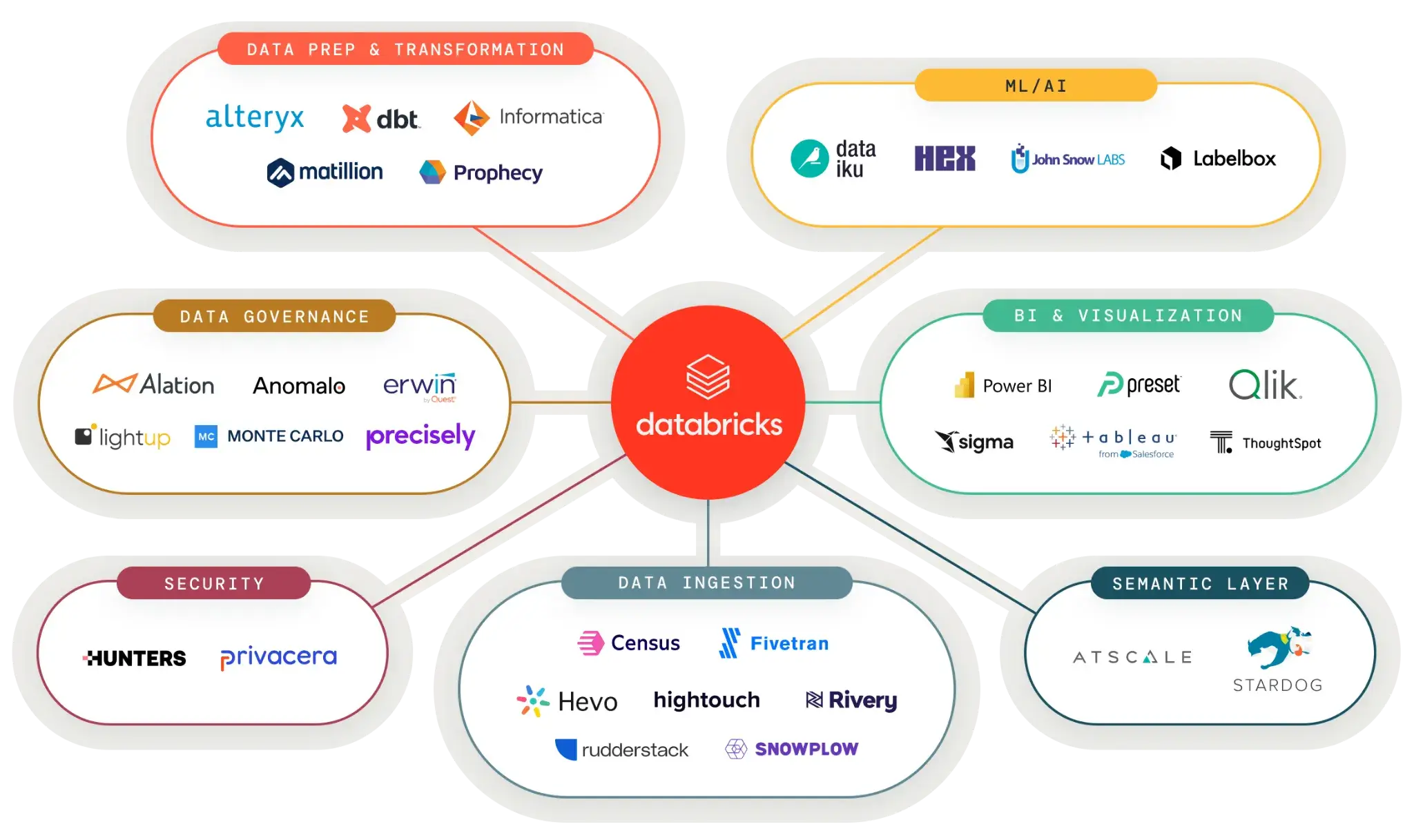
Databricks integrates deeply with cloud providers and the broader data ecosystem. The platform runs natively on AWS, Azure, and GCP, with optimizations specific to each cloud.
For data ingestion, Databricks supports:
- Streaming sources: Kafka, Kinesis, Event Hubs via Spark Structured Streaming
- Database connectors: JDBC/ODBC for MySQL, PostgreSQL, Oracle, SQL Server
- Cloud storage: S3, ADLS, GCS with direct access patterns
- Partner connectors: Fivetran, Airbyte, and other ETL tools
For ML and analytics, Databricks connects to:
- BI tools: Tableau, Power BI, Looker, Qlik through JDBC/ODBC
- ML platforms: Integration with MLflow, Weights & Biases, Neptune.ai
- Orchestration: Compatible with Airflow, Prefect, and Dagster for workflow management
- Git providers: GitHub, GitLab, Azure DevOps for version control
The Delta Sharing protocol allows you to share live data with external organizations without copying. Recipients can access shared tables through pandas, Apache Spark, or other compatible readers.
Databricks Partner Connect provides one-click integration setup for common tools. This feature simplifies the process of connecting to ingestion tools, BI platforms, and transformation services.
Snowflake
Snowflake’s integration ecosystem is extensive, with hundreds of certified partners across different categories.
For data movement, Snowflake supports:
- ETL/ELT tools: Fivetran, Matillion, Talend, Informatica with native connectors
- Streaming: Snowpipe for continuous ingestion from cloud storage
- Database replication: Built-in support for replicating data across regions
- External tables: Query data in S3, GCS, or Azure without loading it
For analytics and activation, Snowflake connects to:
- BI platforms: Tableau, Power BI, Looker, ThoughtSpot with optimized drivers
- Reverse ETL: Census, Hightouch for syncing warehouse data to operational tools
- Data apps: Streamlit for building interactive applications on Snowflake data
- Marketplace: Access thousands of third-party datasets directly
Snowflake’s Data Marketplace is unique in the ecosystem. You can subscribe to data from providers like Weather Company or Foursquare and query it immediately alongside your own data.
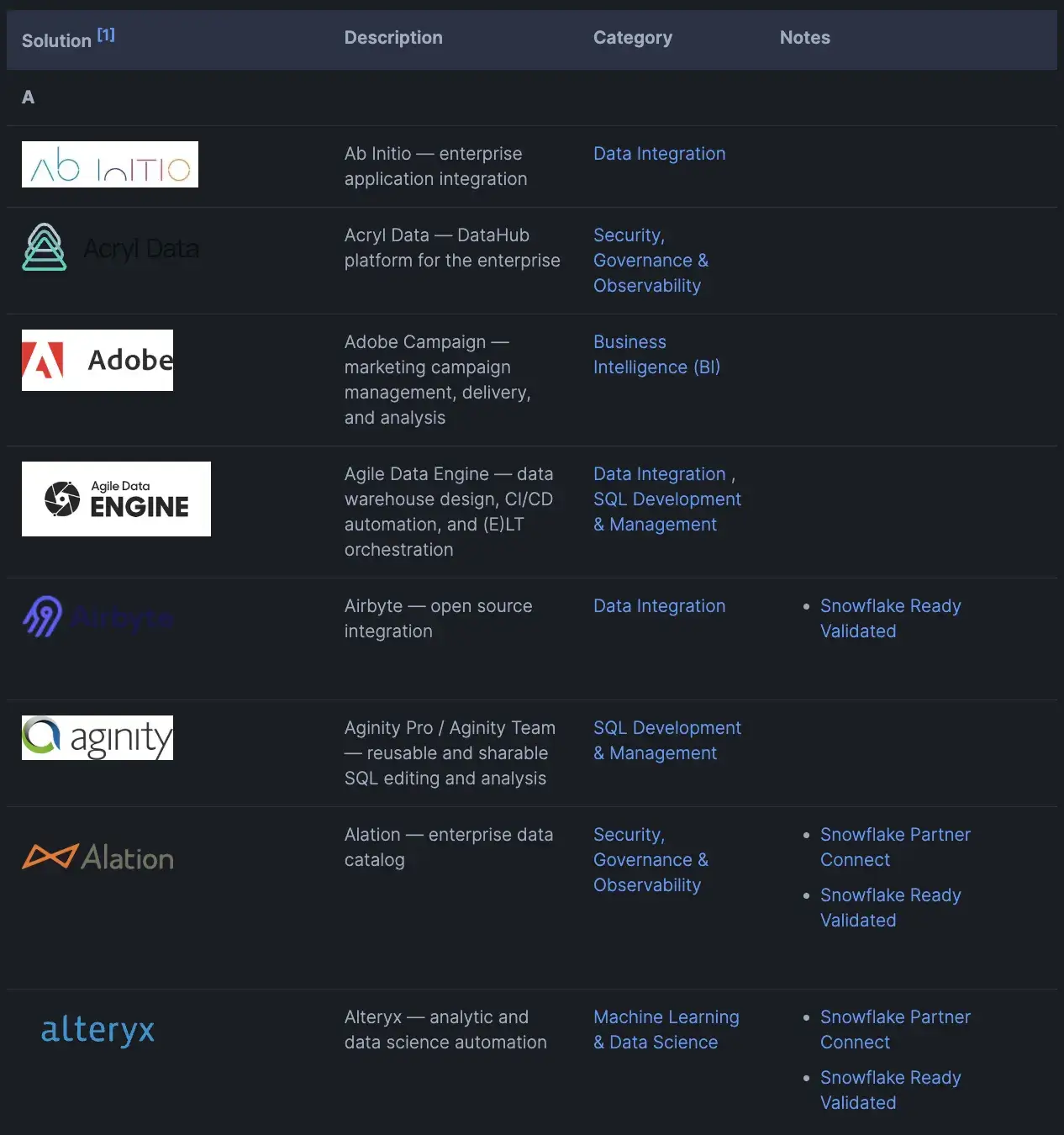
To put it simply: Databricks offers a wide array of connectors and APIs to integrate with data sources and downstream tools, while Snowflake provides a rich set of connectors and native integrations with popular ETL and BI platforms, ensuring it can slot into most enterprise data architectures.
Databricks vs Snowflake: Pricing
Databricks
Databricks uses a usage-based pricing model. You can start with pay-as-you-go, with no up-front costs, and you pay only for the products you use with per-second billing granularity.
If you have predictable usage, Databricks offers Committed Use Contracts. There are commitment-based discounts where higher committed usage can unlock better pricing and additional benefits.
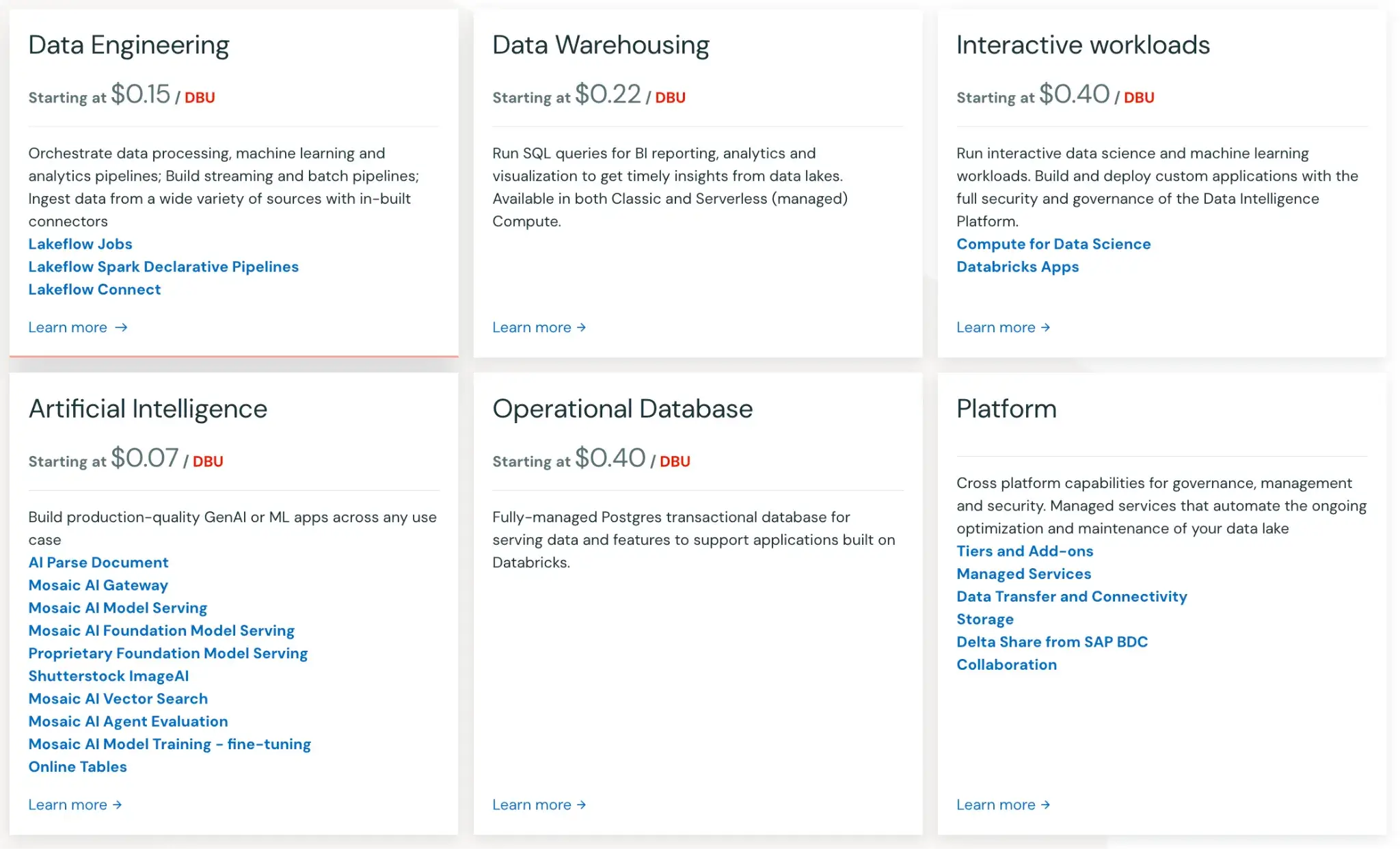
Here are some of the products Databricks offers and their starting prices:
- Data Engineering: $0.15 per DBU
- Data Warehousing: $0.22 per DBU
- Interactive Workloads: $0.40 per DBU
- Artificial Intelligence: $0.70 per DBU
- Operational Database: $0.40 per DBU
- Platform: Pricing undisclosed
Snowflake
Snowflake pricing is consumption-based and separates compute from storage. For compute, you run work on Virtual Warehouses, which consume credits while they are running queries or loading data.
Warehouses use per-second billing with a 60-second minimum each time a warehouse starts or resumes, so you pay for active compute time rather than a fixed monthly server size.
Storage is billed separately as a flat rate per TB per month, and Snowflake calculates this based on the stored data footprint (after compression).
Your unit rates depend on the Snowflake Edition you choose, the region, and whether you use On-Demand pricing or a discounted Capacity commitment.
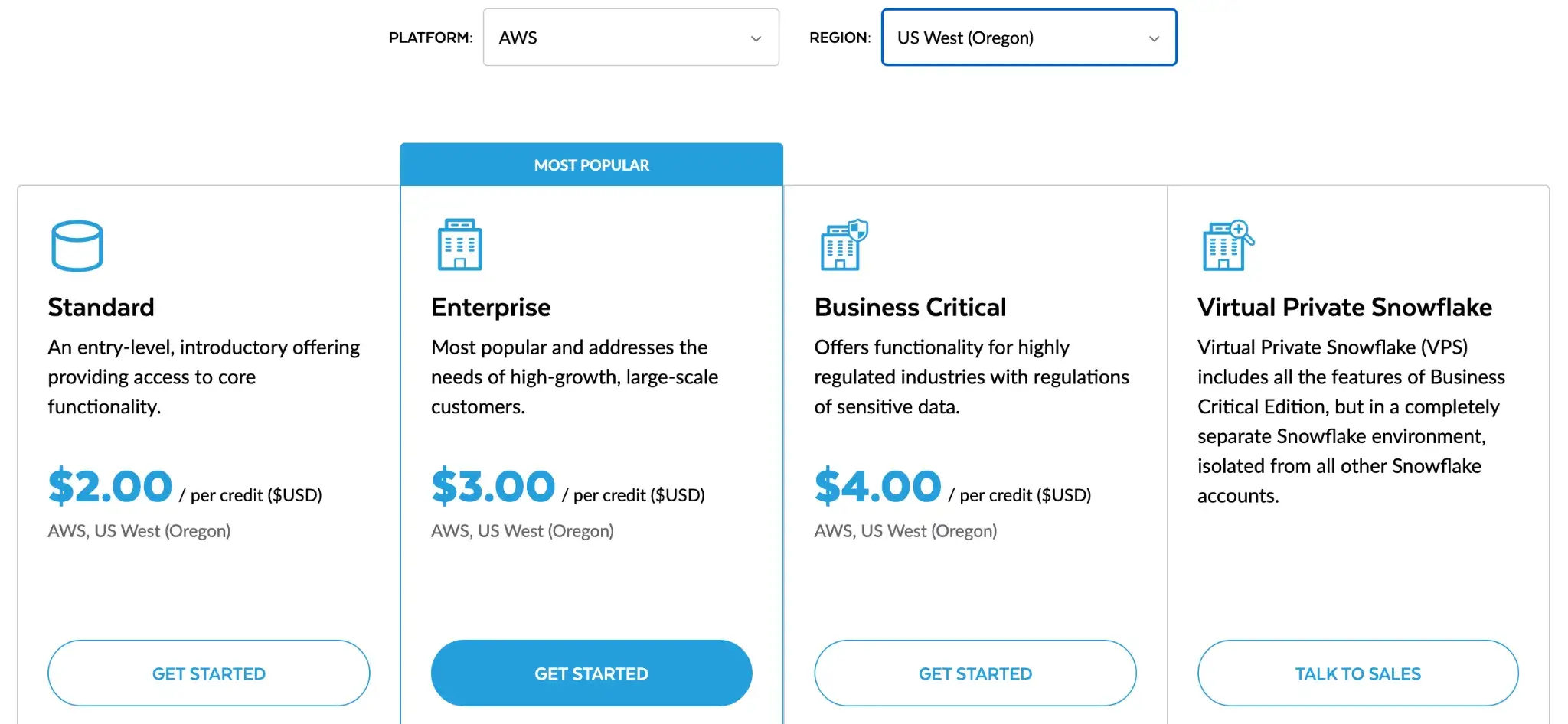
For example, if you select AWS as your platform and US West (Oregon) as your region, the pricing is as follows:
- Standard: $2 per credit
- Enterprise: $3 per credit
- Business Critical: $4 per credit
- On-Demand Storage: $23 per TB per month
Use ZenML to Decouple ML Logic from Infrastructure
👀 Note: ZenML has an integration in place with Databricks as an orchestrator, and while a dedicated Snowflake integration is not yet announced, using Snowflake via standard Python within ZenML is a common pattern. Keep an eye on ZenML’s integrations page for any new connectors (e.g., for Snowflake) in the future.
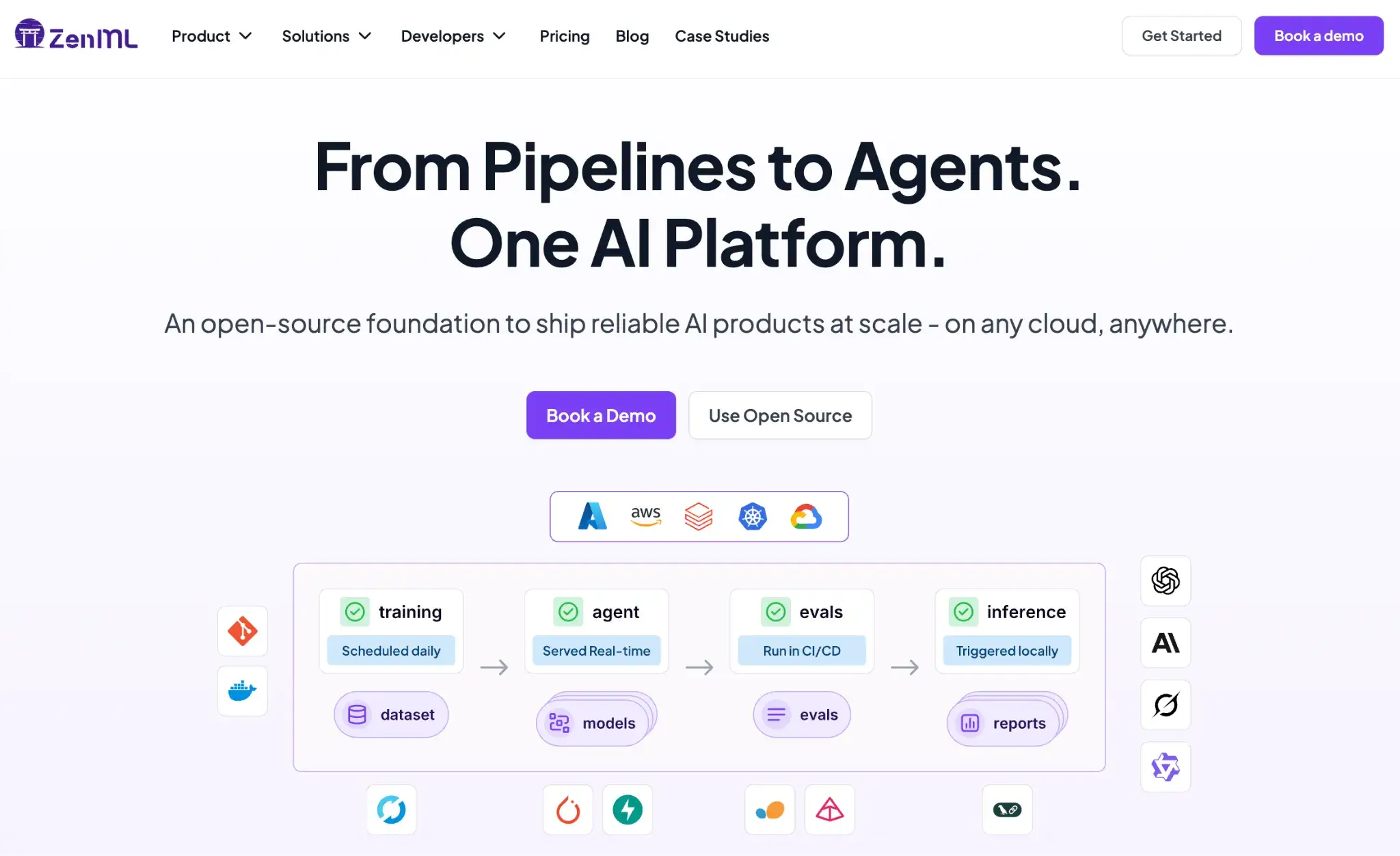
One of the biggest risks when choosing between Databricks and Snowflake is long-term lock-in. Both platforms encourage you to create a login within their environment, which makes switching later more expensive and time-consuming.
ZenML addresses this by decoupling ML logic from infrastructure. You write pipelines in standard Python, and ZenML handles where and how they run.
Databricks can be used as a scalable compute for training and feature engineering, while Snowflake can remain the system of record for analytics and curated data.
ZenML orchestrates the flow between them without forcing business logic into notebooks, stored procedures, or platform-specific APIs. This makes it easier to mix tools, change execution environments, and route workloads based on cost or scale.
Heavy training jobs can run on Databricks clusters or external compute, while lighter data prep or evaluation steps can pull directly from Snowflake.
ZenML acts as the outer control layer that tracks data versions, models, and pipeline runs across both systems. The result is flexibility without fragmentation: each platform is used for what it does best, while your ML workflows stay portable, testable, and easier to evolve over time.
📚 Relevant comparisons to read:
Also read our guide on the top Databricks alternatives you should try.
Databricks vs Snowflake: Which One to Choose?
The choice between Databricks and Snowflake depends on your team’s DNA.
✅ Choose Databricks if you are an engineering-led team building complex data products and AI models.
✅ Choose Snowflake if you are an analytics-led team focused on SQL reporting and business intelligence.
Better yet, use them together. Store your data in open formats. Use ZenML to orchestrate your workflows across both. This gives you the best of both worlds: the power of the Lakehouse and the simplicity of the Data Cloud.