
On this page
NVIDIA open-sourced the scheduling engine behind Run:ai. Now there are two tools from the same codebase, and teams I talk to are often confused which one to use.
If you’re running GPU workloads on Kubernetes at any reasonable scale, you’ve probably hit the same wall we have: the default Kubernetes scheduler has no idea what a GPU topology is, doesn’t understand gang scheduling, and treats an A100 the same way it treats a CPU core. This is a problem when you’re paying $2-3/hour per GPU and half of them are sitting idle.
Two tools that keep coming up about this pain point are KAI Scheduler and Run:ai, and that confusion is real because they literally share the same code.
Here’s a quick backstory for why this is the case - NVIDIA acquired Run:ai in late 2024. The deal got scrutinized by both the US DOJ and the European Commission. Shortly after closing, NVIDIA open-sourced Run:ai’s core scheduling engine as KAI Scheduler under Apache 2.0, and KAI was later accepted as a CNCF Sandbox project.
So what’s the actual difference? Think of it as - KAI Scheduler is the engine and Run:ai is the full vehicle.
My team and I tried both and compared them across GPU scheduling, resource optimization, gang scheduling, integrations, and pricing. We also asked a bunch of our ZenML users who run GPU workloads which one they use and why. The answers were surprisingly consistent.
KAI Scheduler vs Run:ai: Key Takeaways
KAI Scheduler: The open-source GPU scheduling engine that NVIDIA extracted from Run:ai and released under Apache 2.0 in April 2025. It’s a Kubernetes-native scheduler purpose-built for AI workloads, with automatic gang scheduling via its PodGrouper (no manual PodGroup CRDs like Volcano), fractional GPU sharing through pod annotations, and workload consolidation that defragments running pods across the cluster.
Run:ai: NVIDIA’s full enterprise GPU orchestration platform, built on top of KAI Scheduler’s engine. It wraps the same scheduling core in a management layer that adds enforced GPU memory isolation, support for standard NVIDIA MIG profiles, GPU memory swap to CPU RAM, multi-cluster management from a single control plane, and granular RBAC with SSO.
How Does KAI Scheduler vs Run:ai Feature Comparison Look Like?
| Feature | KAI Scheduler | Run:ai |
|---|---|---|
| Kubernetes-native AI workload scheduling | Helm-installed microservices replacing the default K8s scheduler. Two-level hierarchical queues with DRF. kubectl + CRDs only. | Same scheduling engine + enterprise control plane with Web UI, REST API, and CLI. The control plane manages multiple clusters, while scheduler queues are primarily department → project per node pool. Has three native workload types: Workspaces, Training, and Inference; distributed training is configured within Training workloads. |
| Dynamic GPU allocation/utilization | Continuous fair-share recalculation, time-based fairshare via Prometheus, workload consolidation (unique among OSS schedulers). | Topology-aware placement across NVLink domains, racks, and blocks, reclaim mechanism based on fairness, hard resource guarantees for non-preemptible workloads. |
| GPU sharing/fractional GPU | Annotation-based fractional allocation (percentage or absolute MiB). No memory enforcement. Applications must self-regulate. | Enforced memory isolation, dynamic fractions with Request/Limit bursting, GPU time-slicing (strict + fair), dynamic MIG, GPU memory swap to CPU RAM. |
| Gang/batch scheduling | Automatic pod grouping via PodGrouper plugins (Kubeflow, KubeRay, Argo). No manual PodGroup CRDs needed. | Same KAI engine + multi-level hierarchical pod groups for complex frameworks like NVIDIA Dynamo. Additional job lifecycle controls via UI/API. |
| Integrations | Kubeflow Training Operator, KubeRay, Argo Workflows, Knative, Prometheus/Grafana, Karpenter. Community setups for ZenML, OpenNebula. | Everything KAI supports + NVIDIA NIM, NVIDIA Dynamo, Jupyter/PyCharm/VS Code, Airflow, ClearML, MLflow, Ray, Seldon. AWS, Azure, GCP, Oracle Cloud marketplace. |
| Pricing | Free - Apache 2.0. | NVIDIA AI Enterprise: $4,500/GPU/year. Bundled with H100/H200 GPUs. 75% discount for education/startups. |
Feature 1. Kubernetes-Native AI Workload Scheduling
Both tools replace the default Kubernetes scheduler for GPU workloads, but the core scheduling intelligence is the same. The depth of management around it is where they diverge.
KAI Scheduler
KAI Scheduler runs as a set of microservices installed via a single Helm chart: scheduler, binder, pod-grouper, admission controller, queue controller, and operator. You need a running Kubernetes cluster, Helm, and the NVIDIA GPU Operator as prerequisites for GPU workloads. If CDI is enabled in certain environments like OpenShift, add the appropriate KAI binder flag.
Workloads opt in by setting schedulerName: kai-scheduler:
apiVersion: v1
kind: Pod
metadata:
  labels:
    kai.scheduler/queue: "team-a"
spec:
  schedulerName: kai-scheduler
  containers:
    - name: training
      image: my-training-image:latest
      resources:
        limits:
          nvidia.com/gpu: 1
KAI runs a continuous four-phase scheduling cycle: snapshot the cluster, state, compute fair-share divisions, run scheduling actions (allocate → consolidate → reclaim → preempt), then update status.
It supports two-level hierarchical queues with Dominant Resource Fairness, configurable quotas, over-quota weights, and hard limits.
That’s it. You don’t need a dashboard or an API (beyond the Kubernetes API, of course).
Run:ai
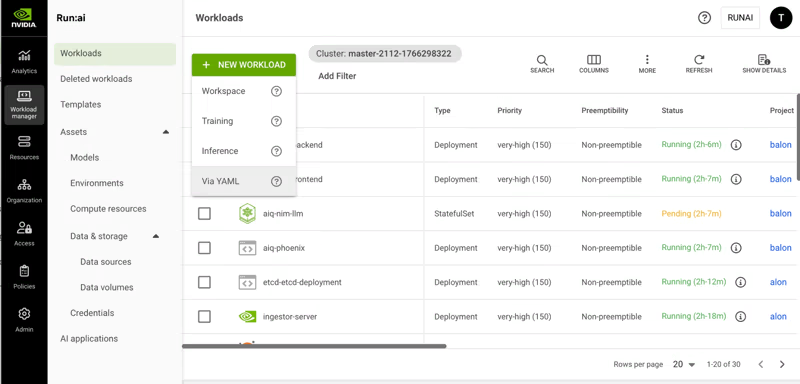
Run:ai takes the same engine and wraps it in a full control plane. You get a web UI, REST API, CLI, and Python client. The organizational hierarchy goes four levels deep:
Account → Clusters → Departments → Projects, each with per-node-pool quotas.
The platform also defines four workload types with distinct default behaviors:
- Workspace (interactive): Jupyter notebooks, data exploration; non-preemptible by default.
- Training: Batch workloads; preemptible, designed for checkpoint-based recovery
- Distributed Training: Multi-node with gang scheduling; all pods schedule together, or none do.
- Inference: Production serving; highest priority, non-preemptible.
The scheduler uses node pools to group nodes by GPU type, region, or topology. Each pool gets its own placement strategy: bin-pack to consolidate workloads and free up whole nodes, or spread to distribute for maximum per-workload resources.
Feature 2. Dynamic GPU Allocation/Utilization Optimization
The gap between open-source and enterprise gets real here.
KAI Scheduler
KAI continuously recalculates fair-share values, quotas, and limits to match workload demand. Its time-based fairshare system (v0.10.0+) plugs into Prometheus to track historical GPU usage per queue. A queue that’s been hogging GPUs gets penalized in future over-quota distributions. The penalty strength is tunable via a kValue parameter.
Note: The above scenario only affects over-quota distribution. Your guaranteed quota stays untouched no matter what.
KAI also does workload consolidation, which I haven’t seen in any other open-source GPU scheduler. It can relocate running pods to reduce fragmentation across the cluster. That’s a big deal when you have a 64-GPU distributed training job waiting for contiguous resources while small inference pods are scattered everywhere.
Run:ai
Run:ai does all of the above and adds topology-aware scheduling that considers NVLink domains, racks, and blocks when placing multi-GPU workloads. For the latest GB200 NVL72 systems, there’s a dedicated GPU Network Acceleration configuration.
The platform’s reclaim mechanism is also more nuanced; it doesn’t just preempt based on priority. It returns resources for over-quota projects to underserved ones based on fairness calculations. Non-preemptible workloads can only run within a deserved quota, which gives production inference hard resource guarantees.
Feature 3. GPU Sharing/Fractional GPU Usage
Both tools let multiple workloads share GPUs. The enforcement story is where things get interesting.
KAI Scheduler
KAI supports GPU sharing through pod annotations. The two modes: gpu-fraction for percentage-based and gpu-memory for absolute MiB requests:
apiVersion: v1
kind: Pod
metadata:
  annotations:
    gpu-fraction: "0.5"
  labels:
    kai.scheduler/queue: "research"
spec:
  schedulerName: kai-scheduler
  containers:
    - name: inference
      image: my-model:latest
Here’s the thing you need to know: KAI does not enforce GPU memory isolation. If you give a workload 50% of a GPU and it decided to consume 90% (hello vLLM with its default gpu-memory-utilization), nothing stops it.
Your neighbor’s workload crashes, and you have to manually configure memory limits in your application code. Sorry to break it to you, but this is a real operational headache if your team doesn’t enforce discipline.
Also, because GPU sharing uses annotations instead of resources.requests, cluster autoscalers can’t see these pods. KAI has a workaround using utility pods, but it’s not exactly plug-and-play.
Run:ai
Run:ai adds enforced memory isolation. Exceed your allocated GPU memory? You get an OOM exception. Your neighbor is safe and that’s a huge difference in production. It also does dynamic GPU fractions with Request/Limit semantics:
gpu-fraction: 0.25          # guaranteed minimum
gpu-fraction-limit: 0.80    # burstable when memory is free
On top of that, Run:ai supports GPU time-slicing (strict and fair modes), NVIDIA MIG with on-the-fly partition creation (the scheduler calls the MIG API dynamically, no manual nvidia-smi mig commands), and GPU memory swap the pages GPU memory to CPU RAM. The swap feature alone can save you from cold-starting inference models that got preempted. We’re talking seconds of warm-start latency versus minutes.
Feature 4. Gang/Batch Scheduling
Since Run:ai is built on KAI’s engine, the core gang scheduling mechanism is shared.
KAI Scheduler
KAI uses PodGroups to ensure all pods in a group schedule atomically. The PodGrouper is the standout feature here.
It automatically detects and groups related pods by traversing Kubernetes ownerReferences up to the top-level owner. Registered plugins handle Kubeflow TFJob/MPIJob/PyTorchJob, KubeRay, RayCluster, Argo, and standard batch Jobs.
This is a genuine ergonomic win over Volcano, which requires manual PodGroup CRD creation. Submit a RayCluster with a head pod and four workers, and KAI’s PodGrouper figures out the grouping automatically.
Run:ai
Run:ai uses the same engine but adds multi-level gang scheduling with hierarchical pod group structures. This matters for frameworks like NVIDIA Dynamo inference, where you have gateway pods, prefill workers, and decoder workers, each with independent replica requirements but all needing to be placed as a coordinated unit.
KAI Scheduler vs Run:ai: Integration Ecosystem
KAI Scheduler
KAI’s integrations are a Kubernetes-native ML ecosystem-focused. The PodGrouper recognizes Kubeflow Training Operator workloads (TFJob, MPIJob, PyTorchJob), KubeRay clusters, and Argo Workflows.
You also get Knative support for serverless GPU services, Prometheus/Grafana for metrics, and Karpenter/Cluster Autoscaler compatibility for cloud environments.
Community setups exist for ZenML and OpenNebula. The integration list is growing, but it’s still early days. If you need something that isn’t natively supported, you’ll be writing custom PodGrouper plugins or handling things at the Kubernetes level yourself.
Run:ai
Run:ai’s integration surface is much broader. Beyond everything KAI supports, you get NVIDIA NIM for model serving, NVIDIA Dynamo for distributed inference, and IDE integrations for Jupyter, PyCharm, and VS Code with auto-launch.
Community-supported integrations cover:
- Apache Airflow
- ClearML
- JupyterHub
- Kubeflow Pipelines
- MLflow, Ray
- Seldon
Cloud provider support spans AWS, Azure, GCP, and Oracle Cloud with marketplace availability across all four.
KAI Scheduler vs Run:ai: Pricing Comparison
KAI Scheduler
KAI is free under Apache 2.0; there are no restrictions, no phone-home, no feature gating. You only pay for engineering time to deploy and maintain it.
Run:ai
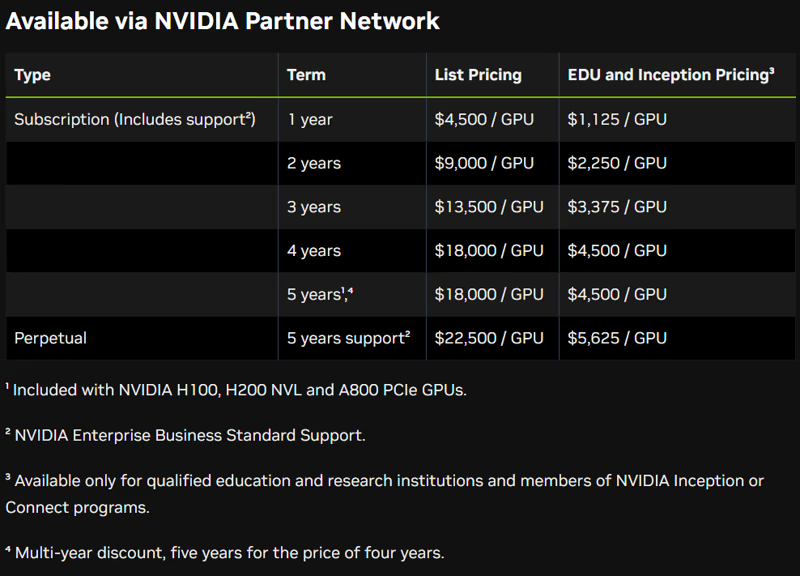
Run:ai’s pricing is bundled with NVIDIA AI Enterprise at $4,500 per GPU per year (for 1 year). If you subscribe to its 5-year plan, the pricing drops to $3,600 per GPU per year.
It also offers a Perpetual license with five years of support: $22,500 per GPU.
Here’s the detail most people miss: NVIDIA’s H100 PCIe, H200 NVL, and A800 PCIe GPUs ship with a bundled five-year AI Enterprise subscription. If you’re running these GPUs, you might already have Run:ai entitlements. Check with NVIDIA directly rather than assuming.
If you already license NVIDIA AI Enterprise for the same GPUs, Run:ai may not add incremental software cost, but you should verify current entitlements and deployment terms with NVIDIA or your reseller.
Relevant read: Run:ai vs ClearML
Wrapping Up KAI Scheduler vs Run:ai Discussion
The choice here is pretty clear once you know what layer of the stack you’re operating at.
Pick KAI Scheduler if you want GPU-aware scheduling without enterprise overhead. You’re comfortable with kubectl and CRDs. You’re a startup, research lab, or a team that would rather spend engineering time than licensing dollars.
Pick Run:ai if you’re operating at enterprise scale with hundreds or thousands of GPUs across multiple clusters. Enforced GPU memory isolation, dynamic MIG, GPU memory swap, multi-tenant security, and centralized governance are non-negotiable for you.
Now here’s the thing - whether you pick KAI or Run:ai at the infrastructure level, the question that follows is: what handles the layer above the scheduler? GPU scheduling in one layer. What about pipeline orchestration, artifact lineage, and cross-environment governance that sit above GPU scheduling?
That is exactly where ZenML fits. ZenML operates at the pipeline and workload level, not the GPU scheduling level. You can run ZenML pipelines on Kubernetes clusters managed by the KAI scheduler or Run:ai underneath. Our platform handles the cross-stack orchestration, artifact tracking, and reproducibility. The scheduler handles GPU placement and resource optimization.
An exciting coming soon feature my team and I are building is the Resource Pools. The feature adds resource-aware scheduling that works across stacks.
With this, platform teams can create pools representing physical resources, attach them to stacks via resource policies, and data scientists can just declare how many resources they need and hit run.
If your ML platform has more than one compute backend, ZenML’s Resource Pools will fill this gap that neither KAI nor Run:ai covers on its own.
If your primary challenge is maximizing GPU utilization on a Kubernetes cluster, KAI Scheduler or Run:ai gives you the deepest scheduling intelligence at the infrastructure level.
But if your reality is multi-stack and you need a governance layer across all of it, give ZenML a spin; it’s free.