
On this page
Historically, the worlds of high-performance computing (HPC) and enterprise software were distinct islands. HPC teams ran massive simulations on supercomputers using Slurm, while software teams built microservices on the cloud using Kubernetes.
Today, GenAI and Large Language Models (LLMs) have forced these two worlds to collide.
Currently, Machine Learning engineers face a dilemma. They need the raw, bare-metal performance of HPC for training massive models, but they also need the agility, serving capabilities, and ecosystem of the cloud-native world.
This poses the billion-dollar question: Should you build your ML platform on Slurm or Kubernetes?
In this Slurm vs Kubernetes comparison, we break down the architectural differences, scheduling philosophies, and feature sets to help you decide which orchestrator belongs in your MLOps stack.
P.S. We also discuss how an MLOps platform like ZenML helps you leverage both orchestrators within a unified ML lifecycle.
Slurm vs Kubernetes: Key Takeaways
🧑💻 Slurm: A workload manager designed for batch processing. It excels at queuing large-scale, monolithic jobs (think LLM training) that require exclusive access to hardware. Its philosophy is simple: ‘Wait your turn, then run fast.’
🧑💻 Kubernetes: A container orchestrator designed for services. It excels at managing long-running applications, microservices, and elastic scaling. Its philosophy is declarative: ‘Make the system state match this configuration.’
🧑💻 ZenML: While Slurm and Kubernetes manage the infrastructure, ZenML manages the workflow. It allows you to write pipeline code once and deploy it to either orchestrator without rewriting your logic.
Slurm vs Kubernetes: Maturity and Lineage
To understand the strengths of each tool, look at its origins. The table below compares the framework maturity of Slurm and Kubernetes:
| Metric | Slurm | Kubernetes |
|---|---|---|
| First public release | 2002 (Lawrence Livermore National Lab) | 2014 (Google), v1.0 in 2015 |
| GitHub stars | 3.5k+ | 119k+ |
| Forks | 763+ | 41.9k+ |
| Commits | 72,648+ | 134,194+ |
| Core philosophy | Job-centric: A prioritized queue of batch scripts waiting for resources. | Container-centric: A declarative API ensuring pods are running and healthy. |
| Adoption profile | Used by ~65% of TOP500 supercomputers for weather modeling and physics simulations. | The standard for enterprise IT, SaaS platforms, and modern MLOps stacks. |
Slurm originated in the supercomputing labs of the early 2000s. It was designed for scientific and HPC workloads on Linux cluster systems. It is widely used in research and enterprise HPC environments. To put a number, Slurm is the workload manager on more than half of the Top500 supercomputers.
Kubernetes was born at Google (inspired by Borg) in the cloud era, optimizing for commodity hardware and resilience. It saw rapid adoption in the industry for cloud infrastructure. All major cloud providers offer managed Kubernetes services and a large extension ecosystem.
Unlike Slurm, Kubernetes is tied to the container paradigm and is relatively new, yet it has become the de facto standard for cloud orchestration.
Slurm vs Kubernetes: Features Comparison
While both systems share the high-level goal of ‘running code on computers,’ the mechanisms they use to achieve this are radically different. In this section, we compare them across four critical dimensions: Workflow, Architecture, Resource Modeling, and Scheduling Policies.
But before we dive in, here’s a quick table that summarizes key differences:
| Feature | Slurm | Kubernetes |
|---|---|---|
| Primary Workflow | Imperative batch: Users submit finite scripts (sbatch) that run to completion. The model is “fire-and-forget,” optimized for long-running training jobs. | Declarative state: Users define a desired end-state (YAML). The system continuously reconciles to maintain that state, optimized for always-on services. |
| Control Plane | Centralized: A monolithic controller (slurmctld) keeps state in memory. This enables extremely fast scheduling decisions but creates a single point of failure. | Distributed: Decoupled components (API Server, etcd, Scheduler). This provides high resilience and fault tolerance, but introduces higher latency for scheduling decisions. |
| Resource Model | Hardware assets: Focuses on exclusive access to specific nodes or cores. Provides deep topology awareness for MPI and minimizes noisy-neighbor effects. | Abstracted pool: Compute is treated as a fungible pool. Resources are shared via requests/limits and container isolation rather than exclusive hardware ownership. |
| Scheduling Policy | Queue and priority: Uses Fair Share and Backfill algorithms to maximize utilization of scarce hardware. Enforces strict FIFO or priority-based ordering. | Reconciliation and bin-packing: Filters and scores nodes to place pods based on fit. Optimized for availability and packing density, but lacks native support for complex batch queues. |
Now, let’s compare these features head-to-head, in detail:
Feature 1: Overall Purpose and Primary Workflows
The fundamental unit of work defines the user interaction model. In Slurm, the unit is a Job. In Kubernetes, the unit is a Pod.
Slurm
Slurm is designed for finite tasks that run to completion. The primary interface is the Command Line Interface (CLI). A user interacts with Slurm by writing a shell script that contains special directives.
- Submission: The user authors a bash script like
train.sh. This script includessbatchcomments that tell the scheduler what resources are needed. - Queuing: The user runs
sbatch train.sh. The scheduler parses the script, assigns it a Job ID, and places it in a priority queue. The job state is PENDING. - Execution: Once resources are available, Slurm allocates the nodes. It then executes the script on the first node of the allocation. The script typically calls
srunto launch parallel processes across all allocated nodes. The job state becomes RUNNING. - Completion: When the script finishes (or fails), the resources are released immediately. The output is written to a file.
This ‘fire-and-forget’ model is ideal for training deep learning models. The job owns the hardware exclusively. There are no sidecars, no background daemons, and minimal OS noise.
Kubernetes
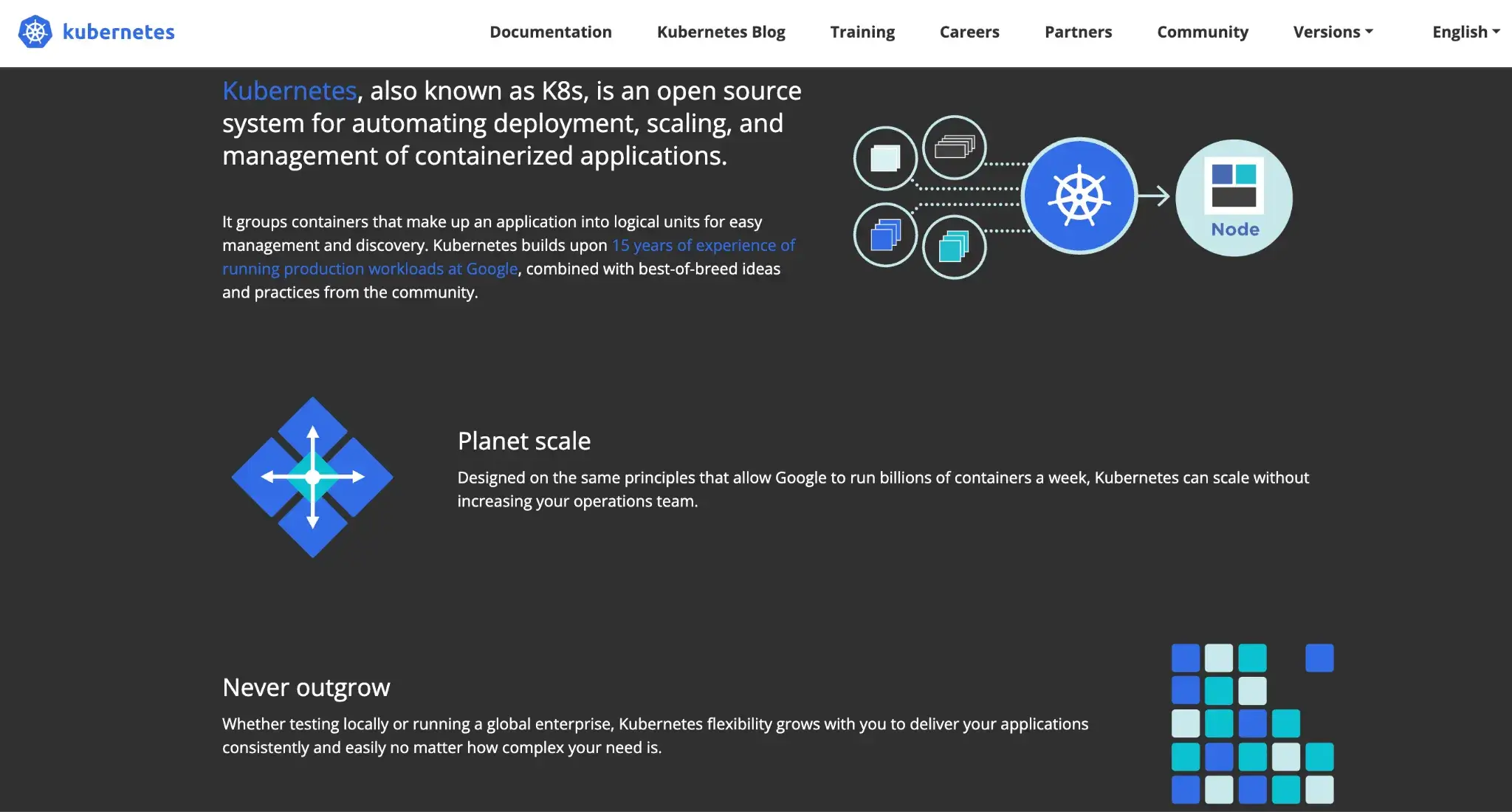
Kubernetes is designed for long-running services and composable workloads. The primary interface is the Kubernetes API, typically accessed via kubectl and YAML files.
- Submission: The user defines the workload in a YAML manifest. This file describes the container image, the command to run, the resources required, and the restart policy.
- Reconciliation: The user runs
kubectl apply -f job.yaml. This submits the configuration to the API server. The Scheduler notices the new Pods and assigns them to nodes. The kubelet on each node pulls the container image via the node’s container runtime (for example, containerd) and starts the container. - Execution: The workload runs inside a container isolation boundary. If a node fails, Kubernetes does not reschedule the same Pod (Pods are bound to a node). If the workload is managed by a controller (e.g., Deployment/Job/StatefulSet), the controller creates a replacement Pod which the scheduler places on a healthy node.
- Abstraction: The user does not think about 'nodes.' They think about 'resources.' Kubernetes abstracts the physical infrastructure away.
However, Kubernetes assumes workloads are decoupled; if a node dies, it simply restarts the pod elsewhere, which can be disastrous for rigid MPI jobs without add-ons.
Bottom Line: Slurm wins for rapid experimentation and massive training jobs due to its ‘submit-and-forget’ simplicity and reduced overhead. Kubernetes is well-suited for production pipelines in which the model must integrate with other microservices, offering superior reproducibility through containers.
Feature 2: Cluster Architecture and Control Plane
The architectural layout of the control plane dictates the system’s scalability, fault tolerance, and operational complexity.
Slurm
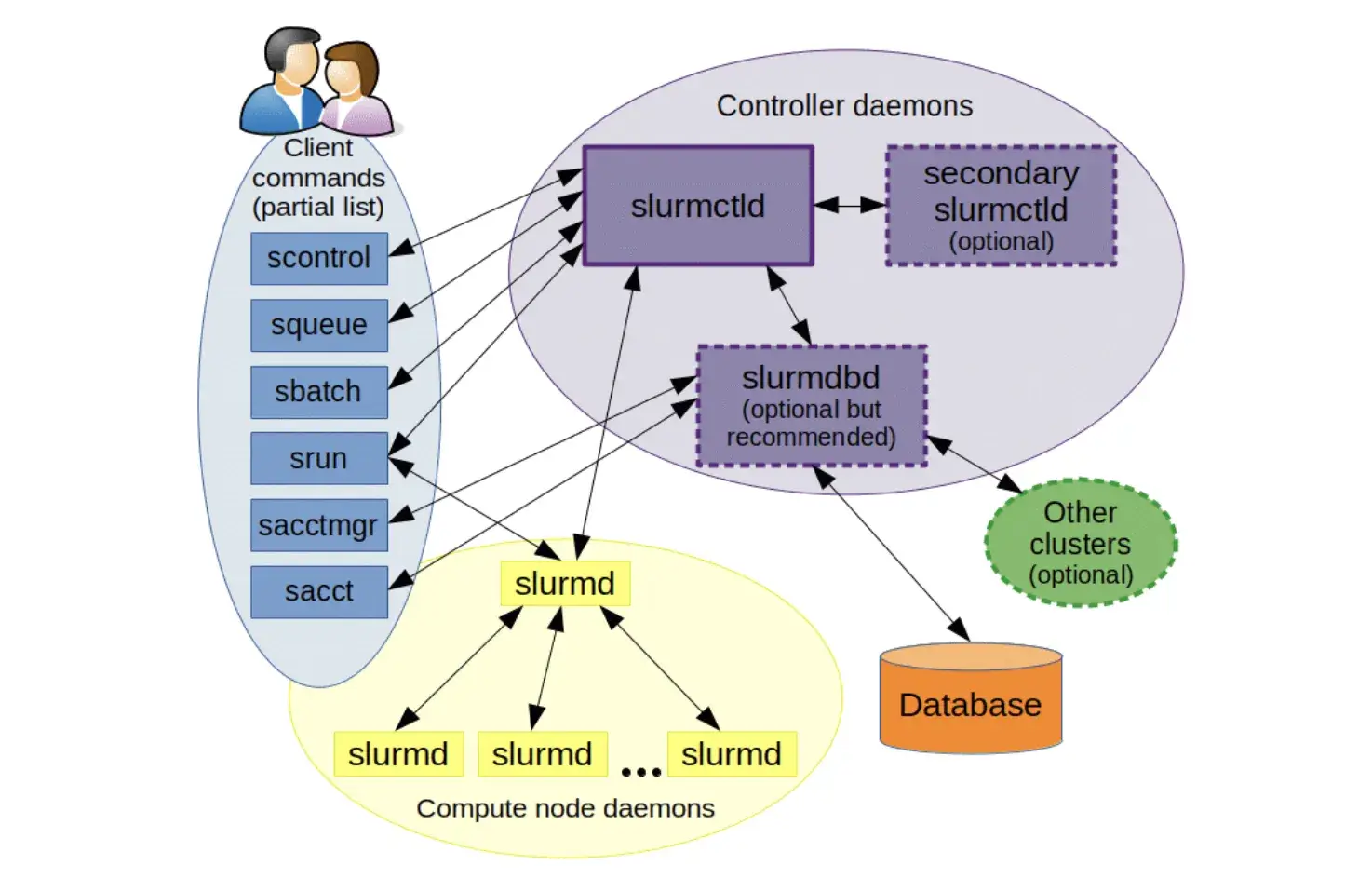
Slurm’s architecture is centralized and relatively simple, designed to squeeze maximum performance out of static hardware.
- Controller (
slurmctld): Manages job queues and resource assignments. Can be run redundantly for high availability. - Compute Node Daemon (
slurmd): Listens for work on each node, executes job steps, and reports status. - Database Daemon (
slurmdbd): Records job accounting (user, time, resources used) in a database. - User Commands: Tools like
sbatch,srun,squeue, etc., interface withslurmctldto submit and monitor jobs.
The control processes can run on a single management node with minimal overhead. However, it creates a single point of failure and a scaling bottleneck. Slurm’s control plane is centralized (slurmctld), but it supports a backup controller for failover. Without that HA setup, slurmctld is a single operational chokepoint.
Kubernetes
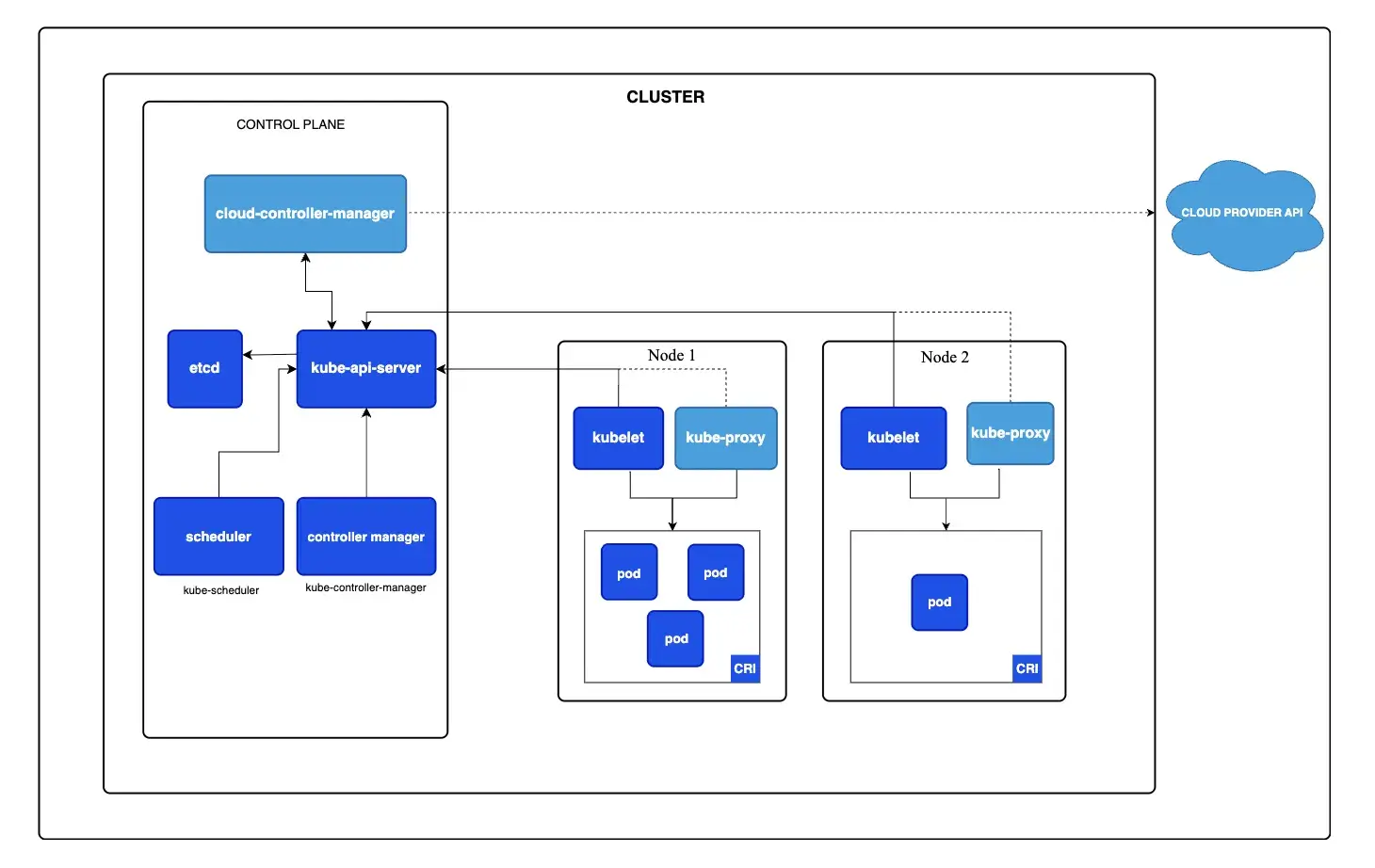
Kubernetes employs a decoupled, microservices-based control plane. This design prioritizes resilience and API consistency.
- API Server (
kube-apiserver): The only component that talks to the database. All other elements (users, scheduler, nodes) communicate with this server via REST API calls. It is stateless and can scale horizontally. etcd: The distributed brain.etcdis a consistent key-value store that holds the entire state of the cluster. It uses the Raft consensus algorithm to maintain a consistent cluster state and can tolerate the loss of some control-plane members as long as quorum remains. You still need etcd backups/snapshots for disaster recovery and quorum-loss scenarios.- Scheduler (
kube-scheduler): A specialized client that watches the API server for unscheduled Pods and assigns them to nodes. It is decoupled from the API server, meaning you can replace it with a custom scheduler (e.g., Volcano). kubelet: The agent on each node. Unlikeslurmd, thekubeletis autonomous. It continuously compares the running containers with the desired state specified by the API server.
Bottom line: Slurm wins for high-throughput batch scheduling where decisions need to be made in microseconds for thousands of jobs. Kubernetes wins for system resilience and cloud-native operations, ensuring the control plane survives individual node failures and networking partitions.
Feature 3. Resource Model
How the system views CPU, Memory, and Accelerators is the most critical factor for ML workloads.
Slurm
Slurm views resources as tangible hardware assets. It was built for environments where researchers need to know exactly which CPU core they are running on.
A job request specifies how many nodes and CPUs (cores) it needs. For this, Slurm uses a plugin system called GRES to manage GPUs.
If you want GPUs per task, use --gpus-per-task (or an equivalent per-task GPU request mechanism), rather than --gres=gpu:<n>.
#SBATCH --gres=gpu:4
#SBATCH --cpus-per-task=16
When a user requests a node, Slurm can lock that node so that no other job can run on it.
Slurm can enforce CPU and memory boundaries via cgroups, but its model stays job-centric: you request an allocation (nodes/cores/GPUs) and the scheduler optimizes for predictable, low-noise execution.
Kubernetes
Kubernetes uses a Requests-and-Limits model. You specify requests and limits for CPU and memory. Kubernetes packs Pods onto nodes based on these numbers.
Kubernetes supports GPUs through the device plugin framework, where vendors advertise GPUs as extended resources, for example - nvidia.com/gpu .
Example snippet in a Pod spec:
resources:
  requests:
    cpu: "4"
    memory: "8Gi"
  limits:
    cpu: "8"
    memory: "16Gi"
    nvidia.com/gpu: 1
Here, the container asks for 4 CPU cores and 1 GPU, with a limit of 8 cores and 1 GPU. The scheduler ensures each Pod’s requests can fit on a node.
Kubernetes commonly co-locates many Pods on the same node via requests/limits. Slurm can be configured for either exclusive or shared node access, but HPC setups often prefer exclusive allocations for performance isolation. This is highly cost-effective but requires careful configuration to avoid resource contention during training.
Bottom Line: Slurm wins on performance for distributed training, offering the exclusive access and topology awareness needed to saturate interconnects. Kubernetes wins on flexibility, efficiently abstracting hardware details to allow diverse workloads to share the same pool of resources.
Feature 4. Scheduling Model and Policies
The scheduler is the component that decides when a job runs and where it goes. Both have a central scheduler that maps workloads to nodes.
Slurm
Slurm uses a queue-based, priority-driven scheduler. It’s highly configurable and often tuned for throughput. It can be used:
- Backfill Scheduling: If a massive job is waiting for 100 nodes, Slurm will sneak in smaller, shorter jobs on the idle nodes while they wait, maximizing utilization without delaying the big job.
- Gang Scheduling: Slurm supports this natively. It ensures that for a distributed job across 50 nodes, all 50 separate processes start at the exact same time. If one node is busy, the job waits. This is critical for MPI-based training.
👀 Note: Slurm supports time-sliced gang scheduling (multiple jobs share the same resources and are alternately suspended), and it also co-schedules distributed MPI launches through synchronized process start.
There are topology-aware plugins, too. For example, when a job is submitted, Slurm either starts it immediately or places it in a queue. Once resources free up, Slurm re-evaluates queued jobs in priority order, potentially preempting or rescheduling based on configured policies.
Kubernetes
Kubernetes uses a generic scheduling framework. The default kube-scheduler performs scheduling using a reconciliation loop with a filter/score mechanism.
- Filter and Score: It filters nodes that don't fit the requirements and scores the rest to find the ‘best’ fit.
- Preemption: High-priority pods can kick off lower-priority pods.
By default, Kubernetes prefers to spread Pods across the least-allocated nodes. If you want strict bin packing for cost efficiency, you can configure the scheduler scoring strategy, for example - most allocated.
However, Kubernetes does not support strict gang scheduling out of the box. You typically need third-party operators like Volcano or Kueue to prevent ‘partial allocation’ deadlocks where a distributed job gets only half the GPUs it needs and hangs forever.
Bottom Line: Slurm is the undisputed king of batch scheduling, utilizing ‘Backfill’ and ‘Fair Share’ to ensure expensive GPUs are never idle. Kubernetes is better suited for always-on services, prioritizing the availability and packing density of long-running pods over complex queue management.
Slurm vs Kubernetes: Integration Capabilities
An orchestrator is only as good as the tools it connects with. This is where the divide between ‘Unix Philosophy’ and ‘API Economy’ becomes stark.
Slurm
Slurm integrates well with the traditional HPC stack.
- MPI (Message Passing Interface): Slurm has native, first-class support for MPI. When
srunlaunches a job, it sets up the PMI wire-up automatically. This makes launching massive MPI jobs trivial. - Apptainer (Singularity): While Slurm can run containerized workloads via integrations, the HPC standard is Apptainer (Singularity). It allows containers to run securely without a daemon, integrating cleanly with Slurm's process model.
- Weakness: Slurm struggles with services. It has no native concept of a 'Service Mesh,' 'Ingress,' or 'Load Balancer.' Running a dashboard or a model serving API on Slurm usually involves manual port forwarding and SSH tunnels.
Kubernetes
Kubernetes is the universal adapter for modern software.
- Operators: The Operator Pattern allows Kubernetes to manage complex, stateful applications. For ML, operators like the Kubeflow Training Operator (which provides CRDs like
PyTorchJobor Ray Operator manage the lifecycle of distributed training. They handle the 'gang scheduling' logic, service discovery, and fault tolerance automatically. - The Ecosystem: If you need a vector database, a feature store, a monitoring stack (Prometheus/Grafana), or a CI/CD runner, there is a Helm chart for it. You can deploy a complete MLOps platform on Kubernetes in minutes.
- Cloud Integration: Kubernetes integrates natively with cloud IAM (Identity and Access Management), VPCs, and persistent storage (EBS, GCS). This makes it the superior choice for pipelines that need to read from S3, write to a database, and expose an API endpoint.
Slurm vs Kubernetes: Pricing
Neither Slurm nor Kubernetes has a license fee, but costs come from infrastructure and support.
Slurm
Slurm is open-source (GPL) and free to use. Institutions typically run Slurm on their own server clusters; the primary costs are compute hardware and system administration.
Kubernetes
Kubernetes is also open-source (Apache 2). Cloud providers often charge for managed Kubernetes: for example, GKE charges a small fee per cluster, and AWS’s EKS charges by the hour for the control plane.
There are no vendor lock-in fees for the core Kubernetes software; however, you will incur costs for underlying compute resources and any managed service fees.
ZenML: The Unified Control Plane for Slurm and Kubernetes
The choice between Slurm and Kubernetes often forces a split in the ML team. Data Scientists iterate on Slurm to access high-end GPUs and fast interconnects. MLOps engineers build on Kubernetes to ensure stability and integration.
This is where ZenML enters the picture.
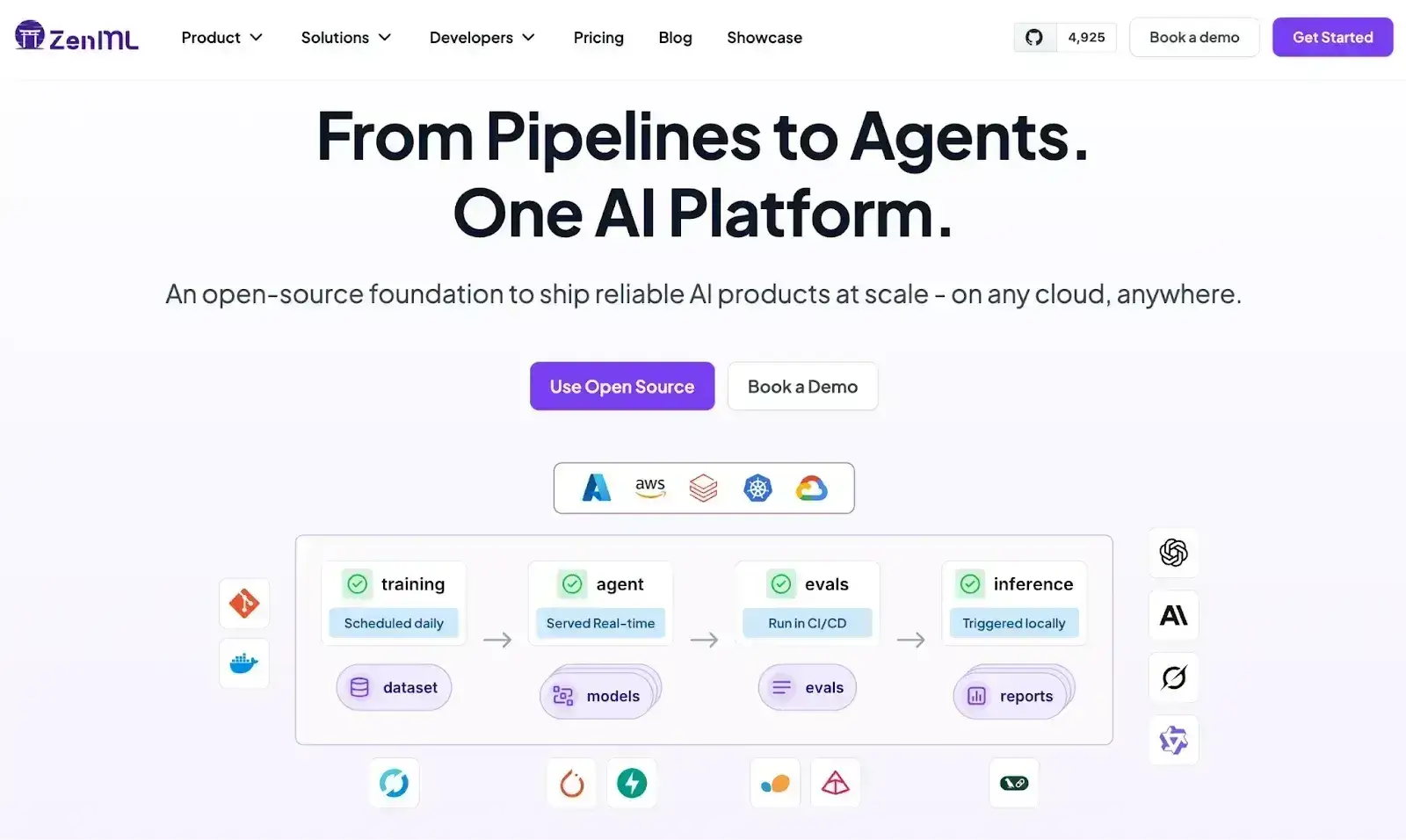
ZenML acts as a unified control plane that resolves this conflict. It treats the orchestrator as a swappable component in the stack, allowing the same pipeline code to execute on different backends without refactoring.
Here’s how ZenML helps:
1. Decoupling Code from Infrastructure
In ZenML, a pipeline is defined in Python using the @pipeline decorator. The logic of what to run is separated from where to run it.
- Local Development: A user creates a stack with a
Localorchestrator to test the pipeline on their laptop. - Production Training: The user switches the stack to use a SkyPilot or Kubeflow orchestrator. ZenML automatically containerizes the code, pushes it to a registry, and submits it to the remote cluster.
2. Hybrid Workflows (The Best of Both Worlds)
ZenML enables hybrid pipelines where different steps run on different infrastructures.
Step 1 (Data Prep): Runs on a Kubernetes CPU node (via Kubeflow orchestrator) to pull data from a warehouse and preprocess it.
Step 2 (Training): Uses a Step Operator or custom integration to trigger an external Slurm job (for example via sbatch, SkyPilot, or a user-managed submission layer) on a Slurm cluster with H100 GPUs.
Step 3 (Evaluation): Runs back on Kubernetes to generate reports and register the model. This approach allows teams to use Kubernetes for what it’s good at (data pipes, services) and Slurm for what it’s good at (raw compute).
👀 Note: ZenML does not currently provide a native Slurm orchestrator; instead, it integrates with Slurm environments through external tools and custom execution layers while preserving pipeline structure, tracking, and lineage.
3. Reproducibility and Lineage
A major pain point with raw Slurm usage is the lack of tracking: ‘Which bash script produced this model?’
ZenML solves this by automatically tracking the code version, configuration, parameters, and output artifacts of every run, regardless of whether it executed on a Kubernetes Pod or a Slurm node. This creates a ‘Single Pane of Glass’ for all ML operations.
📚 Relevant blogs to read:
- Neptune AI vs WandB vs ZenML
- Temporal vs Airflow
- Kubeflow vs MLflow vs ZenML
- Metaflow vs MLflow vs ZenML
Slurm vs Kubernetes: Which One Is the Best for You?
The choice between Slurm and Kubernetes comes down to your workload DNA.
- Choose Slurm if you are a research lab or HPC center running massive, tightly coupled training jobs on fixed hardware where maximum utilization and strict queuing are paramount.
- Choose Kubernetes if you are an enterprise engineering team building end-to-end ML products that require serving, elasticity, and integration with modern CI/CD and microservices.
- Use ZenML when you need to bridge these worlds. By treating Slurm and Kubernetes as interchangeable execution backends, ZenML allows your data scientists to focus on modeling rather than writing sbatch scripts or Kubernetes manifests.