
On this page
Most ML platform teams I talk to are not really choosing between Databricks or SageMaker or ZenML as a binary. They are trying to decide where the center of gravity of their ML platform should sit, how much of the workflow should be locked to one vendor, and where a portable pipeline layer fits on top.
That is why this comparison comes up so often. Databricks and Amazon SageMaker AI are both serious enterprise platforms, but they start from very different places. Databricks grew out of the lakehouse and pulls ML close to governed data. SageMaker grew out of AWS and pulls ML close to managed cloud primitives.
ZenML enters the comparison from a different angle. It is not trying to replace Databricks or SageMaker. It’s an open-source MLOps framework that sits on top of either platform, gives ML teams a Python-first pipeline abstraction, and tracks artifacts and metadata across the runs. ZenML integrates with Databricks as an orchestrator and with SageMaker as both an orchestrator and a step operator, so the practical question is rarely Databricks vs SageMaker vs ZenML. It’s more often which of these two platforms do I run, and how do I keep my pipelines portable on top of it?
This article compares the three across orchestration, data prep and feature engineering, experiment tracking, GenAI/LLMOps workflows, integrations, pricing, and best-fit use cases.
Databricks vs SageMaker vs ZenML: Key Takeaways
Databricks: Pick this if your data already lives in Delta and Unity Catalog and you want ML, analytics, data engineering, governance, and GenAI workflows on one lakehouse platform.
Amazon SageMaker AI: Pick this if you are AWS-native and want managed ML building blocks. SageMaker gives you purpose-built services for processing, training, tuning, pipelines, feature store, model registry, real-time and batch inference, MLflow tracking, and foundation models.
ZenML: Pick this if your team wants portable, reproducible ML and AI pipelines without locking the pipeline abstraction to one cloud. ZenML is not a data warehouse or a managed cloud ML suite. It gives you a Python pipeline interface, automatic artifact and metadata tracking, a stack-based infrastructure abstraction, and integrations with the tools you already run, including Databricks and SageMaker themselves.
Databricks vs SageMaker vs ZenML: Maturity and Lineage
Before getting into individual features, it helps to understand where each product comes from.
Databricks started as a data platform company rooted in Apache Spark and the lakehouse architecture. Over time it expanded from large-scale data processing into ML, governance, feature serving, model serving, and GenAI application development.
Amazon SageMaker AI comes from the opposite direction. It’s a cloud-native ML service family inside AWS. Its maturity comes from being deeply integrated with AWS primitives like IAM, S3, CloudWatch, EventBridge, ECR, Lambda, and VPC networking.
ZenML has a different lineage. It was built around the idea that ML pipelines need a first-class abstraction that survives infrastructure changes. The pitch is not “use this one cloud service for everything.” It is “write the pipeline once, then choose the stack components that should execute, store, track, deploy, and monitor it.” A team can start locally, move to Kubernetes, add MLflow or W&B for tracking, use S3 or GCS or Azure Blob as an artifact store, run some steps on SageMaker, run others on Databricks, and later standardize on Kubeflow or Airflow.
Here is a quick table:
| Metric | Databricks | SageMaker | ZenML |
|---|---|---|---|
| First public release | Hosted cloud platform GA, June 2015; founded 2013 at UC Berkeley AMPLab | Launched at AWS re:Invent, November 2017 | v0.1.0 on PyPI, December 21, 2020 (founded 2020, Munich) |
| GitHub stars | Closed source (stewards Apache Spark, 41k+) | Closed source (managed AWS service) | 5.4k+ |
| Core philosophy | Lakehouse: data, analytics, AI on one platform | Managed AWS-native ML service family | Open-source MLOps framework, infrastructure-agnostic |
| Notable proof points | 15,000+ orgs incl. Block, Comcast, Condé Nast, Rivian, Shell. ~70% of Fortune 500 | Many AWS customers across regulated and large-scale environments | Used by enterprises like JetBrains, Adeo, Brevo, and more |
Databricks vs SageMaker vs ZenML: Features Comparison
Here is the high-level comparison before we go deeper:
| Feature | Databricks | SageMaker | ZenML |
|---|---|---|---|
| End-to-end ML workflow orchestration | Lakeflow Jobs for scheduled multi-task workflows, ML pipelines, notebooks, Python scripts, and Databricks-native tasks | SageMaker Pipelines for purpose-built ML workflow DAGs across processing, training, evaluation, registration, and deployment steps | Python @step and @pipeline abstractions that execute on local, Kubernetes, Kubeflow, Airflow, SageMaker, Databricks, Vertex AI, and more |
| Data prep and feature engineering | Strong if features live in Delta/Unity Catalog, with Feature Store, point-in-time joins, feature serving, and lineage | Strong AWS-native Feature Store with online/offline stores, Feature Processing, Data Wrangler, and Processing jobs | Tracks datasets and intermediate artifacts as first-class pipeline outputs; integrates with Feast rather than replacing a feature store |
| Experiment tracking | Managed MLflow built into the workspace for runs, experiments, models, metrics, and artifacts | Managed MLflow on SageMaker AI, plus SageMaker Pipelines integration with SageMaker Experiments | Tracks pipeline runs, artifacts, metadata, and lineage; plugs into MLflow, W&B, Comet, and other trackers |
| GenAI/LLMOps workflows | Mosaic AI/Databricks GenAI stack for agents, apps, vector search, model serving, MLflow tracing, evaluation, and monitoring | JumpStart foundation models, managed MLflow, model deployment, evaluation, fine-tuning, and AWS-native GenAI integrations | Pipeline-first LLMOps for RAG, evaluation, agents, prompts, embeddings, and artifacts across different model providers |
Feature 1. End-to-end ML workflow orchestration
Workflow orchestration is the backbone of production ML. It decides how preprocessing, training, evaluation, registration, deployment, batch inference, and monitoring jobs run as a repeatable process.
Databricks
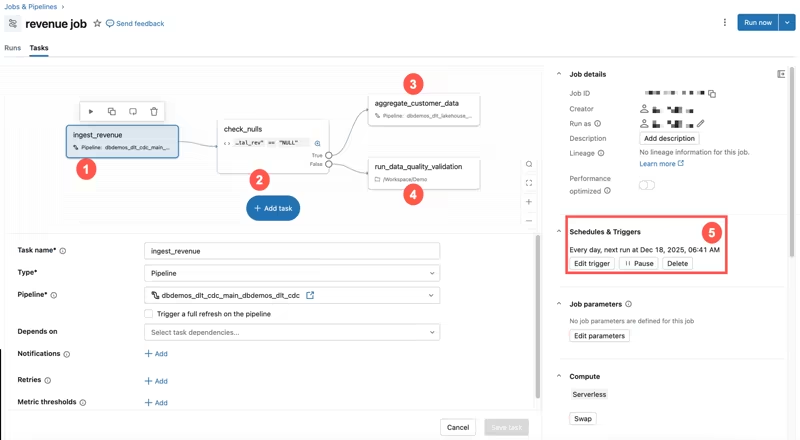
Databricks handles orchestration primarily through Lakeflow Jobs. A Databricks job can contain one or more tasks, and those tasks can run notebooks, Python scripts, SQL, dbt, JARs, pipeline tasks, and ML workloads. Jobs support dependencies, branching, loops, triggers, notifications, Git settings, parameters, and monitoring.
For ML teams, this means Databricks can coordinate a full production workflow inside the same environment where the data and compute already live. A typical workflow looks like this:
- Ingest new data into Delta tables.
- Run a feature engineering notebook or Python script.
- Train a model and log metrics to MLflow.
- Run evaluation checks.
- Register a candidate model.
- Deploy or trigger downstream inference jobs.
- Notify the team if a validation step fails.
Where Databricks is strong: orchestrating production ML workloads that already run inside the lakehouse.
Where it can feel limiting: if you want the same pipeline abstraction to survive a move to a different cloud or orchestrator, Lakeflow Jobs are powerful but naturally Databricks-shaped.
SageMaker
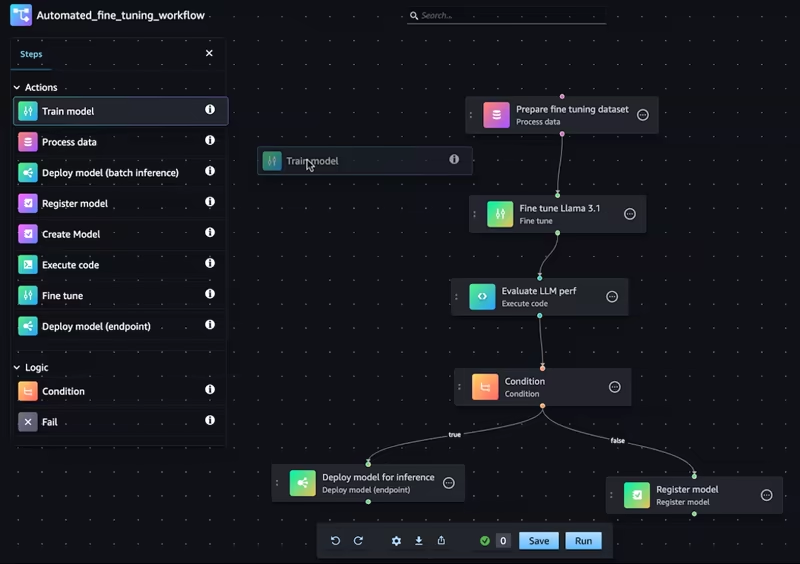
Amazon SageMaker AI uses SageMaker Pipelines for ML workflow orchestration. A SageMaker pipeline is a DAG of interconnected steps. Those steps can handle processing, training, evaluation, condition checks, model registration, model creation, batch transform, and other SageMaker-native actions.
The important difference from a generic workflow scheduler is that SageMaker Pipelines is purpose-built for ML. It understands common ML lifecycle objects like training jobs, processing jobs, model packages, evaluation results, and pipeline executions.
A typical SageMaker pipeline might look like this:
- Run a Processing step to clean and split raw data.
- Run a Training step to train a model.
- Run another Processing step to evaluate the trained model.
- Use a Condition step to decide whether the model meets quality thresholds.
- Register the model into SageMaker Model Registry if the checks pass.
- Deploy to an endpoint or prepare for batch transform.
Where SageMaker is strong: AWS-native managed ML pipelines where every step maps cleanly to a SageMaker service.
Where it can feel limiting: the more deeply you use SageMaker Pipelines, the more your workflow is shaped around SageMaker concepts and AWS IAM/service boundaries.
ZenML
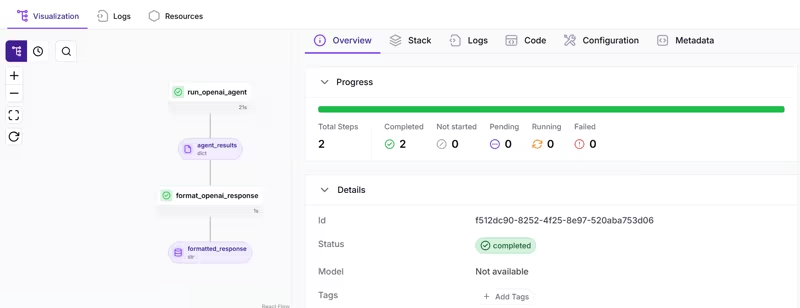
ZenML takes a meta-orchestration approach. You define the pipeline in Python with @step and @pipeline, and ZenML delegates execution to whichever orchestrator is configured in your active stack.
A simple ZenML pipeline looks like this:
from zenml import pipeline, step

@step
def load_data() -> dict:
    return {"features": [[1, 2], [3, 4]], "labels": [0, 1]}

@step
def train_model(data: dict) -> str:
    # Your training logic here
    return "trained_model"

@pipeline
def training_pipeline():
    data = load_data()
    train_model(data)

training_pipeline()
The pipeline code doesn’t need to know whether it’s running locally, on Kubernetes, on Kubeflow, on Airflow, on SageMaker, on Databricks, or on something else. That is the point of the stack abstraction.
This is also why ZenML doesn’t actually replace but complements Databricks or SageMaker. ZenML integrates with Databricks as an orchestrator and uses DatabricksOrchestratorSettings to configure Spark version, worker count, node types, autoscaling, and policy IDs.
With SageMaker, ZenML offers both an orchestrator and a step operator, so you can run a full pipeline on SageMaker or push only the heavy training step onto a SageMaker training job while the rest runs elsewhere. In both cases, ZenML adds pipeline-level lineage, artifacts, and metadata on top of the platform you have already paid for.
ZenML also treats step inputs and outputs as pipeline artifacts. If a step returns a dataset, model, evaluation report, prompt template, or metrics object, ZenML stores and tracks it. So orchestration is not only “run task B after task A.” It is also “what data moved between the steps, and how was it produced?”
Where ZenML is strong: pipeline definitions that survive infrastructure changes, plus a clean ML-native developer experience layered on top of whatever orchestrator you already use, especially in a team setting.
Where it can feel limiting: ZenML is not a managed compute platform. The execution still runs on your stack: Kubernetes, SageMaker, Databricks, Airflow, or another backend.
Bottom line:
- Databricks is excellent for orchestrating ML workflows inside the lakehouse.
- SageMaker is excellent for AWS-native managed ML pipelines.
- ZenML is strongest when you want the pipeline definition to survive infrastructure changes, and it works on top of Databricks and SageMaker rather than replacing them.
Feature 2. Data prep and feature engineering pipelines
Here is where the ML systems get messy. The hard part is not transforming raw data; it’s ensuring the same features are computed consistently for training and serving, preserving lineage, avoiding training-serving skew, and making datasets reproducible.
Databricks
Databricks is particularly strong here because it treats data engineering and ML as part of the same platform.
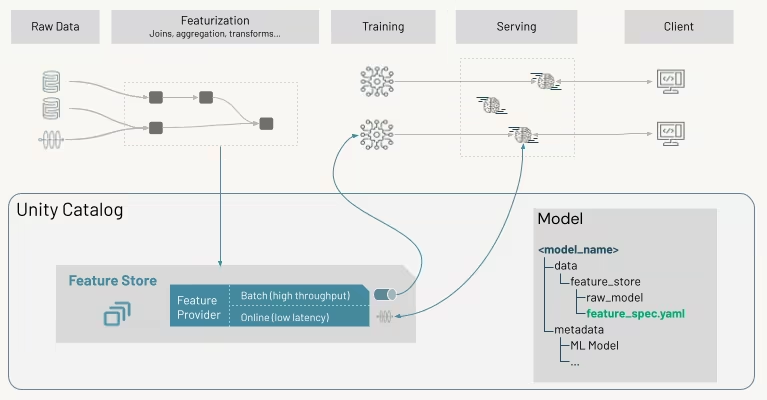
Databricks Feature Store with Unity Catalog provides a central registry for features used in AI and ML models. Feature tables and models can be registered in Unity Catalog, which gives you built-in governance, lineage, discovery, and cross-workspace sharing.
Databricks also supports point-in-time joins for training datasets, online feature stores for low-latency feature serving, and automatic feature lookup during inference.
Where Databricks is strong: feature engineering for teams whose raw data is already structured, large, streaming, or in Delta tables.
Where it can feel limiting: this model works best when you have already bought into the Databricks way of organizing data. If your data platform is spread across multiple warehouses, object stores, Python services, and clouds, Databricks can still help, but it is no longer the neutral control layer for the whole workflow.
SageMaker
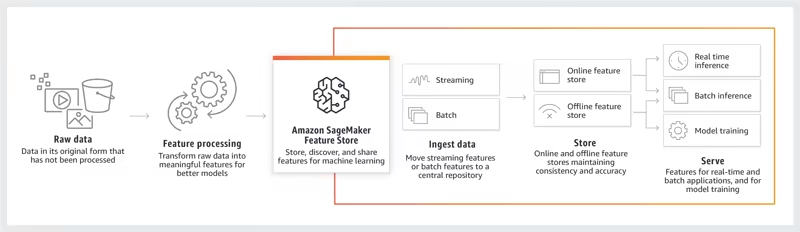
SageMaker provides a dedicated Feature Store with online and offline storage modes. The online store is built for low-latency reads for real-time inference. The offline store keeps historical feature values, typically backed by S3, for training and batch inference.
SageMaker also has Feature Processing, which transforms raw data into features and ingests them into feature groups. It provides a Feature Processor SDK and creates and maintains SageMaker Pipelines to load and ingest the data.
For data preparation beyond feature stores, SageMaker offers Data Wrangler and Processing jobs. A common pattern is to use a Processing job for preprocessing, write features to Feature Store, train a model using those features, and then deploy with online feature lookup support.
Where SageMaker is strong: AWS-native managed components for the whole feature workflow, end to end.
Where it can feel limiting: you are managing IAM, S3 locations, SageMaker job configuration, feature group definitions, and the broader AWS service graph as you go.
ZenML
ZenML does not try to be a fully managed feature store. Instead, it focuses on making feature pipelines reproducible, tracked, and portable.
In ZenML, every value returned from a step can become an artifact. That includes raw datasets, cleaned datasets, train/test splits, feature tables, model objects, evaluation reports, embeddings, prompt templates, and other intermediate outputs. ZenML stores those artifacts in the artifact store configured in your stack and tracks their lineage across runs.
For example:
from typing import Tuple
import pandas as pd
from zenml import pipeline, step

@step
def load_raw_data() -> pd.DataFrame:
    return pd.read_csv("data/raw.csv")

@step
def create_features(df: pd.DataFrame) -> pd.DataFrame:
    df["feature_1_x_2"] = df["feature_1"] * 2
    return df

@step
def split_dataset(df: pd.DataFrame) -> Tuple[pd.DataFrame, pd.DataFrame]:
    train = df.sample(frac=0.8, random_state=42)
    test = df.drop(train.index)
    return train, test

@pipeline
def feature_pipeline():
    raw = load_raw_data()
    features = create_features(raw)
    split_dataset(features)
The benefit is that feature creation logic stays in regular Python pipeline code, while ZenML handles artifact tracking and lineage. If you want artifacts on S3, GCS, Azure Blob, MinIO, or local storage, that is handled through the artifact store component. You can also point those steps at a SageMaker step operator to run resource-heavy steps on SageMaker compute, or trigger the whole pipeline from Databricks. The feature logic does not change.
Where ZenML is strong: portable, lineage-tracked feature pipelines that can sit on top of Databricks Feature Store, SageMaker Feature Store, or just plain artifacts.
Where it can feel limiting: ZenML is not a low-latency online feature serving system. For low-latency online serving, you still want the platform feature stores or a dedicated serving tool underneath.
Bottom line:
- Databricks has the strongest feature engineering story when your data platform is the lakehouse.
- SageMaker has the strongest AWS-native managed feature workflow.
- ZenML is strongest when you want portable feature pipelines with artifact lineage and want to keep the choice of feature store open.
Feature 3. Experiment tracking
Experiment tracking is where teams answer the basic but critical questions:
- Which parameters produced this model?
- Which dataset version was used?
- Which code version ran?
- Which run performed best?
Databricks
Databricks uses MLflow as the core experiment tracking experience. You can log parameters, metrics, tags, artifacts, training datasets, models, and notebooks. Databricks also provides a hosted MLflow tracking server inside the workspace, so teams do not need to run their own MLflow server to get started.
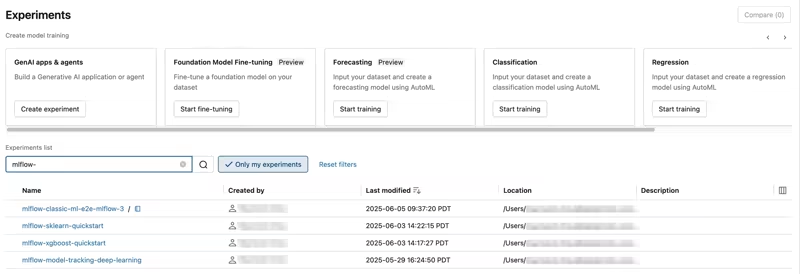
Databricks experiments organize MLflow runs and make it easier to compare them. A run is one execution of model code, and an experiment groups related runs. Models are logged as artifacts and managed through the model lifecycle, especially when combined with Unity Catalog.
Where Databricks is strong: managed MLflow tightly connected to governed data, notebooks, jobs, registry, and serving inside the workspace.
Where it can feel limiting: the value compounds when everything lives in Databricks. The experience is less differentiated if your training and inference code lives outside.
SageMaker
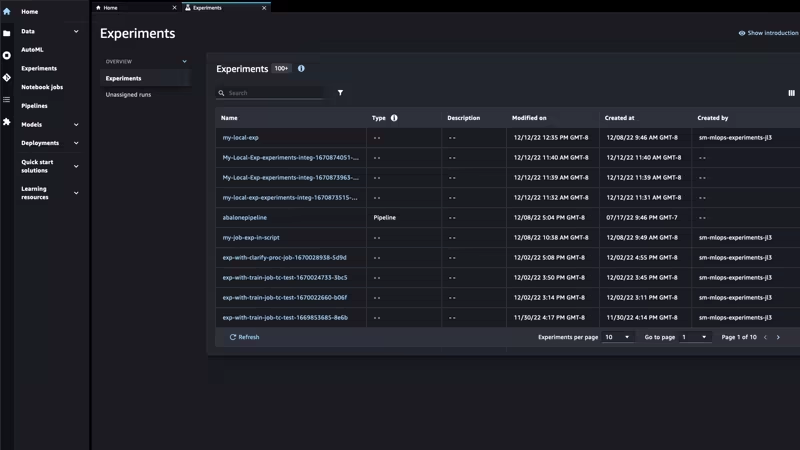
With managed MLflow on SageMaker AI, teams can create MLflow tracking servers, connect with the MLflow SDK and AWS MLflow plugin, log experiments, compare runs in the MLflow UI, register models, and deploy to SageMaker endpoints.
SageMaker also integrates MLflow with IAM, CloudTrail, EventBridge, SageMaker Model Registry, and SageMaker Inference. SageMaker Pipelines is also integrated with SageMaker Experiments, so pipeline executions can create experiment entities, run groups, and runs corresponding to jobs in the pipeline.
Where SageMaker is strong: managed MLflow and pipeline-linked experiments inside AWS.
Where it can feel limiting: there are multiple generations of tracking concepts (Experiments Classic, Pipelines integration, MLflow on SageMaker). For a new implementation, MLflow on SageMaker is the cleaner direction.
ZenML
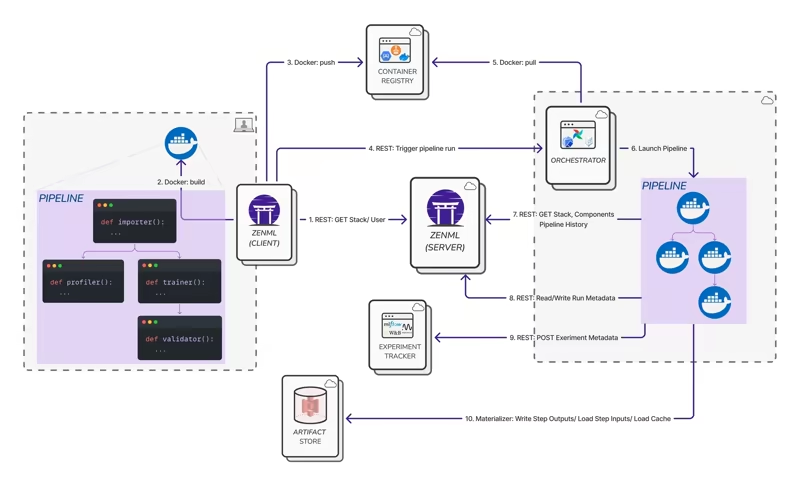
ZenML approaches experiment tracking through pipeline lineage first.
Every ZenML pipeline run captures the structure of the pipeline, the steps executed, the parameters used, the artifacts produced, and the metadata associated with the run. This is different from a standalone experiment tracker that only sees what your training script manually logs.
ZenML also supports experiment tracker stack components. You can plug in MLflow, Weights & Biases, Comet, or others and use them inside ZenML pipeline steps. This is the key distinction. ZenML is not asking you to choose between built-in tracking and external trackers. It gives you automatic pipeline metadata and artifact lineage, then lets you add your preferred tracking UI on top.
That means a team using Databricks-managed MLflow or SageMaker-managed MLflow can keep using both, while ZenML connects those runs back to the wider pipeline context (which step produced which artifact, which run consumed it, what infrastructure executed it).
Where ZenML is strong: experiment tracking tied to portable pipeline lineage, while still letting you use your preferred tracking UI.
Where it can feel limiting: if all your ML work already lives in Databricks and you are happy with Databricks-native MLflow, ZenML adds the most value when you need portability beyond that environment.
Bottom line:
- Databricks offers the smoothest managed MLflow experience inside the lakehouse.
- SageMaker has a strong AWS-managed MLflow path; avoid relying on outdated Studio Classic assumptions.
- ZenML is strongest when you want experiment tracking tied to portable pipeline lineage and want to keep your existing tracker UI.
Feature 4. GenAI/LLMOps workflows
With LLMOps, teams now have to manage prompts, embeddings, vector indexes, RAG pipelines, agents, and so much more. Databricks, SageMaker, and ZenML all support GenAI workflows. Again, the philosophy differs.
Databricks
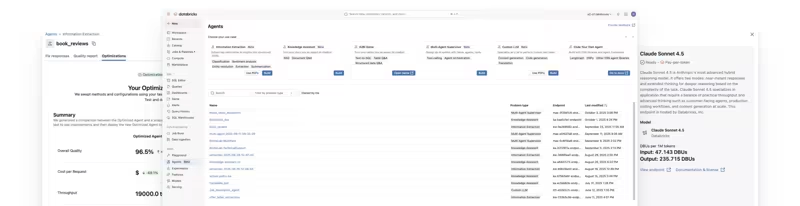
Databricks provides a broad GenAI and LLMOps stack through Mosaic AI and related Databricks services. It supports foundation model access, model serving, AI Playground, agent development, Databricks Apps, and much more.
This is compelling for enterprises that want GenAI built close to governed enterprise data. A RAG app can use Unity Catalog tables, vector indexes, model serving endpoints, MLflow traces, evaluation datasets, and production monitoring inside the same platform.
Where Databricks is strong: governed enterprise GenAI built on top of your existing lakehouse data.
Where it can feel limiting: the full experience is platform-heavy. If you want lightweight, provider-neutral LLMOps pipelines across multiple tools, Databricks may be more than you need.
SageMaker
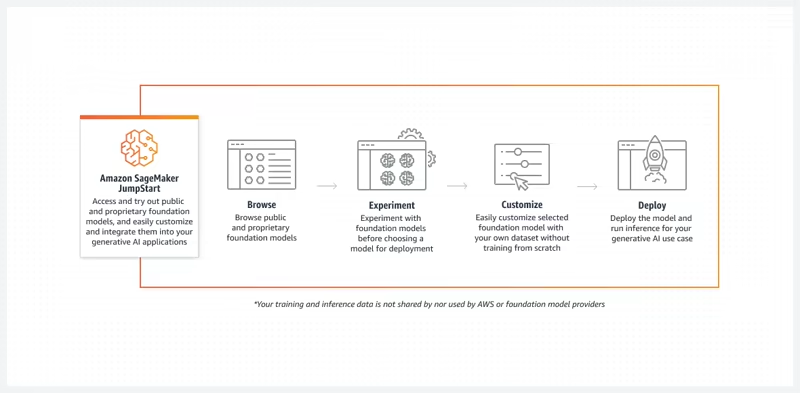
SageMaker supports GenAI through JumpStart foundation models, model fine-tuning, model deployment, managed MLflow, SageMaker endpoints, model evaluation, and AWS-native integrations.
SageMaker JumpStart gives you access to public and proprietary foundation models for generation, code, QA, summarization, classification, and retrieval tasks. Through Studio, teams can explore, fine-tune, deploy, and evaluate JumpStart models.
Where SageMaker is strong: AWS-native foundation model workflows with managed fine-tuning, evaluation, and deployment.
Where it can feel limiting: the developer workflow can span many AWS services. Teams need to be comfortable with IAM, networking, model hosting costs, S3 artifact storage, deployment configuration, and monitoring.
ZenML
ZenML’s LLMOps story is pipeline-first. An LLM workflow is just another pipeline. The artifacts can be prompts, embeddings, datasets, evaluation outputs, or model objects instead of only trained model weights, while the lineage and reproducibility story stays the same.
Our LLMOps guide walks through how to build RAG pipelines, evaluate retrieval and generation quality, and finetune embeddings or LLMs inside a tracked pipeline run. The first AI pipeline material shows how the same pattern works whether you are building classical ML or agent systems.
This is a different position from Databricks and SageMaker. ZenML is not trying to be the foundation model provider. It is not a vector database or a cloud inference platform or a reproducible workflow layer that sits around those components.
A RAG pipeline in ZenML usually chunks documents into embeddings, stores them in a vector database, and then runs retrieval and generation as their own steps with evaluation metrics tracked at each stage.
Your team still picks the model provider and the vector store. The heavy embedding or finetuning work can run on Databricks or SageMaker compute. ZenML adds the lineage and reproducibility so that swapping any of those components later does not break the workflow.
Bottom line:
- Databricks is strongest for governed enterprise GenAI on the lakehouse.
- SageMaker is strongest for AWS-native foundation model workflows.
- ZenML is strongest for pipeline-first LLMOps across providers and is happy to run those pipelines on Databricks or SageMaker compute.
Databricks vs SageMaker vs ZenML: Integration Capabilities
Integrations are where the three diverge most.
Databricks
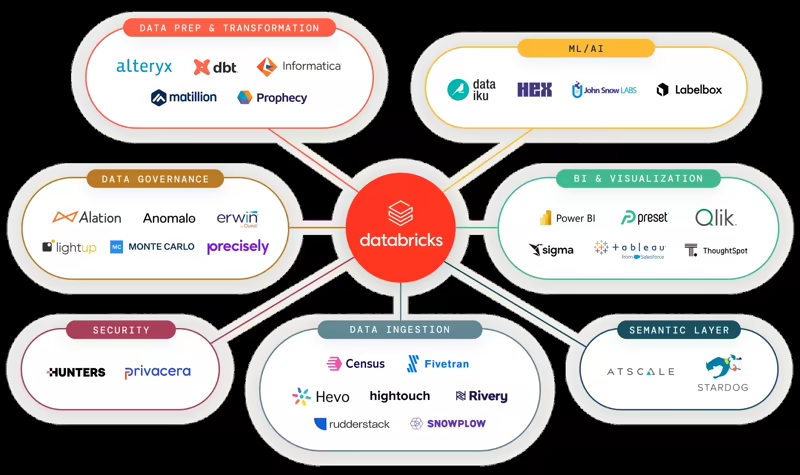
Databricks integrates deeply within its own data and AI platform. Its strongest integrations are with Delta Lake, Unity Catalog, MLflow, Lakeflow Jobs, Model Serving, Vector Search, Databricks Apps, notebooks, SQL, Spark, and cloud object storage.
It can also integrate with Airflow and external model providers, but the best experience is inside the Databricks ecosystem.
The platform is designed to reduce fragmentation by pulling data engineering, analytics, ML, governance, and GenAI into one platform.
SageMaker
SageMaker integrates deeply with AWS. You can connect SageMaker workflows to S3, ECR, IAM, CloudWatch, CloudTrail, EventBridge, Lambda, VPC networking, AWS Glue, Redshift, Kinesis, and other AWS services.
SageMaker Pipelines automate SageMaker jobs, and managed MLflow integrates with SageMaker Model Registry, SageMaker endpoints, IAM, CloudTrail, and EventBridge.
This is a strength if AWS is your platform standard, but it also means SageMaker is best evaluated as part of your AWS architecture, not as a standalone ML tool.
ZenML
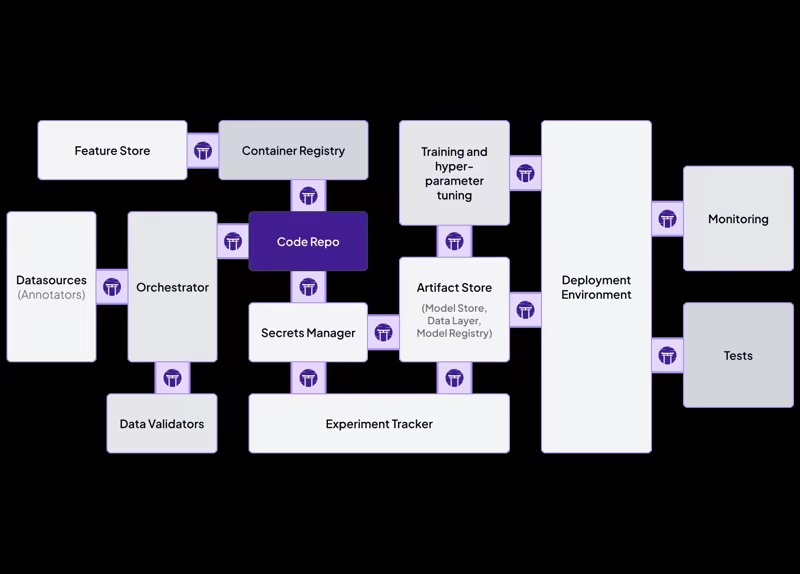
ZenML’s integration model is one of its core strengths. Stack components include orchestrators, artifact stores, container registries, experiment trackers, step operators, data validators, feature stores, model deployers, model registries, alerters, annotators, and more.
- For orchestration alone, ZenML supports local execution, local Docker, Kubernetes, Kubeflow, Vertex AI, SageMaker, AzureML, Databricks, Tekton, Airflow, SkyPilot, and custom orchestrators.
- For artifact storage, it can use local storage, S3, GCS, Azure Blob, MinIO, Alibaba OSS, and custom backends.
- For experiment tracking, it can work with MLflow, W&B, Comet, and others.
This is also where the complementary story to Databricks and SageMaker becomes very concrete:
- ZenML + Databricks. ZenML integrates with Databricks as an orchestrator stack component. Pipelines run on Databricks compute using
DatabricksOrchestratorSettingsto configure Spark version, worker counts, node types, autoscaling, and policy IDs. Schedules and runs are visible in the Databricks UI. On top of that, ZenML adds a Python pipeline abstraction, artifact tracking, and lineage that connects Databricks runs to the rest of your stack. - ZenML + SageMaker. ZenML integrates with SageMaker as both an orchestrator and a step operator. You can run an entire pipeline on SageMaker, or selectively push only the heavy training step onto a SageMaker training job while the rest of the pipeline runs on Kubernetes or locally. ZenML also pairs naturally with the rest of the AWS toolbox: S3 as artifact store, ECR as container registry, EKS as a Kubernetes orchestrator, and EC2 via SkyPilot for cost-optimized compute.
Databricks vs SageMaker vs ZenML: Pricing
Databricks
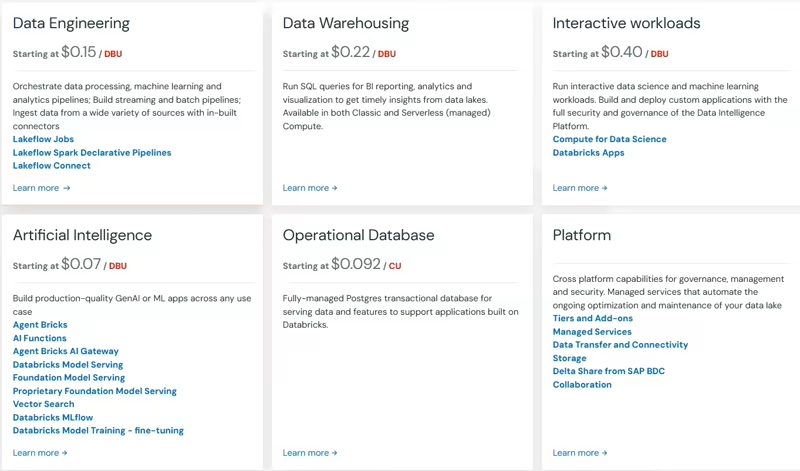
Databricks uses pay-as-you-go pricing with no upfront costs. Customers pay for the products they use, generally at per-second granularity, with pricing varying by cloud provider, workload type, compute type, and Databricks service. Databricks also offers committed-use contracts for customers that want discounts based on usage commitments.
SageMaker
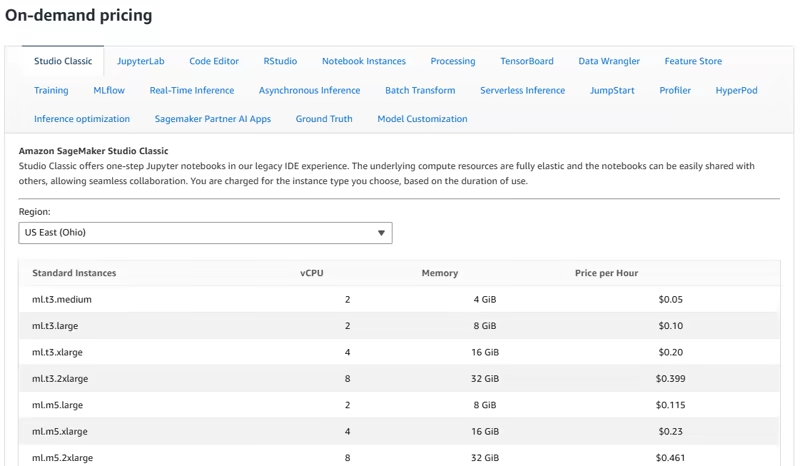
SageMaker is also usage-based, with on-demand pricing and SageMaker Savings Plans as the main payment options. The bill is spread across many dimensions: Studio/JupyterLab, notebooks, Processing, Training, Feature Store, MLflow tracking servers, Real-Time Inference, Asynchronous Inference, and more.
ZenML
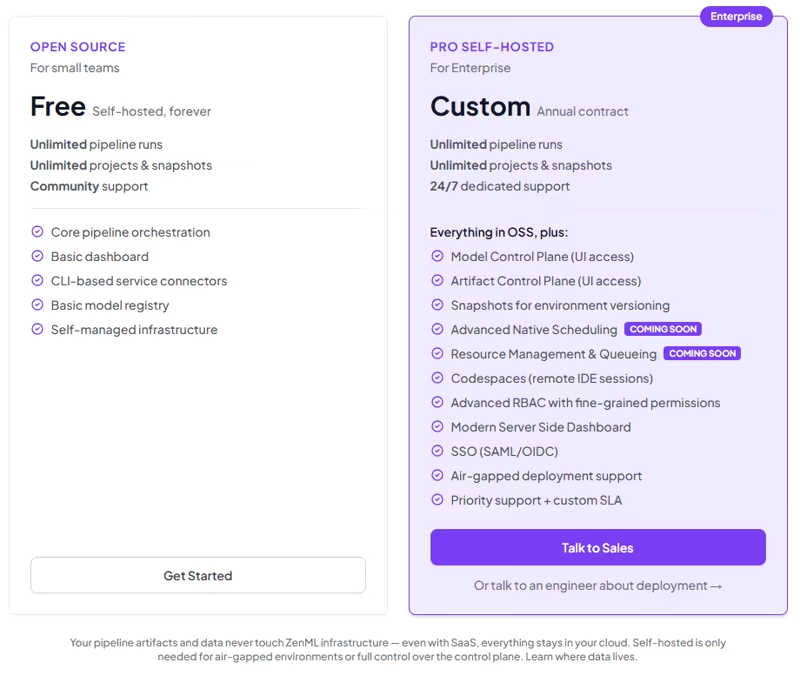
We offer a free open-source self-hosted option with unlimited pipeline runs, unlimited projects and snapshots, community support, core pipeline orchestration, a basic dashboard, CLI-based service connectors, and a basic model registry.
We also have a ZenML Pro (Self-hosted) plan that adds advanced collaboration, security, RBAC, and support features. Book a demo to learn more.
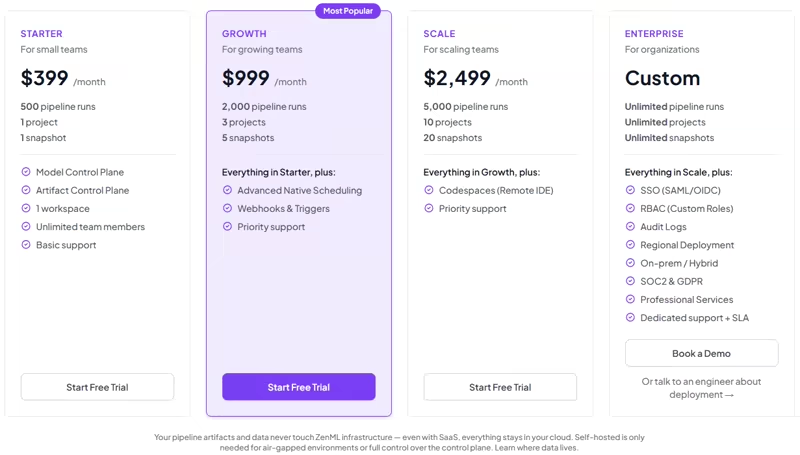
For managed SaaS (self-checkout), we have 4 plans:
- Starter: $399 per month
- Growth: $999 per month
- Scale: $2,499 per month
- Enterprise: Custom pricing
Which One’s the Best ML Platform For You?
There is no universal winner in Databricks vs SageMaker vs ZenML. The right answer depends on what your ML platform team is actually trying to standardize.
✅ Choose Databricks if your main problem is unifying data, governance, ML, analytics, and GenAI in one lakehouse platform. It is strongest when your data is already in Delta tables, your organization uses Unity Catalog, and your workflows depend on Spark-scale feature engineering or governed enterprise data access.
✅ Choose SageMaker if your main problem is building production ML on AWS without managing every piece of infrastructure yourself. It is strongest when your team already uses S3, IAM, ECR, and wants managed ML services.
✅ Choose ZenML if your main problem is keeping ML and AI workflows reproducible, portable, and maintainable as your infrastructure evolves. It is strongest when your team wants to write pipelines in Python, track artifacts and metadata automatically, plug into best-of-breed ML tools.
The more useful framing for most teams is that ZenML is built to complement Databricks and SageMaker, not replace them.
If your team is building serious ML systems, the more interesting question is not “which platform has the most features?” The deeper question is: where should the source of truth for our ML workflow live?
Want to see how ZenML can standardize ML workflows on top of the platforms you already use? Sign up for the open-source plan and try it with your current stack.
When you are ready to scale pipeline collaboration, metadata visibility, and production control, book a demo to see how ZenML Pro can support your team.
📚 Relevant reading: