
On this page
Modern ML platform teams are no longer choosing between “just notebooks” and “just pipelines.” They are choosing how much of the data, ML, governance, and production workflow should live inside one platform versus how much should remain portable across tools.
That is why the Dataiku vs Databricks comparison comes up so often. Both are mature enterprise platforms, but they start from different centers of gravity (more on this later).
ZenML enters the comparison from a different angle. It is not trying to replace every part of a data platform. Instead, it gives ML teams a Python-first MLOps framework for building production-ready pipelines, tracking artifacts and metadata, and running the same workflow across different infrastructure choices.
Dataiku vs Databricks vs ZenML: Key Takeaways
Dataiku: Build for problem is collaboration across analysts, data scientists, business users, and governance teams. The visual Flow, no-code/low-code recipes, scenarios, dashboards, and the Govern layer all sit inside one workspace. Mixed-skill teams can work on the same project without context-switching across five different tools.
Databricks: Pick if you are already centered on a lakehouse architecture and your biggest bottleneck is large-scale data processing and governed access to data and AI assets. Spark, Delta, SQL analytics, MLflow, Unity Catalog, and Lakeflow Jobs are the centerpiece. The platform is at its best when data engineering, analytics, and ML all live next to the data.
ZenML: Pick if your ML platform team wants to standardize how pipelines are written, tracked, and moved from local experimentation to production with no vendor lock-in. You get Python pipelines, automatic artifact tracking, metadata lineage, stack-based integrations, and the flexibility to run on whichever orchestrator, artifact store, model registry, experiment tracker, and cloud infrastructure your team already uses.
Dataiku vs Databricks vs ZenML: Maturity and Lineage
Dataiku DSS 1.0 was officially released in February 2014, while Databricks’ hosted cloud platform became generally available in June 2015.
Dataiku and Databricks are closed-source enterprise platforms (with free trial editions and public Python SDKs). ZenML’s core framework/open-source edition is available under Apache 2.0, while ZenML Pro and managed SaaS include commercial features.
Here’s a quick table:
| Metric | Dataiku | Databricks | ZenML |
|---|---|---|---|
| First public release | DSS 1.0, 2014 (Founded 2013, Paris) | Hosted cloud platform GA, June 2015; founded 2013 at UC Berkeley AMPLab | v0.1, January 2021 (Founded 2020, Munich) |
| GitHub stars | Closed source (proprietary) | Closed source (stewards Apache Spark, 41k+) | 5.4k+ |
| Core philosophy | Unified, governed AI studio for mixed-skill teams | Lakehouse: data, analytics, AI on one platform | Open-source MLOps framework, infrastructure-agnostic |
| Notable proof points | Pfizer, Sephora, GE, BNP Paribas | 15,000+ orgs incl. Block, Comcast, Condé Nast, Rivian, Shell. ~70% of Fortune 500 | JetBrains, Adeo (Leroy Merlin), Playtika |
The practical takeaway is simple. Dataiku and Databricks are broad, mature enterprise platforms. ZenML is a focused open-source layer for making ML workflows reproducible, portable, and production-ready across whichever platforms you already run.
Dataiku vs Databricks vs ZenML: Features Comparison
Short on time? Here’s a table of what features we will compare in this guide:
| Feature | Dataiku | Databricks | ZenML |
|---|---|---|---|
| Workflow orchestration | Flow-based project structure with datasets, recipes, jobs, and scenarios for scheduled automation | Lakeflow Jobs for orchestrating Databricks tasks, notebooks, pipelines, Python scripts, triggers, and dependencies | Python @step and @pipeline abstractions with stack-based execution on local or remote orchestrators |
| Pipeline/Workflow visualization | Visual Flow graph, charts, dashboards, stories, and business-facing project outputs | Job DAGs, run history, notebook/SQL visualizations, dashboards, and system-table-based monitoring | Dashboard DAGs, run metadata, artifact visualizations, and notebook-based artifact inspection |
| Experiment Tracking and Model Lifecycle | DSS experiment tracking uses the MLflow Tracking API and integrates with DSS project security and managed folders | Native MLflow tracking for experiments, runs, parameters, metrics, artifacts, models, and lifecycle tracking | Built-in artifact and metadata tracking plus optional experiment tracker stack components such as MLflow, W&B, Neptune, and Comet |
| Governance, Lineage, and Access Control | Dataiku Govern, data lineage, project permissions, groups, and governed AI workflows | Unity Catalog for access control, lineage, discovery, quality monitoring, and governance across Databricks assets | Artifact lineage, pipeline metadata, service connectors, and ZenML Pro RBAC for team-level access management |
Feature 1. Workflow orchestration
Workflow orchestration is about coordinating the steps that turn raw data into useful outputs: transformed datasets, trained models, batch predictions, evaluation reports, dashboards, or deployed services. The interesting question is where orchestration starts.
Dataiku
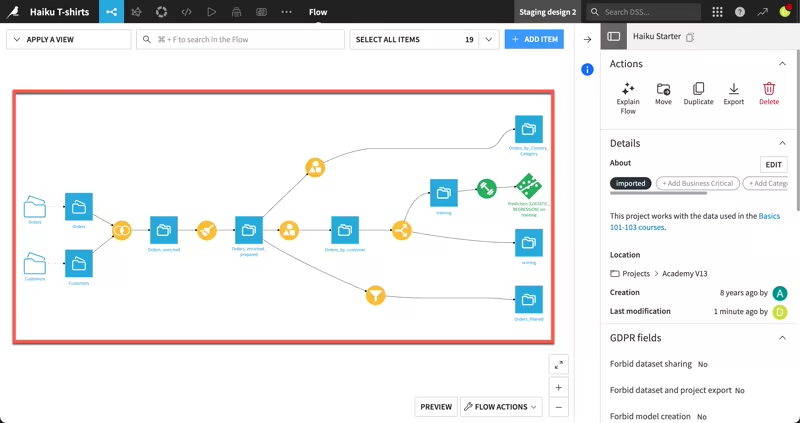
Dataiku’s orchestration model is closely tied to its visual Flow. Projects are built from datasets, managed folders, recipes, models, and other buildable items. The platform links these objects together into a DAG called the Flow.
The platform is data-driven, so you don’t simply run arbitrary tasks in isolation. You define outputs, connect them to upstream inputs through recipes, and Dataiku figures out what needs to be built - Python recipe, visual recipe, SQL recipe, or machine learning model can all become part of this Flow.
It’s great for you if your team analysts and data scientists collaborate on the same project. Analysts can use visual recipes, and data scientists can write Python, R, SQL, or Spark code.
For automation, Dataiku uses scenarios.
A scenario can define steps to run, triggers that launch the execution, and reporters that send outcomes. Your team can schedule a daily Flow build, run data quality checks, retrain a model, refresh a dashboard, and notify stakeholders when something fails.
Where Dataiku is strong: orchestration for collaborative data and AI projects where the workflow is visible to many roles, not only ML engineers.
Where it can feel limiting: if your ML team wants a code-first pipeline abstraction that can move freely across orchestrators and infrastructure, Dataiku’s orchestration is more tied to the Dataiku environment itself.
Databricks
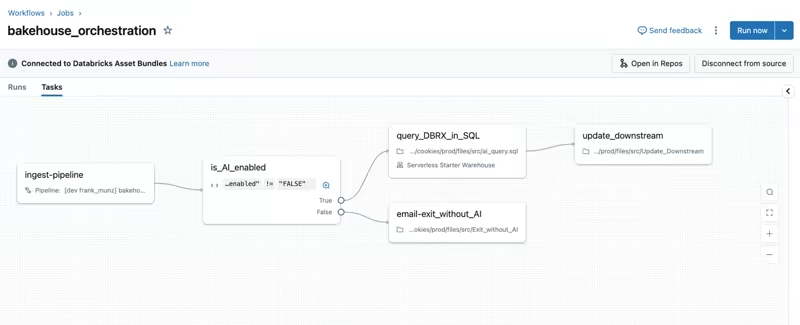
Databricks approaches orchestration through Lakeflow Jobs. A Databricks job coordinates one or more tasks inside a workflow. Tasks can run notebooks, Python scripts, dbt tasks, JARs, Python wheels, SQL tasks, Lakeflow pipelines, and other Databricks-native workloads.
Jobs support dependencies, triggers, parameters, notifications, Git-backed task source control, branching logic, and looping. Databricks also represents job tasks as a DAG in the UI, which makes it easier to understand dependencies and monitor production runs.
This is a natural fit if your data and ML work already lives in Databricks. Your team can use Lakeflow Jobs to ingest data, transform it with Spark, validate quality, train a model, register outputs, and then run downstream analytics workflows. Everything happens close to the lakehouse.
Databricks also gives teams programmatic options through the CLI, SDKs, Jobs REST API, Databricks Asset Bundles, and external orchestration integrations like Airflow.
Where Databricks is strong: orchestrating production data and ML workloads that already run inside the Databricks lakehouse.
Where it can feel limiting: if the goal is to keep ML workflow definitions independent of Databricks, Lakeflow Jobs are powerful but naturally Databricks-centered.
ZenML
ZenML’s orchestration model starts with Python functions. A ZenML step is created with the @step decorator. A pipeline is created with the @pipeline decorator and composes those steps into a workflow.
from zenml import pipeline, step

@step
def load_data() -> dict:
    return {"features": [[1, 2], [3, 4]], "labels": [0, 1]}

@step
def train_model(data: dict) -> str:
    # Replace this with your training logic
    return "trained_model"

@pipeline
def training_pipeline():
    data = load_data()
    train_model(data)

training_pipeline()
The key difference between ZenML and the other two is the stack abstraction. ZenML pipelines are not hard-coded to one execution backend. You can run locally during development, then switch to a production stack that uses an orchestrator, artifact store, container registry, experiment tracker, model registry, and other infrastructure components.
The core pipeline logic typically does not need to change, though stack configuration and integration-specific settings may still change.
ZenML also supports dynamic pipelines, which are useful when the number of steps or branches depends on runtime data or configuration.
Where ZenML is strong: portable ML workflow orchestration. You get a consistent pipeline interface while still using your preferred infrastructure underneath.
Where it can feel limiting: ZenML is not trying to be a full data warehouse, BI tool, or all-in-one analytics workbench. It works best when you want a production ML pipeline layer that connects to the rest of your stack.
Bottom line:
- Dataiku is strongest when you want orchestration to be visual and accessible to mixed-skill teams.
- Databricks is strongest when you want orchestration to stay close to lakehouse data and compute.
- ZenML is strongest when you want orchestration to be Python-first, reproducible, and portable across infrastructure.
Feature 2. Pipeline/Workflow visualization
Visualization means different things on each of these platforms.
Dataiku
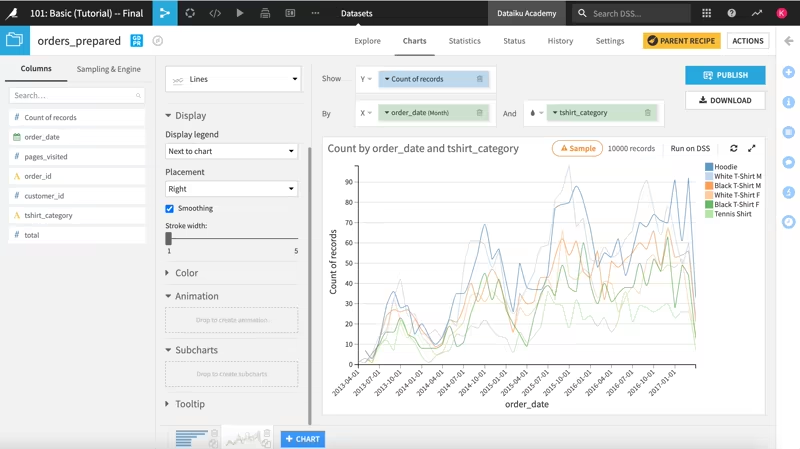
Dataiku’s visual experience is one of its biggest differentiators. The Flow gives you a graph of the project’s datasets, recipes, models, folders, and other objects, which helps analysts and data scientists understand how a result was created and what upstream dependencies it relies on.
For data visualization, Dataiku includes charts, dashboards, static insights, webapps, and stories. Dashboards allow you to share elements of a data project with other analysts or stakeholders who may not need full project access.
Dataiku Stories are more business-facing: they help you build interactive, contextualized presentations that refresh with new data.
The result is a platform that not only shows pipeline execution but it also gives business users a way to consume the outputs of the work.
Where Dataiku is strong: visual project understanding, business dashboards, and cross-functional communication.
Where it can feel limiting: the visualization experience is centered on Dataiku projects. If your ML workloads span many external systems, you may still need separate observability and lineage layers.
Databricks
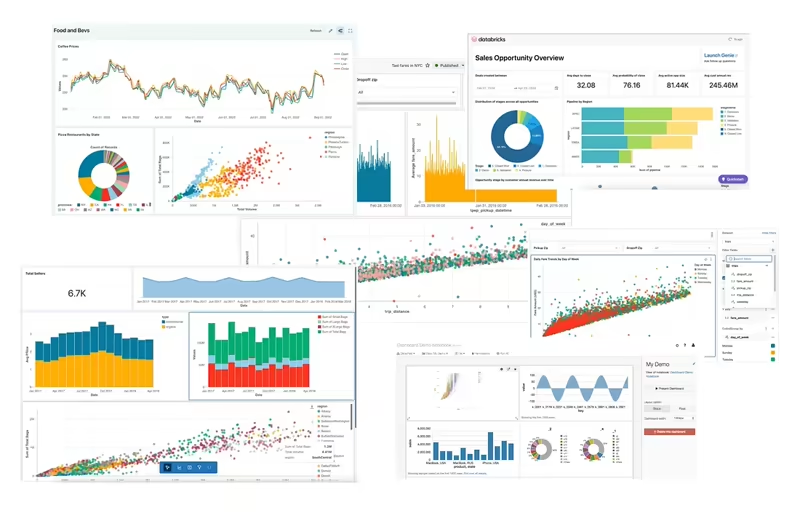
Databricks has two major visualization layers relevant to ML platform teams.
First, Lakeflow Jobs provides job-level visualization. Tasks in a job are visually represented as a DAG, and the UI lets you inspect job owners, run history, task-level details, status, logs, and metrics. Databricks also exposes job run and task data through system tables, which teams can query to build dashboards for job health, performance, and cost trends.
Second, Databricks provides visualizations in notebooks and the SQL editor. Users can create charts from result tables, edit visualization types, apply filters, and add visualizations to dashboards. This is helpful when the workflow is exploratory or analytics-heavy.
Where Databricks is strong: visualizing data, SQL results, dashboards, and production job execution inside the Databricks workspace.
Where it can feel limiting: Databricks visualization is excellent for Databricks-native workloads, but less ideal as a neutral cross-stack ML pipeline dashboard if your workflows run across many tools outside Databricks.
ZenML
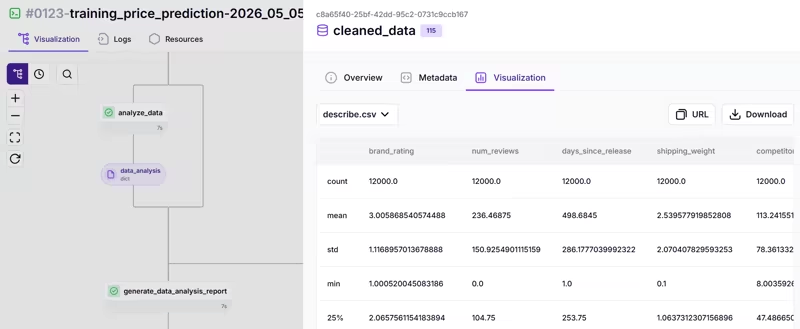
ZenML focuses visualization on ML pipeline execution and artifact inspection. When you run a ZenML pipeline, the run is logged to the dashboard where teams can inspect the DAG, step metadata, artifacts, parameters, and timeline.
ZenML also provides artifact visualizations. The dashboard can display visualizations for artifacts produced by pipeline runs, and users can also call visualize() in notebooks. ZenML supports common artifact visualization types like DataFrame summaries, validation reports, image artifacts, HTML visualizations, and embedded dataset viewers.
Why does this matter? Because ML teams often need to debug more than whether a task succeeded. They need to inspect what data moved between steps, which artifacts were produced, how the pipeline changed between runs, and whether the model evaluation output looks correct. A green job indicator does not tell you any of that.
Where ZenML is strong: ML workflow visibility, run metadata, artifact inspection, and step-level pipeline debugging.
Where it can feel limiting: ZenML is not a general-purpose BI visualization layer. For business dashboards, teams will still use tools like Databricks SQL, Dataiku dashboards, Superset, Tableau, Power BI, or similar.
Bottom line:
- Dataiku is strongest for visual project collaboration and stakeholder-facing outputs.
- Databricks is strongest for notebook, SQL, dashboard, and job-level visualization inside the lakehouse.
- ZenML is strongest for visualizing ML pipeline execution and artifacts across your MLOps workflow.
Feature 3. Experiment Tracking and Model Lifecycle
Experiment tracking helps you record parameters, metrics, datasets, models, artifacts, code versions, and evaluation results so you can compare runs and reproduce outcomes.
Dataiku
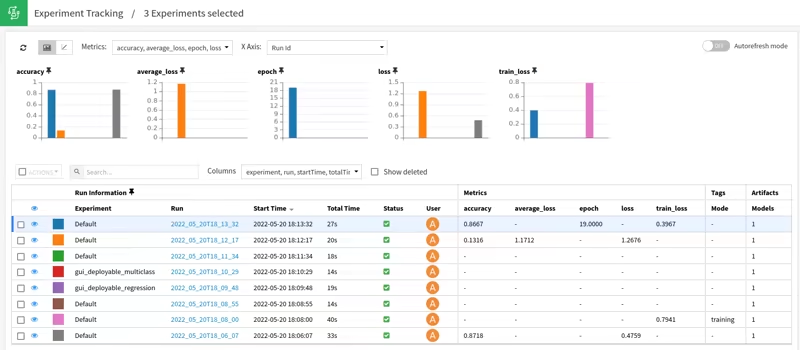
Dataiku supports experiment tracking inside DSS. Its experiment tracking saves experiment-related information like parameters, performance metrics, models, and other project data. For code-based experimentation, Dataiku uses the MLflow Tracking API.
Experiments contain runs, and runs store parameters, metrics, and artifacts. Dataiku adds DSS-specific benefits: experiments and runs inherit DSS project-level security, run artifacts can be stored in DSS managed folders, and MLflow models saved as run artifacts can be deployed using Dataiku’s MLflow model support.
This is useful if you already work in Dataiku and want experiment tracking to live inside the same governed project environment as their data preparation, visual ML, code notebooks, and deployment workflows.
Where Dataiku is strong: experiment tracking inside a broader enterprise AI workspace, especially when you want visual and code-based workflows under the same project security model.
Where it can feel limiting: if your ML platform team wants experiment tracking to be one interchangeable component in a broader MLOps stack, Dataiku’s model is more platform-centered.
Databricks
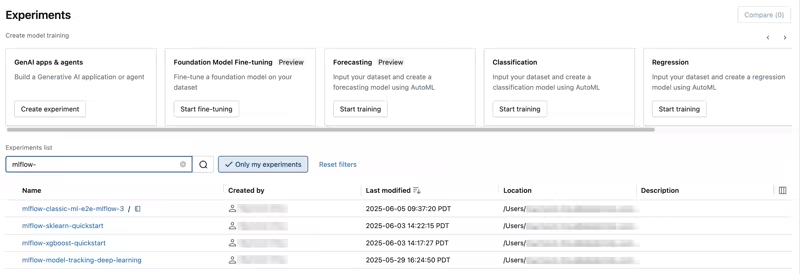
Databricks is deeply tied to MLflow. In Databricks, MLflow tracking lets teams log notebooks and training datasets, parameters, metrics, tags, and artifacts related to model training.
MLflow organizes work into experiments, runs, and models. A run is one execution of model code. An experiment is a collection of related runs. You can compare and filter runs to understand how model performance changes based on parameters, input data, or code changes.
Databricks also benefits from being the home of managed MLflow in many enterprise environments. If you are already using Databricks notebooks, Unity Catalog, feature engineering, model serving, and lakehouse data, MLflow tracking fits naturally into that workflow.
Where Databricks is strong: MLflow-native experiment tracking and model lifecycle management are tightly connected to Databricks compute, notebooks, data, and governance.
Where it can feel limiting: the deeper your lifecycle becomes tied to Databricks, the harder it may be to keep your ML workflow portable across non-Databricks infrastructure.
ZenML
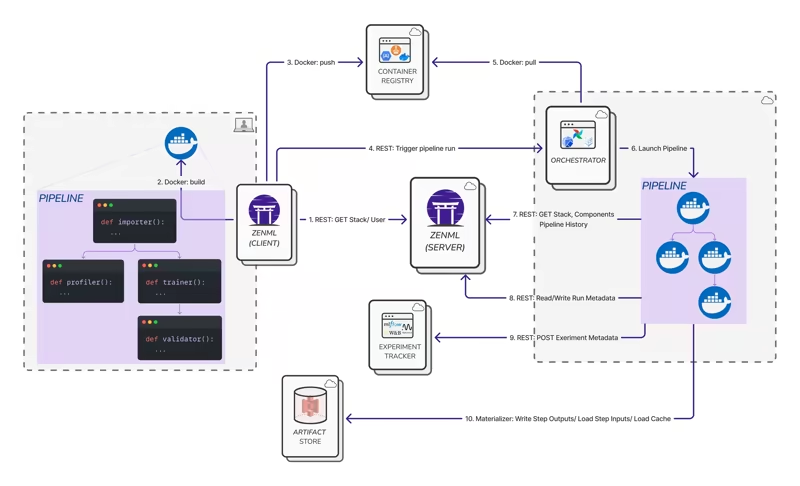
ZenML treats tracking as part of the pipeline itself. Every pipeline run produces metadata. Step inputs and outputs become artifacts. Those artifacts are stored, versioned, and connected to the steps that produced and consumed them. You get lineage by default, not as a feature you remember to enable.
ZenML also supports optional Experiment Tracker stack components. You can plug in tools like MLflow, Weights & Biases, or Comet while keeping the ZenML pipeline as the source of execution context.
This is the key distinction - ZenML is not asking you to choose between built-in tracking and external trackers. It gives you automatic pipeline metadata and artifact lineage, then lets you augment that with your preferred experiment tracking UI.
You could use ZenML to define the pipeline, store artifacts in S3, run steps on Kubernetes, and log experiment details to MLflow or W&B. If the infrastructure changes later, the pipeline code does not need to be rewritten from scratch.
Where ZenML is strong: experiment tracking that is connected to reproducible pipeline runs, artifacts, and stack configuration.
Where it can feel limiting: if all your ML work already lives in Databricks and you are happy with Databricks-native MLflow, ZenML is most useful when you need portability beyond that environment.
Bottom line:
- Dataiku uses experiment tracking as part of a governed DSS project.
- Databricks provides a strong MLflow-native lifecycle inside the lakehouse.
- ZenML connects experiment tracking to portable ML pipelines and lets teams bring their preferred tracker into the stack.
Feature 4. Governance, Lineage, and Access Control
Governance matters in all three platforms, but the scope differs: Dataiku and Databricks cover broad enterprise governance, while ZenML is strongest around ML pipeline lineage, artifact traceability, reproducibility, and Pro RBAC.
Dataiku
Dataiku’s governance story has several layers.
First, Dataiku Govern is a unified platform for overseeing and managing data and AI initiatives across an organization. It is designed for governance processes, policies, approvals, templates, and GenAI asset management in enterprise environments.
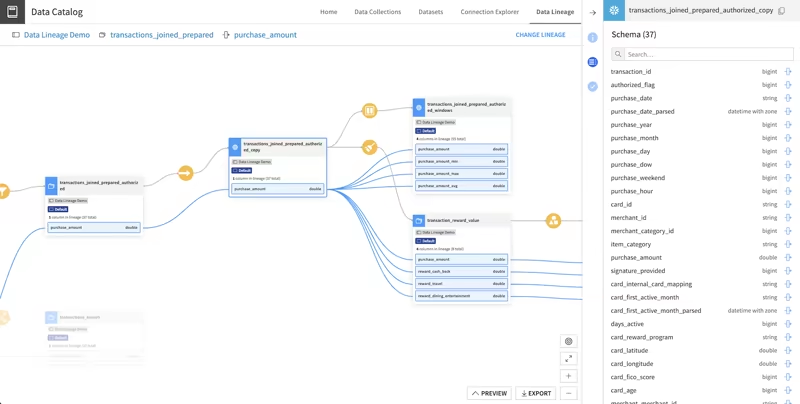
Second, Dataiku provides data lineage, including column-level lineage across datasets and projects in a Dataiku instance. This helps you investigate upstream and downstream impact when a data issue appears or when downstream stakeholders need to be notified of changes.
Third, Dataiku uses a group-based permissions model. Project permissions can control who can read content, write content, run scenarios, edit dashboards, manage shared objects, export datasets, administer projects, and more.
Where Dataiku is strong: enterprise governance for collaborative AI and analytics programs, especially when business users, analysts, data scientists, and governance teams need a shared operating model.
Where it can feel limiting: Dataiku governance is strongest inside the Dataiku environment. If your workflows span many independent ML systems, you may need extra lineage and access controls outside Dataiku.
Databricks
Databricks governance is centered on Unity Catalog that provides a hierarchical privilege model for users, groups, and service principals across data and AI assets. It governs access from the account level down to table rows and columns.
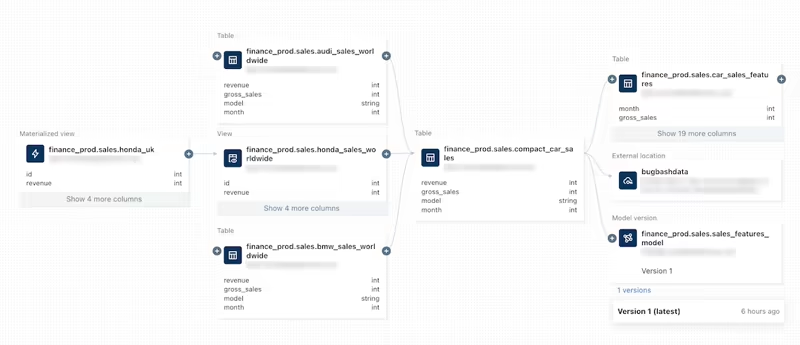
Databricks also provides data lineage using Unity Catalog that captures runtime lineage across queries run on Databricks, supports column-level lineage, and includes notebooks, jobs, and dashboards related to a query. Lineage can be visualized in Catalog Explorer and accessed programmatically through lineage system tables.
If your main challenge is governed access to tables, models, features, dashboards, SQL, notebooks, and lakehouse data products, Unity Catalog in Databricks will take care of it.
Where Databricks is strong: centralized data and AI governance for lakehouse assets, especially in large organizations with many workspaces, users, and data products.
Where it can feel limiting: governance is strongest for Databricks-managed or Unity Catalog-connected assets. If the ML workflow spans external tools and orchestrators, some governance context may live outside Databricks.
ZenML
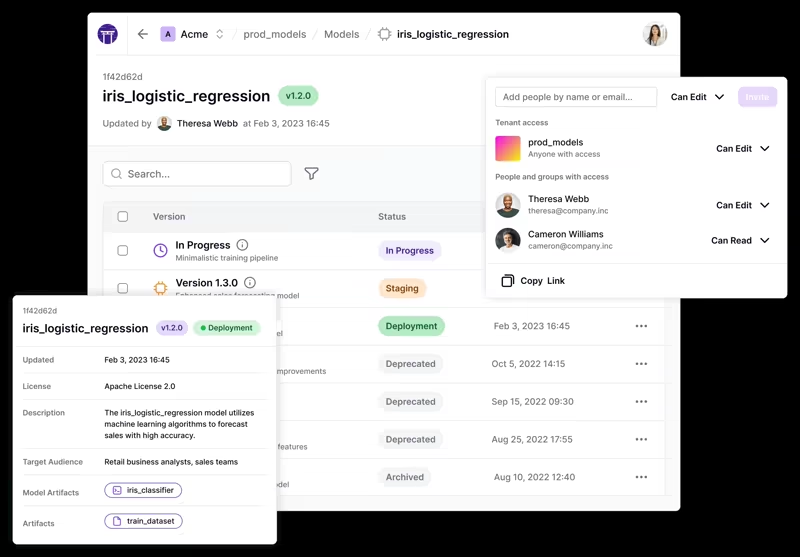
ZenML governance starts with the ML workflow itself.
Artifacts are automatically stored, versioned, and connected to the steps that produce and consume them. This creates lineage for pipeline runs and helps teams trace how datasets, models, metrics, prompt templates, evaluation outputs, and other artifacts move through a workflow.
ZenML also has service connectors that help teams manage access to external services without exposing raw credentials to every user. For team environments, ZenML access management provides guidance around roles such as data scientists, MLOps platform engineers, and project owners. ZenML Pro includes RBAC features for assigning permissions to users and teams.
Where ZenML is strong: ML pipeline lineage, artifact traceability, reproducibility, and controlled access to stack components.
Where it can feel limiting: ZenML is not a full enterprise data catalog or organization-wide AI governance suite. It complements those systems rather than replacing them.
Bottom line:
- Dataiku is strongest for governed enterprise AI projects.
- Databricks is strongest for governed lakehouse data and AI assets.
- ZenML is strongest for governance and lineage around portable ML pipeline execution.
Dataiku vs Databricks vs ZenML: Integration Capabilities
Dataiku
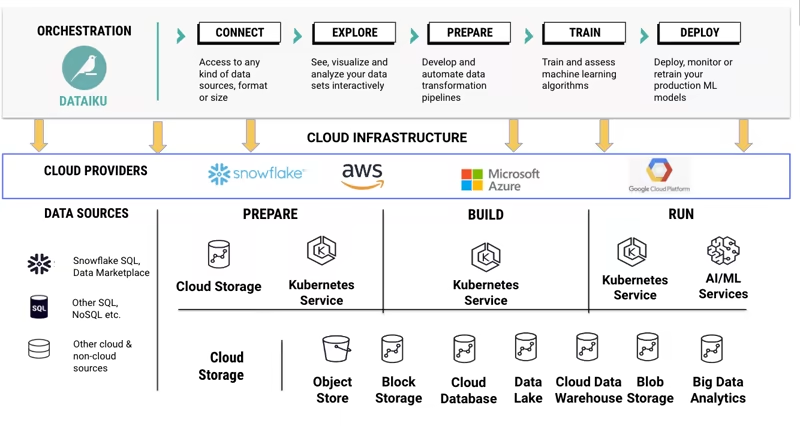
Dataiku integrates broadly across the enterprise data and AI ecosystem. It supports many data connections, including file-based connections, SQL databases, cloud object stores, Hadoop/Spark ecosystems, and external services. It also has plugin capabilities for adding dataset connectors, recipes, processors, webapps, and other extensions.
Many integrations become usable from the same Dataiku project interface. A less technical user in your team can also connect to a dataset and use visual recipes.
Dataiku can also connect to Databricks in certain workflows, which matters for organizations that use Databricks for compute or lakehouse storage but want Dataiku for collaboration and visual AI workflows.
Best fit for teams that want a centralized enterprise AI workbench with built-in connectivity and a visual interface for many user types.
Databricks
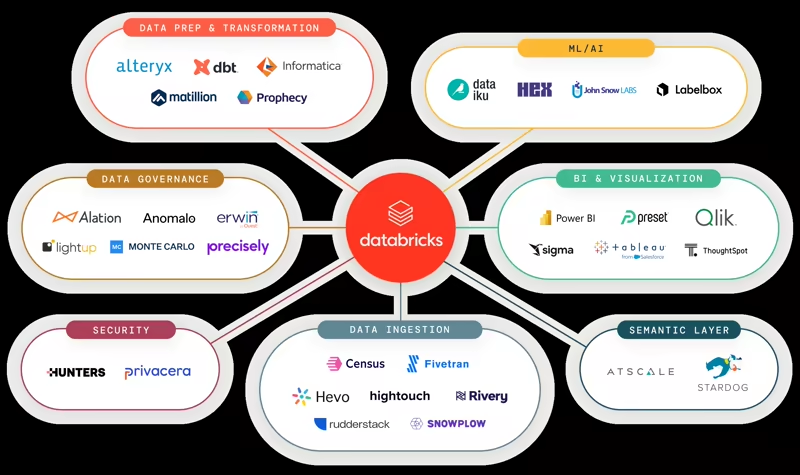
Databricks integrates most naturally with the modern cloud data stack. Its integration overview covers data sources, BI tools, developer tools, and local development workflows. It also connects to cloud object storage, relational databases, streaming services, enterprise platforms, AWS Glue, AWS Secrets Manager, and more.
Databricks also has strong integrations around SQL connectors, JDBC/ODBC, BI tools, Partner Connect, Lakeflow Connect for ingestion, MLflow, Unity Catalog, Delta Sharing, and developer tooling.
Best fit for teams whose core data and AI platform is Databricks and who want integrations that orbit the lakehouse.
ZenML
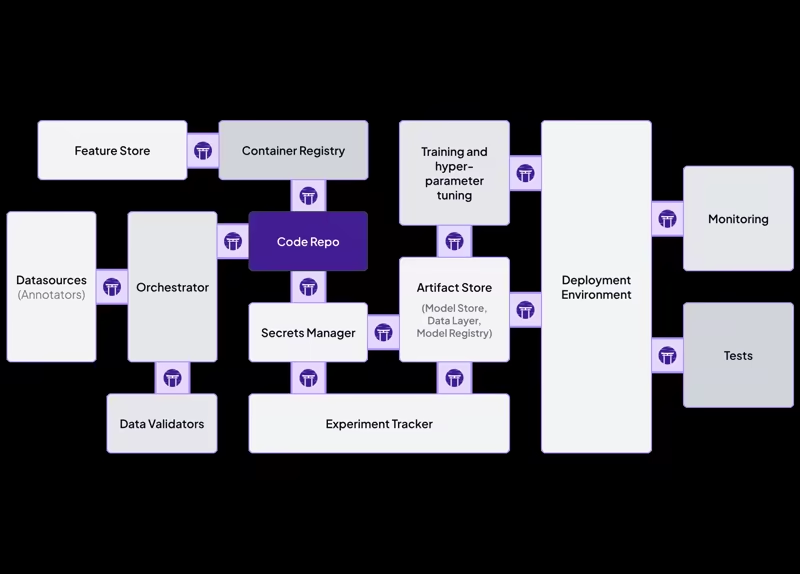
ZenML’s integration model is one of its core strengths. Instead of forcing teams into one built-in implementation for every part of MLOps, ZenML uses a stack-based model. A stack can include an orchestrator, artifact store, container registry, experiment tracker, model registry, model deployer, step operator, alerter, data validator, feature store, and more.
ZenML lists integrations across major MLOps categories, including experiment tracking, orchestration, artifact storage, model registries, data validation, feature stores, and cloud infrastructure.
The key advantage with ZenML is portability. You can start local, then move to a remote stack without changing the core pipeline logic. You can also swap components as your infrastructure matures. The pipeline code does not care which orchestrator is underneath.
Best fit for ML platform teams that already have tools they like and need one consistent way to compose them into production ML pipelines.
Dataiku vs Databricks vs ZenML: Pricing
Dataiku
Dataiku does not publish simple self-serve per-seat pricing for its enterprise product in the same way many smaller SaaS tools do. The public path is typically to start a trial or request a demo/quote. Dataiku offers a free trial of Dataiku Cloud for evaluation.
For enterprise buyers, the total cost will depend on deployment model, users, features, support, governance requirements, and infrastructure usage. This makes Dataiku pricing more sales-led and enterprise-oriented.
Databricks
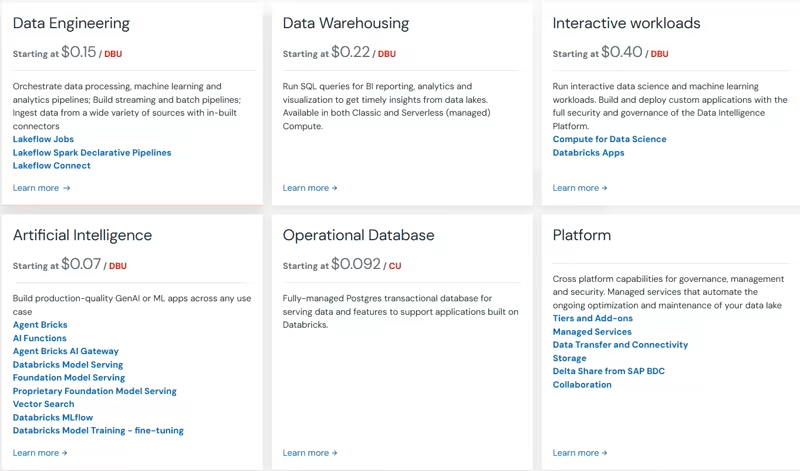
Databricks uses pay-as-you-go pricing with no upfront costs. Customers pay for the products they use, generally at per-second granularity, with pricing varying by cloud provider, workload type, compute type, and Databricks service.
Databricks also offers committed-use contracts for customers that want discounts and other benefits based on usage commitments.
The important thing to remember is that Databricks cost includes both the Databricks platform usage and the underlying cloud infrastructure. Workload design, cluster/serverless choices, job scheduling, data layout, and governance practices can all affect spend.
ZenML
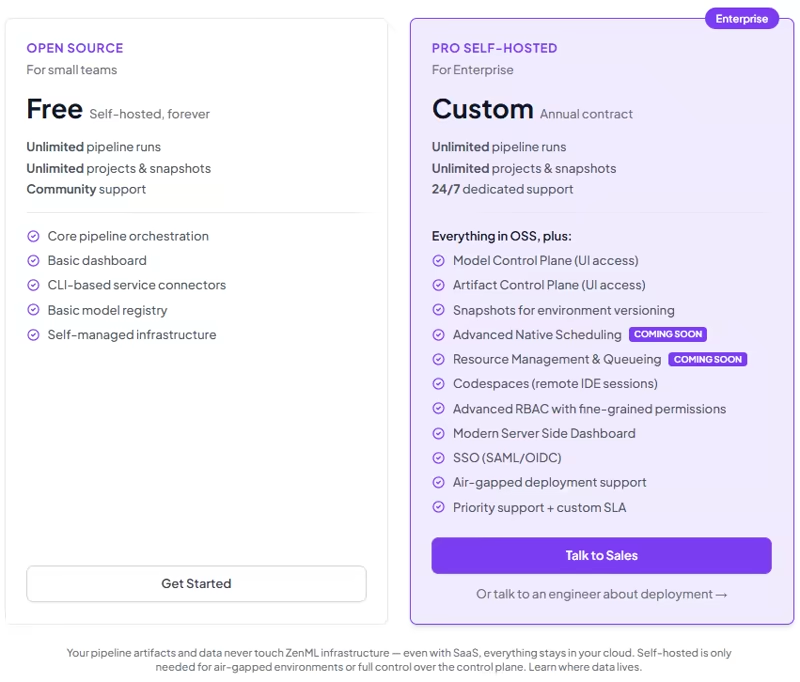
We offer a free open-source self-hosted option with unlimited pipeline runs, unlimited projects and snapshots, community support, core pipeline orchestration, a basic dashboard, CLI-based service connectors, and a basic model registry.
We also have ZenML Pro (Self-hosted) plan that gives you a lot of advanced features. Book a demo to get to know about it.
For managed SaaS (self-checkout), we have 4 plans:
- Starter: $399 per month
- Growth: $999 per month
- Scale: $2,499 per month
- Enterprise: Custom pricing
Which One’s the Best ML Platform For You?
There is no universal winner in Dataiku vs Databricks vs ZenML. The right answer depends on what your ML platform team is actually trying to standardize.
Choose Dataiku if your main problem is collaboration across business users, analysts, data scientists, and governance teams. It is strongest when you want one enterprise environment for visual workflows, data prep, automated ML, dashboards, project governance, and business-facing AI outputs.
Choose Databricks if your main problem is building a scalable lakehouse for data engineering, analytics, ML, and AI. It is strongest when Spark, Delta, SQL analytics, MLflow, Unity Catalog, Lakeflow Jobs, and cloud-scale compute are central to your data and AI strategy.
Choose ZenML if your main problem is making ML workflows reproducible and portable across infrastructure. It is strongest when your team wants to write pipelines once, track artifacts and metadata automatically, plug into tools like MLflow or W&B, and move from local development to production stacks without rewriting the workflow.
ZenML is built to complement Dataiku or Databricks. You might use Databricks as the lakehouse, Dataiku for collaborative analytics and governed AI workflows, and ZenML as the ML pipeline layer that keeps training, evaluation, deployment, and batch workflows reproducible across environments.
If your team is building serious ML systems, the more interesting question is not “which platform has the most features?” The deeper question is: where should the source of truth for our ML workflow live?
Want to see how ZenML can standardize your ML workflows without forcing a full platform migration? Sign up for the open-source plan and try it with your current stack.
When you are ready to scale pipeline collaboration, metadata visibility, and production control, book a demo to see how ZenML Pro can support your team.
Relevant reading: