On this page
Over the past year, something unexpected started happening in our ZenML community — teams were hacking ZenML’s pipeline DAG to run agents. They’d wire up dynamic steps with conditional branching, pass state through artifact store workarounds, and stretch the step abstraction well past its comfort zone.
Technically, it worked, but the abstraction was fighting them at every turn, and they knew it, and so did we.
We started having conversations with teams, and it became clear that a growing portion of our users were going beyond ML pipelines. They were using ZenML as an agent workflow orchestration engine, building autonomous systems that ran for hours or days, making decisions nobody could predict upfront.
Meanwhile, a new kind of pressure was emerging — token anxiety. The feeling that every minute your machine sits idle is a missed opportunity, because an agent could be running the next experiment, triaging the next bug, or drafting the next report while you sleep.
Our own users showed us the gap, and so we built something for it.
Today, we’re introducing Kitaru: an open source infrastructure for durable execution of asynchronous Python agents. It’s built by us — the ZenML team, powered by ZenML’s engine, and designed from scratch for a workload that pipelines were never meant to handle.
3 Reasons Why We Didn’t Just Extend ZenML
We seriously considered adding “agent mode” to ZenML; it would have been less work, and we had thousands of existing users. But after a lot of brainstorming sessions, three honest reasons convinced us to start fresh:
1. Mental Model Mismatch
ZenML’s core principle is “define a graph, then execute it.” That works beautifully for ML training pipelines where you know the steps upfront: ingest, preprocess, train, evaluate, deploy. Agents have a graph, but it loops (it can be cyclic and is not fixed at completion time).
We needed to default to dynamic execution AND NOT bolt it on as an escape hatch. We actually added dynamic pipelines to ZenML late last year, and it was a step in the right direction. But agents need dynamic to be the default, not an opt-in mode on top of a static-first system. The fundamental unit for building agents in Kitaru isn’t a step in a pipeline; it’s a checkpoint in a flow.
You don’t checkpoint because something is the next step in the DAG. You checkpoint because re-running that function would burn $20 in tokens.
Flows are just Python functions — if/else, while, try/except all work natively. The framework doesn’t need to know the execution shape before it starts.
The stack concept also needed rethinking. Why? Agent workloads require different infrastructure components. An LLM model configuration becomes a first-class component. The experiment tracker abstraction from the ML world isn’t relevant anymore. In the future, things like sandboxes or other externalised compute are also likely to be a part.
What’s more, features like replay and retry — resuming a crashed agent from step 7, while steps 1-6 use cached artifacts — needed to be the new product’s core primitives, not afterthoughts. All of this existed in one form or another within ZenML, but it wasn’t packaged in a way that agent users could intuitively grasp it or build on top of it with ease.
2. Different Users, Different Languages
ZenML users are ML engineers building training pipelines. They think in terms of datasets, feature stores, and model registries.
The team-building production agents are a different audience. They think in terms of tool calls, approval gates, and token budgets.
When we had conversations with agent teams, they never actually described their problems in pipeline terms.
They said things like “my agent crashes, and I lose everything.”
or
“I’m burning $50 a day in wasted LLM calls because I can’t resume from where it failed.”
Trying to serve both audiences with a single product would mean confusing everyone.
3. Needs For a New UI
ZenML’s dashboard was built to visualize pipeline DAGs and compare training runs. Agents need something similar but with a different UI. A UI that:
- Showcases flows and checkpoints
- Provides real-time visibility into long-running executions
- Focuses on artifact visualization that makes sense for agent output rather than training metrics.
Bolting this onto the existing dashboard would have produced a split-brain experience.
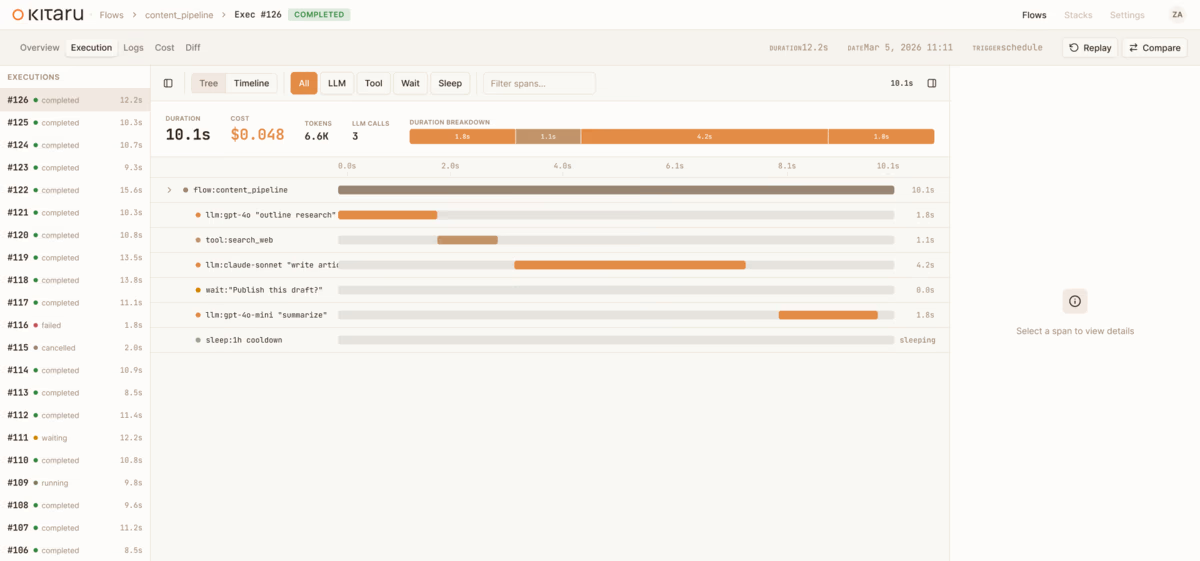
To be clear: ZenML isn’t going anywhere; it’s still the backbone for ML pipeline infrastructure and the teams that rely on it. Kitaru is built on ZenML’s engine; it’s a new interface for a new workload, not a replacement.
What is Kitaru?
In one line, Kitaru is a durable execution for Python agents. It’s NOT a framework or an observability or tracing tool.
Think of it as an orchestration layer that gives your existing agent code crash recovery, humans or agents in the loop, and replay from any checkpoint.
The entire SDK has eight primitives.
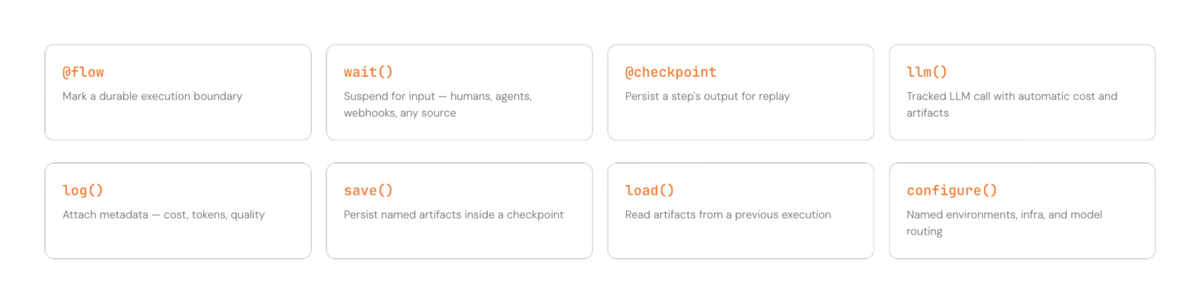
Here are the three that matter the most:
@flow/@checkpoint: Two decorators, and that’s the onboarding. Mark a function as a flow, mark the expensive function inside it as checkpoints, and Kitaru handles persistence and recovery.wait(): Pause for human input, or input from another agent or a webhook, release compute entirely, and resume hours or days later. No polling or idle containers burning $$.- Replay: Crash at step 9? Fix the issue and resume from step 9. Steps 1-8 use cached artifacts. No re-burning tokens on work that agents have already completed successfully.
Here’s what it looks like in practice:
import kitaru
from kitaru import flow, checkpoint

# `@checkpoint` persists each function's output so if the agent
# crashes at step 3, steps 1 and 2 never run again.
@checkpoint
def write_draft(topic: str, notes: str) -> str:
    return use_ext_lib_to_write_draft(topic, notes)

# Call all checkpoints in simple python in your @flow function
@flow
def writing_agent(topic: str) -> str:
    # `kitaru.llm()` resolves the model alias, injects the API key
    # from secrets automatically, and logs the call (latency, token
    # count, cost) against the enclosing checkpoint.
    notes = kitaru.llm(
        f"Research this topic in depth: {topic}", model="fast"
    )
    draft = write_draft(topic, notes)

    # Suspends the whole process, releases compute, and resumes
    # when a human responds. 30 seconds or 3 days later.
    approved = kitaru.wait(
        schema=bool,
        question=f"Approve this draft?\n\n{draft[:500]}",
    )
    if not approved:
        return "Draft rejected by reviewer."
    return draft
What ZenML Taught Us That Made Kitaru Possible
Of course, we didn’t start from zero. Five years of building ZenML gave us hard-won lessons that shaped every decision we made for Kitaru.
1. Artifact Versioning
In ZenML, every intermediate training output is stored, versioned, and comparable. The same capability turns out to be just as valuable for agent checkpoints as it is for training pipeline artifacts.
Kitaru inherits this directly from ZenML; every checkpoint input and output is persisted and versioned automatically.
2. The Stack Abstraction
ZenML’s idea that infrastructure is a composable stack rather than a monolith carries over unchanged. pip install kitaru runs everything locally. kitaru stack use prod points it at your Kubernetes cluster, Vertex AI, SageMaker, or AzureML; same agent code, different target.
And because this is built on a SQL database and an artifact store, a simple deployment can scale to thousands of concurrent flows.
3. Reproducibility
The ability to trace any ZenML pipeline run back to exact inputs and code was transformative for ML teams. For agents, the same principle becomes replay — go back to any checkpoint in any execution and resume from there with different inputs. Same underlying capability, but different user-facing primitive.
4. Developer Experience is the Product
This was the biggest lesson. ZenML’s early versions were powerful but required understanding pipelines, steps, materializers, artifact stores, orchestrators, and stacks before you could do anything useful.
We spent years simplifying that onboarding. With Kitaru, we started from the other end: two decorators to get going, and everything else layers on. The first five minutes should be @flow, @checkpoint, and python my_agent.py. That’s it.
Who is Kitaru For?
We want to be clear and specific about when you should use Kitaru and who it is for:
- Python engineers hitting the reliability wall with production agents: Your agent works in demo but crashes in production, and every failure means starting from scratch.
- Teams burning tokens on re-runs because they can’t resume from failure: If your agent crashes at step 33 of a 2-hour run and you have to restart from step 1, Kitaru solves that problem directly.
- Anyone who needs approval mid-agent-run: But they are currently faking it with Slack messages and manual restarts. Kitaru’s
wait()primitive makes human/agent/webhook-in-the-loop a first-class operation, not a “hack.” - People already using PydanticAI, OpenAI SDK, CrewAI, or raw Python: Kitaru wraps what you already have. It ships with a PydanticAI adapter at launch and doesn’t ask you to rewrite your agent.
Check out the coding agent example to see a real production agent.
Most importantly, Kitaru is NOT for you if you’re building ML training pipelines; ZenML is still your tool. And if you’re looking for a tracing dashboard or an agent framework like PydanticAI, Kitaru is a different layer; it’s the infrastructure that sits underneath your framework of choice.
Try Kitaru OSS Now
Kitaru is open source under Apache 2.0 and free to start.
pip install kitaruAdd @flow and @checkpoint to your agent and run it. That’s the whole onboarding.
We’re building this in the open because that’s how we built ZenML, and we think this is the best way to build infrastructure that actually earns trust. Every design decision, every roadmap item, every tradeoff is public.
If you like the product, give us a star on GitHub and raise an issue if you find one. We would love your feedback.