
On this page
Building a prototype of an AI agent is easy. Making it cost-effective and efficient in production is a different beast entirely.
Large Language Model Operations (LLMOps) platforms provide the infrastructure to manage the lifecycle of your AI agents. They replace ad hoc scripts with structured workflows, ensuring that your agents perform consistently and that you can debug them when they don’t.
In this guide, we review the 11 best LLMOps platforms on the market. We evaluate them based on their ability to handle the unique challenges of agentic workflows, like multi-step reasoning, tool usage, and complex state management.
Quick Overview of the Best LLMOps Platforms
Here’s a quick look at what the LLMOps platforms in this guide are best for:
- ZenML: Teams that want a unified workflow layer to run, track, and manage ML and LLM pipelines in one place, including agent and RAG workloads.
- LangGraph: Developers building controllable, stateful agent workflows that need graphs, loops, and explicit state handling.
- LlamaIndex: Teams working with retrieval-heavy agents who need flexible indexing, parsing, and multi-stage retrieval pipelines.
- Langfuse: Teams wanting an open-source monitoring layer with strong tracing, prompt versioning, cost tracking, and evaluations.
- DeepEval: Engineers who want simple test cases for LLM outputs, with automatic scoring and judgment-based evaluations.
- Portkey: Production teams needing an AI gateway for routing, failover, caching, and detailed LLM request metrics.
- LangSmith: Teams using LangChain who need structured tracing, evaluations, prompt testing, and experiment comparison in one place.
- Arize Phoenix: RAG-heavy applications that need local-first tracing, embedding visualizations, offline evaluations, and notebook-friendly analysis.
- BentoML: Teams deploying open-source LLMs and agent logic as scalable, production-grade API services.
- Pinecone: Applications that depend on fast, filterable vector search to power retrieval steps inside agent workflows.
- W&B Weave: Teams already using W&B who want unified logging, LLM trace inspection, prompt testing, and evaluation pipelines.
Factors to Consider when Selecting an LLMOps Platform to Use
Choosing an LLMOps platform means looking beyond basic model serving. Here are four key factors to evaluate as you compare tools:
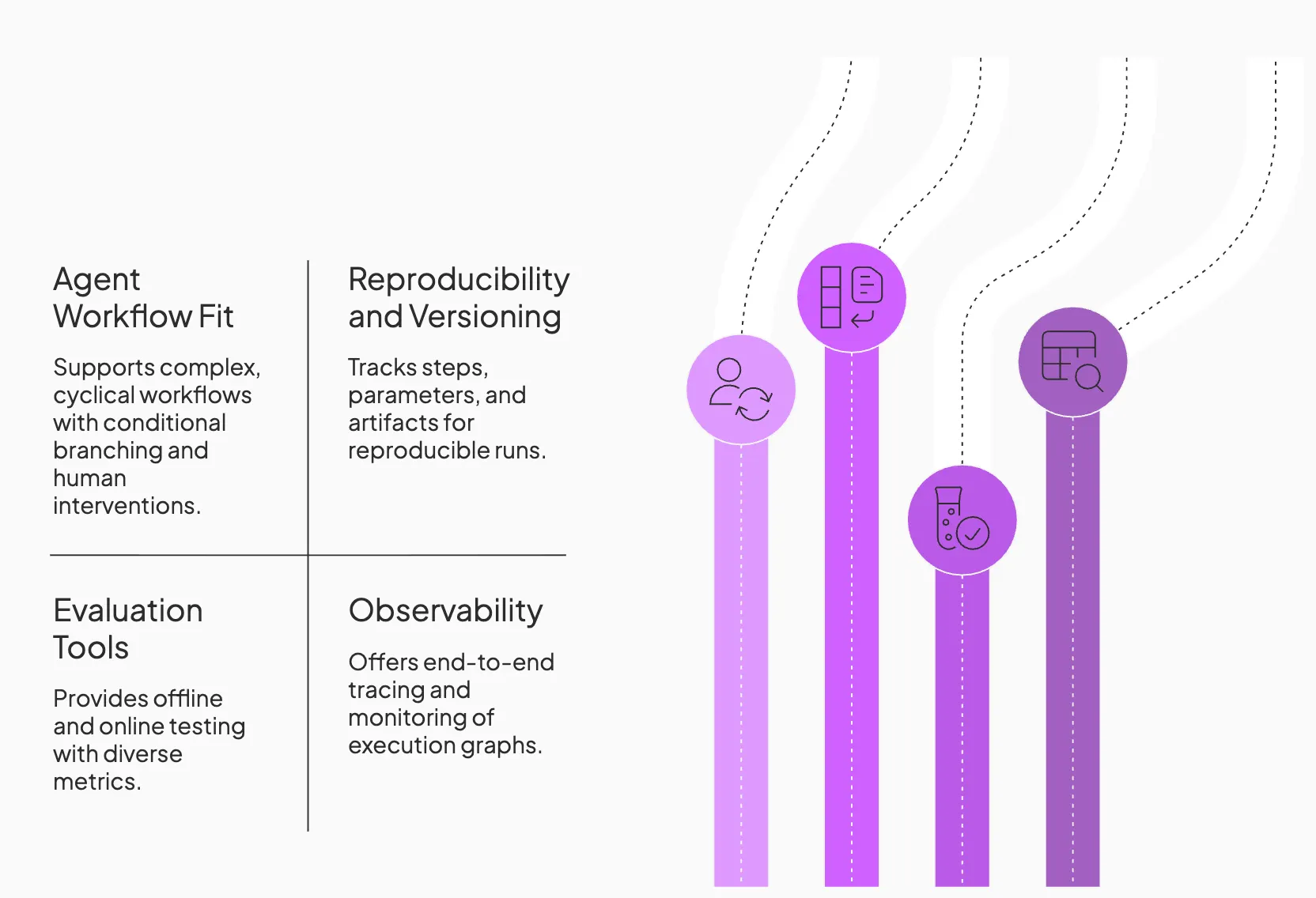
1. Agent Workflow Fit
Consider how well the platform supports multi-step agent building. It must support cyclical workflows where an agent can reason, act, and repeat. Look for tools that handle complex orchestration patterns, such as conditional branching and human-in-the-loop interventions, without breaking the pipeline structure.
2. Reproducibility and Versioning
An ideal LLMOps platform should make your runs reproducible by tracking every step, parameter, and artifact. It includes features like experiment tracking, artifact lineage, and prompt or model versioning.
For example, ZenML can link pipeline runs to a specific Git commit hash when a code repository is configured. LangSmith provides prompt versioning via “prompt commits” (commit hashes), and you can additionally attach your app version or Git SHA as trace metadata for reproducibility.
3. Evaluation that Matches Agent Reality
LLM applications often defy traditional unit tests, so evaluation tools are crucial. Platforms should support both offline (pre-deployment) and online (live traffic) testing.
Some tools like DeepEval emphasize systematic LLM evaluation with dozens of metrics and ‘pytest-like’ test flows. Others, such as W&B Weave, let you incorporate human and AI feedback to score agent outputs.
4. Observability, You can Operate
Observability and monitoring are key to operating product-grade LLM agents. Your observability stack must provide end-to-end tracing that visualizes the entire execution graph.
It should allow you to inspect intermediate steps, monitor token usage and costs, and identify exactly where a multi-step chain went off the rails.
What are the Best LLMOps Tools Currently on the Market
Here’s a quick table summarizing all the best LLMOps tools on the market:
| Tool | Key Features | Pricing |
|---|---|---|
| ZenML | – RAG flow designed like a real pipeline, not a notebook demo – Treats evaluation as a first-class pipeline concern – Supports fine-tuning as a controlled training-to-release workflow | – Free (open-source) – Cloud plans (custom pricing) |
| LangGraph | – Graph-based control over agent reasoning loops – Shared state across steps for deterministic execution – Support for conditional, parallel, and cyclical workflows | – Free tier – Plus ($39/user/month) – Enterprise (custom) |
| LlamaIndex | – Flexible indexes for RAG-heavy agent workflows – LlamaParse for structured extraction from complex files – Hybrid retrieval pipelines for multi-step reasoning | – Free (open-source) – Cloud plans start at $50/month |
| Langfuse | – Full execution tracing with cost and latency metrics – Prompt versioning with comparison and A/B tests – Session replay for debugging agent runs | – Free (open-source) – Core ($29/month) – Pro ($199/month) – Enterprise ($2499/month) |
| DeepEval | – Evaluation metrics for step accuracy, plan quality, and output faithfulness – Synthetic test generation and LLM-judge scoring – CI-ready tests for blocking regressions | – Free (open-source) – Hosted Confident AI plans (free + paid tiers) |
| Portkey | – Single gateway for routing across multiple LLM providers – Trace logging for latency, cost, and request metadata – Budget guardrails, caching, and rate limits | – Free tier – Production plan ($49/month) – Enterprise |
| LangSmith | – Deep traces for prompts, tools, and intermediate steps – Automated evaluations and scoring workflows – Prompt playground for version comparison | – Free tier – Plus ($39/user/month) – Enterprise (custom) |
| Arize Phoenix | – Notebook-native local tracing and embedding analysis – RAG-specific evaluations for retrieval correctness – Clustering for error pattern detection | – Free (open-source) – Cloud: Free + Pro ($50/month) – Enterprise |
| BentoML | – Deploy open-source LLMs as production APIs – Continuous batching and optimized inference paths – Serve agent logic through REST or gRPC endpoints | – Free (open-source) – BentoCloud (custom pricing) |
| Pinecone | – Fast, serverless vector search for retrieval workflows – Metadata filtering for structured + semantic queries – Automatic scaling for large embedding volumes | – Free Starter – Standard (min $50/month) – Enterprise (min $500/month) |
| W&B Weave | – Auto-logging for prompts, inputs, and outputs – Evaluation pipelines with custom and LLM-based scoring – Dashboards for cost, latency, and behavior trends | – Free tier – Team ($60/user/month) – Enterprise (custom) |
1. ZenML
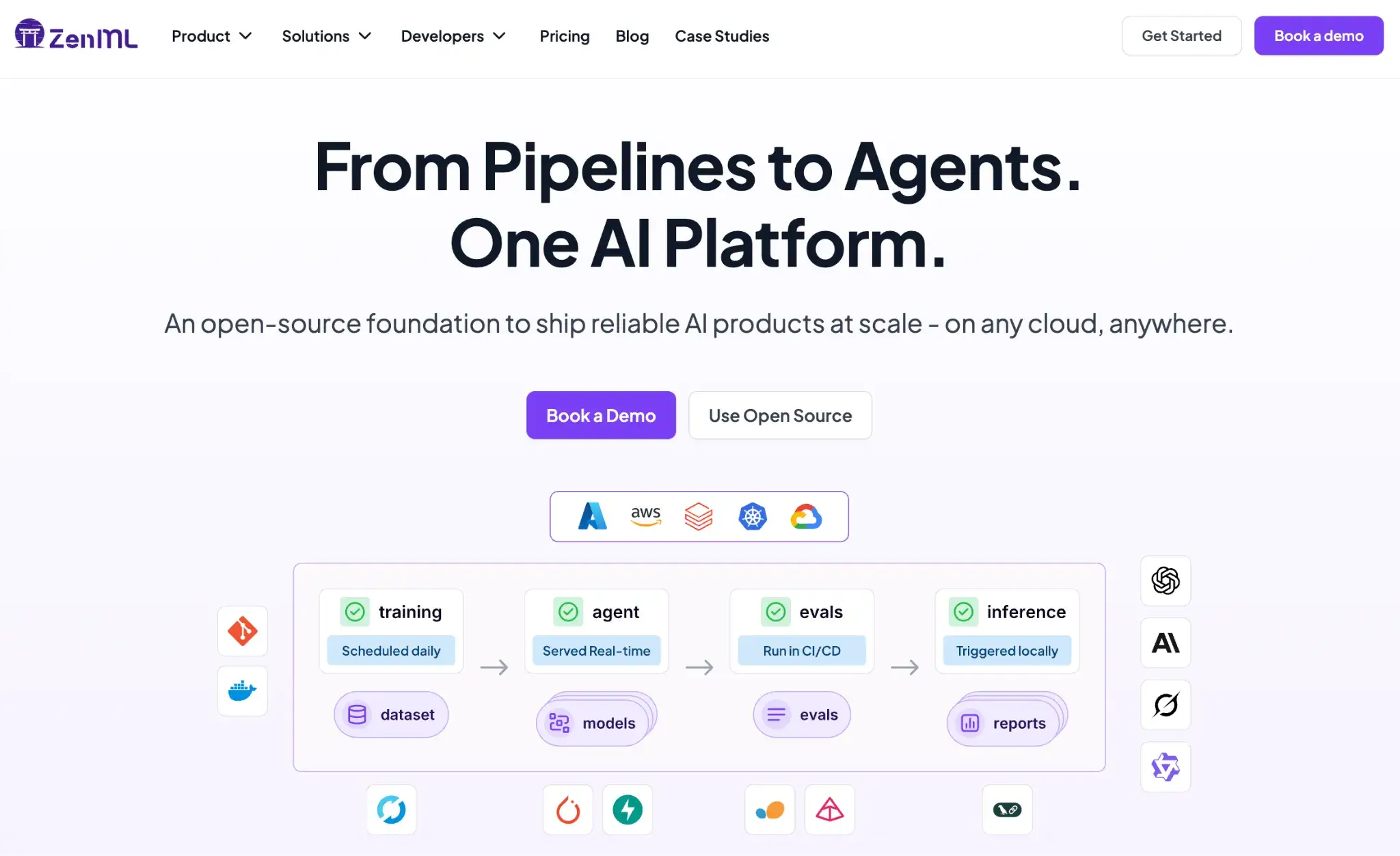
ZenML is one of the strongest LLMOps platforms if you want a single workflow layer to run and manage both classic ML and LLM pipelines in the same place. It brings MLOps-grade structure to agent and RAG workloads, so runs stay reproducible and debuggable as you scale.
Key Feature 1. RAG with ZenML
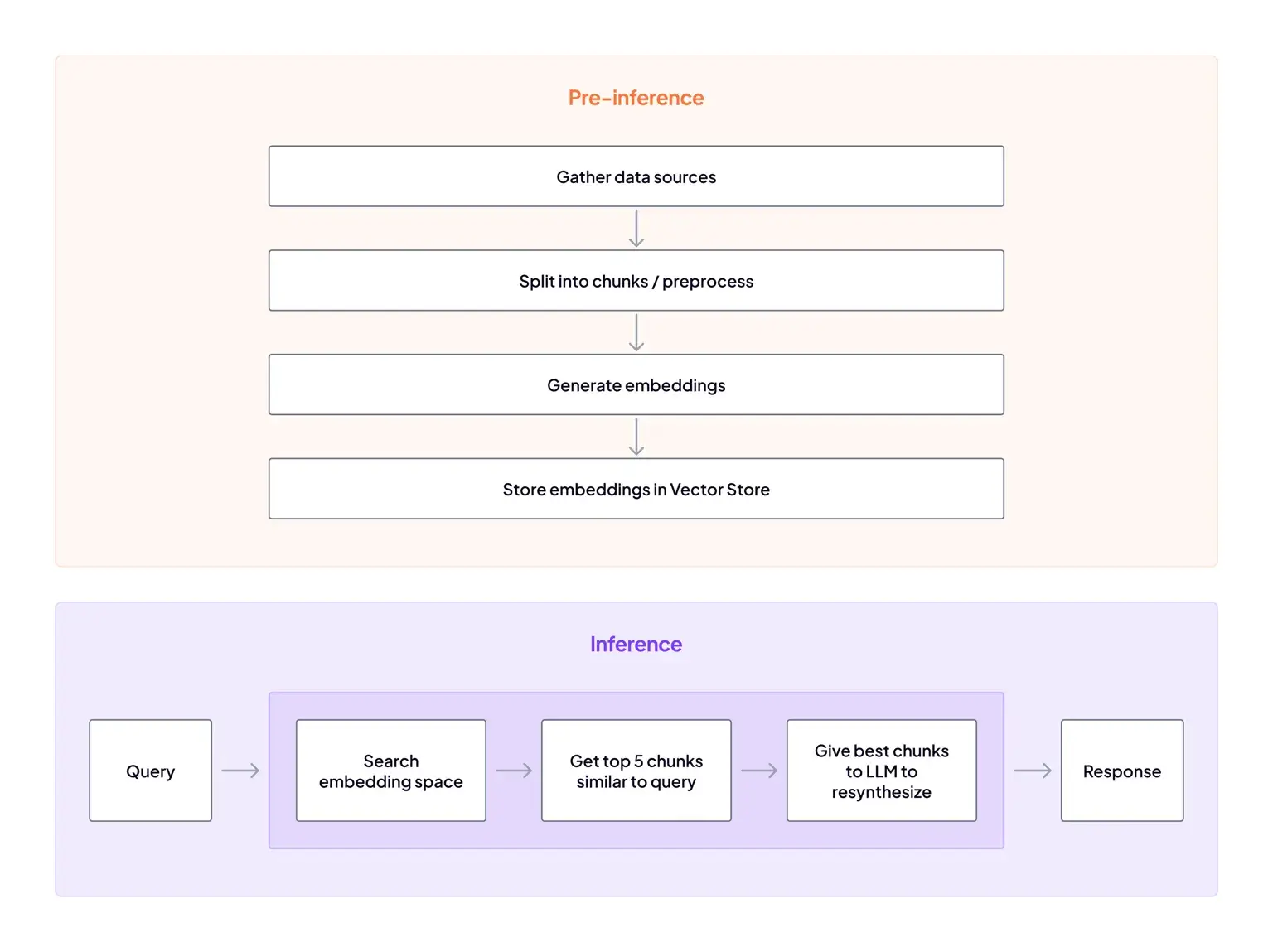
ZenML’s RAG flow is designed like a real pipeline, not a notebook demo. You build steps for data ingestion + preprocessing, generate embeddings, store them in a vector database, then run a RAG inference pipeline that retrieves relevant chunks and feeds them into the LLM.
Our platform also emphasizes tracking RAG artifacts across these steps, so you can trace what dataset, chunks, embeddings, and index state produced a given answer.
That pipeline-first structure makes it easier to iterate on retrieval components over time, like swapping embedding models or changing chunking, without losing run history.
Key Feature 2. Evaluation and metrics
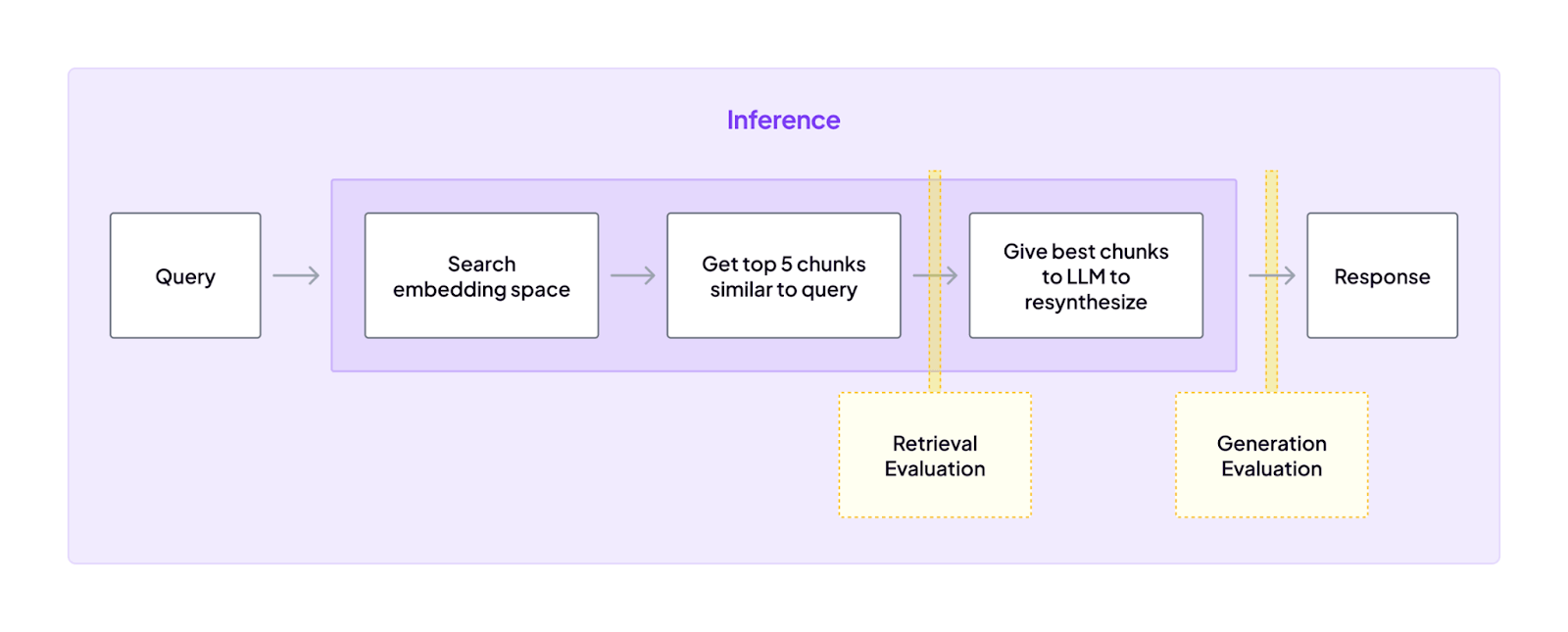
ZenML treats evaluation as a first-class pipeline concern. It breaks evals into two realities:
- Retrieval evaluation: You measure whether the retriever is pulling relevant context, and how changes in the pipeline impact semantic search quality.
- Generation evaluation: You assess answer quality, which is harder to score with simple rules, so ZenML relies on approaches like LLM-as-a-judge, where it makes sense.
A practical pattern our platform recommends is running evaluation as a separate pipeline after the embeddings pipeline.
That separation keeps ingestion and indexing clean, while still letting you use evals as a gating step when you need to decide if a build is “good enough” for production.
It also calls out a useful tradeoff: use a local judge for faster iteration, then run a more expensive cloud judge when you want higher confidence.
Key Feature 3. Fine-Tuning LLMs with ZenML
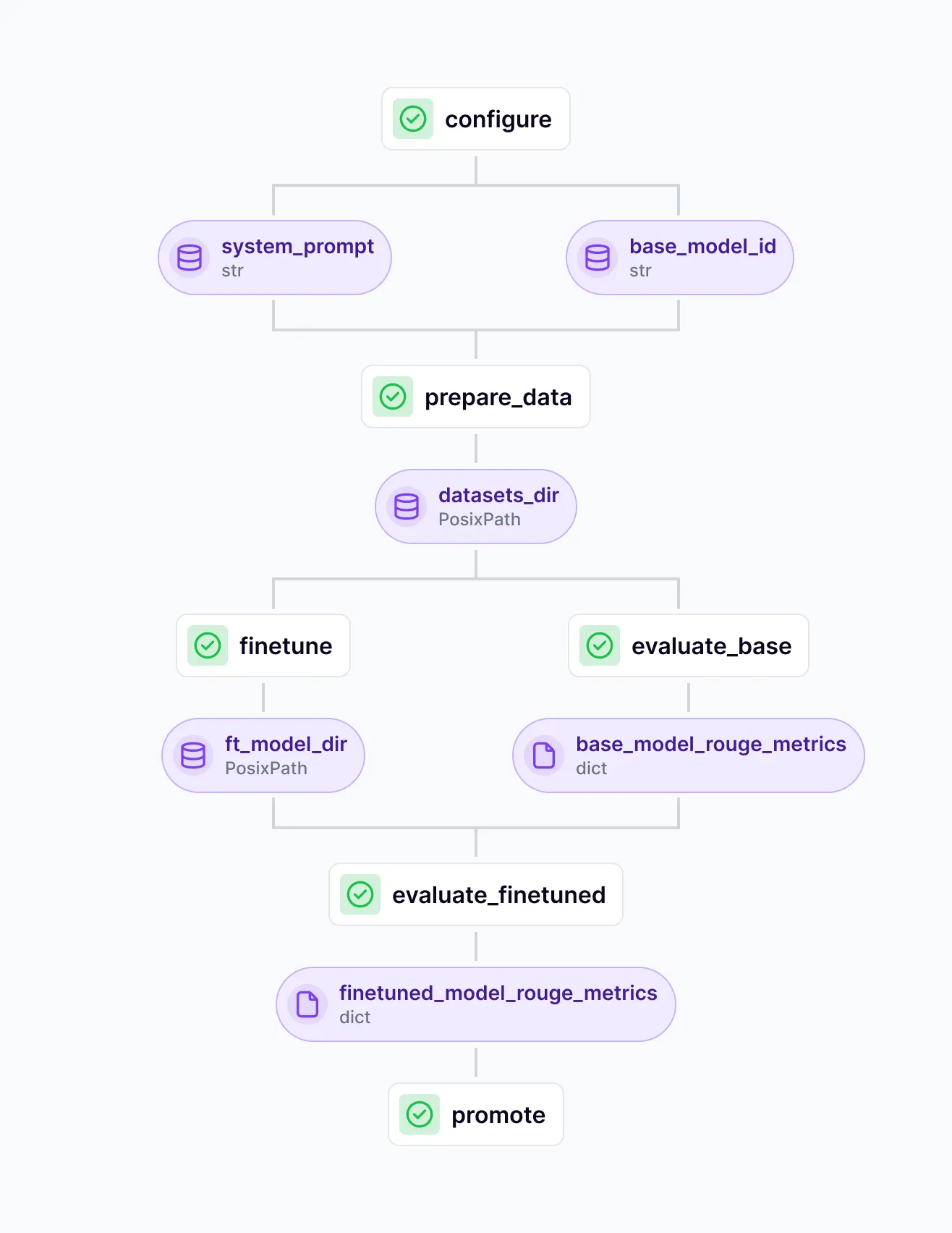
ZenML supports fine-tuning as a controlled training-to-release workflow. Instead of “train and hope,” you treat fine-tuning like an engineering process:
- Data preparation as a first-class stage: Build and version your fine-tuning dataset (instruction format, filtering, splits) so results are reproducible.
- Training as a pipeline step: Run fine-tuning with defined configs so hyperparameters, base model choice, and training artifacts are tracked per run.
- Evaluation baked into the loop: Evaluate the base model and the fine-tuned model using consistent criteria, so you can prove improvement rather than relying on vibes.
- Promotion and deployment readiness: When a fine-tuned model performs better, you can promote it through environments (e.g., staging → production) with a clear lineage of what data and settings created it.
This matters because fine-tuning creates long-term maintenance obligations. ZenML’s approach helps you only fine-tune when it’s justified, and when you do, you can manage it with the same discipline you’d apply to any production ML model.
Pricing
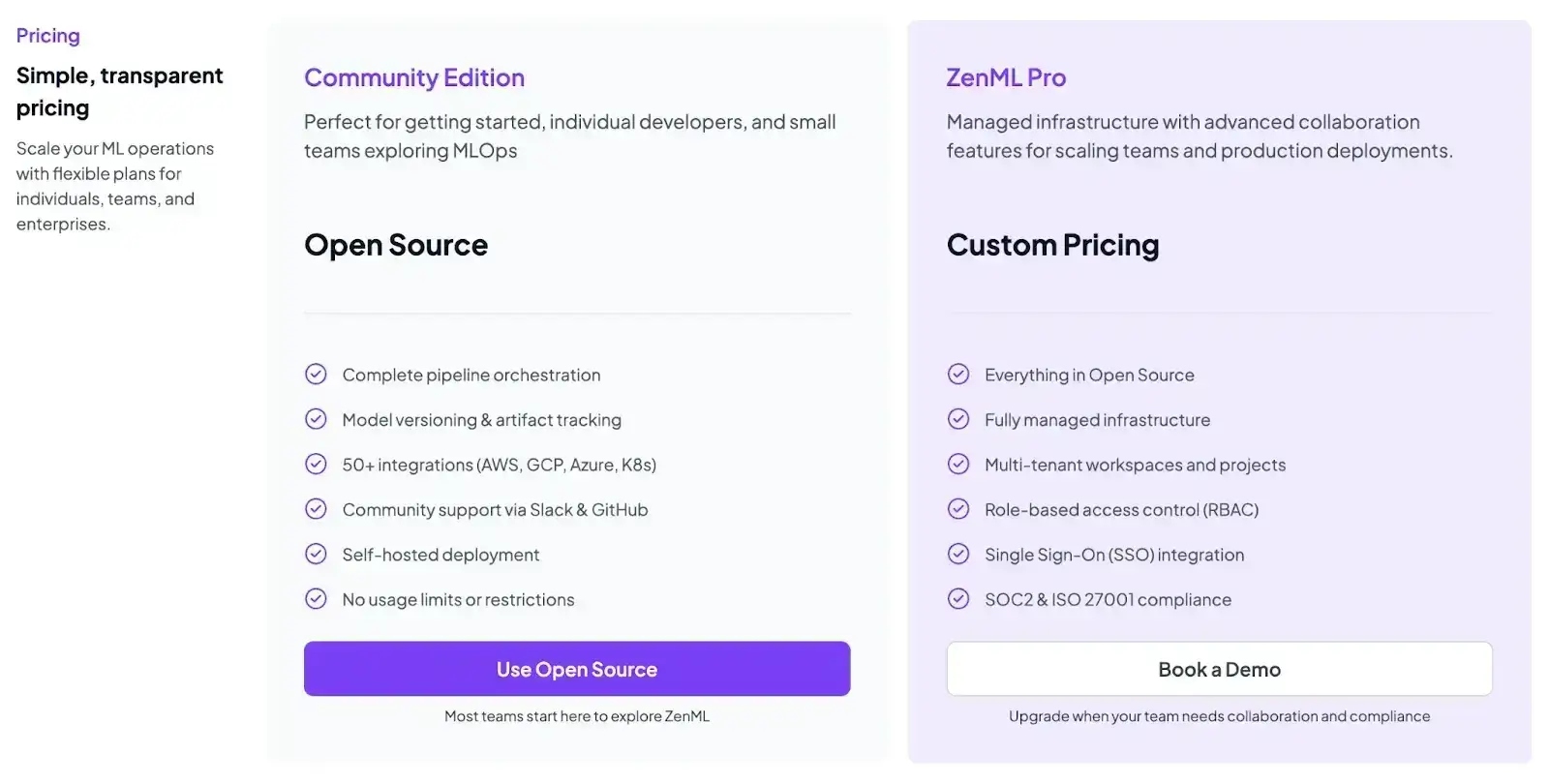
ZenML is free and open-source (Apache 2.0). You can self-host the core framework at no cost. For teams that want a managed control plane or advanced enterprise features, ZenML offers paid plans with custom pricing.
Pros and Cons
ZenML’s biggest advantage is that it gives you a unified orchestration layer for ML and LLM pipelines, with artifact lineage and run tracking that makes agent and RAG iterations reproducible over time. It fits teams that want to treat LLM work like engineering, with pipelines you can rerun, compare, and extend as requirements change.
The tradeoff is that ZenML is a workflow framework, so you need to invest in pipeline design and platform setup. If all you want is tracing and dashboards, it can feel heavier than a pure observability tool.
2. LangGraph
LangGraph is a specialized library from LangChain designed to build stateful, multi-agent applications by representing their logic as a graph. Its graph-based approach gives developers explicit control over data flow and reasoning loops. This makes complex behaviors easier to visualize and audit.
Features
- Define cyclical workflows with conditional paths, loops, and parallel branches that give agents clear, auditable control flow.
- Maintain shared state and memory across nodes so agents can store intermediate results or conversation history and reuse them later in the graph.
- Stream partial outputs from LLM nodes so downstream steps can begin processing early, enabling responsive experiences even during long multi-step agent executions.
- Add human-in-the-loop checkpoints that pause execution for human approval before the agent proceeds to critical actions.
- Run nodes in parallel when tasks are independent, reducing total execution time for complex agent workflows.
Pricing
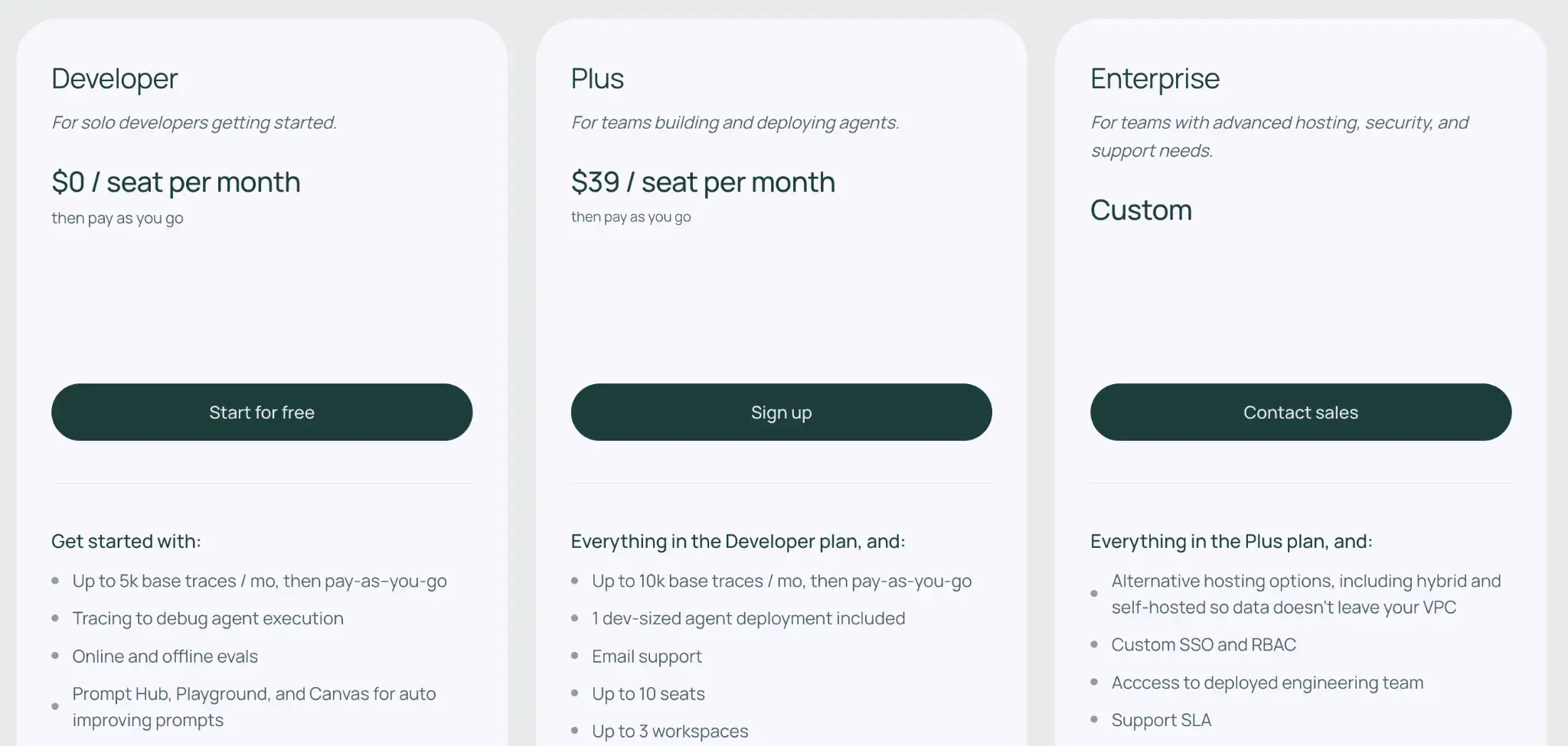
LangGraph is open-source and free to use locally. For deployment and collaboration, LangChain offers:
- Developer: Free for hobbyists (limited features)
- Plus: $39 per seat per month
- Enterprise: Custom pricing
📚 Read more about LangGraph:
Pros and Cons
LangGraph provides unmatched visibility into your agents’ logic. By structuring your agent as a graph of nodes and edges, you get a blueprint of the agent’s entire reasoning process.
The main drawback is the complexity involved in setting it up. Defining graphs requires writing significant boilerplate code, and managing the state schema for intricate multi-agent systems can become mentally taxing compared to simpler, linear frameworks.
3. LlamaIndex
LlamaIndex is a data-centric framework that specializes in connecting LLMs to your private or public data sources. It’s designed to build retrieval-augmented generation (RAG) systems and serves as a data ingestion, indexing, and retrieval toolkit for RAG-heavy LLM applications.
Features
- Build flexible indices that store data as vectors, trees, or graphs so agents can retrieve context in the structure that best fits your workflow.
- Use LlamaParse to parse complex documents like PDFs with nested tables and charts to create clean, structured data for your agents.
- Orchestrate agent reasoning with robust abstractions that enable agents to plan tasks, use tools, and execute multi-step logic loops.
- Combine multiple retrieval methods into a single query pipeline, enabling agents to run keyword filtering, vector search, and LLM refinement steps together.
- Integrate with external tools via LlamaHub, which offers hundreds of ready-to-use connectors for databases, APIs, and SaaS applications.
Pricing
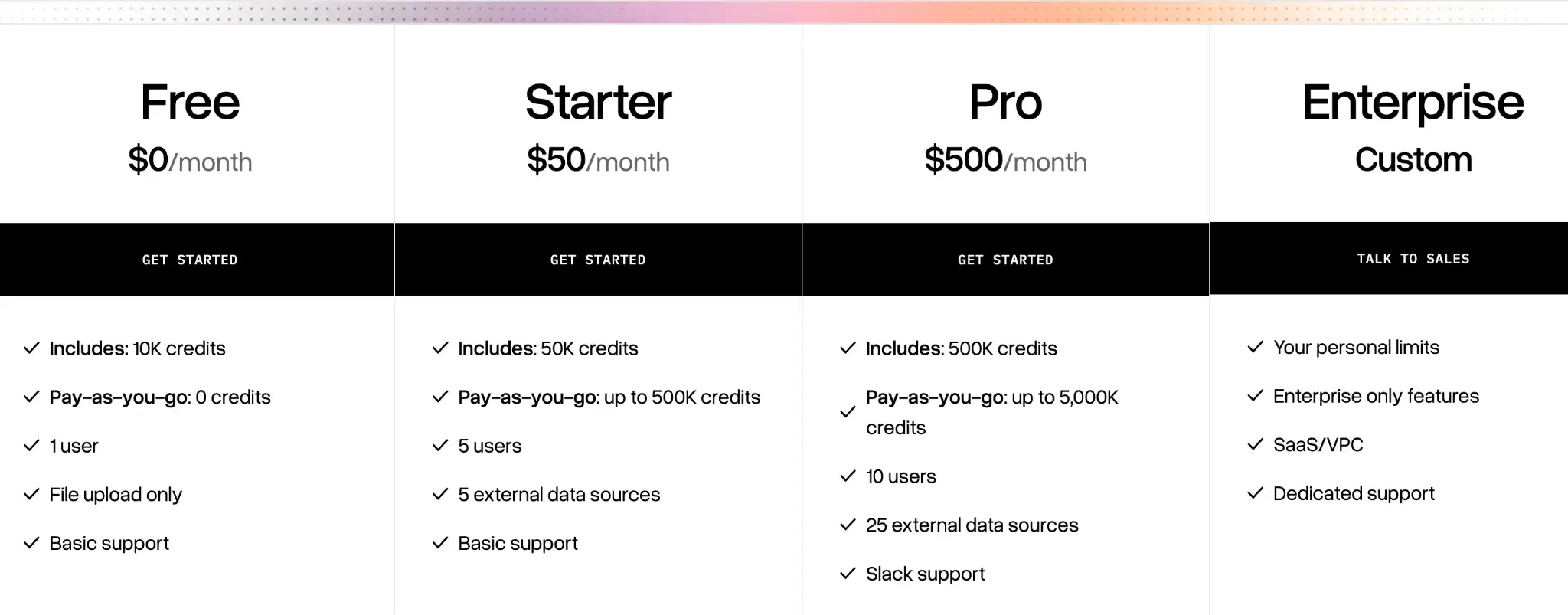
LlamaIndex framework is open-source and free. For managed services, they offer LlamaCloud:
- Free
- Starter: $50 per month
- Pro: $500 per month for higher limits and team seats
- Enterprise: Custom pricing
Pros and Cons
LlamaIndex gives granular control over how your agents ingest and retrieve data. Its advanced indexing strategies, like knowledge graphs, allow agents to answer open-ended questions that most vector search tools miss. Developers love that they can customize everything from chunking logic to embedding models.
However, the framework’s vast feature set can lead to a steep learning curve. Plus, it lacks the built-in observability and full-stack orchestration features found in broader MLOps platforms.
📚 More about LlamaIndex:
4. Langfuse
Langfuse is an open-source LLM engineering platform that focuses on tracing, observability, and product analytics. It helps teams debug complex agent behaviors and keep a close eye on costs through a collaborative, framework-agnostic interface.
Features
- Trace complex execution flows visually to see the full tree of agent actions, including nested tool calls and database lookups.
- Track costs and latency across all LLM calls in real-time with a dedicated dashboard that breaks down token usage by model, user, and feature.
- Manage and version prompts in a clean UI so you can compare variations, track changes, and see how updates influence agent behavior.
- Replay sessions to inspect the exact context and state of an agent during a failed run, facilitating easier debugging.
Pricing
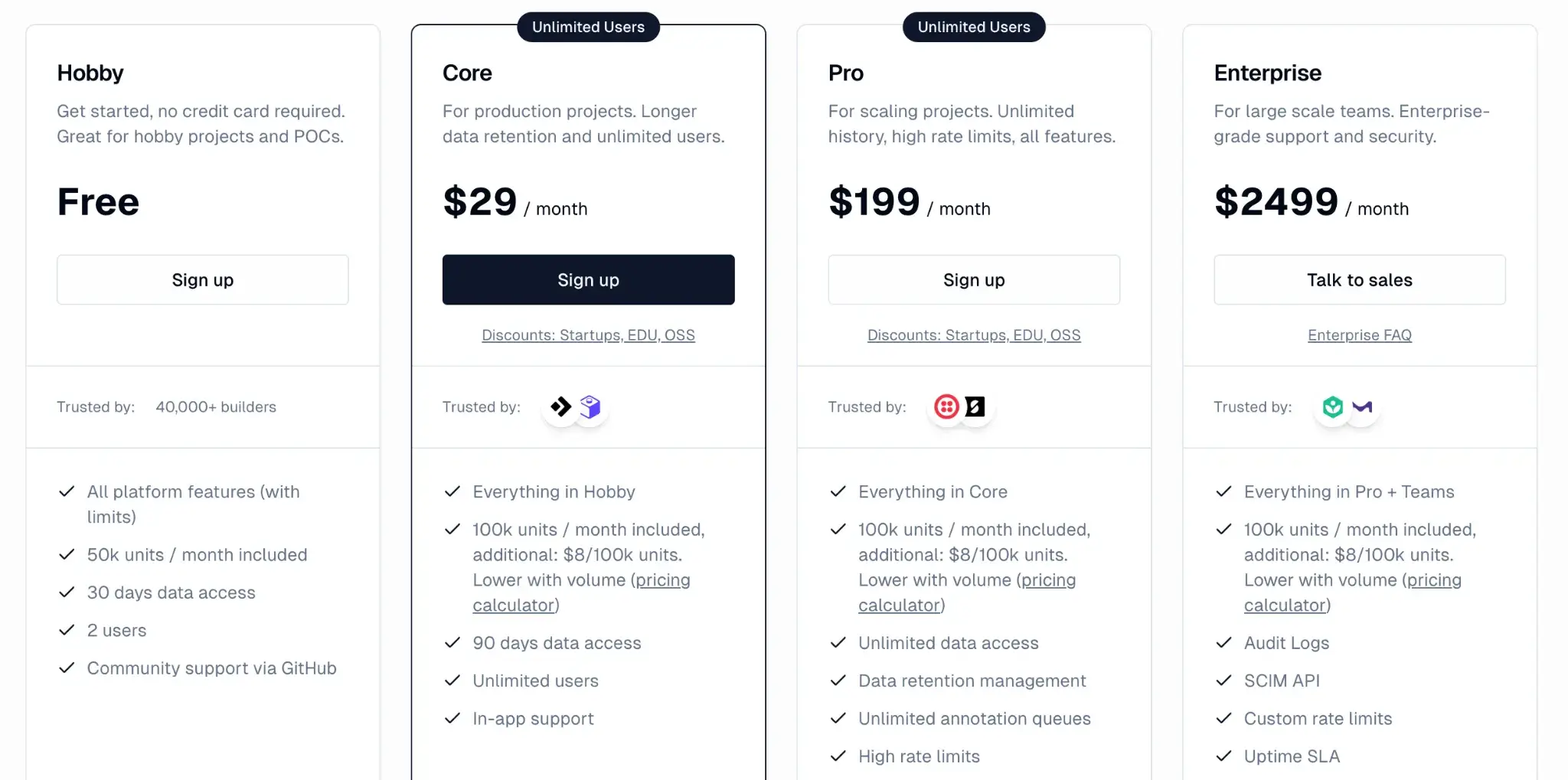
Langfuse offers an open-source version, a generous cloud-hosted free tier, and three paid plans for scaling teams:
- Hobby: Free
- Core: $29 per month
- Pro: $199 per month
- Enterprise: $2499 per month
📚 More about Langfuse:
Pro and Cons
Langfuse balances simplicity and powerful analytics. Beyond tracking and debugging, it has a strong focus on product analytics. You can track usage patterns and user journeys, something competitors often lack. In-line commenting on traces and shareable trace URLs makes debugging sessions team-friendly.
On the downside, it’s primarily an observability tool and lacks the broader orchestration and deployment capabilities of a full LLMOps platform. It’s also not as tightly integrated into any one development workflow as, say, LangSmith is for LangChain. You’ll need to instrument your code to send events to Langfuse
5. DeepEval
DeepEval is an open-source evaluation framework specifically designed to unit-test LLM applications and agents. It provides a suite of metrics to assess not only the final answer but also the retrieval quality and faithfulness of your agent’s reasoning.
Features
- Measure agent performance using specialized metrics like Plan Quality, Tool Correctness, and Step Efficiency to diagnose specific failure points.
- Run synthetic evaluations by automatically generating test cases, helping you stress-test your agents before they go into production.
- Integrate with CI/CD pipelines to block deployments if your agent's performance drops below a defined threshold.
- Customize evaluation logic using "G-Eval," which lets you define your own criteria and use an LLM as a judge to score outputs.
Pricing
The DeepEval framework is fully open-source and free to use locally. Confident AI (the company behind it) offers a hosted platform that builds on DeepEval, with a free tier and paid plans.
Pros and Cons
DeepEval brings the rigor of software testing to AI development. Its evaluation-driven development lets you write tests for your agent’s abilities and catch issues early. The Python-first approach means it fits naturally into developers’ workflows.
However, setting up evaluations requires effort and a good understanding of the metrics. It focuses solely on evaluation, so you will need to pair it with other tools for tracing and orchestration.
(While it does integrate with its companion platform, Confident AI, for observability and performance tracking, you’d need to pay.)
6. Portkey
Portkey combines an API gateway with an LLM observability platform. It sits between your application and the model providers, giving you a central hub to manage traces, logging, and analytics.
Features
- Route LLM requests through one endpoint to switch providers, update keys, or apply fallback rules without changing your app code.
- Log detailed traces for every request, capturing over 40 metadata points including latency, cost, and custom tags.
- Set cost and usage guardrails to cap spending, trigger alerts, enforce rate limits, and cache common requests to avoid unnecessary API calls.
- Export traces to external systems through OpenTelemetry so you can plug Portkey data into tools like Datadog, Jaeger, or your existing dashboards.
Pricing
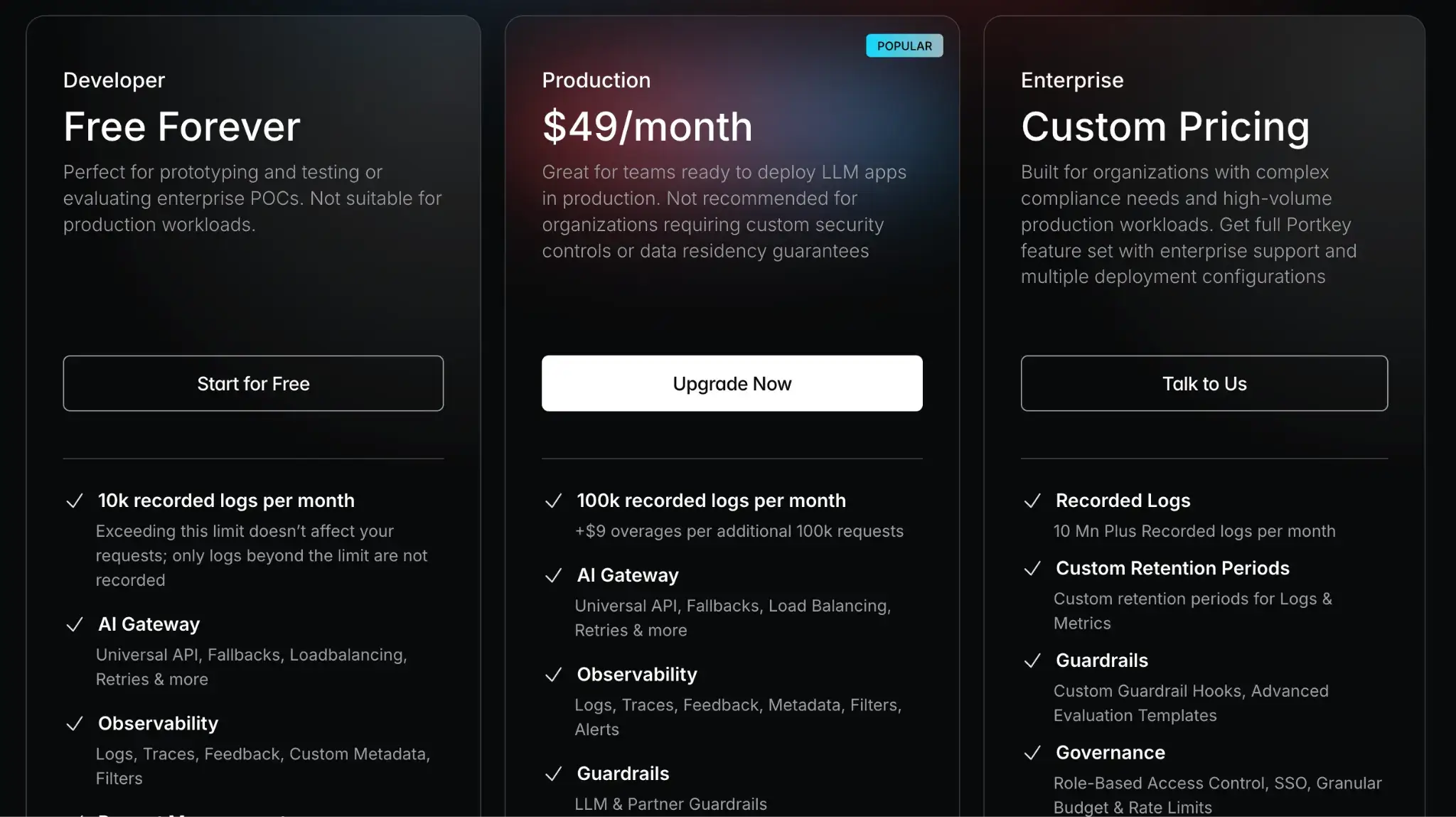
Portkey offers a free forever developer plan, which is great for trying it out or low-volume projects. For higher volume production use, there are two plans:
- Production: $49 per month
- Enterprise: Custom pricing
Pros and Cons
The major pro of Portkey is that its all-in-one approach significantly reduces the engineering effort to build a robust AI feature. Standardizing interactions makes switching LLM providers or deploying to new regions much easier.
The tradeoff is the introduction of a proxy layer, which can be a single point of failure if not managed correctly. Some teams may also prefer SDK-based integrations over routing all traffic through a third-party gateway.
7. LangSmith
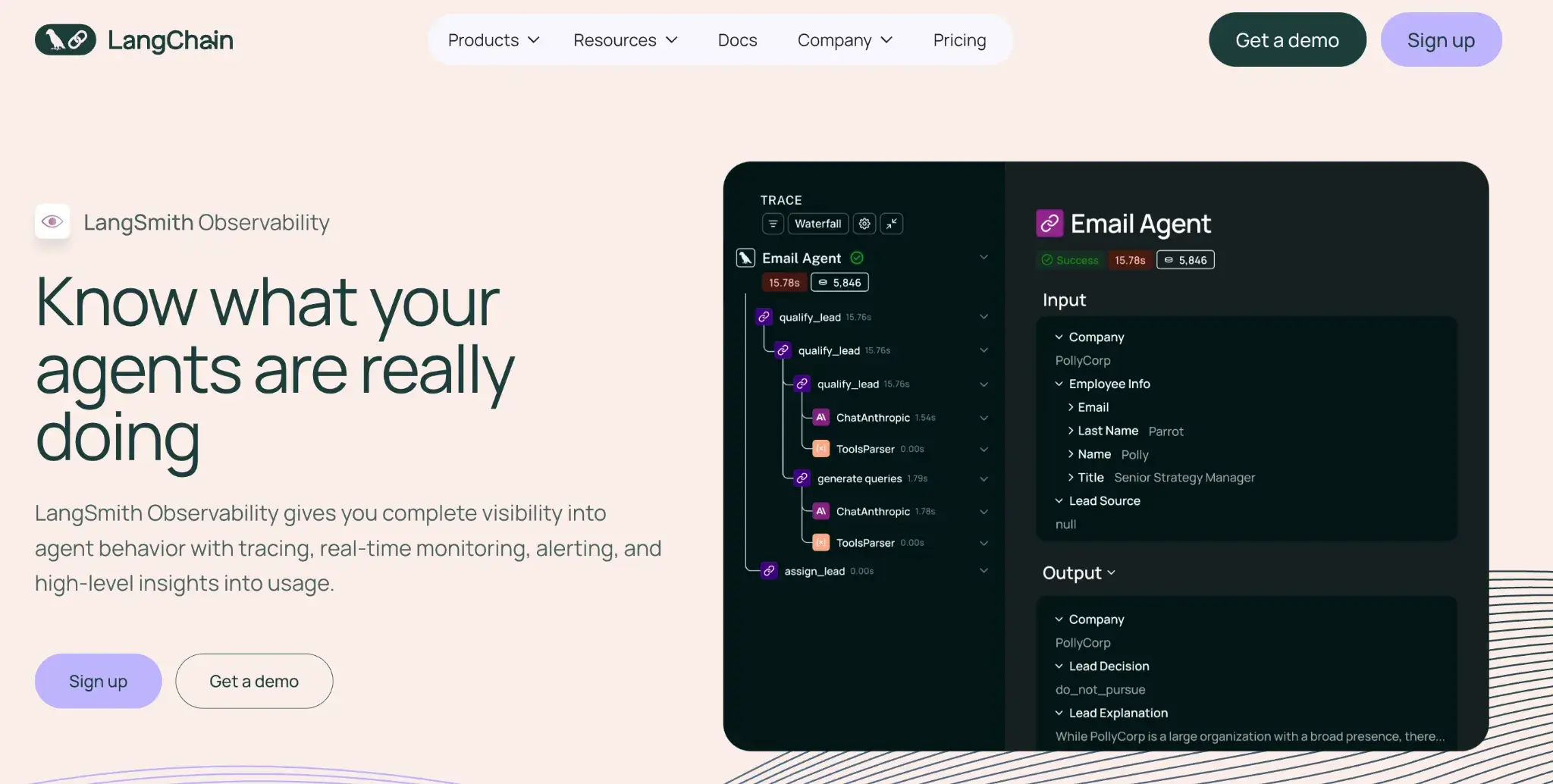
LangSmith is an observability and evaluation platform from LangChain. It provides deep visibility into the execution of LangChain applications, making it the default choice for developers already using that framework.
Features
- Record full traces of every run to capture prompts, tool calls, and intermediate steps in a clear timeline that helps you debug agent behavior.
- Run automated evaluations that score outputs with LLM judges or human feedback so you can compare versions and catch regressions early.
- Test prompts in a playground to preview variations, switch models, and inspect outputs side by side before deploying changes.
- Build live dashboards to track metrics like latency, success rate, and cost, and set alerts when performance drifts.
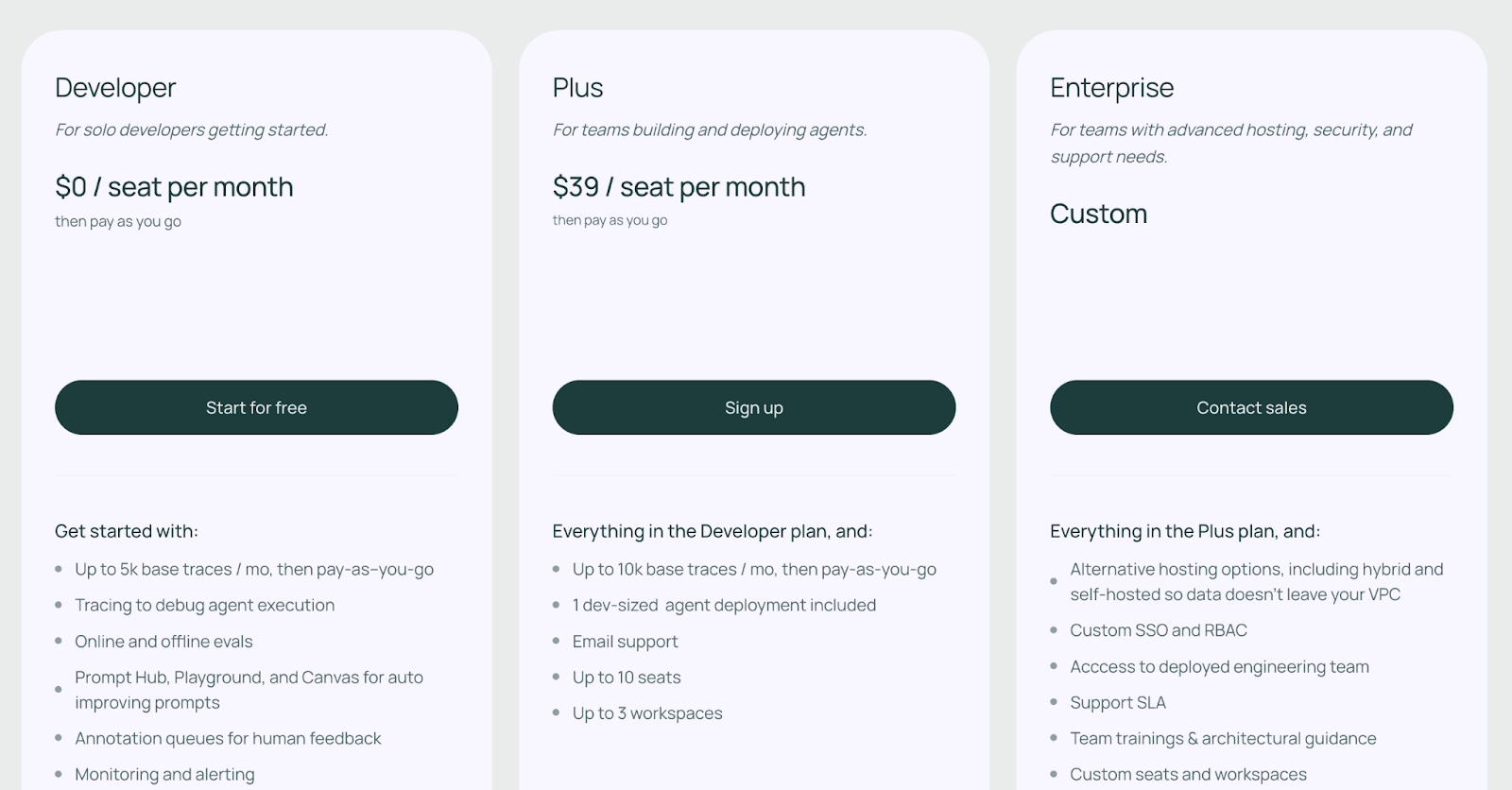
Pricing
LangSmith has a free tier for hobbyists and paid plans for teams:
- Developer: Free
- Plus: $39/month
- Enterprise: Custom pricing
Pros and Cons
LangSmith offers the smoothest integration experience for LangChain users. Its debugging interface is intuitive and specifically designed to untangle the messy logic of agentic chains.
However, its focus is largely on the application layer. It does not provide infrastructure monitoring (e.g., GPU health) or model-serving capabilities, so you will likely need to pair it with other ops tools.
8. Arize Phoenix
Arize Phoenix is an open-source observability platform designed for difficult-to-debug LLM applications. It provides a notebook-based UI for interactively exploring model outputs, traces, and embeddings to diagnose issues.
Features
- Run Phoenix as a local notebook app to inspect embeddings, plot distributions, and explore model behavior through interactive visual widgets.
- Ingest traces through OpenTelemetry to view every agent step, RAG retrieval, and model call in a timeline that links application events to model outputs.
- Evaluate retrieval quality by checking output relevance and scoring final responses with LLM or rule-based judges.
- Cluster similar outputs to surface shared failure patterns and flag outlier responses that don’t match expected behavior.
- Inspect embeddings visually to spot drift, anomalies, or inconsistencies that may indicate indexing or model-quality issues.
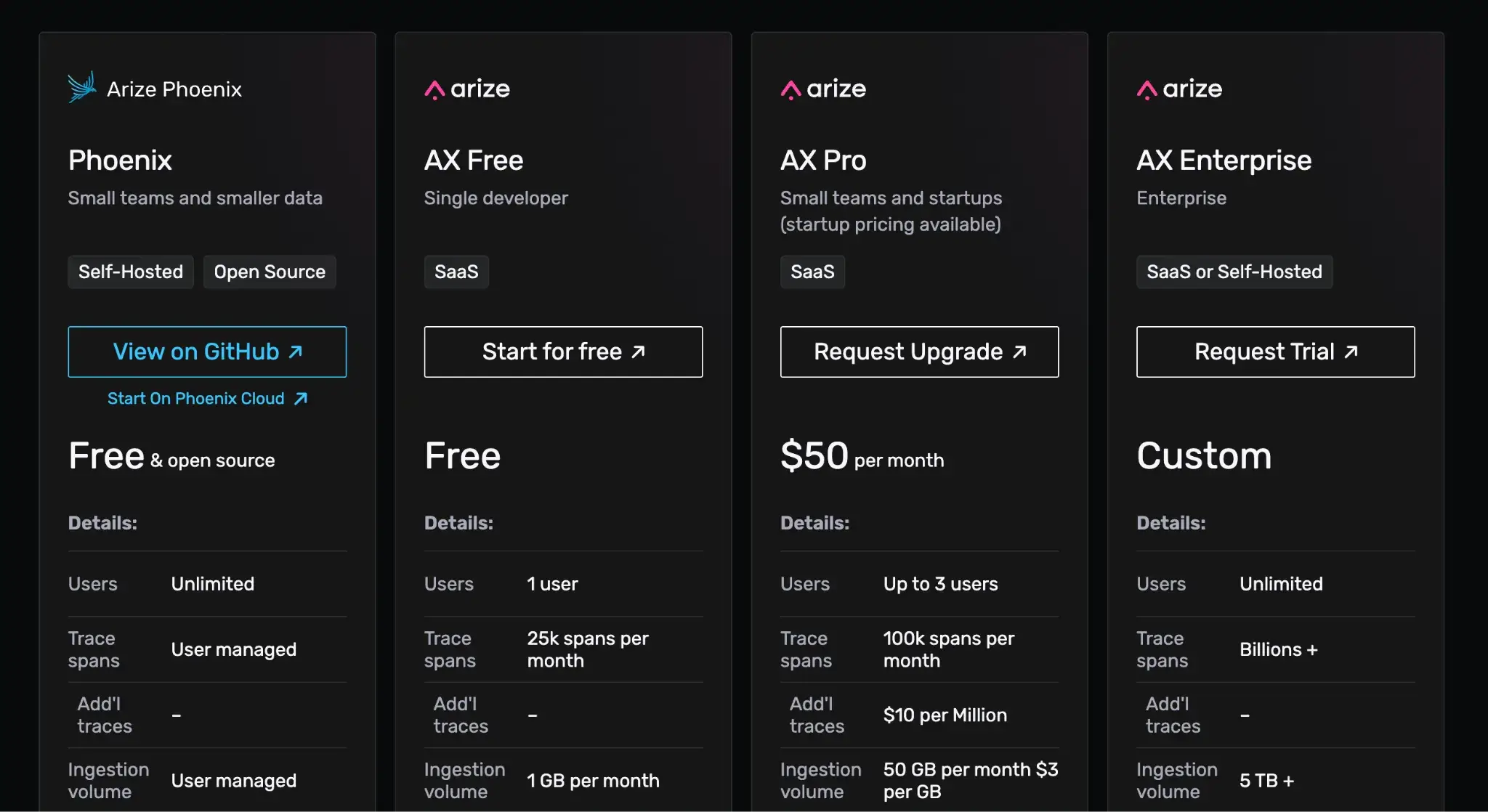
Pricing
Phoenix is free to self-host. For a managed Arize offering, see Arize AX plans (AX Free, AX Pro at $50/month, AX Enterprise custom).
Pros and Cons
Phoenix’s focus on RAG-specific metrics makes it a strong choice for knowledge-heavy agents. For that, it has powerful visualizations, you get rich interactive charts and tables that make understanding your LLM’s behavior much easier.
On the downside, Phoenix can feel heavyweight. It’s essentially a full application you need to run, with a somewhat complex UI. I. It caters more to power users who need to perform deep data analysis rather than just viewing simple logs.
9. BentoML
BentoML is an open-source platform that simplifies the serving and deployment of AI models. For agents that rely on custom open-source models, like Llama 3 or Mistral, BentoML provides the infrastructure to run them efficiently and reliably.
Features
- Package LLM models and code into containers (Bentos) that include all dependencies, code, and configurations for easy deployment anywhere.
- Optimize inference performance with features like continuous batching and model composition, crucial for reducing latency in agent interactions.
- Deploy agent logic as APIs by embedding LangChain or custom multi-step workflows inside BentoML services.
- Scale automatically based on traffic demand and ensure your agent remains responsive during spikes without wasting resources when idle.
- Expose REST/gRPC endpoints so applications can call LLMs or agents over standard interfaces without custom server code.
Pricing
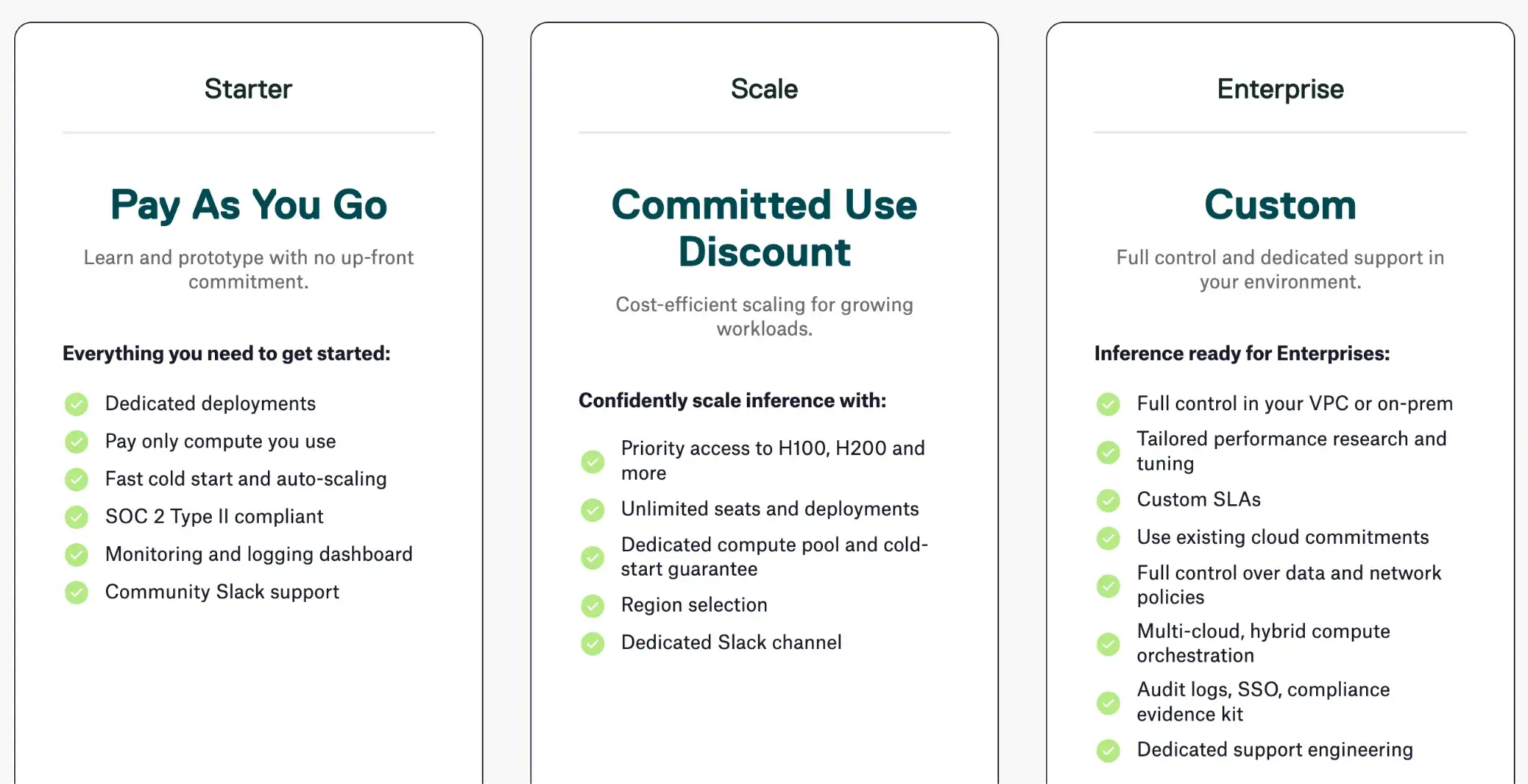
BentoML is open-source. Their managed Bento Cloud service offers three paid tiers with custom pricing.
Pros and Cons
BentoML’s major advantage is the simplicity of model deployment. It automates the tricky engineering required to expose models as scalable APIs. For LLMOps, this means you can go from a prototype to a production endpoint in hours rather than weeks.
However, it focuses primarily on the serving layer. It does not provide high-level agent orchestration or prompt management, so it works best when paired with a framework like LangGraph or ZenML.
10. Pinecone
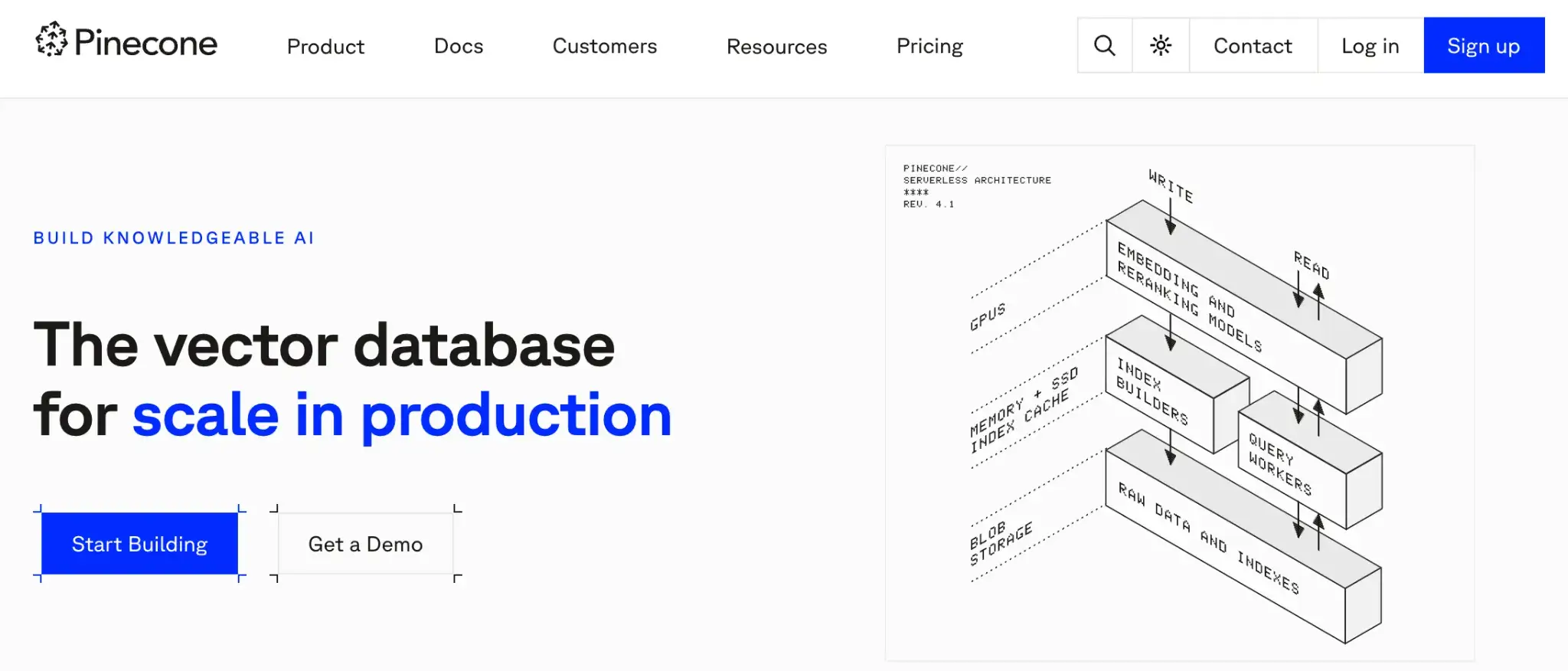
Pinecone is a serverless vector database designed to handle the high-dimensional data required for accurate AI retrieval and indexing. It stands out for its scalability and developer-friendliness. You can spin up a production-ready vector index in seconds and scale to billions of vectors with low latency.
Features
- Run fast vector search to return relevant embeddings in real time, giving agents quick access to context even at large index sizes.
- Filter results using metadata so agents can narrow searches by tags, fields, or document attributes, combining semantic and structured querying.
- Scale storage automatically as vector size grows, eliminating the need to manage sharding or replicas while keeping latency stable.
- Integrate via simple SDKs that plug directly into frameworks like LangChain and LlamaIndex, letting agents store and fetch embeddings with minimal setup.
Pricing
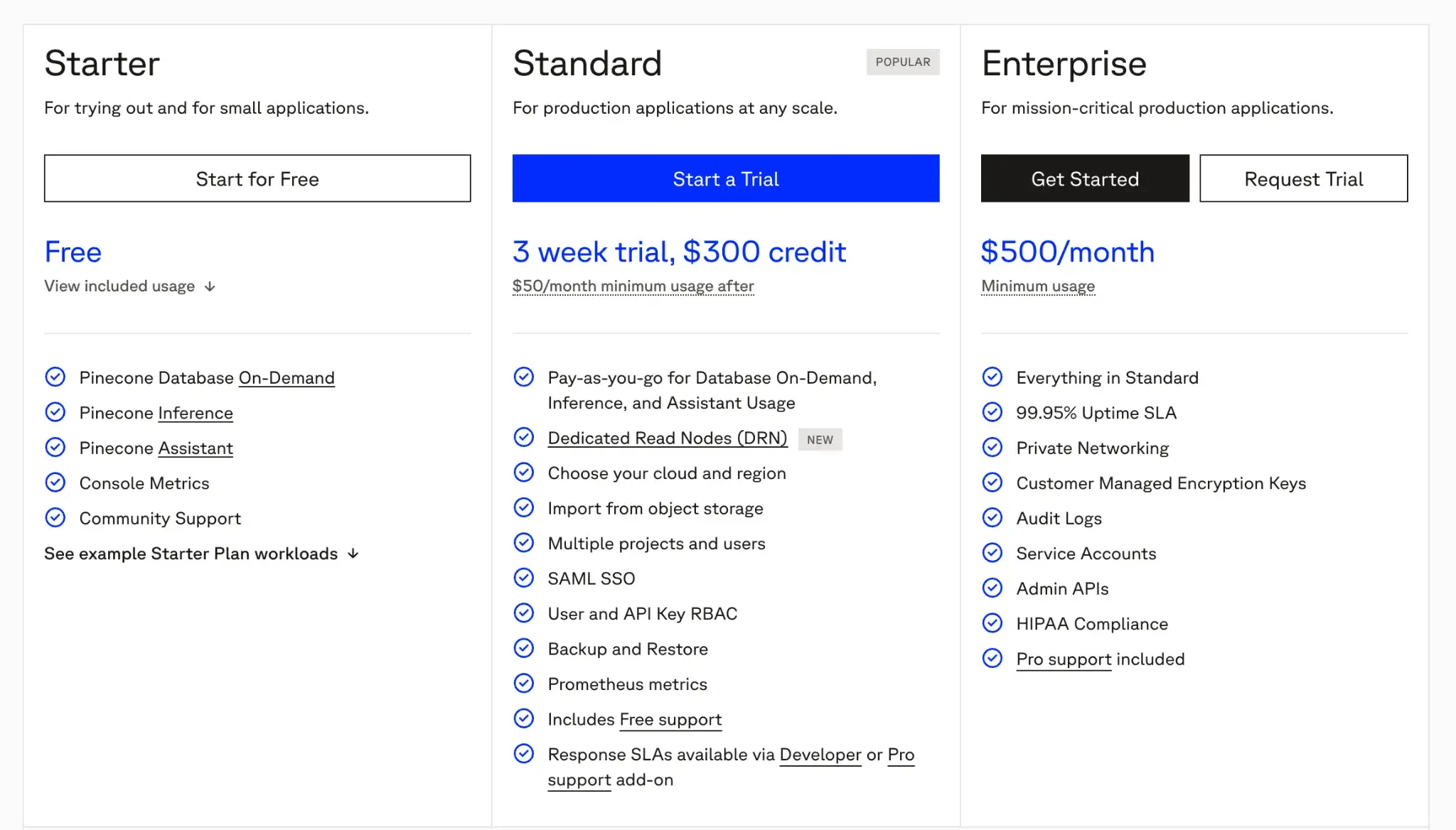
Pinecone offers a free Starter plan. Paid plans include:
- Standard: Pay-as-you-go with a minimum spend of $50 per month
- Enterprise: Custom SLAs with a minimum spend of $500 per month
Pros and Cons
Pinecone is the industry standard for developers who need a vector database that ‘just works.’ Its serverless architecture handles the heavy lifting of optimized storage and retrieval, while you focus on your agent’s logic. It’s also continuously improving, with features like dedicated read replicas for high QPS scenarios.
However, because it is a closed-source, proprietary SaaS, you face potential vendor lock-in. Migrating off Pinecone means exporting all your vectors and possibly losing some of the performance gains from its tuning. Costs can also scale unpredictably if your agent generates a massive volume of read/write operations compared to a self-hosted solution.
11. Weights & Biases (Weave)
Weave is W&B’s solution for LLMOps, extending its experiment-tracking platform into an observability and evaluation toolkit for LLM applications. It’s a bit like a mix of an experiment tracker, a debugging tool, and a monitoring dashboard specifically tailored to language model apps.
Features
- Log every LLM call to capture prompts, parameters, and outputs as traces you can inspect or compare across versions.
- Run evaluation pipelines to score model or agent responses using LLM judges or custom metrics and track quality shifts over time.
- Build custom dashboards that visualize latency, cost, response quality, or failure trends in real time for quick monitoring.
- Test prompts in a playground to compare variations, switch models, and log experiments for later analysis.
- Share trace insights easily through cloud-hosted links so teams can review outputs, issues, or experiment results together.
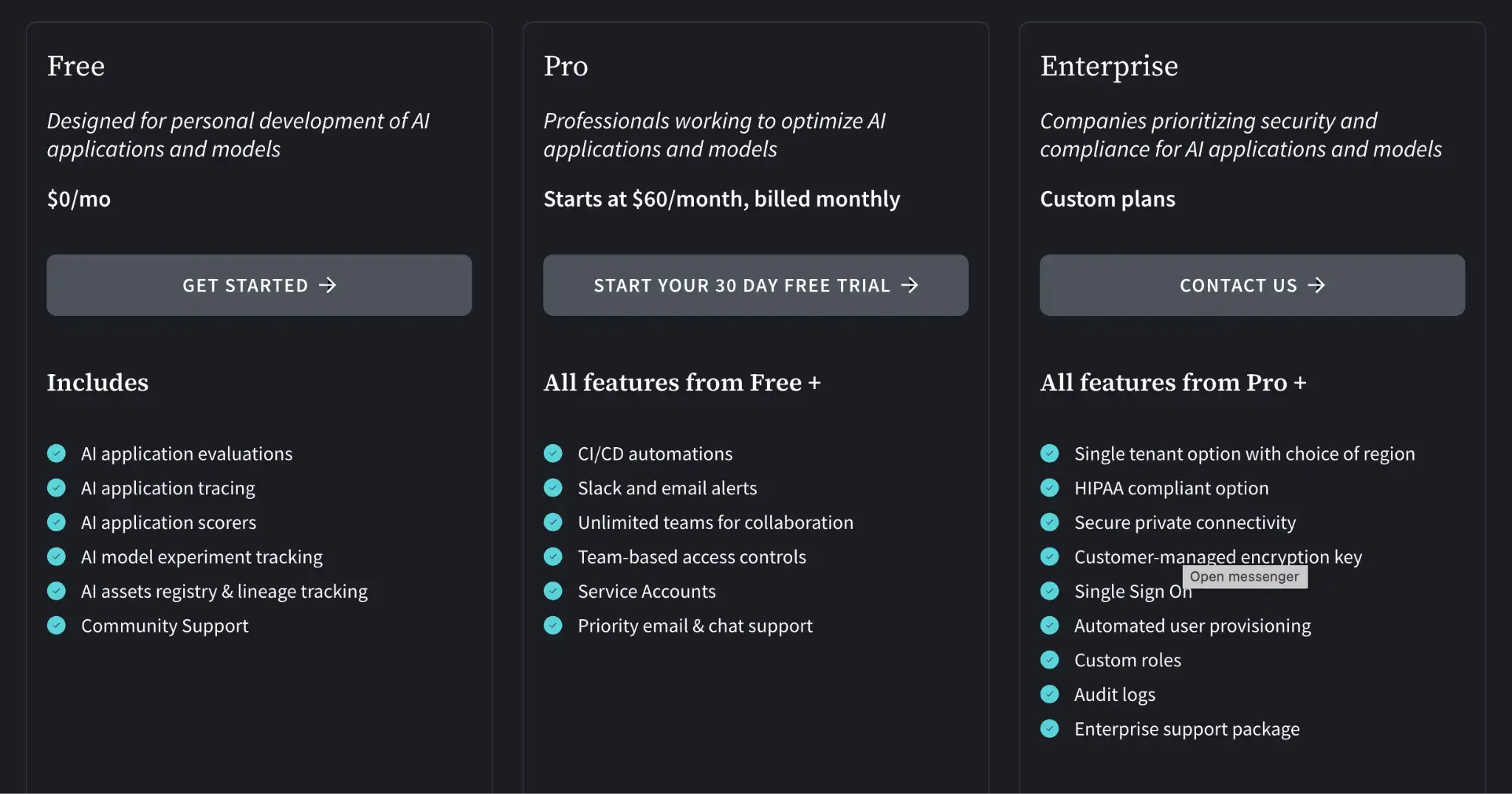
Pricing
Weave is available within the Weights & Biases platform:
- Free: For personal projects with limited storage
- Team: Starts at $60/user per month
- Enterprise: Custom pricing
Pros and Cons
Weave is exceptionally strong for teams that view agent development as an iterative scientific process. Its integration with the broader W&B ecosystem makes it easy to connect your training data and fine-tuned models directly to your inference evaluations.
On the other hand, the interface can feel complex for users who just want simple monitoring. It retains much of the “researcher” DNA of the original platform, which might be overkill for engineering teams looking for a lightweight production observability tool.
Which LLMOps Platform is the Right Choice for You?
When it comes to picking a platform, there is no one-size-fits-all answer. It truly depends on your project’s priorities and your team’s composition.
Based on our analysis, here are our recommendations:
- If you need an end-to-end orchestration framework that brings MLOps rigor to LLM pipelines, ZenML is a top choice. It’s best for engineering teams that value reproducibility and want a unified platform for both traditional ML and LLMOps.
- If your focus is on complex agent logic and you want explicit control over agent decision flows, consider LangGraph.
- For teams that need to augment RAG-heavy applications, LlamaIndex + Pinecone is a powerful combo.
ZenML’s open-source nature and extensibility make it ideal if you plan to integrate many custom tools or scale in complex environments.